Chapter 5 Types of Storage Devices
Describing Storage Devices Storage devices hold data permanently, even when the computer is turned off . Two processes Writing data Reading data 6A-
Describing Storage Devices Storage terms The physical material that actually holds data is called a  storage medium. A floppy disk is a storage medium. The hardware that writes data to or reads data from a storage medium is called a  storage device . A floppy disk drive is a storage device. Types of Storage Devices : Magnetic devices  use a magnet Optical devices  use lasers Solid-state devices  have physical switches 6A-
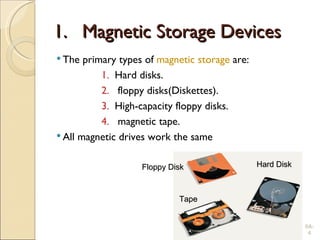
Magnetic Storage Devices The primary types of  magnetic storage  are: Hard disks. floppy disks(Diskettes). High-capacity floppy disks. magnetic tape. All magnetic drives work the same 6A- Floppy Disk Hard Disk Tape
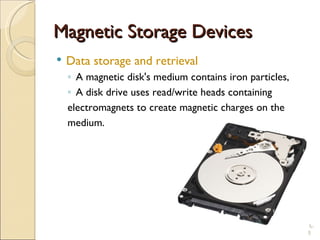
Magnetic Storage Devices Data storage and retrieval A magnetic disk's medium contains iron particles, A disk drive uses read/write heads containing electromagnets to create magnetic charges on the medium. 6A-
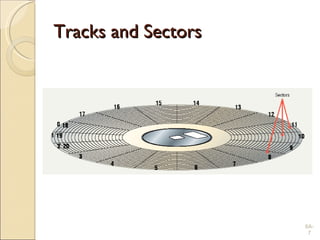
Magnetic Storage Devices Data organization Disks must be formatted before use Determines how data will be stored: Format draws tracks on the disk Tracks is divided into sectors Purpose of formatting a magnetic disk: Before the computer can use a magnetic disk to store data, the disk’s surface must be magnetically formatted, so that the computer  can go directly to a specific point on it without searching through data . 6A-
Tracks and Sectors 6A-
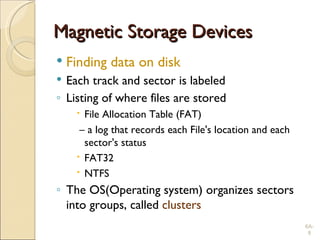
Magnetic Storage Devices Finding data on disk Each track and sector is labeled Listing of where files are stored File Allocation Table (FAT) –  a log that records each File's location and each sector's status FAT32 NTFS The OS(Operating system) organizes sectors into groups, called  clusters 6A-
Magnetic Storage Devices Diskettes Also known as  floppy disks Spin at 300 RPM Takes .2 second to find data 3 ½  floppy disk holds 1.44 MB 6A-
Magnetic Storage Devices Hard disks Primary storage device in a computer 2 or more aluminum platters Each platter has 2 sides Spin between 5,400 to 15,000 RPM Data found in 9.5 ms or less Drive capacity greater than 40 GB 6A-
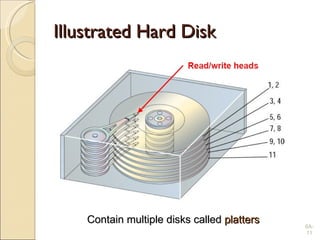
Illustrated Hard Disk 6A- Contain multiple disks called  platters
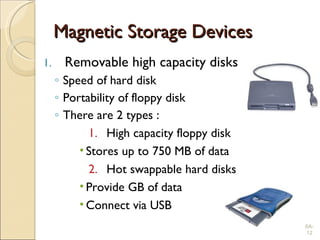
Magnetic Storage Devices Removable high capacity disks Speed of hard disk Portability of floppy disk There are 2 types : High capacity floppy disk Stores up to 750 MB of data Hot swappable hard disks Provide GB of data Connect via USB 6A-
Magnetic Storage Devices 6A- Hot swappable  hard disks Hot swappable   hard disk : can be removed and replaced while the computer is still running.
Magnetic Storage Devices Tape drives Best used for Infrequently accessed data Back-up solutions Slow sequential access Capacity exceeds 200 GB 6A-
Optical Storage Devices List seven types of optical storage devices commonly used in PCs. Compact Disc Read-Only Memory (CD-ROM). CD-Recordable (CD-R). CD-ReWritable (CD-RW). Digital Video Disc Read-Only Memory (DVD-ROM). DVD-Recordable (DVD-R). DVD-ReWritable (DVD-RW). PhotoCD. 6A-
Optical Storage Devices CD-ROM  Most software ships on a CD Read using a laser Written from the inside out Standard CD holds 650 MB 6A-
Recordable Optical Technologies CD Recordable (CD-R) Create a data or audio CD Data cannot be changed Can continue adding until full 6A-
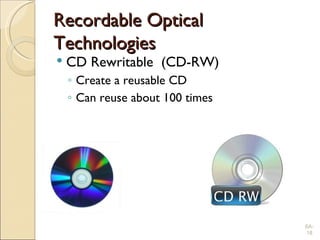
Recordable Optical Technologies CD Rewritable  (CD-RW) Create a reusable CD Can reuse about 100 times 6A-
Recordable Optical Technologies Photo CD Provides for photo storage Photos added to CD until full Original pictures cannot be changed 6A-
Optical Storage Devices DVD-ROM Digital Video Disk Use both sides of the disk Capacities can reach 18 GB DVD players can read CDs 6A-
Recordable Optical Technologies DVD Recordable (DVD-R) Allows home users to create DVDs Data cannot be changed DVD-RAM Allow reusing of DVD media 6A-
Solid State Devices Data is stored physically Store data on memory circuits. No magnets or laser Very fast The primary types of Solid State Devices are: Flash memory  Smart cards  Solid-state disks 6A-
Solid State Devices Flash memory Found in cameras and USB drives Combination of RAM and ROM Long term updateable storage 6A-
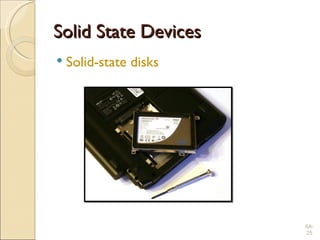
Solid State Devices Solid-state disks Large amount of SDRAM Extremely fast. Require battery backups Most have hard disks copying data 6A-
Solid State Devices Solid-state disks 6A-
Solid State Devices Smart cards Credit cards with a chip Chip stores data A smart card contain memory and microprocessor components.  The card is made of plastic. Hotels use for electronic keys 6A-
Questions List four types of magnetic storage devices commonly used in PCs. List seven types of optical storage devices commonly used in PCs. Name three types of solid-state storage devices. What is the purpose of formatting a magnetic disk? What is the storage capacity of a standard floppy disk? 6A-
Measuring and Improving Drive Performance
Drive Performance Average access time Also known as  seek time Time to find desired data Measured in  milliseconds(ms) Hard drive between 6 and 12 ms CD between 80 and 800 ms 6B-
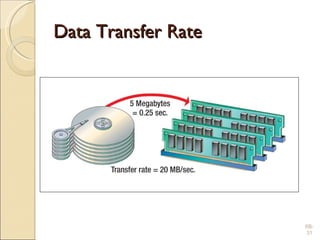
Drive Performance Data transfer rate the amount of data that one device can send to another in a given amount of time. Measured in  Bps( mega bytes  per second )   Hard drive ranges from 15 to 160 MBps Floppy disks transfer at 45 KBps 6B-
Data Transfer Rate 6B-
Optimizing Performance 1. Disk optimization Handled by operating system(OS) tool Routine disk maintenance Optimization should be run monthly 6B-
Optimizing Performance 2. Clean up unnecessary files Delete temp files Uninstall unused programs Delete obsolete data files Files should be cleaned weekly 6B-
Optimizing Performance 3. Scan a disk for errors Bad spots on the media Find and fix the error Move data to a good spot Mark the spot as bad Disks should be scanned monthly 6B-
Optimizing Performance 4. Defragment a disk Files fragment when resaved Fragmented files load slower Defragment puts the fragments together Disks should be defragged monthly 6B-
Defragment 6B-
Optimizing Performance 5.File compression Shrinks the size of a file Takes up less space on disk Reduce a disks performance Will increase disk capacity PKZip, WinZip and WinRAR 6B-
File Compression 6B- 763 KB on disk Compressed 157 KB
Chapter 6 End of Chapter

Ch5 storagedevices(updated)

  • 1.
    Chapter 5 Typesof Storage Devices
  • 2.
    Describing Storage DevicesStorage devices hold data permanently, even when the computer is turned off . Two processes Writing data Reading data 6A-
  • 3.
    Describing Storage DevicesStorage terms The physical material that actually holds data is called a storage medium. A floppy disk is a storage medium. The hardware that writes data to or reads data from a storage medium is called a storage device . A floppy disk drive is a storage device. Types of Storage Devices : Magnetic devices use a magnet Optical devices use lasers Solid-state devices have physical switches 6A-
  • 4.
    Magnetic Storage DevicesThe primary types of magnetic storage are: Hard disks. floppy disks(Diskettes). High-capacity floppy disks. magnetic tape. All magnetic drives work the same 6A- Floppy Disk Hard Disk Tape
  • 5.
    Magnetic Storage DevicesData storage and retrieval A magnetic disk's medium contains iron particles, A disk drive uses read/write heads containing electromagnets to create magnetic charges on the medium. 6A-
  • 6.
    Magnetic Storage DevicesData organization Disks must be formatted before use Determines how data will be stored: Format draws tracks on the disk Tracks is divided into sectors Purpose of formatting a magnetic disk: Before the computer can use a magnetic disk to store data, the disk’s surface must be magnetically formatted, so that the computer can go directly to a specific point on it without searching through data . 6A-
  • 7.
  • 8.
    Magnetic Storage DevicesFinding data on disk Each track and sector is labeled Listing of where files are stored File Allocation Table (FAT) – a log that records each File's location and each sector's status FAT32 NTFS The OS(Operating system) organizes sectors into groups, called clusters 6A-
  • 9.
    Magnetic Storage DevicesDiskettes Also known as floppy disks Spin at 300 RPM Takes .2 second to find data 3 ½ floppy disk holds 1.44 MB 6A-
  • 10.
    Magnetic Storage DevicesHard disks Primary storage device in a computer 2 or more aluminum platters Each platter has 2 sides Spin between 5,400 to 15,000 RPM Data found in 9.5 ms or less Drive capacity greater than 40 GB 6A-
  • 11.
    Illustrated Hard Disk6A- Contain multiple disks called platters
  • 12.
    Magnetic Storage DevicesRemovable high capacity disks Speed of hard disk Portability of floppy disk There are 2 types : High capacity floppy disk Stores up to 750 MB of data Hot swappable hard disks Provide GB of data Connect via USB 6A-
  • 13.
    Magnetic Storage Devices6A- Hot swappable hard disks Hot swappable hard disk : can be removed and replaced while the computer is still running.
  • 14.
    Magnetic Storage DevicesTape drives Best used for Infrequently accessed data Back-up solutions Slow sequential access Capacity exceeds 200 GB 6A-
  • 15.
    Optical Storage DevicesList seven types of optical storage devices commonly used in PCs. Compact Disc Read-Only Memory (CD-ROM). CD-Recordable (CD-R). CD-ReWritable (CD-RW). Digital Video Disc Read-Only Memory (DVD-ROM). DVD-Recordable (DVD-R). DVD-ReWritable (DVD-RW). PhotoCD. 6A-
  • 16.
    Optical Storage DevicesCD-ROM Most software ships on a CD Read using a laser Written from the inside out Standard CD holds 650 MB 6A-
  • 17.
    Recordable Optical TechnologiesCD Recordable (CD-R) Create a data or audio CD Data cannot be changed Can continue adding until full 6A-
  • 18.
    Recordable Optical TechnologiesCD Rewritable (CD-RW) Create a reusable CD Can reuse about 100 times 6A-
  • 19.
    Recordable Optical TechnologiesPhoto CD Provides for photo storage Photos added to CD until full Original pictures cannot be changed 6A-
  • 20.
    Optical Storage DevicesDVD-ROM Digital Video Disk Use both sides of the disk Capacities can reach 18 GB DVD players can read CDs 6A-
  • 21.
    Recordable Optical TechnologiesDVD Recordable (DVD-R) Allows home users to create DVDs Data cannot be changed DVD-RAM Allow reusing of DVD media 6A-
  • 22.
    Solid State DevicesData is stored physically Store data on memory circuits. No magnets or laser Very fast The primary types of Solid State Devices are: Flash memory Smart cards Solid-state disks 6A-
  • 23.
    Solid State DevicesFlash memory Found in cameras and USB drives Combination of RAM and ROM Long term updateable storage 6A-
  • 24.
    Solid State DevicesSolid-state disks Large amount of SDRAM Extremely fast. Require battery backups Most have hard disks copying data 6A-
  • 25.
    Solid State DevicesSolid-state disks 6A-
  • 26.
    Solid State DevicesSmart cards Credit cards with a chip Chip stores data A smart card contain memory and microprocessor components. The card is made of plastic. Hotels use for electronic keys 6A-
  • 27.
    Questions List fourtypes of magnetic storage devices commonly used in PCs. List seven types of optical storage devices commonly used in PCs. Name three types of solid-state storage devices. What is the purpose of formatting a magnetic disk? What is the storage capacity of a standard floppy disk? 6A-
  • 28.
    Measuring and ImprovingDrive Performance
  • 29.
    Drive Performance Averageaccess time Also known as seek time Time to find desired data Measured in milliseconds(ms) Hard drive between 6 and 12 ms CD between 80 and 800 ms 6B-
  • 30.
    Drive Performance Datatransfer rate the amount of data that one device can send to another in a given amount of time. Measured in Bps( mega bytes per second ) Hard drive ranges from 15 to 160 MBps Floppy disks transfer at 45 KBps 6B-
  • 31.
  • 32.
    Optimizing Performance 1.Disk optimization Handled by operating system(OS) tool Routine disk maintenance Optimization should be run monthly 6B-
  • 33.
    Optimizing Performance 2.Clean up unnecessary files Delete temp files Uninstall unused programs Delete obsolete data files Files should be cleaned weekly 6B-
  • 34.
    Optimizing Performance 3.Scan a disk for errors Bad spots on the media Find and fix the error Move data to a good spot Mark the spot as bad Disks should be scanned monthly 6B-
  • 35.
    Optimizing Performance 4.Defragment a disk Files fragment when resaved Fragmented files load slower Defragment puts the fragments together Disks should be defragged monthly 6B-
  • 36.
  • 37.
    Optimizing Performance 5.Filecompression Shrinks the size of a file Takes up less space on disk Reduce a disks performance Will increase disk capacity PKZip, WinZip and WinRAR 6B-
  • 38.
    File Compression 6B-763 KB on disk Compressed 157 KB
  • 39.
    Chapter 6 Endof Chapter

Editor's Notes

  • #23 لا مغناطيس أو ليزر
  • #30 الوقت للعثور على البيانات المطلوبة
  • #32 معدل نقل البيانات
  • #33 تمت معالجتها بواسطة نظام التشغيل ( OS)  أداة
  • #34 تحسين الأداء