Mr.T.SOMASUNDARAM
DEPARTMENT OF MANAGEMENT
KRISTU JAYANTI COLLEGE
BENGALURU
DIGITIAL FLUENCY
General features of computer –
Evolution of computers;
Computer Applications – Data
Processing – Information
Processing – Commercial – Office
Automation – Industry and
Engineering – Healthcare –
Education – Disruptive
technologies.
UNIT 1: INTRODUCTION TO
COMPUTERS
 The term ‘Computer’ is derived from
Latin word ‘Compute’, which means
to calculate.
 A Computer is an electronic
machine, devised for performing
calculations and controlling
operations either in logical or
numerical terms.
 It performs diverse operations with
help of instructions to process the
information to get desired results.
 It covers huge areas like education,
Government, Industries, Medicine,
etc.
Introduction
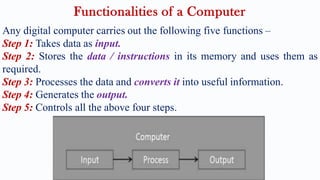
Any digital computer carries out the following five functions –
Step 1: Takes data as input.
Step 2: Stores the data / instructions in its memory and uses them as
required.
Step 3: Processes the data and converts it into useful information.
Step 4: Generates the output.
Step 5: Controls all the above four steps.
Functionalities of a Computer
The main characteristics of computers are –
a) Speed:
 Computers are capable of carrying out the task with enormous speed.
 It can perform from 4 MIPS to 100 MIPS (millions of instructions per second).
 Information signal travels at incredible electronic speed.
b) Storage:
 It can store enormous quantity of information.
 It expressed in terms of Kilobytes (or) Mega Bytes (MB) or Gega Bytes (GB)
 It is achieved through ‘Main memory’ or ‘Primary storage’, or ‘Secondary
storage’.
 Hard disks, Floppy disks, Compact Disc (CD) storage are examples of
secondary storage.
Characteristics features of Computers (Advantages)
c) Accuracy:
 The accuracy of a computer is consistently high.
 It is indispensable in various fields such as scientific research, space research,
weather predictions.
d) Versatility:
 Computers are versatile in that they can perform almost any task, provided they
are given appropriate logical steps.
 (E.g.) it has capable of performing wide ranging tasks like construction of
payroll, inventory management in a factory, hotel billing, banking application,
task in every day life.
e) Automation:
 It is automatic in operation and once programming logic is initiated, computer
performs repeated operation without human interventions.
Characteristics features of Computers (Advantages)
f) Diligence:
 Computers are machine and don’t get tired or lose concentration like human
beings.
 Large no. of calculations are performed the resultant output and remain exactly
same if operations are repeated.
 But when human being asked to do same job, consistency can’t be achieved.
 For consistent and continuous standard output, computer’s diligence is great
help.
g) Reliability:
 Computers give very accurate results with predetermined values.
 It correct and modify parameters automatically and formatted results with high
degree of precisions.
Characteristics features of Computers (Advantages)
a) No I.Q.:
 A computer is a machine that has no intelligence to perform any task.
 Each instruction has to be given to computer.
 A computer can’t take any decision on its own.
b) Dependency:
 It functions as per the user’s instruction, thus it is fully dependent on humans.
c) Environment:
 The operating environment of the computer should be dust free and suitable.
d) No feeling:
 Computers have no feelings or emotions.
 It cannot make judgement based on feeling, taste, experience and knowledge
unlike humans.
Disadvantages of Computers
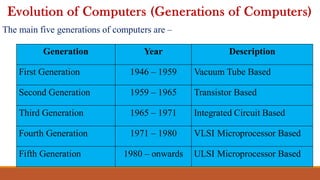
The main five generations of computers are –
Evolution of Computers (Generations of Computers)
Generation Year Description
First Generation 1946 – 1959 Vacuum Tube Based
Second Generation 1959 – 1965 Transistor Based
Third Generation 1965 – 1971 Integrated Circuit Based
Fourth Generation 1971 – 1980 VLSI Microprocessor Based
Fifth Generation 1980 – onwards ULSI Microprocessor Based
1. First Generation Computers: (1946 – 1959)
 Vacuum tubes as the basic components for memory and circuit for CPU.
 These were very expensive and only large organizations were able to afford it.
 It used tubes like electric bulbs, produced a lot of heat and installations used
to fuse frequently.
 In this generation, batch processing operating system was used.
 Punch cards, paper tape and magnetic tape was used as input and output
devices.
 First generation computers used machine code as programming language.
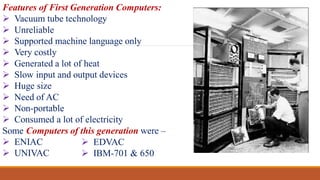
Features of First Generation Computers:
 Vacuum tube technology
 Unreliable
 Supported machine language only
 Very costly
 Generated a lot of heat
 Slow input and output devices
 Huge size
 Need of AC
 Non-portable
 Consumed a lot of electricity
Some Computers of this generation were –
 ENIAC
 UNIVAC
 EDVAC
 IBM-701 & 650
2. Second Generation Computers: (1959 – 1965)
 Transistors were used and it is cheaper, consumed less power, more compact
in size, more reliable and faster than 1st generation machines.
 Magnetic cores were used as the primary memory and magnetic tape and
magnetic disks as secondary storage devices.
 Assemble language and high level programming languages like FORTRAN,
COBOL were used.
 The computers used batch processing and multiprogramming operating
system.
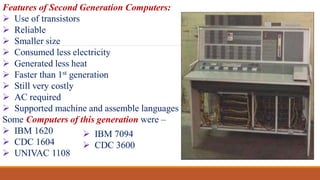
Features of Second Generation Computers:
 Use of transistors
 Reliable
 Smaller size
 Consumed less electricity
 Generated less heat
 Faster than 1st generation
 Still very costly
 AC required
 Supported machine and assemble languages
Some Computers of this generation were –
 IBM 1620
 CDC 1604
 UNIVAC 1108
 IBM 7094
 CDC 3600
3. Third Generation Computers: (1965 – 1971)
 Integrated Circuits (ICs) are used in place of transistors.
 Single IC has many transistors, resistors and capacitors along with associated
circuitry.
 IC was invented by Jack Kilby and made computers smaller in size, reliable
and efficient.
 Remote processing, time – sharing, multi-programming operating system
were used.
 High level languages (FORTRAN, PASCAL, COBOL) are used.
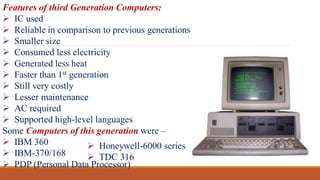
Features of third Generation Computers:
 IC used
 Reliable in comparison to previous generations
 Smaller size
 Consumed less electricity
 Generated less heat
 Faster than 1st generation
 Still very costly
 Lesser maintenance
 AC required
 Supported high-level languages
Some Computers of this generation were –
 IBM 360
 IBM-370/168
 PDP (Personal Data Processor)
 Honeywell-6000 series
 TDC 316
4. Fourth Generation Computers: (1971 – 1980)
 Computers of fourth generation used Very Large Scale Integrated (VLSI)
Circuits .
 VLSI circuits having about 5000 transistors and other elements with
associated circuits on single chip.
 It is powerful, compact, reliable and affordable, which gives rise to Personal
Computer (PC) revolution.
 Time – sharing, real time networks, distributed operating system were used.
 High level languages (C, C++, DBASE) are used.
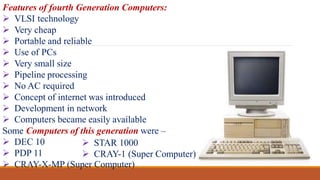
Features of fourth Generation Computers:
 VLSI technology
 Very cheap
 Portable and reliable
 Use of PCs
 Very small size
 Pipeline processing
 No AC required
 Concept of internet was introduced
 Development in network
 Computers became easily available
Some Computers of this generation were –
 DEC 10
 PDP 11
 CRAY-X-MP (Super Computer)
 STAR 1000
 CRAY-1 (Super Computer)
5. Fifth Generation Computers: (1980 – 1990)
 VLSI technology became ULSI (Ultra Large Scale Integration) technology, in
production of microprocessor chips having 10 million electronic components.
 It is based on parallel processing hardware & AI software.
 AI is emerging branch in computer science and interprets the means and method
of making computers think like human beings.
 High level languages (C, C++, JAVA, .NET) are used.
 AI includes Robotics, Neural networks, Game playing, development of expert
systems to make decisions in real-life situation, natural language understanding
and generation.
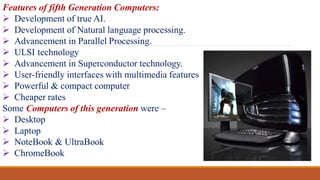
Features of fifth Generation Computers:
 Development of true AI.
 Development of Natural language processing.
 Advancement in Parallel Processing.
 ULSI technology
 Advancement in Superconductor technology.
 User-friendly interfaces with multimedia features
 Powerful & compact computer
 Cheaper rates
Some Computers of this generation were –
 Desktop
 Laptop
 NoteBook & UltraBook
 ChromeBook
6. 6th – 10th Generation Computers: (1990 – till date)
 It is different from other generation computers in terms of size, speed
and tasks that perform.
 These computers are called intelligent computers based on AI or
Artificial brains.
Some Computers of this generation were –
 PowerBook
 Pentium Microprocessor
 Sun Ultra Workstation
 iMac
 Power Mac G5
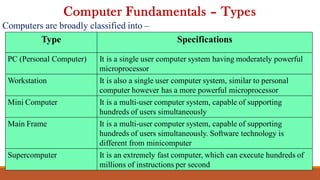
Computers are broadly classified into –
Computer Fundamentals – Types
Type Specifications
PC (Personal Computer) It is a single user computer system having moderately powerful
microprocessor
Workstation It is also a single user computer system, similar to personal
computer however has a more powerful microprocessor
Mini Computer It is a multi-user computer system, capable of supporting
hundreds of users simultaneously
Main Frame It is a multi-user computer system, capable of supporting
hundreds of users simultaneously. Software technology is
different from minicomputer
Supercomputer It is an extremely fast computer, which can execute hundreds of
millions of instructions per second
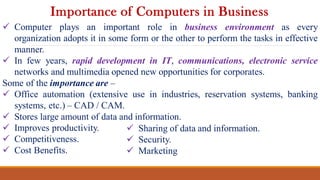
 Computer plays an important role in business environment as every
organization adopts it in some form or the other to perform the tasks in effective
manner.
 In few years, rapid development in IT, communications, electronic service
networks and multimedia opened new opportunities for corporates.
Some of the importance are –
 Office automation (extensive use in industries, reservation systems, banking
systems, etc.) – CAD / CAM.
 Stores large amount of data and information.
 Improves productivity.
 Competitiveness.
 Cost Benefits.
Importance of Computers in Business
 Sharing of data and information.
 Security.
 Marketing
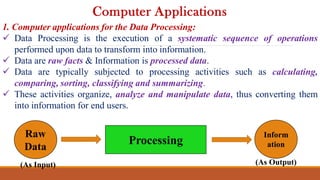
1. Computer applications for the Data Processing:
 Data Processing is the execution of a systematic sequence of operations
performed upon data to transform into information.
 Data are raw facts & Information is processed data.
 Data are typically subjected to processing activities such as calculating,
comparing, sorting, classifying and summarizing.
 These activities organize, analyze and manipulate data, thus converting them
into information for end users.
Computer Applications
Raw
Data
Inform
ation
Processing
(As Input) (As Output)
2. Computer applications for Information Processing:
 Information Processing is a concept that covers both traditional concepts of
processing numeric and alphabetic data, processing of text, images and voices.
 It emphasizes that the production of information products for users should be
focus of processing activities.
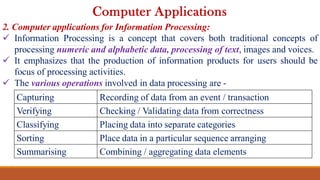
 The various operations involved in data processing are -
Computer Applications
Capturing Recording of data from an event / transaction
Verifying Checking / Validating data from correctness
Classifying Placing data into separate categories
Sorting Place data in a particular sequence arranging
Summarising Combining / aggregating data elements
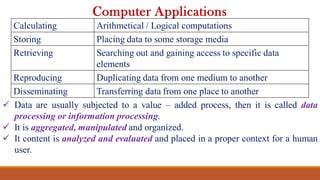
 Data are usually subjected to a value – added process, then it is called data
processing or information processing.
 It is aggregated, manipulated and organized.
 It content is analyzed and evaluated and placed in a proper context for a human
user.
Computer Applications
Calculating Arithmetical / Logical computations
Storing Placing data to some storage media
Retrieving Searching out and gaining access to specific data
elements
Reproducing Duplicating data from one medium to another
Disseminating Transferring data from one place to another
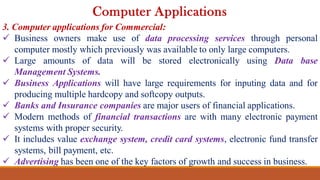
3. Computer applications for Commercial:
 Business owners make use of data processing services through personal
computer mostly which previously was available to only large computers.
 Large amounts of data will be stored electronically using Data base
Management Systems.
 Business Applications will have large requirements for inputing data and for
producing multiple hardcopy and softcopy outputs.
 Banks and Insurance companies are major users of financial applications.
 Modern methods of financial transactions are with many electronic payment
systems with proper security.
 It includes value exchange system, credit card systems, electronic fund transfer
systems, bill payment, etc.
 Advertising has been one of the key factors of growth and success in business.
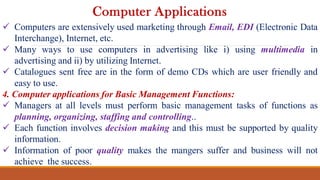
Computer Applications
 Computers are extensively used marketing through Email, EDI (Electronic Data
Interchange), Internet, etc.
 Many ways to use computers in advertising like i) using multimedia in
advertising and ii) by utilizing Internet.
 Catalogues sent free are in the form of demo CDs which are user friendly and
easy to use.
4. Computer applications for Basic Management Functions:
 Managers at all levels must perform basic management tasks of functions as
planning, organizing, staffing and controlling..
 Each function involves decision making and this must be supported by quality
information.
 Information of poor quality makes the mangers suffer and business will not
achieve the success.
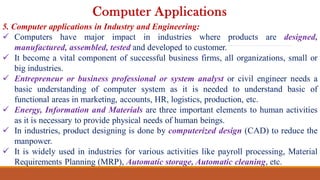
Computer Applications
5. Computer applications in Industry and Engineering:
 Computers have major impact in industries where products are designed,
manufactured, assembled, tested and developed to customer.
 It become a vital component of successful business firms, all organizations, small or
big industries.
 Entrepreneur or business professional or system analyst or civil engineer needs a
basic understanding of computer system as it is needed to understand basic of
functional areas in marketing, accounts, HR, logistics, production, etc.
 Energy, Information and Materials are three important elements to human activities
as it is necessary to provide physical needs of human beings.
 In industries, product designing is done by computerized design (CAD) to reduce the
manpower.
 It is widely used in industries for various activities like payroll processing, Material
Requirements Planning (MRP), Automatic storage, Automatic cleaning, etc.
Computer Applications
6. Computer applications in Healthcare:
 Nowadays, certain medical tests with latest computer controlled equipment to keep all
parts of his body.
 Numerous applications of computers in medical field and used in medical research by
analyzing the data produced from experiments in trial of drugs.
 Computers are widely used in hospitals as a large bank of data about medical
conditions of patients.
 Computerized health’s records for immunization has been used by health authorities
like medical officers, health visitors, etc.
 Ideal health care centre would be centre on single stage, life time, computerized
patient record (CPR).
 CPR contains demographic and medical patient information, family history, treatment
information prescriptions, test results, X-Ray and Scans.
Computer Applications
7. Computer applications in Education:
 Teaching & learning
 Testing & Evaluation
 Guidance purpose
 Library & Information sources
 School/College administration
Computer Applications
Disruptive Technologies
“Disruptive technology is the technology that affects the normal
operation of a market or an industry. It displaces a well-established
product or technology, creating a new industry or market. A professor
at Harvard Business School, Clayton M. Christensen, invented the term
“disruptive technology.”
(E.g.)
1.Artificial Intelligence (AI)
2.Block chain Technology
3.Internet of Things (IoT)
Digital Fluency
Digital Fluency

Digital Fluency

  • 1.
    Mr.T.SOMASUNDARAM DEPARTMENT OF MANAGEMENT KRISTUJAYANTI COLLEGE BENGALURU DIGITIAL FLUENCY
  • 2.
    General features ofcomputer – Evolution of computers; Computer Applications – Data Processing – Information Processing – Commercial – Office Automation – Industry and Engineering – Healthcare – Education – Disruptive technologies. UNIT 1: INTRODUCTION TO COMPUTERS
  • 3.
     The term‘Computer’ is derived from Latin word ‘Compute’, which means to calculate.  A Computer is an electronic machine, devised for performing calculations and controlling operations either in logical or numerical terms.  It performs diverse operations with help of instructions to process the information to get desired results.  It covers huge areas like education, Government, Industries, Medicine, etc. Introduction
  • 4.
    Any digital computercarries out the following five functions – Step 1: Takes data as input. Step 2: Stores the data / instructions in its memory and uses them as required. Step 3: Processes the data and converts it into useful information. Step 4: Generates the output. Step 5: Controls all the above four steps. Functionalities of a Computer
  • 5.
    The main characteristicsof computers are – a) Speed:  Computers are capable of carrying out the task with enormous speed.  It can perform from 4 MIPS to 100 MIPS (millions of instructions per second).  Information signal travels at incredible electronic speed. b) Storage:  It can store enormous quantity of information.  It expressed in terms of Kilobytes (or) Mega Bytes (MB) or Gega Bytes (GB)  It is achieved through ‘Main memory’ or ‘Primary storage’, or ‘Secondary storage’.  Hard disks, Floppy disks, Compact Disc (CD) storage are examples of secondary storage. Characteristics features of Computers (Advantages)
  • 6.
    c) Accuracy:  Theaccuracy of a computer is consistently high.  It is indispensable in various fields such as scientific research, space research, weather predictions. d) Versatility:  Computers are versatile in that they can perform almost any task, provided they are given appropriate logical steps.  (E.g.) it has capable of performing wide ranging tasks like construction of payroll, inventory management in a factory, hotel billing, banking application, task in every day life. e) Automation:  It is automatic in operation and once programming logic is initiated, computer performs repeated operation without human interventions. Characteristics features of Computers (Advantages)
  • 7.
    f) Diligence:  Computersare machine and don’t get tired or lose concentration like human beings.  Large no. of calculations are performed the resultant output and remain exactly same if operations are repeated.  But when human being asked to do same job, consistency can’t be achieved.  For consistent and continuous standard output, computer’s diligence is great help. g) Reliability:  Computers give very accurate results with predetermined values.  It correct and modify parameters automatically and formatted results with high degree of precisions. Characteristics features of Computers (Advantages)
  • 8.
    a) No I.Q.: A computer is a machine that has no intelligence to perform any task.  Each instruction has to be given to computer.  A computer can’t take any decision on its own. b) Dependency:  It functions as per the user’s instruction, thus it is fully dependent on humans. c) Environment:  The operating environment of the computer should be dust free and suitable. d) No feeling:  Computers have no feelings or emotions.  It cannot make judgement based on feeling, taste, experience and knowledge unlike humans. Disadvantages of Computers
  • 9.
    The main fivegenerations of computers are – Evolution of Computers (Generations of Computers) Generation Year Description First Generation 1946 – 1959 Vacuum Tube Based Second Generation 1959 – 1965 Transistor Based Third Generation 1965 – 1971 Integrated Circuit Based Fourth Generation 1971 – 1980 VLSI Microprocessor Based Fifth Generation 1980 – onwards ULSI Microprocessor Based
  • 10.
    1. First GenerationComputers: (1946 – 1959)  Vacuum tubes as the basic components for memory and circuit for CPU.  These were very expensive and only large organizations were able to afford it.  It used tubes like electric bulbs, produced a lot of heat and installations used to fuse frequently.  In this generation, batch processing operating system was used.  Punch cards, paper tape and magnetic tape was used as input and output devices.  First generation computers used machine code as programming language.
  • 11.
    Features of FirstGeneration Computers:  Vacuum tube technology  Unreliable  Supported machine language only  Very costly  Generated a lot of heat  Slow input and output devices  Huge size  Need of AC  Non-portable  Consumed a lot of electricity Some Computers of this generation were –  ENIAC  UNIVAC  EDVAC  IBM-701 & 650
  • 12.
    2. Second GenerationComputers: (1959 – 1965)  Transistors were used and it is cheaper, consumed less power, more compact in size, more reliable and faster than 1st generation machines.  Magnetic cores were used as the primary memory and magnetic tape and magnetic disks as secondary storage devices.  Assemble language and high level programming languages like FORTRAN, COBOL were used.  The computers used batch processing and multiprogramming operating system.
  • 13.
    Features of SecondGeneration Computers:  Use of transistors  Reliable  Smaller size  Consumed less electricity  Generated less heat  Faster than 1st generation  Still very costly  AC required  Supported machine and assemble languages Some Computers of this generation were –  IBM 1620  CDC 1604  UNIVAC 1108  IBM 7094  CDC 3600
  • 14.
    3. Third GenerationComputers: (1965 – 1971)  Integrated Circuits (ICs) are used in place of transistors.  Single IC has many transistors, resistors and capacitors along with associated circuitry.  IC was invented by Jack Kilby and made computers smaller in size, reliable and efficient.  Remote processing, time – sharing, multi-programming operating system were used.  High level languages (FORTRAN, PASCAL, COBOL) are used.
  • 15.
    Features of thirdGeneration Computers:  IC used  Reliable in comparison to previous generations  Smaller size  Consumed less electricity  Generated less heat  Faster than 1st generation  Still very costly  Lesser maintenance  AC required  Supported high-level languages Some Computers of this generation were –  IBM 360  IBM-370/168  PDP (Personal Data Processor)  Honeywell-6000 series  TDC 316
  • 16.
    4. Fourth GenerationComputers: (1971 – 1980)  Computers of fourth generation used Very Large Scale Integrated (VLSI) Circuits .  VLSI circuits having about 5000 transistors and other elements with associated circuits on single chip.  It is powerful, compact, reliable and affordable, which gives rise to Personal Computer (PC) revolution.  Time – sharing, real time networks, distributed operating system were used.  High level languages (C, C++, DBASE) are used.
  • 17.
    Features of fourthGeneration Computers:  VLSI technology  Very cheap  Portable and reliable  Use of PCs  Very small size  Pipeline processing  No AC required  Concept of internet was introduced  Development in network  Computers became easily available Some Computers of this generation were –  DEC 10  PDP 11  CRAY-X-MP (Super Computer)  STAR 1000  CRAY-1 (Super Computer)
  • 18.
    5. Fifth GenerationComputers: (1980 – 1990)  VLSI technology became ULSI (Ultra Large Scale Integration) technology, in production of microprocessor chips having 10 million electronic components.  It is based on parallel processing hardware & AI software.  AI is emerging branch in computer science and interprets the means and method of making computers think like human beings.  High level languages (C, C++, JAVA, .NET) are used.  AI includes Robotics, Neural networks, Game playing, development of expert systems to make decisions in real-life situation, natural language understanding and generation.
  • 19.
    Features of fifthGeneration Computers:  Development of true AI.  Development of Natural language processing.  Advancement in Parallel Processing.  ULSI technology  Advancement in Superconductor technology.  User-friendly interfaces with multimedia features  Powerful & compact computer  Cheaper rates Some Computers of this generation were –  Desktop  Laptop  NoteBook & UltraBook  ChromeBook
  • 20.
    6. 6th –10th Generation Computers: (1990 – till date)  It is different from other generation computers in terms of size, speed and tasks that perform.  These computers are called intelligent computers based on AI or Artificial brains. Some Computers of this generation were –  PowerBook  Pentium Microprocessor  Sun Ultra Workstation  iMac  Power Mac G5
  • 21.
    Computers are broadlyclassified into – Computer Fundamentals – Types Type Specifications PC (Personal Computer) It is a single user computer system having moderately powerful microprocessor Workstation It is also a single user computer system, similar to personal computer however has a more powerful microprocessor Mini Computer It is a multi-user computer system, capable of supporting hundreds of users simultaneously Main Frame It is a multi-user computer system, capable of supporting hundreds of users simultaneously. Software technology is different from minicomputer Supercomputer It is an extremely fast computer, which can execute hundreds of millions of instructions per second
  • 22.
     Computer playsan important role in business environment as every organization adopts it in some form or the other to perform the tasks in effective manner.  In few years, rapid development in IT, communications, electronic service networks and multimedia opened new opportunities for corporates. Some of the importance are –  Office automation (extensive use in industries, reservation systems, banking systems, etc.) – CAD / CAM.  Stores large amount of data and information.  Improves productivity.  Competitiveness.  Cost Benefits. Importance of Computers in Business  Sharing of data and information.  Security.  Marketing
  • 23.
    1. Computer applicationsfor the Data Processing:  Data Processing is the execution of a systematic sequence of operations performed upon data to transform into information.  Data are raw facts & Information is processed data.  Data are typically subjected to processing activities such as calculating, comparing, sorting, classifying and summarizing.  These activities organize, analyze and manipulate data, thus converting them into information for end users. Computer Applications Raw Data Inform ation Processing (As Input) (As Output)
  • 24.
    2. Computer applicationsfor Information Processing:  Information Processing is a concept that covers both traditional concepts of processing numeric and alphabetic data, processing of text, images and voices.  It emphasizes that the production of information products for users should be focus of processing activities.  The various operations involved in data processing are - Computer Applications Capturing Recording of data from an event / transaction Verifying Checking / Validating data from correctness Classifying Placing data into separate categories Sorting Place data in a particular sequence arranging Summarising Combining / aggregating data elements
  • 25.
     Data areusually subjected to a value – added process, then it is called data processing or information processing.  It is aggregated, manipulated and organized.  It content is analyzed and evaluated and placed in a proper context for a human user. Computer Applications Calculating Arithmetical / Logical computations Storing Placing data to some storage media Retrieving Searching out and gaining access to specific data elements Reproducing Duplicating data from one medium to another Disseminating Transferring data from one place to another
  • 26.
    3. Computer applicationsfor Commercial:  Business owners make use of data processing services through personal computer mostly which previously was available to only large computers.  Large amounts of data will be stored electronically using Data base Management Systems.  Business Applications will have large requirements for inputing data and for producing multiple hardcopy and softcopy outputs.  Banks and Insurance companies are major users of financial applications.  Modern methods of financial transactions are with many electronic payment systems with proper security.  It includes value exchange system, credit card systems, electronic fund transfer systems, bill payment, etc.  Advertising has been one of the key factors of growth and success in business. Computer Applications
  • 27.
     Computers areextensively used marketing through Email, EDI (Electronic Data Interchange), Internet, etc.  Many ways to use computers in advertising like i) using multimedia in advertising and ii) by utilizing Internet.  Catalogues sent free are in the form of demo CDs which are user friendly and easy to use. 4. Computer applications for Basic Management Functions:  Managers at all levels must perform basic management tasks of functions as planning, organizing, staffing and controlling..  Each function involves decision making and this must be supported by quality information.  Information of poor quality makes the mangers suffer and business will not achieve the success. Computer Applications
  • 28.
    5. Computer applicationsin Industry and Engineering:  Computers have major impact in industries where products are designed, manufactured, assembled, tested and developed to customer.  It become a vital component of successful business firms, all organizations, small or big industries.  Entrepreneur or business professional or system analyst or civil engineer needs a basic understanding of computer system as it is needed to understand basic of functional areas in marketing, accounts, HR, logistics, production, etc.  Energy, Information and Materials are three important elements to human activities as it is necessary to provide physical needs of human beings.  In industries, product designing is done by computerized design (CAD) to reduce the manpower.  It is widely used in industries for various activities like payroll processing, Material Requirements Planning (MRP), Automatic storage, Automatic cleaning, etc. Computer Applications
  • 29.
    6. Computer applicationsin Healthcare:  Nowadays, certain medical tests with latest computer controlled equipment to keep all parts of his body.  Numerous applications of computers in medical field and used in medical research by analyzing the data produced from experiments in trial of drugs.  Computers are widely used in hospitals as a large bank of data about medical conditions of patients.  Computerized health’s records for immunization has been used by health authorities like medical officers, health visitors, etc.  Ideal health care centre would be centre on single stage, life time, computerized patient record (CPR).  CPR contains demographic and medical patient information, family history, treatment information prescriptions, test results, X-Ray and Scans. Computer Applications
  • 30.
    7. Computer applicationsin Education:  Teaching & learning  Testing & Evaluation  Guidance purpose  Library & Information sources  School/College administration Computer Applications
  • 31.
    Disruptive Technologies “Disruptive technologyis the technology that affects the normal operation of a market or an industry. It displaces a well-established product or technology, creating a new industry or market. A professor at Harvard Business School, Clayton M. Christensen, invented the term “disruptive technology.” (E.g.) 1.Artificial Intelligence (AI) 2.Block chain Technology 3.Internet of Things (IoT)