AN OVERVIEW OF PHYSICAL STORAGE MEDIA DATABASE MANAGEMENT SYSTEMS
1.Several types of data storage exist in most computer systems. They vary in speed of access, cost per unit of data, and reliability. Cache  :  most costly and  fastest form of storage . Usually very small, and managed by the operating system.  Main Memory (MM):  the storage area for data available to be operated on.  General-purpose machine instructions  operate on main memory.  Contents of main memory are usually lost in a  power failure or ``crash''.  Usually too small (even with megabytes) and too  expensive to store the entire database .
Flash memory :  EEPROM ( electrically erasable programmable read-only memory ).  Data in flash memory survive from power failure.  Reading data from flash memory takes about  10 nano-secs  (roughly as fast as from main memory), and writing data into flash memory is more complicated: write-once takes about 4-10 microsecs.  To overwrite what has been written, one has to first erase the entire bank of the memory. It may support only a  limited number of erase cycles  ( to ).  It has found its popularity as a  replacement for disks  for storing small volumes of data (5-10 megabytes ).
FLASH STORAGE Flash USB drive   A flash USB drive is a memory storage unit, using its own 'flash' memory type, contrast to magnetic disks used...  Compactflash   The Memory Stick Duo, which is slightly smaller than the competing Secure Digital format, was developed in response to Sony's...
FLASH STORAGE Microdrive   Pioneered by IBM, microdrives are minute hard disks that come in CompactFlash Type II format and typically offer larger storage...  MMC   Like any flash memory card, it can be used to store various types of files, including photos, videos, music, or...
FLASH STORAGE MMC Memory Card   A flash memory card that provides storage for cellphones, PDAs and other handheld devices. Introduced in 1997 with a 4MB...  Multimediacard   A MultiMediaCard (MMC) is a tiny memory card that uses flash memory to make storage portable among various devices
Magnetic-disk storage :   primary medium for long-term storage .   Typically the  entire database is stored on disk .  Data must be  moved from disk to main memory  in order for the data to be operated on.  After operations are performed, data must be  copied back to disk  if any changes were made.  Disk storage is called  direct access  storage  as it is possible to read data on the disk in any order (unlike sequential access).  Disk storage usually survives power failures and system crashes.
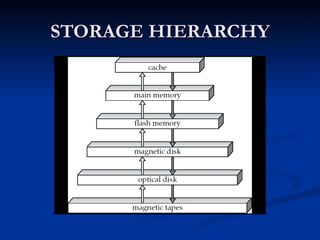
Optical storage :  CD-ROM (compact-disk read-only memory),  WORM ( write-once read-many )  disk (for archival storage of data), and  Juke box  (containing a few drives and numerous disks loaded on demand).  Tape Storage :  used primarily for backup and archival data.  Cheaper, but much  slower access , since tape must be  read sequentially from the beginning .  Used as  protection from disk failures !  The storage device hierarchy is presented in Figure given below, where the higher levels are expensive (cost per bit), fast (access time), but the capacity is smaller.
STORAGE HIERARCHY
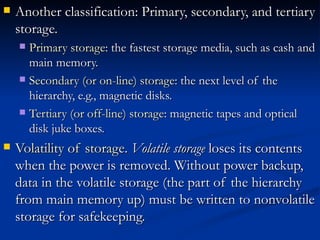
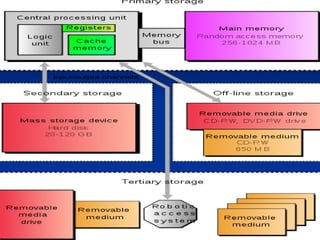
Another classification: Primary, secondary, and tertiary storage.  Primary storage : the fastest storage media, such as cash and main memory.  Secondary (or on-line) storage : the next level of the hierarchy, e.g., magnetic disks.  Tertiary (or off-line) storage : magnetic tapes and optical disk juke boxes.  Volatility of storage .  Volatile storage  loses its contents when the power is removed. Without power backup, data in the volatile storage (the part of the hierarchy from main memory up) must be written to nonvolatile storage for safekeeping.
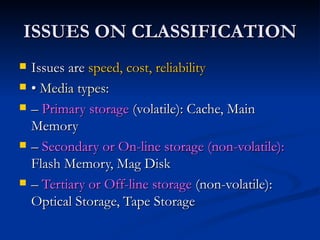
ISSUES ON CLASSIFICATION Issues are  speed, cost, reliability •  Media types: –  Primary storage  (volatile): Cache, Main Memory –  Secondary or On-line storage (non-volatile):  Flash Memory, Mag Disk –  Tertiary or Off-line storage  (non-volatile): Optical Storage, Tape Storage
 
SECONDARY STORAGE
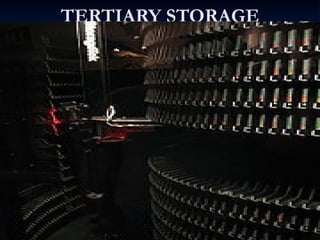
TERTIARY STORAGE
END

storage media

  • 1.
    AN OVERVIEW OFPHYSICAL STORAGE MEDIA DATABASE MANAGEMENT SYSTEMS
  • 2.
    1.Several types ofdata storage exist in most computer systems. They vary in speed of access, cost per unit of data, and reliability. Cache : most costly and fastest form of storage . Usually very small, and managed by the operating system. Main Memory (MM): the storage area for data available to be operated on. General-purpose machine instructions operate on main memory. Contents of main memory are usually lost in a power failure or ``crash''. Usually too small (even with megabytes) and too expensive to store the entire database .
  • 3.
    Flash memory : EEPROM ( electrically erasable programmable read-only memory ). Data in flash memory survive from power failure. Reading data from flash memory takes about 10 nano-secs (roughly as fast as from main memory), and writing data into flash memory is more complicated: write-once takes about 4-10 microsecs. To overwrite what has been written, one has to first erase the entire bank of the memory. It may support only a limited number of erase cycles ( to ). It has found its popularity as a replacement for disks for storing small volumes of data (5-10 megabytes ).
  • 4.
    FLASH STORAGE FlashUSB drive A flash USB drive is a memory storage unit, using its own 'flash' memory type, contrast to magnetic disks used... Compactflash The Memory Stick Duo, which is slightly smaller than the competing Secure Digital format, was developed in response to Sony's...
  • 5.
    FLASH STORAGE Microdrive Pioneered by IBM, microdrives are minute hard disks that come in CompactFlash Type II format and typically offer larger storage... MMC Like any flash memory card, it can be used to store various types of files, including photos, videos, music, or...
  • 6.
    FLASH STORAGE MMCMemory Card A flash memory card that provides storage for cellphones, PDAs and other handheld devices. Introduced in 1997 with a 4MB... Multimediacard A MultiMediaCard (MMC) is a tiny memory card that uses flash memory to make storage portable among various devices
  • 7.
    Magnetic-disk storage : primary medium for long-term storage . Typically the entire database is stored on disk . Data must be moved from disk to main memory in order for the data to be operated on. After operations are performed, data must be copied back to disk if any changes were made. Disk storage is called direct access storage as it is possible to read data on the disk in any order (unlike sequential access). Disk storage usually survives power failures and system crashes.
  • 8.
    Optical storage : CD-ROM (compact-disk read-only memory), WORM ( write-once read-many ) disk (for archival storage of data), and Juke box (containing a few drives and numerous disks loaded on demand). Tape Storage : used primarily for backup and archival data. Cheaper, but much slower access , since tape must be read sequentially from the beginning . Used as protection from disk failures ! The storage device hierarchy is presented in Figure given below, where the higher levels are expensive (cost per bit), fast (access time), but the capacity is smaller.
  • 9.
  • 10.
    Another classification: Primary,secondary, and tertiary storage. Primary storage : the fastest storage media, such as cash and main memory. Secondary (or on-line) storage : the next level of the hierarchy, e.g., magnetic disks. Tertiary (or off-line) storage : magnetic tapes and optical disk juke boxes. Volatility of storage . Volatile storage loses its contents when the power is removed. Without power backup, data in the volatile storage (the part of the hierarchy from main memory up) must be written to nonvolatile storage for safekeeping.
  • 11.
    ISSUES ON CLASSIFICATIONIssues are speed, cost, reliability • Media types: – Primary storage (volatile): Cache, Main Memory – Secondary or On-line storage (non-volatile): Flash Memory, Mag Disk – Tertiary or Off-line storage (non-volatile): Optical Storage, Tape Storage
  • 12.
  • 13.
  • 14.
  • 15.