DATABASE
MANAGEMENT SYSTEMS
Unit / Topic: IV /I
Overview of Physical Storage
Media
SO 1: Physical Storage Media
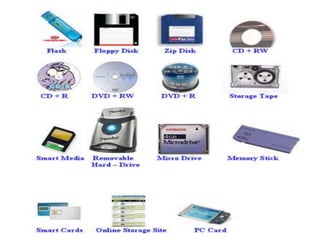
• Physical Storage Media is used for storing (writing
/recording/saving) and retrieving (reading /opening)
data.
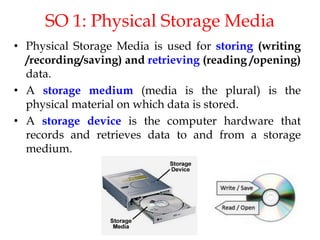
• A storage medium (media is the plural) is the
physical material on which data is stored.
• A storage device is the computer hardware that
records and retrieves data to and from a storage
medium.
Classification
• Classification of Physical Storage Media is based upon
the following characteristics:
Speed of access
Cost per unit of data
Reliability
• Data loss on power failure or system crash
• Physical failure of the storage device
Contd..
• Can differentiate storage into:
• Volatile Storage:
• Loses contents when power is switched off
• Non-volatile Storage:
• Contents persist even when power is switched
off.
SO2: Types of Storage Media
• Cache
• Main Memory
• Flash Memory
• Magnetic Disk
• Optical Disk
• Magnetic Tapes
Cache
• Most costly and fastest form of storage.
• Fast access , volatile.
• Usually very small in size.
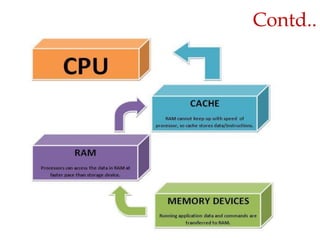
• It is a type of high speed memory that stores a copy
of data which is transferred between the processor
and main memory.
Contd..
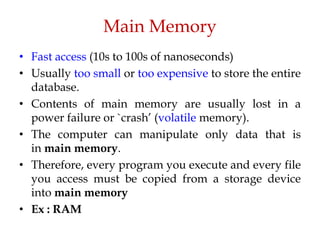
Main Memory
• Fast access (10s to 100s of nanoseconds)
• Usually too small or too expensive to store the entire
database.
• Contents of main memory are usually lost in a
power failure or `crash’ (volatile memory).
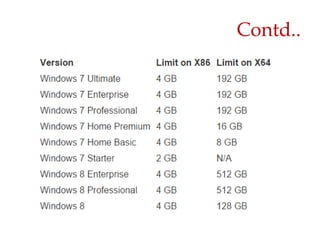
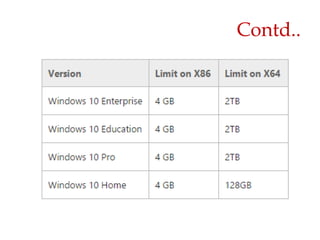
• The computer can manipulate only data that is
in main memory.
• Therefore, every program you execute and every file
you access must be copied from a storage device
into main memory
• Ex : RAM
Contd..
Contd..
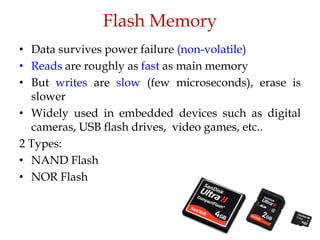
Flash Memory
• Data survives power failure (non-volatile)
• Reads are roughly as fast as main memory
• But writes are slow (few microseconds), erase is
slower
• Widely used in embedded devices such as digital
cameras, USB flash drives, video games, etc..
2 Types:
• NAND Flash
• NOR Flash
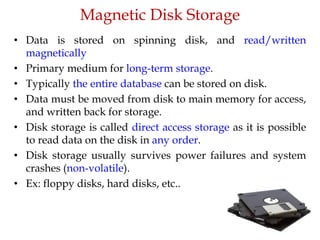
Magnetic Disk Storage
• Data is stored on spinning disk, and read/written
magnetically
• Primary medium for long-term storage.
• Typically the entire database can be stored on disk.
• Data must be moved from disk to main memory for access,
and written back for storage.
• Disk storage is called direct access storage as it is possible
to read data on the disk in any order.
• Disk storage usually survives power failures and system
crashes (non-volatile).
• Ex: floppy disks, hard disks, etc..
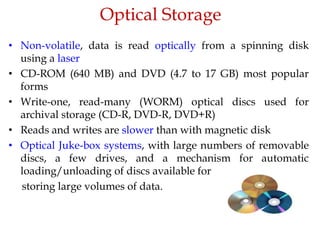
Optical Storage
• Non-volatile, data is read optically from a spinning disk
using a laser
• CD-ROM (640 MB) and DVD (4.7 to 17 GB) most popular
forms
• Write-one, read-many (WORM) optical discs used for
archival storage (CD-R, DVD-R, DVD+R)
• Reads and writes are slower than with magnetic disk
• Optical Juke-box systems, with large numbers of removable
discs, a few drives, and a mechanism for automatic
loading/unloading of discs available for
storing large volumes of data.
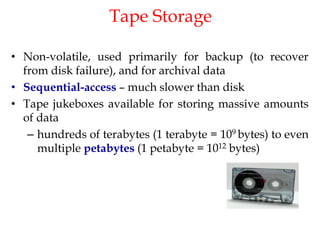
Tape Storage
• Non-volatile, used primarily for backup (to recover
from disk failure), and for archival data
• Sequential-access – much slower than disk
• Tape jukeboxes available for storing massive amounts
of data
– hundreds of terabytes (1 terabyte = 109 bytes) to even
multiple petabytes (1 petabyte = 1012 bytes)
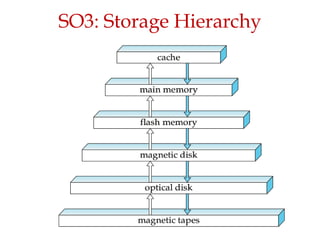
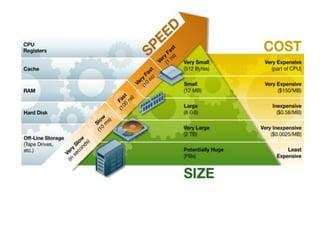
SO3: Storage Hierarchy
Contd..
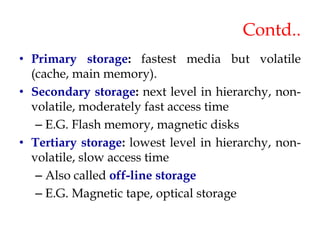
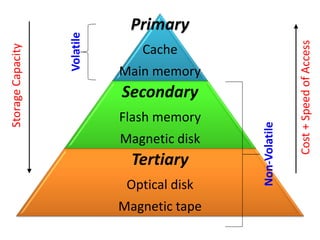
• Primary storage: fastest media but volatile
(cache, main memory).
• Secondary storage: next level in hierarchy, non-
volatile, moderately fast access time
– E.G. Flash memory, magnetic disks
• Tertiary storage: lowest level in hierarchy, non-
volatile, slow access time
– Also called off-line storage
– E.G. Magnetic tape, optical storage
Primary
Cache
Main memory
Secondary
Flash memory
Magnetic disk
Tertiary
Optical disk
Magnetic tape
Storage
Capacity
Cost
+
Speed
of
Access
Volatile
Non-Volatile
Magnetic disk
Magnetic Disks
• Magnetic disks provide the bulk of secondary
storage for modern computer systems.
• The storage requirements of large applications have
been growing very faster than the growth rate of
disk capacities.
• A very large database may require hundreds of
disks.
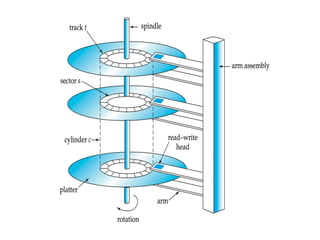
Platter:
• Each disk platter has a flat, circular shape.
• Its two surfaces are covered with a magnetic
material, and information is recorded on the
surfaces.
Read-write head:
• Positioned very close to the platter surface
(almost touching it)
• Reads or writes magnetically encoded
information.
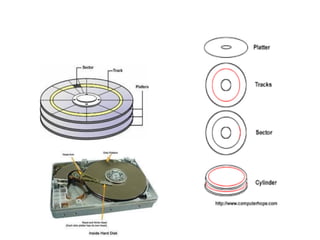
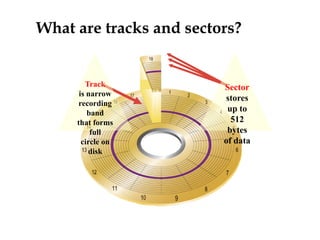
What are tracks and sectors?
Track
is narrow
recording
band
that forms
full
circle on
disk
Sector
stores
up to
512
bytes
of data
Contd..
Tracks:
• Surface of platter divided into circular tracks
• Over 50K-100K tracks per platter on typical hard
disks
Sectors:
• Each track is divided into sectors.
• A sector is the smallest unit of data that can be
read or written.
• Sector size - typically 512 bytes
Contd..
To read/write a sector:
• Disk arm swings to position head on right track
• Platter spins continually; data is read/written as
sector passes under head
Head-disk assemblies:
• Multiple disk platters on a single spindle (1 to 5
usually)
• One head per platter, mounted on a common arm.
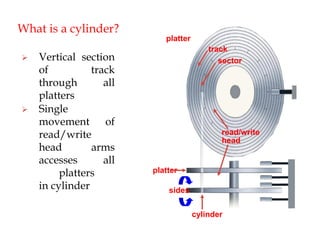
• Cylinder i consists of ith track of all the platters
What is a cylinder?
 Vertical section
of track
through all
platters
 Single
movement of
read/write
head arms
accesses all
platters
in cylinder
platter
read/write
head
platter
sides
cylinder
track
sector
Contd..
Disk Controller:
• Interfaces between the computer system and the
actual hardware of the disk drive.
• It accepts commands to r/w a sector, and initiate
actions.
• Disk controllers also attach checksums to each sector
to check read error.
SAN
• A Storage area network, or SAN, is a high-
speed network of storage devices that also
connects those storage devices with servers.
• It provides block-level storage that can be
accessed by the applications running on any
networked servers.
Performance Measures of Disks
• Access time – the time it takes from when a read or write request
is issued to when data transfer begins. Consists of:
– Seek time – time it takes to reposition the arm over the
correct track.
- 4 to 10 milliseconds on typical disks
– Rotational latency – time it takes for the sector to be accessed
to appear under the head.
• 4 to 11 milliseconds on typical disks (5400 to 15000 r.p.m.)
Performance Measures of Disks
• Data-transfer rate – the rate at which data can be retrieved from
or stored to the disk.
– 25 to 100 MB per second max rate, lower for inner tracks
– Multiple disks may share a controller, so rate that controller
can handle is also important
• Mean time to failure (MTTF) – the average time the disk is
expected to run continuously without any failure.
– Typically 3 to 5 years
– MTTF decreases as disk ages
Optimization of Disk-Block Access
Block:
• A contiguous sequence of sectors from a single track
• Data is transferred between disk and main memory in blocks
• Sizes range from 512 bytes to several kilobytes
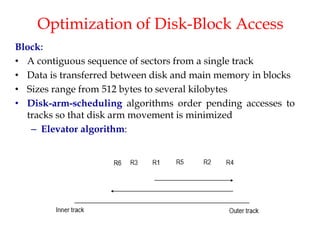
• Disk-arm-scheduling algorithms order pending accesses to
tracks so that disk arm movement is minimized
– Elevator algorithm:
Contd..
• File organization – optimize block access time by
organizing the blocks to correspond to how data will
be accessed
– E.g. Store related information on the same or nearby
cylinders.
– Files may get fragmented over time
• E.g. if data is inserted to/deleted from the file
• Or free blocks on disk are scattered, and newly created file
has its blocks scattered over the disk
• Sequential access to a fragmented file results in increased
disk arm movement
– Some systems have utilities to defragment the file system,
in order to speed up file access
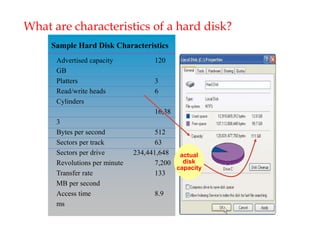
What are characteristics of a hard disk?
Sample Hard Disk Characteristics
Advertised capacity 120
GB
Platters 3
Read/write heads 6
Cylinders
16,38
3
Bytes per second 512
Sectors per track 63
Sectors per drive 234,441,648
Revolutions per minute 7,200
Transfer rate 133
MB per second
Access time 8.9
ms
actual
disk
capacity
WHAT IS RAID?
• In 1987, Patterson, Gibson and Katz at the University of
California Berkeley, published a paper entitled “A Case
for Redundant Array of Inexpensive Disks(RAID)”.
Nowadays called as Redundant Array of Independent
Disks.
• Familiarly known as Disk Arrays.
• The basic idea of RAID was to combine multiple, small
inexpensive disks drive into an array of disk drives
which yields performance exceeding that of a Single
Large Expensive Drive(SLED).
• Additionally this array of drives appear to the computer
(OS) as a single logical storage unit or drive.
CONCEPT OF RAID
• In simpler terms, RAID is a storage technology that
combines multiple disks drive into a single logical
unit or drive to achieve storage virtualization.
• Typically used on server computers, advanced
personal computers.
IDEA BEHIND RAID
• Improvement of Reliability via Redundancy
• Improvement in Performance via Parallelism
Improvement of Reliability via
Redundancy
• Redundancy – store extra information that can be used
to rebuild information lost in a disk failure
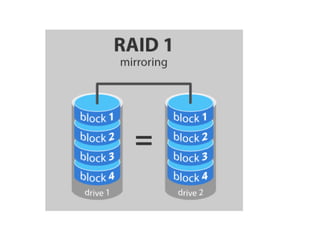
• E.g., Mirroring (or shadowing)
• Duplicate every disk. Logical disk consists of two
physical disks.
• Every write is carried out on both disks
• Reads can take place from either disk
• If one disk in a pair fails, data still available in the other
Improvement IN Performance via Parallelism
Two main goals of parallelism in a disk system:
1. Load balance small accesses  increases throughput.
2. Parallelize large accesses  reduces response time.
• Improves transfer rate by striping data across multiple
disks.
• Bit-level striping – split the bits of each byte across
multiple disks
• In an array of eight disks, write bit i of each byte to disk i.
• Each access can read data at eight times the rate of a
single disk.
• Block-level striping – with n disks, block i of a file goes to
disk (i mod n) + 1
Raid levels
• Raid level 0
• Raid level 1
• Raid level 2
• Raid level 3
• Raid level 4
• Raid level 5
• Raid level 6
• RAID level 10(1+0)
Raid 0
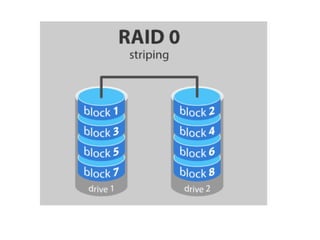
• Block striping – disk arrays with striping at the level of
blocks
• No-redundancy
• Advantages:
– Used in high-performance applications where data
lose is not critical
Raid 1
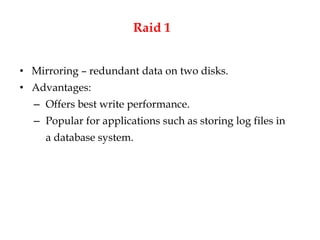
• Mirroring – redundant data on two disks.
• Advantages:
– Offers best write performance.
– Popular for applications such as storing log files in
a database system.
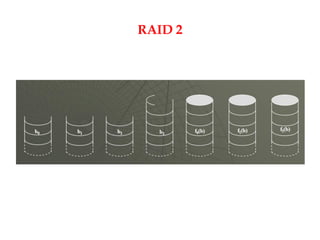
Raid 2
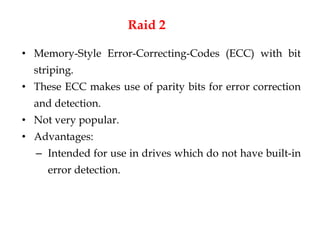
• Memory-Style Error-Correcting-Codes (ECC) with bit
striping.
• These ECC makes use of parity bits for error correction
and detection.
• Not very popular.
• Advantages:
– Intended for use in drives which do not have built-in
error detection.
RAID 2
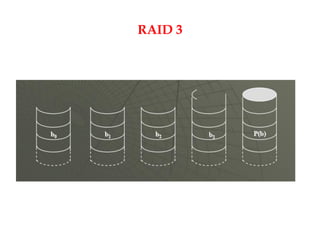
Raid 3
• Bit-interleaved parity
• A single parity bit can be used for error correction and
detection.
• When writing data, corresponding parity bits must also
be computed and written to a parity bit disk
• The system (disk controller) detects which sector is
damaged, so it is easy to find the error data based on the
stored parity bit.
RAID 3
Raid 4
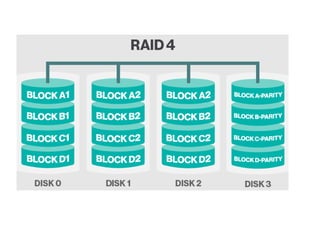
• Block-interleaved parity
• Keeps a parity block on a separate disk
• If one of the disk fails, the parity block can be used with
the corresponding blocks from the other disks to restore
the blocks of the failed disk.
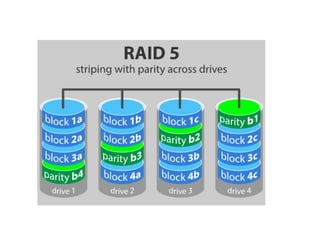
Raid 5
• Block-interleaved distributed parity
• Partitions data and parity among all N+1 disks, instead of
storing data in N disks and parity in 1 disk.
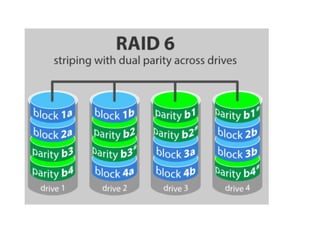
RAID 6
• P+Q Redundancy scheme; similar to Level 5, but stores
extra redundant information to guard against multiple
disk failures.
• Better reliability than Level 5 at a higher cost; not used
as widely.
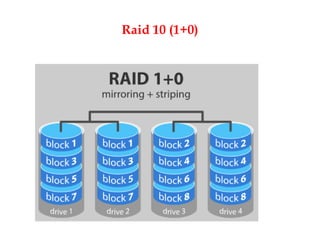
Raid 10 (1+0)
CHOICE OF RAID LEVEL
Based on:
• financial cost of extra-disk
• Performance in terms of I/O operations
• Performance during failure
• Performance during rebuild of failed disk
TYPES OF RAID
• Software RAID: RAID implementations done entirely in
software, with no special hardware support
• Hardware RAID: RAID implementations with special
hardware
– Use non-volatile RAM (NV-RAM) to record writes that are
being executed
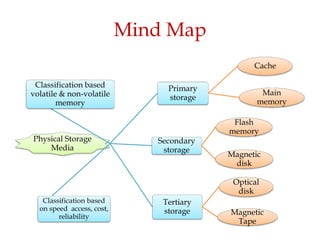
Mind Map
Physical Storage
Media
Primary
storage
Cache
Main
memory
Secondary
storage
Flash
memory
Magnetic
disk
Tertiary
storage
Optical
disk
Magnetic
Tape
Classification based
on speed access, cost,
reliability
Classification based
volatile & non-volatile
memory
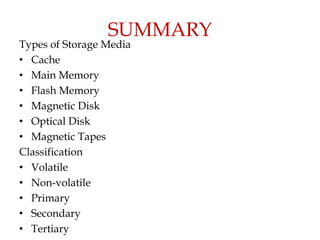
SUMMARY
Types of Storage Media
• Cache
• Main Memory
• Flash Memory
• Magnetic Disk
• Optical Disk
• Magnetic Tapes
Classification
• Volatile
• Non-volatile
• Primary
• Secondary
• Tertiary
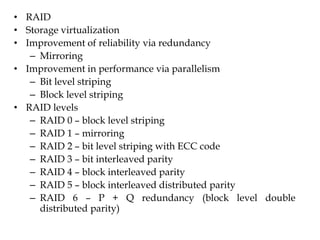
• RAID
• Storage virtualization
• Improvement of reliability via redundancy
– Mirroring
• Improvement in performance via parallelism
– Bit level striping
– Block level striping
• RAID levels
– RAID 0 – block level striping
– RAID 1 – mirroring
– RAID 2 – bit level striping with ECC code
– RAID 3 – bit interleaved parity
– RAID 4 – block interleaved parity
– RAID 5 – block interleaved distributed parity
– RAID 6 – P + Q redundancy (block level double
distributed parity)
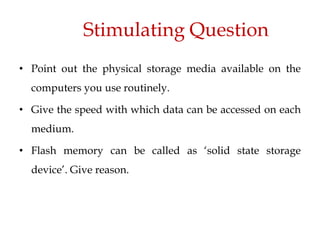
Stimulating Question
• Point out the physical storage media available on the
computers you use routinely.
• Give the speed with which data can be accessed on each
medium.
• Flash memory can be called as ‘solid state storage
device’. Give reason.

19IS305_U4_LP10_LM10-22-23.pdf

  • 1.
  • 3.
    Overview of PhysicalStorage Media
  • 4.
    SO 1: PhysicalStorage Media • Physical Storage Media is used for storing (writing /recording/saving) and retrieving (reading /opening) data. • A storage medium (media is the plural) is the physical material on which data is stored. • A storage device is the computer hardware that records and retrieves data to and from a storage medium.
  • 5.
    Classification • Classification ofPhysical Storage Media is based upon the following characteristics: Speed of access Cost per unit of data Reliability • Data loss on power failure or system crash • Physical failure of the storage device
  • 6.
    Contd.. • Can differentiatestorage into: • Volatile Storage: • Loses contents when power is switched off • Non-volatile Storage: • Contents persist even when power is switched off.
  • 7.
    SO2: Types ofStorage Media • Cache • Main Memory • Flash Memory • Magnetic Disk • Optical Disk • Magnetic Tapes
  • 8.
    Cache • Most costlyand fastest form of storage. • Fast access , volatile. • Usually very small in size. • It is a type of high speed memory that stores a copy of data which is transferred between the processor and main memory.
  • 9.
  • 10.
    Main Memory • Fastaccess (10s to 100s of nanoseconds) • Usually too small or too expensive to store the entire database. • Contents of main memory are usually lost in a power failure or `crash’ (volatile memory). • The computer can manipulate only data that is in main memory. • Therefore, every program you execute and every file you access must be copied from a storage device into main memory • Ex : RAM
  • 11.
  • 12.
  • 13.
    Flash Memory • Datasurvives power failure (non-volatile) • Reads are roughly as fast as main memory • But writes are slow (few microseconds), erase is slower • Widely used in embedded devices such as digital cameras, USB flash drives, video games, etc.. 2 Types: • NAND Flash • NOR Flash
  • 14.
    Magnetic Disk Storage •Data is stored on spinning disk, and read/written magnetically • Primary medium for long-term storage. • Typically the entire database can be stored on disk. • Data must be moved from disk to main memory for access, and written back for storage. • Disk storage is called direct access storage as it is possible to read data on the disk in any order. • Disk storage usually survives power failures and system crashes (non-volatile). • Ex: floppy disks, hard disks, etc..
  • 15.
    Optical Storage • Non-volatile,data is read optically from a spinning disk using a laser • CD-ROM (640 MB) and DVD (4.7 to 17 GB) most popular forms • Write-one, read-many (WORM) optical discs used for archival storage (CD-R, DVD-R, DVD+R) • Reads and writes are slower than with magnetic disk • Optical Juke-box systems, with large numbers of removable discs, a few drives, and a mechanism for automatic loading/unloading of discs available for storing large volumes of data.
  • 16.
    Tape Storage • Non-volatile,used primarily for backup (to recover from disk failure), and for archival data • Sequential-access – much slower than disk • Tape jukeboxes available for storing massive amounts of data – hundreds of terabytes (1 terabyte = 109 bytes) to even multiple petabytes (1 petabyte = 1012 bytes)
  • 17.
  • 19.
    Contd.. • Primary storage:fastest media but volatile (cache, main memory). • Secondary storage: next level in hierarchy, non- volatile, moderately fast access time – E.G. Flash memory, magnetic disks • Tertiary storage: lowest level in hierarchy, non- volatile, slow access time – Also called off-line storage – E.G. Magnetic tape, optical storage
  • 20.
    Primary Cache Main memory Secondary Flash memory Magneticdisk Tertiary Optical disk Magnetic tape Storage Capacity Cost + Speed of Access Volatile Non-Volatile
  • 21.
  • 22.
    Magnetic Disks • Magneticdisks provide the bulk of secondary storage for modern computer systems. • The storage requirements of large applications have been growing very faster than the growth rate of disk capacities. • A very large database may require hundreds of disks.
  • 25.
    Platter: • Each diskplatter has a flat, circular shape. • Its two surfaces are covered with a magnetic material, and information is recorded on the surfaces. Read-write head: • Positioned very close to the platter surface (almost touching it) • Reads or writes magnetically encoded information.
  • 26.
    What are tracksand sectors? Track is narrow recording band that forms full circle on disk Sector stores up to 512 bytes of data
  • 27.
    Contd.. Tracks: • Surface ofplatter divided into circular tracks • Over 50K-100K tracks per platter on typical hard disks Sectors: • Each track is divided into sectors. • A sector is the smallest unit of data that can be read or written. • Sector size - typically 512 bytes
  • 28.
    Contd.. To read/write asector: • Disk arm swings to position head on right track • Platter spins continually; data is read/written as sector passes under head Head-disk assemblies: • Multiple disk platters on a single spindle (1 to 5 usually) • One head per platter, mounted on a common arm. • Cylinder i consists of ith track of all the platters
  • 29.
    What is acylinder?  Vertical section of track through all platters  Single movement of read/write head arms accesses all platters in cylinder platter read/write head platter sides cylinder track sector
  • 30.
    Contd.. Disk Controller: • Interfacesbetween the computer system and the actual hardware of the disk drive. • It accepts commands to r/w a sector, and initiate actions. • Disk controllers also attach checksums to each sector to check read error.
  • 31.
    SAN • A Storagearea network, or SAN, is a high- speed network of storage devices that also connects those storage devices with servers. • It provides block-level storage that can be accessed by the applications running on any networked servers.
  • 32.
    Performance Measures ofDisks • Access time – the time it takes from when a read or write request is issued to when data transfer begins. Consists of: – Seek time – time it takes to reposition the arm over the correct track. - 4 to 10 milliseconds on typical disks – Rotational latency – time it takes for the sector to be accessed to appear under the head. • 4 to 11 milliseconds on typical disks (5400 to 15000 r.p.m.)
  • 33.
    Performance Measures ofDisks • Data-transfer rate – the rate at which data can be retrieved from or stored to the disk. – 25 to 100 MB per second max rate, lower for inner tracks – Multiple disks may share a controller, so rate that controller can handle is also important • Mean time to failure (MTTF) – the average time the disk is expected to run continuously without any failure. – Typically 3 to 5 years – MTTF decreases as disk ages
  • 34.
    Optimization of Disk-BlockAccess Block: • A contiguous sequence of sectors from a single track • Data is transferred between disk and main memory in blocks • Sizes range from 512 bytes to several kilobytes • Disk-arm-scheduling algorithms order pending accesses to tracks so that disk arm movement is minimized – Elevator algorithm:
  • 35.
    Contd.. • File organization– optimize block access time by organizing the blocks to correspond to how data will be accessed – E.g. Store related information on the same or nearby cylinders. – Files may get fragmented over time • E.g. if data is inserted to/deleted from the file • Or free blocks on disk are scattered, and newly created file has its blocks scattered over the disk • Sequential access to a fragmented file results in increased disk arm movement – Some systems have utilities to defragment the file system, in order to speed up file access
  • 36.
    What are characteristicsof a hard disk? Sample Hard Disk Characteristics Advertised capacity 120 GB Platters 3 Read/write heads 6 Cylinders 16,38 3 Bytes per second 512 Sectors per track 63 Sectors per drive 234,441,648 Revolutions per minute 7,200 Transfer rate 133 MB per second Access time 8.9 ms actual disk capacity
  • 37.
    WHAT IS RAID? •In 1987, Patterson, Gibson and Katz at the University of California Berkeley, published a paper entitled “A Case for Redundant Array of Inexpensive Disks(RAID)”. Nowadays called as Redundant Array of Independent Disks. • Familiarly known as Disk Arrays. • The basic idea of RAID was to combine multiple, small inexpensive disks drive into an array of disk drives which yields performance exceeding that of a Single Large Expensive Drive(SLED). • Additionally this array of drives appear to the computer (OS) as a single logical storage unit or drive.
  • 38.
    CONCEPT OF RAID •In simpler terms, RAID is a storage technology that combines multiple disks drive into a single logical unit or drive to achieve storage virtualization. • Typically used on server computers, advanced personal computers.
  • 39.
    IDEA BEHIND RAID •Improvement of Reliability via Redundancy • Improvement in Performance via Parallelism
  • 40.
    Improvement of Reliabilityvia Redundancy • Redundancy – store extra information that can be used to rebuild information lost in a disk failure • E.g., Mirroring (or shadowing) • Duplicate every disk. Logical disk consists of two physical disks. • Every write is carried out on both disks • Reads can take place from either disk • If one disk in a pair fails, data still available in the other
  • 41.
    Improvement IN Performancevia Parallelism Two main goals of parallelism in a disk system: 1. Load balance small accesses  increases throughput. 2. Parallelize large accesses  reduces response time. • Improves transfer rate by striping data across multiple disks. • Bit-level striping – split the bits of each byte across multiple disks • In an array of eight disks, write bit i of each byte to disk i. • Each access can read data at eight times the rate of a single disk. • Block-level striping – with n disks, block i of a file goes to disk (i mod n) + 1
  • 42.
    Raid levels • Raidlevel 0 • Raid level 1 • Raid level 2 • Raid level 3 • Raid level 4 • Raid level 5 • Raid level 6 • RAID level 10(1+0)
  • 43.
    Raid 0 • Blockstriping – disk arrays with striping at the level of blocks • No-redundancy • Advantages: – Used in high-performance applications where data lose is not critical
  • 45.
    Raid 1 • Mirroring– redundant data on two disks. • Advantages: – Offers best write performance. – Popular for applications such as storing log files in a database system.
  • 47.
    Raid 2 • Memory-StyleError-Correcting-Codes (ECC) with bit striping. • These ECC makes use of parity bits for error correction and detection. • Not very popular. • Advantages: – Intended for use in drives which do not have built-in error detection.
  • 48.
  • 49.
    Raid 3 • Bit-interleavedparity • A single parity bit can be used for error correction and detection. • When writing data, corresponding parity bits must also be computed and written to a parity bit disk • The system (disk controller) detects which sector is damaged, so it is easy to find the error data based on the stored parity bit.
  • 50.
  • 51.
    Raid 4 • Block-interleavedparity • Keeps a parity block on a separate disk • If one of the disk fails, the parity block can be used with the corresponding blocks from the other disks to restore the blocks of the failed disk.
  • 53.
    Raid 5 • Block-interleaveddistributed parity • Partitions data and parity among all N+1 disks, instead of storing data in N disks and parity in 1 disk.
  • 55.
    RAID 6 • P+QRedundancy scheme; similar to Level 5, but stores extra redundant information to guard against multiple disk failures. • Better reliability than Level 5 at a higher cost; not used as widely.
  • 57.
  • 58.
    CHOICE OF RAIDLEVEL Based on: • financial cost of extra-disk • Performance in terms of I/O operations • Performance during failure • Performance during rebuild of failed disk
  • 59.
    TYPES OF RAID •Software RAID: RAID implementations done entirely in software, with no special hardware support • Hardware RAID: RAID implementations with special hardware – Use non-volatile RAM (NV-RAM) to record writes that are being executed
  • 60.
  • 61.
    SUMMARY Types of StorageMedia • Cache • Main Memory • Flash Memory • Magnetic Disk • Optical Disk • Magnetic Tapes Classification • Volatile • Non-volatile • Primary • Secondary • Tertiary
  • 62.
    • RAID • Storagevirtualization • Improvement of reliability via redundancy – Mirroring • Improvement in performance via parallelism – Bit level striping – Block level striping • RAID levels – RAID 0 – block level striping – RAID 1 – mirroring – RAID 2 – bit level striping with ECC code – RAID 3 – bit interleaved parity – RAID 4 – block interleaved parity – RAID 5 – block interleaved distributed parity – RAID 6 – P + Q redundancy (block level double distributed parity)
  • 63.
    Stimulating Question • Pointout the physical storage media available on the computers you use routinely. • Give the speed with which data can be accessed on each medium. • Flash memory can be called as ‘solid state storage device’. Give reason.