Searching
 Searching is a process of finding a particular element among several given elements.
 The search is successful if the required element is found.
 Otherwise, the search is unsuccessful.
Searching Algorithms
The searching of an element in the given array may be carried out in the following two ways-
1. Linear Search
2. Binary Search
Linear Search
 Linear Search is the simplest searching algorithm.
 It traverses the array sequentially to locate the required element.
 It searches for an element by comparing it with each element of the array one by one.
 So, it is also called as Sequential Search.
Linear Search Algorithm is applied when
 No information is given about the array.
 The given array is unsorted or the elements are unordered.
 The list of data items is smaller.
Algorithm for linear searching
1. Input: A set of data in array a, and variable x. i.e., the target element
A[1….n];
item=x;
location=0;
2. Search the list to find the target element:
for (i=1; i<=n; i++)
{
if (A[i]==item)
{
print “Found”;
location=i;
stop searching;
}
}
3. if (i>n) print ” Not Found”;
4. Output: Found or Not Found.
Example
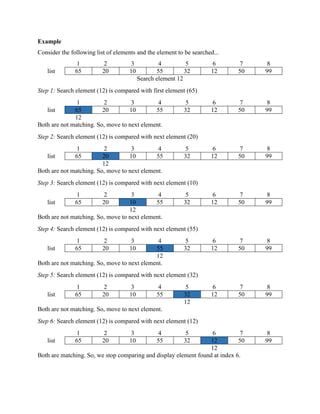
Consider the following list of elements and the element to be searched...
list
1 2 3 4 5 6 7 8
65 20 10 55 32 12 50 99
Search element 12
Step 1: Search element (12) is compared with first element (65)
list
1 2 3 4 5 6 7 8
65 20 10 55 32 12 50 99
12
Both are not matching. So, move to next element.
Step 2: Search element (12) is compared with next element (20)
list
1 2 3 4 5 6 7 8
65 20 10 55 32 12 50 99
12
Both are not matching. So, move to next element.
Step 3: Search element (12) is compared with next element (10)
list
1 2 3 4 5 6 7 8
65 20 10 55 32 12 50 99
12
Both are not matching. So, move to next element.
Step 4: Search element (12) is compared with next element (55)
list
1 2 3 4 5 6 7 8
65 20 10 55 32 12 50 99
12
Both are not matching. So, move to next element.
Step 5: Search element (12) is compared with next element (32)
list
1 2 3 4 5 6 7 8
65 20 10 55 32 12 50 99
12
Both are not matching. So, move to next element.
Step 6: Search element (12) is compared with next element (12)
list
1 2 3 4 5 6 7 8
65 20 10 55 32 12 50 99
12
Both are matching. So, we stop comparing and display element found at index 6.
Sample Code (Single Occurrence of element):
#include <stdio.h>
int main()
{
int array[100], search, c, n;
printf("Enter the number of elements in arrayn");
scanf("%d",&n);
printf("Enter %d integer(s)n", n);
for (c = 0; c < n; c++)
scanf("%d", &array[c]);
printf("Enter the number to searchn");
scanf("%d", &search);
for (c = 0; c < n; c++)
{
if (array[c] == search)
{
printf("%d is present at location %d.n", search, c+1);
break;
}
}
if (c == n)
printf("%d is not present in array.n", search);
return 0;
}
Sample Output
Case 1:
Enter the number of elements in array
5
Enter 5 integer(s)
1 4 5 6 6
Enter the number to search
6
6 is present at location 4.
Case 2:
Enter the number of elements in array
5
Enter 5 integer(s)
1 2 3 4 7
Enter the number to search
8
8 is not present in array.
Sample Code (Multiple Occurrence of element):
#include <stdio.h>
int main()
{
int array[100], search, c, n, count = 0;
printf("Enter the number of elements in arrayn");
scanf("%d", &n);
printf("Enter %d numbersn", n);
for ( c = 0 ; c < n ; c++ )
scanf("%d", &array[c]);
printf("Enter the number to searchn");
scanf("%d", &search);
for (c = 0; c < n; c++) {
if (array[c] == search) {
printf("%d is present at location %d.n", search, c+1);
count++;
}
}
if (count == 0)
printf("%d is not present in array.n", search);
else
printf("%d is present %d times in array.n", search,
count);
return 0;
}
Sample Output
Enter the number of elements in array
5
Enter 5 numbers
1 2 3 3 4
Enter the number to search
3
3 is present at location 3.
3 is present at location 4.
3 is present 2 times in array.
Binary Search
 Binary Search is one of the fastest searching algorithms.
 It is used for finding the location of an element in a linear array.
 It works on the principle of divide and conquer technique.
Binary Search Algorithm can be applied only on Sorted arrays.
So, the elements must be arranged in-
 Either ascending order if the elements are numbers.
 Or dictionary order if the elements are strings.
To apply binary search on an unsorted array,
 First, sort the array using some sorting technique.
 Then, use binary search algorithm.
Algorithm for binary searching
1. Input A[1…..m], x; //A is the array with size m and x is the target element.
2. first=1, last=m
3. while(first<=last)
{
mid = (first+last)/2;
i. if (x=A[mid]), then print mid; //target element=A[mid] or target element is
//in index mid
break(stop searching);
ii. else if(x<A[mid]), then last=mid-1;
iii. else first=mid+1;
}
4. if(first>last), print “Not Found”;
5. Output: mid or “Not Found”;
Example
Consider the following list of elements and element 15 has to be searched in it using Binary Search
Algorithm.
1 2 3 4 5 6 7
3 10 15 20 35 40 60
Step-01:
 To begin with, we take first=1 and last=7.
 We compute location of the middle element as-
mid = (first + last) / 2 = (1 + 7) / 2 = 4
 Here, A[mid] = A[4] = 20 ≠ 15 and first < =last.
 So, we start next iteration.
Step-02:
 Since A[mid] = 20 > 15, so we take last = mid – 1 = 4 – 1 = 3 whereas beg remains
unchanged.
 We compute location of the middle element as-
mid = (first + last) / 2 = (1 + 3) / 2 = 2
 Here, A[mid] = A[2] = 10 ≠ 15 and first < =last.
 So, we start next iteration.
Step-03:
 Since A[mid] = 10 < 15, so we take first = mid + 1 = 2 + 1 = 3 whereas end remains
unchanged.
 We compute location of the middle element as-
mid = (first + last) / 2 = (3 + 3) / 2 = 3
 Here, A[mid] = A[3] = 15 which matches to the element being searched.
 So, our search terminates in success and index 3 is returned.
Sample Code
#include <stdio.h>
int main()
{
int c, first, last, middle, n, search, array[100];
printf("Enter number of elementsn");
scanf("%d",&n);
printf("Enter %d integersn", n);
for (c = 0; c < n; c++)
scanf("%d",&array[c]);
printf("Enter value to findn");
scanf("%d", &search);
first = 0;
last = n - 1;
middle = (first+last)/2;
while (first <= last) {
if (array[middle] < search)
first = middle + 1;
else if (array[middle] == search) {
printf("%d found at location %d.n", search, middle+1);
break;
}
else
last = middle - 1;
middle = (first + last)/2;
}
if (first > last)
printf("Not found! %d is not present in the list.n",
search);
return 0;
}
Sample Output
Enter number of elements
5
Enter 5 integers
1 3 4 5 6
Enter value to find
5
5 found at location 4.

Searching

  • 1.
    Searching  Searching isa process of finding a particular element among several given elements.  The search is successful if the required element is found.  Otherwise, the search is unsuccessful. Searching Algorithms The searching of an element in the given array may be carried out in the following two ways- 1. Linear Search 2. Binary Search Linear Search  Linear Search is the simplest searching algorithm.  It traverses the array sequentially to locate the required element.  It searches for an element by comparing it with each element of the array one by one.  So, it is also called as Sequential Search. Linear Search Algorithm is applied when  No information is given about the array.  The given array is unsorted or the elements are unordered.  The list of data items is smaller. Algorithm for linear searching 1. Input: A set of data in array a, and variable x. i.e., the target element A[1….n]; item=x; location=0; 2. Search the list to find the target element: for (i=1; i<=n; i++) { if (A[i]==item) { print “Found”; location=i; stop searching; } } 3. if (i>n) print ” Not Found”; 4. Output: Found or Not Found.
  • 2.
    Example Consider the followinglist of elements and the element to be searched... list 1 2 3 4 5 6 7 8 65 20 10 55 32 12 50 99 Search element 12 Step 1: Search element (12) is compared with first element (65) list 1 2 3 4 5 6 7 8 65 20 10 55 32 12 50 99 12 Both are not matching. So, move to next element. Step 2: Search element (12) is compared with next element (20) list 1 2 3 4 5 6 7 8 65 20 10 55 32 12 50 99 12 Both are not matching. So, move to next element. Step 3: Search element (12) is compared with next element (10) list 1 2 3 4 5 6 7 8 65 20 10 55 32 12 50 99 12 Both are not matching. So, move to next element. Step 4: Search element (12) is compared with next element (55) list 1 2 3 4 5 6 7 8 65 20 10 55 32 12 50 99 12 Both are not matching. So, move to next element. Step 5: Search element (12) is compared with next element (32) list 1 2 3 4 5 6 7 8 65 20 10 55 32 12 50 99 12 Both are not matching. So, move to next element. Step 6: Search element (12) is compared with next element (12) list 1 2 3 4 5 6 7 8 65 20 10 55 32 12 50 99 12 Both are matching. So, we stop comparing and display element found at index 6.
  • 3.
    Sample Code (SingleOccurrence of element): #include <stdio.h> int main() { int array[100], search, c, n; printf("Enter the number of elements in arrayn"); scanf("%d",&n); printf("Enter %d integer(s)n", n); for (c = 0; c < n; c++) scanf("%d", &array[c]); printf("Enter the number to searchn"); scanf("%d", &search); for (c = 0; c < n; c++) { if (array[c] == search) { printf("%d is present at location %d.n", search, c+1); break; } } if (c == n) printf("%d is not present in array.n", search); return 0; } Sample Output Case 1: Enter the number of elements in array
  • 4.
    5 Enter 5 integer(s) 14 5 6 6 Enter the number to search 6 6 is present at location 4. Case 2: Enter the number of elements in array 5 Enter 5 integer(s) 1 2 3 4 7 Enter the number to search 8 8 is not present in array. Sample Code (Multiple Occurrence of element): #include <stdio.h> int main() { int array[100], search, c, n, count = 0; printf("Enter the number of elements in arrayn"); scanf("%d", &n); printf("Enter %d numbersn", n); for ( c = 0 ; c < n ; c++ ) scanf("%d", &array[c]); printf("Enter the number to searchn"); scanf("%d", &search); for (c = 0; c < n; c++) { if (array[c] == search) {
  • 5.
    printf("%d is presentat location %d.n", search, c+1); count++; } } if (count == 0) printf("%d is not present in array.n", search); else printf("%d is present %d times in array.n", search, count); return 0; } Sample Output Enter the number of elements in array 5 Enter 5 numbers 1 2 3 3 4 Enter the number to search 3 3 is present at location 3. 3 is present at location 4. 3 is present 2 times in array. Binary Search  Binary Search is one of the fastest searching algorithms.  It is used for finding the location of an element in a linear array.  It works on the principle of divide and conquer technique. Binary Search Algorithm can be applied only on Sorted arrays. So, the elements must be arranged in-  Either ascending order if the elements are numbers.  Or dictionary order if the elements are strings.
  • 6.
    To apply binarysearch on an unsorted array,  First, sort the array using some sorting technique.  Then, use binary search algorithm. Algorithm for binary searching 1. Input A[1…..m], x; //A is the array with size m and x is the target element. 2. first=1, last=m 3. while(first<=last) { mid = (first+last)/2; i. if (x=A[mid]), then print mid; //target element=A[mid] or target element is //in index mid break(stop searching); ii. else if(x<A[mid]), then last=mid-1; iii. else first=mid+1; } 4. if(first>last), print “Not Found”; 5. Output: mid or “Not Found”; Example Consider the following list of elements and element 15 has to be searched in it using Binary Search Algorithm. 1 2 3 4 5 6 7 3 10 15 20 35 40 60 Step-01:  To begin with, we take first=1 and last=7.  We compute location of the middle element as- mid = (first + last) / 2 = (1 + 7) / 2 = 4  Here, A[mid] = A[4] = 20 ≠ 15 and first < =last.  So, we start next iteration. Step-02:  Since A[mid] = 20 > 15, so we take last = mid – 1 = 4 – 1 = 3 whereas beg remains unchanged.
  • 7.
     We computelocation of the middle element as- mid = (first + last) / 2 = (1 + 3) / 2 = 2  Here, A[mid] = A[2] = 10 ≠ 15 and first < =last.  So, we start next iteration. Step-03:  Since A[mid] = 10 < 15, so we take first = mid + 1 = 2 + 1 = 3 whereas end remains unchanged.  We compute location of the middle element as- mid = (first + last) / 2 = (3 + 3) / 2 = 3  Here, A[mid] = A[3] = 15 which matches to the element being searched.  So, our search terminates in success and index 3 is returned. Sample Code #include <stdio.h> int main() { int c, first, last, middle, n, search, array[100]; printf("Enter number of elementsn"); scanf("%d",&n); printf("Enter %d integersn", n); for (c = 0; c < n; c++) scanf("%d",&array[c]); printf("Enter value to findn"); scanf("%d", &search); first = 0; last = n - 1; middle = (first+last)/2;
  • 8.
    while (first <=last) { if (array[middle] < search) first = middle + 1; else if (array[middle] == search) { printf("%d found at location %d.n", search, middle+1); break; } else last = middle - 1; middle = (first + last)/2; } if (first > last) printf("Not found! %d is not present in the list.n", search); return 0; } Sample Output Enter number of elements 5 Enter 5 integers 1 3 4 5 6 Enter value to find 5
  • 9.
    5 found atlocation 4.