Data Definition Language:
Constraints
CIS-182
CIS-182 Constraints
Constraints
• Constraints define acceptable values
• Types of constraints
– Field: Not Null, Check, Unique, Primary Key, Foreign
Key
• These are Domain Constraints
– Table: Check, Unique, Primary Key, Foreign Key
• These are Entity Constraints
Required Fields
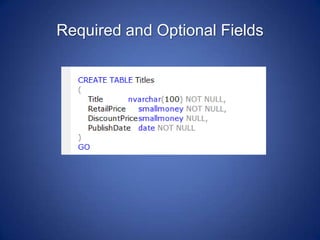
• Required fields must be set to NOT NULL
– Fields accept Null by default
– Null means missing, not known
StudentID CHAR(9) NOT NULL
Required and Optional Fields
Check Constraints
• Check Constraint
– Can set a range or end points
– Can specify that value must be in a list
– Can specify that data has a pattern
• Can test a column or table (row)
– Domain constraint defines what will be found in column
– Entity constraint defines what exists in a row
• A single test applied to multiple columns must
be done at the table level
– A project must have an end date after the start date
Operators
• Relational operators describe how to compare
numbers, dates
– =, >, <, <>, >=, <=
• Like compares patterns
• In tests to see if a value is in a list
• Logical
– And, Or tie together multiple tests
– Not generates the inverse
Ranges
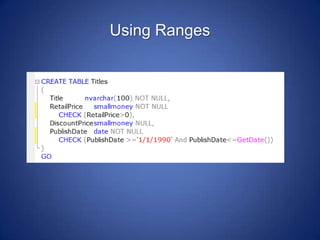
• Typically used with numbers and dates
• Can test for a single endpoint
– GPA <= 4
– Birthday < GetDate()
• Can test for two endpoints
– Credits Between 1 and 10
– Credits >=1 And Credits <=10
Using Ranges
Comparing to List
• Can specify that a value must be found in a
group
• Different from a range!
– Being in the list of 1, 2, 3, 4, 5 is different from being
between 1 and 5
• Values separated by comma
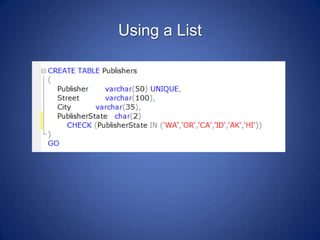
Department IN (‘CIS’,’CS’,’CNA’)
Using a List
Pattern Matching
• Used when text data has specific characteristics
– Course number must be three numbers
– Department must be 2 or 3 letters
• Can test for letters, numbers, other characters
Pattern Matching Syntax
• Use Like
Department LIKE ‘C__’
• Can use wildcards
– Single character is _ (underscore)
– No, one or many characters is % (per cent)
• Use brackets if have options in a position
Department LIKE ‘[A-Z][A-Z][A-Z ][A-Z ]’
(Department must be at least two letters, with a letter or
space included in last two positions)
CourseNumber LIKE ‘[0-2][0-9][0-9]’
(numbers must start with 0, 1, or 2 and be three digits)
This is a single underscore
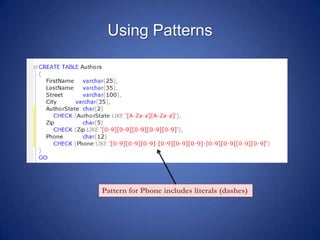
Using Patterns
Pattern for Phone includes literals (dashes)
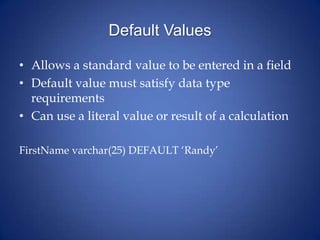
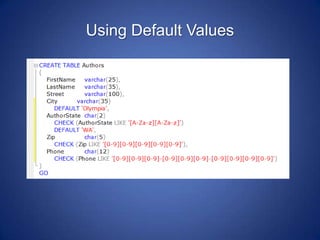
Default Values
• Allows a standard value to be entered in a field
• Default value must satisfy data type
requirements
• Can use a literal value or result of a calculation
FirstName varchar(25) DEFAULT ‘Randy’
Using Default Values
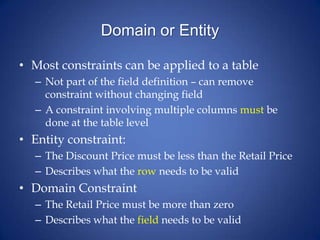
Domain or Entity
• Most constraints can be applied to a table
– Not part of the field definition – can remove
constraint without changing field
– A constraint involving multiple columns must be
done at the table level
• Entity constraint:
– The Discount Price must be less than the Retail Price
– Describes what the row needs to be valid
• Domain Constraint
– The Retail Price must be more than zero
– Describes what the field needs to be valid
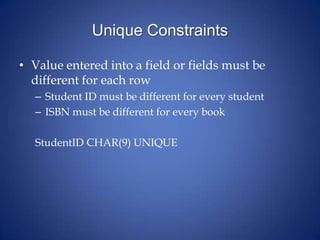
Unique Constraints
• Value entered into a field or fields must be
different for each row
– Student ID must be different for every student
– ISBN must be different for every book
StudentID CHAR(9) UNIQUE
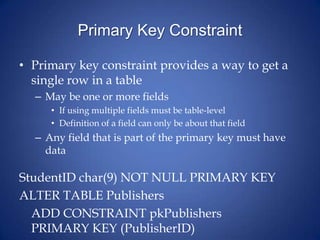
Primary Key Constraint
• Primary key constraint provides a way to get a
single row in a table
– May be one or more fields
• If using multiple fields must be table-level
• Definition of a field can only be about that field
– Any field that is part of the primary key must have
data
StudentID char(9) NOT NULL PRIMARY KEY
ALTER TABLE Publishers
ADD CONSTRAINT pkPublishers
PRIMARY KEY (PublisherID)
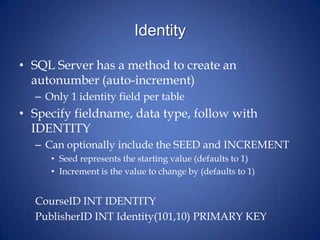
Identity
• SQL Server has a method to create an
autonumber (auto-increment)
– Only 1 identity field per table
• Specify fieldname, data type, follow with
IDENTITY
– Can optionally include the SEED and INCREMENT
• Seed represents the starting value (defaults to 1)
• Increment is the value to change by (defaults to 1)
CourseID INT IDENTITY
PublisherID INT Identity(101,10) PRIMARY KEY
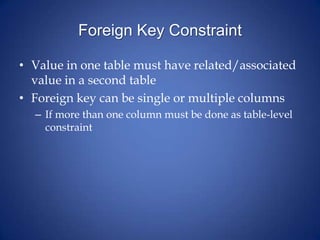
Foreign Key Constraint
• Value in one table must have related/associated
value in a second table
• Foreign key can be single or multiple columns
– If more than one column must be done as table-level
constraint
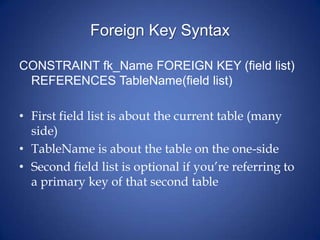
Foreign Key Syntax
CONSTRAINT fk_Name FOREIGN KEY (field list)
REFERENCES TableName(field list)
• First field list is about the current table (many
side)
• TableName is about the table on the one-side
• Second field list is optional if you’re referring to
a primary key of that second table
Working With Constraints
• Constraints can be named
– Makes it easier to change or remove the constraint
later
• If not named, SQL Server will create a name
– Every object needs an identifier!
Using ALTER
• ALTER is used to change an existing object
– Keeps current settings – including permissions
• DROP is used to remove an object
– can CREATE after DROPping but would need to reset
permissions
Example Constraints
• Change an existing table:
ALTER TABLE Students
CONSTRAINT ck_StudentID
CHECK (StudentID LIKE ‘875-[0-9][0-9]- [0-9][0-9][0-
9][0-9]’)
• Create a new table with constraint
CREATE TABLE Courses
(
Department VARCHAR(3)
CHECK (Department IN (‘CIS’,’CS’,’CNA’)
)

SQL Constraints

  • 1.
  • 2.
    Constraints • Constraints defineacceptable values • Types of constraints – Field: Not Null, Check, Unique, Primary Key, Foreign Key • These are Domain Constraints – Table: Check, Unique, Primary Key, Foreign Key • These are Entity Constraints
  • 3.
    Required Fields • Requiredfields must be set to NOT NULL – Fields accept Null by default – Null means missing, not known StudentID CHAR(9) NOT NULL
  • 4.
  • 5.
    Check Constraints • CheckConstraint – Can set a range or end points – Can specify that value must be in a list – Can specify that data has a pattern • Can test a column or table (row) – Domain constraint defines what will be found in column – Entity constraint defines what exists in a row • A single test applied to multiple columns must be done at the table level – A project must have an end date after the start date
  • 6.
    Operators • Relational operatorsdescribe how to compare numbers, dates – =, >, <, <>, >=, <= • Like compares patterns • In tests to see if a value is in a list • Logical – And, Or tie together multiple tests – Not generates the inverse
  • 7.
    Ranges • Typically usedwith numbers and dates • Can test for a single endpoint – GPA <= 4 – Birthday < GetDate() • Can test for two endpoints – Credits Between 1 and 10 – Credits >=1 And Credits <=10
  • 8.
  • 9.
    Comparing to List •Can specify that a value must be found in a group • Different from a range! – Being in the list of 1, 2, 3, 4, 5 is different from being between 1 and 5 • Values separated by comma Department IN (‘CIS’,’CS’,’CNA’)
  • 10.
  • 11.
    Pattern Matching • Usedwhen text data has specific characteristics – Course number must be three numbers – Department must be 2 or 3 letters • Can test for letters, numbers, other characters
  • 12.
    Pattern Matching Syntax •Use Like Department LIKE ‘C__’ • Can use wildcards – Single character is _ (underscore) – No, one or many characters is % (per cent) • Use brackets if have options in a position Department LIKE ‘[A-Z][A-Z][A-Z ][A-Z ]’ (Department must be at least two letters, with a letter or space included in last two positions) CourseNumber LIKE ‘[0-2][0-9][0-9]’ (numbers must start with 0, 1, or 2 and be three digits) This is a single underscore
  • 13.
    Using Patterns Pattern forPhone includes literals (dashes)
  • 14.
    Default Values • Allowsa standard value to be entered in a field • Default value must satisfy data type requirements • Can use a literal value or result of a calculation FirstName varchar(25) DEFAULT ‘Randy’
  • 15.
  • 16.
    Domain or Entity •Most constraints can be applied to a table – Not part of the field definition – can remove constraint without changing field – A constraint involving multiple columns must be done at the table level • Entity constraint: – The Discount Price must be less than the Retail Price – Describes what the row needs to be valid • Domain Constraint – The Retail Price must be more than zero – Describes what the field needs to be valid
  • 17.
    Unique Constraints • Valueentered into a field or fields must be different for each row – Student ID must be different for every student – ISBN must be different for every book StudentID CHAR(9) UNIQUE
  • 18.
    Primary Key Constraint •Primary key constraint provides a way to get a single row in a table – May be one or more fields • If using multiple fields must be table-level • Definition of a field can only be about that field – Any field that is part of the primary key must have data StudentID char(9) NOT NULL PRIMARY KEY ALTER TABLE Publishers ADD CONSTRAINT pkPublishers PRIMARY KEY (PublisherID)
  • 19.
    Identity • SQL Serverhas a method to create an autonumber (auto-increment) – Only 1 identity field per table • Specify fieldname, data type, follow with IDENTITY – Can optionally include the SEED and INCREMENT • Seed represents the starting value (defaults to 1) • Increment is the value to change by (defaults to 1) CourseID INT IDENTITY PublisherID INT Identity(101,10) PRIMARY KEY
  • 20.
    Foreign Key Constraint •Value in one table must have related/associated value in a second table • Foreign key can be single or multiple columns – If more than one column must be done as table-level constraint
  • 21.
    Foreign Key Syntax CONSTRAINTfk_Name FOREIGN KEY (field list) REFERENCES TableName(field list) • First field list is about the current table (many side) • TableName is about the table on the one-side • Second field list is optional if you’re referring to a primary key of that second table
  • 22.
    Working With Constraints •Constraints can be named – Makes it easier to change or remove the constraint later • If not named, SQL Server will create a name – Every object needs an identifier!
  • 23.
    Using ALTER • ALTERis used to change an existing object – Keeps current settings – including permissions • DROP is used to remove an object – can CREATE after DROPping but would need to reset permissions
  • 24.
    Example Constraints • Changean existing table: ALTER TABLE Students CONSTRAINT ck_StudentID CHECK (StudentID LIKE ‘875-[0-9][0-9]- [0-9][0-9][0- 9][0-9]’) • Create a new table with constraint CREATE TABLE Courses ( Department VARCHAR(3) CHECK (Department IN (‘CIS’,’CS’,’CNA’) )