XML SchemasCIS-189
Alternative to DTD’s as way to define structureDefining a language (vocabulary)Structure may be also referred to as vocabularyEnsures that data matches specificationsServes as basis for other XML-related technologiesXML Schemas
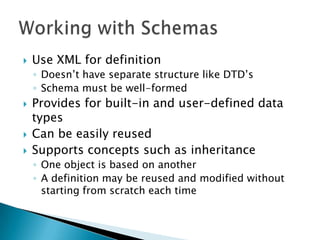
Use XML for definitionDoesn’t have separate structure like DTD’sSchema must be well-formedProvides for built-in and user-defined data typesCan be easily reusedSupports concepts such as inheritanceOne object is based on anotherA definition may be reused and modified without starting from scratch each timeWorking with Schemas
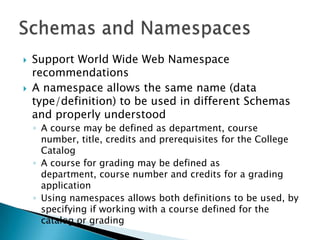
Support World Wide Web Namespace recommendationsA namespace allows the same name (data type/definition) to be used in different Schemas and properly understoodA course may be defined as department, course number, title, credits and prerequisites for the College CatalogA course for grading may be defined as department, course number and credits for a grading applicationUsing namespaces allows both definitions to be used, by specifying if working with a course defined for the catalog or gradingSchemas and Namespaces
Schema file uses an .xsd extensionRoot element is the schemaCan nest all elements within the schemaEverything is hierarchicalORCan have multiple elements as child elements of the schema rootAllows use of a definition any place in the document (data) fileElements which are child elements of schema are globalCreating Schemas
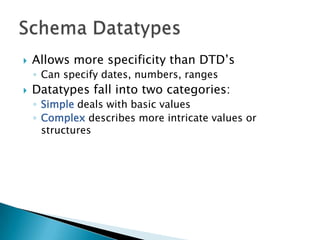
Allows more specificity than DTD’sCan specify dates, numbers, rangesDatatypes fall into two categories:Simple deals with basic valuesComplex describes more intricate values or structuresSchema Datatypes
Simple data type is about text, numbers, dateSometime referred to as “primitives”Data types built in to Schema vocabulary (and related elements, attributes) are in the XML Schema namespaceNeed reference to namespace to have valid XML specified (where to find the defined type)Elements that are Simple Datatypes don’t have attributesIncluding an attribute makes an element ComplexSimple Datatypes
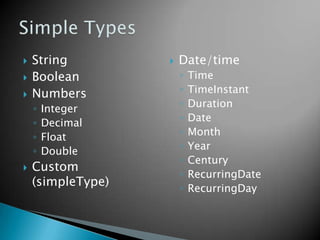
StringBooleanNumbersIntegerDecimalFloatDoubleCustom (simpleType)Date/timeTimeTimeInstantDurationDateMonthYearCenturyRecurringDateRecurringDaySimple Types
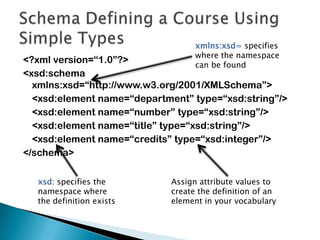
<?xml version=“1.0”?><xsd:schemaxmlns:xsd=“http://www.w3.org/2001/XMLSchema”>	<xsd:element name=“department” type=“xsd:string”/>	<xsd:element name=“number” type=“xsd:string”/>	<xsd:element name=“title” type=“xsd:string”/>	<xsd:element name=“credits” type=“xsd:integer”/></schema>Schema Defining a Course Using Simple Typesxmlns:xsd= specifies where the namespace can be foundxsd: specifies the namespace where the definition existsAssign attribute values to create the definition of an element in your vocabulary
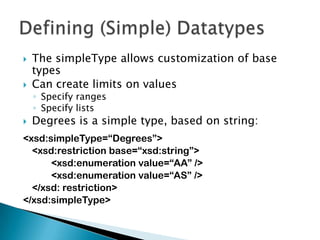
The simpleType allows customization of base typesCan create limits on valuesSpecify rangesSpecify listsDegrees is a simple type, based on string:<xsd:simpleType=“Degrees”>	<xsd:restriction base=“xsd:string”>		<xsd:enumeration value=“AA” />		<xsd:enumeration value=“AS” />	</xsd: restriction></xsd:simpleType>Defining (Simple) Datatypes
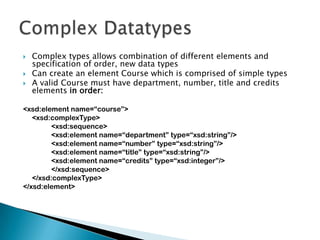
Complex types allows combination of different elements and specification of order, new data typesCan create an element Course which is comprised of simple typesA valid Course must have department, number, title and credits elements in order:<xsd:element name=“course”>	<xsd:complexType>		<xsd:sequence>		<xsd:element name=“department” type=“xsd:string”/>		<xsd:element name=“number” type=“xsd:string”/>		<xsd:element name=“title” type=“xsd:string”/>		<xsd:element name=“credits” type=“xsd:integer”/>		</xsd:sequence>	</xsd:complexType></xsd:element>ComplexDatatypes
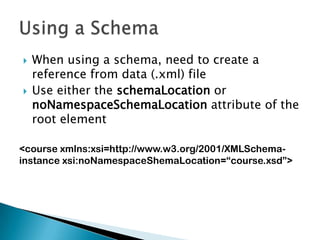
When using a schema, need to create a reference from data (.xml) fileUse either the schemaLocation or noNamespaceSchemaLocation attribute of the root element<course xmlns:xsi=http://www.w3.org/2001/XMLSchema-instance xsi:noNamespaceShemaLocation=“course.xsd”>Using a Schema
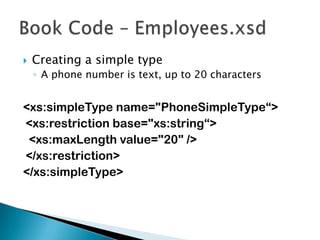
Creating a simple typeA phone number is text, up to 20 characters<xs:simpleType name="PhoneSimpleType“>	<xs:restrictionbase="xs:string“>		<xs:maxLength value="20" />	</xs:restriction></xs:simpleType>Book Code – Employees.xsd
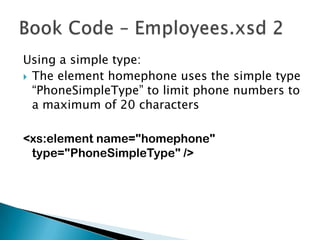
Using a simple type:The element homephone uses the simple type “PhoneSimpleType” to limit phone numbers to a maximum of 20 characters<xs:element name="homephone" type="PhoneSimpleType" />Book Code – Employees.xsd 2
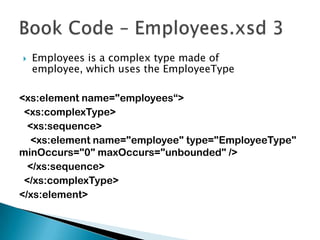
Employees is a complex type made of employee, which uses the EmployeeType<xs:element name="employees“>	<xs:complexType>	<xs:sequence>		<xs:element name="employee" type="EmployeeType" minOccurs="0" maxOccurs="unbounded" />	</xs:sequence></xs:complexType></xs:element>Book Code – Employees.xsd 3
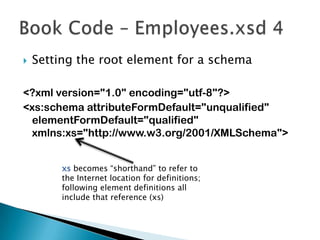
Setting the root element for a schema<?xml version="1.0" encoding="utf-8"?><xs:schemaattributeFormDefault="unqualified" elementFormDefault="qualified" xmlns:xs="http://www.w3.org/2001/XMLSchema">Book Code – Employees.xsd 4xs becomes “shorthand” to refer to the Internet location for definitions; following element definitions all include that reference (xs)

XML schemas

  • 1.
  • 2.
    Alternative to DTD’sas way to define structureDefining a language (vocabulary)Structure may be also referred to as vocabularyEnsures that data matches specificationsServes as basis for other XML-related technologiesXML Schemas
  • 3.
    Use XML fordefinitionDoesn’t have separate structure like DTD’sSchema must be well-formedProvides for built-in and user-defined data typesCan be easily reusedSupports concepts such as inheritanceOne object is based on anotherA definition may be reused and modified without starting from scratch each timeWorking with Schemas
  • 4.
    Support World WideWeb Namespace recommendationsA namespace allows the same name (data type/definition) to be used in different Schemas and properly understoodA course may be defined as department, course number, title, credits and prerequisites for the College CatalogA course for grading may be defined as department, course number and credits for a grading applicationUsing namespaces allows both definitions to be used, by specifying if working with a course defined for the catalog or gradingSchemas and Namespaces
  • 5.
    Schema file usesan .xsd extensionRoot element is the schemaCan nest all elements within the schemaEverything is hierarchicalORCan have multiple elements as child elements of the schema rootAllows use of a definition any place in the document (data) fileElements which are child elements of schema are globalCreating Schemas
  • 6.
    Allows more specificitythan DTD’sCan specify dates, numbers, rangesDatatypes fall into two categories:Simple deals with basic valuesComplex describes more intricate values or structuresSchema Datatypes
  • 7.
    Simple data typeis about text, numbers, dateSometime referred to as “primitives”Data types built in to Schema vocabulary (and related elements, attributes) are in the XML Schema namespaceNeed reference to namespace to have valid XML specified (where to find the defined type)Elements that are Simple Datatypes don’t have attributesIncluding an attribute makes an element ComplexSimple Datatypes
  • 8.
  • 9.
    <?xml version=“1.0”?><xsd:schemaxmlns:xsd=“http://www.w3.org/2001/XMLSchema”> <xsd:element name=“department”type=“xsd:string”/> <xsd:element name=“number” type=“xsd:string”/> <xsd:element name=“title” type=“xsd:string”/> <xsd:element name=“credits” type=“xsd:integer”/></schema>Schema Defining a Course Using Simple Typesxmlns:xsd= specifies where the namespace can be foundxsd: specifies the namespace where the definition existsAssign attribute values to create the definition of an element in your vocabulary
  • 10.
    The simpleType allowscustomization of base typesCan create limits on valuesSpecify rangesSpecify listsDegrees is a simple type, based on string:<xsd:simpleType=“Degrees”> <xsd:restriction base=“xsd:string”> <xsd:enumeration value=“AA” /> <xsd:enumeration value=“AS” /> </xsd: restriction></xsd:simpleType>Defining (Simple) Datatypes
  • 11.
    Complex types allowscombination of different elements and specification of order, new data typesCan create an element Course which is comprised of simple typesA valid Course must have department, number, title and credits elements in order:<xsd:element name=“course”> <xsd:complexType> <xsd:sequence> <xsd:element name=“department” type=“xsd:string”/> <xsd:element name=“number” type=“xsd:string”/> <xsd:element name=“title” type=“xsd:string”/> <xsd:element name=“credits” type=“xsd:integer”/> </xsd:sequence> </xsd:complexType></xsd:element>ComplexDatatypes
  • 12.
    When using aschema, need to create a reference from data (.xml) fileUse either the schemaLocation or noNamespaceSchemaLocation attribute of the root element<course xmlns:xsi=http://www.w3.org/2001/XMLSchema-instance xsi:noNamespaceShemaLocation=“course.xsd”>Using a Schema
  • 13.
    Creating a simpletypeA phone number is text, up to 20 characters<xs:simpleType name="PhoneSimpleType“> <xs:restrictionbase="xs:string“> <xs:maxLength value="20" /> </xs:restriction></xs:simpleType>Book Code – Employees.xsd
  • 14.
    Using a simpletype:The element homephone uses the simple type “PhoneSimpleType” to limit phone numbers to a maximum of 20 characters<xs:element name="homephone" type="PhoneSimpleType" />Book Code – Employees.xsd 2
  • 15.
    Employees is acomplex type made of employee, which uses the EmployeeType<xs:element name="employees“> <xs:complexType> <xs:sequence> <xs:element name="employee" type="EmployeeType" minOccurs="0" maxOccurs="unbounded" /> </xs:sequence></xs:complexType></xs:element>Book Code – Employees.xsd 3
  • 16.
    Setting the rootelement for a schema<?xml version="1.0" encoding="utf-8"?><xs:schemaattributeFormDefault="unqualified" elementFormDefault="qualified" xmlns:xs="http://www.w3.org/2001/XMLSchema">Book Code – Employees.xsd 4xs becomes “shorthand” to refer to the Internet location for definitions; following element definitions all include that reference (xs)