CIS-189
   Cascading Style Sheets allow further
    separation of content from presentation
    ◦ Can speed up content creation, since not worried
      about presentation
   A single stylesheet can alter the appearance
    of multiple web pages or documents
   Different stylesheets can alter the appearance
    of a single web page or document
   Web pages can load more quickly since
    stylesheets are downloaded once and cached
    (held in memory)
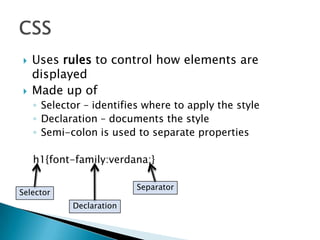
   Uses rules to control how elements are
    displayed
   Made up of
    ◦ Selector – identifies where to apply the style
    ◦ Declaration – documents the style
    ◦ Semi-colon is used to separate properties

    h1{font-family:verdana;}

                          Separator
Selector
            Declaration
   Stylesheets can be in-line, part of the
    document itself
   Stylesheets can be separate files
   Stylesheets support inheritance
    ◦ Can use several stylesheets in a single document
    ◦ In-line style overrides an external rule
<style type="text/css" media="screen">
body {
   background-color: #F4FBFD ;
   font-family: verdana;
   font-size: small;
   color: navy;
}                                body and table represent elements;
table {                          .specialDates is a class
   font-family: verdana;
   font-size: small;
   cell-padding: 2px;
}
.specialDates{
   font-weight: bold;
  font-style: italic;
  }
</style>
   Reference:
<?xml-stylesheet type="text/css" href="talltales.css"?>
   CSS File:
talltales {
  background-image: url(background.gif);
  background-repeat: repeat;
}

tt {                                 talltales and tt represent elements
  display: block;
  width: 700px;
  padding: 10px;
  margin: 10px;
  border: 5px groove #353A54;
  background-color: #353A54;
}
… (continues)


                                              From Sam’s Teach Yourself XML
?xml version="1.0"?>
<?xml-stylesheet type="text/css" href="talltales.css"?>
<!DOCTYPE talltales SYSTEM "talltales.dtd">

<talltales>
 <tt answer="a">
  <question>
    In 1994, a man had an accident while robbing a pizza restaurant in
  Akron, Ohio, that resulted in his
    arrest. What happened to him?
  </question>
  <a>He slipped on a patch of grease on the floor and knocked himself out.</a>
  <b>He backed into a police car while attempting to drive off.</b>
  <c>He choked on a breadstick that he had grabbed as he was running out.</c>
 </tt>
… (continues)


                                                 From Sam’s Teach Yourself XML
From Sam’s Teach Yourself XML
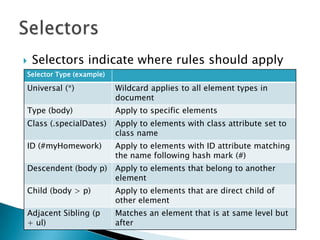
   Selectors indicate where rules should apply
Selector Type (example)

Universal (*)             Wildcard applies to all element types in
                          document
Type (body)               Apply to specific elements
Class (.specialDates)     Apply to elements with class attribute set to
                          class name
ID (#myHomework)          Apply to elements with ID attribute matching
                          the name following hash mark (#)
Descendent (body p)       Apply to elements that belong to another
                          element
Child (body > p)          Apply to elements that are direct child of
                          other element
Adjacent Sibling (p       Matches an element that is at same level but
+ ul)                     after
   Selectors can also apply to attributes
    ◦ Not fully supported across browsers
   Class selector is for XHTML
    ◦ Browser knows meaning of class attribute for HTML
   ID selector only applies to attributes using ID
    type
    ◦ Must use DTD or schema for XML file
    ◦ Browsers don’t force validation, so can’t
      consistently read ID selectors correctly
   CSS treats each element as a rectangle (box)
   Box includes
    ◦ Margin is transparent area separating rectangle
      from other elements
    ◦ Border defines the edge of the content area
    ◦ Padding separates the content from the border
   Boxes can be block or inline
    ◦ Block deals with separate value similar to
      paragraphs (<p>, <div>, <h1>)
    ◦ Inline allows content to follow (flow) other
      tags/elements (<span>, <em>)
<p>Each week prior to Thanksgiving, students will prepare a
summary of material covered in-class, online, and in the assigned
reading. <strong>Each student is expected to prepare their own
summary.</strong> Each week has a series of questions that must be
answered as part of the summary to receive full credit; the
questions are included in the weekly folder in Angel. Code
fragments should be included to illustrate concepts or practices.
Students may prepare the summary as a Word document or build a
wiki; Word documents or links to the wiki must be emailed to the
instructor by midnight on Friday to receive credit. Students will
receive 5 points for a complete summary, 3 points for an
incomplete summary, and no points for a late or missing
submission.</p>


<p></p> represents a block; <strong></strong> represents in-line.
<?xml version="1.0" encoding="utf-8"?>
<assignments>
<assignment>
  <duedate>09/27/2011</duedate>
  <name>Homework 1 - Using XML</name>
</assignment>
<assignment>
  <duedate>10/11/2011</duedate>
  <name>Homework 2 - DOM</name>
</assignment>
<assignment>
  <duedate>10/18/2011</duedate>
  <name>Homework 3 - DTD</name>
</assignment>
…
</assignments>
assignment {
       font-family: Verdana, Geneva, Tahoma, sans-serif;
       font-size: medium;
       font-weight: bold;
       display:inline;
       color: #0000FF;
}
duedate {
       background-color: #99CCFF;
}


                Each assignment immediately follows prior assignment
assignment {
       font-family: Verdana, Geneva, Tahoma, sans-serif;
       font-size: medium;
       font-weight: bold;
       display:block;
       color: #0000FF;
}
duedate {
       background-color: #99CCFF;
       display:inline;
}


                           Each assignment is on a new line (block)
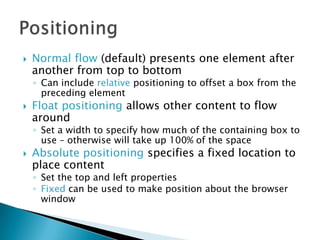
   Normal flow (default) presents one element after
    another from top to bottom
    ◦ Can include relative positioning to offset a box from the
      preceding element
   Float positioning allows other content to flow
    around
    ◦ Set a width to specify how much of the containing box to
      use – otherwise will take up 100% of the space
   Absolute positioning specifies a fixed location to
    place content
    ◦ Set the top and left properties
    ◦ Fixed can be used to make position about the browser
      window
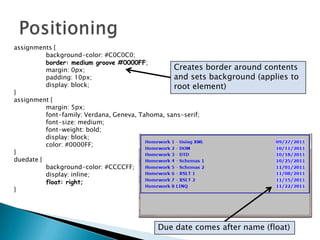
assignments {
          background-color: #C0C0C0;
          border: medium groove #0000FF;
          margin: 0px;                            Creates border around contents
          padding: 10px;                          and sets background (applies to
          display: block;                         root element)
}
assignment {
          margin: 5px;
          font-family: Verdana, Geneva, Tahoma, sans-serif;
          font-size: medium;
          font-weight: bold;
          display: block;
          color: #0000FF;
}
duedate {
          background-color: #CCCCFF;
          display: inline;
          float: right;
}


                                        Due date comes after name (float)
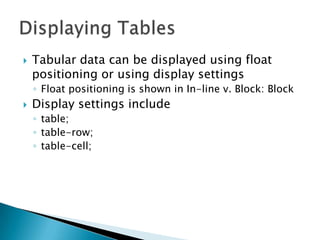
   Tabular data can be displayed using float
    positioning or using display settings
    ◦ Float positioning is shown in In-line v. Block: Block
   Display settings include
    ◦ table;
    ◦ table-row;
    ◦ table-cell;
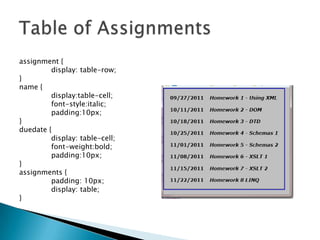
assignment {
         display: table-row;
}
name {
         display:table-cell;
         font-style:italic;
         padding:10px;
}
duedate {
         display: table-cell;
         font-weight:bold;
         padding:10px;
}
assignments {
         padding: 10px;
         display: table;
}

CSS

  • 1.
  • 2.
    Cascading Style Sheets allow further separation of content from presentation ◦ Can speed up content creation, since not worried about presentation  A single stylesheet can alter the appearance of multiple web pages or documents  Different stylesheets can alter the appearance of a single web page or document  Web pages can load more quickly since stylesheets are downloaded once and cached (held in memory)
  • 3.
    Uses rules to control how elements are displayed  Made up of ◦ Selector – identifies where to apply the style ◦ Declaration – documents the style ◦ Semi-colon is used to separate properties h1{font-family:verdana;} Separator Selector Declaration
  • 4.
    Stylesheets can be in-line, part of the document itself  Stylesheets can be separate files  Stylesheets support inheritance ◦ Can use several stylesheets in a single document ◦ In-line style overrides an external rule
  • 5.
    <style type="text/css" media="screen"> body{ background-color: #F4FBFD ; font-family: verdana; font-size: small; color: navy; } body and table represent elements; table { .specialDates is a class font-family: verdana; font-size: small; cell-padding: 2px; } .specialDates{ font-weight: bold; font-style: italic; } </style>
  • 6.
    Reference: <?xml-stylesheet type="text/css" href="talltales.css"?>  CSS File: talltales { background-image: url(background.gif); background-repeat: repeat; } tt { talltales and tt represent elements display: block; width: 700px; padding: 10px; margin: 10px; border: 5px groove #353A54; background-color: #353A54; } … (continues) From Sam’s Teach Yourself XML
  • 7.
    ?xml version="1.0"?> <?xml-stylesheet type="text/css"href="talltales.css"?> <!DOCTYPE talltales SYSTEM "talltales.dtd"> <talltales> <tt answer="a"> <question> In 1994, a man had an accident while robbing a pizza restaurant in Akron, Ohio, that resulted in his arrest. What happened to him? </question> <a>He slipped on a patch of grease on the floor and knocked himself out.</a> <b>He backed into a police car while attempting to drive off.</b> <c>He choked on a breadstick that he had grabbed as he was running out.</c> </tt> … (continues) From Sam’s Teach Yourself XML
  • 8.
    From Sam’s TeachYourself XML
  • 9.
    Selectors indicate where rules should apply Selector Type (example) Universal (*) Wildcard applies to all element types in document Type (body) Apply to specific elements Class (.specialDates) Apply to elements with class attribute set to class name ID (#myHomework) Apply to elements with ID attribute matching the name following hash mark (#) Descendent (body p) Apply to elements that belong to another element Child (body > p) Apply to elements that are direct child of other element Adjacent Sibling (p Matches an element that is at same level but + ul) after
  • 10.
    Selectors can also apply to attributes ◦ Not fully supported across browsers  Class selector is for XHTML ◦ Browser knows meaning of class attribute for HTML  ID selector only applies to attributes using ID type ◦ Must use DTD or schema for XML file ◦ Browsers don’t force validation, so can’t consistently read ID selectors correctly
  • 11.
    CSS treats each element as a rectangle (box)  Box includes ◦ Margin is transparent area separating rectangle from other elements ◦ Border defines the edge of the content area ◦ Padding separates the content from the border  Boxes can be block or inline ◦ Block deals with separate value similar to paragraphs (<p>, <div>, <h1>) ◦ Inline allows content to follow (flow) other tags/elements (<span>, <em>)
  • 12.
    <p>Each week priorto Thanksgiving, students will prepare a summary of material covered in-class, online, and in the assigned reading. <strong>Each student is expected to prepare their own summary.</strong> Each week has a series of questions that must be answered as part of the summary to receive full credit; the questions are included in the weekly folder in Angel. Code fragments should be included to illustrate concepts or practices. Students may prepare the summary as a Word document or build a wiki; Word documents or links to the wiki must be emailed to the instructor by midnight on Friday to receive credit. Students will receive 5 points for a complete summary, 3 points for an incomplete summary, and no points for a late or missing submission.</p> <p></p> represents a block; <strong></strong> represents in-line.
  • 13.
    <?xml version="1.0" encoding="utf-8"?> <assignments> <assignment> <duedate>09/27/2011</duedate> <name>Homework 1 - Using XML</name> </assignment> <assignment> <duedate>10/11/2011</duedate> <name>Homework 2 - DOM</name> </assignment> <assignment> <duedate>10/18/2011</duedate> <name>Homework 3 - DTD</name> </assignment> … </assignments>
  • 14.
    assignment { font-family: Verdana, Geneva, Tahoma, sans-serif; font-size: medium; font-weight: bold; display:inline; color: #0000FF; } duedate { background-color: #99CCFF; } Each assignment immediately follows prior assignment
  • 15.
    assignment { font-family: Verdana, Geneva, Tahoma, sans-serif; font-size: medium; font-weight: bold; display:block; color: #0000FF; } duedate { background-color: #99CCFF; display:inline; } Each assignment is on a new line (block)
  • 16.
    Normal flow (default) presents one element after another from top to bottom ◦ Can include relative positioning to offset a box from the preceding element  Float positioning allows other content to flow around ◦ Set a width to specify how much of the containing box to use – otherwise will take up 100% of the space  Absolute positioning specifies a fixed location to place content ◦ Set the top and left properties ◦ Fixed can be used to make position about the browser window
  • 17.
    assignments { background-color: #C0C0C0; border: medium groove #0000FF; margin: 0px; Creates border around contents padding: 10px; and sets background (applies to display: block; root element) } assignment { margin: 5px; font-family: Verdana, Geneva, Tahoma, sans-serif; font-size: medium; font-weight: bold; display: block; color: #0000FF; } duedate { background-color: #CCCCFF; display: inline; float: right; } Due date comes after name (float)
  • 18.
    Tabular data can be displayed using float positioning or using display settings ◦ Float positioning is shown in In-line v. Block: Block  Display settings include ◦ table; ◦ table-row; ◦ table-cell;
  • 19.
    assignment { display: table-row; } name { display:table-cell; font-style:italic; padding:10px; } duedate { display: table-cell; font-weight:bold; padding:10px; } assignments { padding: 10px; display: table; }