MODULE 2
Introduction to the Relational Model
VEERESH KUMAR S
Assistant Professor
Department of IT
SMEC.
Relational Model
VEERESH KUMAR S
Assistant Professor
Department of IT
SMEC.
Introduction
●
Relational model – stored data in tabular form
●
Relation – table with rows and columns
●
A relation consists of a relation schema and a relation
instance.
●
Relation instance – table
●
Relation schema – describes column heads
●
Eg of relation schema :
Name of relation (name of each field or attribute :
domain name)
Students(sid:string, Name:string, Age:integer, GPA:real)
Employee(Eid:string, Name:String, Address:string,
Contd...
●
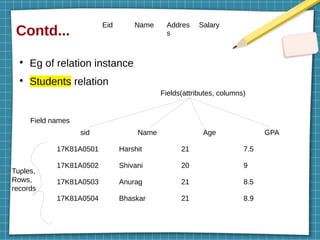
Eg of relation instance
●
Students relation
sid Name Age GPA
17K81A0501 Harshit 21 7.5
17K81A0502 Shivani 20 9
17K81A0503 Anurag 21 8.5
17K81A0504 Bhaskar 21 8.9
Fields(attributes, columns)
Field names
Tuples,
Rows,
records
Eid Name Addres
s
Salary
Contd...
●
Relation schema
R(f1
:D1
, ..., fn
:Dn
) where f – fields & D – domain
●
Domain constraints need to satisfy in a relation schema
●
Degree of a relation (Arity) – total number of fields or
attributes. - 4
●
Cardinality of a relation – total number of tuples or rows
- 4
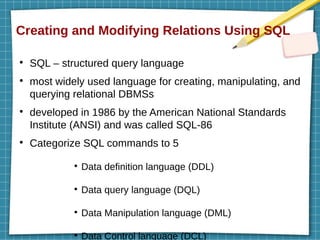
Creating and Modifying Relations Using SQL
●
SQL – structured query language
●
most widely used language for creating, manipulating, and
querying relational DBMSs
●
developed in 1986 by the American National Standards
Institute (ANSI) and was called SQL-86
●
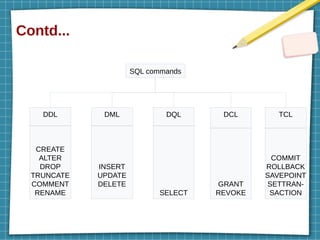
Categorize SQL commands to 5
●
Data definition language (DDL)
●
Data query language (DQL)
●
Data Manipulation language (DML)
●
Data Control language (DCL)
Contd...
SQL commands
DML
INSERT
UPDATE
DELETE
DDL
CREATE
ALTER
DROP
TRUNCATE
COMMENT
RENAME
DQL
SELECT
DCL
GRANT
REVOKE
TCL
COMMIT
ROLLBACK
SAVEPOINT
SETTRAN-
SACTION
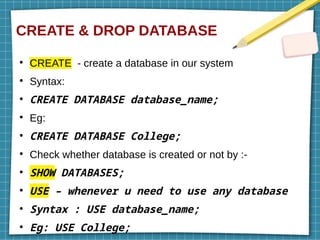
CREATE & DROP DATABASE
●
CREATE - create a database in our system
●
Syntax:
●
CREATE DATABASE database_name;
●
Eg:
●
CREATE DATABASE College;
●
Check whether database is created or not by :-
●
SHOW DATABASES;
●
USE – whenever u need to use any database
●
Syntax : USE database_name;
●
Eg: USE College;
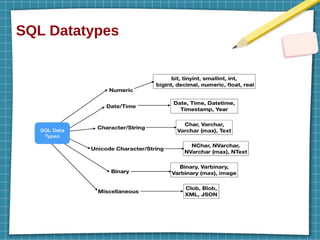
SQL Datatypes
CREATE TABLE
●
Syntax :
●
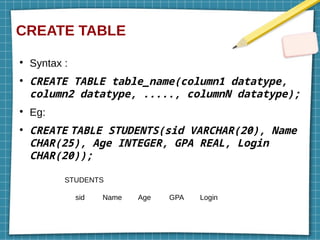
CREATE TABLE table_name(column1 datatype,
column2 datatype, ....., columnN datatype);
●
Eg:
●
CREATE TABLE STUDENTS(sid VARCHAR(20), Name
CHAR(25), Age INTEGER, GPA REAL, Login
CHAR(20));
sid Name Age GPA Login
STUDENTS
Contd...
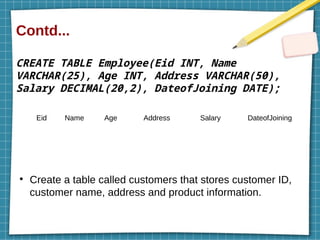
CREATE TABLE Employee(Eid INT, Name
VARCHAR(25), Age INT, Address VARCHAR(50),
Salary DECIMAL(20,2), DateofJoining DATE);
●
Create a table called customers that stores customer ID,
customer name, address and product information.
Eid Name Age Address Salary DateofJoining
Contd...
●
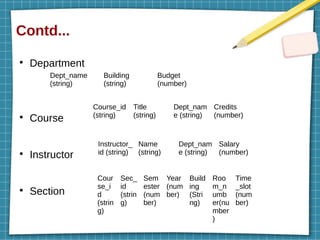
Department
●
Course
●
Instructor
●
Section
Dept_name
(string)
Building
(string)
Budget
(number)
Course_id
(string)
Title
(string)
Dept_nam
e (string)
Credits
(number)
Instructor_
id (string)
Name
(string)
Dept_nam
e (string)
Salary
(number)
Cour
se_i
d
(strin
g)
Sec_
id
(strin
g)
Sem
ester
(num
ber)
Year
(num
ber)
Build
ing
(Stri
ng)
Roo
m_n
umb
er(nu
mber
)
Time
_slot
(num
ber)
INSERT – inserting data into a table
●
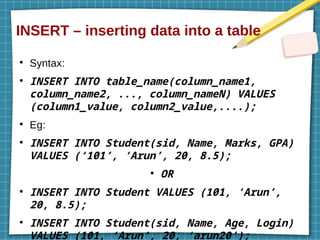
Syntax:
●
INSERT INTO table_name(column_name1,
column_name2, ..., column_nameN) VALUES
(column1_value, column2_value,....);
●
Eg:
●
INSERT INTO Student(sid, Name, Marks, GPA)
VALUES (‘101’, ‘Arun’, 20, 8.5);
●
OR
●
INSERT INTO Student VALUES (101, ‘Arun’,
20, 8.5);
●
INSERT INTO Student(sid, Name, Age, Login)
VALUES (101, ‘Arun’, 20, ‘arun20’);
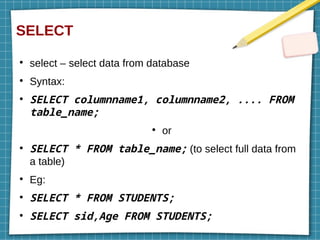
SELECT
●
select – select data from database
●
Syntax:
●
SELECT columnname1, columnname2, .... FROM
table_name;
●
or
●
SELECT * FROM table_name; (to select full data from
a table)
●
Eg:
●
SELECT * FROM STUDENTS;
●
SELECT sid,Age FROM STUDENTS;
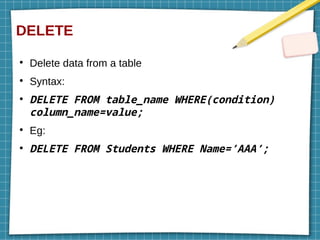
DELETE
●
Delete data from a table
●
Syntax:
●
DELETE FROM table_name WHERE(condition)
column_name=value;
●
Eg:
●
DELETE FROM Students WHERE Name=’AAA’;
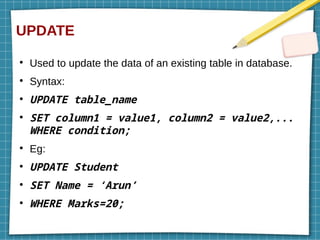
UPDATE
●
Used to update the data of an existing table in database.
●
Syntax:
●
UPDATE table_name
●
SET column1 = value1, column2 = value2,...
WHERE condition;
●
Eg:
●
UPDATE Student
●
SET Name = ‘Arun’
●
WHERE Marks=20;
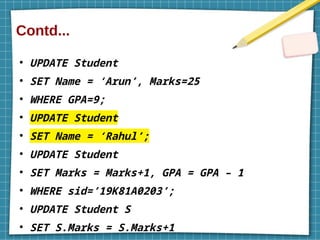
Contd...
●
UPDATE Student
●
SET Name = ‘Arun’, Marks=25
●
WHERE GPA=9;
●
UPDATE Student
●
SET Name = ‘Rahul’;
●
UPDATE Student
●
SET Marks = Marks+1, GPA = GPA – 1
●
WHERE sid=’19K81A0203’;
●
UPDATE Student S
●
SET S.Marks = S.Marks+1
Integrity Constraints Over Relations
●
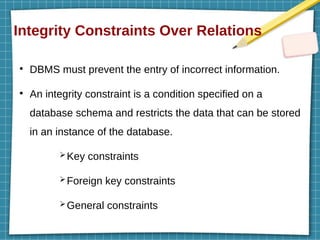
DBMS must prevent the entry of incorrect information.
●
An integrity constraint is a condition specified on a
database schema and restricts the data that can be stored
in an instance of the database.
➢Key constraints
➢Foreign key constraints
➢General constraints
Key Constraints
●
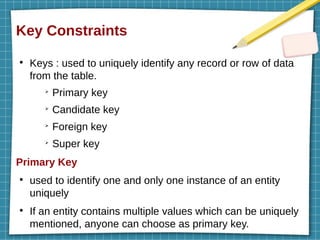
Keys : used to uniquely identify any record or row of data
from the table.
➢
Primary key
➢
Candidate key
➢
Foreign key
➢
Super key
Primary Key
●
used to identify one and only one instance of an entity
uniquely
●
If an entity contains multiple values which can be uniquely
mentioned, anyone can choose as primary key.
Contd...
●
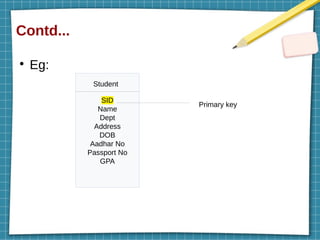
Eg:
SID
Name
Dept
Address
DOB
Aadhar No
Passport No
GPA
Student
Primary key
Candidate Key
●
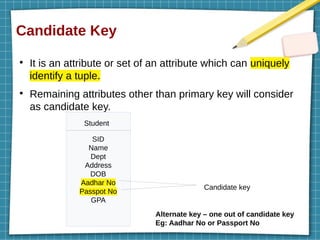
It is an attribute or set of an attribute which can uniquely
identify a tuple.
●
Remaining attributes other than primary key will consider
as candidate key.
SID
Name
Dept
Address
DOB
Aadhar No
Passpot No
GPA
Student
Candidate key
Alternate key – one out of candidate key
Eg: Aadhar No or Passport No
Super Key
●
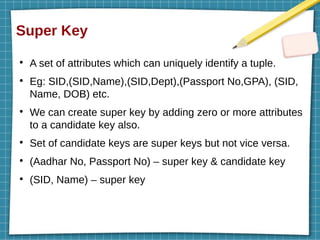
A set of attributes which can uniquely identify a tuple.
●
Eg: SID,(SID,Name),(SID,Dept),(Passport No,GPA), (SID,
Name, DOB) etc.
●
We can create super key by adding zero or more attributes
to a candidate key also.
●
Set of candidate keys are super keys but not vice versa.
●
(Aadhar No, Passport No) – super key & candidate key
●
(SID, Name) – super key
Foreign Key
●
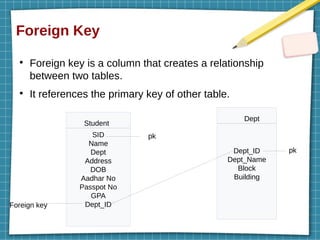
Foreign key is a column that creates a relationship
between two tables.
●
It references the primary key of other table.
SID
Name
Dept
Address
DOB
Aadhar No
Passpot No
GPA
Dept_ID
Student
Dept_ID
Dept_Name
Block
Building
Dept
pk
Foreign key
pk
NOT NULL & UNIQUE
●
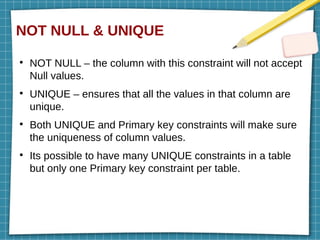
NOT NULL – the column with this constraint will not accept
Null values.
●
UNIQUE – ensures that all the values in that column are
unique.
●
Both UNIQUE and Primary key constraints will make sure
the uniqueness of column values.
●
Its possible to have many UNIQUE constraints in a table
but only one Primary key constraint per table.
Specifying Key Constraints in SQL
●
NOT NULL
●
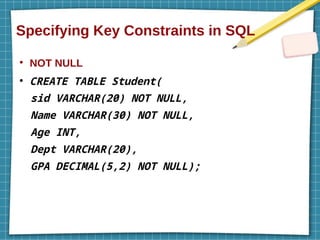
CREATE TABLE Student(
sid VARCHAR(20) NOT NULL,
Name VARCHAR(30) NOT NULL,
Age INT,
Dept VARCHAR(20),
GPA DECIMAL(5,2) NOT NULL);
Contd...
●
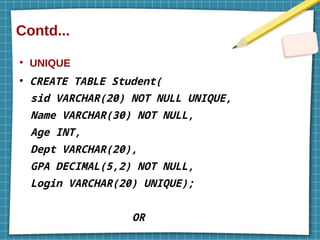
UNIQUE
●
CREATE TABLE Student(
sid VARCHAR(20) NOT NULL UNIQUE,
Name VARCHAR(30) NOT NULL,
Age INT,
Dept VARCHAR(20),
GPA DECIMAL(5,2) NOT NULL,
Login VARCHAR(20) UNIQUE);
OR
Contd...
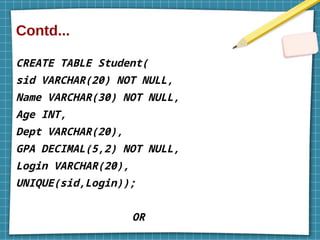
CREATE TABLE Student(
sid VARCHAR(20) NOT NULL,
Name VARCHAR(30) NOT NULL,
Age INT,
Dept VARCHAR(20),
GPA DECIMAL(5,2) NOT NULL,
Login VARCHAR(20),
UNIQUE(sid,Login));
OR
Contd...
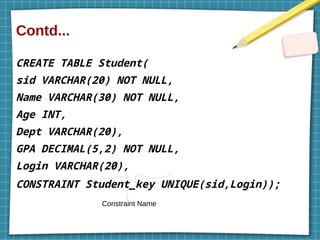
CREATE TABLE Student(
sid VARCHAR(20) NOT NULL,
Name VARCHAR(30) NOT NULL,
Age INT,
Dept VARCHAR(20),
GPA DECIMAL(5,2) NOT NULL,
Login VARCHAR(20),
CONSTRAINT Student_key UNIQUE(sid,Login));
Constraint Name
Contd...
●
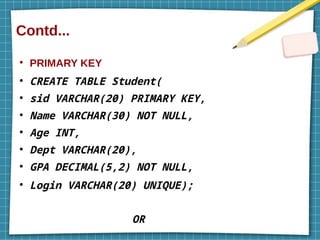
PRIMARY KEY
●
CREATE TABLE Student(
●
sid VARCHAR(20) PRIMARY KEY,
●
Name VARCHAR(30) NOT NULL,
●
Age INT,
●
Dept VARCHAR(20),
●
GPA DECIMAL(5,2) NOT NULL,
●
Login VARCHAR(20) UNIQUE);
OR
Rough work
CREATE TABLE Student(ID VARCHAR(20)
PRIMARY KEY,Name VARCHAR(25),Marks INT);
create table Student(ID varchar(20), Name
varchar(25),Marks int,PRIMARY KEY(ID));
●
Create table person(CC varchar(10),Phn No
varchar(10), Name varchar(20), CONSTRAINT
prkey PRIMARY KEY(CC,Phn NO));
●
+91-9989249995
Name of constraint(primary key)
Contd...
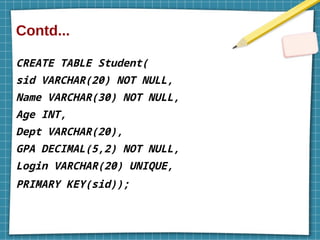
CREATE TABLE Student(
sid VARCHAR(20) NOT NULL,
Name VARCHAR(30) NOT NULL,
Age INT,
Dept VARCHAR(20),
GPA DECIMAL(5,2) NOT NULL,
Login VARCHAR(20) UNIQUE,
PRIMARY KEY(sid));
Contd...
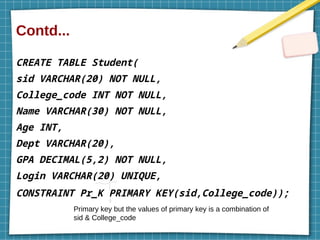
CREATE TABLE Student(
sid VARCHAR(20) NOT NULL,
College_code INT NOT NULL,
Name VARCHAR(30) NOT NULL,
Age INT,
Dept VARCHAR(20),
GPA DECIMAL(5,2) NOT NULL,
Login VARCHAR(20) UNIQUE,
CONSTRAINT Pr_K PRIMARY KEY(sid,College_code));
Primary key but the values of primary key is a combination of
sid & College_code
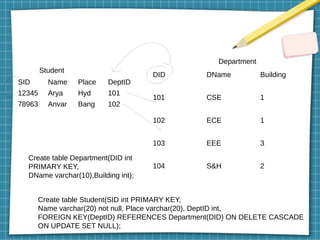
SID Name Place DeptID
12345 Arya Hyd 101
78963 Anvar Bang 102
DID DName Building
101 CSE 1
102 ECE 1
103 EEE 3
104 S&H 2
Student
Department
Create table Department(DID int
PRIMARY KEY,
DName varchar(10),Building int);
Create table Student(SID int PRIMARY KEY,
Name varchar(20) not null, Place varchar(20), DeptID int,
FOREIGN KEY(DeptID) REFERENCES Department(DID) ON DELETE CASCADE
ON UPDATE SET NULL);
Contd...
●
FOREIGN KEY
●
CREATE TABLE Student(
●
sid VARCHAR(20) NOT NULL UNIQUE,
●
Name VARCHAR(30) NOT NULL,
●
Age INT,
●
Dept VARCHAR(20),
●
GPA DECIMAL(5,2) NOT NULL,
●
Login VARCHAR(20) UNIQUE
●
Dept_ID VARCHAR(20),
●
PRIMARY KEY(sid),
Contd...
CREATE TABLE Student(
sid VARCHAR(20) NOT NULL UNIQUE,
Name VARCHAR(30) NOT NULL,
Age INT,
Dept VARCHAR(20),
GPA DECIMAL(5,2) NOT NULL,
Login VARCHAR(20) UNIQUE
Dept_ID VARCHAR(20),
PRIMARY KEY(sid),
CONSTRAINT Fr_K FOREIGN KEY(Dept_ID)
REFERENCES Dept(Dept_ID));
Contd...
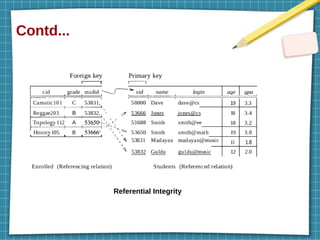
Referential Integrity
Enforcing Integrity Constraints
●
If an insert, delete, or update command causes a violation,
it is rejected.
●
Ways to handle Foreign key :
➢
ON DELETE
➢
ON UPDATE
●
4 Actions associated with ON DELETE & ON UPDATE
➢
CASCADE – child data is update or delete when the
parent data is deleted or updated
➢
NO ACTION – no action is performed with the child
data when the parent data is deleted or updated
➢
SET DEFAULT – child data is set to default values
when the parent data is deleted or updated
Contd...
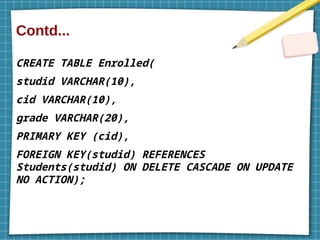
CREATE TABLE Enrolled(
studid VARCHAR(10),
cid VARCHAR(10),
grade VARCHAR(20),
PRIMARY KEY (cid),
FOREIGN KEY(studid) REFERENCES
Students(studid) ON DELETE CASCADE ON UPDATE
NO ACTION);
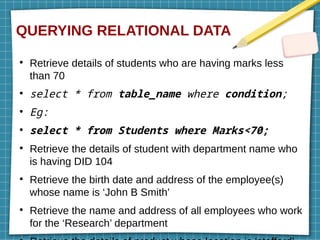
QUERYING RELATIONAL DATA
●
Retrieve details of students who are having marks less
than 70
●
select * from table_name where condition;
●
Eg:
●
select * from Students where Marks<70;
●
Retrieve the details of student with department name who
is having DID 104
●
Retrieve the birth date and address of the employee(s)
whose name is ‘John B Smith’
●
Retrieve the name and address of all employees who work
for the ‘Research’ department
Logical Database Design
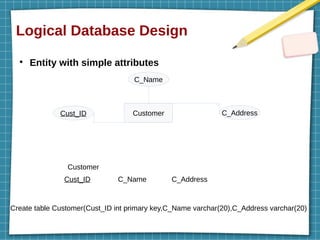
●
Entity with simple attributes
Customer
C_Name
Cust_ID C_Address
Cust_ID C_Name C_Address
Customer
Create table Customer(Cust_ID int primary key,C_Name varchar(20),C_Address varchar(20)
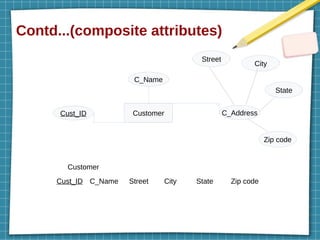
Contd...(composite attributes)
Customer
C_Name
Cust_ID C_Address
Cust_ID C_Name Street City State Zip code
Customer
Street
City
State
Zip code
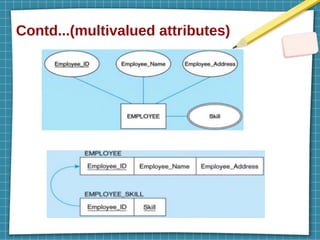
Contd...(multivalued attributes)
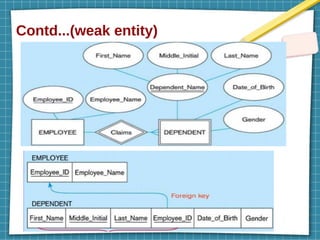
Contd...(weak entity)
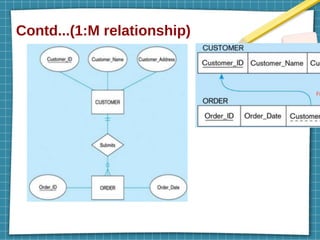
Contd...(1:M relationship)
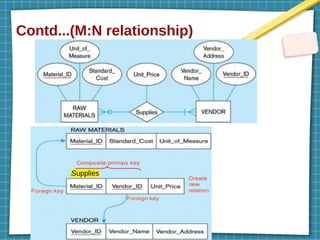
Contd...(M:N relationship)
Supplies
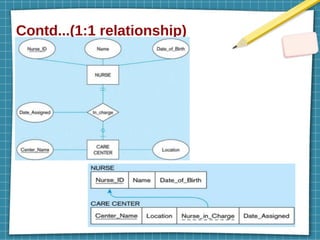
Contd...(1:1 relationship)
Introduction to Views
●
Views are virtual tables based on a result set of SQL query
statement
●
A view can contain all rows of a table or select rows from a
table
●
Syntax:
●
CREATE VIEW view_name AS
●
SELECT column1, column2.....
●
FROM table_name
●
WHERE [condition];
●
Eg:
●
create view Research_Emp as select * from
Contd...
Retrieve details from view
●
Syntax:
●
select * from view_name;
or
●
select column_name1,col_name2,...
from
view_name where
condition;
●
Eg:
●
select * from Research_Emp;
or
Contd...
Drop a view
●
Syntax:
●
DROP VIEW view_name;
●
Eg:
●
drop view Research_Emp;
Contd...
Updating a view
●
Syntax:
●
CREATE OR REPLACE VIEW view_name AS
●
SELECT column1,coulmn2,..
●
FROM table_name
●
WHERE condition;
●
Eg:
●
create or replace view Research_Emp as
select Fname,Lname,Bdate,Address from
Employee,Department where DNo=DeptNo and
Dname=’Research’;
Contd...
Insertion
●
Syntax:
●
INSERT INTO view_name(column1, column2 ,
column3,..)
●
VALUES(value1, value2, value3..);
●
Deletion
●
Syntax:
●
DELETE FROM view_name
●
WHERE condition;
Destroying & Altering a table
Destroy a table
●
Syntax:
●
DROP table table_name;
●
Eg:
●
drop table Student;
●
DELETE – delete data based on some condn
●
DROP – delete data along with structure of
table
Alter command
●
Used to add, delete or modify columns in an existing table.
●
Also able to add and drop various constraints on an
existing table.
Command to add a new column
●
Syntax:
●
ALTER TABLE table_name ADD column_name
datatype;
●
Eg:
●
alter table Student add Marks int;
Contd...
Command to drop a column
●
Syntax:
●
ALTER TABLE table_name DROP column
column_name;
●
Eg:
●
alter table Student drop column Marks;
Contd...
Command to change column name or table name
●
Syntax(table):
●
ALTER TABLE table_name RENAME TO
new_table_name;[rename table old_name to
new_name;]
●
Eg:
●
alter table Student RENAME TO Std;
●
Syntax(column):
●
ALTER TABLE table_name RENAME COLUMN
old_column_name TO new_column_name;
●
Eg:
Contd...
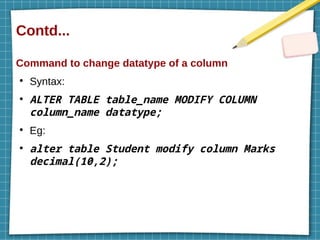
Command to change datatype of a column
●
Syntax:
●
ALTER TABLE table_name MODIFY COLUMN
column_name datatype;
●
Eg:
●
alter table Student modify column Marks
decimal(10,2);
Contd...
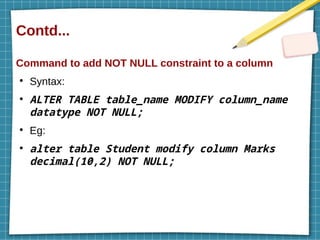
Command to add NOT NULL constraint to a column
●
Syntax:
●
ALTER TABLE table_name MODIFY column_name
datatype NOT NULL;
●
Eg:
●
alter table Student modify column Marks
decimal(10,2) NOT NULL;
Contd...
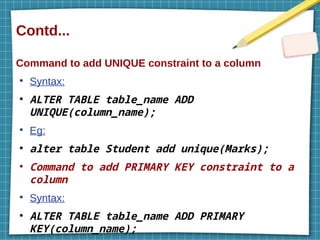
Command to add UNIQUE constraint to a column
●
Syntax:
●
ALTER TABLE table_name ADD
UNIQUE(column_name);
●
Eg:
●
alter table Student add unique(Marks);
●
Command to add PRIMARY KEY constraint to a
column
●
Syntax:
●
ALTER TABLE table_name ADD PRIMARY
KEY(column_name);
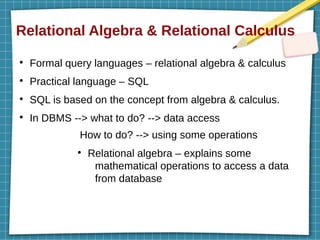
Relational Algebra & Relational Calculus
●
Formal query languages – relational algebra & calculus
●
Practical language – SQL
●
SQL is based on the concept from algebra & calculus.
●
In DBMS --> what to do? --> data access
How to do? --> using some operations
●
Relational algebra – explains some
mathematical operations to access a data
from database
Contd...
Importance
●
Provides a formal foundation for relational model
operations.
●
Basis for implementing & optimizing queries
●
Core operations & functions are based on this.
Operations
●
2 groups :
➢
Set operations – UNION, INTERSECTION,
SET DIFFERENCE, CARTESIAN (CROSS
PRODUCT) etc
➢
Relaional db operations – SELECT,
PROJECT, JOIN etc
Unary Relational Operations
●
Operations that operate on single relation
●
2 operations :
➢
SELECT
➢
PROJECT
SELECT Operation
●
Used to choose a subset of tuples(rows) from a relation
based on a selection condition.
●
Operator used for SELECT operation – σ (sigma)
●
Syntax :
σ <selection condition>
(R)
Contd...
●
R – name of relation(table)
●
<selection condition> is a boolean expression
<attribute name><comparison op><constant value>
or
<attribute name><comparison
op><attribute name>
●
Comparison operator - {=, <, >, ≤,
≥, ≠}
●
Clauses can be connected by
standard boolean operators like
AND, OR, NOT
Contd...
●
Select details of employees from EMPLOYEE relation
whose department number is 4
σ Dno=4
(EMPLOYEE)
●
Select EMPLOYEE tuples whose salary is
greater than 30000
σ Salary>30000
(EMPLOYEE)
Contd...
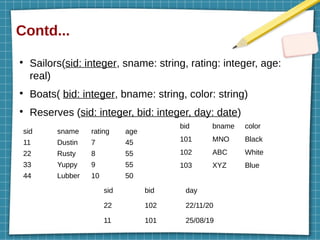
●
Sailors(sid: integer, sname: string, rating: integer, age:
real)
●
Boats( bid: integer, bname: string, color: string)
●
Reserves (sid: integer, bid: integer, day: date)
sid sname rating age
11 Dustin 7 45
22 Rusty 8 55
33 Yuppy 9 55
44 Lubber 10 50
bid bname color
101 MNO Black
102 ABC White
103 XYZ Blue
sid bid day
22 102 22/11/20
11 101 25/08/19
Contd...
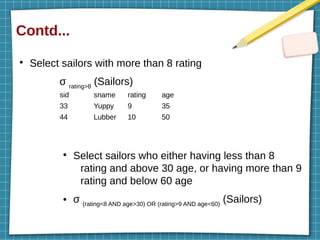
●
Select sailors with more than 8 rating
σ rating>8
(Sailors)
●
Select sailors who either having less than 8
rating and above 30 age, or having more than 9
rating and below 60 age
● σ (rating<8 AND age>30) OR (rating>9 AND age<60)
(Sailors)
sid sname rating age
33 Yuppy 9 35
44 Lubber 10 50
Contd...
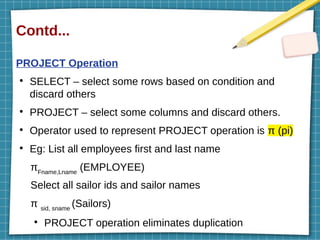
PROJECT Operation
●
SELECT – select some rows based on condition and
discard others
●
PROJECT – select some columns and discard others.
●
Operator used to represent PROJECT operation is π (pi)
●
Eg: List all employees first and last name
πFname,Lname
(EMPLOYEE)
Select all sailor ids and sailor names
π sid, sname
(Sailors)
●
PROJECT operation eliminates duplication
Contd...
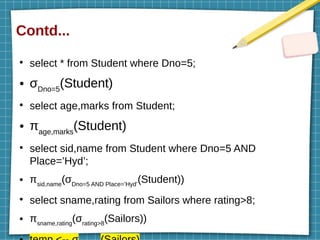
●
select * from Student where Dno=5;
● σDno=5
(Student)
●
select age,marks from Student;
● πage,marks
(Student)
●
select sid,name from Student where Dno=5 AND
Place=’Hyd’;
● πsid,name
(σDno=5 AND Place=’Hyd’
(Student))
●
select sname,rating from Sailors where rating>8;
● πsname,rating
(σrating>8
(Sailors))
SET OPERATIONS
●
4 operations :
➢
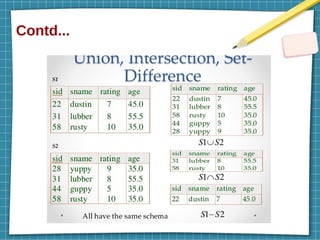
UNION (R U S) – result of this operation is a relation
that includes all tuples that are either in R or in S or in
both(duplicates will eliminate)
➢
INTERSECTION (R ∩ S) – includes all tuples that are
in both R and S
➢
SET DIFFERENCE or MINUS (R – S) – includes all
tuples that are in R but not in S
➢
A={1,2,3} B={2} A-B = {1,3} B-A = { }
➢
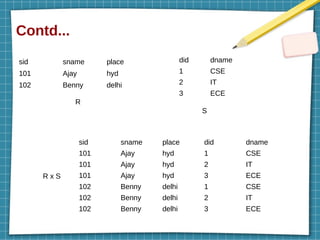
CARTESIAN or CROSS PRODUCT or CROSS JOIN
(R x S) – produces a result by combining every tuple
from one relation(R) with every tuple from the other
relation(S)
Contd...
Contd...
sid sname place
101 Ajay hyd
102 Benny delhi
did dname
1 CSE
2 IT
3 ECE
sid sname place did dname
101 Ajay hyd 1 CSE
101 Ajay hyd 2 IT
101 Ajay hyd 3 ECE
102 Benny delhi 1 CSE
102 Benny delhi 2 IT
102 Benny delhi 3 ECE
R
S
R x S
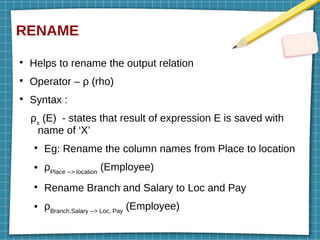
RENAME
●
Helps to rename the output relation
●
Operator – ρ (rho)
●
Syntax :
ρx
(E) - states that result of expression E is saved with
name of ‘X’
●
Eg: Rename the column names from Place to location
● ρPlace --> location
(Employee)
●
Rename Branch and Salary to Loc and Pay
● ρBranch,Salary --> Loc, Pay
(Employee)
Binary Relational Operations
●
Operations that operate on two relations
●
2 operations :
➢
JOIN
➢
DIVISION
JOIN Operation ( )
⋈
●
Used to combine related tuples from 2 relations into a
single longer tuples.
●
Cross product + some condition --> JOIN
●
Variations: 1) Conditional JOIN
2) Equi JOIN
3) Natural JOIN – Left,Right,Full
Contd...
Equi JOIN
●
Combines tuples from different relations based on a
condition (2 attributes of tables shd be equal)
R1 ⋈θ
R2 (where θ – condition)
●
Eg : Select details of working employees
Employee ⋈Employee.Eno=Dep.Eno
Dep
Conditional JOIN
●
Same as Equi JOIN but allows all other operators
also like <, >,≥,≤ etc
Contd...
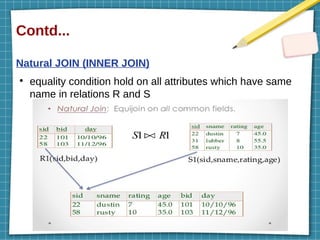
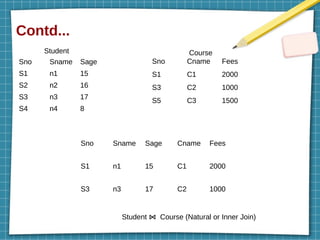
Natural JOIN (INNER JOIN)
●
equality condition hold on all attributes which have same
name in relations R and S
Contd...
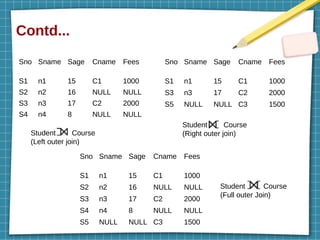
OUTER JOIN
●
This also returns result by combining relations but unlike
INNER JOIN, this operation will return either one result if
the join condition fails
●
Variations :
➢
Left outer join
➢
Right outer join
➢
Full outer join
Contd...
Sno Sname Sage
S1 n1 15
S2 n2 16
S3 n3 17
S4 n4 8
Sno Cname Fees
S1 C1 2000
S3 C2 1000
S5 C3 1500
Student Course
Sno Sname Sage Cname Fees
S1 n1 15 C1 2000
S3 n3 17 C2 1000
Student Course (Natural or Inner Join)
⋈
Contd...
Sno Sname Sage Cname Fees
S1 n1 15 C1 1000
S2 n2 16 NULL NULL
S3 n3 17 C2 2000
S4 n4 8 NULL NULL
Student Course
(Left outer join)
Sno Sname Sage Cname Fees
S1 n1 15 C1 1000
S3 n3 17 C2 2000
S5 NULL NULL C3 1500
Student Course
(Right outer join)
Sno Sname Sage Cname Fees
S1 n1 15 C1 1000
S2 n2 16 NULL NULL
S3 n3 17 C2 2000
S4 n4 8 NULL NULL
S5 NULL NULL C3 1500
Student Course
(Full outer Join)
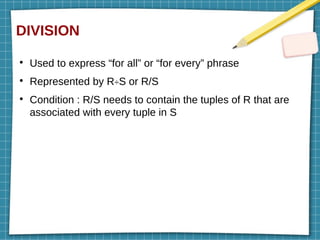
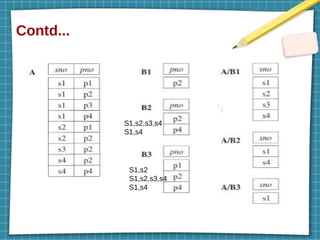
DIVISION
●
Used to express “for all” or “for every” phrase
●
Represented by R÷S or R/S
●
Condition : R/S needs to contain the tuples of R that are
associated with every tuple in S
Contd...
S1,s2,s3,s4
S1,s4
S1,s2
S1,s2,s3,s4
S1,s4
Practice Questions
●
Sailors(sid: integer, sname: string, rating: integer, age:
real)
●
Boats( bid: integer, bname: string, color: string)
●
Reserves (sid: integer, bid: integer, day: date)
sid sname rating age
11 Dustin 7 45
22 Rusty 8 55
33 Yuppy 9 55
44 Lubber 10 50
bid bname color
101 MNO Black
102 ABC White
103 XYZ Blue
sid bid day
22 102 22/11/20
11 101 25/08/19
Practice Questions
●
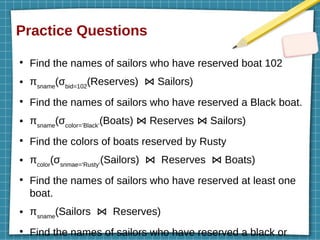
Find the names of sailors who have reserved boat 102
● πsname
(σbid=102
(Reserves) Sailors)
⋈
●
Find the names of sailors who have reserved a Black boat.
● πsname
(σcolor=’Black’
(Boats) Reserves Sailors)
⋈ ⋈
●
Find the colors of boats reserved by Rusty
● πcolor
(σsnmae=’Rusty’
(Sailors) Reserves Boats)
⋈ ⋈
●
Find the names of sailors who have reserved at least one
boat.
● πsname
(Sailors Reserves)
⋈
●
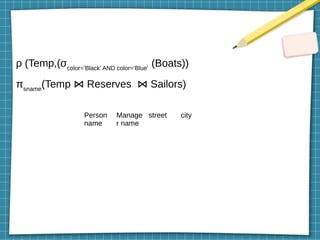
Find the names of sailors who have reserved a black or
ρ (Temp,(σcolor=’Black’ AND color=’Blue’
(Boats))
πsname
(Temp Reserves Sailors)
⋈ ⋈
Person
name
Manage
r name
street city
Relational Calculus
●
Relational calculus is an alternative to relational algebra.
●
Non-procedural query language.
●
Deals with what to do, doesn’t deal with how to do
●
2 types : 1) Tuple relational calculus (TRC) - tuples
2) Domain relational calculus (DRC) - columns
Tuple Relational Calculus (TRC)
●
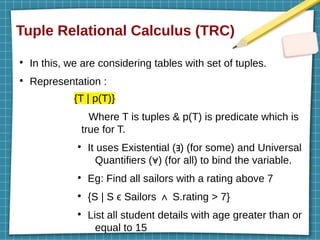
In this, we are considering tables with set of tuples.
●
Representation :
{T | p(T)}
Where T is tuples & p(T) is predicate which is
true for T.
●
It uses Existential ( ) (for some) and Universal
∃
Quantifiers ( ) (for all) to bind the variable.
∀
●
Eg: Find all sailors with a rating above 7
●
{S | S ϵ Sailors S.rating > 7}
∧
●
List all student details with age greater than or
equal to 15
Contd... (Eg.)
●
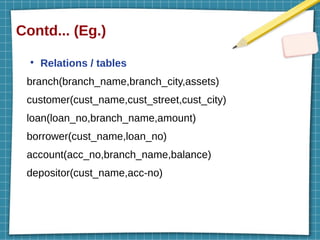
Relations / tables
branch(branch_name,branch_city,assets)
customer(cust_name,cust_street,cust_city)
loan(loan_no,branch_name,amount)
borrower(cust_name,loan_no)
account(acc_no,branch_name,balance)
depositor(cust_name,acc-no)
Contd...
●
Find branch name,loan number and amount for loans over
$1500
●
{t | t ϵ loan / t[amount]>$1500}
●
Find accounts from NY branch
●
{T | T ϵ account / T[branch-name]=’NY’}
●
Find branch details which have more than 1 billion asset
●
{B | B ϵ branch / B.assets> 1billion}
●
Find loan number for each loan of an amount greater than
$1500
●
{ln | ϶ L ϵ loan (ln[loan-no]=L[loan-no] /
L[amount]>$1500)}
Contd...
●
Find the names of all customers who have a loan from the
Pune branch
●
{N | ϶ B ϵ borrower(N[cust-name]=B[cust-name] / ϶ L ϵ
loan(L[loan-no]=B[loan-no] / L[branch-name]=’Pune’))}
●
Find all customers who have a loan, an account or both at
the bank
●
{N | ϶ B ϵ borrower(N[cust-name]=B[cust-name]) V ϶ D ϵ
depositor (N[cust-name]=D[cust-name])}
Domain Relational Calculus (DRC)
●
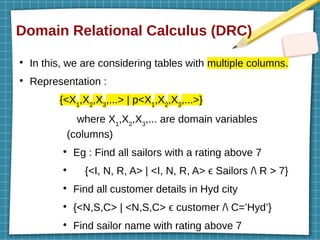
In this, we are considering tables with multiple columns.
●
Representation :
{<X1
,X2
,X3
,...> | p<X1
,X2
,X3
,...>}
where X1
,X2
,X3
,... are domain variables
(columns)
●
Eg : Find all sailors with a rating above 7
●
{<I, N, R, A> | <I, N, R, A> ϵ Sailors / R > 7}
●
Find all customer details in Hyd city
●
{<N,S,C> | <N,S,C> ϵ customer / C=’Hyd’}
●
Find sailor name with rating above 7
Contd...
●
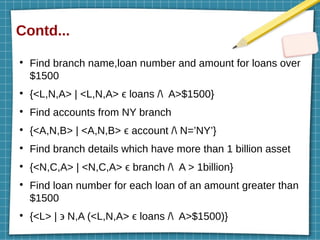
Find branch name,loan number and amount for loans over
$1500
●
{<L,N,A> | <L,N,A> ϵ loans / A>$1500}
●
Find accounts from NY branch
●
{<A,N,B> | <A,N,B> ϵ account / N=’NY’}
●
Find branch details which have more than 1 billion asset
●
{<N,C,A> | <N,C,A> ϵ branch / A > 1billion}
●
Find loan number for each loan of an amount greater than
$1500
●
{<L> | ϶ N,A (<L,N,A> ϵ loans / A>$1500)}
Contd...
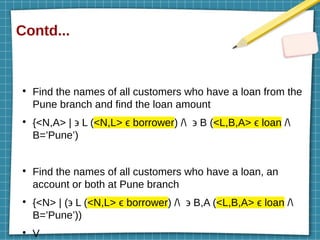
●
Find the names of all customers who have a loan from the
Pune branch and find the loan amount
●
{<N,A> | ϶ L (<N,L> ϵ borrower) / ϶ B (<L,B,A> ϵ loan /
B=’Pune’)
●
Find the names of all customers who have a loan, an
account or both at Pune branch
●
{<N> | (϶ L (<N,L> ϵ borrower) / ϶ B,A (<L,B,A> ϵ loan /
B=’Pune’))
●
V
Thank You

DATA BASE ANAGEMENT SYSTEMS MODULE22.pptx

  • 1.
    MODULE 2 Introduction tothe Relational Model VEERESH KUMAR S Assistant Professor Department of IT SMEC.
  • 2.
    Relational Model VEERESH KUMARS Assistant Professor Department of IT SMEC.
  • 3.
    Introduction ● Relational model –stored data in tabular form ● Relation – table with rows and columns ● A relation consists of a relation schema and a relation instance. ● Relation instance – table ● Relation schema – describes column heads ● Eg of relation schema : Name of relation (name of each field or attribute : domain name) Students(sid:string, Name:string, Age:integer, GPA:real) Employee(Eid:string, Name:String, Address:string,
  • 4.
    Contd... ● Eg of relationinstance ● Students relation sid Name Age GPA 17K81A0501 Harshit 21 7.5 17K81A0502 Shivani 20 9 17K81A0503 Anurag 21 8.5 17K81A0504 Bhaskar 21 8.9 Fields(attributes, columns) Field names Tuples, Rows, records Eid Name Addres s Salary
  • 5.
    Contd... ● Relation schema R(f1 :D1 , ...,fn :Dn ) where f – fields & D – domain ● Domain constraints need to satisfy in a relation schema ● Degree of a relation (Arity) – total number of fields or attributes. - 4 ● Cardinality of a relation – total number of tuples or rows - 4
  • 6.
    Creating and ModifyingRelations Using SQL ● SQL – structured query language ● most widely used language for creating, manipulating, and querying relational DBMSs ● developed in 1986 by the American National Standards Institute (ANSI) and was called SQL-86 ● Categorize SQL commands to 5 ● Data definition language (DDL) ● Data query language (DQL) ● Data Manipulation language (DML) ● Data Control language (DCL)
  • 7.
  • 8.
    CREATE & DROPDATABASE ● CREATE - create a database in our system ● Syntax: ● CREATE DATABASE database_name; ● Eg: ● CREATE DATABASE College; ● Check whether database is created or not by :- ● SHOW DATABASES; ● USE – whenever u need to use any database ● Syntax : USE database_name; ● Eg: USE College;
  • 9.
  • 10.
    CREATE TABLE ● Syntax : ● CREATETABLE table_name(column1 datatype, column2 datatype, ....., columnN datatype); ● Eg: ● CREATE TABLE STUDENTS(sid VARCHAR(20), Name CHAR(25), Age INTEGER, GPA REAL, Login CHAR(20)); sid Name Age GPA Login STUDENTS
  • 11.
    Contd... CREATE TABLE Employee(EidINT, Name VARCHAR(25), Age INT, Address VARCHAR(50), Salary DECIMAL(20,2), DateofJoining DATE); ● Create a table called customers that stores customer ID, customer name, address and product information. Eid Name Age Address Salary DateofJoining
  • 12.
    Contd... ● Department ● Course ● Instructor ● Section Dept_name (string) Building (string) Budget (number) Course_id (string) Title (string) Dept_nam e (string) Credits (number) Instructor_ id (string) Name (string) Dept_nam e(string) Salary (number) Cour se_i d (strin g) Sec_ id (strin g) Sem ester (num ber) Year (num ber) Build ing (Stri ng) Roo m_n umb er(nu mber ) Time _slot (num ber)
  • 13.
    INSERT – insertingdata into a table ● Syntax: ● INSERT INTO table_name(column_name1, column_name2, ..., column_nameN) VALUES (column1_value, column2_value,....); ● Eg: ● INSERT INTO Student(sid, Name, Marks, GPA) VALUES (‘101’, ‘Arun’, 20, 8.5); ● OR ● INSERT INTO Student VALUES (101, ‘Arun’, 20, 8.5); ● INSERT INTO Student(sid, Name, Age, Login) VALUES (101, ‘Arun’, 20, ‘arun20’);
  • 14.
    SELECT ● select – selectdata from database ● Syntax: ● SELECT columnname1, columnname2, .... FROM table_name; ● or ● SELECT * FROM table_name; (to select full data from a table) ● Eg: ● SELECT * FROM STUDENTS; ● SELECT sid,Age FROM STUDENTS;
  • 15.
    DELETE ● Delete data froma table ● Syntax: ● DELETE FROM table_name WHERE(condition) column_name=value; ● Eg: ● DELETE FROM Students WHERE Name=’AAA’;
  • 16.
    UPDATE ● Used to updatethe data of an existing table in database. ● Syntax: ● UPDATE table_name ● SET column1 = value1, column2 = value2,... WHERE condition; ● Eg: ● UPDATE Student ● SET Name = ‘Arun’ ● WHERE Marks=20;
  • 17.
    Contd... ● UPDATE Student ● SET Name= ‘Arun’, Marks=25 ● WHERE GPA=9; ● UPDATE Student ● SET Name = ‘Rahul’; ● UPDATE Student ● SET Marks = Marks+1, GPA = GPA – 1 ● WHERE sid=’19K81A0203’; ● UPDATE Student S ● SET S.Marks = S.Marks+1
  • 18.
    Integrity Constraints OverRelations ● DBMS must prevent the entry of incorrect information. ● An integrity constraint is a condition specified on a database schema and restricts the data that can be stored in an instance of the database. ➢Key constraints ➢Foreign key constraints ➢General constraints
  • 19.
    Key Constraints ● Keys :used to uniquely identify any record or row of data from the table. ➢ Primary key ➢ Candidate key ➢ Foreign key ➢ Super key Primary Key ● used to identify one and only one instance of an entity uniquely ● If an entity contains multiple values which can be uniquely mentioned, anyone can choose as primary key.
  • 20.
  • 21.
    Candidate Key ● It isan attribute or set of an attribute which can uniquely identify a tuple. ● Remaining attributes other than primary key will consider as candidate key. SID Name Dept Address DOB Aadhar No Passpot No GPA Student Candidate key Alternate key – one out of candidate key Eg: Aadhar No or Passport No
  • 22.
    Super Key ● A setof attributes which can uniquely identify a tuple. ● Eg: SID,(SID,Name),(SID,Dept),(Passport No,GPA), (SID, Name, DOB) etc. ● We can create super key by adding zero or more attributes to a candidate key also. ● Set of candidate keys are super keys but not vice versa. ● (Aadhar No, Passport No) – super key & candidate key ● (SID, Name) – super key
  • 23.
    Foreign Key ● Foreign keyis a column that creates a relationship between two tables. ● It references the primary key of other table. SID Name Dept Address DOB Aadhar No Passpot No GPA Dept_ID Student Dept_ID Dept_Name Block Building Dept pk Foreign key pk
  • 24.
    NOT NULL &UNIQUE ● NOT NULL – the column with this constraint will not accept Null values. ● UNIQUE – ensures that all the values in that column are unique. ● Both UNIQUE and Primary key constraints will make sure the uniqueness of column values. ● Its possible to have many UNIQUE constraints in a table but only one Primary key constraint per table.
  • 25.
    Specifying Key Constraintsin SQL ● NOT NULL ● CREATE TABLE Student( sid VARCHAR(20) NOT NULL, Name VARCHAR(30) NOT NULL, Age INT, Dept VARCHAR(20), GPA DECIMAL(5,2) NOT NULL);
  • 26.
    Contd... ● UNIQUE ● CREATE TABLE Student( sidVARCHAR(20) NOT NULL UNIQUE, Name VARCHAR(30) NOT NULL, Age INT, Dept VARCHAR(20), GPA DECIMAL(5,2) NOT NULL, Login VARCHAR(20) UNIQUE); OR
  • 27.
    Contd... CREATE TABLE Student( sidVARCHAR(20) NOT NULL, Name VARCHAR(30) NOT NULL, Age INT, Dept VARCHAR(20), GPA DECIMAL(5,2) NOT NULL, Login VARCHAR(20), UNIQUE(sid,Login)); OR
  • 28.
    Contd... CREATE TABLE Student( sidVARCHAR(20) NOT NULL, Name VARCHAR(30) NOT NULL, Age INT, Dept VARCHAR(20), GPA DECIMAL(5,2) NOT NULL, Login VARCHAR(20), CONSTRAINT Student_key UNIQUE(sid,Login)); Constraint Name
  • 29.
    Contd... ● PRIMARY KEY ● CREATE TABLEStudent( ● sid VARCHAR(20) PRIMARY KEY, ● Name VARCHAR(30) NOT NULL, ● Age INT, ● Dept VARCHAR(20), ● GPA DECIMAL(5,2) NOT NULL, ● Login VARCHAR(20) UNIQUE); OR
  • 30.
    Rough work CREATE TABLEStudent(ID VARCHAR(20) PRIMARY KEY,Name VARCHAR(25),Marks INT); create table Student(ID varchar(20), Name varchar(25),Marks int,PRIMARY KEY(ID)); ● Create table person(CC varchar(10),Phn No varchar(10), Name varchar(20), CONSTRAINT prkey PRIMARY KEY(CC,Phn NO)); ● +91-9989249995 Name of constraint(primary key)
  • 31.
    Contd... CREATE TABLE Student( sidVARCHAR(20) NOT NULL, Name VARCHAR(30) NOT NULL, Age INT, Dept VARCHAR(20), GPA DECIMAL(5,2) NOT NULL, Login VARCHAR(20) UNIQUE, PRIMARY KEY(sid));
  • 32.
    Contd... CREATE TABLE Student( sidVARCHAR(20) NOT NULL, College_code INT NOT NULL, Name VARCHAR(30) NOT NULL, Age INT, Dept VARCHAR(20), GPA DECIMAL(5,2) NOT NULL, Login VARCHAR(20) UNIQUE, CONSTRAINT Pr_K PRIMARY KEY(sid,College_code)); Primary key but the values of primary key is a combination of sid & College_code
  • 33.
    SID Name PlaceDeptID 12345 Arya Hyd 101 78963 Anvar Bang 102 DID DName Building 101 CSE 1 102 ECE 1 103 EEE 3 104 S&H 2 Student Department Create table Department(DID int PRIMARY KEY, DName varchar(10),Building int); Create table Student(SID int PRIMARY KEY, Name varchar(20) not null, Place varchar(20), DeptID int, FOREIGN KEY(DeptID) REFERENCES Department(DID) ON DELETE CASCADE ON UPDATE SET NULL);
  • 34.
    Contd... ● FOREIGN KEY ● CREATE TABLEStudent( ● sid VARCHAR(20) NOT NULL UNIQUE, ● Name VARCHAR(30) NOT NULL, ● Age INT, ● Dept VARCHAR(20), ● GPA DECIMAL(5,2) NOT NULL, ● Login VARCHAR(20) UNIQUE ● Dept_ID VARCHAR(20), ● PRIMARY KEY(sid),
  • 35.
    Contd... CREATE TABLE Student( sidVARCHAR(20) NOT NULL UNIQUE, Name VARCHAR(30) NOT NULL, Age INT, Dept VARCHAR(20), GPA DECIMAL(5,2) NOT NULL, Login VARCHAR(20) UNIQUE Dept_ID VARCHAR(20), PRIMARY KEY(sid), CONSTRAINT Fr_K FOREIGN KEY(Dept_ID) REFERENCES Dept(Dept_ID));
  • 36.
  • 37.
    Enforcing Integrity Constraints ● Ifan insert, delete, or update command causes a violation, it is rejected. ● Ways to handle Foreign key : ➢ ON DELETE ➢ ON UPDATE ● 4 Actions associated with ON DELETE & ON UPDATE ➢ CASCADE – child data is update or delete when the parent data is deleted or updated ➢ NO ACTION – no action is performed with the child data when the parent data is deleted or updated ➢ SET DEFAULT – child data is set to default values when the parent data is deleted or updated
  • 38.
    Contd... CREATE TABLE Enrolled( studidVARCHAR(10), cid VARCHAR(10), grade VARCHAR(20), PRIMARY KEY (cid), FOREIGN KEY(studid) REFERENCES Students(studid) ON DELETE CASCADE ON UPDATE NO ACTION);
  • 39.
    QUERYING RELATIONAL DATA ● Retrievedetails of students who are having marks less than 70 ● select * from table_name where condition; ● Eg: ● select * from Students where Marks<70; ● Retrieve the details of student with department name who is having DID 104 ● Retrieve the birth date and address of the employee(s) whose name is ‘John B Smith’ ● Retrieve the name and address of all employees who work for the ‘Research’ department
  • 40.
    Logical Database Design ● Entitywith simple attributes Customer C_Name Cust_ID C_Address Cust_ID C_Name C_Address Customer Create table Customer(Cust_ID int primary key,C_Name varchar(20),C_Address varchar(20)
  • 41.
    Contd...(composite attributes) Customer C_Name Cust_ID C_Address Cust_IDC_Name Street City State Zip code Customer Street City State Zip code
  • 42.
  • 43.
  • 44.
  • 45.
  • 46.
  • 47.
    Introduction to Views ● Viewsare virtual tables based on a result set of SQL query statement ● A view can contain all rows of a table or select rows from a table ● Syntax: ● CREATE VIEW view_name AS ● SELECT column1, column2..... ● FROM table_name ● WHERE [condition]; ● Eg: ● create view Research_Emp as select * from
  • 48.
    Contd... Retrieve details fromview ● Syntax: ● select * from view_name; or ● select column_name1,col_name2,... from view_name where condition; ● Eg: ● select * from Research_Emp; or
  • 49.
    Contd... Drop a view ● Syntax: ● DROPVIEW view_name; ● Eg: ● drop view Research_Emp;
  • 50.
    Contd... Updating a view ● Syntax: ● CREATEOR REPLACE VIEW view_name AS ● SELECT column1,coulmn2,.. ● FROM table_name ● WHERE condition; ● Eg: ● create or replace view Research_Emp as select Fname,Lname,Bdate,Address from Employee,Department where DNo=DeptNo and Dname=’Research’;
  • 51.
    Contd... Insertion ● Syntax: ● INSERT INTO view_name(column1,column2 , column3,..) ● VALUES(value1, value2, value3..); ● Deletion ● Syntax: ● DELETE FROM view_name ● WHERE condition;
  • 52.
    Destroying & Alteringa table Destroy a table ● Syntax: ● DROP table table_name; ● Eg: ● drop table Student; ● DELETE – delete data based on some condn ● DROP – delete data along with structure of table
  • 53.
    Alter command ● Used toadd, delete or modify columns in an existing table. ● Also able to add and drop various constraints on an existing table. Command to add a new column ● Syntax: ● ALTER TABLE table_name ADD column_name datatype; ● Eg: ● alter table Student add Marks int;
  • 54.
    Contd... Command to dropa column ● Syntax: ● ALTER TABLE table_name DROP column column_name; ● Eg: ● alter table Student drop column Marks;
  • 55.
    Contd... Command to changecolumn name or table name ● Syntax(table): ● ALTER TABLE table_name RENAME TO new_table_name;[rename table old_name to new_name;] ● Eg: ● alter table Student RENAME TO Std; ● Syntax(column): ● ALTER TABLE table_name RENAME COLUMN old_column_name TO new_column_name; ● Eg:
  • 56.
    Contd... Command to changedatatype of a column ● Syntax: ● ALTER TABLE table_name MODIFY COLUMN column_name datatype; ● Eg: ● alter table Student modify column Marks decimal(10,2);
  • 57.
    Contd... Command to addNOT NULL constraint to a column ● Syntax: ● ALTER TABLE table_name MODIFY column_name datatype NOT NULL; ● Eg: ● alter table Student modify column Marks decimal(10,2) NOT NULL;
  • 58.
    Contd... Command to addUNIQUE constraint to a column ● Syntax: ● ALTER TABLE table_name ADD UNIQUE(column_name); ● Eg: ● alter table Student add unique(Marks); ● Command to add PRIMARY KEY constraint to a column ● Syntax: ● ALTER TABLE table_name ADD PRIMARY KEY(column_name);
  • 59.
    Relational Algebra &Relational Calculus ● Formal query languages – relational algebra & calculus ● Practical language – SQL ● SQL is based on the concept from algebra & calculus. ● In DBMS --> what to do? --> data access How to do? --> using some operations ● Relational algebra – explains some mathematical operations to access a data from database
  • 60.
    Contd... Importance ● Provides a formalfoundation for relational model operations. ● Basis for implementing & optimizing queries ● Core operations & functions are based on this. Operations ● 2 groups : ➢ Set operations – UNION, INTERSECTION, SET DIFFERENCE, CARTESIAN (CROSS PRODUCT) etc ➢ Relaional db operations – SELECT, PROJECT, JOIN etc
  • 61.
    Unary Relational Operations ● Operationsthat operate on single relation ● 2 operations : ➢ SELECT ➢ PROJECT SELECT Operation ● Used to choose a subset of tuples(rows) from a relation based on a selection condition. ● Operator used for SELECT operation – σ (sigma) ● Syntax : σ <selection condition> (R)
  • 62.
    Contd... ● R – nameof relation(table) ● <selection condition> is a boolean expression <attribute name><comparison op><constant value> or <attribute name><comparison op><attribute name> ● Comparison operator - {=, <, >, ≤, ≥, ≠} ● Clauses can be connected by standard boolean operators like AND, OR, NOT
  • 63.
    Contd... ● Select details ofemployees from EMPLOYEE relation whose department number is 4 σ Dno=4 (EMPLOYEE) ● Select EMPLOYEE tuples whose salary is greater than 30000 σ Salary>30000 (EMPLOYEE)
  • 64.
    Contd... ● Sailors(sid: integer, sname:string, rating: integer, age: real) ● Boats( bid: integer, bname: string, color: string) ● Reserves (sid: integer, bid: integer, day: date) sid sname rating age 11 Dustin 7 45 22 Rusty 8 55 33 Yuppy 9 55 44 Lubber 10 50 bid bname color 101 MNO Black 102 ABC White 103 XYZ Blue sid bid day 22 102 22/11/20 11 101 25/08/19
  • 65.
    Contd... ● Select sailors withmore than 8 rating σ rating>8 (Sailors) ● Select sailors who either having less than 8 rating and above 30 age, or having more than 9 rating and below 60 age ● σ (rating<8 AND age>30) OR (rating>9 AND age<60) (Sailors) sid sname rating age 33 Yuppy 9 35 44 Lubber 10 50
  • 66.
    Contd... PROJECT Operation ● SELECT –select some rows based on condition and discard others ● PROJECT – select some columns and discard others. ● Operator used to represent PROJECT operation is π (pi) ● Eg: List all employees first and last name πFname,Lname (EMPLOYEE) Select all sailor ids and sailor names π sid, sname (Sailors) ● PROJECT operation eliminates duplication
  • 67.
    Contd... ● select * fromStudent where Dno=5; ● σDno=5 (Student) ● select age,marks from Student; ● πage,marks (Student) ● select sid,name from Student where Dno=5 AND Place=’Hyd’; ● πsid,name (σDno=5 AND Place=’Hyd’ (Student)) ● select sname,rating from Sailors where rating>8; ● πsname,rating (σrating>8 (Sailors))
  • 68.
    SET OPERATIONS ● 4 operations: ➢ UNION (R U S) – result of this operation is a relation that includes all tuples that are either in R or in S or in both(duplicates will eliminate) ➢ INTERSECTION (R ∩ S) – includes all tuples that are in both R and S ➢ SET DIFFERENCE or MINUS (R – S) – includes all tuples that are in R but not in S ➢ A={1,2,3} B={2} A-B = {1,3} B-A = { } ➢ CARTESIAN or CROSS PRODUCT or CROSS JOIN (R x S) – produces a result by combining every tuple from one relation(R) with every tuple from the other relation(S)
  • 69.
  • 70.
    Contd... sid sname place 101Ajay hyd 102 Benny delhi did dname 1 CSE 2 IT 3 ECE sid sname place did dname 101 Ajay hyd 1 CSE 101 Ajay hyd 2 IT 101 Ajay hyd 3 ECE 102 Benny delhi 1 CSE 102 Benny delhi 2 IT 102 Benny delhi 3 ECE R S R x S
  • 71.
    RENAME ● Helps to renamethe output relation ● Operator – ρ (rho) ● Syntax : ρx (E) - states that result of expression E is saved with name of ‘X’ ● Eg: Rename the column names from Place to location ● ρPlace --> location (Employee) ● Rename Branch and Salary to Loc and Pay ● ρBranch,Salary --> Loc, Pay (Employee)
  • 72.
    Binary Relational Operations ● Operationsthat operate on two relations ● 2 operations : ➢ JOIN ➢ DIVISION JOIN Operation ( ) ⋈ ● Used to combine related tuples from 2 relations into a single longer tuples. ● Cross product + some condition --> JOIN ● Variations: 1) Conditional JOIN 2) Equi JOIN 3) Natural JOIN – Left,Right,Full
  • 73.
    Contd... Equi JOIN ● Combines tuplesfrom different relations based on a condition (2 attributes of tables shd be equal) R1 ⋈θ R2 (where θ – condition) ● Eg : Select details of working employees Employee ⋈Employee.Eno=Dep.Eno Dep Conditional JOIN ● Same as Equi JOIN but allows all other operators also like <, >,≥,≤ etc
  • 74.
    Contd... Natural JOIN (INNERJOIN) ● equality condition hold on all attributes which have same name in relations R and S
  • 75.
    Contd... OUTER JOIN ● This alsoreturns result by combining relations but unlike INNER JOIN, this operation will return either one result if the join condition fails ● Variations : ➢ Left outer join ➢ Right outer join ➢ Full outer join
  • 76.
    Contd... Sno Sname Sage S1n1 15 S2 n2 16 S3 n3 17 S4 n4 8 Sno Cname Fees S1 C1 2000 S3 C2 1000 S5 C3 1500 Student Course Sno Sname Sage Cname Fees S1 n1 15 C1 2000 S3 n3 17 C2 1000 Student Course (Natural or Inner Join) ⋈
  • 77.
    Contd... Sno Sname SageCname Fees S1 n1 15 C1 1000 S2 n2 16 NULL NULL S3 n3 17 C2 2000 S4 n4 8 NULL NULL Student Course (Left outer join) Sno Sname Sage Cname Fees S1 n1 15 C1 1000 S3 n3 17 C2 2000 S5 NULL NULL C3 1500 Student Course (Right outer join) Sno Sname Sage Cname Fees S1 n1 15 C1 1000 S2 n2 16 NULL NULL S3 n3 17 C2 2000 S4 n4 8 NULL NULL S5 NULL NULL C3 1500 Student Course (Full outer Join)
  • 78.
    DIVISION ● Used to express“for all” or “for every” phrase ● Represented by R÷S or R/S ● Condition : R/S needs to contain the tuples of R that are associated with every tuple in S
  • 79.
  • 80.
    Practice Questions ● Sailors(sid: integer,sname: string, rating: integer, age: real) ● Boats( bid: integer, bname: string, color: string) ● Reserves (sid: integer, bid: integer, day: date) sid sname rating age 11 Dustin 7 45 22 Rusty 8 55 33 Yuppy 9 55 44 Lubber 10 50 bid bname color 101 MNO Black 102 ABC White 103 XYZ Blue sid bid day 22 102 22/11/20 11 101 25/08/19
  • 81.
    Practice Questions ● Find thenames of sailors who have reserved boat 102 ● πsname (σbid=102 (Reserves) Sailors) ⋈ ● Find the names of sailors who have reserved a Black boat. ● πsname (σcolor=’Black’ (Boats) Reserves Sailors) ⋈ ⋈ ● Find the colors of boats reserved by Rusty ● πcolor (σsnmae=’Rusty’ (Sailors) Reserves Boats) ⋈ ⋈ ● Find the names of sailors who have reserved at least one boat. ● πsname (Sailors Reserves) ⋈ ● Find the names of sailors who have reserved a black or
  • 82.
    ρ (Temp,(σcolor=’Black’ ANDcolor=’Blue’ (Boats)) πsname (Temp Reserves Sailors) ⋈ ⋈ Person name Manage r name street city
  • 83.
    Relational Calculus ● Relational calculusis an alternative to relational algebra. ● Non-procedural query language. ● Deals with what to do, doesn’t deal with how to do ● 2 types : 1) Tuple relational calculus (TRC) - tuples 2) Domain relational calculus (DRC) - columns
  • 84.
    Tuple Relational Calculus(TRC) ● In this, we are considering tables with set of tuples. ● Representation : {T | p(T)} Where T is tuples & p(T) is predicate which is true for T. ● It uses Existential ( ) (for some) and Universal ∃ Quantifiers ( ) (for all) to bind the variable. ∀ ● Eg: Find all sailors with a rating above 7 ● {S | S ϵ Sailors S.rating > 7} ∧ ● List all student details with age greater than or equal to 15
  • 85.
    Contd... (Eg.) ● Relations /tables branch(branch_name,branch_city,assets) customer(cust_name,cust_street,cust_city) loan(loan_no,branch_name,amount) borrower(cust_name,loan_no) account(acc_no,branch_name,balance) depositor(cust_name,acc-no)
  • 86.
    Contd... ● Find branch name,loannumber and amount for loans over $1500 ● {t | t ϵ loan / t[amount]>$1500} ● Find accounts from NY branch ● {T | T ϵ account / T[branch-name]=’NY’} ● Find branch details which have more than 1 billion asset ● {B | B ϵ branch / B.assets> 1billion} ● Find loan number for each loan of an amount greater than $1500 ● {ln | ϶ L ϵ loan (ln[loan-no]=L[loan-no] / L[amount]>$1500)}
  • 87.
    Contd... ● Find the namesof all customers who have a loan from the Pune branch ● {N | ϶ B ϵ borrower(N[cust-name]=B[cust-name] / ϶ L ϵ loan(L[loan-no]=B[loan-no] / L[branch-name]=’Pune’))} ● Find all customers who have a loan, an account or both at the bank ● {N | ϶ B ϵ borrower(N[cust-name]=B[cust-name]) V ϶ D ϵ depositor (N[cust-name]=D[cust-name])}
  • 88.
    Domain Relational Calculus(DRC) ● In this, we are considering tables with multiple columns. ● Representation : {<X1 ,X2 ,X3 ,...> | p<X1 ,X2 ,X3 ,...>} where X1 ,X2 ,X3 ,... are domain variables (columns) ● Eg : Find all sailors with a rating above 7 ● {<I, N, R, A> | <I, N, R, A> ϵ Sailors / R > 7} ● Find all customer details in Hyd city ● {<N,S,C> | <N,S,C> ϵ customer / C=’Hyd’} ● Find sailor name with rating above 7
  • 89.
    Contd... ● Find branch name,loannumber and amount for loans over $1500 ● {<L,N,A> | <L,N,A> ϵ loans / A>$1500} ● Find accounts from NY branch ● {<A,N,B> | <A,N,B> ϵ account / N=’NY’} ● Find branch details which have more than 1 billion asset ● {<N,C,A> | <N,C,A> ϵ branch / A > 1billion} ● Find loan number for each loan of an amount greater than $1500 ● {<L> | ϶ N,A (<L,N,A> ϵ loans / A>$1500)}
  • 90.
    Contd... ● Find the namesof all customers who have a loan from the Pune branch and find the loan amount ● {<N,A> | ϶ L (<N,L> ϵ borrower) / ϶ B (<L,B,A> ϵ loan / B=’Pune’) ● Find the names of all customers who have a loan, an account or both at Pune branch ● {<N> | (϶ L (<N,L> ϵ borrower) / ϶ B,A (<L,B,A> ϵ loan / B=’Pune’)) ● V
  • 91.