CIS-166 Final
 Open book, open notes, open computer
 100 points
 True/false, multiple choice, fill-in, short
  answer
 Emphasis on material since midterm
Arrays
 List or series of values all referenced by
  the same name
 Use an array to keep a series of variables
  for later processing such as
    ◦ Reordering
    ◦ Calculating
    ◦ Printing
Array Terms
   Element
    ◦ Individual item in the array
   Index (or subscript)
    ◦ Zero based number used to reference
      the specific elements in the array
    ◦ Must be an integer
   Boundaries
    ◦ Lower Subscript, 0 by default
    ◦ Upper Subscript
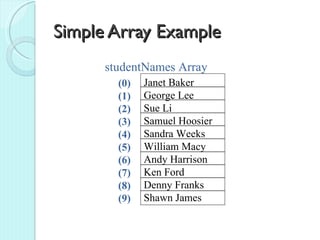
Simple Array Example
      studentNames Array
        (0)   Janet Baker
        (1)   George Lee
        (2)   Sue Li
        (3)   Samuel Hoosier
        (4)   Sandra Weeks
        (5)   William Macy
        (6)   Andy Harrison
        (7)   Ken Ford
        (8)   Denny Franks
        (9)   Shawn James
Dim Statement for Arrays
Default Values

string[] strName = string[4]
 Results in an array of 4 elements:
     strName(0), strName(1),
     strName(2), strName(3)


decimal[] decBalance= new
 decimal[100]
 Results in an array of 100 elements:
     decBalance(0), . . . , decBalance(99)
Dim Statement for Arrays
Assigned Values

string[] departments = {"ACT", "MKT", "HR"}
  Results in an array with 3 elements, each with a value,
  departments[0] is “ACT”
Integer[] intActCode = {10, 20, 30, 40}
  Results in an array with 4 elements, each with a number
  stored
Referencing Array Elements
   Use the Index(es) of the Element

       strName(row)
    (0) Sam Smith     strName[0] : "Sam Smith"
    (1) Jill Creech   strName[1] : "Jill Creech"
    (2) Paul Fry      strName[2] : "Paul Fry"
    (3) Rich Wells    strName[3] : "Rich Wells"
Working with Arrays
   Use Loops to reference each element in
    the array
    ◦ For / Next
    ◦ For Each / Next
For Next Loop
Assume strNames[10] already declared

integer intCounter, intEnd
intEnd = strNames.GetUpperBound(0)
For (intCounter = 0; intcounter<=intEnd;
  intCounter++)
   {Console.Writeline(strNames[intCounter])}
For Each Loop
Assume strNames[10] already declared

foreach (string Item in strNames)
  {Console.Writeline(Item)]
Object Terminology Review
   Object - like a noun, a thing
    ◦ An object is based on a class
 Properties - like an adjective,
  characteristics of object
 Methods - like a verb, an action or
  behavior, something the object can do
 Events - object response to user
  action or other events
Polymorphism
   Overloading: Argument type determines
    which version of a method is used
    ◦ Example: MessageBox.Show method
   Overriding: Refers to a class that has the
    same method name as its base class
    ◦ Method in subclass takes precedence
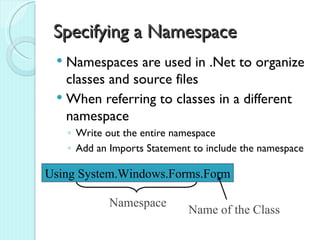
Specifying a Namespace
  Namespaces are used in .Net to organize
   classes and source files
  When referring to classes in a different
   namespace
     ◦ Write out the entire namespace
     ◦ Add an Imports Statement to include the namespace

Using System.Windows.Forms.Form

              Namespace
                               Name of the Class
Instance versus Static Variables
 Instance variables or properties use a
  separate memory location for each
  instance of the object
 Static variables or properties use a single
  memory location that is available for ALL
  objects of a class
    ◦ Can be accessed without instantiating an
      object of the class
    ◦ Use the Static keyword to create
                         Static Methods can also be created
Constructors and Destructors
   Constructor: Method that
    automatically executes when an object
    is instantiated
    ◦ Create by writing a procedure using the
      Class Name, followed by any arguments
   Destructor: Method that
    automatically executes when an object
    is destroyed
    ◦ Microsoft discourages use of in .Net
Collections
   Group of objects
    ◦ Can be strongly typed: all objects based on
      the same class
   Similar to an array
    ◦ Collection expands and contracts
      automatically
   Have common properties and methods
    ◦ Add, Remove, Count, Item (Indexer)
Item Property
   Typically default property for a collection
    ◦ Refer to collection object, followed by
      location (in [])
   Returns a member of the group
    ◦ Typically based on location, but can use other
      values
    ◦ Data type depends on the type of objects the
      collection manages
Text Data Files
 Actual data stored in files on disk
  device
 File: Entire collection of data
 Records: Rows or lines, one per
  entity
 Fields: Data elements (values) within a
  row
Text File Handling

 A Stream is designed to transfer a
  series
  of bytes from one location to another
 Streams are objects that have
  properties and methods
 Found in the System.IO namespace
 File handling projects usually contain
  an Imports statement before the
  statement declaring the form's class
Writing Data Files
 Declare a new StreamWriter object
 Use StreamWriter's WriteLine
  method
 Call StreamWriter's Close method
Write and WriteLine Methods
 Write Method: Places items consecutively
  in the file with no separator
 WriteLine Method: Places an Enter
  (carriage return) between records
Reading Files
   Declare a new StreamReader object
    ◦ File must exist!
   Use StreamReader's ReadLine method
    ◦ Loop to retrieve multiple records
   Call StreamReader's Close method
ReadLine Method
 Use to read previously saved data
 Each time it executes, it reads the next
  line of data
 Always assign the value from the read
  to a location, such as a label, text box,
  or string variable
Checking for End of File
 Use StreamReader's Peek Method
 Peek looks at the next element without
  actually reading it
 If you Peek beyond the last element the
  value returned is -1

Cis166 Final Review C#

  • 1.
    CIS-166 Final  Openbook, open notes, open computer  100 points  True/false, multiple choice, fill-in, short answer  Emphasis on material since midterm
  • 2.
    Arrays  List orseries of values all referenced by the same name  Use an array to keep a series of variables for later processing such as ◦ Reordering ◦ Calculating ◦ Printing
  • 3.
    Array Terms  Element ◦ Individual item in the array  Index (or subscript) ◦ Zero based number used to reference the specific elements in the array ◦ Must be an integer  Boundaries ◦ Lower Subscript, 0 by default ◦ Upper Subscript
  • 4.
    Simple Array Example studentNames Array (0) Janet Baker (1) George Lee (2) Sue Li (3) Samuel Hoosier (4) Sandra Weeks (5) William Macy (6) Andy Harrison (7) Ken Ford (8) Denny Franks (9) Shawn James
  • 5.
    Dim Statement forArrays Default Values string[] strName = string[4] Results in an array of 4 elements: strName(0), strName(1), strName(2), strName(3) decimal[] decBalance= new decimal[100] Results in an array of 100 elements: decBalance(0), . . . , decBalance(99)
  • 6.
    Dim Statement forArrays Assigned Values string[] departments = {"ACT", "MKT", "HR"} Results in an array with 3 elements, each with a value, departments[0] is “ACT” Integer[] intActCode = {10, 20, 30, 40} Results in an array with 4 elements, each with a number stored
  • 7.
    Referencing Array Elements  Use the Index(es) of the Element strName(row) (0) Sam Smith strName[0] : "Sam Smith" (1) Jill Creech strName[1] : "Jill Creech" (2) Paul Fry strName[2] : "Paul Fry" (3) Rich Wells strName[3] : "Rich Wells"
  • 8.
    Working with Arrays  Use Loops to reference each element in the array ◦ For / Next ◦ For Each / Next
  • 9.
    For Next Loop AssumestrNames[10] already declared integer intCounter, intEnd intEnd = strNames.GetUpperBound(0) For (intCounter = 0; intcounter<=intEnd; intCounter++) {Console.Writeline(strNames[intCounter])}
  • 10.
    For Each Loop AssumestrNames[10] already declared foreach (string Item in strNames) {Console.Writeline(Item)]
  • 11.
    Object Terminology Review  Object - like a noun, a thing ◦ An object is based on a class  Properties - like an adjective, characteristics of object  Methods - like a verb, an action or behavior, something the object can do  Events - object response to user action or other events
  • 12.
    Polymorphism  Overloading: Argument type determines which version of a method is used ◦ Example: MessageBox.Show method  Overriding: Refers to a class that has the same method name as its base class ◦ Method in subclass takes precedence
  • 13.
    Specifying a Namespace  Namespaces are used in .Net to organize classes and source files  When referring to classes in a different namespace ◦ Write out the entire namespace ◦ Add an Imports Statement to include the namespace Using System.Windows.Forms.Form Namespace Name of the Class
  • 14.
    Instance versus StaticVariables  Instance variables or properties use a separate memory location for each instance of the object  Static variables or properties use a single memory location that is available for ALL objects of a class ◦ Can be accessed without instantiating an object of the class ◦ Use the Static keyword to create Static Methods can also be created
  • 15.
    Constructors and Destructors  Constructor: Method that automatically executes when an object is instantiated ◦ Create by writing a procedure using the Class Name, followed by any arguments  Destructor: Method that automatically executes when an object is destroyed ◦ Microsoft discourages use of in .Net
  • 16.
    Collections  Group of objects ◦ Can be strongly typed: all objects based on the same class  Similar to an array ◦ Collection expands and contracts automatically  Have common properties and methods ◦ Add, Remove, Count, Item (Indexer)
  • 17.
    Item Property  Typically default property for a collection ◦ Refer to collection object, followed by location (in [])  Returns a member of the group ◦ Typically based on location, but can use other values ◦ Data type depends on the type of objects the collection manages
  • 18.
    Text Data Files Actual data stored in files on disk device  File: Entire collection of data  Records: Rows or lines, one per entity  Fields: Data elements (values) within a row
  • 19.
    Text File Handling A Stream is designed to transfer a series of bytes from one location to another  Streams are objects that have properties and methods  Found in the System.IO namespace  File handling projects usually contain an Imports statement before the statement declaring the form's class
  • 20.
    Writing Data Files Declare a new StreamWriter object  Use StreamWriter's WriteLine method  Call StreamWriter's Close method
  • 21.
    Write and WriteLineMethods  Write Method: Places items consecutively in the file with no separator  WriteLine Method: Places an Enter (carriage return) between records
  • 22.
    Reading Files  Declare a new StreamReader object ◦ File must exist!  Use StreamReader's ReadLine method ◦ Loop to retrieve multiple records  Call StreamReader's Close method
  • 23.
    ReadLine Method  Useto read previously saved data  Each time it executes, it reads the next line of data  Always assign the value from the read to a location, such as a label, text box, or string variable
  • 24.
    Checking for Endof File  Use StreamReader's Peek Method  Peek looks at the next element without actually reading it  If you Peek beyond the last element the value returned is -1