DML & DCL command
Submitted by –
Pragya Singh
Class – BSc I.T. 4th semester
Content -
SQL
Introduction of DML and DCL
Statement of DML and DCL
Multiple type question
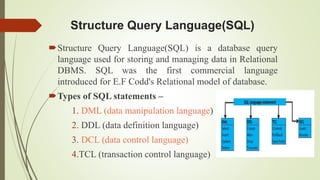
Structure Query Language(SQL)
Structure Query Language(SQL) is a database query
language used for storing and managing data in Relational
DBMS. SQL was the first commercial language
introduced for E.F Codd's Relational model of database.
Types of SQL statements –
1. DML (data manipulation language)
2. DDL (data definition language)
3. DCL (data control language)
4.TCL (transaction control language)
Introduction of DML
DML is short name of Data Manipulation Language which
deals with data manipulation and includes most common
SQL statements such SELECT, INSERT, UPDATE,
DELETE, etc., and it is used to store, modify, retrieve,
delete and update data in a database.
SELECT - retrieve data from a database
INSERT - insert data into a table
UPDATE - updates existing data within a table
DELETE - Delete all records from a database table
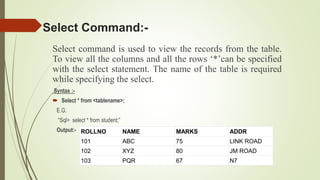
Select command is used to view the records from the table.
To view all the columns and all the rows ‘*’can be specified
with the select statement. The name of the table is required
while specifying the select.
Syntax :-
 Select * from <tablename>;
E.G.
“Sql> select * from student;”
Output:-
Select Command:-
ROLLNO NAME MARKS ADDR
101 ABC 75 LINK ROAD
102 XYZ 80 JM ROAD
103 PQR 67 N7
Cont…
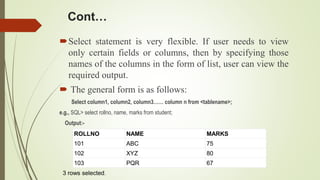
Select statement is very flexible. If user needs to view
only certain fields or columns, then by specifying those
names of the columns in the form of list, user can view the
required output.
 The general form is as follows:
Select column1, column2, column3…… column n from <tablename>;
e.g., SQL> select rollno, name, marks from student;
Output:-
ROLLNO NAME MARKS
101 ABC 75
102 XYZ 80
103 PQR 67
3 rows selected.
Cont…
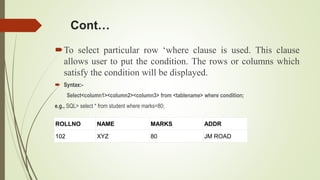
To select particular row ‘where clause is used. This clause
allows user to put the condition. The rows or columns which
satisfy the condition will be displayed.
 Syntax:-
Select<column1><column2><column3> from <tablename> where condition;
e.g., SQL> select * from student where marks=80;
ROLLNO NAME MARKS ADDR
102 XYZ 80 JM ROAD
Insert Command:-
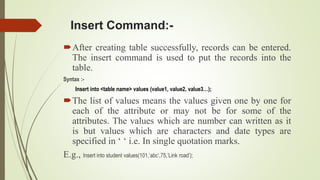
After creating table successfully, records can be entered.
The insert command is used to put the records into the
table.
Syntax :-
Insert into <table name> values (value1, value2, value3…);
The list of values means the values given one by one for
each of the attribute or may not be for some of the
attributes. The values which are number can written as it
is but values which are characters and date types are
specified in ‘ ‘ i.e. In single quotation marks.
E.g., Insert into student values(101,’abc’,75,’Link road’);
Cont…
The above statement allows user to enter one by one record by
putting the values along with insert command. To enter
multiple values continuously one by one we can specify the
general command which can be afterwards run by giving the ‘ /
‘.
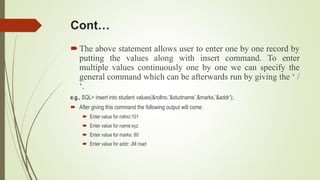
e.g., SQL> insert into student values(&rollno,’&studname’,&marks,’&addr’);
 After giving this command the following output will come:
 Enter value for rollno:101
 Enter value for name:xyz
 Enter value for marks: 80
 Enter value for addr: JM road
Cont…
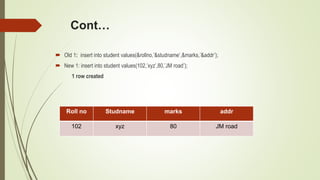
 Old 1: insert into student values(&rollno,’&studname’,&marks,’&addr’);
 New 1: insert into student values(102,’xyz’,80,’JM road’);
1 row created
Roll no Studname marks addr
102 xyz 80 JM road
Update Command:-
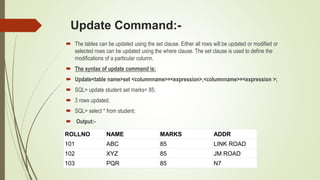
 The tables can be updated using the set clause. Either all rows will be updated or modified or
selected rows can be updated using the where clause. The set clause is used to define the
modifications of a particular column.
 The syntax of update command is:
 Update<table name>set <columnname>=<expression>,<columnname>=<expression >;
 SQL> update student set marks= 85;
 3 rows updated.
 SQL> select * from student;
 Output:-
ROLLNO NAME MARKS ADDR
101 ABC 85 LINK ROAD
102 XYZ 85 JM ROAD
103 PQR 85 N7
Cont…
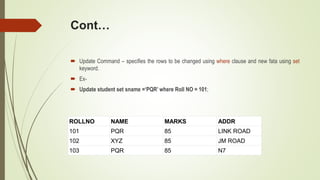
 Update Command – specifies the rows to be changed using where clause and new fata using set
keyword.
 Ex-
 Update student set sname =‘PQR’ where Roll NO = 101;
ROLLNO NAME MARKS ADDR
101 PQR 85 LINK ROAD
102 XYZ 85 JM ROAD
103 PQR 85 N7
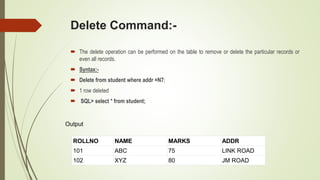
Delete Command:-
 The delete operation can be performed on the table to remove or delete the particular records or
even all records.
 Syntax:-
 Delete from student where addr =N7;
 1 row deleted
 SQL> select * from student;
ROLLNO NAME MARKS ADDR
101 ABC 75 LINK ROAD
102 XYZ 80 JM ROAD
Output
Cont…
 To delete all records from the table the following command is used.
 SQL> delete from student;
 3 rows deleted.
Introduction to DCL
DCL stands for Data Control Language.
DCL is used to control user access in a database.
This command is related to the security issues.
Using DCL command, it allows or restricts the user from
accessing data in database schema.
DCL commands are as follows,
1. GRANT
2. REVOKE
It is used to grant or revoke access permissions from any
database user.
Grant command
GRANT command gives user's access privileges to the
database.
This command allows specified users to perform specific
tasks.
 Syntax:
GRANT <privilege list>
ON <relation name or view name>
TO <user/role list>;
Example : GRANT Command
 GRANT ALL ON employee
TO ABC;
[WITH GRANT OPTION]
 In the above example, user 'ABC' has been given permission to view and modify the records in the
'employee' table.
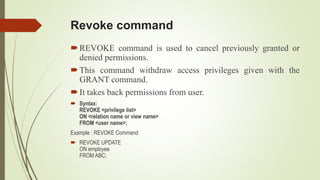
Revoke command
REVOKE command is used to cancel previously granted or
denied permissions.
This command withdraw access privileges given with the
GRANT command.
It takes back permissions from user.
 Syntax:
REVOKE <privilege list>
ON <relation name or view name>
FROM <user name>;
Example : REVOKE Command
 REVOKE UPDATE
ON employee
FROM ABC;
MCQ
1.The language used application programs to request data from the DBMS is referred to as __________
a) DML
b) DDL
c) Query language
d) All of the Mentioned
 Answer:a
Explanation: Data Manipulation Language (DML) statements are used for managing data in
database. DML commands are not auto-committed. It means changes made by DML command are
not permanent to database, it can be rolled back.
2. Which of the following keyword is used with Data Control Language (DCL) statements?
a) SELECT
b) INSERT
c) DELETE
d) GRANT
 Answer:d
Explanation: GRANT is the keyword which is used with Data Control Language statements
Cont…
3.Which of the following keyword is used with Data Control Language (DCL) statements?
a) SELECT
b) INSERT
c) DELETE
d) GRANT
 Answer:d
Explanation: GRANT is the keyword which is used with Data Control Language statements.
4. Which of the following is not included in DML (Data Manipulation Language)
a) INSERT
b) UPDATE
c) DELETE
d) CREATE
 Answer:d
Explanation: The CREATE TABLE statement is used to create a table in a database. Tables are
organized into rows and columns; and each table must have a name.
References
 Fundamental of Database System
Elmasri . Navathe
 Database System Concept
Henry F.koth
https://www.geeksforgeeks.org/sql-ddl-dml-dcl-tcl-commands/ on 28th March 2019
https://www.w3schools.in/mysql/ddl-dml-dcl/ on 28th March 2019
SQL commands

SQL commands

  • 1.
    DML & DCLcommand Submitted by – Pragya Singh Class – BSc I.T. 4th semester
  • 2.
    Content - SQL Introduction ofDML and DCL Statement of DML and DCL Multiple type question
  • 3.
    Structure Query Language(SQL) StructureQuery Language(SQL) is a database query language used for storing and managing data in Relational DBMS. SQL was the first commercial language introduced for E.F Codd's Relational model of database. Types of SQL statements – 1. DML (data manipulation language) 2. DDL (data definition language) 3. DCL (data control language) 4.TCL (transaction control language)
  • 4.
    Introduction of DML DMLis short name of Data Manipulation Language which deals with data manipulation and includes most common SQL statements such SELECT, INSERT, UPDATE, DELETE, etc., and it is used to store, modify, retrieve, delete and update data in a database. SELECT - retrieve data from a database INSERT - insert data into a table UPDATE - updates existing data within a table DELETE - Delete all records from a database table
  • 5.
    Select command isused to view the records from the table. To view all the columns and all the rows ‘*’can be specified with the select statement. The name of the table is required while specifying the select. Syntax :-  Select * from <tablename>; E.G. “Sql> select * from student;” Output:- Select Command:- ROLLNO NAME MARKS ADDR 101 ABC 75 LINK ROAD 102 XYZ 80 JM ROAD 103 PQR 67 N7
  • 6.
    Cont… Select statement isvery flexible. If user needs to view only certain fields or columns, then by specifying those names of the columns in the form of list, user can view the required output.  The general form is as follows: Select column1, column2, column3…… column n from <tablename>; e.g., SQL> select rollno, name, marks from student; Output:- ROLLNO NAME MARKS 101 ABC 75 102 XYZ 80 103 PQR 67 3 rows selected.
  • 7.
    Cont… To select particularrow ‘where clause is used. This clause allows user to put the condition. The rows or columns which satisfy the condition will be displayed.  Syntax:- Select<column1><column2><column3> from <tablename> where condition; e.g., SQL> select * from student where marks=80; ROLLNO NAME MARKS ADDR 102 XYZ 80 JM ROAD
  • 8.
    Insert Command:- After creatingtable successfully, records can be entered. The insert command is used to put the records into the table. Syntax :- Insert into <table name> values (value1, value2, value3…); The list of values means the values given one by one for each of the attribute or may not be for some of the attributes. The values which are number can written as it is but values which are characters and date types are specified in ‘ ‘ i.e. In single quotation marks. E.g., Insert into student values(101,’abc’,75,’Link road’);
  • 9.
    Cont… The above statementallows user to enter one by one record by putting the values along with insert command. To enter multiple values continuously one by one we can specify the general command which can be afterwards run by giving the ‘ / ‘. e.g., SQL> insert into student values(&rollno,’&studname’,&marks,’&addr’);  After giving this command the following output will come:  Enter value for rollno:101  Enter value for name:xyz  Enter value for marks: 80  Enter value for addr: JM road
  • 10.
    Cont…  Old 1:insert into student values(&rollno,’&studname’,&marks,’&addr’);  New 1: insert into student values(102,’xyz’,80,’JM road’); 1 row created Roll no Studname marks addr 102 xyz 80 JM road
  • 11.
    Update Command:-  Thetables can be updated using the set clause. Either all rows will be updated or modified or selected rows can be updated using the where clause. The set clause is used to define the modifications of a particular column.  The syntax of update command is:  Update<table name>set <columnname>=<expression>,<columnname>=<expression >;  SQL> update student set marks= 85;  3 rows updated.  SQL> select * from student;  Output:- ROLLNO NAME MARKS ADDR 101 ABC 85 LINK ROAD 102 XYZ 85 JM ROAD 103 PQR 85 N7
  • 12.
    Cont…  Update Command– specifies the rows to be changed using where clause and new fata using set keyword.  Ex-  Update student set sname =‘PQR’ where Roll NO = 101; ROLLNO NAME MARKS ADDR 101 PQR 85 LINK ROAD 102 XYZ 85 JM ROAD 103 PQR 85 N7
  • 13.
    Delete Command:-  Thedelete operation can be performed on the table to remove or delete the particular records or even all records.  Syntax:-  Delete from student where addr =N7;  1 row deleted  SQL> select * from student; ROLLNO NAME MARKS ADDR 101 ABC 75 LINK ROAD 102 XYZ 80 JM ROAD Output
  • 14.
    Cont…  To deleteall records from the table the following command is used.  SQL> delete from student;  3 rows deleted.
  • 15.
    Introduction to DCL DCLstands for Data Control Language. DCL is used to control user access in a database. This command is related to the security issues. Using DCL command, it allows or restricts the user from accessing data in database schema. DCL commands are as follows, 1. GRANT 2. REVOKE It is used to grant or revoke access permissions from any database user.
  • 16.
    Grant command GRANT commandgives user's access privileges to the database. This command allows specified users to perform specific tasks.  Syntax: GRANT <privilege list> ON <relation name or view name> TO <user/role list>; Example : GRANT Command  GRANT ALL ON employee TO ABC; [WITH GRANT OPTION]  In the above example, user 'ABC' has been given permission to view and modify the records in the 'employee' table.
  • 17.
    Revoke command REVOKE commandis used to cancel previously granted or denied permissions. This command withdraw access privileges given with the GRANT command. It takes back permissions from user.  Syntax: REVOKE <privilege list> ON <relation name or view name> FROM <user name>; Example : REVOKE Command  REVOKE UPDATE ON employee FROM ABC;
  • 18.
    MCQ 1.The language usedapplication programs to request data from the DBMS is referred to as __________ a) DML b) DDL c) Query language d) All of the Mentioned  Answer:a Explanation: Data Manipulation Language (DML) statements are used for managing data in database. DML commands are not auto-committed. It means changes made by DML command are not permanent to database, it can be rolled back. 2. Which of the following keyword is used with Data Control Language (DCL) statements? a) SELECT b) INSERT c) DELETE d) GRANT  Answer:d Explanation: GRANT is the keyword which is used with Data Control Language statements
  • 19.
    Cont… 3.Which of thefollowing keyword is used with Data Control Language (DCL) statements? a) SELECT b) INSERT c) DELETE d) GRANT  Answer:d Explanation: GRANT is the keyword which is used with Data Control Language statements. 4. Which of the following is not included in DML (Data Manipulation Language) a) INSERT b) UPDATE c) DELETE d) CREATE  Answer:d Explanation: The CREATE TABLE statement is used to create a table in a database. Tables are organized into rows and columns; and each table must have a name.
  • 20.
    References  Fundamental ofDatabase System Elmasri . Navathe  Database System Concept Henry F.koth https://www.geeksforgeeks.org/sql-ddl-dml-dcl-tcl-commands/ on 28th March 2019 https://www.w3schools.in/mysql/ddl-dml-dcl/ on 28th March 2019