Prof. Neeraj Bhargava
Pooja Dixit
Department of Computer Science
School of Engineering & System Science
MDS, University Ajmer, Rajasthan, India
 Database trigger – a stored PL/SQL program unit that is
associated with a specific database table, or with certain view
types – can also be associated with a system event such as
database startup.
 Triggers execute (fire) automatically for specified SQL DML
operations – INSERT, UPDATE, or DELETE affecting one or more
rows of a table.
 Database triggers can be used to perform any of the following
tasks:
◦ Audit data modification.
◦ Log events transparently.
◦ Enforce complex business rules.
◦ Derive column values automatically.
◦ Implement complex security authorizations.
◦ Maintain replicate tables.
◦ Publish information about events for a publish-subscribe
environment such as that associated with web programming.
 Triggers:
◦ are named PL/SQL blocks with declarative, executable, and
exception handling sections.
◦ are stand-alone database objects – they are not stored as part of a
package and cannot be local to a block.
◦ do not accept arguments.
 To create/test a trigger, you (not the system user of
the trigger) must have appropriate access to all
objects referenced by a trigger action.
 Example: To create a BEFORE INSERT trigger for the
employee table requires you to have INSERT ROW
privileges for the table.
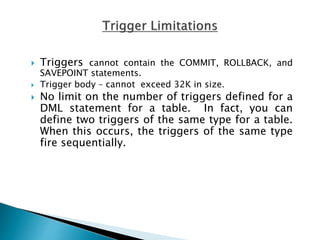
 Triggers cannot contain the COMMIT, ROLLBACK, and
SAVEPOINT statements.
 Trigger body – cannot exceed 32K in size.
 No limit on the number of triggers defined for a
DML statement for a table. In fact, you can
define two triggers of the same type for a table.
When this occurs, the triggers of the same type
fire sequentially.
 Triggers:
◦ are named PL/SQL blocks with declarative, executable, and
exception handling sections.
◦ are stand-alone database objects – they are not stored as part of a
package and cannot be local to a block.
◦ do not accept arguments.
 To create/test a trigger, you (not the system user of
the trigger) must have appropriate access to all
objects referenced by a trigger action.
 Example: To create a BEFORE INSERT trigger for the
employee table requires you to have INSERT ROW
privileges for the table.
 Triggers cannot contain the COMMIT, ROLLBACK, and
SAVEPOINT statements.
 Trigger body – cannot exceed 32K in size.
 No limit on the number of triggers defined for a
DML statement for a table. In fact, you can
define two triggers of the same type for a table.
When this occurs, the triggers of the same type
fire sequentially.
CREATE [OR REPLACE] TRIGGER trigger_name
{BEFORE|AFTER|INSTEAD OF} triggering_event
[referencing_clause] ON {table_name | view_name}
[WHEN condition] [FOR EACH ROW]
DECLARE
Declaration statements
[BEGIN
Executable statements
EXCEPTION
Exception-handling statements]
END;
 The trigger body must have at least the
executable section.
 The declarative and exception handling sections
are optional.
 When there is a declarative section, the trigger
body must start with the DECLARE keyword.
 The WHEN clause specifies the condition under
which a trigger should fire.
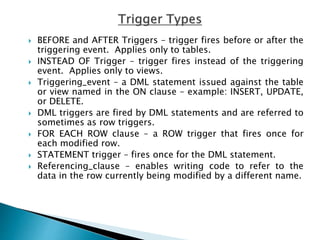
 BEFORE and AFTER Triggers – trigger fires before or after the
triggering event. Applies only to tables.
 INSTEAD OF Trigger – trigger fires instead of the triggering
event. Applies only to views.
 Triggering_event – a DML statement issued against the table
or view named in the ON clause – example: INSERT, UPDATE,
or DELETE.
 DML triggers are fired by DML statements and are referred to
sometimes as row triggers.
 FOR EACH ROW clause – a ROW trigger that fires once for
each modified row.
 STATEMENT trigger – fires once for the DML statement.
 Referencing_clause – enables writing code to refer to the
data in the row currently being modified by a different name.
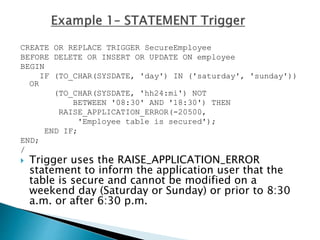
CREATE OR REPLACE TRIGGER SecureEmployee
BEFORE DELETE OR INSERT OR UPDATE ON employee
BEGIN
IF (TO_CHAR(SYSDATE, 'day') IN ('saturday', 'sunday'))
OR
(TO_CHAR(SYSDATE, 'hh24:mi') NOT
BETWEEN '08:30' AND '18:30') THEN
RAISE_APPLICATION_ERROR(-20500,
'Employee table is secured');
END IF;
END;
/
 Trigger uses the RAISE_APPLICATION_ERROR
statement to inform the application user that the
table is secure and cannot be modified on a
weekend day (Saturday or Sunday) or prior to 8:30
a.m. or after 6:30 p.m.
SQL> UPDATE Employee SET Salary = 10
WHERE EmployeeID = '01885';
UPDATE Employee SET Salary = 10 WHERE EmployeeID
= '01885'
*
ERROR at line 1:
ORA-20500: table is secured
ORA-06512: at "DBOCK.SECUREEMPLOYEE", line 4
ORA-04088: error during execution of trigger
'DBOCK.SECUREEMPLOYEE'
 Access data on the row currently being
processed by using two correlation identifiers
named :old and :new. These are special Oracle
bind variables.
 The PL/SQL compiler treats the :old and :new
records as records of type
trigger_Table_Name%ROWTYPE.
 To reference a column in the triggering table,
use the notation shown here where the
ColumnName value is a valid column in the
triggering table.
:new.ColumnName
:old.ColumnName
DML Statement :old :new
INSERT Undefined – all column
values are NULL as
there is no “old” version
of the data row being
inserted.
Stores the values that
will be inserted into the
new row for the table.
UPDATE Stores the original
values for the row being
updated before the
update takes place.
Stores the new values
for the row – values the
row will contain after
the update takes place.
DELETE Stores the original
values for the row being
deleted before the
deletion takes place.
Undefined – all column
values are NULL as
there will not be a
“new” version of the
row being deleted.
 Triggers can automate the creation of an audit log
when a table is modified.
 Create an Equipment_Audit table to store audit log
records.
CREATE TABLE Equipment_Audit (
Action VARCHAR2(10),
ActionDate DATE DEFAULT SYSDATE,
EquipmentNumber CHAR(4),
Description VARCHAR2(25),
OriginalCost NUMBER(7,2),
QuantityAvailable NUMBER(4),
ProjectNumber NUMBER(4));
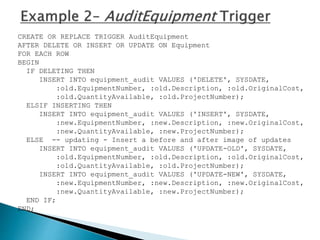
CREATE OR REPLACE TRIGGER AuditEquipment
AFTER DELETE OR INSERT OR UPDATE ON Equipment
FOR EACH ROW
BEGIN
IF DELETING THEN
INSERT INTO equipment_audit VALUES ('DELETE', SYSDATE,
:old.EquipmentNumber, :old.Description, :old.OriginalCost,
:old.QuantityAvailable, :old.ProjectNumber);
ELSIF INSERTING THEN
INSERT INTO equipment_audit VALUES ('INSERT', SYSDATE,
:new.EquipmentNumber, :new.Description, :new.OriginalCost,
:new.QuantityAvailable, :new.ProjectNumber);
ELSE -- updating - Insert a before and after image of updates
INSERT INTO equipment_audit VALUES ('UPDATE-OLD', SYSDATE,
:old.EquipmentNumber, :old.Description, :old.OriginalCost,
:old.QuantityAvailable, :old.ProjectNumber);
INSERT INTO equipment_audit VALUES ('UPDATE-NEW', SYSDATE,
:new.EquipmentNumber, :new.Description, :new.OriginalCost,
:new.QuantityAvailable, :new.ProjectNumber);
END IF;
END;
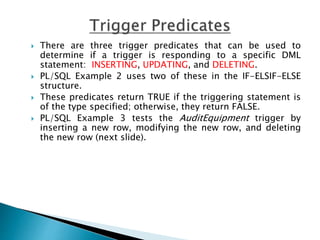
 There are three trigger predicates that can be used to
determine if a trigger is responding to a specific DML
statement: INSERTING, UPDATING, and DELETING.
 PL/SQL Example 2 uses two of these in the IF-ELSIF-ELSE
structure.
 These predicates return TRUE if the triggering statement is
of the type specified; otherwise, they return FALSE.
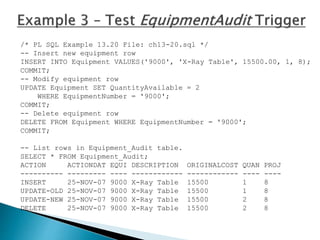
 PL/SQL Example 3 tests the AuditEquipment trigger by
inserting a new row, modifying the new row, and deleting
the new row (next slide).
/* PL SQL Example 13.20 File: ch13-20.sql */
-- Insert new equipment row
INSERT INTO Equipment VALUES('9000', 'X-Ray Table', 15500.00, 1, 8);
COMMIT;
-- Modify equipment row
UPDATE Equipment SET QuantityAvailable = 2
WHERE EquipmentNumber = '9000';
COMMIT;
-- Delete equipment row
DELETE FROM Equipment WHERE EquipmentNumber = '9000';
COMMIT;
-- List rows in Equipment_Audit table.
SELECT * FROM Equipment_Audit;
ACTION ACTIONDAT EQUI DESCRIPTION ORIGINALCOST QUAN PROJ
---------- --------- ---- ------------ ------------ ---- ----
INSERT 25-NOV-07 9000 X-Ray Table 15500 1 8
UPDATE-OLD 25-NOV-07 9000 X-Ray Table 15500 1 8
UPDATE-NEW 25-NOV-07 9000 X-Ray Table 15500 2 8
DELETE 25-NOV-07 9000 X-Ray Table 15500 2 8
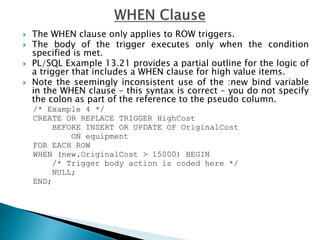
 The WHEN clause only applies to ROW triggers.
 The body of the trigger executes only when the condition
specified is met.
 PL/SQL Example 13.21 provides a partial outline for the logic of
a trigger that includes a WHEN clause for high value items.
 Note the seemingly inconsistent use of the :new bind variable
in the WHEN clause – this syntax is correct – you do not specify
the colon as part of the reference to the pseudo column.
/* Example 4 */
CREATE OR REPLACE TRIGGER HighCost
BEFORE INSERT OR UPDATE OF OriginalCost
ON equipment
FOR EACH ROW
WHEN (new.OriginalCost > 15000) BEGIN
/* Trigger body action is coded here */
NULL;
END;
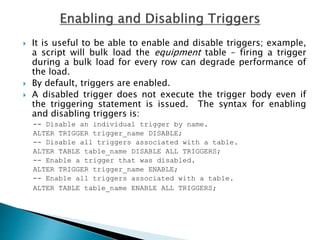
 It is useful to be able to enable and disable triggers; example,
a script will bulk load the equipment table – firing a trigger
during a bulk load for every row can degrade performance of
the load.
 By default, triggers are enabled.
 A disabled trigger does not execute the trigger body even if
the triggering statement is issued. The syntax for enabling
and disabling triggers is:
-- Disable an individual trigger by name.
ALTER TRIGGER trigger_name DISABLE;
-- Disable all triggers associated with a table.
ALTER TABLE table_name DISABLE ALL TRIGGERS;
-- Enable a trigger that was disabled.
ALTER TRIGGER trigger_name ENABLE;
-- Enable all triggers associated with a table.
ALTER TABLE table_name ENABLE ALL TRIGGERS;
 The DROP TRIGGER statement drops a trigger from
the database.
 If you drop a table, all associated table triggers are
also dropped.
 The syntax is:
DROP TRIGGER trigger_name;
 Created/replaced named procedures and functions.
 Created packages that group PL/SQL types, variables,
exceptions, and subprograms that are logically related.
 Write PL/SQL blocks that called packages, procedures, and
functions.
 Write exception-handling code for the above objects.
 Used different parameter types to pass values to/from a
procedure and function.
 Created triggers to manage complex business rules, establish
special audit trails, and derive column values automatically.
 Created both STATEMENT and ROW triggers and used triggers
for a common database processing task, creating an audit trail
to track changes made to the data stored in a table.

Triggers

  • 1.
    Prof. Neeraj Bhargava PoojaDixit Department of Computer Science School of Engineering & System Science MDS, University Ajmer, Rajasthan, India
  • 2.
     Database trigger– a stored PL/SQL program unit that is associated with a specific database table, or with certain view types – can also be associated with a system event such as database startup.  Triggers execute (fire) automatically for specified SQL DML operations – INSERT, UPDATE, or DELETE affecting one or more rows of a table.  Database triggers can be used to perform any of the following tasks: ◦ Audit data modification. ◦ Log events transparently. ◦ Enforce complex business rules. ◦ Derive column values automatically. ◦ Implement complex security authorizations. ◦ Maintain replicate tables. ◦ Publish information about events for a publish-subscribe environment such as that associated with web programming.
  • 3.
     Triggers: ◦ arenamed PL/SQL blocks with declarative, executable, and exception handling sections. ◦ are stand-alone database objects – they are not stored as part of a package and cannot be local to a block. ◦ do not accept arguments.  To create/test a trigger, you (not the system user of the trigger) must have appropriate access to all objects referenced by a trigger action.  Example: To create a BEFORE INSERT trigger for the employee table requires you to have INSERT ROW privileges for the table.
  • 4.
     Triggers cannotcontain the COMMIT, ROLLBACK, and SAVEPOINT statements.  Trigger body – cannot exceed 32K in size.  No limit on the number of triggers defined for a DML statement for a table. In fact, you can define two triggers of the same type for a table. When this occurs, the triggers of the same type fire sequentially.
  • 5.
     Triggers: ◦ arenamed PL/SQL blocks with declarative, executable, and exception handling sections. ◦ are stand-alone database objects – they are not stored as part of a package and cannot be local to a block. ◦ do not accept arguments.  To create/test a trigger, you (not the system user of the trigger) must have appropriate access to all objects referenced by a trigger action.  Example: To create a BEFORE INSERT trigger for the employee table requires you to have INSERT ROW privileges for the table.
  • 6.
     Triggers cannotcontain the COMMIT, ROLLBACK, and SAVEPOINT statements.  Trigger body – cannot exceed 32K in size.  No limit on the number of triggers defined for a DML statement for a table. In fact, you can define two triggers of the same type for a table. When this occurs, the triggers of the same type fire sequentially.
  • 7.
    CREATE [OR REPLACE]TRIGGER trigger_name {BEFORE|AFTER|INSTEAD OF} triggering_event [referencing_clause] ON {table_name | view_name} [WHEN condition] [FOR EACH ROW] DECLARE Declaration statements [BEGIN Executable statements EXCEPTION Exception-handling statements] END;  The trigger body must have at least the executable section.  The declarative and exception handling sections are optional.  When there is a declarative section, the trigger body must start with the DECLARE keyword.  The WHEN clause specifies the condition under which a trigger should fire.
  • 8.
     BEFORE andAFTER Triggers – trigger fires before or after the triggering event. Applies only to tables.  INSTEAD OF Trigger – trigger fires instead of the triggering event. Applies only to views.  Triggering_event – a DML statement issued against the table or view named in the ON clause – example: INSERT, UPDATE, or DELETE.  DML triggers are fired by DML statements and are referred to sometimes as row triggers.  FOR EACH ROW clause – a ROW trigger that fires once for each modified row.  STATEMENT trigger – fires once for the DML statement.  Referencing_clause – enables writing code to refer to the data in the row currently being modified by a different name.
  • 9.
    CREATE OR REPLACETRIGGER SecureEmployee BEFORE DELETE OR INSERT OR UPDATE ON employee BEGIN IF (TO_CHAR(SYSDATE, 'day') IN ('saturday', 'sunday')) OR (TO_CHAR(SYSDATE, 'hh24:mi') NOT BETWEEN '08:30' AND '18:30') THEN RAISE_APPLICATION_ERROR(-20500, 'Employee table is secured'); END IF; END; /  Trigger uses the RAISE_APPLICATION_ERROR statement to inform the application user that the table is secure and cannot be modified on a weekend day (Saturday or Sunday) or prior to 8:30 a.m. or after 6:30 p.m.
  • 10.
    SQL> UPDATE EmployeeSET Salary = 10 WHERE EmployeeID = '01885'; UPDATE Employee SET Salary = 10 WHERE EmployeeID = '01885' * ERROR at line 1: ORA-20500: table is secured ORA-06512: at "DBOCK.SECUREEMPLOYEE", line 4 ORA-04088: error during execution of trigger 'DBOCK.SECUREEMPLOYEE'
  • 11.
     Access dataon the row currently being processed by using two correlation identifiers named :old and :new. These are special Oracle bind variables.  The PL/SQL compiler treats the :old and :new records as records of type trigger_Table_Name%ROWTYPE.  To reference a column in the triggering table, use the notation shown here where the ColumnName value is a valid column in the triggering table. :new.ColumnName :old.ColumnName
  • 12.
    DML Statement :old:new INSERT Undefined – all column values are NULL as there is no “old” version of the data row being inserted. Stores the values that will be inserted into the new row for the table. UPDATE Stores the original values for the row being updated before the update takes place. Stores the new values for the row – values the row will contain after the update takes place. DELETE Stores the original values for the row being deleted before the deletion takes place. Undefined – all column values are NULL as there will not be a “new” version of the row being deleted.
  • 13.
     Triggers canautomate the creation of an audit log when a table is modified.  Create an Equipment_Audit table to store audit log records. CREATE TABLE Equipment_Audit ( Action VARCHAR2(10), ActionDate DATE DEFAULT SYSDATE, EquipmentNumber CHAR(4), Description VARCHAR2(25), OriginalCost NUMBER(7,2), QuantityAvailable NUMBER(4), ProjectNumber NUMBER(4));
  • 14.
    CREATE OR REPLACETRIGGER AuditEquipment AFTER DELETE OR INSERT OR UPDATE ON Equipment FOR EACH ROW BEGIN IF DELETING THEN INSERT INTO equipment_audit VALUES ('DELETE', SYSDATE, :old.EquipmentNumber, :old.Description, :old.OriginalCost, :old.QuantityAvailable, :old.ProjectNumber); ELSIF INSERTING THEN INSERT INTO equipment_audit VALUES ('INSERT', SYSDATE, :new.EquipmentNumber, :new.Description, :new.OriginalCost, :new.QuantityAvailable, :new.ProjectNumber); ELSE -- updating - Insert a before and after image of updates INSERT INTO equipment_audit VALUES ('UPDATE-OLD', SYSDATE, :old.EquipmentNumber, :old.Description, :old.OriginalCost, :old.QuantityAvailable, :old.ProjectNumber); INSERT INTO equipment_audit VALUES ('UPDATE-NEW', SYSDATE, :new.EquipmentNumber, :new.Description, :new.OriginalCost, :new.QuantityAvailable, :new.ProjectNumber); END IF; END;
  • 15.
     There arethree trigger predicates that can be used to determine if a trigger is responding to a specific DML statement: INSERTING, UPDATING, and DELETING.  PL/SQL Example 2 uses two of these in the IF-ELSIF-ELSE structure.  These predicates return TRUE if the triggering statement is of the type specified; otherwise, they return FALSE.  PL/SQL Example 3 tests the AuditEquipment trigger by inserting a new row, modifying the new row, and deleting the new row (next slide).
  • 16.
    /* PL SQLExample 13.20 File: ch13-20.sql */ -- Insert new equipment row INSERT INTO Equipment VALUES('9000', 'X-Ray Table', 15500.00, 1, 8); COMMIT; -- Modify equipment row UPDATE Equipment SET QuantityAvailable = 2 WHERE EquipmentNumber = '9000'; COMMIT; -- Delete equipment row DELETE FROM Equipment WHERE EquipmentNumber = '9000'; COMMIT; -- List rows in Equipment_Audit table. SELECT * FROM Equipment_Audit; ACTION ACTIONDAT EQUI DESCRIPTION ORIGINALCOST QUAN PROJ ---------- --------- ---- ------------ ------------ ---- ---- INSERT 25-NOV-07 9000 X-Ray Table 15500 1 8 UPDATE-OLD 25-NOV-07 9000 X-Ray Table 15500 1 8 UPDATE-NEW 25-NOV-07 9000 X-Ray Table 15500 2 8 DELETE 25-NOV-07 9000 X-Ray Table 15500 2 8
  • 17.
     The WHENclause only applies to ROW triggers.  The body of the trigger executes only when the condition specified is met.  PL/SQL Example 13.21 provides a partial outline for the logic of a trigger that includes a WHEN clause for high value items.  Note the seemingly inconsistent use of the :new bind variable in the WHEN clause – this syntax is correct – you do not specify the colon as part of the reference to the pseudo column. /* Example 4 */ CREATE OR REPLACE TRIGGER HighCost BEFORE INSERT OR UPDATE OF OriginalCost ON equipment FOR EACH ROW WHEN (new.OriginalCost > 15000) BEGIN /* Trigger body action is coded here */ NULL; END;
  • 18.
     It isuseful to be able to enable and disable triggers; example, a script will bulk load the equipment table – firing a trigger during a bulk load for every row can degrade performance of the load.  By default, triggers are enabled.  A disabled trigger does not execute the trigger body even if the triggering statement is issued. The syntax for enabling and disabling triggers is: -- Disable an individual trigger by name. ALTER TRIGGER trigger_name DISABLE; -- Disable all triggers associated with a table. ALTER TABLE table_name DISABLE ALL TRIGGERS; -- Enable a trigger that was disabled. ALTER TRIGGER trigger_name ENABLE; -- Enable all triggers associated with a table. ALTER TABLE table_name ENABLE ALL TRIGGERS;
  • 19.
     The DROPTRIGGER statement drops a trigger from the database.  If you drop a table, all associated table triggers are also dropped.  The syntax is: DROP TRIGGER trigger_name;
  • 20.
     Created/replaced namedprocedures and functions.  Created packages that group PL/SQL types, variables, exceptions, and subprograms that are logically related.  Write PL/SQL blocks that called packages, procedures, and functions.  Write exception-handling code for the above objects.  Used different parameter types to pass values to/from a procedure and function.  Created triggers to manage complex business rules, establish special audit trails, and derive column values automatically.  Created both STATEMENT and ROW triggers and used triggers for a common database processing task, creating an audit trail to track changes made to the data stored in a table.