Information &
Communication Technology
PRESENTATION TOPIC
SPREADSHEET CONCEPTS
1
Presented by Group K
Group Members;
1) Shahzeb
2) Shakeel Ahmed
3) Soorath
4) Sham Kumar
2
Topics to be covered
 Spreadsheet Concepts
 What is Spreadsheet?
 Creating a Spreadsheet
 Entering Data into a Spreadsheet Cell
 Absolute vs. Relative Cell Referencing
 Charts & What-if Analysis
 Spreadsheets and the Web
3
SPREADSHEET CONCEPTS
Spreadsheet software is commonly used by a
variety of businesses and employees, including
CEOs, managers, assistants, analysts, and sales
representatives. Basic spreadsheet concepts and
features are described next.
4
What is Spreadsheet?
 A spreadsheet is a group of values and other data organized into rows and
columns. Most spreadsheets include formulas that are used to compute
calculations based on data entered into the spreadsheet.
 Formulas update automatically
 No manual computations are required
 Spreadsheet software typically includes a variety of data analysis tools, as
well as the ability to generate charts.
 Widely used Spreadsheet Applications:
 Microsoft Excel
 Corel Quattro Pro
 Apple Numbers
5
Creating a Spreadsheet
 A single spreadsheet document is often called a worksheet.
Most spreadsheet programs allow multiple worksheets to be
saved together in a single spreadsheet file, called a
workbook.
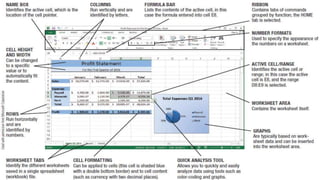
 Worksheets are divided into rows and columns.
 The intersection of a row and a column is called a cell.
 Each cell is identified by its cell address, which consists of the
column letter followed by the row number, such as B4 or E22.
6
7
Entering Data into a Spreadsheet
Cell
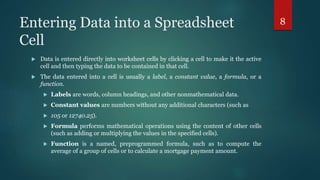
 Data is entered directly into worksheet cells by clicking a cell to make it the active
cell and then typing the data to be contained in that cell.
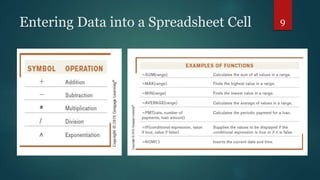
 The data entered into a cell is usually a label, a constant value, a formula, or a
function.
 Labels are words, column headings, and other nonmathematical data.
 Constant values are numbers without any additional characters (such as
 105 or 12740.25).
 Formula performs mathematical operations using the content of other cells
(such as adding or multiplying the values in the specified cells).
 Function is a named, preprogrammed formula, such as to compute the
average of a group of cells or to calculate a mortgage payment amount.
8
Entering Data into a Spreadsheet Cell 9
Absolute vs. Relative Cell Referencing
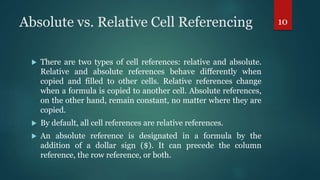
 There are two types of cell references: relative and absolute.
Relative and absolute references behave differently when
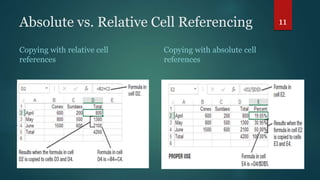
copied and filled to other cells. Relative references change
when a formula is copied to another cell. Absolute references,
on the other hand, remain constant, no matter where they are
copied.
 By default, all cell references are relative references.
 An absolute reference is designated in a formula by the
addition of a dollar sign ($). It can precede the column
reference, the row reference, or both.
10
Absolute vs. Relative Cell Referencing
Copying with relative cell
references
Copying with absolute cell
references
11
Charts & What-if Analysis
 Most spreadsheet programs include some type of charting or
graphing capability.
 A chart is a graphic representation of data. Charts allow users
to see what the results of data to better understand and
predict current and future data.
 In Microsoft Excel and other spreadsheets there are two types
of charts an embedded chart and chart sheet. An embedded
chart is a chart object that can be inserted into a worksheet. A
chart sheet is a chart that is a sheet of its own.
12
Charts & What-if Analysis
 What-If Analysis is the process of changing the values in cells
to see how those changes will affect the outcome of formulas
on the worksheet.
 Spreadsheet programs automatically recalculate all formulas
on a worksheet every time the content of a cell on the
worksheet is edited.
 For example, you want to know what profit would have
resulted for January if sales had been $15,000 instead of
$10,570. You can simply enter the new value (15000) into cell,
and the spreadsheet program automatically recalculates all
formulas, allowing you to determine the profit.
13
Spreadsheets and the Web
Many spreadsheet programs include the option to save
the current worksheet as a Web page, and hyperlinks
can be inserted into worksheet cells. Microsoft Excel
includes the ability to send a workbook as an e-mail
message and to collaborate online; ranges of cells can
also be copied to a Web publishing or word processing
program to insert spreadsheet data into a document as
a table.
14
Thanks………
15

Spreadsheet Concepts

  • 1.
  • 2.
    Presented by GroupK Group Members; 1) Shahzeb 2) Shakeel Ahmed 3) Soorath 4) Sham Kumar 2
  • 3.
    Topics to becovered  Spreadsheet Concepts  What is Spreadsheet?  Creating a Spreadsheet  Entering Data into a Spreadsheet Cell  Absolute vs. Relative Cell Referencing  Charts & What-if Analysis  Spreadsheets and the Web 3
  • 4.
    SPREADSHEET CONCEPTS Spreadsheet softwareis commonly used by a variety of businesses and employees, including CEOs, managers, assistants, analysts, and sales representatives. Basic spreadsheet concepts and features are described next. 4
  • 5.
    What is Spreadsheet? A spreadsheet is a group of values and other data organized into rows and columns. Most spreadsheets include formulas that are used to compute calculations based on data entered into the spreadsheet.  Formulas update automatically  No manual computations are required  Spreadsheet software typically includes a variety of data analysis tools, as well as the ability to generate charts.  Widely used Spreadsheet Applications:  Microsoft Excel  Corel Quattro Pro  Apple Numbers 5
  • 6.
    Creating a Spreadsheet A single spreadsheet document is often called a worksheet. Most spreadsheet programs allow multiple worksheets to be saved together in a single spreadsheet file, called a workbook.  Worksheets are divided into rows and columns.  The intersection of a row and a column is called a cell.  Each cell is identified by its cell address, which consists of the column letter followed by the row number, such as B4 or E22. 6
  • 7.
  • 8.
    Entering Data intoa Spreadsheet Cell  Data is entered directly into worksheet cells by clicking a cell to make it the active cell and then typing the data to be contained in that cell.  The data entered into a cell is usually a label, a constant value, a formula, or a function.  Labels are words, column headings, and other nonmathematical data.  Constant values are numbers without any additional characters (such as  105 or 12740.25).  Formula performs mathematical operations using the content of other cells (such as adding or multiplying the values in the specified cells).  Function is a named, preprogrammed formula, such as to compute the average of a group of cells or to calculate a mortgage payment amount. 8
  • 9.
    Entering Data intoa Spreadsheet Cell 9
  • 10.
    Absolute vs. RelativeCell Referencing  There are two types of cell references: relative and absolute. Relative and absolute references behave differently when copied and filled to other cells. Relative references change when a formula is copied to another cell. Absolute references, on the other hand, remain constant, no matter where they are copied.  By default, all cell references are relative references.  An absolute reference is designated in a formula by the addition of a dollar sign ($). It can precede the column reference, the row reference, or both. 10
  • 11.
    Absolute vs. RelativeCell Referencing Copying with relative cell references Copying with absolute cell references 11
  • 12.
    Charts & What-ifAnalysis  Most spreadsheet programs include some type of charting or graphing capability.  A chart is a graphic representation of data. Charts allow users to see what the results of data to better understand and predict current and future data.  In Microsoft Excel and other spreadsheets there are two types of charts an embedded chart and chart sheet. An embedded chart is a chart object that can be inserted into a worksheet. A chart sheet is a chart that is a sheet of its own. 12
  • 13.
    Charts & What-ifAnalysis  What-If Analysis is the process of changing the values in cells to see how those changes will affect the outcome of formulas on the worksheet.  Spreadsheet programs automatically recalculate all formulas on a worksheet every time the content of a cell on the worksheet is edited.  For example, you want to know what profit would have resulted for January if sales had been $15,000 instead of $10,570. You can simply enter the new value (15000) into cell, and the spreadsheet program automatically recalculates all formulas, allowing you to determine the profit. 13
  • 14.
    Spreadsheets and theWeb Many spreadsheet programs include the option to save the current worksheet as a Web page, and hyperlinks can be inserted into worksheet cells. Microsoft Excel includes the ability to send a workbook as an e-mail message and to collaborate online; ranges of cells can also be copied to a Web publishing or word processing program to insert spreadsheet data into a document as a table. 14
  • 15.