Spark in Production:
Lessons from 100+ production
users
Aaron Davidson
October 28, 2015
300+
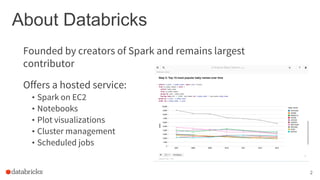
About Databricks
Offers a hosted service:
• Spark on EC2
• Notebooks
• Plot visualizations
• Cluster management
• Scheduled jobs
2
Founded by creators of Spark and remains largest
contributor
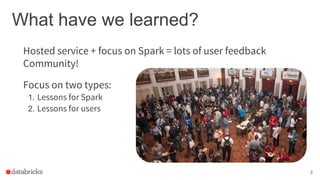
What have we learned?
Focus on two types:
1. Lessons for Spark
2. Lessons for users
3
Hosted service + focus on Spark = lots of user feedback
Community!
Outline: What are the problems?
4
● Moving beyond Python performance
● Using Spark with new languages (R)
● Network and CPU-bound workloads
● Miscellaneous common pitfalls
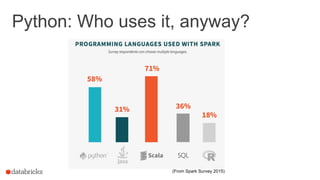
Python: Who uses it, anyway?
(From Spark Survey 2015)
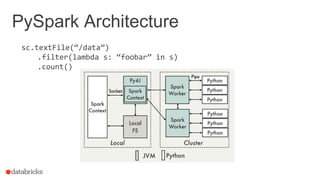
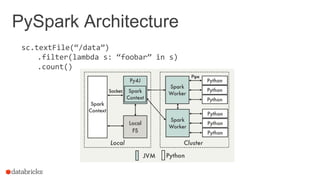
PySpark Architecture
sc.textFile(“/data”)
.filter(lambda s: “foobar” in s)
.count()
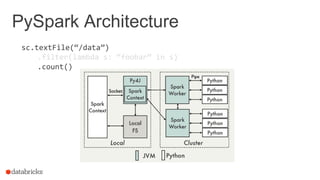
PySpark Architecture
sc.textFile(“/data”)
.filter(lambda s: “foobar” in s)
.count()
PySpark Architecture
sc.textFile(“/data”)
.filter(lambda s: “foobar” in s)
.count()
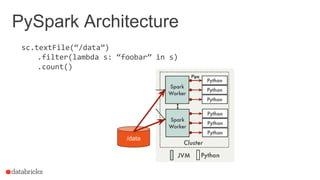
PySpark Architecture
sc.textFile(“/data”)
.filter(lambda s: “foobar” in s)
.count()
/data
PySpark Architecture
sc.textFile(“/data”)
.filter(lambda s: “foobar” in s)
.count()
/data
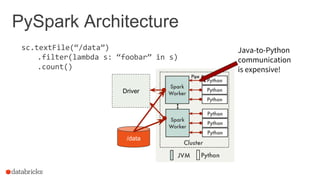
Driver
Java-to-Python
communication
is expensive!
Moving beyond Python performance
Using RDDs
data = sc.textFile(...).split("t")
data.map(lambda x: (x[0], [int(x[1]), 1])) 
.reduceByKey(lambda x, y: [x[0] + y[0], x[1] + y[1]]) 
.map(lambda x: [x[0], x[1][0] / x[1][1]]) 
.collect()
11
Moving beyond Python performance
Using RDDs
data = sc.textFile(...).split("t")
data.map(lambda x: (x[0], [int(x[1]), 1])) 
.reduceByKey(lambda x, y: [x[0] + y[0], x[1] + y[1]]) 
.map(lambda x: [x[0], x[1][0] / x[1][1]]) 
.collect()
Using DataFrames
sqlCtx.table("people") 
.groupBy("name") 
.agg("name", avg("age")) 
.collect()
12
Moving beyond Python performance
Using RDDs
data = sc.textFile(...).split("t")
data.map(lambda x: (x[0], [int(x[1]), 1])) 
.reduceByKey(lambda x, y: [x[0] + y[0], x[1] + y[1]]) 
.map(lambda x: [x[0], x[1][0] / x[1][1]]) 
.collect()
Using DataFrames
sqlCtx.table("people") 
.groupBy("name") 
.agg("name", avg("age")) 
.collect()
13
(At least as much as possible!)
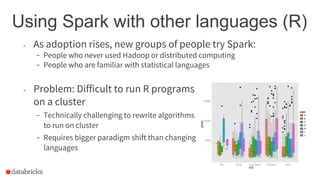
Using Spark with other languages (R)
- Problem: Difficult to run R programs
on a cluster
- Technically challenging to rewrite algorithms
to run on cluster
- Requires bigger paradigm shift than changing
languages
- As adoption rises, new groups of people try Spark:
- People who never used Hadoop or distributed computing
- People who are familiar with statistical languages
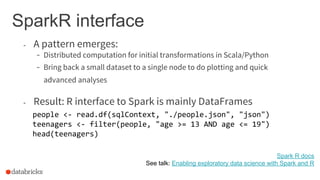
SparkR interface
- A pattern emerges:
- Distributed computation for initial transformations in Scala/Python
- Bring back a small dataset to a single node to do plotting and quick
advanced analyses
- Result: R interface to Spark is mainly DataFrames
people <- read.df(sqlContext, "./people.json", "json")
teenagers <- filter(people, "age >= 13 AND age <= 19")
head(teenagers)
Spark R docs
See talk: Enabling exploratory data science with Spark and R
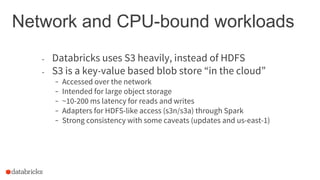
Network and CPU-bound workloads
- Databricks uses S3 heavily, instead of HDFS
- S3 is a key-value based blob store “in the cloud”
- Accessed over the network
- Intended for large object storage
- ~10-200 ms latency for reads and writes
- Adapters for HDFS-like access (s3n/s3a) through Spark
- Strong consistency with some caveats (updates and us-east-1)
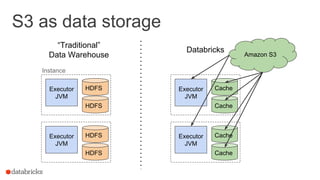
S3 as data storage
Executor
JVM
HDFS
HDFS
Executor
JVM
HDFS
HDFS
Executor
JVM
Cache
Cache
Executor
JVM
Cache
Cache
Amazon S3
Instance
“Traditional”
Data Warehouse
Databricks
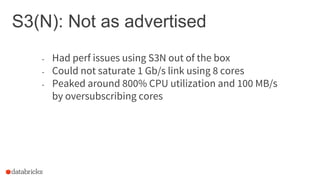
S3(N): Not as advertised
- Had perf issues using S3N out of the box
- Could not saturate 1 Gb/s link using 8 cores
- Peaked around 800% CPU utilization and 100 MB/s
by oversubscribing cores
S3 Performance Problem #1
val bytes = new Array[Byte](256 * 1024)
val numRead = s3File.read(bytes)
numRead = ?
8999 1 8999 1 8999 1 8999 1 8999 1 8999 1
Answer: buffering!
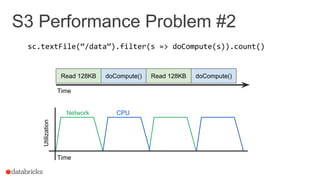
S3 Performance Problem #2
sc.textFile(“/data”).filter(s => doCompute(s)).count()
Read 128KB doCompute() Read 128KB doCompute()
Network CPU
Utilization
Time
Time
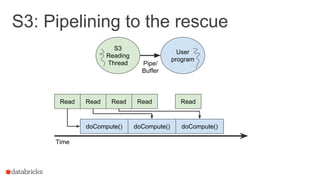
S3: Pipelining to the rescue
Read
Time
S3
Reading
Thread
User
program
Pipe/
Buffer
doCompute()
Read Read
doCompute() doCompute()
ReadRead
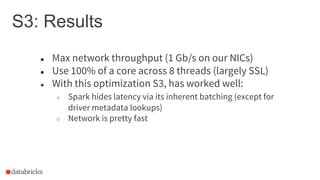
S3: Results
● Max network throughput (1 Gb/s on our NICs)
● Use 100% of a core across 8 threads (largely SSL)
● With this optimization S3, has worked well:
○ Spark hides latency via its inherent batching (except for
driver metadata lookups)
○ Network is pretty fast
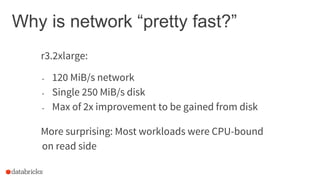
Why is network “pretty fast?”
r3.2xlarge:
- 120 MiB/s network
- Single 250 MiB/s disk
- Max of 2x improvement to be gained from disk
More surprising: Most workloads were CPU-bound
on read side
Why is Spark often CPU-bound?
- Users think more about the high-level details than
the CPU-efficiency
- Reasonable! Getting something to work at all is most important.
- Need the right tracing and visualization tools to find bottlenecks.
See talk: SparkUI visualization: a lens into your application
Why is Spark often CPU-bound?
- Just reading data may be expensive
- Decompression is not cheap - between snappy, lzf/lzo, and gzip,
be wary of gzip
See talk: SparkUI visualization: a lens into your application
- Users think more about the high-level details than
the CPU-efficiency
- Reasonable! Getting something to work at all is most important.
- Need the right tracing and visualization tools to find bottlenecks.
- Need efficient primitives for common operations (Tungsten).
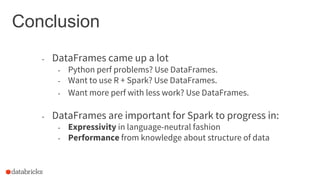
Conclusion
- DataFrames came up a lot
- Python perf problems? Use DataFrames.
- Want to use R + Spark? Use DataFrames.
- Want more perf with less work? Use DataFrames.
- DataFrames are important for Spark to progress in:
- Expressivity in language-neutral fashion
- Performance from knowledge about structure of data
Common pitfalls
● Avoid RDD groupByKey()
○ API requires all values for a single key to fit in memory
○ DataFrame groupBy() works as expected, though
Common pitfalls
● Avoid RDD groupByKey()
○ API requires all values for a single key to fit in memory
○ DataFrame groupBy() works as expected, though
● Avoid Cartesian products in SQL
○ Always ensure you have a join condition! (Can check with
df.explain())
Common pitfalls
● Avoid RDD groupByKey()
○ API requires all values for a single key to fit in memory
○ DataFrame groupBy() works as expected, though
● Avoid Cartesian products in SQL
○ Always ensure you have a join condition! (Can check with
df.explain())
● Avoid overusing cache()
○ Avoid use of vanilla cache() when using data which does
not fit in memory or which will not be reused.
○ Starting in Spark 1.6, this can actually hurt performance
significantly.
○ Consider persist(MEMORY_AND_DISK) instead.
Common pitfalls (continued)
● Be careful when joining small with large table
○ Broadcast join is by far the best option, so make sure
SparkSQL takes it
○ Cache smaller table in memory, or use Parquet
Common pitfalls (continued)
● Be careful when joining small with large table
○ Broadcast join is by far the best option, so make sure
SparkSQL takes it
○ Cache smaller table in memory, or use Parquet
● Avoid using jets3t 1.9 (default in Hadoop 2)
○ Inexplicably terrible performance
Common pitfalls (continued)
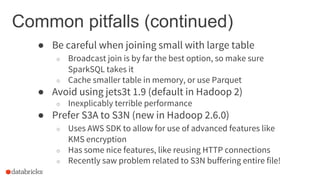
● Be careful when joining small with large table
○ Broadcast join is by far the best option, so make sure
SparkSQL takes it
○ Cache smaller table in memory, or use Parquet
● Avoid using jets3t 1.9 (default in Hadoop 2)
○ Inexplicably terrible performance
● Prefer S3A to S3N (new in Hadoop 2.6.0)
○ Uses AWS SDK to allow for use of advanced features like
KMS encryption
○ Has some nice features, like reusing HTTP connections
○ Recently saw problem related to S3N buffering entire file!
Common pitfalls (continued)
● In RDD API, can manually reuse partitioner to avoid
extra shuffles
Questions?

Spark Summit EU 2015: Lessons from 300+ production users

  • 1.
    Spark in Production: Lessonsfrom 100+ production users Aaron Davidson October 28, 2015 300+
  • 2.
    About Databricks Offers ahosted service: • Spark on EC2 • Notebooks • Plot visualizations • Cluster management • Scheduled jobs 2 Founded by creators of Spark and remains largest contributor
  • 3.
    What have welearned? Focus on two types: 1. Lessons for Spark 2. Lessons for users 3 Hosted service + focus on Spark = lots of user feedback Community!
  • 4.
    Outline: What arethe problems? 4 ● Moving beyond Python performance ● Using Spark with new languages (R) ● Network and CPU-bound workloads ● Miscellaneous common pitfalls
  • 5.
    Python: Who usesit, anyway? (From Spark Survey 2015)
  • 6.
  • 7.
  • 8.
  • 9.
  • 10.
    PySpark Architecture sc.textFile(“/data”) .filter(lambda s:“foobar” in s) .count() /data Driver Java-to-Python communication is expensive!
  • 11.
    Moving beyond Pythonperformance Using RDDs data = sc.textFile(...).split("t") data.map(lambda x: (x[0], [int(x[1]), 1])) .reduceByKey(lambda x, y: [x[0] + y[0], x[1] + y[1]]) .map(lambda x: [x[0], x[1][0] / x[1][1]]) .collect() 11
  • 12.
    Moving beyond Pythonperformance Using RDDs data = sc.textFile(...).split("t") data.map(lambda x: (x[0], [int(x[1]), 1])) .reduceByKey(lambda x, y: [x[0] + y[0], x[1] + y[1]]) .map(lambda x: [x[0], x[1][0] / x[1][1]]) .collect() Using DataFrames sqlCtx.table("people") .groupBy("name") .agg("name", avg("age")) .collect() 12
  • 13.
    Moving beyond Pythonperformance Using RDDs data = sc.textFile(...).split("t") data.map(lambda x: (x[0], [int(x[1]), 1])) .reduceByKey(lambda x, y: [x[0] + y[0], x[1] + y[1]]) .map(lambda x: [x[0], x[1][0] / x[1][1]]) .collect() Using DataFrames sqlCtx.table("people") .groupBy("name") .agg("name", avg("age")) .collect() 13 (At least as much as possible!)
  • 14.
    Using Spark withother languages (R) - Problem: Difficult to run R programs on a cluster - Technically challenging to rewrite algorithms to run on cluster - Requires bigger paradigm shift than changing languages - As adoption rises, new groups of people try Spark: - People who never used Hadoop or distributed computing - People who are familiar with statistical languages
  • 15.
    SparkR interface - Apattern emerges: - Distributed computation for initial transformations in Scala/Python - Bring back a small dataset to a single node to do plotting and quick advanced analyses - Result: R interface to Spark is mainly DataFrames people <- read.df(sqlContext, "./people.json", "json") teenagers <- filter(people, "age >= 13 AND age <= 19") head(teenagers) Spark R docs See talk: Enabling exploratory data science with Spark and R
  • 16.
    Network and CPU-boundworkloads - Databricks uses S3 heavily, instead of HDFS - S3 is a key-value based blob store “in the cloud” - Accessed over the network - Intended for large object storage - ~10-200 ms latency for reads and writes - Adapters for HDFS-like access (s3n/s3a) through Spark - Strong consistency with some caveats (updates and us-east-1)
  • 17.
    S3 as datastorage Executor JVM HDFS HDFS Executor JVM HDFS HDFS Executor JVM Cache Cache Executor JVM Cache Cache Amazon S3 Instance “Traditional” Data Warehouse Databricks
  • 18.
    S3(N): Not asadvertised - Had perf issues using S3N out of the box - Could not saturate 1 Gb/s link using 8 cores - Peaked around 800% CPU utilization and 100 MB/s by oversubscribing cores
  • 19.
    S3 Performance Problem#1 val bytes = new Array[Byte](256 * 1024) val numRead = s3File.read(bytes) numRead = ? 8999 1 8999 1 8999 1 8999 1 8999 1 8999 1 Answer: buffering!
  • 20.
    S3 Performance Problem#2 sc.textFile(“/data”).filter(s => doCompute(s)).count() Read 128KB doCompute() Read 128KB doCompute() Network CPU Utilization Time Time
  • 21.
    S3: Pipelining tothe rescue Read Time S3 Reading Thread User program Pipe/ Buffer doCompute() Read Read doCompute() doCompute() ReadRead
  • 22.
    S3: Results ● Maxnetwork throughput (1 Gb/s on our NICs) ● Use 100% of a core across 8 threads (largely SSL) ● With this optimization S3, has worked well: ○ Spark hides latency via its inherent batching (except for driver metadata lookups) ○ Network is pretty fast
  • 23.
    Why is network“pretty fast?” r3.2xlarge: - 120 MiB/s network - Single 250 MiB/s disk - Max of 2x improvement to be gained from disk More surprising: Most workloads were CPU-bound on read side
  • 24.
    Why is Sparkoften CPU-bound? - Users think more about the high-level details than the CPU-efficiency - Reasonable! Getting something to work at all is most important. - Need the right tracing and visualization tools to find bottlenecks. See talk: SparkUI visualization: a lens into your application
  • 25.
    Why is Sparkoften CPU-bound? - Just reading data may be expensive - Decompression is not cheap - between snappy, lzf/lzo, and gzip, be wary of gzip See talk: SparkUI visualization: a lens into your application - Users think more about the high-level details than the CPU-efficiency - Reasonable! Getting something to work at all is most important. - Need the right tracing and visualization tools to find bottlenecks. - Need efficient primitives for common operations (Tungsten).
  • 26.
    Conclusion - DataFrames cameup a lot - Python perf problems? Use DataFrames. - Want to use R + Spark? Use DataFrames. - Want more perf with less work? Use DataFrames. - DataFrames are important for Spark to progress in: - Expressivity in language-neutral fashion - Performance from knowledge about structure of data
  • 27.
    Common pitfalls ● AvoidRDD groupByKey() ○ API requires all values for a single key to fit in memory ○ DataFrame groupBy() works as expected, though
  • 28.
    Common pitfalls ● AvoidRDD groupByKey() ○ API requires all values for a single key to fit in memory ○ DataFrame groupBy() works as expected, though ● Avoid Cartesian products in SQL ○ Always ensure you have a join condition! (Can check with df.explain())
  • 29.
    Common pitfalls ● AvoidRDD groupByKey() ○ API requires all values for a single key to fit in memory ○ DataFrame groupBy() works as expected, though ● Avoid Cartesian products in SQL ○ Always ensure you have a join condition! (Can check with df.explain()) ● Avoid overusing cache() ○ Avoid use of vanilla cache() when using data which does not fit in memory or which will not be reused. ○ Starting in Spark 1.6, this can actually hurt performance significantly. ○ Consider persist(MEMORY_AND_DISK) instead.
  • 30.
    Common pitfalls (continued) ●Be careful when joining small with large table ○ Broadcast join is by far the best option, so make sure SparkSQL takes it ○ Cache smaller table in memory, or use Parquet
  • 31.
    Common pitfalls (continued) ●Be careful when joining small with large table ○ Broadcast join is by far the best option, so make sure SparkSQL takes it ○ Cache smaller table in memory, or use Parquet ● Avoid using jets3t 1.9 (default in Hadoop 2) ○ Inexplicably terrible performance
  • 32.
    Common pitfalls (continued) ●Be careful when joining small with large table ○ Broadcast join is by far the best option, so make sure SparkSQL takes it ○ Cache smaller table in memory, or use Parquet ● Avoid using jets3t 1.9 (default in Hadoop 2) ○ Inexplicably terrible performance ● Prefer S3A to S3N (new in Hadoop 2.6.0) ○ Uses AWS SDK to allow for use of advanced features like KMS encryption ○ Has some nice features, like reusing HTTP connections ○ Recently saw problem related to S3N buffering entire file!
  • 33.
    Common pitfalls (continued) ●In RDD API, can manually reuse partitioner to avoid extra shuffles
  • 34.