Spark Application Carousel
Spark Summit East 2015
About Today’s Talk
• About Me:
• Vida Ha - Solutions Engineer at Databricks.
• Goal:
• For beginning/early intermediate Spark Developers.
• Motivate you to start writing more apps in Spark.
• Share some tips I’ve learned along the way.
2
Today’s Applications Covered
• Web Logs Analysis
• Basic Data Pipeline - Spark & Spark SQL
• Wikipedia Dataset
• Machine Learning
• Facebook API
• Graph Algorithms
3
4
Application  1:  Web  Log  Analysis
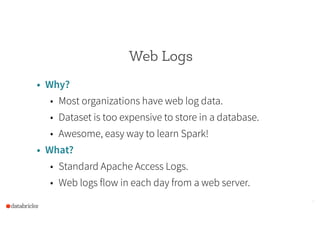
Web Logs
• Why?
• Most organizations have web log data.
• Dataset is too expensive to store in a database.
• Awesome, easy way to learn Spark!
• What?
• Standard Apache Access Logs.
• Web logs flow in each day from a web server.
5
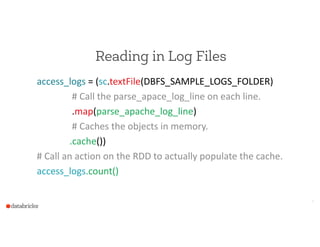
Reading in Log Files
access_logs  =  (sc.textFile(DBFS_SAMPLE_LOGS_FOLDER)  
                              #  Call  the  parse_apace_log_line  on  each  line.  
                              .map(parse_apache_log_line)  
                              #  Caches  the  objects  in  memory.  
                            .cache())  
#  Call  an  action  on  the  RDD  to  actually  populate  the  cache.  
access_logs.count()
6
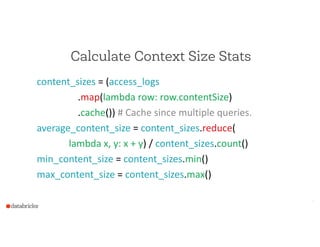
Calculate Context Size Stats
content_sizes  =  (access_logs  
                                  .map(lambda  row:  row.contentSize)  
                                  .cache())  #  Cache  since  multiple  queries.  
average_content_size  =  content_sizes.reduce(  
      lambda  x,  y:  x  +  y)  /  content_sizes.count()  
min_content_size  =  content_sizes.min()  
max_content_size  =  content_sizes.max()
7
Frequent IPAddresses - Key/Value Pairs
ip_addresses_rdd  =  (access_logs  
                                        .map(lambda  log:  (log.ipAddress,  1))  
                                        .reduceByKey(lambda  x,  y  :  x  +  y)  
                                        .filter(lambda  s:  s[1]  >  n)  
                                        .map(lambda  s:  Row(ip_address  =  s[0],  
                                                                                                                    count  =  s[1])))  
         #  Alternately,  could  just  collect()  the  values.  
           .registerTempTable(“ip_addresses”)
8
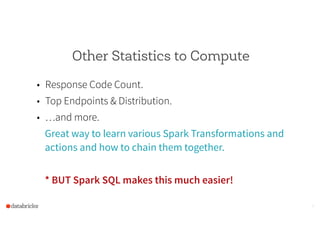
Other Statistics to Compute
• Response Code Count.
• Top Endpoints & Distribution.
• …and more.
Great way to learn various Spark Transformations and
actions and how to chain them together.
!
* BUT Spark SQL makes this much easier!
9
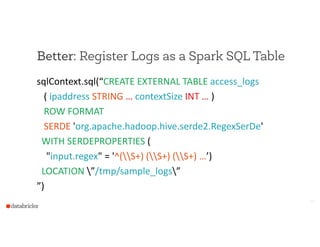
Better: Register Logs as a Spark SQL Table
sqlContext.sql(“CREATE  EXTERNAL  TABLE  access_logs  
      (  ipaddress  STRING  …  contextSize  INT  …  )  
      ROW  FORMAT    
      SERDE  'org.apache.hadoop.hive.serde2.RegexSerDe'  
    WITH  SERDEPROPERTIES  (  
        "input.regex"  =  '^(S+)  (S+)  (S+)  …’)  
    LOCATION  ”/tmp/sample_logs”  
”)
10
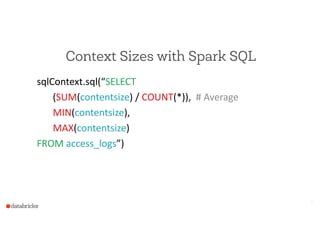
Context Sizes with Spark SQL
sqlContext.sql(“SELECT    
     (SUM(contentsize)  /  COUNT(*)),    #  Average  
   MIN(contentsize),    
   MAX(contentsize)  
FROM  access_logs”)
11
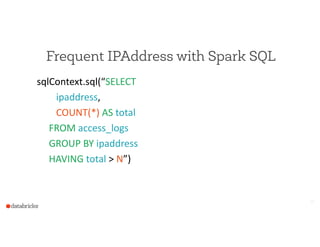
Frequent IPAddress with Spark SQL
sqlContext.sql(“SELECT    
                ipaddress,  
                COUNT(*)  AS  total          
          FROM  access_logs  
          GROUP  BY  ipaddress  
          HAVING  total  >  N”)
12
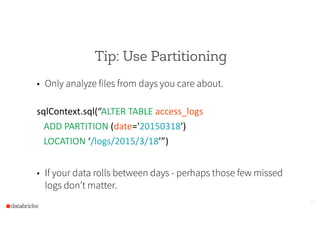
Tip: Use Partitioning
• Only analyze files from days you care about.
!
sqlContext.sql(“ALTER  TABLE  access_logs    
      ADD  PARTITION  (date='20150318')    
      LOCATION  ‘/logs/2015/3/18’”)  
!
• If your data rolls between days - perhaps those few missed
logs don’t matter.
13
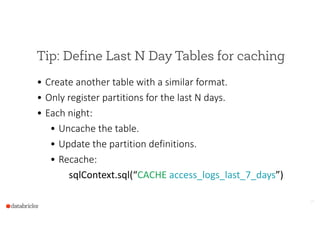
Tip: Define Last N Day Tables for caching
• Create  another  table  with  a  similar  format.  
• Only  register  partitions  for  the  last  N  days.  
• Each  night:  
• Uncache  the  table.  
• Update  the  partition  definitions.  
• Recache:  
      sqlContext.sql(“CACHE  access_logs_last_7_days”)
14
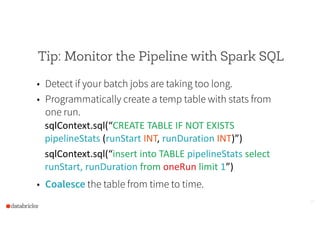
Tip: Monitor the Pipeline with Spark SQL
• Detect if your batch jobs are taking too long.
• Programmatically create a temp table with stats from
one run.
sqlContext.sql(“CREATE  TABLE  IF  NOT  EXISTS  
pipelineStats  (runStart  INT,  runDuration  INT)”)  
sqlContext.sql(“insert  into  TABLE  pipelineStats  select  
runStart,  runDuration  from  oneRun  limit  1”)  
• Coalesce the table from time to time.
15
16
Demo:  Web  Log  Analysis
17
Application:  Wikipedia
Tip: Use Spark to Parallelize Downloading
Wikipedia can be downloaded in one giant file, or you can
download the 27 parts.
!
val  articlesRDD  =  sc.parallelize(articlesToRetrieve.toList,  4)  
val  retrieveInPartitions  =  (iter:  Iterator[String])  =>  {  
    iter.map(article  =>  retrieveArticleAndWriteToS3(article))  }  
val  fetchedArticles  =    
    articlesRDD.mapPartitions(retrieveInPartitions).collect()
18
Processing XML data
• Excessively large (> 1GB) compressed XML data is hard
to process.
• Not easily splittable.
• Solution: Break into text files where there is one XML
element per line.
19
ETL-ing your data with Spark
• Use an XML Parser to pull out fields of interest in the
XML document.
• Save the data in Parquet File format for faster querying.
• Register the Parquet format files as Spark SQL since
there is a clearly defined schema.
20
Using Spark for Fast Data Exploration
!
• CACHE the dataset for faster querying.
• Interactive programming experience.
• Use a mix of Python or Scala combined with SQL to
analyze the dataset.
21
Tip: Use MLLib to Learn from Dataset
• Wikipedia articles are an rich set of data for the English
language.
• Word2Vec is a simple algorithm to learn synonyms and
can be applied to the wikipedia article.
• Try out your favorite ML/NLP algorithms!
22
23
Demo:  Wikipedia  App
24
Application:  Facebook  API
Tip: Use Spark to Scrape Facebook Data
• Use Spark to Facebook to make requests for friends of
friends in parallel.
• NOTE: Latest Facebook API will only show friends that
have also enabled the app.
• If you build a Facebook App and get more users to
accept it, you can build a more complete picture of the
social graph!
25
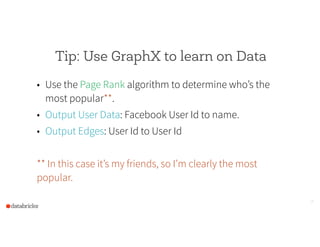
Tip: Use GraphX to learn on Data
• Use the Page Rank algorithm to determine who’s the
most popular**.
• Output User Data: Facebook User Id to name.
• Output Edges: User Id to User Id
!
** In this case it’s my friends, so I’m clearly the most
popular.
26
27
Demo:  Facebook  API
Conclusion
• I hope this talk has inspired you to want to write Spark
applications on your favorite dataset.
• Hacking (and making mistakes) is the best way to learn.
• If you want to walk through some examples, see the
Databricks Spark Reference Applications:
• https://github.com/databricks/reference-apps
28
THE END

Spark Application Carousel: Highlights of Several Applications Built with Spark

  • 1.
  • 2.
    About Today’s Talk •About Me: • Vida Ha - Solutions Engineer at Databricks. • Goal: • For beginning/early intermediate Spark Developers. • Motivate you to start writing more apps in Spark. • Share some tips I’ve learned along the way. 2
  • 3.
    Today’s Applications Covered •Web Logs Analysis • Basic Data Pipeline - Spark & Spark SQL • Wikipedia Dataset • Machine Learning • Facebook API • Graph Algorithms 3
  • 4.
    4 Application  1:  Web Log  Analysis
  • 5.
    Web Logs • Why? •Most organizations have web log data. • Dataset is too expensive to store in a database. • Awesome, easy way to learn Spark! • What? • Standard Apache Access Logs. • Web logs flow in each day from a web server. 5
  • 6.
    Reading in LogFiles access_logs  =  (sc.textFile(DBFS_SAMPLE_LOGS_FOLDER)                                #  Call  the  parse_apace_log_line  on  each  line.                                .map(parse_apache_log_line)                                #  Caches  the  objects  in  memory.                              .cache())   #  Call  an  action  on  the  RDD  to  actually  populate  the  cache.   access_logs.count() 6
  • 7.
    Calculate Context SizeStats content_sizes  =  (access_logs                                    .map(lambda  row:  row.contentSize)                                    .cache())  #  Cache  since  multiple  queries.   average_content_size  =  content_sizes.reduce(       lambda  x,  y:  x  +  y)  /  content_sizes.count()   min_content_size  =  content_sizes.min()   max_content_size  =  content_sizes.max() 7
  • 8.
    Frequent IPAddresses -Key/Value Pairs ip_addresses_rdd  =  (access_logs                                          .map(lambda  log:  (log.ipAddress,  1))                                          .reduceByKey(lambda  x,  y  :  x  +  y)                                          .filter(lambda  s:  s[1]  >  n)                                          .map(lambda  s:  Row(ip_address  =  s[0],                                                                                                                      count  =  s[1])))         #  Alternately,  could  just  collect()  the  values.           .registerTempTable(“ip_addresses”) 8
  • 9.
    Other Statistics toCompute • Response Code Count. • Top Endpoints & Distribution. • …and more. Great way to learn various Spark Transformations and actions and how to chain them together. ! * BUT Spark SQL makes this much easier! 9
  • 10.
    Better: Register Logsas a Spark SQL Table sqlContext.sql(“CREATE  EXTERNAL  TABLE  access_logs        (  ipaddress  STRING  …  contextSize  INT  …  )        ROW  FORMAT          SERDE  'org.apache.hadoop.hive.serde2.RegexSerDe'      WITH  SERDEPROPERTIES  (          "input.regex"  =  '^(S+)  (S+)  (S+)  …’)      LOCATION  ”/tmp/sample_logs”   ”) 10
  • 11.
    Context Sizes withSpark SQL sqlContext.sql(“SELECT         (SUM(contentsize)  /  COUNT(*)),    #  Average     MIN(contentsize),       MAX(contentsize)   FROM  access_logs”) 11
  • 12.
    Frequent IPAddress withSpark SQL sqlContext.sql(“SELECT                    ipaddress,                  COUNT(*)  AS  total                    FROM  access_logs            GROUP  BY  ipaddress            HAVING  total  >  N”) 12
  • 13.
    Tip: Use Partitioning •Only analyze files from days you care about. ! sqlContext.sql(“ALTER  TABLE  access_logs          ADD  PARTITION  (date='20150318')          LOCATION  ‘/logs/2015/3/18’”)   ! • If your data rolls between days - perhaps those few missed logs don’t matter. 13
  • 14.
    Tip: Define LastN Day Tables for caching • Create  another  table  with  a  similar  format.   • Only  register  partitions  for  the  last  N  days.   • Each  night:   • Uncache  the  table.   • Update  the  partition  definitions.   • Recache:       sqlContext.sql(“CACHE  access_logs_last_7_days”) 14
  • 15.
    Tip: Monitor thePipeline with Spark SQL • Detect if your batch jobs are taking too long. • Programmatically create a temp table with stats from one run. sqlContext.sql(“CREATE  TABLE  IF  NOT  EXISTS   pipelineStats  (runStart  INT,  runDuration  INT)”)   sqlContext.sql(“insert  into  TABLE  pipelineStats  select   runStart,  runDuration  from  oneRun  limit  1”)   • Coalesce the table from time to time. 15
  • 16.
  • 17.
  • 18.
    Tip: Use Sparkto Parallelize Downloading Wikipedia can be downloaded in one giant file, or you can download the 27 parts. ! val  articlesRDD  =  sc.parallelize(articlesToRetrieve.toList,  4)   val  retrieveInPartitions  =  (iter:  Iterator[String])  =>  {      iter.map(article  =>  retrieveArticleAndWriteToS3(article))  }   val  fetchedArticles  =        articlesRDD.mapPartitions(retrieveInPartitions).collect() 18
  • 19.
    Processing XML data •Excessively large (> 1GB) compressed XML data is hard to process. • Not easily splittable. • Solution: Break into text files where there is one XML element per line. 19
  • 20.
    ETL-ing your datawith Spark • Use an XML Parser to pull out fields of interest in the XML document. • Save the data in Parquet File format for faster querying. • Register the Parquet format files as Spark SQL since there is a clearly defined schema. 20
  • 21.
    Using Spark forFast Data Exploration ! • CACHE the dataset for faster querying. • Interactive programming experience. • Use a mix of Python or Scala combined with SQL to analyze the dataset. 21
  • 22.
    Tip: Use MLLibto Learn from Dataset • Wikipedia articles are an rich set of data for the English language. • Word2Vec is a simple algorithm to learn synonyms and can be applied to the wikipedia article. • Try out your favorite ML/NLP algorithms! 22
  • 23.
  • 24.
  • 25.
    Tip: Use Sparkto Scrape Facebook Data • Use Spark to Facebook to make requests for friends of friends in parallel. • NOTE: Latest Facebook API will only show friends that have also enabled the app. • If you build a Facebook App and get more users to accept it, you can build a more complete picture of the social graph! 25
  • 26.
    Tip: Use GraphXto learn on Data • Use the Page Rank algorithm to determine who’s the most popular**. • Output User Data: Facebook User Id to name. • Output Edges: User Id to User Id ! ** In this case it’s my friends, so I’m clearly the most popular. 26
  • 27.
  • 28.
    Conclusion • I hopethis talk has inspired you to want to write Spark applications on your favorite dataset. • Hacking (and making mistakes) is the best way to learn. • If you want to walk through some examples, see the Databricks Spark Reference Applications: • https://github.com/databricks/reference-apps 28
  • 29.