Running Spark on Cloud
Advantages and Challenges - Praveen Seluka
Introduction
• About Qubole :
• Big Data as a Service on Cloud - Started by Ashish
Thusoo and Joydeep Sen Sarma who created Apache
Hive at Facebook
• Hadoop, Hive, Spark, Presto and other technologies
• easy-to-use and highly performant in cloud
• About me :
• lead Spark as a Service effort at Qubole
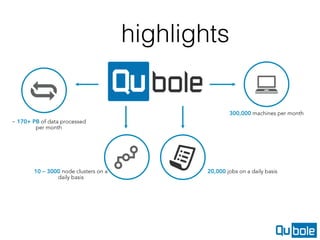
~ 170+ PB of data processed
per month
10 – 3000 node clusters on a
daily basis
300,000 machines per month
20,000 jobs on a daily basis
highlights
Agenda
1. Getting Started with Spark on Cloud
2. Advantages of running in cloud
3. Challenges and how Qubole solves it - and
tools required for complete Spark experience
1) Getting Started : Spark on
Cloud
• Install Spark on EC2 (HDFS if required)
• Ability to spin up cluster of instances
• Choosing Spark backend cluster mode and
configuring it
• Standalone
• YARN
• Mesos
1) spark-ec2 scripts can help
• http://spark.apache.org/docs/latest/ec2-
scripts.html
• helps you spin up named clusters
• creates security group, comes pre-baked with
spark installed - ready to work
• Ability to choose instance type, region, zone,
spark version…
2a) Advantages : S3 as
Datalake
• Separating compute and storage - they can scale
independently
• S3 is highly available, reliable and scalable. We have
not heard object loss - ever.
• Cost effective
• HDFS vs s3 - very little difference in perf
• Same access as HDFS : HadoopFileSystem API for
accessing S3. NativeS3FileSystem or S3aFileSystem
2b)Advantages : Ephemeral Clusters
• The biggest advantage of using s3 as storage is, we
can spin up clusters only when needed
• Ability to have multiple clusters - one for a team/
individual
• NFLX - users spin up a cluster for each job - Simplicity
(not efficient though)
2c) Advantages : Flexibility
• Ability to choose instance types
• High memory instances - r3.* for high memory workloads
where you cache RDD and access it
• c3.* for CPU intensive workloads
• spot instances
• Add EBS disks - if the instance is low on ephemeral
storage
2d) Advantages : Autoscaling
• Big-data workloads are bursty in nature
• Scale the cluster on-demand, and shrink when its idle
• Highly cost effective
• multi-tenancy
• Qubole provides efficient autoscaling spark clusters -
more on that later
3a) Challenges - cluster lifecycle
• Automate cluster lifecycle. terminate when idle - it’s
easy to forget
• Periodically check for bad instances and remove them
• Cluster health check and terminate/restart
• a simple interface required to create/delete and
configure multiple clusters
• We forked MIT starcluster years back and have added
significant stuff like lifecycle to it
3b) Challenges : Interfaces
• Data Engineer needs to submit ML/graph
algorithms through an API/SDK
• Data Analyst needs to use Tableau/Mode/Tool of
choice
• Data Scientist needs notebook for interactive
exploration and analysis
3c) Challenges - Spark
Autoscaling
• Spark Job has static resource allocation
• —num-executors 20 —executor-memory 5G —
executor-cores 4
• Each executor is a long running JVM - held by the
Spark Job for the lifetime of the application
• Each executor can run multiple tasks. for the
above configuration, with spark.cpu.tasks=1,
there can be 20*4=80 tasks running in parallel
3c) Challenges - Spark
Autoscaling
• Problem : Its hard to predict the amount of resources
required for the job
• We added API’s to add/remove executors at runtime
when the job is running (Contributed to Open Source)
• sc.requestExecutors(x)
• sc.removeExecutors(List())
• Spark driver program can now add or remove
executors at runtime
3c) Challenges - Spark
Autoscaling
• We built autoscaling algorithm which can request and
release executors based on load dynamically
• Stage = x number of tasks
• Once a task completes within a stage, we know the task
run time t. So, we can estimate the stageRuntime = x * t
• We try to complete the stage within a threshold
(configurable). if the stage is expected to take more time
than threshold, we upscale. We determine the number of
executors required to complete the stage within expected
time, and add requests.
3c) Challenges - Spark
Autoscaling
• Downscaling is tricky. Executors have cached
RDD’s and shuffle data
• Use external shuffle service (YARN aux service)
• We downscale when there are no running
stages. But if the executor has cached RDD’s
then we dont remove the executor. (Removing it
will require recomputation of RDD from source
and can be expensive)
3d) Challenges - Debuggability
• Spark history server runs inside cluster to serve Spark UI
even after job completes
• Copy app logs (container logs) and event logs(spark UI) to
s3
• Run history server anywhere outside which can render Spark
UI by accessing event logs from s3
• Requires a control tier, which has list of all applications that
have run so far
• Qubole makes the whole experience seamless - here is why ?
3e) Challenges - Move is slow in s3
• In s3, move = copy + delete
• Use DFOC/ParquetDFOC which can copy the
results to destination directly
3f) Challenges : Spot instances
• Really useful for short running workloads. if the job fails due to
spot loss, retry
• In general, Using spot instances for spark is a hard problem.
Can a long running Spark job recover and keep running inspite
of big spot node loss ?
• yes, but very inefficient
• mechanisms to improve - RDD caching with replica
placement in on-demand nodes
• shuffle service and storing shuffle data in HDFS/replicated
storage
3g) Spark JobServer
• Enables in-memory RDD to be accessible from
multiple spark applications
• Long running Spark Contexts
Thanks
• pseluka@qubole.com
• help@qubole.com for anything
• @praveen_seluka at twitter

Running Spark on Cloud

  • 1.
    Running Spark onCloud Advantages and Challenges - Praveen Seluka
  • 2.
    Introduction • About Qubole: • Big Data as a Service on Cloud - Started by Ashish Thusoo and Joydeep Sen Sarma who created Apache Hive at Facebook • Hadoop, Hive, Spark, Presto and other technologies • easy-to-use and highly performant in cloud • About me : • lead Spark as a Service effort at Qubole
  • 3.
    ~ 170+ PBof data processed per month 10 – 3000 node clusters on a daily basis 300,000 machines per month 20,000 jobs on a daily basis highlights
  • 4.
    Agenda 1. Getting Startedwith Spark on Cloud 2. Advantages of running in cloud 3. Challenges and how Qubole solves it - and tools required for complete Spark experience
  • 5.
    1) Getting Started: Spark on Cloud • Install Spark on EC2 (HDFS if required) • Ability to spin up cluster of instances • Choosing Spark backend cluster mode and configuring it • Standalone • YARN • Mesos
  • 6.
    1) spark-ec2 scriptscan help • http://spark.apache.org/docs/latest/ec2- scripts.html • helps you spin up named clusters • creates security group, comes pre-baked with spark installed - ready to work • Ability to choose instance type, region, zone, spark version…
  • 7.
    2a) Advantages :S3 as Datalake • Separating compute and storage - they can scale independently • S3 is highly available, reliable and scalable. We have not heard object loss - ever. • Cost effective • HDFS vs s3 - very little difference in perf • Same access as HDFS : HadoopFileSystem API for accessing S3. NativeS3FileSystem or S3aFileSystem
  • 8.
    2b)Advantages : EphemeralClusters • The biggest advantage of using s3 as storage is, we can spin up clusters only when needed • Ability to have multiple clusters - one for a team/ individual • NFLX - users spin up a cluster for each job - Simplicity (not efficient though)
  • 9.
    2c) Advantages :Flexibility • Ability to choose instance types • High memory instances - r3.* for high memory workloads where you cache RDD and access it • c3.* for CPU intensive workloads • spot instances • Add EBS disks - if the instance is low on ephemeral storage
  • 10.
    2d) Advantages :Autoscaling • Big-data workloads are bursty in nature • Scale the cluster on-demand, and shrink when its idle • Highly cost effective • multi-tenancy • Qubole provides efficient autoscaling spark clusters - more on that later
  • 11.
    3a) Challenges -cluster lifecycle • Automate cluster lifecycle. terminate when idle - it’s easy to forget • Periodically check for bad instances and remove them • Cluster health check and terminate/restart • a simple interface required to create/delete and configure multiple clusters • We forked MIT starcluster years back and have added significant stuff like lifecycle to it
  • 12.
    3b) Challenges :Interfaces • Data Engineer needs to submit ML/graph algorithms through an API/SDK • Data Analyst needs to use Tableau/Mode/Tool of choice • Data Scientist needs notebook for interactive exploration and analysis
  • 13.
    3c) Challenges -Spark Autoscaling • Spark Job has static resource allocation • —num-executors 20 —executor-memory 5G — executor-cores 4 • Each executor is a long running JVM - held by the Spark Job for the lifetime of the application • Each executor can run multiple tasks. for the above configuration, with spark.cpu.tasks=1, there can be 20*4=80 tasks running in parallel
  • 14.
    3c) Challenges -Spark Autoscaling • Problem : Its hard to predict the amount of resources required for the job • We added API’s to add/remove executors at runtime when the job is running (Contributed to Open Source) • sc.requestExecutors(x) • sc.removeExecutors(List()) • Spark driver program can now add or remove executors at runtime
  • 15.
    3c) Challenges -Spark Autoscaling • We built autoscaling algorithm which can request and release executors based on load dynamically • Stage = x number of tasks • Once a task completes within a stage, we know the task run time t. So, we can estimate the stageRuntime = x * t • We try to complete the stage within a threshold (configurable). if the stage is expected to take more time than threshold, we upscale. We determine the number of executors required to complete the stage within expected time, and add requests.
  • 16.
    3c) Challenges -Spark Autoscaling • Downscaling is tricky. Executors have cached RDD’s and shuffle data • Use external shuffle service (YARN aux service) • We downscale when there are no running stages. But if the executor has cached RDD’s then we dont remove the executor. (Removing it will require recomputation of RDD from source and can be expensive)
  • 17.
    3d) Challenges -Debuggability • Spark history server runs inside cluster to serve Spark UI even after job completes • Copy app logs (container logs) and event logs(spark UI) to s3 • Run history server anywhere outside which can render Spark UI by accessing event logs from s3 • Requires a control tier, which has list of all applications that have run so far • Qubole makes the whole experience seamless - here is why ?
  • 18.
    3e) Challenges -Move is slow in s3 • In s3, move = copy + delete • Use DFOC/ParquetDFOC which can copy the results to destination directly
  • 19.
    3f) Challenges :Spot instances • Really useful for short running workloads. if the job fails due to spot loss, retry • In general, Using spot instances for spark is a hard problem. Can a long running Spark job recover and keep running inspite of big spot node loss ? • yes, but very inefficient • mechanisms to improve - RDD caching with replica placement in on-demand nodes • shuffle service and storing shuffle data in HDFS/replicated storage
  • 20.
    3g) Spark JobServer •Enables in-memory RDD to be accessible from multiple spark applications • Long running Spark Contexts
  • 21.
    Thanks • pseluka@qubole.com • help@qubole.comfor anything • @praveen_seluka at twitter