SOFTWARE FOR
EDUCATORS AND
STUDENTS
EDUCATIONAL TECHNOLOGY 2
What is Computer Software?
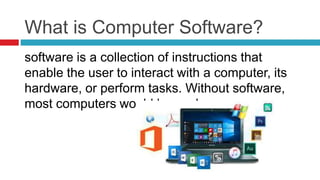
software is a collection of instructions that
enable the user to interact with a computer, its
hardware, or perform tasks. Without software,
most computers would be useless.
Two types of software:
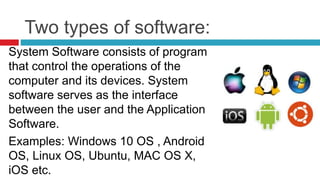
System Software consists of program
that control the operations of the
computer and its devices. System
software serves as the interface
between the user and the Application
Software.
Examples: Windows 10 OS , Android
OS, Linux OS, Ubuntu, MAC OS X,
iOS etc.
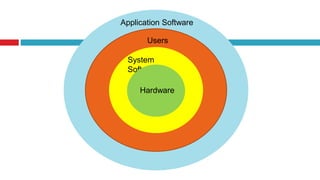
Application Software
Users
System
Software
Hardware
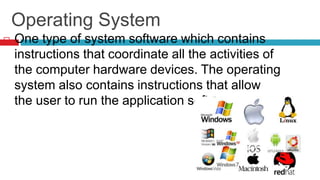
Operating System
 One type of system software which contains
instructions that coordinate all the activities of
the computer hardware devices. The operating
system also contains instructions that allow
the user to run the application software.
Different Operating System
 Stand Alone OS is a complete operating system
that works on a desktop computers, notebook or
other computing devices
 Embedded OS resides in an internal chip rather
than in hard drive. This operating system used on
mobile devices and other consumer electronics.
 Emerging OS is like that of Google’s Chrome OS
has the potential to revolutionize computing. It
was designed to work exclusively with web-based
and cloud based applications and to run on
Chromebook computers.
Application Software or application programs allow
the user to perform specific tasks like writing
documents, making project presentation, video
recording and many others.
Application Software can be used for the following
purposes:
 As a productivity/ business tool
 Creates graphics and multimedia projects
 Support school and professional activities
 Help individual with home and personal activities
 Facilitates communications
Types of Application Software used
in schools
A. Instructional software are programs
specifically designed to deliver instruction or aid
with the delivery of instruction. It intended to
teach skills or information through
demonstration.
 Tutorial software teaches new concepts. Tutorial
usually offers pretest, post-test and drill and
practice. This tutorial software guide the user from
start to the end of learning
 Drill and practice software provides exercises in
which student work on items one at a time and
receive feedback on their correctness. Drills and
practice strengthens students’ skills by providing
them repetitive task until they master the concept
or idea.
 Simulation provide a life like or world like scenario
or system that student may experience through
the computer.
 Instructional Games used to motivate learners in
learning a concept or topic. It also allows learners
 Problem solving software focuses on fostering
skills in problem solving. This software
provides opportunities to practice solving
various kinds of content area problems.
 Special need software specifically for students
with learning disabilities to assist them
carrying out school task. This includes speech
synthesis software, text enlargement
programs, talking calculator etc.
B. Productivity software is designed to help
teachers and students in creating their reports,
computing grades, communicating, developing
of materials and keeping of record effectively
and efficiently.
 Word processing software is one of the most
widely used application software. It is used in
creating documents such as letters,
memorandum, reports, newsletter, thesis, lesson
plans, handouts, test exams, communications and
many others.
 Electronic Spreadsheet software allows the user
to organize numeric data in rows and columns.
This software is normally used to doing budgets,
grade computation and accomplish mathematical
problems.
 Presentation Software is designed to
communicate and display information including
text, images, audio and video elements in a
slideshow format.
 Graphic amd Multimedia Software allows
professionals like engineers, architects, publishers
and graphic artist to design work that is intended
C. Administrative Software are programs that
administrator at school use to establish and
strengthen record keeping and exchanges of
information among various institutions and
agencies. These include student information
records, admissions, accounting, payroll system,
tuition management, class scheduling,
purchasing, faculty hiring, faculty evaluation etc.
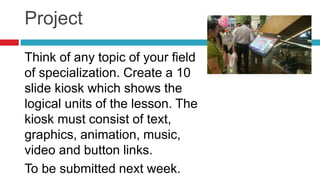
Project
Think of any topic of your field
of specialization. Create a 10
slide kiosk which shows the
logical units of the lesson. The
kiosk must consist of text,
graphics, animation, music,
video and button links.
To be submitted next week.

Software for educators and students

  • 1.
  • 2.
    What is ComputerSoftware? software is a collection of instructions that enable the user to interact with a computer, its hardware, or perform tasks. Without software, most computers would be useless.
  • 3.
    Two types ofsoftware: System Software consists of program that control the operations of the computer and its devices. System software serves as the interface between the user and the Application Software. Examples: Windows 10 OS , Android OS, Linux OS, Ubuntu, MAC OS X, iOS etc.
  • 4.
  • 5.
    Operating System  Onetype of system software which contains instructions that coordinate all the activities of the computer hardware devices. The operating system also contains instructions that allow the user to run the application software.
  • 6.
    Different Operating System Stand Alone OS is a complete operating system that works on a desktop computers, notebook or other computing devices  Embedded OS resides in an internal chip rather than in hard drive. This operating system used on mobile devices and other consumer electronics.  Emerging OS is like that of Google’s Chrome OS has the potential to revolutionize computing. It was designed to work exclusively with web-based and cloud based applications and to run on Chromebook computers.
  • 7.
    Application Software orapplication programs allow the user to perform specific tasks like writing documents, making project presentation, video recording and many others. Application Software can be used for the following purposes:  As a productivity/ business tool  Creates graphics and multimedia projects  Support school and professional activities  Help individual with home and personal activities  Facilitates communications
  • 8.
    Types of ApplicationSoftware used in schools A. Instructional software are programs specifically designed to deliver instruction or aid with the delivery of instruction. It intended to teach skills or information through demonstration.  Tutorial software teaches new concepts. Tutorial usually offers pretest, post-test and drill and practice. This tutorial software guide the user from start to the end of learning
  • 9.
     Drill andpractice software provides exercises in which student work on items one at a time and receive feedback on their correctness. Drills and practice strengthens students’ skills by providing them repetitive task until they master the concept or idea.  Simulation provide a life like or world like scenario or system that student may experience through the computer.  Instructional Games used to motivate learners in learning a concept or topic. It also allows learners
  • 10.
     Problem solvingsoftware focuses on fostering skills in problem solving. This software provides opportunities to practice solving various kinds of content area problems.  Special need software specifically for students with learning disabilities to assist them carrying out school task. This includes speech synthesis software, text enlargement programs, talking calculator etc.
  • 11.
    B. Productivity softwareis designed to help teachers and students in creating their reports, computing grades, communicating, developing of materials and keeping of record effectively and efficiently.  Word processing software is one of the most widely used application software. It is used in creating documents such as letters, memorandum, reports, newsletter, thesis, lesson plans, handouts, test exams, communications and many others.
  • 12.
     Electronic Spreadsheetsoftware allows the user to organize numeric data in rows and columns. This software is normally used to doing budgets, grade computation and accomplish mathematical problems.  Presentation Software is designed to communicate and display information including text, images, audio and video elements in a slideshow format.  Graphic amd Multimedia Software allows professionals like engineers, architects, publishers and graphic artist to design work that is intended
  • 13.
    C. Administrative Softwareare programs that administrator at school use to establish and strengthen record keeping and exchanges of information among various institutions and agencies. These include student information records, admissions, accounting, payroll system, tuition management, class scheduling, purchasing, faculty hiring, faculty evaluation etc.
  • 14.
    Project Think of anytopic of your field of specialization. Create a 10 slide kiosk which shows the logical units of the lesson. The kiosk must consist of text, graphics, animation, music, video and button links. To be submitted next week.