JSS MAHAVIDYAPEETHA MYSORE - 570004
JSS INSTITUTE OF EDUCATION SAKALESHPURA - 573134
2020 - 2021
SEMINAR ON
Subject :- Methods, Techniques & Approaches of Pedagogy
Topiç :- Software Materials
Guided by :
Dr. Prabhuswamy. M
Assistant professor
JSS Institute
of Education
Sakaleshpura
Contents
Introduction :
Software anything that is not hardware but is
used with hardware.
Software material is the programs and other
operating information used by a computer.
Software is the programs and routines for a
computer or the program material for an
electronic device which make it run.
Meaning :
A piece of software that is installed and
used on a computer.
Examples of application software are
Microsoft Word, spreadsheets, VLC media
player, Firefox or Google Chrome, photo
editor, mobile apps such as video games,
Whatsapp, etc
Types of soft materials :
• Digital Radio
• VLC media
• MS OFFICE
• MS Word
• PowerPoint Presentation
• Spreadsheet
• Google Classroom
• Khan Academy
1) Digital RADIO
Radio has been playing a vital role in the field
of communication. A radio is a sightless Or
viewless medium. It is also called blind medium
as the performer doesn't see his audience and
the listener's cannot see the performer.
Advantages of RADIO
•Radio is one of the media which covers huge
population.
•Radio can be enjoyed at home, in office,
while driving car.
•Important information or news can be easily
spread on radio.
•For local market radio is one of the powerful
medium of communication.
2) VLC MEDIA
VideoLAN is a non-profit organization which
develops software for playing video and other
media formats. It originally developed two
programs for media streaming, VideoLAN
Client (VLC) and VideoLAN Server (VLS), but
most of the features of VLS have been
incorporated into VLC, with the result
renamed VLC media player.
Uses of VLC media
• VLC Media Player is a free, open-source cross-
platform multimedia player that runs on
Windows, Mac OSX, and Linux. VLC can be used
to play DVDs, Audio CDs, and most types of
video files
3) MS OFFICE
Microsoft Office is a suite of desktop productivity
applications that is designed specifically to be
used for office or business use. It is a proprietary
product of Microsoft Corporation and was first
released in 1990. It mainly consists of Word,
Excel, PowerPoint, etc.
Advantages of MS OFFICE
•Universal Software.
•Used by over 1.2 billion people and most
businesses.
•Online Support from Microsoft.
•Easy to use.
•Multipurpose.
4) MS WORD
Microsoft Word is a widely used commercial
word processor designed by Microsoft.
Microsoft Word is a component of Microsoft
Office.
Microsoft Word is often called simply Word
or MS Word.
Uses of MS WORD
• Creating text documents.
• Editing and Formatting the existing documents.
• Making a text document interactive with different
features and tools.
• Graphical documents and comprising images.
• Detect grammatical errors in a text document.
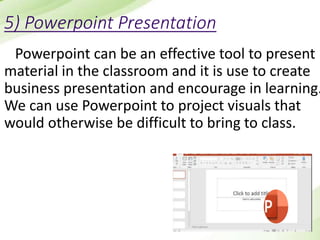
5) Powerpoint Presentation
Powerpoint can be an effective tool to present
material in the classroom and it is use to create
business presentation and encourage in learning.
We can use Powerpoint to project visuals that
would otherwise be difficult to bring to class.
Use Of PowerPoint in Classroom
•Engaging multiple learning styles.
•Increasing visual impact.
•Improving learners focus.
•Increasing spontaneity and interactivity.
•Increasing wonder.
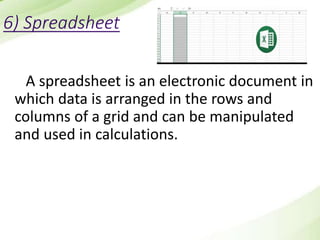
6) Spreadsheet
A spreadsheet is an electronic document in
which data is arranged in the rows and
columns of a grid and can be manipulated
and used in calculations.
Uses of Spreadsheet
• Business Data Storage. A spreadsheet
is an easy way to store all different kinds of
data.
• Accounting and Calculation Uses.
• Data Sifting and Cleanup.
• Generating Reports and Charts.
• Business Administrative Tasks.
7) Google Classroom
Google Classroom is a free blended learning
platform developed by Google for schools
that aims to simplify creating, distributing,
and grading assignments. The primary
purpose of Google Classroom is to streamline
the process of sharing files between teachers
and students.
Uses of Google Classroom
• Classroom is available on the web or by mobile app.
• Make announcements and post comments to
assignments.
• You can use Classroom with many tools that you
already use, such as Gmail, Google Docs, and Google
Calendar.
• View whether your students have completed
assignments or not.
8) Khan Academy
• Khan Academy Kids is an award-winning
educational app for young learners ages two to
seven.
• Khan Academy is a free education app for both
students and teachers. Khan Academy offers
practice exercises, instructional videos .
Advantages of Khan Academy
• It is free and accessible.
• There are a wide variety of subjects available.
• You can learn and work at your own place.
• It provides an incredible amount of math
problems for a variety of grade levels.(from very
basic elementary concepts through calculus).
CONCLUSION
Although there are different types of computer
software. These software use in different sectors.
Their operating process is also different. Some types
of software works graphically, some works on
database management system, some on word
processors etc. Day by day softwares are upgrating.
References
https://en.m.wikipedia.org/wiki/VideoLAN
https://en.m.wikipedia.org/wiki/Software
https://en.m.wikipedia.org/wiki/Digital_radio
https://en.m.wikipedia.org/wiki/Microsoft_Office
https://en.m.wikipedia.org/wiki/Microsoft_Word
https://en.m.wikipedia.org/wiki/Spreadsheet
https://en.m.wikipedia.org/wiki/Microsoft_PowerPoint
https://en.m.wikipedia.org/wiki/Google_Classroom
https://en.m.wikipedia.org/wiki/Khan_Academy
Thank You

Soft Materials

  • 1.
    JSS MAHAVIDYAPEETHA MYSORE- 570004 JSS INSTITUTE OF EDUCATION SAKALESHPURA - 573134 2020 - 2021 SEMINAR ON Subject :- Methods, Techniques & Approaches of Pedagogy Topiç :- Software Materials Guided by : Dr. Prabhuswamy. M Assistant professor JSS Institute of Education Sakaleshpura
  • 2.
  • 3.
    Introduction : Software anythingthat is not hardware but is used with hardware. Software material is the programs and other operating information used by a computer. Software is the programs and routines for a computer or the program material for an electronic device which make it run.
  • 4.
    Meaning : A pieceof software that is installed and used on a computer. Examples of application software are Microsoft Word, spreadsheets, VLC media player, Firefox or Google Chrome, photo editor, mobile apps such as video games, Whatsapp, etc
  • 5.
    Types of softmaterials : • Digital Radio • VLC media • MS OFFICE • MS Word • PowerPoint Presentation • Spreadsheet • Google Classroom • Khan Academy
  • 6.
    1) Digital RADIO Radiohas been playing a vital role in the field of communication. A radio is a sightless Or viewless medium. It is also called blind medium as the performer doesn't see his audience and the listener's cannot see the performer.
  • 7.
    Advantages of RADIO •Radiois one of the media which covers huge population. •Radio can be enjoyed at home, in office, while driving car. •Important information or news can be easily spread on radio. •For local market radio is one of the powerful medium of communication.
  • 8.
    2) VLC MEDIA VideoLANis a non-profit organization which develops software for playing video and other media formats. It originally developed two programs for media streaming, VideoLAN Client (VLC) and VideoLAN Server (VLS), but most of the features of VLS have been incorporated into VLC, with the result renamed VLC media player.
  • 9.
    Uses of VLCmedia • VLC Media Player is a free, open-source cross- platform multimedia player that runs on Windows, Mac OSX, and Linux. VLC can be used to play DVDs, Audio CDs, and most types of video files
  • 10.
    3) MS OFFICE MicrosoftOffice is a suite of desktop productivity applications that is designed specifically to be used for office or business use. It is a proprietary product of Microsoft Corporation and was first released in 1990. It mainly consists of Word, Excel, PowerPoint, etc.
  • 11.
    Advantages of MSOFFICE •Universal Software. •Used by over 1.2 billion people and most businesses. •Online Support from Microsoft. •Easy to use. •Multipurpose.
  • 12.
    4) MS WORD MicrosoftWord is a widely used commercial word processor designed by Microsoft. Microsoft Word is a component of Microsoft Office. Microsoft Word is often called simply Word or MS Word.
  • 13.
    Uses of MSWORD • Creating text documents. • Editing and Formatting the existing documents. • Making a text document interactive with different features and tools. • Graphical documents and comprising images. • Detect grammatical errors in a text document.
  • 14.
    5) Powerpoint Presentation Powerpointcan be an effective tool to present material in the classroom and it is use to create business presentation and encourage in learning. We can use Powerpoint to project visuals that would otherwise be difficult to bring to class.
  • 15.
    Use Of PowerPointin Classroom •Engaging multiple learning styles. •Increasing visual impact. •Improving learners focus. •Increasing spontaneity and interactivity. •Increasing wonder.
  • 16.
    6) Spreadsheet A spreadsheetis an electronic document in which data is arranged in the rows and columns of a grid and can be manipulated and used in calculations.
  • 17.
    Uses of Spreadsheet •Business Data Storage. A spreadsheet is an easy way to store all different kinds of data. • Accounting and Calculation Uses. • Data Sifting and Cleanup. • Generating Reports and Charts. • Business Administrative Tasks.
  • 18.
    7) Google Classroom GoogleClassroom is a free blended learning platform developed by Google for schools that aims to simplify creating, distributing, and grading assignments. The primary purpose of Google Classroom is to streamline the process of sharing files between teachers and students.
  • 19.
    Uses of GoogleClassroom • Classroom is available on the web or by mobile app. • Make announcements and post comments to assignments. • You can use Classroom with many tools that you already use, such as Gmail, Google Docs, and Google Calendar. • View whether your students have completed assignments or not.
  • 20.
    8) Khan Academy •Khan Academy Kids is an award-winning educational app for young learners ages two to seven. • Khan Academy is a free education app for both students and teachers. Khan Academy offers practice exercises, instructional videos .
  • 21.
    Advantages of KhanAcademy • It is free and accessible. • There are a wide variety of subjects available. • You can learn and work at your own place. • It provides an incredible amount of math problems for a variety of grade levels.(from very basic elementary concepts through calculus).
  • 22.
    CONCLUSION Although there aredifferent types of computer software. These software use in different sectors. Their operating process is also different. Some types of software works graphically, some works on database management system, some on word processors etc. Day by day softwares are upgrating.
  • 23.
  • 24.