Asstt. Prof. Suresh KumarAsstt. Prof. Suresh Kumar
Ganga Global Institute ofGanga Global Institute of
Teacher EducationTeacher Education
Email ID:Email ID:   sureshk925@gmail.comsureshk925@gmail.com
Subject: ICT and Instructional System
ComputerComputer
SoftwareSoftware
Software
Computer Instructions or data, anything
that can be stored electronically is
Software, which enable the computer to
function.
For example: There is a problem in the
Software implies – Problem with program
or data
Types of Software
 System Software
 Application Software
 Open source Software and
 Proprietary Software
System Software:
System Software includes the Operating
System and all the utilities that enable the
computer to function.
System software is a term referring to
any computer software which manages
and controls the hardware so that
application software can perform a task.
Example:
Operating Systems, Compiler, Loader,
Linker, Interpreter.
System Software:
Operating System:
 Operating System is a software, which makes a
computer to actually work.
 It is the software the enables all the programs we
use.
 The OS organizes and controls the hardware.
 OS acts as an interface between the application
programs and the machine hardware.
 Examples: Windows, Linux, Unix and Mac OS, etc.,
System Software (contd):
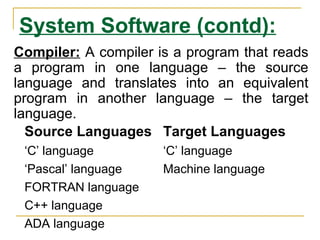
Source Languages Target Languages
‘C’ language ‘C’ language
‘Pascal’ language Machine language
FORTRAN language
C++ language
ADA language
Compiler: A compiler is a program that reads
a program in one language – the source
language and translates into an equivalent
program in another language – the target
language.
System Software (contd):
Loader: A loader is the part of an operating system that
is responsible for loading programs into memory,
preparing them for execution and then executing them.
The loader is usually a part of the operating system's
kernel and usually is loaded at system boot time and
stays in memory until the system is rebooted, shut down,
or powered off.
In Unix, the loader is the handler for the system call
execve().
System Software (contd):
Linker: A linker or link editor is a program that
takes one or more objects generated by
compilers and assembles them into a single
executable program.
Linkers can take objects from a collection called
a library. The objects are program modules
containing machine code and information for the
linker.
The linker takes care of arranging the objects in
a program's address space.
System Software (contd):
Interpreter: An interpreter is a computer
program that translates and executes
instructions written in a computer programming
language line-by-line, unit by unit etc.,
An interpreter needs to be able to analyze, or
parse, instructions written in the source
language.
Example: Lisp systems, etc.,
Application Software:
 Application Software includes
programs that do real work for user.
Perform common information
processing jobs. Sometimes known as
productivity packages
Example:
Payroll systems, Inventory Control,
Manage student database, Word
Processor, Spreadsheet and Database
Management System etc.
Application Software:
Word Processors:
Word processing is a tool that helps user in
creating, editing, and printing documents. Word
processors will normally have the following
capabilities built into them:
 Spell checking
 Standard layouts for normal documents
 Have some characters appear in bold print,
italics, or underlined
 Center lines, make text line up on the left side of
the paper, or the right side of the paper
 Save the document so it can be used again
 Print the document.
 Examples: Word Perfect and Microsoft Word
Application Software (contd…):
Spreadsheets: The spreadsheet
packages are designed to use numbers
and formulas to do calculations with
ease. Examples of spreadsheets include:
 Budgets
 Payrolls
 Grade Calculations
 Address Lists
The most commonly used spreadsheet
programs are Microsoft Excel and Lotus
Application Software (contd…):
Graphic Presentations: The
presentation programs can make giving
presentations and using overheads easier.
Other uses include:
 Slide Shows
 Repeating Computer Presentations on a
computer monitor
 Using Sound and animation in slide
shows
The most recognized graphic presentation
programs are Microsoft PowerPoint and Harvard
Graphics.
Application Software(contd…):
Database Management System (DBMS):
 A DBMS is a software tool that allows
multiple users to store, access, and process
data into useful information.
 Database programs are designed for these
types of applications:
 Membership lists
 Student lists
 Grade reports
 Instructor schedules
All of these have to be maintained so you
can find what you need quickly and
accurately.
Example:Microsoft Access, dBASE, Oracle.
Utility Softwares Perform miscellaneous
housekeeping and file conversion
functions.
 Data backup
 Data recovery
 Virus protection
 Data compression
 Data defragmentation
 Performance monitors and security
monitors
Customised Software
 Written by programmers
 Takes a lot of time to write and test
 When specifications are unique
Packages or Commercial
 Sold in stores, catalogs, or downloadable
from the WWW
 Purchased from software publishers
 Must be installed
 Standard or custom installation
 The setup process copies some of all of the
software to the hard disk
 May require the CD-ROM to be in the drive
to run
Thank
You !

Computer software 2

  • 1.
    Asstt. Prof. SureshKumarAsstt. Prof. Suresh Kumar Ganga Global Institute ofGanga Global Institute of Teacher EducationTeacher Education Email ID:Email ID:   sureshk925@gmail.comsureshk925@gmail.com Subject: ICT and Instructional System
  • 2.
  • 3.
    Software Computer Instructions ordata, anything that can be stored electronically is Software, which enable the computer to function. For example: There is a problem in the Software implies – Problem with program or data
  • 4.
    Types of Software System Software  Application Software  Open source Software and  Proprietary Software
  • 5.
    System Software: System Softwareincludes the Operating System and all the utilities that enable the computer to function. System software is a term referring to any computer software which manages and controls the hardware so that application software can perform a task. Example: Operating Systems, Compiler, Loader, Linker, Interpreter.
  • 6.
    System Software: Operating System: Operating System is a software, which makes a computer to actually work.  It is the software the enables all the programs we use.  The OS organizes and controls the hardware.  OS acts as an interface between the application programs and the machine hardware.  Examples: Windows, Linux, Unix and Mac OS, etc.,
  • 7.
    System Software (contd): SourceLanguages Target Languages ‘C’ language ‘C’ language ‘Pascal’ language Machine language FORTRAN language C++ language ADA language Compiler: A compiler is a program that reads a program in one language – the source language and translates into an equivalent program in another language – the target language.
  • 8.
    System Software (contd): Loader:A loader is the part of an operating system that is responsible for loading programs into memory, preparing them for execution and then executing them. The loader is usually a part of the operating system's kernel and usually is loaded at system boot time and stays in memory until the system is rebooted, shut down, or powered off. In Unix, the loader is the handler for the system call execve().
  • 9.
    System Software (contd): Linker:A linker or link editor is a program that takes one or more objects generated by compilers and assembles them into a single executable program. Linkers can take objects from a collection called a library. The objects are program modules containing machine code and information for the linker. The linker takes care of arranging the objects in a program's address space.
  • 10.
    System Software (contd): Interpreter:An interpreter is a computer program that translates and executes instructions written in a computer programming language line-by-line, unit by unit etc., An interpreter needs to be able to analyze, or parse, instructions written in the source language. Example: Lisp systems, etc.,
  • 11.
    Application Software:  ApplicationSoftware includes programs that do real work for user. Perform common information processing jobs. Sometimes known as productivity packages Example: Payroll systems, Inventory Control, Manage student database, Word Processor, Spreadsheet and Database Management System etc.
  • 12.
    Application Software: Word Processors: Wordprocessing is a tool that helps user in creating, editing, and printing documents. Word processors will normally have the following capabilities built into them:  Spell checking  Standard layouts for normal documents  Have some characters appear in bold print, italics, or underlined  Center lines, make text line up on the left side of the paper, or the right side of the paper  Save the document so it can be used again  Print the document.  Examples: Word Perfect and Microsoft Word
  • 13.
    Application Software (contd…): Spreadsheets:The spreadsheet packages are designed to use numbers and formulas to do calculations with ease. Examples of spreadsheets include:  Budgets  Payrolls  Grade Calculations  Address Lists The most commonly used spreadsheet programs are Microsoft Excel and Lotus
  • 14.
    Application Software (contd…): GraphicPresentations: The presentation programs can make giving presentations and using overheads easier. Other uses include:  Slide Shows  Repeating Computer Presentations on a computer monitor  Using Sound and animation in slide shows The most recognized graphic presentation programs are Microsoft PowerPoint and Harvard Graphics.
  • 15.
    Application Software(contd…): Database ManagementSystem (DBMS):  A DBMS is a software tool that allows multiple users to store, access, and process data into useful information.  Database programs are designed for these types of applications:  Membership lists  Student lists  Grade reports  Instructor schedules All of these have to be maintained so you can find what you need quickly and accurately. Example:Microsoft Access, dBASE, Oracle.
  • 16.
    Utility Softwares Performmiscellaneous housekeeping and file conversion functions.  Data backup  Data recovery  Virus protection  Data compression  Data defragmentation  Performance monitors and security monitors
  • 17.
    Customised Software  Writtenby programmers  Takes a lot of time to write and test  When specifications are unique
  • 18.
    Packages or Commercial Sold in stores, catalogs, or downloadable from the WWW  Purchased from software publishers  Must be installed  Standard or custom installation  The setup process copies some of all of the software to the hard disk  May require the CD-ROM to be in the drive to run
  • 19.