

The Software as an
Educational
Resource
By
Calar, Marjorie
Conag, Erika Zaira
Singson, Mylene
Topics to be Discussed:
• Give the definition of Software and
Hardware
• Kinds of Educational Software and its
importance
• Microsoft Windows
• Instructional Software and CBI’s
• Comparison of Software and Hardware
and its examples
“The computer machine or
hardware is naturally an attention-
getter ”
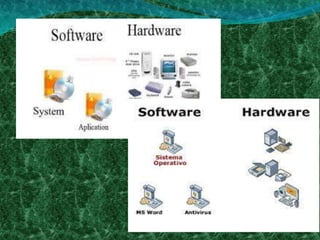
Software
- A general term used to describe a
collection of computer programs,
procedures, and documentation
that performs some task on the
computer system hardware.
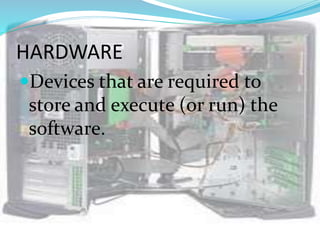
HARDWARE
Devices that are required to
store and execute (or run) the
software.
Two kinds of Software:
• The system software – this is the
operating system that is found or bundled
inside all computer machines.
 The applications software – this
contains the system that commands the
particular task or solves a particular
problem.
Programming Software- (software
development tool) an application that
software developers used to create, debug,
maintain, or supports other programs and
application
Application software may be:
- A custom software that is
made for specific tasks often
by large corporations, or
- A commercial software
packaged for personal
computers that helps with a
variety of tasks.
4 Types of Software
1. Courseware
2. Classroom Management
Software
3. Assessment Software
4. Reference Software
Courseware
 Combined terms of “course” and “software”
 Additional educational material intended as kits for
teachers or as tutorials for students packaged for use
with a computer
 Html pages
 Pdf files
Classroom Management Software
 Designed for use in school classrooms
 Such software may be projected onto a large
whiteboard at the front of the class or in computer
desktops
 Interactive whiteboards
 Reference works
 Children’s software
Assessment Software
 Refers to software with a primary purpose of assessing
and testing students in a virtual environment
 Moodle
 QuestionMark
 EvaluNet
Reference Software
Emulates and expands upon print
reference forms
 Dictionary
 Encyclopedia
 Thesaurus
 Atlas
 Encarta
Microsoft Windows
 an operating environment
between the user and the
computer operating system.
a “shell”- a layer that
creates the way the
computer should work.
GUI
A type of user interface that allows
users to interact with electronic devices
through graphical icons and visual
indicators
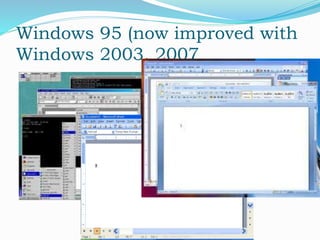
Windows 95 (now improved with
Windows 2003, 2007
Windows provides:
User convenience – just click a file name
to retrieve data or click from program to
program as easy as changing channels
in your TV screen
 A new look – fancy borders, smooth
and streamlined text fonts
 Information center – Windows puts
all communications activities (e-mail,
downloads etc. in a single screen
icon); adapts/configures the computer
for the Internet.
 Plug and play – configures the
computer with added components,
such as for sound and video.
Instructional
Software
Instructional
Software
Computer programs
designed to deliver
instruction or to assist in
the delivery of instruction
on a specific topic.
5 Types of Instructional
Software
1. Drill and Practice
2. Tutorial Software
3. Simulation Software
4. Instructional game Software
5. Problem Solving Software
1. Drill and Practice
Refers to structured and repetitive
practice of previously learned
concepts
Gives students immediate feedback
whether there answers are right or
wrong
 http://www.aplusmath.com/Flashcards/index.html
http://www.superkids.com/aweb/tools/math/
2. Tutorial Software
Provide information and
instructional activities to help
students master a topic
 http://www.adaptedmind.com/Math-
Worksheets.html?gclid=CJ2ao_ia27ACFUZN4
AodDDvq2g

3. Simulation software
Provides models of real
or imaginary systems
that are used to
enhance instruction
4. Instructional Game
Software
Usually used as rewards
or to reinforce a skill
The best way to test
students’ knowledge is
through letting them play
games
5. Problem Solving
Software
Provides good hands on
experience with skills such as
sequencing, figuring out
relevant information to solve
problems
BUT
BEWARE
OF
CBI’s!!!
Guidelines in Evaluating Computer-
Based Educational (CBI) materials:
• Be extremely cautious in using CBIs
and ‘free’ Internet materials.
• Value Instructional Worth
•Teachers must evaluate these
resources using sound pedagogical
principles.
Clarity of concepts and principles
Maintain accuracy,
coherence, logic of
information
Updated software
Relevance and Effectiveness
Must not be biased
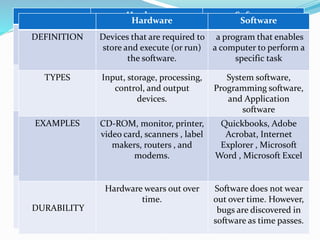
Hardware Software
DEFINITION Devices that are required to
store and execute (or run)
the software.
a program that enables
a computer to perform a
specific task
TYPES Input, storage, processing,
control, and output
devices.
System software,
Programming software,
and Application
software
EXAMPLES CD-ROM, monitor, printer,
video card, scanners , label
makers, routers , and
modems.
Quickbooks, Adobe
Acrobat, Internet
Explorer , Microsoft
Word , Microsoft Excel
DURABILITY
Hardware wears out over
time.
Software does not wear
out over time. However,
bugs are discovered in
software as time passes.
Hardware Software
DEFINITION Devices that are required to
store and execute (or run)
the software.
a program that enables
a computer to perform a
specific task
TYPES Input, storage, processing,
control, and output
devices.
System software,
Programming software,
and Application
software
EXAMPLES CD-ROM, monitor, printer,
video card, scanners , label
makers, routers , and
modems.
Quickbooks, Adobe
Acrobat, Internet
Explorer , Microsoft
Word , Microsoft Excel
DURABILITY
Hardware wears out over
time.
Software does not wear
out over time. However,
bugs are discovered in
software as time passes.
Thank you!!!

Software

  • 1.
    The Software asan Educational Resource By Calar, Marjorie Conag, Erika Zaira Singson, Mylene
  • 2.
    Topics to beDiscussed: • Give the definition of Software and Hardware • Kinds of Educational Software and its importance • Microsoft Windows • Instructional Software and CBI’s • Comparison of Software and Hardware and its examples
  • 3.
    “The computer machineor hardware is naturally an attention- getter ”
  • 4.
    Software - A generalterm used to describe a collection of computer programs, procedures, and documentation that performs some task on the computer system hardware.
  • 5.
    HARDWARE Devices that arerequired to store and execute (or run) the software.
  • 6.
    Two kinds ofSoftware: • The system software – this is the operating system that is found or bundled inside all computer machines.  The applications software – this contains the system that commands the particular task or solves a particular problem. Programming Software- (software development tool) an application that software developers used to create, debug, maintain, or supports other programs and application
  • 7.
    Application software maybe: - A custom software that is made for specific tasks often by large corporations, or - A commercial software packaged for personal computers that helps with a variety of tasks.
  • 8.
    4 Types ofSoftware 1. Courseware 2. Classroom Management Software 3. Assessment Software 4. Reference Software
  • 9.
    Courseware  Combined termsof “course” and “software”  Additional educational material intended as kits for teachers or as tutorials for students packaged for use with a computer  Html pages  Pdf files
  • 10.
    Classroom Management Software Designed for use in school classrooms  Such software may be projected onto a large whiteboard at the front of the class or in computer desktops  Interactive whiteboards  Reference works  Children’s software
  • 11.
    Assessment Software  Refersto software with a primary purpose of assessing and testing students in a virtual environment  Moodle  QuestionMark  EvaluNet
  • 12.
    Reference Software Emulates andexpands upon print reference forms  Dictionary  Encyclopedia  Thesaurus  Atlas  Encarta
  • 13.
  • 14.
     an operatingenvironment between the user and the computer operating system. a “shell”- a layer that creates the way the computer should work.
  • 15.
    GUI A type ofuser interface that allows users to interact with electronic devices through graphical icons and visual indicators
  • 16.
    Windows 95 (nowimproved with Windows 2003, 2007
  • 17.
    Windows provides: User convenience– just click a file name to retrieve data or click from program to program as easy as changing channels in your TV screen  A new look – fancy borders, smooth and streamlined text fonts
  • 18.
     Information center– Windows puts all communications activities (e-mail, downloads etc. in a single screen icon); adapts/configures the computer for the Internet.  Plug and play – configures the computer with added components, such as for sound and video.
  • 19.
  • 20.
    Instructional Software Computer programs designed todeliver instruction or to assist in the delivery of instruction on a specific topic.
  • 21.
    5 Types ofInstructional Software 1. Drill and Practice 2. Tutorial Software 3. Simulation Software 4. Instructional game Software 5. Problem Solving Software
  • 22.
    1. Drill andPractice Refers to structured and repetitive practice of previously learned concepts Gives students immediate feedback whether there answers are right or wrong  http://www.aplusmath.com/Flashcards/index.html http://www.superkids.com/aweb/tools/math/
  • 23.
    2. Tutorial Software Provideinformation and instructional activities to help students master a topic  http://www.adaptedmind.com/Math- Worksheets.html?gclid=CJ2ao_ia27ACFUZN4 AodDDvq2g 
  • 24.
    3. Simulation software Providesmodels of real or imaginary systems that are used to enhance instruction
  • 25.
    4. Instructional Game Software Usuallyused as rewards or to reinforce a skill The best way to test students’ knowledge is through letting them play games
  • 26.
    5. Problem Solving Software Providesgood hands on experience with skills such as sequencing, figuring out relevant information to solve problems
  • 27.
  • 28.
    Guidelines in EvaluatingComputer- Based Educational (CBI) materials: • Be extremely cautious in using CBIs and ‘free’ Internet materials. • Value Instructional Worth •Teachers must evaluate these resources using sound pedagogical principles.
  • 29.
    Clarity of conceptsand principles Maintain accuracy, coherence, logic of information Updated software Relevance and Effectiveness Must not be biased
  • 30.
    Hardware Software DEFINITION Devicesthat are required to store and execute (or run) the software. a program that enables a computer to perform a specific task TYPES Input, storage, processing, control, and output devices. System software, Programming software, and Application software EXAMPLES CD-ROM, monitor, printer, video card, scanners , label makers, routers , and modems. Quickbooks, Adobe Acrobat, Internet Explorer , Microsoft Word , Microsoft Excel DURABILITY Hardware wears out over time. Software does not wear out over time. However, bugs are discovered in software as time passes. Hardware Software DEFINITION Devices that are required to store and execute (or run) the software. a program that enables a computer to perform a specific task TYPES Input, storage, processing, control, and output devices. System software, Programming software, and Application software EXAMPLES CD-ROM, monitor, printer, video card, scanners , label makers, routers , and modems. Quickbooks, Adobe Acrobat, Internet Explorer , Microsoft Word , Microsoft Excel DURABILITY Hardware wears out over time. Software does not wear out over time. However, bugs are discovered in software as time passes.
  • 32.