Process Selection
and
Facility Layout
Learning ObjectivesLearning Objectives
 Explain the strategic importance of process
selection.
 Explain the influence that process selection
has on an organization.
 Describe the basic processing types.
 Discuss automated approaches to
processing.
Learning ObjectivesLearning Objectives
 List some reasons for redesign of layouts.
 Describe the basic layout types.
 List the main advantages and
disadvantages of product layouts and
process layouts.
 Solve simple line-balancing problems.
 Process selection
 Deciding on the way production of
goods or services will be organized
 Major implications
 Capacity planning
 Layout of facilities
 Equipment
 Design of work systems
IntroductionIntroduction
Forecasting
Product and
Service Design
Technological
Change
Capacity
Planning
Process
Selection
Facilities and
Equipment
Layout
Work
Design
Process Selection andProcess Selection and
System DesignSystem Design
• Key aspects of process strategy
– Capital intensive (mix of equipment/labor)
– Process flexibility
– Design
– Volume
– Technology
Process StrategyProcess Strategy
Kinds of TechnologyKinds of Technology
 Operations management is primarily
concerned with three kinds of technology:
 Product and service technology
 Process technology
 Information technology
 All three have a major impact on:
 Costs
 Productivity
 Competitiveness
Technology CompetitiveTechnology Competitive
AdvantageAdvantage
 Innovations in
 Products and services
Cell phones
PDAs
Wireless computing
 Processing technology
Increasing productivity
Increasing quality
Lowering costs
 Variety
 How much
 Flexibility
 What degree
 Volume
 Expected output
Job Shop
Batch
Repetitive
Continuous
Process SelectionProcess Selection
 Job shop
 Small scale
 Batch
 Moderate volume
 Repetitive/assembly line
 High volumes of standardized goods or
services
 Continuous
 Very high volumes of non-discrete goods
Process TypesProcess Types
Process Type
Job Shop Appliance repair
Emergency
room
Ineffective
Batch Commercial
baking
Classroom
Lecture
Repetitive Automotive
assembly
Automatic
carwash
Continuous
(flow)
Ineffective Steel Production
Water purification
Product and ServiceProduct and Service
ProcessesProcesses
Low Volume High Volume
Dimension Job shop Batch Repetitive Continuous
Job variety Very High Moderate Low Very low
Process
flexibility
Very High Moderate Low Very low
Unit cost Very High Moderate Low Very low
Volume of
output
Very low Low High Very High
Product – Process MatrixProduct – Process Matrix
Other issues; scheduling
work-in-process inventory
labor skill
Process and Product ProfilingProcess and Product Profiling
 Process selection can involve substantial
investment in
 Equipment
 Layout of facilities
 Product profiling: Linking key product or service
requirements to process capabilities
 Key dimensions
 Range of products or services
 Expected order sizes
 Pricing strategies
 Expected schedule changes
 Order winning requirements
 Automation: Machinery that has sensing
and control devices that enables it to
operate
 Fixed automation
 Programmable automation
AutomationAutomation
• Computer-aided design and
manufacturing systems (CAD/CAM)
• Numerically controlled (NC) machines
• Robot
• Manufacturing cell
• Flexible manufacturing systems(FMS)
• Computer-integrated manufacturing (CIM)
AutomationAutomation
 Layout: the configuration of departments,
work centers, and equipment, with particular
emphasis on movement of work (customers
or materials) through the system
Product layouts
Process layouts
Fixed-Position layout
Combination layouts
Facilities LayoutFacilities Layout
Objective of Layout DesignObjective of Layout Design
1. Facilitate attainment of product quality
2. Use workers and space efficiently
3. Avoid bottlenecks
4. Minimize unnecessary material handling
costs
5. Eliminate unnecessary movement of
workers or materials
6. Minimize production time or customer
service time
7. Design for safety
 Requires substantial investments of
money and effort
 Involves long-term commitments
 Has significant impact on cost and
efficiency of short-term operations
Importance of LayoutImportance of Layout
DecisionsDecisions
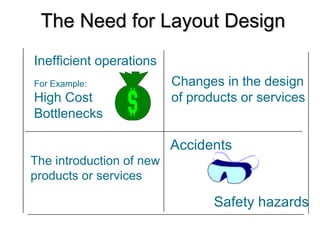
Inefficient operations
For Example:
High Cost
Bottlenecks
Changes in the design
of products or services
The introduction of new
products or services
Accidents
Safety hazards
The Need for Layout DesignThe Need for Layout Design
Changes in
environmental
or other legal
requirements
Changes in volume of
output or mix of
products
Changes in methods
and equipment
Morale problems
The Need for Layout DesignThe Need for Layout Design
(Cont’d)(Cont’d)
 Product layouts
 Process layouts
 Fixed-Position layout
 Combination layouts
Basic Layout TypesBasic Layout Types
 Product layout
 Layout that uses standardized processing
operations to achieve smooth, rapid, high-
volume flow
 Process layout
 Layout that can handle varied processing
requirements
 Fixed Position layout
 Layout in which the product or project
remains stationary, and workers, materials,
and equipment are moved as needed
Basic Layout TypesBasic Layout Types
Raw
materials
or customer
Finished
item
Station
2
Station
2
Station
3
Station
3
Station
4
Station
4
Material
and/or
labor
Station
1
Material
and/or
labor
Material
and/or
labor
Material
and/or
labor
Used for Repetitive or Continuous Processing
Product LayoutProduct Layout
 High rate of output
 Low unit cost
 Labor specialization
 Low material handling cost
 High utilization of labor and equipment
 Established routing and scheduling
 Routine accounting, purchasing and
inventory control
Advantages of Product LayoutAdvantages of Product Layout
 Creates dull, repetitive jobs
 Poorly skilled workers may not maintain
equipment or quality of output
 Fairly inflexible to changes in volume
 Highly susceptible to shutdowns
 Needs preventive maintenance
 Individual incentive plans are
impractical
Disadvantages of Product LayoutDisadvantages of Product Layout
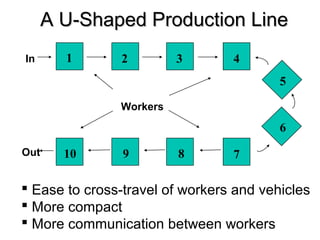
1 2 3 4
5
6
78910
In
Out
Workers
A U-Shaped Production LineA U-Shaped Production Line
 Ease to cross-travel of workers and vehicles
 More compact
 More communication between workers
Work
Station 1
Work
Station 2
Work
Station 3
Product Layout
(sequential)
Used for Repetitive Processing
or Continuous Processes
Product LayoutProduct Layout
Dept. A
Dept. B Dept. D
Dept. C
Dept. F
Dept. E
Used for Intermittent processing
Job Shop or Batch Processes
Process Layout
(functional)
Process LayoutProcess Layout
 Can handle a variety of processing
requirements
 Not particularly vulnerable to equipment
failures
 Equipment used is less costly
 Possible to use individual incentive
plans
Advantages of Process LayoutsAdvantages of Process Layouts
 In-process inventory costs can be high
 Challenging routing and scheduling
 Equipment utilization rates are low
 Material handling slow and inefficient
 Complexities often reduce span of
supervision
 Special attention for each product or
customer
 Accounting and purchasing are more
Disadvantages of ProcessDisadvantages of Process
LayoutsLayouts
Fixed Position LayoutsFixed Position Layouts
 Fixed Position Layout: Layout in which the
product or project remains stationary, and
workers, materials, and equipment are
moved as needed.
 Nature of the product dictates this type of
layout
 Weight
 Size
 Bulk
 Large construction projects
 Cellular Production
 Layout in which machines are grouped into
a cell that can process items that have
similar processing requirements
 Group Technology
 The grouping into part families of items with
similar design or manufacturing
characteristics
Cellular LayoutsCellular Layouts
Dimension Functional Cellular
Number of moves
between departments
many few
Travel distances longer shorter
Travel paths variable fixed
Job waiting times greater shorter
Throughput time higher lower
Amount of work in
process
higher lower
Supervision difficulty higher lower
Scheduling complexity higher lower
Equipment utilization lower higher
Functional vs. Cellular LayoutsFunctional vs. Cellular Layouts
 Warehouse and storage layouts
 Retail layouts
 Office layouts
Service LayoutsService Layouts
Line Balancing is the process of assigning
tasks to workstations in such a way that
the workstations have approximately
equal time requirements.
Design Product Layouts: LineDesign Product Layouts: Line
BalancingBalancing
Cycle time is the maximum time
allowed at each workstation to
complete its set of tasks on a unit.
Cycle TimeCycle Time
D
OT
=timecycle=CT
rateoutputDesired=D
daypertimeoperatingOT
CT
OT
=rateOutput
=
Determine Maximum OutputDetermine Maximum Output
task timeofsum=t
CT
t)(
=N
∑
∑
Determine the Minimum NumberDetermine the Minimum Number
of Workstations Requiredof Workstations Required
Precedence diagram: Tool used in line balancing to
display elemental tasks and sequence requirements
A Simple Precedence
Diagrama b
c d e
0.1 min.
0.7 min.
1.0 min.
0.5 min. 0.2 min.
Precedence DiagramPrecedence Diagram
 Arrange tasks shown in Figure 6.10 into
three workstations.
 Use a cycle time of 1.0 minute
 Assign tasks in order of the most number of
followers
Example 1: Assembly LineExample 1: Assembly Line
BalancingBalancing
Workstatio
n
Time
Remaining Eligible
Assign
Task
Revised
Time
Remaining
Station
Idle Time
1 1.0
0.9
0.2
a, c
c
none
a
c
-
0.9
0.2
0.2
2 1.0 b b 0.0 0.0
3 1.0
0.5
0.3
d
e
-
d
e
-
0.5
0.3 0.3
0.5
Example 1 SolutionExample 1 Solution
Percent idle time =
Idle time per cycle
(N)(CT)
Efficiency = 100 – Percent idle time
Calculate Percent Idle TimeCalculate Percent Idle Time
Assign tasks in order of most following
tasks.
 Count the number of tasks that follow
Assign tasks in order of greatest
positional weight.
 Positional weight is the sum of each task’s
time and the times of all following tasks.
Some Heuristic (intuitive) Rules:
Line Balancing RulesLine Balancing Rules
Example 2Example 2
Plan to produce 400 units in 1 day (8 hours)
Immediate Task time
Task follower (min)
a b 0.2
b e 0.2
c d 0.8
d f 0.6
e f 0.3
f g 1.0
g h 0.4
h end 0.3
c d
a b e
f g h
0.2 0.2 0.3
0.8 0.6
1.0 0.4 0.3
Station 1 Station 2 Station 3 Station 4
a b e
f
d
g h
c
Solution to Example 2Solution to Example 2
1 min.2 min.1 min.1 min.
30/hr. 30/hr. 30/hr. 30/hr.
Bottleneck
Bottleneck WorkstationBottleneck Workstation
Parallel WorkstationsParallel Workstations
1 min.
2 min.
1 min.1 min.
60/hr.
30/hr. 30/hr.
60/hr.
2 min.
30/hr.
30/hr.
Parallel Workstations
Copier ExampleCopier Example
This means thatThis means that
tasks B and Etasks B and E
cannot be donecannot be done
until task A hasuntil task A has
been completedbeen completed
PerformancePerformance Task Must FollowTask Must Follow
TimeTime Task ListedTask Listed
TaskTask (minutes)(minutes) BelowBelow
AA 1010 ——
BB 1111 AA
CC 55 BB
DD 44 BB
EE 1212 AA
FF 33 C, DC, D
GG 77 FF
HH 1111 EE
II 33 G, HG, H
Total timeTotal time 6666
Copier ExampleCopier Example
PerformancePerformance Task Must FollowTask Must Follow
TimeTime Task ListedTask Listed
TaskTask (minutes)(minutes) BelowBelow
AA 1010 ——
BB 1111 AA
CC 55 BB
DD 44 BB
EE 1212 AA
FF 33 C, DC, D
GG 77 FF
HH 1111 EE
II 33 G, HG, H
Total timeTotal time 6666 I
GF
C
D
H
B
E
A
10
1112
5
4
3
711 3
Figure 9.13
I
GF
C
D
H
B
E
A
10
1112
5
4
3
711 3
Figure 9.13
PerformancePerformance Task Must FollowTask Must Follow
TimeTime Task ListedTask Listed
TaskTask (minutes)(minutes) BelowBelow
AA 1010 ——
BB 1111 AA
CC 55 BB
DD 44 BB
EE 1212 AA
FF 33 C, DC, D
GG 77 FF
HH 1111 EE
II 33 G, HG, H
Total timeTotal time 6666
Copier ExampleCopier Example
480 available
mins per day
40 units required
Cycle time =
Production time
available per day
Units required per day
= 480 / 40
= 12 minutes per unit
Minimum
number of
workstations
=
∑ Time for task i
Cycle time
n
i = 1
= 66 / 12
= 5.5 or 6 stations
I
GF
C
D
H
B
E
A
10
1112
5
4
3
711 3
Figure 9.13
PerformancePerformance Task Must FollowTask Must Follow
TimeTime Task ListedTask Listed
TaskTask (minutes)(minutes) BelowBelow
AA 1010 ——
BB 1111 AA
CC 55 BB
DD 44 BB
EE 1212 AA
FF 33 C, DC, D
GG 77 FF
HH 1111 EE
II 33 G, HG, H
Total timeTotal time 6666
Copier ExampleCopier Example
480 available
mins per day
40 units required
Cycle time = 12 mins
Minimum
workstations = 5.5 or 6
Line-Balancing Heuristics
1. Longest task time Choose the available task with
the longest task time
2. Most following tasks Choose the available task with
the largest number of following
tasks
3. Ranked positional
weight
Choose the available task for
which the sum of following task
times is the longest
4. Shortest task time Choose the available task with
the shortest task time
5. Least number of
following tasks
Choose the available task with
the least number of following
tasks
Table 9.4
480 available
mins per day
40 units required
Cycle time = 12 mins
Minimum
workstations = 5.5 or 6
PerformancePerformance Task Must FollowTask Must Follow
TimeTime Task ListedTask Listed
TaskTask (minutes)(minutes) BelowBelow
AA 1010 ——
BB 1111 AA
CC 55 BB
DD 44 BB
EE 1212 AA
FF 33 C, DC, D
GG 77 FF
HH 1111 EE
II 33 G, HG, H
Total timeTotal time 6666
Copier ExampleCopier Example
I
GF
H
C
D
10 11
12
5
4
3 7
11
3
B
E
A
Station
1
Station
2
Station
3
Station
5
Station 4
Station 6
Figure 9.14
PerformancePerformance Task Must FollowTask Must Follow
TimeTime Task ListedTask Listed
TaskTask (minutes)(minutes) BelowBelow
AA 1010 ——
BB 1111 AA
CC 55 BB
DD 44 BB
EE 1212 AA
FF 33 C, DC, D
GG 77 FF
HH 1111 EE
II 33 G, HG, H
Total timeTotal time 6666
Copier ExampleCopier Example
480 available
mins per day
40 units required
Cycle time = 12 mins
Minimum
workstations = 5.5 or 6
Efficiency =
∑ Task times
(actual number of workstations) x (largest cycle time)
= 66 minutes / (6 stations) x (12 minutes)
= 91.7%
Example 1Example 1
PerformancePerformance Task Must FollowTask Must Follow
TimeTime Task ListedTask Listed
TaskTask (minutes)(minutes) BelowBelow
11 0.200.20 --
22 0.400.40 --
33 0.700.70 11
44 0.100.10 1,21,2
55 0.300.30 22
66 0.110.11 33
77 0.320.32 33
88 0.600.60 3,43,4
99 0.270.27 6,7,86,7,8
1010 0.380.38 5,85,8
1111 0.500.50 9,109,10
1212 0.120.12 1111
Total time 4 min.Total time 4 min.
Balance byBalance by
1 Longest task time1 Longest task time
methodmethod
2 RPW method2 RPW method
Example 2Example 2
PerformancePerformance Task Must FollowTask Must Follow
TimeTime Task ListedTask Listed
TaskTask (minutes)(minutes) BelowBelow
11 0.50.5 --
22 0.30.3 11
33 0.80.8 11
44 0.20.2 22
55 0.10.1 22
66 0.60.6 33
77 0.40.4 4,54,5
88 0.50.5 3,53,5
99 0.30.3 7,87,8
1010 0.60.6 6,96,9
Total time 4.3 min.Total time 4.3 min.
Balance byBalance by
1 Longest task time1 Longest task time
methodmethod
2 RPW method2 RPW method
Information Requirements:
1. List of departments
2. Projection of work flows
3. Distance between locations
4. Amount of money to be invested
5. List of special considerations
6. Location of key utilities
Designing Process LayoutsDesigning Process Layouts
1 3 2
30
170 100
A B C
Example 3: Interdepartmental WorkExample 3: Interdepartmental Work
FlowsFlows
for Assigned Departmentsfor Assigned Departments
Gear
cutting
Mill Drill
Lathes
Grind
Heat
treat
Assembly
111
333
222
444
222
111
444
111 333
1111 2222
222
3333
111
444
111
333333333
44444
333333
22222
Functional LayoutFunctional Layout
1111 -1111
2222 - 2222
Assembly
3333 - 3333
4444 - 4444
Lathe
Lathe
Mill
Mill
Mill
Mill
Drill
Drill
Drill
Heat
treat
Heat
treat
Heat
treat
Gear
cut
Gear
cut
Grind
Grind
Cellular Manufacturing LayoutCellular Manufacturing Layout
 Used to obtain optimal solutions to
problems that involve restrictions or
limitations, such as:
 Materials
 Budgets
 Labor
 Machine time
Linear ProgrammingLinear Programming
 Objective Function: mathematical statement
of profit or cost for a given solution
 Decision variables: amounts of either inputs
or outputs
 Feasible solution space: the set of all
feasible combinations of decision variables as
defined by the constraints
 Constraints: limitations that restrict the
available alternatives
 Parameters: numerical values
Linear Programming ModelLinear Programming Model
1.Set up objective function and
constraints in mathematical format
2.Plot the constraints
3.Identify the feasible solution space
4.Plot the objective function
5.Determine the optimum solution
Graphical Linear ProgrammingGraphical Linear Programming
Graphical method for finding optimal
solutions to two-variable problems
 Objective - profit
Maximize Z=60X1 + 50X2
 Subject to
Assembly 4X1 + 10X2 <= 100 hours
Inspection 2X1 + 1X2 <= 22 hours
Storage 3X1 + 3X2 <= 39 cubic feet
X1, X2 >= 0
Linear Programming ExampleLinear Programming Example
Assembly Constraint
4X1 +10X2 = 100
0
2
4
6
8
10
12
0
2
4
6
8
10
12
14
16
18
20
22
24
Product X1
ProductX2
Linear Programming ExampleLinear Programming Example
Add Inspection Constraint
2X1 + 1X2 = 22
0
5
10
15
20
25
0
2
4
6
8
10
12
14
16
18
20
22
24
Product X1
ProductX2
Add Storage Constraint
3X1 + 3X2 = 39
0
5
10
15
20
25
0
2
4
6
8
10
12
14
16
18
20
22
24
Product X1
ProductX2
Assembly
Storage
Inspection
Feasible solution space
Linear Programming ExampleLinear Programming Example
Add Profit Lines
0
5
10
15
20
25
0
2
4
6
8
10
12
14
16
18
20
22
24
Product X1
ProductX2
Z=300
Z=900
Z=600
Linear Programming ExampleLinear Programming Example
 The intersection of inspection and storage
 Solve two equations in two unknowns
2X1 + 1X2 = 22
3X1 + 3X2 = 39
X1 = 9
X2 = 4
Z = $740
SolutionSolution
Solutions and Corner PointsSolutions and Corner Points
 Feasible solution space is usually a polygon
 Solution will be at one of the corner points
 Enumeration approach: Substituting the
coordinates of each corner point into the
objective function to determine which corner
point is optimal.
 Simplex: a linear-programming
algorithm that can solve problems
having more than two decision
variables
Simplex MethodSimplex Method
MS Excel Worksheet forMS Excel Worksheet for
Microcomputer ProblemMicrocomputer Problem
MS Excel Worksheet SolutionMS Excel Worksheet Solution

Product service -profiling

  • 1.
  • 2.
    Learning ObjectivesLearning Objectives Explain the strategic importance of process selection.  Explain the influence that process selection has on an organization.  Describe the basic processing types.  Discuss automated approaches to processing.
  • 3.
    Learning ObjectivesLearning Objectives List some reasons for redesign of layouts.  Describe the basic layout types.  List the main advantages and disadvantages of product layouts and process layouts.  Solve simple line-balancing problems.
  • 4.
     Process selection Deciding on the way production of goods or services will be organized  Major implications  Capacity planning  Layout of facilities  Equipment  Design of work systems IntroductionIntroduction
  • 5.
    Forecasting Product and Service Design Technological Change Capacity Planning Process Selection Facilitiesand Equipment Layout Work Design Process Selection andProcess Selection and System DesignSystem Design
  • 6.
    • Key aspectsof process strategy – Capital intensive (mix of equipment/labor) – Process flexibility – Design – Volume – Technology Process StrategyProcess Strategy
  • 7.
    Kinds of TechnologyKindsof Technology  Operations management is primarily concerned with three kinds of technology:  Product and service technology  Process technology  Information technology  All three have a major impact on:  Costs  Productivity  Competitiveness
  • 8.
    Technology CompetitiveTechnology Competitive AdvantageAdvantage Innovations in  Products and services Cell phones PDAs Wireless computing  Processing technology Increasing productivity Increasing quality Lowering costs
  • 9.
     Variety  Howmuch  Flexibility  What degree  Volume  Expected output Job Shop Batch Repetitive Continuous Process SelectionProcess Selection
  • 10.
     Job shop Small scale  Batch  Moderate volume  Repetitive/assembly line  High volumes of standardized goods or services  Continuous  Very high volumes of non-discrete goods Process TypesProcess Types
  • 11.
    Process Type Job ShopAppliance repair Emergency room Ineffective Batch Commercial baking Classroom Lecture Repetitive Automotive assembly Automatic carwash Continuous (flow) Ineffective Steel Production Water purification Product and ServiceProduct and Service ProcessesProcesses Low Volume High Volume
  • 12.
    Dimension Job shopBatch Repetitive Continuous Job variety Very High Moderate Low Very low Process flexibility Very High Moderate Low Very low Unit cost Very High Moderate Low Very low Volume of output Very low Low High Very High Product – Process MatrixProduct – Process Matrix Other issues; scheduling work-in-process inventory labor skill
  • 13.
    Process and ProductProfilingProcess and Product Profiling  Process selection can involve substantial investment in  Equipment  Layout of facilities  Product profiling: Linking key product or service requirements to process capabilities  Key dimensions  Range of products or services  Expected order sizes  Pricing strategies  Expected schedule changes  Order winning requirements
  • 14.
     Automation: Machinerythat has sensing and control devices that enables it to operate  Fixed automation  Programmable automation AutomationAutomation
  • 15.
    • Computer-aided designand manufacturing systems (CAD/CAM) • Numerically controlled (NC) machines • Robot • Manufacturing cell • Flexible manufacturing systems(FMS) • Computer-integrated manufacturing (CIM) AutomationAutomation
  • 16.
     Layout: theconfiguration of departments, work centers, and equipment, with particular emphasis on movement of work (customers or materials) through the system Product layouts Process layouts Fixed-Position layout Combination layouts Facilities LayoutFacilities Layout
  • 17.
    Objective of LayoutDesignObjective of Layout Design 1. Facilitate attainment of product quality 2. Use workers and space efficiently 3. Avoid bottlenecks 4. Minimize unnecessary material handling costs 5. Eliminate unnecessary movement of workers or materials 6. Minimize production time or customer service time 7. Design for safety
  • 18.
     Requires substantialinvestments of money and effort  Involves long-term commitments  Has significant impact on cost and efficiency of short-term operations Importance of LayoutImportance of Layout DecisionsDecisions
  • 19.
    Inefficient operations For Example: HighCost Bottlenecks Changes in the design of products or services The introduction of new products or services Accidents Safety hazards The Need for Layout DesignThe Need for Layout Design
  • 20.
    Changes in environmental or otherlegal requirements Changes in volume of output or mix of products Changes in methods and equipment Morale problems The Need for Layout DesignThe Need for Layout Design (Cont’d)(Cont’d)
  • 21.
     Product layouts Process layouts  Fixed-Position layout  Combination layouts Basic Layout TypesBasic Layout Types
  • 22.
     Product layout Layout that uses standardized processing operations to achieve smooth, rapid, high- volume flow  Process layout  Layout that can handle varied processing requirements  Fixed Position layout  Layout in which the product or project remains stationary, and workers, materials, and equipment are moved as needed Basic Layout TypesBasic Layout Types
  • 23.
  • 24.
     High rateof output  Low unit cost  Labor specialization  Low material handling cost  High utilization of labor and equipment  Established routing and scheduling  Routine accounting, purchasing and inventory control Advantages of Product LayoutAdvantages of Product Layout
  • 25.
     Creates dull,repetitive jobs  Poorly skilled workers may not maintain equipment or quality of output  Fairly inflexible to changes in volume  Highly susceptible to shutdowns  Needs preventive maintenance  Individual incentive plans are impractical Disadvantages of Product LayoutDisadvantages of Product Layout
  • 26.
    1 2 34 5 6 78910 In Out Workers A U-Shaped Production LineA U-Shaped Production Line  Ease to cross-travel of workers and vehicles  More compact  More communication between workers
  • 27.
    Work Station 1 Work Station 2 Work Station3 Product Layout (sequential) Used for Repetitive Processing or Continuous Processes Product LayoutProduct Layout
  • 28.
    Dept. A Dept. BDept. D Dept. C Dept. F Dept. E Used for Intermittent processing Job Shop or Batch Processes Process Layout (functional) Process LayoutProcess Layout
  • 29.
     Can handlea variety of processing requirements  Not particularly vulnerable to equipment failures  Equipment used is less costly  Possible to use individual incentive plans Advantages of Process LayoutsAdvantages of Process Layouts
  • 30.
     In-process inventorycosts can be high  Challenging routing and scheduling  Equipment utilization rates are low  Material handling slow and inefficient  Complexities often reduce span of supervision  Special attention for each product or customer  Accounting and purchasing are more Disadvantages of ProcessDisadvantages of Process LayoutsLayouts
  • 31.
    Fixed Position LayoutsFixedPosition Layouts  Fixed Position Layout: Layout in which the product or project remains stationary, and workers, materials, and equipment are moved as needed.  Nature of the product dictates this type of layout  Weight  Size  Bulk  Large construction projects
  • 32.
     Cellular Production Layout in which machines are grouped into a cell that can process items that have similar processing requirements  Group Technology  The grouping into part families of items with similar design or manufacturing characteristics Cellular LayoutsCellular Layouts
  • 33.
    Dimension Functional Cellular Numberof moves between departments many few Travel distances longer shorter Travel paths variable fixed Job waiting times greater shorter Throughput time higher lower Amount of work in process higher lower Supervision difficulty higher lower Scheduling complexity higher lower Equipment utilization lower higher Functional vs. Cellular LayoutsFunctional vs. Cellular Layouts
  • 34.
     Warehouse andstorage layouts  Retail layouts  Office layouts Service LayoutsService Layouts
  • 35.
    Line Balancing isthe process of assigning tasks to workstations in such a way that the workstations have approximately equal time requirements. Design Product Layouts: LineDesign Product Layouts: Line BalancingBalancing
  • 36.
    Cycle time isthe maximum time allowed at each workstation to complete its set of tasks on a unit. Cycle TimeCycle Time
  • 37.
  • 38.
    task timeofsum=t CT t)( =N ∑ ∑ Determine theMinimum NumberDetermine the Minimum Number of Workstations Requiredof Workstations Required
  • 39.
    Precedence diagram: Toolused in line balancing to display elemental tasks and sequence requirements A Simple Precedence Diagrama b c d e 0.1 min. 0.7 min. 1.0 min. 0.5 min. 0.2 min. Precedence DiagramPrecedence Diagram
  • 40.
     Arrange tasksshown in Figure 6.10 into three workstations.  Use a cycle time of 1.0 minute  Assign tasks in order of the most number of followers Example 1: Assembly LineExample 1: Assembly Line BalancingBalancing
  • 41.
    Workstatio n Time Remaining Eligible Assign Task Revised Time Remaining Station Idle Time 11.0 0.9 0.2 a, c c none a c - 0.9 0.2 0.2 2 1.0 b b 0.0 0.0 3 1.0 0.5 0.3 d e - d e - 0.5 0.3 0.3 0.5 Example 1 SolutionExample 1 Solution
  • 42.
    Percent idle time= Idle time per cycle (N)(CT) Efficiency = 100 – Percent idle time Calculate Percent Idle TimeCalculate Percent Idle Time
  • 43.
    Assign tasks inorder of most following tasks.  Count the number of tasks that follow Assign tasks in order of greatest positional weight.  Positional weight is the sum of each task’s time and the times of all following tasks. Some Heuristic (intuitive) Rules: Line Balancing RulesLine Balancing Rules
  • 44.
    Example 2Example 2 Planto produce 400 units in 1 day (8 hours) Immediate Task time Task follower (min) a b 0.2 b e 0.2 c d 0.8 d f 0.6 e f 0.3 f g 1.0 g h 0.4 h end 0.3 c d a b e f g h 0.2 0.2 0.3 0.8 0.6 1.0 0.4 0.3
  • 45.
    Station 1 Station2 Station 3 Station 4 a b e f d g h c Solution to Example 2Solution to Example 2
  • 46.
    1 min.2 min.1min.1 min. 30/hr. 30/hr. 30/hr. 30/hr. Bottleneck Bottleneck WorkstationBottleneck Workstation
  • 47.
    Parallel WorkstationsParallel Workstations 1min. 2 min. 1 min.1 min. 60/hr. 30/hr. 30/hr. 60/hr. 2 min. 30/hr. 30/hr. Parallel Workstations
  • 48.
    Copier ExampleCopier Example Thismeans thatThis means that tasks B and Etasks B and E cannot be donecannot be done until task A hasuntil task A has been completedbeen completed PerformancePerformance Task Must FollowTask Must Follow TimeTime Task ListedTask Listed TaskTask (minutes)(minutes) BelowBelow AA 1010 —— BB 1111 AA CC 55 BB DD 44 BB EE 1212 AA FF 33 C, DC, D GG 77 FF HH 1111 EE II 33 G, HG, H Total timeTotal time 6666
  • 49.
    Copier ExampleCopier Example PerformancePerformanceTask Must FollowTask Must Follow TimeTime Task ListedTask Listed TaskTask (minutes)(minutes) BelowBelow AA 1010 —— BB 1111 AA CC 55 BB DD 44 BB EE 1212 AA FF 33 C, DC, D GG 77 FF HH 1111 EE II 33 G, HG, H Total timeTotal time 6666 I GF C D H B E A 10 1112 5 4 3 711 3 Figure 9.13
  • 50.
    I GF C D H B E A 10 1112 5 4 3 711 3 Figure 9.13 PerformancePerformanceTask Must FollowTask Must Follow TimeTime Task ListedTask Listed TaskTask (minutes)(minutes) BelowBelow AA 1010 —— BB 1111 AA CC 55 BB DD 44 BB EE 1212 AA FF 33 C, DC, D GG 77 FF HH 1111 EE II 33 G, HG, H Total timeTotal time 6666 Copier ExampleCopier Example 480 available mins per day 40 units required Cycle time = Production time available per day Units required per day = 480 / 40 = 12 minutes per unit Minimum number of workstations = ∑ Time for task i Cycle time n i = 1 = 66 / 12 = 5.5 or 6 stations
  • 51.
    I GF C D H B E A 10 1112 5 4 3 711 3 Figure 9.13 PerformancePerformanceTask Must FollowTask Must Follow TimeTime Task ListedTask Listed TaskTask (minutes)(minutes) BelowBelow AA 1010 —— BB 1111 AA CC 55 BB DD 44 BB EE 1212 AA FF 33 C, DC, D GG 77 FF HH 1111 EE II 33 G, HG, H Total timeTotal time 6666 Copier ExampleCopier Example 480 available mins per day 40 units required Cycle time = 12 mins Minimum workstations = 5.5 or 6 Line-Balancing Heuristics 1. Longest task time Choose the available task with the longest task time 2. Most following tasks Choose the available task with the largest number of following tasks 3. Ranked positional weight Choose the available task for which the sum of following task times is the longest 4. Shortest task time Choose the available task with the shortest task time 5. Least number of following tasks Choose the available task with the least number of following tasks Table 9.4
  • 52.
    480 available mins perday 40 units required Cycle time = 12 mins Minimum workstations = 5.5 or 6 PerformancePerformance Task Must FollowTask Must Follow TimeTime Task ListedTask Listed TaskTask (minutes)(minutes) BelowBelow AA 1010 —— BB 1111 AA CC 55 BB DD 44 BB EE 1212 AA FF 33 C, DC, D GG 77 FF HH 1111 EE II 33 G, HG, H Total timeTotal time 6666 Copier ExampleCopier Example I GF H C D 10 11 12 5 4 3 7 11 3 B E A Station 1 Station 2 Station 3 Station 5 Station 4 Station 6 Figure 9.14
  • 53.
    PerformancePerformance Task MustFollowTask Must Follow TimeTime Task ListedTask Listed TaskTask (minutes)(minutes) BelowBelow AA 1010 —— BB 1111 AA CC 55 BB DD 44 BB EE 1212 AA FF 33 C, DC, D GG 77 FF HH 1111 EE II 33 G, HG, H Total timeTotal time 6666 Copier ExampleCopier Example 480 available mins per day 40 units required Cycle time = 12 mins Minimum workstations = 5.5 or 6 Efficiency = ∑ Task times (actual number of workstations) x (largest cycle time) = 66 minutes / (6 stations) x (12 minutes) = 91.7%
  • 54.
    Example 1Example 1 PerformancePerformanceTask Must FollowTask Must Follow TimeTime Task ListedTask Listed TaskTask (minutes)(minutes) BelowBelow 11 0.200.20 -- 22 0.400.40 -- 33 0.700.70 11 44 0.100.10 1,21,2 55 0.300.30 22 66 0.110.11 33 77 0.320.32 33 88 0.600.60 3,43,4 99 0.270.27 6,7,86,7,8 1010 0.380.38 5,85,8 1111 0.500.50 9,109,10 1212 0.120.12 1111 Total time 4 min.Total time 4 min. Balance byBalance by 1 Longest task time1 Longest task time methodmethod 2 RPW method2 RPW method
  • 55.
    Example 2Example 2 PerformancePerformanceTask Must FollowTask Must Follow TimeTime Task ListedTask Listed TaskTask (minutes)(minutes) BelowBelow 11 0.50.5 -- 22 0.30.3 11 33 0.80.8 11 44 0.20.2 22 55 0.10.1 22 66 0.60.6 33 77 0.40.4 4,54,5 88 0.50.5 3,53,5 99 0.30.3 7,87,8 1010 0.60.6 6,96,9 Total time 4.3 min.Total time 4.3 min. Balance byBalance by 1 Longest task time1 Longest task time methodmethod 2 RPW method2 RPW method
  • 56.
    Information Requirements: 1. Listof departments 2. Projection of work flows 3. Distance between locations 4. Amount of money to be invested 5. List of special considerations 6. Location of key utilities Designing Process LayoutsDesigning Process Layouts
  • 57.
    1 3 2 30 170100 A B C Example 3: Interdepartmental WorkExample 3: Interdepartmental Work FlowsFlows for Assigned Departmentsfor Assigned Departments
  • 58.
    Gear cutting Mill Drill Lathes Grind Heat treat Assembly 111 333 222 444 222 111 444 111 333 11112222 222 3333 111 444 111 333333333 44444 333333 22222 Functional LayoutFunctional Layout
  • 59.
    1111 -1111 2222 -2222 Assembly 3333 - 3333 4444 - 4444 Lathe Lathe Mill Mill Mill Mill Drill Drill Drill Heat treat Heat treat Heat treat Gear cut Gear cut Grind Grind Cellular Manufacturing LayoutCellular Manufacturing Layout
  • 60.
     Used toobtain optimal solutions to problems that involve restrictions or limitations, such as:  Materials  Budgets  Labor  Machine time Linear ProgrammingLinear Programming
  • 61.
     Objective Function:mathematical statement of profit or cost for a given solution  Decision variables: amounts of either inputs or outputs  Feasible solution space: the set of all feasible combinations of decision variables as defined by the constraints  Constraints: limitations that restrict the available alternatives  Parameters: numerical values Linear Programming ModelLinear Programming Model
  • 62.
    1.Set up objectivefunction and constraints in mathematical format 2.Plot the constraints 3.Identify the feasible solution space 4.Plot the objective function 5.Determine the optimum solution Graphical Linear ProgrammingGraphical Linear Programming Graphical method for finding optimal solutions to two-variable problems
  • 63.
     Objective -profit Maximize Z=60X1 + 50X2  Subject to Assembly 4X1 + 10X2 <= 100 hours Inspection 2X1 + 1X2 <= 22 hours Storage 3X1 + 3X2 <= 39 cubic feet X1, X2 >= 0 Linear Programming ExampleLinear Programming Example
  • 64.
    Assembly Constraint 4X1 +10X2= 100 0 2 4 6 8 10 12 0 2 4 6 8 10 12 14 16 18 20 22 24 Product X1 ProductX2 Linear Programming ExampleLinear Programming Example
  • 65.
    Linear Programming ExampleLinearProgramming Example Add Inspection Constraint 2X1 + 1X2 = 22 0 5 10 15 20 25 0 2 4 6 8 10 12 14 16 18 20 22 24 Product X1 ProductX2
  • 66.
    Add Storage Constraint 3X1+ 3X2 = 39 0 5 10 15 20 25 0 2 4 6 8 10 12 14 16 18 20 22 24 Product X1 ProductX2 Assembly Storage Inspection Feasible solution space Linear Programming ExampleLinear Programming Example
  • 67.
    Add Profit Lines 0 5 10 15 20 25 0 2 4 6 8 10 12 14 16 18 20 22 24 ProductX1 ProductX2 Z=300 Z=900 Z=600 Linear Programming ExampleLinear Programming Example
  • 68.
     The intersectionof inspection and storage  Solve two equations in two unknowns 2X1 + 1X2 = 22 3X1 + 3X2 = 39 X1 = 9 X2 = 4 Z = $740 SolutionSolution
  • 69.
    Solutions and CornerPointsSolutions and Corner Points  Feasible solution space is usually a polygon  Solution will be at one of the corner points  Enumeration approach: Substituting the coordinates of each corner point into the objective function to determine which corner point is optimal.
  • 70.
     Simplex: alinear-programming algorithm that can solve problems having more than two decision variables Simplex MethodSimplex Method
  • 71.
    MS Excel WorksheetforMS Excel Worksheet for Microcomputer ProblemMicrocomputer Problem
  • 72.
    MS Excel WorksheetSolutionMS Excel Worksheet Solution

Editor's Notes

  • #20 &amp;lt;number&amp;gt;
  • #21 &amp;lt;number&amp;gt;
  • #22 &amp;lt;number&amp;gt;
  • #23 &amp;lt;number&amp;gt;
  • #24 &amp;lt;number&amp;gt;
  • #27 &amp;lt;number&amp;gt;
  • #33 &amp;lt;number&amp;gt;
  • #36 &amp;lt;number&amp;gt;
  • #37 &amp;lt;number&amp;gt;
  • #38 &amp;lt;number&amp;gt;
  • #39 &amp;lt;number&amp;gt;
  • #40 &amp;lt;number&amp;gt;
  • #41 &amp;lt;number&amp;gt;
  • #43 &amp;lt;number&amp;gt;
  • #44 &amp;lt;number&amp;gt;
  • #46 &amp;lt;number&amp;gt;
  • #47 &amp;lt;number&amp;gt;
  • #49 &amp;lt;number&amp;gt;
  • #50 &amp;lt;number&amp;gt;
  • #51 &amp;lt;number&amp;gt;
  • #52 &amp;lt;number&amp;gt;
  • #53 &amp;lt;number&amp;gt;
  • #54 &amp;lt;number&amp;gt;
  • #58 &amp;lt;number&amp;gt;
  • #60 &amp;lt;number&amp;gt;