By Saurabh & Chinmaya
Definition
 The Portable Executable (PE) format is a file
format for executables, object code, and
DLLs, used in 32-bit and 64-bit versions of
Windows operating systems.
 The term "portable" refers to the format's
versatility in numerous environments of
operating system software architecture.
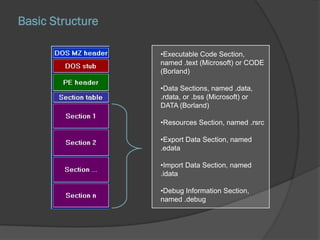
Basic Structure
•Executable Code Section,
named .text (Microsoft) or CODE
(Borland)
•Data Sections, named .data,
.rdata, or .bss (Microsoft) or
DATA (Borland)
•Resources Section, named .rsrc
•Export Data Section, named
.edata
•Import Data Section, named
.idata
•Debug Information Section,
named .debug
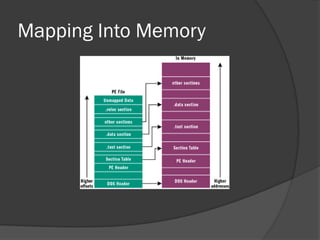
Mapping Into Memory
Tools Of Trade
Lord PE
PEid
PEView
OllyDbg
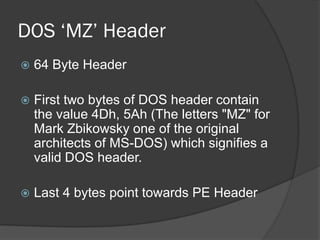
DOS ‘MZ’ Header
 64 Byte Header
 First two bytes of DOS header contain
the value 4Dh, 5Ah (The letters "MZ" for
Mark Zbikowsky one of the original
architects of MS-DOS) which signifies a
valid DOS header.
 Last 4 bytes point towards PE Header
DOS Stub
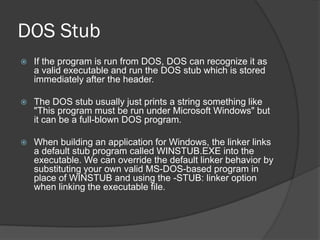
 If the program is run from DOS, DOS can recognize it as
a valid executable and run the DOS stub which is stored
immediately after the header.
 The DOS stub usually just prints a string something like
"This program must be run under Microsoft Windows" but
it can be a full-blown DOS program.
 When building an application for Windows, the linker links
a default stub program called WINSTUB.EXE into the
executable. We can override the default linker behavior by
substituting your own valid MS-DOS-based program in
place of WINSTUB and using the -STUB: linker option
when linking the executable file.
PE File Header
 Also called as Image_NT_Header
 Consists of
 Signature
 Image_File_Header
 Image_Optional_Header
Signature
 4 bytes (Dword) Signature
 Value is ‘00004550’ representing
characters ‘PE’
Image File Header
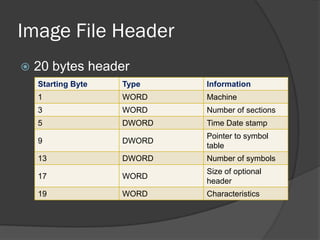
 20 bytes header
Starting Byte Type Information
1 WORD Machine
3 WORD Number of sections
5 DWORD Time Date stamp
9 DWORD
Pointer to symbol
table
13 DWORD Number of symbols
17 WORD
Size of optional
header
19 WORD Characteristics
Optional Header
 It contains following important fields:
 Address Of Entry Point
 Image Base
 Section Alignment
 File Alignment
 Subsystem
 Data directory
○ An array of 16 IMAGE_DATA_DIRECTORY structures,
each relating to an important data structure in the PE
file such as the import address table etc.
Image_Section_Header
 It contains information about various
sections.
 It contains following important fields
 Name of section
 Relative Virtual Address (RVA)
 Virtual Size
 Characteristics of Section
Sections
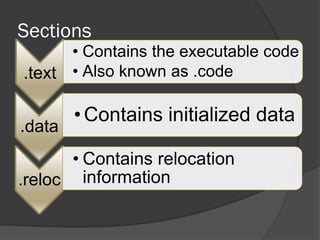
.text
• Contains the executable code
• Also known as .code
.data
• Contains initialized data
.reloc
• Contains relocation
information
Sections
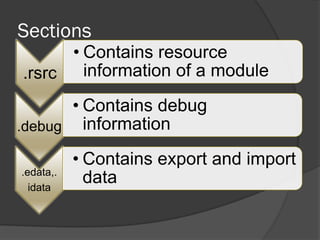
.rsrc
• Contains resource
information of a module
.debug
• Contains debug
information
.edata,.
idata
• Contains export and import
data
Thank You

PE File Format

  • 1.
    By Saurabh &Chinmaya
  • 2.
    Definition  The PortableExecutable (PE) format is a file format for executables, object code, and DLLs, used in 32-bit and 64-bit versions of Windows operating systems.  The term "portable" refers to the format's versatility in numerous environments of operating system software architecture.
  • 3.
    Basic Structure •Executable CodeSection, named .text (Microsoft) or CODE (Borland) •Data Sections, named .data, .rdata, or .bss (Microsoft) or DATA (Borland) •Resources Section, named .rsrc •Export Data Section, named .edata •Import Data Section, named .idata •Debug Information Section, named .debug
  • 4.
  • 5.
    Tools Of Trade LordPE PEid PEView OllyDbg
  • 6.
    DOS ‘MZ’ Header 64 Byte Header  First two bytes of DOS header contain the value 4Dh, 5Ah (The letters "MZ" for Mark Zbikowsky one of the original architects of MS-DOS) which signifies a valid DOS header.  Last 4 bytes point towards PE Header
  • 7.
    DOS Stub  Ifthe program is run from DOS, DOS can recognize it as a valid executable and run the DOS stub which is stored immediately after the header.  The DOS stub usually just prints a string something like "This program must be run under Microsoft Windows" but it can be a full-blown DOS program.  When building an application for Windows, the linker links a default stub program called WINSTUB.EXE into the executable. We can override the default linker behavior by substituting your own valid MS-DOS-based program in place of WINSTUB and using the -STUB: linker option when linking the executable file.
  • 8.
    PE File Header Also called as Image_NT_Header  Consists of  Signature  Image_File_Header  Image_Optional_Header
  • 9.
    Signature  4 bytes(Dword) Signature  Value is ‘00004550’ representing characters ‘PE’
  • 10.
    Image File Header 20 bytes header Starting Byte Type Information 1 WORD Machine 3 WORD Number of sections 5 DWORD Time Date stamp 9 DWORD Pointer to symbol table 13 DWORD Number of symbols 17 WORD Size of optional header 19 WORD Characteristics
  • 11.
    Optional Header  Itcontains following important fields:  Address Of Entry Point  Image Base  Section Alignment  File Alignment  Subsystem  Data directory ○ An array of 16 IMAGE_DATA_DIRECTORY structures, each relating to an important data structure in the PE file such as the import address table etc.
  • 12.
    Image_Section_Header  It containsinformation about various sections.  It contains following important fields  Name of section  Relative Virtual Address (RVA)  Virtual Size  Characteristics of Section
  • 13.
    Sections .text • Contains theexecutable code • Also known as .code .data • Contains initialized data .reloc • Contains relocation information
  • 14.
    Sections .rsrc • Contains resource informationof a module .debug • Contains debug information .edata,. idata • Contains export and import data
  • 15.