PERSISTENCE
IN
WINDOWS
WHOAMI
❖Arpan Raval
❖Senior Threat Analyst @Optiv Inc
❖DFIR and Threat Hunting
❖Twitter @arpanrvl
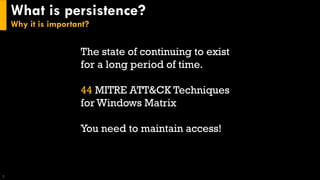
What is persistence?
Why it is important?
3
The state of continuing to exist
for a long period of time.
44 MITRE ATT&CK Techniques
for Windows Matrix
You need to maintain access!
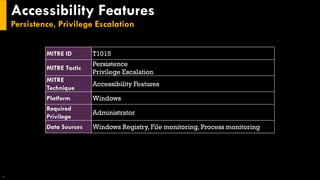
Accessibility Features
Persistence, Privilege Escalation
4
MITRE ID T1015
MITRE Tactic
Persistence
Privilege Escalation
MITRE
Technique
Accessibility Features
Platform Windows
Required
Privilege
Administrator
Data Sources Windows Registry, File monitoring, Process monitoring
Accessibility Features
Persistence, Privilege Escalation
5
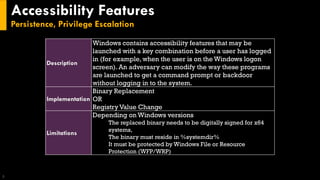
Description
Windows contains accessibility features that may be
launched with a key combination before a user has logged
in (for example, when the user is on the Windows logon
screen). An adversary can modify the way these programs
are launched to get a command prompt or backdoor
without logging in to the system.
Implementation
Binary Replacement
OR
Registry Value Change
Limitations
Depending on Windows versions
The replaced binary needs to be digitally signed for x64
systems,
The binary must reside in %systemdir%
It must be protected by Windows File or Resource
Protection (WFP/WRP)
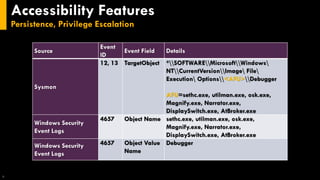
Accessibility Features
Persistence, Privilege Escalation
6
Source
Event
ID
Event Field Details
Sysmon
12, 13 TargetObject *SOFTWAREMicrosoftWindows
NTCurrentVersionImage File
Execution Options<AFU>Debugger
AFU=sethc.exe, utilman.exe, osk.exe,
Magnify.exe, Narrator.exe,
DisplaySwitch.exe, AtBroker.exe
Windows Security
Event Logs
4657 Object Name sethc.exe, utilman.exe, osk.exe,
Magnify.exe, Narrator.exe,
DisplaySwitch.exe, AtBroker.exe
Windows Security
Event Logs
4657 Object Value
Name
Debugger
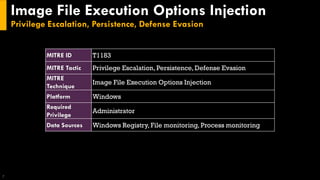
Image File Execution Options Injection
Privilege Escalation, Persistence, Defense Evasion
7
MITRE ID T1183
MITRE Tactic Privilege Escalation, Persistence, Defense Evasion
MITRE
Technique
Image File Execution Options Injection
Platform Windows
Required
Privilege
Administrator
Data Sources Windows Registry, File monitoring, Process monitoring
Image File Execution Options Injection
Privilege Escalation, Persistence, Defense Evasion
8
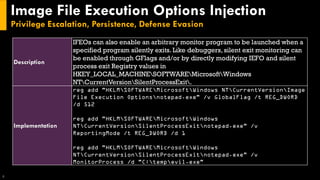
Description
IFEOs can also enable an arbitrary monitor program to be launched when a
specified program silently exits. Like debuggers, silent exit monitoring can
be enabled through GFlags and/or by directly modifying IEFO and silent
process exit Registry values in
HKEY_LOCAL_MACHINESOFTWAREMicrosoftWindows
NTCurrentVersionSilentProcessExit.
Implementation
reg add "HKLMSOFTWAREMicrosoftWindows NTCurrentVersionImage
File Execution Optionsnotepad.exe" /v GlobalFlag /t REG_DWORD
/d 512
reg add "HKLMSOFTWAREMicrosoftWindows
NTCurrentVersionSilentProcessExitnotepad.exe" /v
ReportingMode /t REG_DWORD /d 1
reg add "HKLMSOFTWAREMicrosoftWindows
NTCurrentVersionSilentProcessExitnotepad.exe" /v
MonitorProcess /d "C:tempevil.exe"
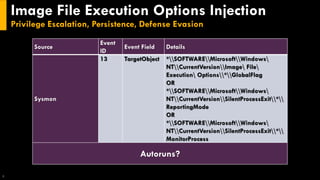
Image File Execution Options Injection
Privilege Escalation, Persistence, Defense Evasion
9
Source
Event
ID
Event Field Details
Sysmon
13 TargetObject *SOFTWAREMicrosoftWindows
NTCurrentVersionImage File
Execution Options*GlobalFlag
OR
*SOFTWAREMicrosoftWindows
NTCurrentVersionSilentProcessExit*
ReportingMode
OR
*SOFTWAREMicrosoftWindows
NTCurrentVersionSilentProcessExit*
MonitorProcess
Autoruns?
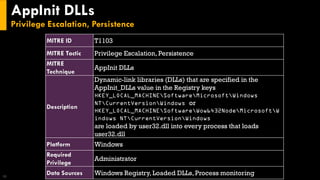
AppInit DLLs
Privilege Escalation, Persistence
10
MITRE ID T1103
MITRE Tactic Privilege Escalation, Persistence
MITRE
Technique
AppInit DLLs
Description
Dynamic-link libraries (DLLs) that are specified in the
AppInit_DLLs value in the Registry keys
HKEY_LOCAL_MACHINESoftwareMicrosoftWindows
NTCurrentVersionWindows or
HKEY_LOCAL_MACHINESoftwareWow6432NodeMicrosoftW
indows NTCurrentVersionWindows
are loaded by user32.dll into every process that loads
user32.dll
Platform Windows
Required
Privilege
Administrator
Data Sources Windows Registry, Loaded DLLs, Process monitoring
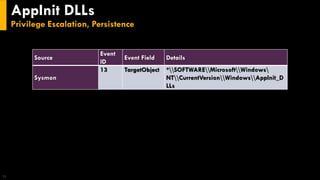
AppInit DLLs
Privilege Escalation, Persistence
11
Source
Event
ID
Event Field Details
Sysmon
13 TargetObject *SOFTWAREMicrosoftWindows
NTCurrentVersionWindowsAppInit_D
LLs
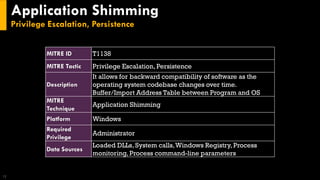
Application Shimming
Privilege Escalation, Persistence
12
MITRE ID T1138
MITRE Tactic Privilege Escalation, Persistence
Description
It allows for backward compatibility of software as the
operating system codebase changes over time.
Buffer/Import Address Table between Program and OS
MITRE
Technique
Application Shimming
Platform Windows
Required
Privilege
Administrator
Data Sources
Loaded DLLs, System calls,Windows Registry, Process
monitoring, Process command-line parameters
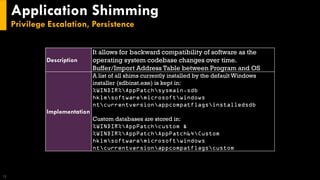
Application Shimming
Privilege Escalation, Persistence
13
Description
It allows for backward compatibility of software as the
operating system codebase changes over time.
Buffer/Import Address Table between Program and OS
Implementation
A list of all shims currently installed by the default Windows
installer (sdbinst.exe) is kept in:
%WINDIR%AppPatchsysmain.sdb
hklmsoftwaremicrosoftwindows
ntcurrentversionappcompatflagsinstalledsdb
Custom databases are stored in:
%WINDIR%AppPatchcustom &
%WINDIR%AppPatchAppPatch64Custom
hklmsoftwaremicrosoftwindows
ntcurrentversionappcompatflagscustom
Application Shimming
Privilege Escalation, Persistence
14
Source
Event
ID
Event Field Details
Windows Security
Event Logs
4688 New Process
Name
*sdbinst.exe
Windows Security
Event Logs
4688 Process
Command
Line
*.sdb*
BITS Jobs
Defense Evasion, Persistence
15
MITRE ID T1197
MITRE Tactic Defense Evasion, Persistence
MITRE
Technique
BITS Jobs
Platform Windows
Required
Privilege
User, Administrator, SYSTEM
Data Sources API monitoring, Packet capture,Windows event logs
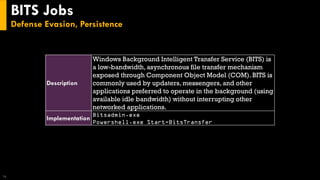
BITS Jobs
Defense Evasion, Persistence
16
Description
Windows Background Intelligent Transfer Service (BITS) is
a low-bandwidth, asynchronous file transfer mechanism
exposed through Component Object Model (COM). BITS is
commonly used by updaters, messengers, and other
applications preferred to operate in the background (using
available idle bandwidth) without interrupting other
networked applications.
Implementation
Bitsadmin.exe
Powershell.exe Start-BitsTransfer
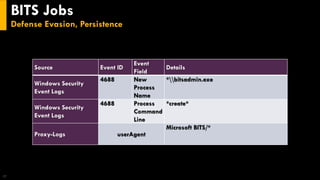
BITS Jobs
Defense Evasion, Persistence
17
Source Event ID
Event
Field
Details
Windows Security
Event Logs
4688 New
Process
Name
*bitsadmin.exe
Windows Security
Event Logs
4688 Process
Command
Line
*create*
Proxy-Logs userAgent
Microsoft BITS/*
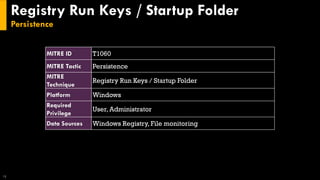
Registry Run Keys / Startup Folder
Persistence
18
MITRE ID T1060
MITRE Tactic Persistence
MITRE
Technique
Registry Run Keys / Startup Folder
Platform Windows
Required
Privilege
User, Administrator
Data Sources Windows Registry, File monitoring
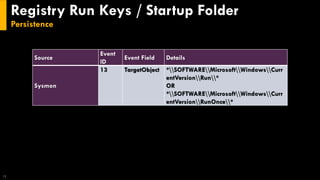
Registry Run Keys / Startup Folder
Persistence
19
Source
Event
ID
Event Field Details
Sysmon
13 TargetObject *SOFTWAREMicrosoftWindowsCurr
entVersionRun*
OR
*SOFTWAREMicrosoftWindowsCurr
entVersionRunOnce*
Windows Management Instrumentation
Event Subscription
Persistence
20
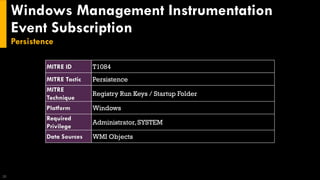
MITRE ID T1084
MITRE Tactic Persistence
MITRE
Technique
Registry Run Keys / Startup Folder
Platform Windows
Required
Privilege
Administrator, SYSTEM
Data Sources WMI Objects
Windows Management Instrumentation
Event Subscription
Persistence
21
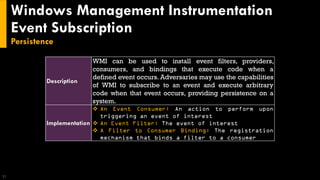
Description
WMI can be used to install event filters, providers,
consumers, and bindings that execute code when a
defined event occurs. Adversaries may use the capabilities
of WMI to subscribe to an event and execute arbitrary
code when that event occurs, providing persistence on a
system.
Implementation
❖ An Event Consumer: An action to perform upon
triggering an event of interest
❖ An Event Filter: The event of interest
❖ A Filter to Consumer Binding: The registration
mechanism that binds a filter to a consumer
Windows Management Instrumentation
Event Subscription
Persistence
22
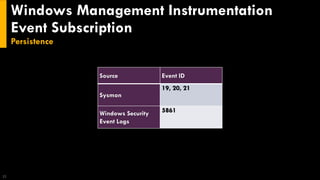
Source Event ID
Sysmon
19, 20, 21
Windows Security
Event Logs
5861
Thank You!
23
Reference
24
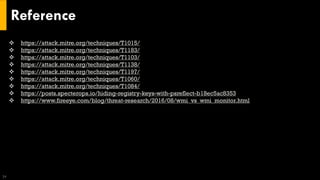
❖ https://attack.mitre.org/techniques/T1015/
❖ https://attack.mitre.org/techniques/T1183/
❖ https://attack.mitre.org/techniques/T1103/
❖ https://attack.mitre.org/techniques/T1138/
❖ https://attack.mitre.org/techniques/T1197/
❖ https://attack.mitre.org/techniques/T1060/
❖ https://attack.mitre.org/techniques/T1084/
❖ https://posts.specterops.io/hiding-registry-keys-with-psreflect-b18ec5ac8353
❖ https://www.fireeye.com/blog/threat-research/2016/08/wmi_vs_wmi_monitor.html

Detecting persistence in windows

  • 1.
  • 2.
    WHOAMI ❖Arpan Raval ❖Senior ThreatAnalyst @Optiv Inc ❖DFIR and Threat Hunting ❖Twitter @arpanrvl
  • 3.
    What is persistence? Whyit is important? 3 The state of continuing to exist for a long period of time. 44 MITRE ATT&CK Techniques for Windows Matrix You need to maintain access!
  • 4.
    Accessibility Features Persistence, PrivilegeEscalation 4 MITRE ID T1015 MITRE Tactic Persistence Privilege Escalation MITRE Technique Accessibility Features Platform Windows Required Privilege Administrator Data Sources Windows Registry, File monitoring, Process monitoring
  • 5.
    Accessibility Features Persistence, PrivilegeEscalation 5 Description Windows contains accessibility features that may be launched with a key combination before a user has logged in (for example, when the user is on the Windows logon screen). An adversary can modify the way these programs are launched to get a command prompt or backdoor without logging in to the system. Implementation Binary Replacement OR Registry Value Change Limitations Depending on Windows versions The replaced binary needs to be digitally signed for x64 systems, The binary must reside in %systemdir% It must be protected by Windows File or Resource Protection (WFP/WRP)
  • 6.
    Accessibility Features Persistence, PrivilegeEscalation 6 Source Event ID Event Field Details Sysmon 12, 13 TargetObject *SOFTWAREMicrosoftWindows NTCurrentVersionImage File Execution Options<AFU>Debugger AFU=sethc.exe, utilman.exe, osk.exe, Magnify.exe, Narrator.exe, DisplaySwitch.exe, AtBroker.exe Windows Security Event Logs 4657 Object Name sethc.exe, utilman.exe, osk.exe, Magnify.exe, Narrator.exe, DisplaySwitch.exe, AtBroker.exe Windows Security Event Logs 4657 Object Value Name Debugger
  • 7.
    Image File ExecutionOptions Injection Privilege Escalation, Persistence, Defense Evasion 7 MITRE ID T1183 MITRE Tactic Privilege Escalation, Persistence, Defense Evasion MITRE Technique Image File Execution Options Injection Platform Windows Required Privilege Administrator Data Sources Windows Registry, File monitoring, Process monitoring
  • 8.
    Image File ExecutionOptions Injection Privilege Escalation, Persistence, Defense Evasion 8 Description IFEOs can also enable an arbitrary monitor program to be launched when a specified program silently exits. Like debuggers, silent exit monitoring can be enabled through GFlags and/or by directly modifying IEFO and silent process exit Registry values in HKEY_LOCAL_MACHINESOFTWAREMicrosoftWindows NTCurrentVersionSilentProcessExit. Implementation reg add "HKLMSOFTWAREMicrosoftWindows NTCurrentVersionImage File Execution Optionsnotepad.exe" /v GlobalFlag /t REG_DWORD /d 512 reg add "HKLMSOFTWAREMicrosoftWindows NTCurrentVersionSilentProcessExitnotepad.exe" /v ReportingMode /t REG_DWORD /d 1 reg add "HKLMSOFTWAREMicrosoftWindows NTCurrentVersionSilentProcessExitnotepad.exe" /v MonitorProcess /d "C:tempevil.exe"
  • 9.
    Image File ExecutionOptions Injection Privilege Escalation, Persistence, Defense Evasion 9 Source Event ID Event Field Details Sysmon 13 TargetObject *SOFTWAREMicrosoftWindows NTCurrentVersionImage File Execution Options*GlobalFlag OR *SOFTWAREMicrosoftWindows NTCurrentVersionSilentProcessExit* ReportingMode OR *SOFTWAREMicrosoftWindows NTCurrentVersionSilentProcessExit* MonitorProcess Autoruns?
  • 10.
    AppInit DLLs Privilege Escalation,Persistence 10 MITRE ID T1103 MITRE Tactic Privilege Escalation, Persistence MITRE Technique AppInit DLLs Description Dynamic-link libraries (DLLs) that are specified in the AppInit_DLLs value in the Registry keys HKEY_LOCAL_MACHINESoftwareMicrosoftWindows NTCurrentVersionWindows or HKEY_LOCAL_MACHINESoftwareWow6432NodeMicrosoftW indows NTCurrentVersionWindows are loaded by user32.dll into every process that loads user32.dll Platform Windows Required Privilege Administrator Data Sources Windows Registry, Loaded DLLs, Process monitoring
  • 11.
    AppInit DLLs Privilege Escalation,Persistence 11 Source Event ID Event Field Details Sysmon 13 TargetObject *SOFTWAREMicrosoftWindows NTCurrentVersionWindowsAppInit_D LLs
  • 12.
    Application Shimming Privilege Escalation,Persistence 12 MITRE ID T1138 MITRE Tactic Privilege Escalation, Persistence Description It allows for backward compatibility of software as the operating system codebase changes over time. Buffer/Import Address Table between Program and OS MITRE Technique Application Shimming Platform Windows Required Privilege Administrator Data Sources Loaded DLLs, System calls,Windows Registry, Process monitoring, Process command-line parameters
  • 13.
    Application Shimming Privilege Escalation,Persistence 13 Description It allows for backward compatibility of software as the operating system codebase changes over time. Buffer/Import Address Table between Program and OS Implementation A list of all shims currently installed by the default Windows installer (sdbinst.exe) is kept in: %WINDIR%AppPatchsysmain.sdb hklmsoftwaremicrosoftwindows ntcurrentversionappcompatflagsinstalledsdb Custom databases are stored in: %WINDIR%AppPatchcustom & %WINDIR%AppPatchAppPatch64Custom hklmsoftwaremicrosoftwindows ntcurrentversionappcompatflagscustom
  • 14.
    Application Shimming Privilege Escalation,Persistence 14 Source Event ID Event Field Details Windows Security Event Logs 4688 New Process Name *sdbinst.exe Windows Security Event Logs 4688 Process Command Line *.sdb*
  • 15.
    BITS Jobs Defense Evasion,Persistence 15 MITRE ID T1197 MITRE Tactic Defense Evasion, Persistence MITRE Technique BITS Jobs Platform Windows Required Privilege User, Administrator, SYSTEM Data Sources API monitoring, Packet capture,Windows event logs
  • 16.
    BITS Jobs Defense Evasion,Persistence 16 Description Windows Background Intelligent Transfer Service (BITS) is a low-bandwidth, asynchronous file transfer mechanism exposed through Component Object Model (COM). BITS is commonly used by updaters, messengers, and other applications preferred to operate in the background (using available idle bandwidth) without interrupting other networked applications. Implementation Bitsadmin.exe Powershell.exe Start-BitsTransfer
  • 17.
    BITS Jobs Defense Evasion,Persistence 17 Source Event ID Event Field Details Windows Security Event Logs 4688 New Process Name *bitsadmin.exe Windows Security Event Logs 4688 Process Command Line *create* Proxy-Logs userAgent Microsoft BITS/*
  • 18.
    Registry Run Keys/ Startup Folder Persistence 18 MITRE ID T1060 MITRE Tactic Persistence MITRE Technique Registry Run Keys / Startup Folder Platform Windows Required Privilege User, Administrator Data Sources Windows Registry, File monitoring
  • 19.
    Registry Run Keys/ Startup Folder Persistence 19 Source Event ID Event Field Details Sysmon 13 TargetObject *SOFTWAREMicrosoftWindowsCurr entVersionRun* OR *SOFTWAREMicrosoftWindowsCurr entVersionRunOnce*
  • 20.
    Windows Management Instrumentation EventSubscription Persistence 20 MITRE ID T1084 MITRE Tactic Persistence MITRE Technique Registry Run Keys / Startup Folder Platform Windows Required Privilege Administrator, SYSTEM Data Sources WMI Objects
  • 21.
    Windows Management Instrumentation EventSubscription Persistence 21 Description WMI can be used to install event filters, providers, consumers, and bindings that execute code when a defined event occurs. Adversaries may use the capabilities of WMI to subscribe to an event and execute arbitrary code when that event occurs, providing persistence on a system. Implementation ❖ An Event Consumer: An action to perform upon triggering an event of interest ❖ An Event Filter: The event of interest ❖ A Filter to Consumer Binding: The registration mechanism that binds a filter to a consumer
  • 22.
    Windows Management Instrumentation EventSubscription Persistence 22 Source Event ID Sysmon 19, 20, 21 Windows Security Event Logs 5861
  • 23.
  • 24.
    Reference 24 ❖ https://attack.mitre.org/techniques/T1015/ ❖ https://attack.mitre.org/techniques/T1183/ ❖https://attack.mitre.org/techniques/T1103/ ❖ https://attack.mitre.org/techniques/T1138/ ❖ https://attack.mitre.org/techniques/T1197/ ❖ https://attack.mitre.org/techniques/T1060/ ❖ https://attack.mitre.org/techniques/T1084/ ❖ https://posts.specterops.io/hiding-registry-keys-with-psreflect-b18ec5ac8353 ❖ https://www.fireeye.com/blog/threat-research/2016/08/wmi_vs_wmi_monitor.html