MODERN OPERATING SYSTEMS
Third Edition
ANDREW S. TANENBAUM
Chapter 1
Introduction
Tanenbaum, Modern Operating Systems 3 e, (c) 2008 Prentice-Hall, Inc. All rights reserved. 0-13-6006639
Outline
 What is an operating system
 The history of Operating System
 Hardware of operating system
 Important concepts of Operating System
What Is An Operating System
A modern computer consists of:
• One or more processors
• Main memory
• Disks
• Printers
• Various input/output devices
Managing all these components requires a layer of
software – the operating system
Tanenbaum, Modern Operating Systems 3 e, (c) 2008 Prentice-Hall, Inc. All rights reserved. 0-13-6006639
What is an Operating System?
 A modern computer is very complex.
 Networking
 Disks
 Video/audio card
 ….
 It is impossible for every application programmer to
understand every detail
 A layer of computer software is introduced to provide a
better, simpler, cleaner model of the resources and
manage them
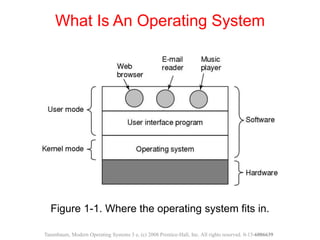
What Is An Operating System
Figure 1-1. Where the operating system fits in.
Tanenbaum, Modern Operating Systems 3 e, (c) 2008 Prentice-Hall, Inc. All rights reserved. 0-13-6006639
What is an Operating System?
 Users use various OS
 Windows, Linux, Mac OS etc.
 User interacts with shell or GUI
 part of OS?
 they use OS to get their work done
 Is device driver part of OS?
What is an Operating System?
 On top of hardware is OS
 Most computers have two modes of operation:
 Kernel mode and user mode
 OS runs in kernel mode, which has complete access to all
hardware and can execute any instruction
 Rest of software runs in user mode, which has limited
capability
 Shell or GUI is the lowest level of user mode software
What is an operating system?
 Two functions:
 From top to down: provide application programmers a
clean abstract set of resources instead of hardware ones
 From down to top: Manage these hardware resources
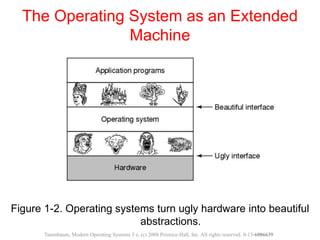
The Operating System as an Extended
Machine
Figure 1-2. Operating systems turn ugly hardware into beautiful
abstractions.
Tanenbaum, Modern Operating Systems 3 e, (c) 2008 Prentice-Hall, Inc. All rights reserved. 0-13-6006639
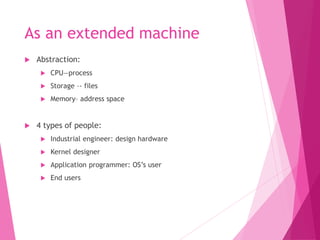
As an extended machine
 Abstraction:
 CPU—process
 Storage –- files
 Memory– address space
 4 types of people:
 Industrial engineer: design hardware
 Kernel designer
 Application programmer: OS’s user
 End users
The Operating System as a Resource
Manager
• Allow multiple programs to run at the same time
• Manage and protect memory, I/O devices, and
other resources
• Includes multiplexing (sharing) resources in two
different ways:
• In time
• In space
Tanenbaum, Modern Operating Systems 3 e, (c) 2008 Prentice-Hall, Inc. All rights reserved. 0-13-6006639
As a resource manager
 Modern OS runs multiple programs of multiple users at
the same time
 Imagine what would happen if several programs want to
print at the same time?
 How to account the resource usage of each process?
 Resources can be multiplexed:
 How to ensure fairness and efficiency?
summary
 Operating system is a software
 Is a complex software
 Runs in kernel mode
 Manages hardware
 Provide a friendly interface for application programmer
History of Operating Systems
Generations:
• (1945–55) Vacuum Tubes
• (1955–65) Transistors and Batch Systems
• (1965–1980) ICs and Multiprogramming
• (1980–Present) Personal Computers
Tanenbaum, Modern Operating Systems 3 e, (c) 2008 Prentice-Hall, Inc. All rights reserved. 0-13-6006639
1st: vacuum tubes
 Large and slow
 Engineers design, build, operate and maintain the
computer
 All programming is done with machine language, or by
wiring circuits using cables
 insert plugboards into the computer and operate
 The work is mainly numerical calculations
2nd: transistors and batch
systems
 Also called mainframes
 Computers are managed by professional operators
 Programmers use punch card to run programs;
operators operate (load compiler, etc ) and
collect output to the user
 Complains soon come:
 Human Operation between computer operation
 Lead to batch system
 Collect a batch of jobs in the input room, then read
them into a magnetic tape; the same for output
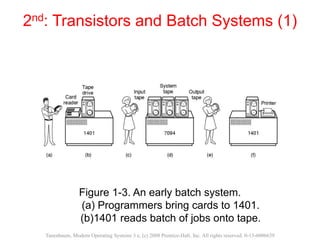
2nd: Transistors and Batch Systems (1)
Figure 1-3. An early batch system.
(a) Programmers bring cards to 1401.
(b)1401 reads batch of jobs onto tape.
Tanenbaum, Modern Operating Systems 3 e, (c) 2008 Prentice-Hall, Inc. All rights reserved. 0-13-6006639
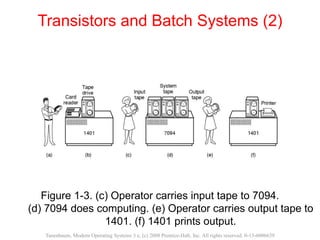
Transistors and Batch Systems (2)
Figure 1-3. (c) Operator carries input tape to 7094.
(d) 7094 does computing. (e) Operator carries output tape to
1401. (f) 1401 prints output.
Tanenbaum, Modern Operating Systems 3 e, (c) 2008 Prentice-Hall, Inc. All rights reserved. 0-13-6006639
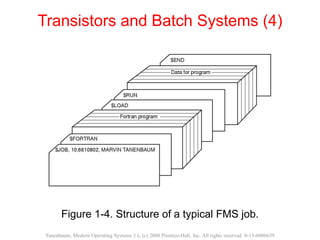
Transistors and Batch Systems (4)
Figure 1-4. Structure of a typical FMS job.
Tanenbaum, Modern Operating Systems 3 e, (c) 2008 Prentice-Hall, Inc. All rights reserved. 0-13-6006639
3rd: IC and Multiprogramming
 OS/360: a dinosaur stuck in a tar pit
 Aims to adapts 1401/7904, covers all trades of life
 However, OS/360 introduces several key techniques
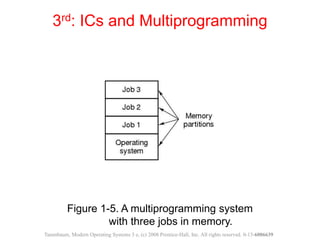
 Multi-programming: solve the problem of CPU idling
 Spooling: simultaneous peripheral operation on line
 Whenever a job finishes, OS load a new job from disk to the
empty-partition
Figure 1-5. A multiprogramming system
with three jobs in memory.
3rd: ICs and Multiprogramming
Tanenbaum, Modern Operating Systems 3 e, (c) 2008 Prentice-Hall, Inc. All rights reserved. 0-13-6006639
3rd: Ics and Multiprogramming
 Problems:
 3rd generation OS was well suited for big scientific
calculations and massive data processing
 But many programmers complain a lot… for not be able to
debug quickly…. Why?
 And the solution to this problem would be….?
 Timesharing:
 A variant of multiprogramming
 Provide both fast interactive service but also fits big batch
work
3rd: IC and Multiprogramming
 A system to be remembered: MULTICS
 A machine that would support hundreds of simultaneous
timesharing users– like the electricity system (like a web
server nowadays)
 Introduces many brilliant ideas but enjoys no commercial
success
 Its step-child is the well-known and time-honored UNIX
 System V/ FreeBSD, MINIX, Linux
4th: personal computers
 Computers have performance similar to 3rd generation,
but prices drastically different
 CP/M
 First disk-based OS
 1980, IBM PC, Basic Interpreter, DOS, MS-DOS
 GUI--Lisa—Apple: user friendly
 MS-DOS with GUI– Win95/98/me—winNT/xp…
Summary
 4 generations OS
 Develops with hardware and user needs
 Multi-user, multi-programming, time-sharing
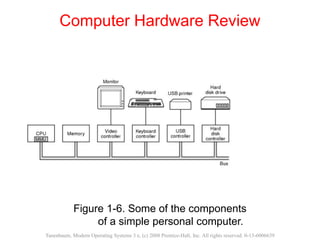
Computer Hardware Review
Figure 1-6. Some of the components
of a simple personal computer.
Tanenbaum, Modern Operating Systems 3 e, (c) 2008 Prentice-Hall, Inc. All rights reserved. 0-13-6006639
Hardware: processor
 Brain of computer
 Fetches instruction from memory and execute
 Cycle of CPU:
 fetch, decode, execute
 CPU has registers to store variable and temporary result:
load from memory to register; store from register to
memory
 Program counter: next instruction to fetch
 Stack pointer: the top of the current stack
 PSW: program status word, priority, mode…
A reference
 Adam Smith: Wealth of Nation
 Of the Division of labor
 One man draws out the wire, another straights it, a
third cuts it, a fourth points it, a fifth grinds it at the
top…
 One person could make up to forth-eight thousand pins
in a day

Operating System

  • 1.
    MODERN OPERATING SYSTEMS ThirdEdition ANDREW S. TANENBAUM Chapter 1 Introduction Tanenbaum, Modern Operating Systems 3 e, (c) 2008 Prentice-Hall, Inc. All rights reserved. 0-13-6006639
  • 2.
    Outline  What isan operating system  The history of Operating System  Hardware of operating system  Important concepts of Operating System
  • 3.
    What Is AnOperating System A modern computer consists of: • One or more processors • Main memory • Disks • Printers • Various input/output devices Managing all these components requires a layer of software – the operating system Tanenbaum, Modern Operating Systems 3 e, (c) 2008 Prentice-Hall, Inc. All rights reserved. 0-13-6006639
  • 4.
    What is anOperating System?  A modern computer is very complex.  Networking  Disks  Video/audio card  ….  It is impossible for every application programmer to understand every detail  A layer of computer software is introduced to provide a better, simpler, cleaner model of the resources and manage them
  • 5.
    What Is AnOperating System Figure 1-1. Where the operating system fits in. Tanenbaum, Modern Operating Systems 3 e, (c) 2008 Prentice-Hall, Inc. All rights reserved. 0-13-6006639
  • 6.
    What is anOperating System?  Users use various OS  Windows, Linux, Mac OS etc.  User interacts with shell or GUI  part of OS?  they use OS to get their work done  Is device driver part of OS?
  • 7.
    What is anOperating System?  On top of hardware is OS  Most computers have two modes of operation:  Kernel mode and user mode  OS runs in kernel mode, which has complete access to all hardware and can execute any instruction  Rest of software runs in user mode, which has limited capability  Shell or GUI is the lowest level of user mode software
  • 8.
    What is anoperating system?  Two functions:  From top to down: provide application programmers a clean abstract set of resources instead of hardware ones  From down to top: Manage these hardware resources
  • 9.
    The Operating Systemas an Extended Machine Figure 1-2. Operating systems turn ugly hardware into beautiful abstractions. Tanenbaum, Modern Operating Systems 3 e, (c) 2008 Prentice-Hall, Inc. All rights reserved. 0-13-6006639
  • 10.
    As an extendedmachine  Abstraction:  CPU—process  Storage –- files  Memory– address space  4 types of people:  Industrial engineer: design hardware  Kernel designer  Application programmer: OS’s user  End users
  • 11.
    The Operating Systemas a Resource Manager • Allow multiple programs to run at the same time • Manage and protect memory, I/O devices, and other resources • Includes multiplexing (sharing) resources in two different ways: • In time • In space Tanenbaum, Modern Operating Systems 3 e, (c) 2008 Prentice-Hall, Inc. All rights reserved. 0-13-6006639
  • 12.
    As a resourcemanager  Modern OS runs multiple programs of multiple users at the same time  Imagine what would happen if several programs want to print at the same time?  How to account the resource usage of each process?  Resources can be multiplexed:  How to ensure fairness and efficiency?
  • 13.
    summary  Operating systemis a software  Is a complex software  Runs in kernel mode  Manages hardware  Provide a friendly interface for application programmer
  • 14.
    History of OperatingSystems Generations: • (1945–55) Vacuum Tubes • (1955–65) Transistors and Batch Systems • (1965–1980) ICs and Multiprogramming • (1980–Present) Personal Computers Tanenbaum, Modern Operating Systems 3 e, (c) 2008 Prentice-Hall, Inc. All rights reserved. 0-13-6006639
  • 15.
    1st: vacuum tubes Large and slow  Engineers design, build, operate and maintain the computer  All programming is done with machine language, or by wiring circuits using cables  insert plugboards into the computer and operate  The work is mainly numerical calculations
  • 16.
    2nd: transistors andbatch systems  Also called mainframes  Computers are managed by professional operators  Programmers use punch card to run programs; operators operate (load compiler, etc ) and collect output to the user  Complains soon come:  Human Operation between computer operation  Lead to batch system  Collect a batch of jobs in the input room, then read them into a magnetic tape; the same for output
  • 17.
    2nd: Transistors andBatch Systems (1) Figure 1-3. An early batch system. (a) Programmers bring cards to 1401. (b)1401 reads batch of jobs onto tape. Tanenbaum, Modern Operating Systems 3 e, (c) 2008 Prentice-Hall, Inc. All rights reserved. 0-13-6006639
  • 18.
    Transistors and BatchSystems (2) Figure 1-3. (c) Operator carries input tape to 7094. (d) 7094 does computing. (e) Operator carries output tape to 1401. (f) 1401 prints output. Tanenbaum, Modern Operating Systems 3 e, (c) 2008 Prentice-Hall, Inc. All rights reserved. 0-13-6006639
  • 19.
    Transistors and BatchSystems (4) Figure 1-4. Structure of a typical FMS job. Tanenbaum, Modern Operating Systems 3 e, (c) 2008 Prentice-Hall, Inc. All rights reserved. 0-13-6006639
  • 20.
    3rd: IC andMultiprogramming  OS/360: a dinosaur stuck in a tar pit  Aims to adapts 1401/7904, covers all trades of life  However, OS/360 introduces several key techniques  Multi-programming: solve the problem of CPU idling  Spooling: simultaneous peripheral operation on line  Whenever a job finishes, OS load a new job from disk to the empty-partition
  • 21.
    Figure 1-5. Amultiprogramming system with three jobs in memory. 3rd: ICs and Multiprogramming Tanenbaum, Modern Operating Systems 3 e, (c) 2008 Prentice-Hall, Inc. All rights reserved. 0-13-6006639
  • 22.
    3rd: Ics andMultiprogramming  Problems:  3rd generation OS was well suited for big scientific calculations and massive data processing  But many programmers complain a lot… for not be able to debug quickly…. Why?  And the solution to this problem would be….?  Timesharing:  A variant of multiprogramming  Provide both fast interactive service but also fits big batch work
  • 23.
    3rd: IC andMultiprogramming  A system to be remembered: MULTICS  A machine that would support hundreds of simultaneous timesharing users– like the electricity system (like a web server nowadays)  Introduces many brilliant ideas but enjoys no commercial success  Its step-child is the well-known and time-honored UNIX  System V/ FreeBSD, MINIX, Linux
  • 24.
    4th: personal computers Computers have performance similar to 3rd generation, but prices drastically different  CP/M  First disk-based OS  1980, IBM PC, Basic Interpreter, DOS, MS-DOS  GUI--Lisa—Apple: user friendly  MS-DOS with GUI– Win95/98/me—winNT/xp…
  • 25.
    Summary  4 generationsOS  Develops with hardware and user needs  Multi-user, multi-programming, time-sharing
  • 26.
    Computer Hardware Review Figure1-6. Some of the components of a simple personal computer. Tanenbaum, Modern Operating Systems 3 e, (c) 2008 Prentice-Hall, Inc. All rights reserved. 0-13-6006639
  • 27.
    Hardware: processor  Brainof computer  Fetches instruction from memory and execute  Cycle of CPU:  fetch, decode, execute  CPU has registers to store variable and temporary result: load from memory to register; store from register to memory  Program counter: next instruction to fetch  Stack pointer: the top of the current stack  PSW: program status word, priority, mode…
  • 28.
    A reference  AdamSmith: Wealth of Nation  Of the Division of labor  One man draws out the wire, another straights it, a third cuts it, a fourth points it, a fifth grinds it at the top…  One person could make up to forth-eight thousand pins in a day