8.1 Sequences
8-1
Concept:
A sequence is an object that holds
multiple items of data, stored one after
the other. You can perform operations on
a sequence, to examine and manipulate
the items stored in it.
8.2 Working with Strings
8-2
Concept:
Python provides several ways to access
the individual characters in a string.
Strings also have methods that allow you
to perform operations on them.
8.2 Working with Strings
8-3
Accessing the Individual Characters in a String
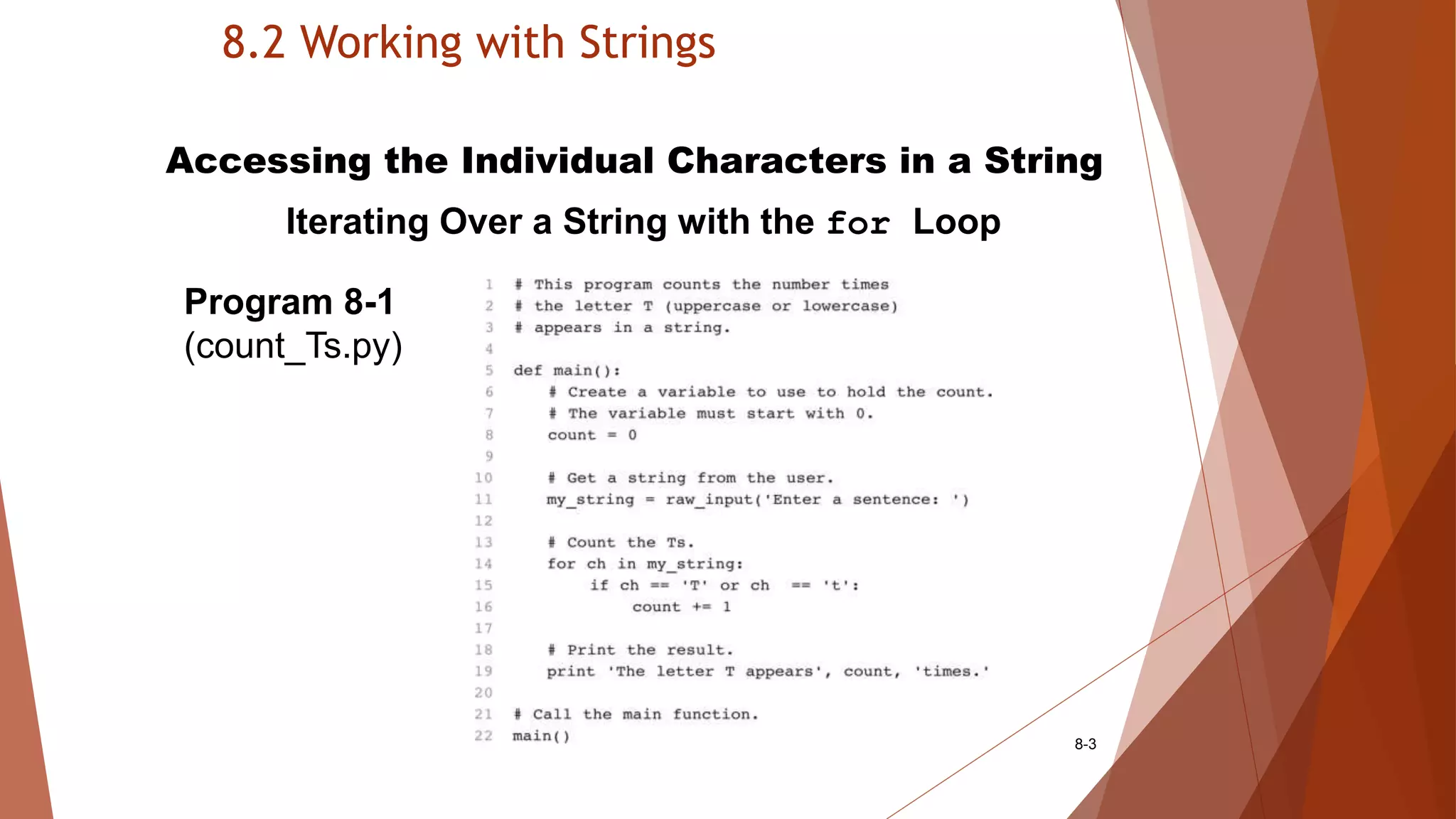
Iterating Over a String with the for Loop
Program 8-1
(count_Ts.py)
8.2 Working with Strings
8-4
Accessing the Individual Characters in a String
Indexing
my_string = ‘Roses are red’
print my_string[0], my_string[6], my_string[10]
print my_string[-1], my_string[-2], my_string[-3]
Figure 8-2 String indexes
8.2 Working with Strings
8-5
Accessing the Individual Characters in a String
IndexError Exceptions
IndexError exception will if an out of range index
is accessed
For example:
city = ‘Boston’
index = 0
while index < 7:
print city[index]
index += 1
B o s t o n
     
0 1 2 3 4 5
8.2 Working with Strings
8-6
Accessing the Individual Characters in a String
The len Function
len returns the length of a sequence
For example:
city = ‘Boston’
index = 0
while index < len(city):
print city[index]
index += 1
B o s t o n
     
0 1 2 3 4 5
8.2 Working with Strings
8-7
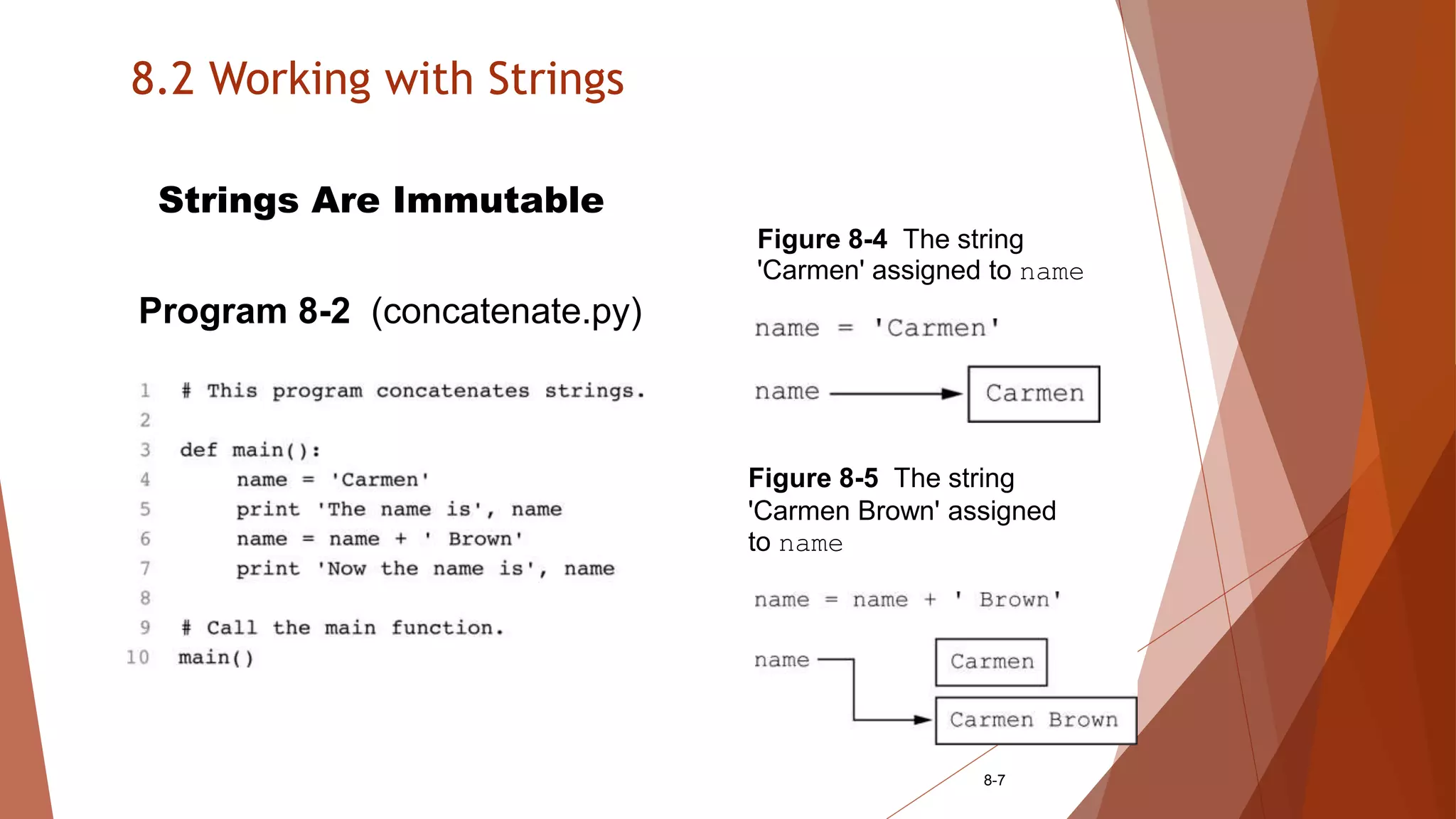
Strings Are Immutable
Program 8-2 (concatenate.py)
Figure 8-4 The string
'Carmen' assigned to name
Figure 8-5 The string
'Carmen Brown' assigned
to name
8.2 Working with Strings
8-8
Strings Are Immutable
Immutable means that once they are created they
cannot be changed.
For example:
friend = ‘Bill’
friend[0] = ‘J’ # No, this will cause an error!
B i l l
   
0 1 2 3
8.2 Working with Strings
8-9
String Slicing
Slice is a span of items that are taken from a
sequence.
String slices are also called substrings.
string[start : end]
8.2 Working with Strings
8-10
String Slicing
full_name = ‘Patty Lynn Smith’
middle_name = full_name[6:10] # middle_name <= ‘Lynn ‘
first_name = full_name[:5] # first_name <= ‘Patty ‘
last_name = full_name[11:] # last_name <= ‘Smith’
my_string = full_name[:] # my_string <= ‘Patty Lynn Smith’
my_string = full_name[0:len(full_name)] # my_string <= ‘Patty Lynn Smith’
last_name = full_name[-5:] # last_name <= ‘Smith’
P a t t y L y n n S m i t h
0 1 2 3 4 5 6 7 8 9 10 11 12 13 14 15
-16 - 15 -14 -13 -12 -11 -10 -9 -8 -7 -6 -5 -4 -3 - 2 -1
8.2 Working with Strings
8-11
String Slicing
string[start : end : step]
letters = ‘ABCDEFGHIJKLMNOPQRSTUVWXYZ’
print letters[0:26:2] # ‘ACEGIKMOQSUWY’
ABCDEFGHIJKLMNOPQRSTUVWXYZ
0 1 2 3 4 5 6 7 8 9 10 11 12 13 14 15 16 17 18 19 20 21 22 23 24 25
8.2 Working with Strings
8-12
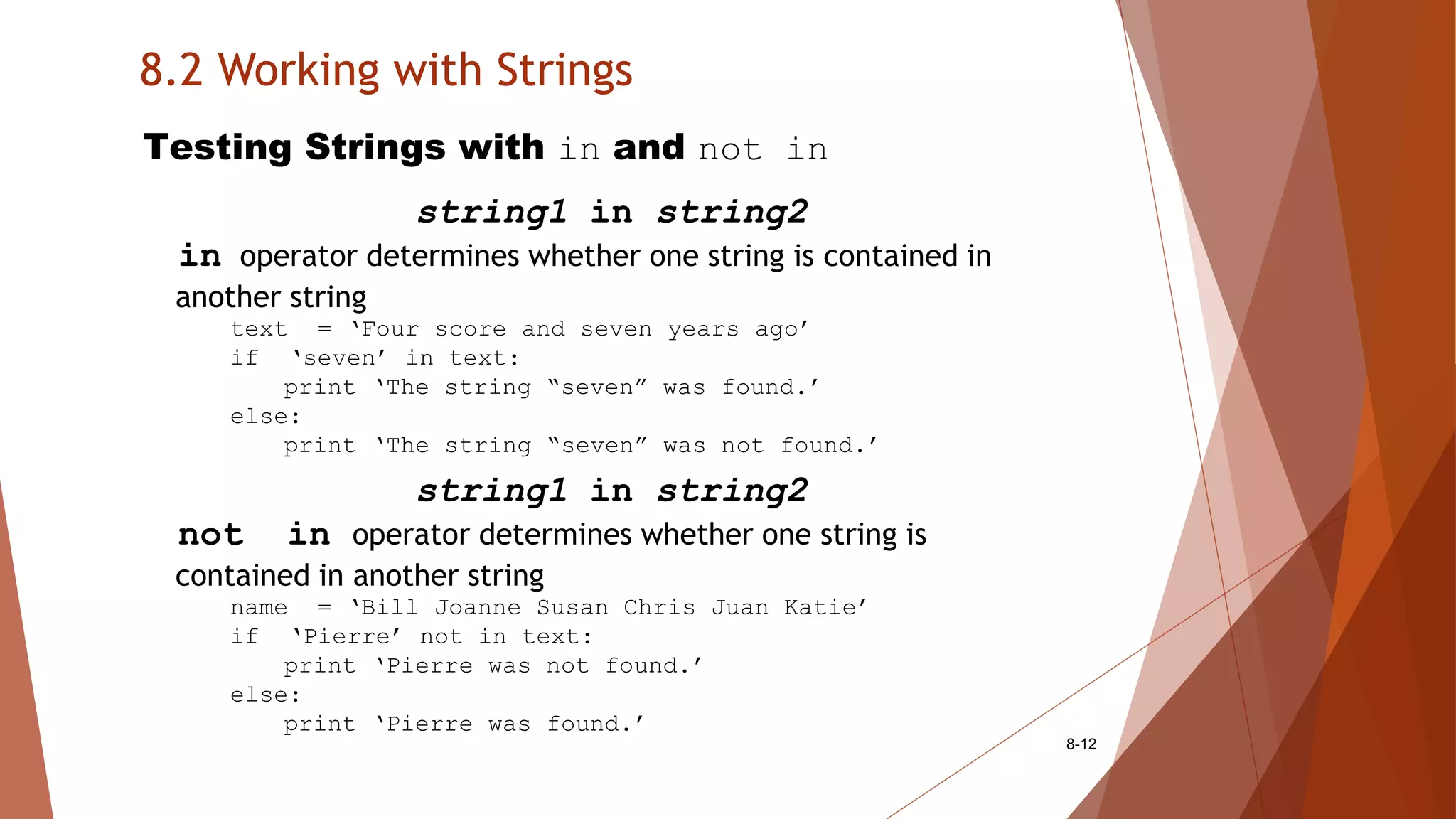
Testing Strings with in and not in
string1 in string2
in operator determines whether one string is contained in
another string
text = ‘Four score and seven years ago’
if ‘seven’ in text:
print ‘The string “seven” was found.’
else:
print ‘The string “seven” was not found.’
string1 in string2
not in operator determines whether one string is
contained in another string
name = ‘Bill Joanne Susan Chris Juan Katie’
if ‘Pierre’ not in text:
print ‘Pierre was not found.’
else:
print ‘Pierre was found.’
8.2 Working with Strings
8-13
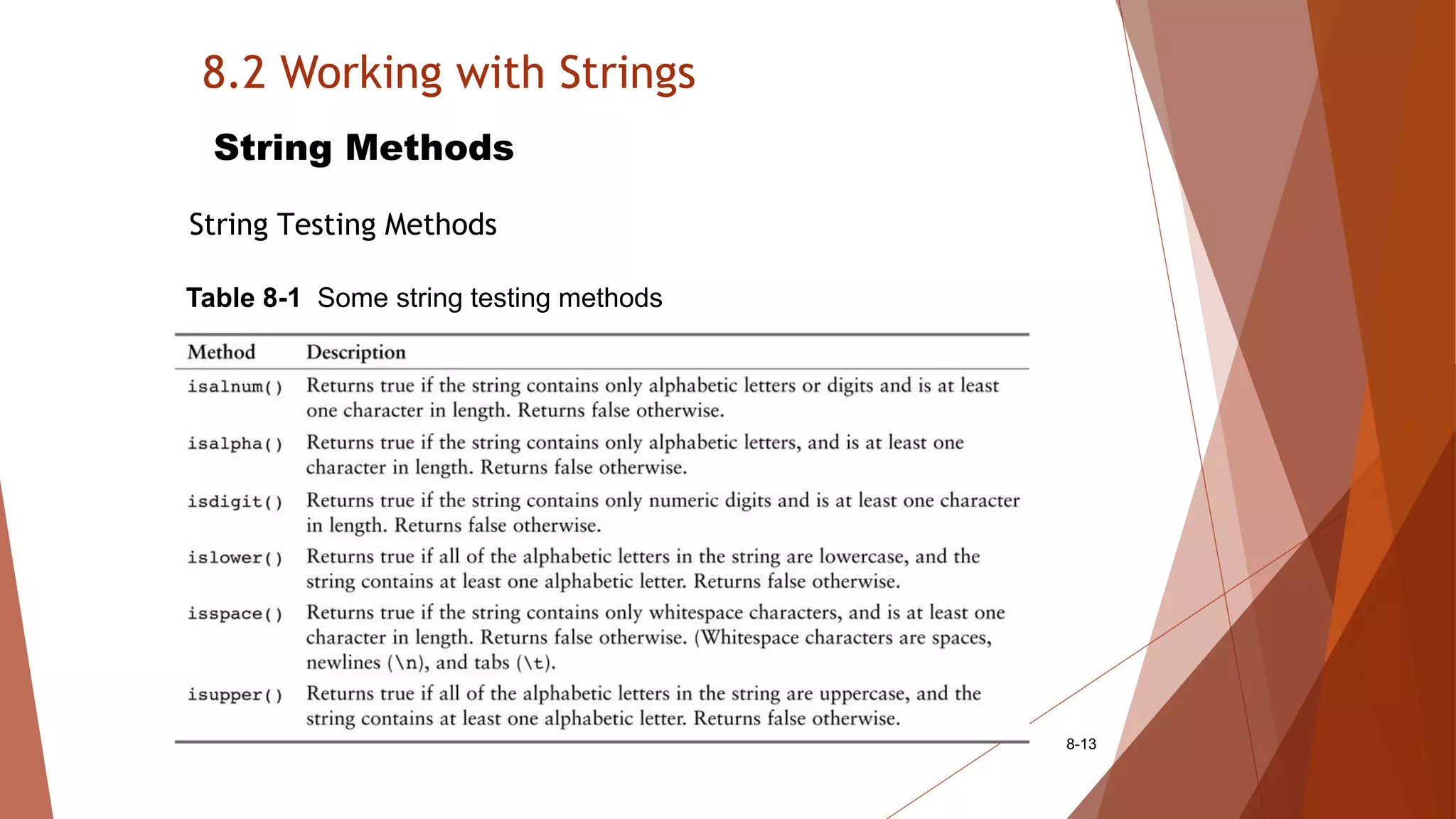
String Methods
String Testing Methods
Table 8-1 Some string testing methods
8.2 Working with Strings
8-14
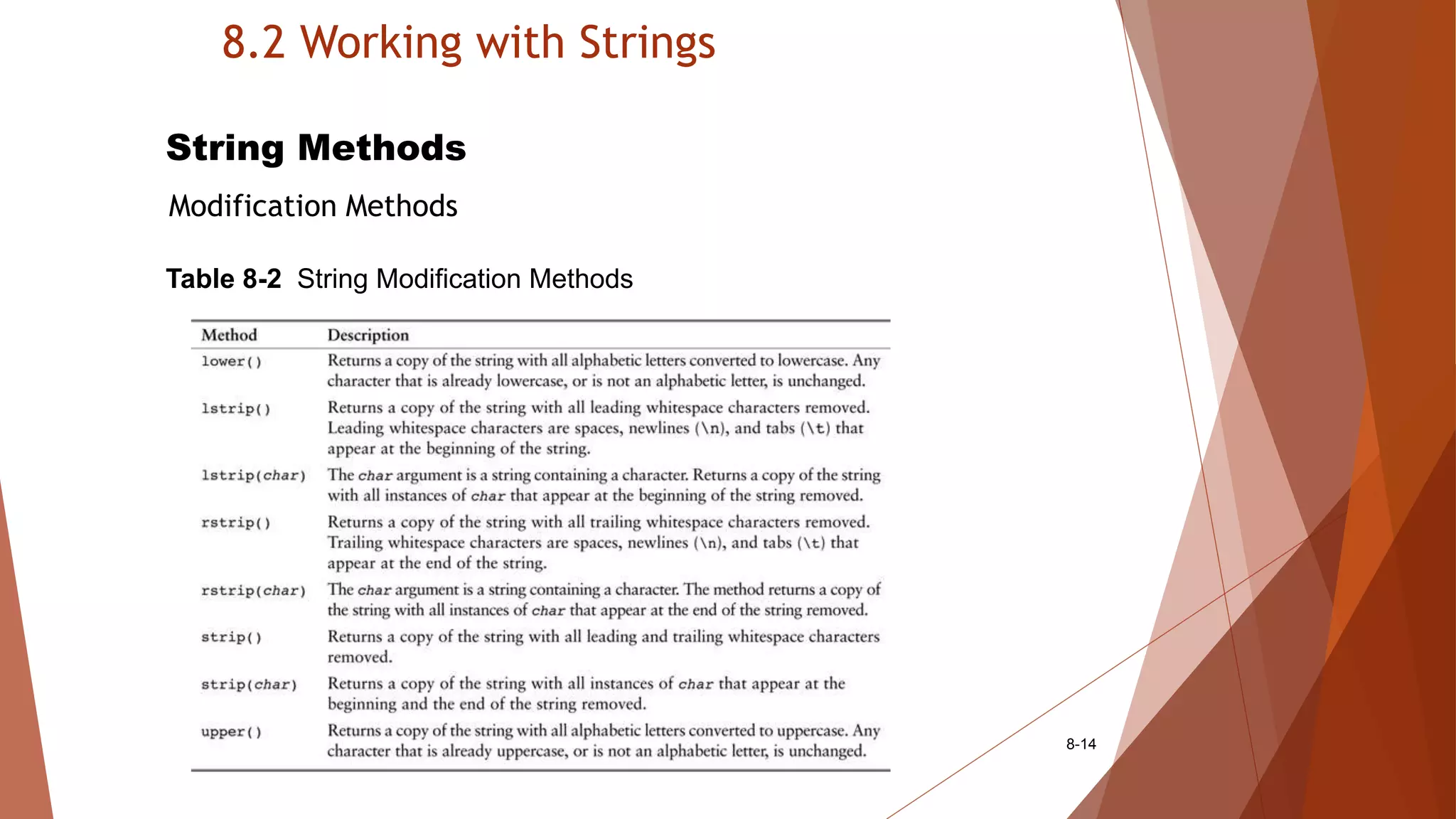
String Methods
Modification Methods
Table 8-2 String Modification Methods
8.2 Working with Strings
8-15
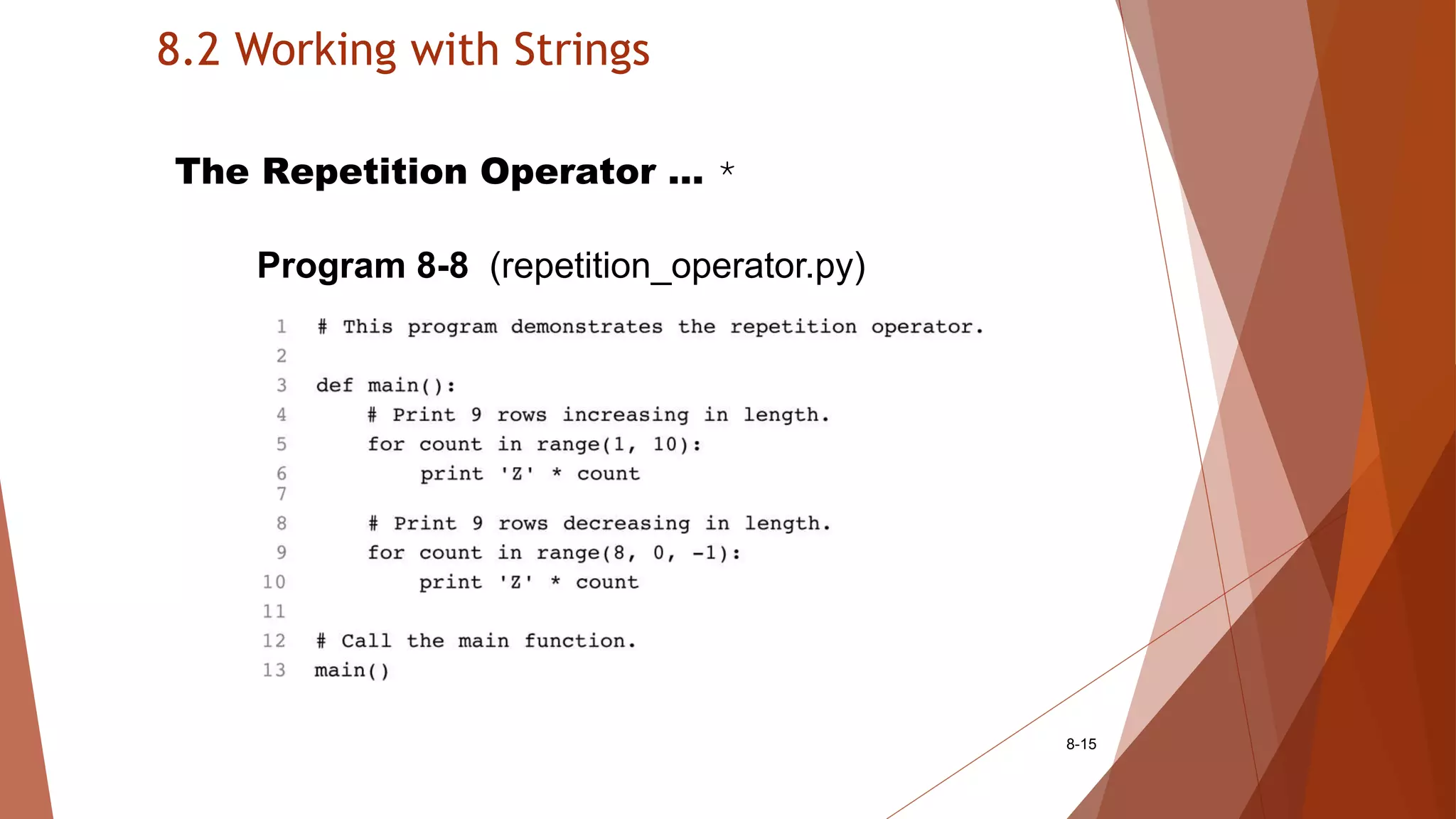
The Repetition Operator … *
Program 8-8 (repetition_operator.py)

More About Strings

  • 1.
    8.1 Sequences 8-1 Concept: A sequenceis an object that holds multiple items of data, stored one after the other. You can perform operations on a sequence, to examine and manipulate the items stored in it.
  • 2.
    8.2 Working withStrings 8-2 Concept: Python provides several ways to access the individual characters in a string. Strings also have methods that allow you to perform operations on them.
  • 3.
    8.2 Working withStrings 8-3 Accessing the Individual Characters in a String Iterating Over a String with the for Loop Program 8-1 (count_Ts.py)
  • 4.
    8.2 Working withStrings 8-4 Accessing the Individual Characters in a String Indexing my_string = ‘Roses are red’ print my_string[0], my_string[6], my_string[10] print my_string[-1], my_string[-2], my_string[-3] Figure 8-2 String indexes
  • 5.
    8.2 Working withStrings 8-5 Accessing the Individual Characters in a String IndexError Exceptions IndexError exception will if an out of range index is accessed For example: city = ‘Boston’ index = 0 while index < 7: print city[index] index += 1 B o s t o n       0 1 2 3 4 5
  • 6.
    8.2 Working withStrings 8-6 Accessing the Individual Characters in a String The len Function len returns the length of a sequence For example: city = ‘Boston’ index = 0 while index < len(city): print city[index] index += 1 B o s t o n       0 1 2 3 4 5
  • 7.
    8.2 Working withStrings 8-7 Strings Are Immutable Program 8-2 (concatenate.py) Figure 8-4 The string 'Carmen' assigned to name Figure 8-5 The string 'Carmen Brown' assigned to name
  • 8.
    8.2 Working withStrings 8-8 Strings Are Immutable Immutable means that once they are created they cannot be changed. For example: friend = ‘Bill’ friend[0] = ‘J’ # No, this will cause an error! B i l l     0 1 2 3
  • 9.
    8.2 Working withStrings 8-9 String Slicing Slice is a span of items that are taken from a sequence. String slices are also called substrings. string[start : end]
  • 10.
    8.2 Working withStrings 8-10 String Slicing full_name = ‘Patty Lynn Smith’ middle_name = full_name[6:10] # middle_name <= ‘Lynn ‘ first_name = full_name[:5] # first_name <= ‘Patty ‘ last_name = full_name[11:] # last_name <= ‘Smith’ my_string = full_name[:] # my_string <= ‘Patty Lynn Smith’ my_string = full_name[0:len(full_name)] # my_string <= ‘Patty Lynn Smith’ last_name = full_name[-5:] # last_name <= ‘Smith’ P a t t y L y n n S m i t h 0 1 2 3 4 5 6 7 8 9 10 11 12 13 14 15 -16 - 15 -14 -13 -12 -11 -10 -9 -8 -7 -6 -5 -4 -3 - 2 -1
  • 11.
    8.2 Working withStrings 8-11 String Slicing string[start : end : step] letters = ‘ABCDEFGHIJKLMNOPQRSTUVWXYZ’ print letters[0:26:2] # ‘ACEGIKMOQSUWY’ ABCDEFGHIJKLMNOPQRSTUVWXYZ 0 1 2 3 4 5 6 7 8 9 10 11 12 13 14 15 16 17 18 19 20 21 22 23 24 25
  • 12.
    8.2 Working withStrings 8-12 Testing Strings with in and not in string1 in string2 in operator determines whether one string is contained in another string text = ‘Four score and seven years ago’ if ‘seven’ in text: print ‘The string “seven” was found.’ else: print ‘The string “seven” was not found.’ string1 in string2 not in operator determines whether one string is contained in another string name = ‘Bill Joanne Susan Chris Juan Katie’ if ‘Pierre’ not in text: print ‘Pierre was not found.’ else: print ‘Pierre was found.’
  • 13.
    8.2 Working withStrings 8-13 String Methods String Testing Methods Table 8-1 Some string testing methods
  • 14.
    8.2 Working withStrings 8-14 String Methods Modification Methods Table 8-2 String Modification Methods
  • 15.
    8.2 Working withStrings 8-15 The Repetition Operator … * Program 8-8 (repetition_operator.py)