MODERN OPERATING SYSTEMS
Third Edition
ANDREW S. TANENBAUM
Chapter 1
Introduction
Outline
 What is an operating system
 The history of Operating System
 Hardware of operating system
 Important concepts of Operating System
What Is An Operating System
A modern computer consists of:
• One or more processors
• Main memory
• Disks
• Printers
• Various input/output devices
Managing all these components requires a layer of
software – the operating system
What is an Operating System?
 A modern computer is very complex.
 Networking
 Disks
 Video/audio card
 ….
 It is impossible for every application programmer to
understand every detail
 A layer of computer software is introduced to provide a
better, simpler, cleaner model of the resources and
manage them
What Is An Operating System
Figure 1-1. Where the operating system fits in.
What is an Operating System?
 Users use various OS
 Windows, Linux, Mac OS etc.
 User interacts with shell or GUI
 part of OS?
 they use OS to get their work done
 Is device driver part of OS?
What is an Operating System?
 On top of hardware is OS
 Most computers have two modes of operation:
 Kernel mode and user mode
 OS runs in kernel mode, which has complete access to all
hardware and can execute any instruction
 Rest of software runs in user mode, which has limited
capability
 Shell or GUI is the lowest level of user mode software
What is an operating system?
 Two functions:
 From top to down: provide application programmers a
clean abstract set of resources instead of hardware ones
 From down to top: Manage these hardware resources
The Operating System as an Extended
Machine
Figure 1-2. Operating systems turn ugly hardware into beautiful
abstractions.
As an extended machine
 Abstraction:
 CPU—process
 Storage –- files
 Memory– address space
 4 types of people:
 Industrial engineer: design hardware
 Kernel designer
 Application programmer: OS’s user
 End users
The Operating System as a Resource
Manager
• Allow multiple programs to run at the same time
• Manage and protect memory, I/O devices, and
other resources
• Includes multiplexing (sharing) resources in two
different ways:
• In time
• In space
As a resource manager
 Modern OS runs multiple programs of multiple users at
the same time
 Imagine what would happen if several programs want to
print at the same time?
 How to account the resource usage of each process?
 Resources can be multiplexed:
 How to ensure fairness and efficiency?
summary
 Operating system is a software
 Is a complex software
 Runs in kernel mode
 Manages hardware
 Provide a friendly interface for application programmer
History of Operating Systems
Generations:
• (1945–55) Vacuum Tubes
• (1955–65) Transistors and Batch Systems
• (1965–1980) ICs and Multiprogramming
• (1980–Present) Personal Computers
1st: vacuum tubes
 Large and slow
 Engineers design, build, operate and maintain the
computer
 All programming is done with machine language, or by
wiring circuits using cables
 insert plugboards into the computer and operate
 The work is mainly numerical calculations
2nd: transistors and batch
systems
 Also called mainframes
 Computers are managed by professional operators
 Programmers use punch card to run programs;
operators operate (load compiler, etc ) and
collect output to the user
 Complains soon come:
 Human Operation between computer operation
 Lead to batch system
 Collect a batch of jobs in the input room, then read
them into a magnetic tape; the same for output
2nd: Transistors and Batch Systems (1)
Figure 1-3. An early batch system.
(a) Programmers bring cards to 1401.
(b)1401 reads batch of jobs onto tape.
Tanenbaum, Modern Operating Systems 3 e, (c) 2008 Prentice-Hall, Inc. All rights reserved. 0-13-6006639
Transistors and Batch Systems (2)
Figure 1-3. (c) Operator carries input tape to 7094.
(d) 7094 does computing. (e) Operator carries output tape to
1401. (f) 1401 prints output.
Tanenbaum, Modern Operating Systems 3 e, (c) 2008 Prentice-Hall, Inc. All rights reserved. 0-13-6006639
Transistors and Batch Systems (4)
Figure 1-4. Structure of a typical FMS job.
3rd: IC and Multiprogramming
 OS/360:
 However, OS/360 introduces several key techniques
 Multi-programming: solve the problem of CPU idling
 Spooling: simultaneous peripheral operation on line
 Whenever a job finishes, OS load a new job from disk to the
empty-partition
Figure 1-5. A multiprogramming system
with three jobs in memory.
3rd: ICs and Multiprogramming
3rd: Ics and Multiprogramming
 Problems:
 3rd generation OS was well suited for big scientific
calculations and massive data processing
 But many programmers complain a lot… for not be able to
debug quickly…. Why?
 And the solution to this problem would be….?
 Timesharing:
 A variant of multiprogramming
 Provide both fast interactive service but also fits big batch
work
3rd: IC and Multiprogramming
 A system to be remembered: MULTICS
 A machine that would support hundreds of simultaneous
timesharing users– like the electricity system (like a web
server nowadays)
 Introduces many brilliant ideas but enjoys no commercial
success
 Its step-child is the well-known and time-honored UNIX
 System V/ FreeBSD, MINIX, Linux
4th: personal computers
 Computers have performance similar to 3rd generation,
but prices drastically different
 4 generations OS
 Develops with hardware and user needs
 Multi-user, multi-programming, time-sharing
 CP/M (Control Program for Microcomputers)
 First disk-based OS
 1980, IBM PC, Basic Interpreter, DOS, MS-DOS
 GUI--Lisa—Apple: user friendly
 MS-DOS with GUI– Win95/98/me— win NT/ windows XP…
Computer Hardware Review
Figure 1-6. Some of the components
of a simple personal computer.
Hardware: processor
 Brain of computer
 Fetches instruction from memory and execute
 Cycle of CPU:
 fetch, decode, execute
 CPU has registers to store variable and temporary result:
load from memory to register; store from register to
memory
 Program counter: next instruction to fetch
 Stack pointer: the top of the current stack
 PSW: program status word (The program status word (PSW)
is an IBM System/360 architecture and successors control
register which performs the function of a status register
and program counter in other architectures, and more),
priority, mode…
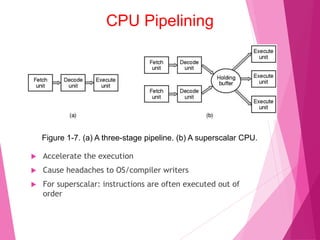
CPU Pipelining
Figure 1-7. (a) A three-stage pipeline. (b) A superscalar CPU.
 Accelerate the execution
 Cause headaches to OS/compiler writers
 For superscalar: instructions are often executed out of
order
Figure 1-8. (a) A quad-core chip with a shared L2 cache.
(b) A quad-core chip with separate L2 caches.
Multithreaded and Multicore
(Multiprocessor) Chips
Figure 1-9. A typical memory hierarchy.
The numbers are very rough approximations.
Memory
Memory
 Memory is where computer fetch and store data, ideally,
it should be both chip/large
 The best people can do, is to construct a memory
hierarchy
 Cache lines:
 Memory divided into cache lines; the mostly used ones are
stored in caches
 Cache hit, cache miss
 Cache: whenever there is disparity in usage or speed; used
to improve performance
 Questions when dealing with cache:
 When to put a new item into the cache.
 Which cache line to put the new item in.
 Which item to remove from the cache when a slot is
needed.
 Where to put a newly evicted item in the larger memory.
Figure 1-10. Structure of a disk drive.
Disks
Tanenbaum, Modern Operating Systems 3 e, (c) 2008 Prentice-Hall, Inc. All rights reserved. 0-13-6006639
Disks
 Cheap and large: two orders better than RAM
 Slow: three orders worse than RAM
 Mechanical movement to fetch data
 One or more platter—rotate– rpm
 Information is stored on concentric circles
 Arm, track, cylinder, sector
 Disk helps to implement Virtual Memory
 When no enough memory is available, disks are used as
the storage, and memory as cache
Figure 1-11. (a) The steps in starting an I/O device and getting an interrupt.
I/O Devices
 a Two parts: a controller and a device
 Controller: to provide simpler interface to OS
 Device driver: talks to controller, give commands and accepts
response
 Busy waiting/interrupt/DMA
Booting the Computer
 BIOS—basic input/output system
 On the motherboard, low-level I/O software
 Checks RAM, keyboard and other basic devices
 Determine the boot device: floppy, CD-ROM, disk
 First sector of the boot-device is read into memory
 The sector contains program to check which partition is
active
 Then a secondary boot-loader is read into memory and
reads in operating system from the active partition
The Operating System Zoo
• Mainframe operating systems
• Server operating systems
• Multiprocessor operating systems
• Personal computer operating systems
• Handheld operating systems
• Embedded operating systems
• Sensor node operating systems
• Real-time operating systems
• Smart card operating systems
• Processes
• Address spaces
• Files
• Input / Output
• Protection
• The shell
• Ontogeny recapitulates phylogeny
• Large memories
• Protection hardware
• Disks
• Virtual memory
Operating System Concepts
Processes
 Process
 Address space: 0-4G; executable
program, program’s data, and its
stack
 Other resources like: registers,
files, alarms, related processes,
and other information
 A process is fundamentally a
container that holds information
for a program to run
Figure 1-13. A process tree. Process A created two child
processes, B and C. Process B created three
child processes, D, E, and F.
Address Space
 The memory used by a process, in concept
 MOS allows multiple processes in memory
simultaneously
 Some processes need more memory than physically
available– virtual memory
Figure 1-14. A file system for a university department.
Files
Tanenbaum, Modern Operating Systems 3 e, (c) 2008 Prentice-Hall, Inc. All rights reserved. 0-13-6006639
Figure 1-15. (a) Before mounting, the files on the CD-ROM are not accessible.
(b) After mounting, they are part of the file hierarchy.
Files
Tanenbaum, Modern Operating Systems 3 e, (c) 2008 Prentice-Hall, Inc. All rights reserved. 0-13-6006639
Figure 1-16. Two processes connected by a pipe.
Files
Tanenbaum, Modern Operating Systems 3 e, (c) 2008 Prentice-Hall, Inc. All rights reserved. 0-13-6006639
System calls
 System calls is the interface users contact with OS and
hardware
 System calls vary from system to system, but the
underlying concepts are similar
Figure 1-17. The 11 steps in making the system call
read(fd, buffer, nbytes).
System Calls
Tanenbaum, Modern Operating Systems 3 e, (c) 2008 Prentice-Hall, Inc. All rights reserved. 0-13-6006639
Figure 1-18. Some of the major POSIX system calls.
System Calls for Process Management
Tanenbaum, Modern Operating Systems 3 e, (c) 2008 Prentice-Hall, Inc. All rights reserved. 0-13-6006639
Figure 1-18. Some of the major POSIX system calls.
System Calls for File Management (1)
Tanenbaum, Modern Operating Systems 3 e, (c) 2008 Prentice-Hall, Inc. All rights reserved. 0-13-6006639
Figure 1-18. Some of the major POSIX system calls.
System Calls for File Management (2)
Tanenbaum, Modern Operating Systems 3 e, (c) 2008 Prentice-Hall, Inc. All rights reserved. 0-13-6006639
Figure 1-18. Some of the major POSIX system calls.
Miscellaneous System Calls
Tanenbaum, Modern Operating Systems 3 e, (c) 2008 Prentice-Hall, Inc. All rights reserved. 0-13-6006639
Figure 1-20. Processes have three segments:
text, data, and stack.
Memory Layout
Figure 1-21. (a) Two directories before linking /usr/jim/memo to
ast’s directory. (b) The same directories after linking.
Linking
Figure 1-22. (a) File system before the mount.
(b) File system after the mount.
Mounting
Tanenbaum, Modern Operating Systems 3 e, (c) 2008 Prentice-Hall, Inc. All rights reserved. 0-13-6006639
Figure 1-23. The Win32 API calls that roughly correspond
to the UNIX calls of Fig. 1-18.
Windows Win32 API
Tanenbaum, Modern Operating Systems 3 e, (c) 2008 Prentice-Hall, Inc. All rights reserved. 0-13-6006639
Monolithic systems – basic structure:
• A main program that invokes the requested
service procedure.
• A set of service procedures that carry out the
system calls.
• A set of utility procedures that help the service
procedures.
Operating Systems Structure
Tanenbaum, Modern Operating Systems 3 e, (c) 2008 Prentice-Hall, Inc. All rights reserved. 0-13-6006639
Figure 1-25. Structure of the THE operating system.
Layered Systems
Tanenbaum, Modern Operating Systems 3 e, (c) 2008 Prentice-Hall, Inc. All rights reserved. 0-13-6006639
Figure 1-26. Structure of the MINIX 3 system.
Microkernels
Figure 1-27. The client-server model over a network.
Client-Server Model
Tanenbaum, Modern Operating Systems 3 e, (c) 2008 Prentice-Hall, Inc. All rights reserved. 0-13-6006639
Figure 1-29. (a) A type 1 hypervisor. (b) A type 2 hypervisor.
Virtual Machines (2)
Tanenbaum, Modern Operating Systems 3 e, (c) 2008 Prentice-Hall, Inc. All rights reserved. 0-13-6006639
• The C language
• Header files
• Large programming projects
• The model of run time
The World According to C
Tanenbaum, Modern Operating Systems 3 e, (c) 2008 Prentice-Hall, Inc. All rights reserved. 0-13-6006639
World according to C
 Operating systems are large C programs consisting of
many pieces written by many programmers
 C language
 Data types, variables, control statements…
 Header files: declaration, definition, macros…
 For a large programming project
Figure 1-30. The process of compiling C and header files to
make an executable.
The Model of Run Time
Tanenbaum, Modern Operating Systems 3 e, (c) 2008 Prentice-Hall, Inc. All rights reserved. 0-13-6006639
Large programming projects
 C preprocessor:
 Gets the header, expand macros, handling conditional
compilation
 Compiler
 .c -.o
 Linker
 Combine all .o to an executable program; traditionally
a.out
Gcc: preprocess-assemble-
compile-link
 gcc -E hello.c –o hello.i
 gcc -S hello.i -o hello.s
 gcc -c hello.s –o hello.o
 gcc hello.o –o hello
 ldd hello


Chapter - 1

  • 1.
    MODERN OPERATING SYSTEMS ThirdEdition ANDREW S. TANENBAUM Chapter 1 Introduction
  • 2.
    Outline  What isan operating system  The history of Operating System  Hardware of operating system  Important concepts of Operating System
  • 3.
    What Is AnOperating System A modern computer consists of: • One or more processors • Main memory • Disks • Printers • Various input/output devices Managing all these components requires a layer of software – the operating system
  • 4.
    What is anOperating System?  A modern computer is very complex.  Networking  Disks  Video/audio card  ….  It is impossible for every application programmer to understand every detail  A layer of computer software is introduced to provide a better, simpler, cleaner model of the resources and manage them
  • 5.
    What Is AnOperating System Figure 1-1. Where the operating system fits in.
  • 6.
    What is anOperating System?  Users use various OS  Windows, Linux, Mac OS etc.  User interacts with shell or GUI  part of OS?  they use OS to get their work done  Is device driver part of OS?
  • 7.
    What is anOperating System?  On top of hardware is OS  Most computers have two modes of operation:  Kernel mode and user mode  OS runs in kernel mode, which has complete access to all hardware and can execute any instruction  Rest of software runs in user mode, which has limited capability  Shell or GUI is the lowest level of user mode software
  • 8.
    What is anoperating system?  Two functions:  From top to down: provide application programmers a clean abstract set of resources instead of hardware ones  From down to top: Manage these hardware resources
  • 9.
    The Operating Systemas an Extended Machine Figure 1-2. Operating systems turn ugly hardware into beautiful abstractions.
  • 10.
    As an extendedmachine  Abstraction:  CPU—process  Storage –- files  Memory– address space  4 types of people:  Industrial engineer: design hardware  Kernel designer  Application programmer: OS’s user  End users
  • 11.
    The Operating Systemas a Resource Manager • Allow multiple programs to run at the same time • Manage and protect memory, I/O devices, and other resources • Includes multiplexing (sharing) resources in two different ways: • In time • In space
  • 12.
    As a resourcemanager  Modern OS runs multiple programs of multiple users at the same time  Imagine what would happen if several programs want to print at the same time?  How to account the resource usage of each process?  Resources can be multiplexed:  How to ensure fairness and efficiency?
  • 13.
    summary  Operating systemis a software  Is a complex software  Runs in kernel mode  Manages hardware  Provide a friendly interface for application programmer
  • 14.
    History of OperatingSystems Generations: • (1945–55) Vacuum Tubes • (1955–65) Transistors and Batch Systems • (1965–1980) ICs and Multiprogramming • (1980–Present) Personal Computers
  • 15.
    1st: vacuum tubes Large and slow  Engineers design, build, operate and maintain the computer  All programming is done with machine language, or by wiring circuits using cables  insert plugboards into the computer and operate  The work is mainly numerical calculations
  • 16.
    2nd: transistors andbatch systems  Also called mainframes  Computers are managed by professional operators  Programmers use punch card to run programs; operators operate (load compiler, etc ) and collect output to the user  Complains soon come:  Human Operation between computer operation  Lead to batch system  Collect a batch of jobs in the input room, then read them into a magnetic tape; the same for output
  • 17.
    2nd: Transistors andBatch Systems (1) Figure 1-3. An early batch system. (a) Programmers bring cards to 1401. (b)1401 reads batch of jobs onto tape. Tanenbaum, Modern Operating Systems 3 e, (c) 2008 Prentice-Hall, Inc. All rights reserved. 0-13-6006639
  • 18.
    Transistors and BatchSystems (2) Figure 1-3. (c) Operator carries input tape to 7094. (d) 7094 does computing. (e) Operator carries output tape to 1401. (f) 1401 prints output. Tanenbaum, Modern Operating Systems 3 e, (c) 2008 Prentice-Hall, Inc. All rights reserved. 0-13-6006639
  • 19.
    Transistors and BatchSystems (4) Figure 1-4. Structure of a typical FMS job.
  • 20.
    3rd: IC andMultiprogramming  OS/360:  However, OS/360 introduces several key techniques  Multi-programming: solve the problem of CPU idling  Spooling: simultaneous peripheral operation on line  Whenever a job finishes, OS load a new job from disk to the empty-partition
  • 21.
    Figure 1-5. Amultiprogramming system with three jobs in memory. 3rd: ICs and Multiprogramming
  • 22.
    3rd: Ics andMultiprogramming  Problems:  3rd generation OS was well suited for big scientific calculations and massive data processing  But many programmers complain a lot… for not be able to debug quickly…. Why?  And the solution to this problem would be….?  Timesharing:  A variant of multiprogramming  Provide both fast interactive service but also fits big batch work
  • 23.
    3rd: IC andMultiprogramming  A system to be remembered: MULTICS  A machine that would support hundreds of simultaneous timesharing users– like the electricity system (like a web server nowadays)  Introduces many brilliant ideas but enjoys no commercial success  Its step-child is the well-known and time-honored UNIX  System V/ FreeBSD, MINIX, Linux
  • 24.
    4th: personal computers Computers have performance similar to 3rd generation, but prices drastically different  4 generations OS  Develops with hardware and user needs  Multi-user, multi-programming, time-sharing  CP/M (Control Program for Microcomputers)  First disk-based OS  1980, IBM PC, Basic Interpreter, DOS, MS-DOS  GUI--Lisa—Apple: user friendly  MS-DOS with GUI– Win95/98/me— win NT/ windows XP…
  • 25.
    Computer Hardware Review Figure1-6. Some of the components of a simple personal computer.
  • 26.
    Hardware: processor  Brainof computer  Fetches instruction from memory and execute  Cycle of CPU:  fetch, decode, execute  CPU has registers to store variable and temporary result: load from memory to register; store from register to memory  Program counter: next instruction to fetch  Stack pointer: the top of the current stack  PSW: program status word (The program status word (PSW) is an IBM System/360 architecture and successors control register which performs the function of a status register and program counter in other architectures, and more), priority, mode…
  • 27.
    CPU Pipelining Figure 1-7.(a) A three-stage pipeline. (b) A superscalar CPU.  Accelerate the execution  Cause headaches to OS/compiler writers  For superscalar: instructions are often executed out of order
  • 28.
    Figure 1-8. (a)A quad-core chip with a shared L2 cache. (b) A quad-core chip with separate L2 caches. Multithreaded and Multicore (Multiprocessor) Chips
  • 29.
    Figure 1-9. Atypical memory hierarchy. The numbers are very rough approximations. Memory
  • 30.
    Memory  Memory iswhere computer fetch and store data, ideally, it should be both chip/large  The best people can do, is to construct a memory hierarchy  Cache lines:  Memory divided into cache lines; the mostly used ones are stored in caches  Cache hit, cache miss  Cache: whenever there is disparity in usage or speed; used to improve performance  Questions when dealing with cache:  When to put a new item into the cache.  Which cache line to put the new item in.  Which item to remove from the cache when a slot is needed.  Where to put a newly evicted item in the larger memory.
  • 31.
    Figure 1-10. Structureof a disk drive. Disks Tanenbaum, Modern Operating Systems 3 e, (c) 2008 Prentice-Hall, Inc. All rights reserved. 0-13-6006639
  • 32.
    Disks  Cheap andlarge: two orders better than RAM  Slow: three orders worse than RAM  Mechanical movement to fetch data  One or more platter—rotate– rpm  Information is stored on concentric circles  Arm, track, cylinder, sector  Disk helps to implement Virtual Memory  When no enough memory is available, disks are used as the storage, and memory as cache
  • 33.
    Figure 1-11. (a)The steps in starting an I/O device and getting an interrupt. I/O Devices  a Two parts: a controller and a device  Controller: to provide simpler interface to OS  Device driver: talks to controller, give commands and accepts response  Busy waiting/interrupt/DMA
  • 34.
    Booting the Computer BIOS—basic input/output system  On the motherboard, low-level I/O software  Checks RAM, keyboard and other basic devices  Determine the boot device: floppy, CD-ROM, disk  First sector of the boot-device is read into memory  The sector contains program to check which partition is active  Then a secondary boot-loader is read into memory and reads in operating system from the active partition
  • 35.
    The Operating SystemZoo • Mainframe operating systems • Server operating systems • Multiprocessor operating systems • Personal computer operating systems • Handheld operating systems • Embedded operating systems • Sensor node operating systems • Real-time operating systems • Smart card operating systems
  • 36.
    • Processes • Addressspaces • Files • Input / Output • Protection • The shell • Ontogeny recapitulates phylogeny • Large memories • Protection hardware • Disks • Virtual memory Operating System Concepts
  • 37.
    Processes  Process  Addressspace: 0-4G; executable program, program’s data, and its stack  Other resources like: registers, files, alarms, related processes, and other information  A process is fundamentally a container that holds information for a program to run Figure 1-13. A process tree. Process A created two child processes, B and C. Process B created three child processes, D, E, and F.
  • 38.
    Address Space  Thememory used by a process, in concept  MOS allows multiple processes in memory simultaneously  Some processes need more memory than physically available– virtual memory
  • 39.
    Figure 1-14. Afile system for a university department. Files Tanenbaum, Modern Operating Systems 3 e, (c) 2008 Prentice-Hall, Inc. All rights reserved. 0-13-6006639
  • 40.
    Figure 1-15. (a)Before mounting, the files on the CD-ROM are not accessible. (b) After mounting, they are part of the file hierarchy. Files Tanenbaum, Modern Operating Systems 3 e, (c) 2008 Prentice-Hall, Inc. All rights reserved. 0-13-6006639
  • 41.
    Figure 1-16. Twoprocesses connected by a pipe. Files Tanenbaum, Modern Operating Systems 3 e, (c) 2008 Prentice-Hall, Inc. All rights reserved. 0-13-6006639
  • 42.
    System calls  Systemcalls is the interface users contact with OS and hardware  System calls vary from system to system, but the underlying concepts are similar
  • 43.
    Figure 1-17. The11 steps in making the system call read(fd, buffer, nbytes). System Calls Tanenbaum, Modern Operating Systems 3 e, (c) 2008 Prentice-Hall, Inc. All rights reserved. 0-13-6006639
  • 44.
    Figure 1-18. Someof the major POSIX system calls. System Calls for Process Management Tanenbaum, Modern Operating Systems 3 e, (c) 2008 Prentice-Hall, Inc. All rights reserved. 0-13-6006639
  • 45.
    Figure 1-18. Someof the major POSIX system calls. System Calls for File Management (1) Tanenbaum, Modern Operating Systems 3 e, (c) 2008 Prentice-Hall, Inc. All rights reserved. 0-13-6006639
  • 46.
    Figure 1-18. Someof the major POSIX system calls. System Calls for File Management (2) Tanenbaum, Modern Operating Systems 3 e, (c) 2008 Prentice-Hall, Inc. All rights reserved. 0-13-6006639
  • 47.
    Figure 1-18. Someof the major POSIX system calls. Miscellaneous System Calls Tanenbaum, Modern Operating Systems 3 e, (c) 2008 Prentice-Hall, Inc. All rights reserved. 0-13-6006639
  • 49.
    Figure 1-20. Processeshave three segments: text, data, and stack. Memory Layout
  • 50.
    Figure 1-21. (a)Two directories before linking /usr/jim/memo to ast’s directory. (b) The same directories after linking. Linking
  • 51.
    Figure 1-22. (a)File system before the mount. (b) File system after the mount. Mounting Tanenbaum, Modern Operating Systems 3 e, (c) 2008 Prentice-Hall, Inc. All rights reserved. 0-13-6006639
  • 52.
    Figure 1-23. TheWin32 API calls that roughly correspond to the UNIX calls of Fig. 1-18. Windows Win32 API Tanenbaum, Modern Operating Systems 3 e, (c) 2008 Prentice-Hall, Inc. All rights reserved. 0-13-6006639
  • 53.
    Monolithic systems –basic structure: • A main program that invokes the requested service procedure. • A set of service procedures that carry out the system calls. • A set of utility procedures that help the service procedures. Operating Systems Structure Tanenbaum, Modern Operating Systems 3 e, (c) 2008 Prentice-Hall, Inc. All rights reserved. 0-13-6006639
  • 54.
    Figure 1-25. Structureof the THE operating system. Layered Systems Tanenbaum, Modern Operating Systems 3 e, (c) 2008 Prentice-Hall, Inc. All rights reserved. 0-13-6006639
  • 55.
    Figure 1-26. Structureof the MINIX 3 system. Microkernels
  • 56.
    Figure 1-27. Theclient-server model over a network. Client-Server Model Tanenbaum, Modern Operating Systems 3 e, (c) 2008 Prentice-Hall, Inc. All rights reserved. 0-13-6006639
  • 57.
    Figure 1-29. (a)A type 1 hypervisor. (b) A type 2 hypervisor. Virtual Machines (2) Tanenbaum, Modern Operating Systems 3 e, (c) 2008 Prentice-Hall, Inc. All rights reserved. 0-13-6006639
  • 58.
    • The Clanguage • Header files • Large programming projects • The model of run time The World According to C Tanenbaum, Modern Operating Systems 3 e, (c) 2008 Prentice-Hall, Inc. All rights reserved. 0-13-6006639
  • 59.
    World according toC  Operating systems are large C programs consisting of many pieces written by many programmers  C language  Data types, variables, control statements…  Header files: declaration, definition, macros…  For a large programming project
  • 60.
    Figure 1-30. Theprocess of compiling C and header files to make an executable. The Model of Run Time Tanenbaum, Modern Operating Systems 3 e, (c) 2008 Prentice-Hall, Inc. All rights reserved. 0-13-6006639
  • 61.
    Large programming projects C preprocessor:  Gets the header, expand macros, handling conditional compilation  Compiler  .c -.o  Linker  Combine all .o to an executable program; traditionally a.out
  • 62.
    Gcc: preprocess-assemble- compile-link  gcc-E hello.c –o hello.i  gcc -S hello.i -o hello.s  gcc -c hello.s –o hello.o  gcc hello.o –o hello  ldd hello 