Chapter 2: Operating-System Structures

                  Operating System Services
                  User Operating System Interface
                  System Calls
                  Types of System Calls
                  System Programs
                  Operating System Design and Implementation
                  Operating System Structure
                  Virtual Machines
                  Operating System Generation
                  System Boot


Operating System Concepts – 7th Edition, Jan 14, 2005   2.2    Silberschatz, Galvin and Gagne ©2005
Objectives

                  To describe the services an operating system provides to users,
                  processes, and other systems
                  To discuss the various ways of structuring an operating system
                  To explain how operating systems are installed and customized
                  and how they boot


Operating System Concepts – 7th Edition, Jan 14, 2005      2.3         Silberschatz, Galvin and Gagne ©2005
Operating System Services

               One set of operating-system services provides functions that are
               helpful to the user:
                      User interface - Almost all operating systems have a user interface (UI)
                            Varies between Command-Line (CLI), Graphics User Interface
                            (GUI), Batch
                      Program execution - The system must be able to load a program into
                      memory and to run that program, end execution, either normally or
                      abnormally (indicating error)
                      I/O operations - A running program may require I/O, which may involve
                      a file or an I/O device.
                      File-system manipulation - The file system is of particular interest.
                      Obviously, programs need to read and write files and directories, create
                      and delete them, search them, list file Information, permission
                      management.


Operating System Concepts – 7th Edition, Jan 14, 2005   2.4               Silberschatz, Galvin and Gagne ©2005
Operating System Services (Cont.)

               One set of operating-system services provides functions that are
               helpful to the user (Cont):
                      Communications – Processes may exchange information, on the same
                      computer or between computers over a network
                            Communications may be via shared memory or through message
                            passing (packets moved by the OS)
                      Error detection – OS needs to be constantly aware of possible errors
                            May occur in the CPU and memory hardware, in I/O devices, in user
                            program
                            For each type of error, OS should take the appropriate action to
                            ensure correct and consistent computing
                            Debugging facilities can greatly enhance the user’s and
                            programmer’s abilities to efficiently use the system


Operating System Concepts – 7th Edition, Jan 14, 2005   2.5                 Silberschatz, Galvin and Gagne ©2005
Operating System Services (Cont.)

                 Another set of OS functions exists for ensuring the efficient operation of the
                 system itself via resource sharing
                        Resource allocation - When multiple users or multiple jobs running
                        concurrently, resources must be allocated to each of them
                             Many types of resources - Some (such as CPU cycles,mainmemory,
                             and file storage) may have special allocation code, others (such as I/O
                             devices) may have general request and release code.
                        Accounting - To keep track of which users use how much and what kinds
                        of computer resources
                        Protection and security - The owners of information stored in a multiuser
                        or networked computer system may want to control use of that information,
                        concurrent processes should not interfere with each other
                             Protection involves ensuring that all access to system resources is
                             controlled
                             Security of the system from outsiders requires user authentication,
                             extends to defending external I/O devices from invalid access attempts
                             If a system is to be protected and secure, precautions must be
                             instituted throughout it. A chain is only as strong as its weakest link.


Operating System Concepts – 7th Edition, Jan 14, 2005     2.6                        Silberschatz, Galvin and Gagne ©2005
User Operating System Interface - CLI

           CLI allows direct command entry
                             Sometimes implemented in kernel, sometimes by systems
                             program
                             Sometimes multiple flavors implemented – shells
                             Primarily fetches a command from user and executes it
                               –   Sometimes commands built-in, sometimes just names of
                                   programs
                                    »   If the latter, adding new features doesn’t require shell
                                        modification


Operating System Concepts – 7th Edition, Jan 14, 2005     2.7                     Silberschatz, Galvin and Gagne ©2005
User Operating System Interface - GUI

                  User-friendly desktop metaphor interface
                         Usually mouse, keyboard, and monitor
                         Icons represent files, programs, actions, etc
                         Various mouse buttons over objects in the interface cause
                         various actions (provide information, options, execute function,
                         open directory (known as a folder)
                         Invented at Xerox PARC
                  Many systems now include both CLI and GUI interfaces
                         Microsoft Windows is GUI with CLI “command” shell
                         Apple Mac OS X as “Aqua” GUI interface with UNIX kernel
                         underneath and shells available
                         Solaris is CLI with optional GUI interfaces (Java Desktop, KDE)


Operating System Concepts – 7th Edition, Jan 14, 2005   2.8                Silberschatz, Galvin and Gagne ©2005
System Calls

                  Programming interface to the services provided by the OS
                  Typically written in a high-level language (C or C++)
                  Mostly accessed by programs via a high-level Application
                  Program Interface (API) rather than direct system call use
                  Three most common APIs are Win32 API for Windows, POSIX API
                  for POSIX-based systems (including virtually all versions of UNIX,
                  Linux, and Mac OS X), and Java API for the Java virtual machine
                  (JVM)
                  Why use APIs rather than system calls?


                  (Note that the system-call names used throughout this text are
                  generic)


Operating System Concepts – 7th Edition, Jan 14, 2005       2.9           Silberschatz, Galvin and Gagne ©2005
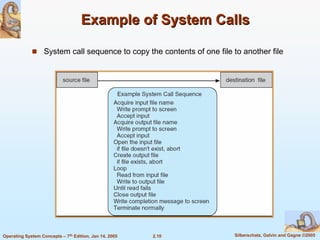
Example of System Calls

                  System call sequence to copy the contents of one file to another file


Operating System Concepts – 7th Edition, Jan 14, 2005   2.10            Silberschatz, Galvin and Gagne ©2005
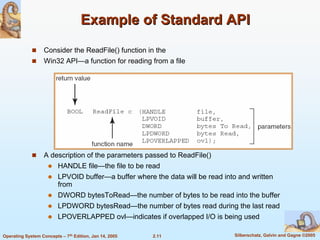
Example of Standard API
                  Consider the ReadFile() function in the
                  Win32 API—a function for reading from a file


                  A description of the parameters passed to ReadFile()
                         HANDLE file—the file to be read
                         LPVOID buffer—a buffer where the data will be read into and written
                         from
                         DWORD bytesToRead—the number of bytes to be read into the buffer
                         LPDWORD bytesRead—the number of bytes read during the last read
                         LPOVERLAPPED ovl—indicates if overlapped I/O is being used

Operating System Concepts – 7th Edition, Jan 14, 2005   2.11                    Silberschatz, Galvin and Gagne ©2005
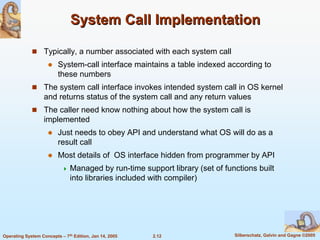
System Call Implementation

                  Typically, a number associated with each system call
                         System-call interface maintains a table indexed according to
                         these numbers
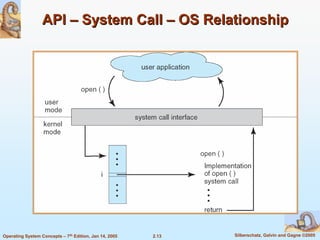
                  The system call interface invokes intended system call in OS kernel
                  and returns status of the system call and any return values
                  The caller need know nothing about how the system call is
                  implemented
                         Just needs to obey API and understand what OS will do as a
                         result call
                         Most details of OS interface hidden from programmer by API
                               Managed by run-time support library (set of functions built
                               into libraries included with compiler)


Operating System Concepts – 7th Edition, Jan 14, 2005   2.12                  Silberschatz, Galvin and Gagne ©2005
API – System Call – OS Relationship


Operating System Concepts – 7th Edition, Jan 14, 2005   2.13   Silberschatz, Galvin and Gagne ©2005
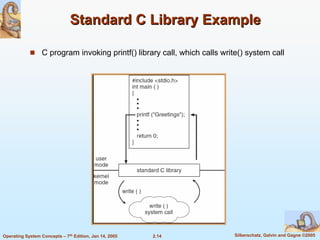
Standard C Library Example

                  C program invoking printf() library call, which calls write() system call


Operating System Concepts – 7th Edition, Jan 14, 2005   2.14                Silberschatz, Galvin and Gagne ©2005
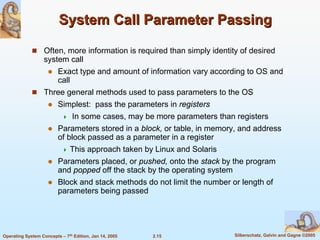
System Call Parameter Passing

                  Often, more information is required than simply identity of desired
                  system call
                         Exact type and amount of information vary according to OS and
                         call
                  Three general methods used to pass parameters to the OS
                         Simplest: pass the parameters in registers
                                In some cases, may be more parameters than registers
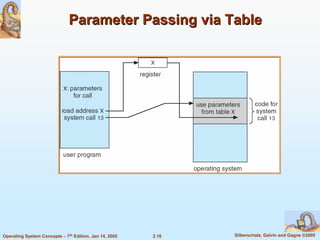
                         Parameters stored in a block, or table, in memory, and address
                         of block passed as a parameter in a register
                               This approach taken by Linux and Solaris
                         Parameters placed, or pushed, onto the stack by the program
                         and popped off the stack by the operating system
                         Block and stack methods do not limit the number or length of
                         parameters being passed


Operating System Concepts – 7th Edition, Jan 14, 2005   2.15               Silberschatz, Galvin and Gagne ©2005
Parameter Passing via Table


Operating System Concepts – 7th Edition, Jan 14, 2005   2.16   Silberschatz, Galvin and Gagne ©2005
Types of System Calls

                  Process control
                  File management
                  Device management
                  Information maintenance
                  Communications


Operating System Concepts – 7th Edition, Jan 14, 2005   2.17   Silberschatz, Galvin and Gagne ©2005
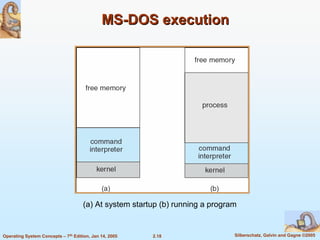
MS-DOS execution


                                     (a) At system startup (b) running a program


Operating System Concepts – 7th Edition, Jan 14, 2005   2.18                   Silberschatz, Galvin and Gagne ©2005
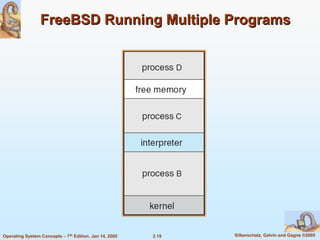
FreeBSD Running Multiple Programs


Operating System Concepts – 7th Edition, Jan 14, 2005   2.19   Silberschatz, Galvin and Gagne ©2005
System Programs

                System programs provide a convenient environment for program
                development and execution. The can be divided into:
                       File manipulation
                       Status information
                       File modification
                       Programming language support
                       Program loading and execution
                       Communications
                       Application programs
                Most users’ view of the operation system is defined by system
                programs, not the actual system calls


Operating System Concepts – 7th Edition, Jan 14, 2005   2.20          Silberschatz, Galvin and Gagne ©2005
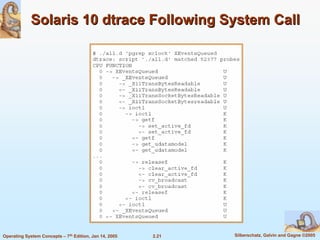
Solaris 10 dtrace Following System Call


Operating System Concepts – 7th Edition, Jan 14, 2005   2.21   Silberschatz, Galvin and Gagne ©2005
System Programs

                  Provide a convenient environment for program development and execution
                         Some of them are simply user interfaces to system calls; others are
                         considerably more complex
                  File management - Create, delete, copy, rename, print, dump, list, and
                  generally manipulate files and directories
                  Status information
                         Some ask the system for info - date, time, amount of available memory,
                         disk space, number of users
                         Others provide detailed performance, logging, and debugging
                         information
                         Typically, these programs format and print the output to the terminal or
                         other output devices
                         Some systems implement a registry - used to store and retrieve
                         configuration information


Operating System Concepts – 7th Edition, Jan 14, 2005   2.22                      Silberschatz, Galvin and Gagne ©2005
System Programs (cont’d)

                  File modification
                         Text editors to create and modify files
                         Special commands to search contents of files or perform
                         transformations of the text
                  Programming-language support - Compilers, assemblers,
                  debuggers and interpreters sometimes provided
                  Program loading and execution- Absolute loaders, relocatable
                  loaders, linkage editors, and overlay-loaders, debugging systems
                  for higher-level and machine language
                  Communications - Provide the mechanism for creating virtual
                  connections among processes, users, and computer systems
                         Allow users to send messages to one another’s screens,
                         browse web pages, send electronic-mail messages, log in
                         remotely, transfer files from one machine to another


Operating System Concepts – 7th Edition, Jan 14, 2005   2.23             Silberschatz, Galvin and Gagne ©2005
Operating System Design and Implementation

                  Design and Implementation of OS not “solvable”, but some
                  approaches have proven successful
                  Internal structure of different Operating Systems can vary widely
                  Start by defining goals and specifications
                  Affected by choice of hardware, type of system
                  User goals and System goals
                         User goals – operating system should be convenient to use,
                         easy to learn, reliable, safe, and fast
                         System goals – operating system should be easy to design,
                         implement, and maintain, as well as flexible, reliable, error-free,
                         and efficient


Operating System Concepts – 7th Edition, Jan 14, 2005   2.24                 Silberschatz, Galvin and Gagne ©2005
Operating System Design and Implementation (Cont.)

                  Important principle to separate
                  Policy: What will be done?
                  Mechanism: How to do it?
                  Mechanisms determine how to do something, policies decide what
                  will be done
                         The separation of policy from mechanism is a very important
                         principle, it allows maximum flexibility if policy decisions are to
                         be changed later


Operating System Concepts – 7th Edition, Jan 14, 2005   2.25                   Silberschatz, Galvin and Gagne ©2005
Simple Structure

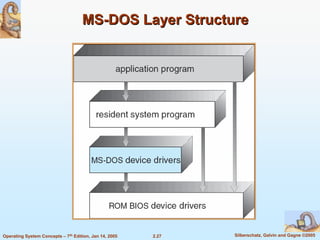
                  MS-DOS – written to provide the most functionality in the least
                  space
                         Not divided into modules
                         Although MS-DOS has some structure, its interfaces and levels
                         of functionality are not well separated


Operating System Concepts – 7th Edition, Jan 14, 2005   2.26             Silberschatz, Galvin and Gagne ©2005
MS-DOS Layer Structure


Operating System Concepts – 7th Edition, Jan 14, 2005   2.27   Silberschatz, Galvin and Gagne ©2005
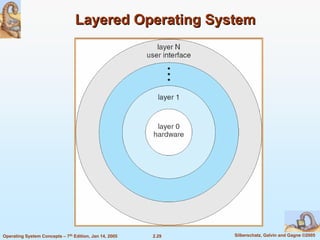
Layered Approach

                  The operating system is divided into a number of layers (levels),
                  each built on top of lower layers. The bottom layer (layer 0), is the
                  hardware; the highest (layer N) is the user interface.
                  With modularity, layers are selected such that each uses functions
                  (operations) and services of only lower-level layers


Operating System Concepts – 7th Edition, Jan 14, 2005   2.28              Silberschatz, Galvin and Gagne ©2005
Layered Operating System


Operating System Concepts – 7th Edition, Jan 14, 2005   2.29   Silberschatz, Galvin and Gagne ©2005
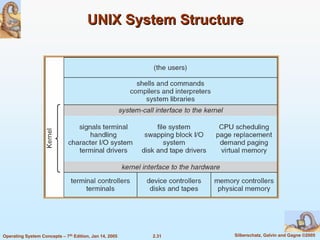
UNIX

                UNIX – limited by hardware functionality, the original UNIX operating
                system had limited structuring. The UNIX OS consists of two
                separable parts
                       Systems programs
                       The kernel
                            Consists of everything below the system-call interface and
                            above the physical hardware
                            Provides the file system, CPU scheduling, memory
                            management, and other operating-system functions; a large
                            number of functions for one level


Operating System Concepts – 7th Edition, Jan 14, 2005   2.30               Silberschatz, Galvin and Gagne ©2005
UNIX System Structure


Operating System Concepts – 7th Edition, Jan 14, 2005   2.31   Silberschatz, Galvin and Gagne ©2005
Microkernel System Structure

                  Moves as much from the kernel into “user” space
                  Communication takes place between user modules using message
                  passing
                  Benefits:
                         Easier to extend a microkernel
                         Easier to port the operating system to new architectures
                         More reliable (less code is running in kernel mode)
                         More secure
                  Detriments:
                         Performance overhead of user space to kernel space
                         communication


Operating System Concepts – 7th Edition, Jan 14, 2005   2.32               Silberschatz, Galvin and Gagne ©2005
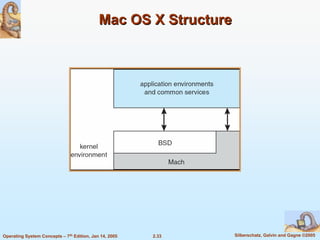
Mac OS X Structure


Operating System Concepts – 7th Edition, Jan 14, 2005   2.33     Silberschatz, Galvin and Gagne ©2005
Modules

                  Most modern operating systems implement kernel modules
                         Uses object-oriented approach
                         Each core component is separate
                         Each talks to the others over known interfaces
                         Each is loadable as needed within the kernel
                  Overall, similar to layers but with more flexible


Operating System Concepts – 7th Edition, Jan 14, 2005    2.34             Silberschatz, Galvin and Gagne ©2005
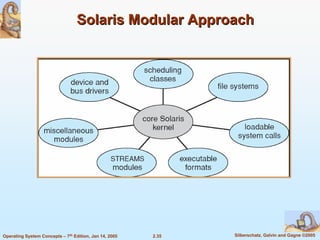
Solaris Modular Approach


Operating System Concepts – 7th Edition, Jan 14, 2005   2.35   Silberschatz, Galvin and Gagne ©2005
Virtual Machines

                  A virtual machine takes the layered approach to its logical
                  conclusion. It treats hardware and the operating system
                  kernel as though they were all hardware
                  A virtual machine provides an interface identical to the
                  underlying bare hardware
                  The operating system creates the illusion of multiple
                  processes, each executing on its own processor with its own
                  (virtual) memory


Operating System Concepts – 7th Edition, Jan 14, 2005   2.36             Silberschatz, Galvin and Gagne ©2005
Virtual Machines (Cont.)

                  The resources of the physical computer are shared to create the
                  virtual machines
                         CPU scheduling can create the appearance that users have
                         their own processor
                         Spooling and a file system can provide virtual card readers and
                         virtual line printers
                         A normal user time-sharing terminal serves as the virtual
                         machine operator’s console


Operating System Concepts – 7th Edition, Jan 14, 2005   2.37               Silberschatz, Galvin and Gagne ©2005
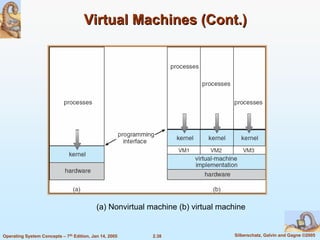
Virtual Machines (Cont.)


                               Non-virtual Machine                   Virtual Machine


                                           (a) Nonvirtual machine (b) virtual machine


Operating System Concepts – 7th Edition, Jan 14, 2005     2.38                   Silberschatz, Galvin and Gagne ©2005
Virtual Machines (Cont.)

                The virtual-machine concept provides complete protection of system
                resources since each virtual machine is isolated from all other virtual
                machines. This isolation, however, permits no direct sharing of
                resources.
                A virtual-machine system is a perfect vehicle for operating-systems
                research and development. System development is done on the
                virtual machine, instead of on a physical machine and so does not
                disrupt normal system operation.
                The virtual machine concept is difficult to implement due to the effort
                required to provide an exact duplicate to the underlying machine


Operating System Concepts – 7th Edition, Jan 14, 2005   2.39             Silberschatz, Galvin and Gagne ©2005
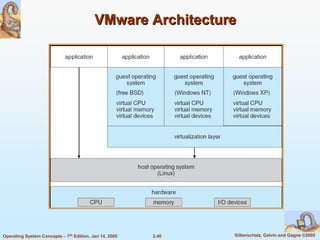
VMware Architecture


Operating System Concepts – 7th Edition, Jan 14, 2005   2.40   Silberschatz, Galvin and Gagne ©2005
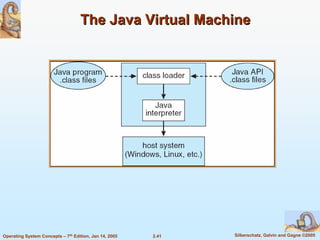
The Java Virtual Machine


Operating System Concepts – 7th Edition, Jan 14, 2005   2.41   Silberschatz, Galvin and Gagne ©2005
Operating System Generation

                  Operating systems are designed to run on any of a class of
                  machines; the system must be configured for each specific
                  computer site
                  SYSGEN program obtains information concerning the specific
                  configuration of the hardware system
                  Booting – starting a computer by loading the kernel
                  Bootstrap program – code stored in ROM that is able to locate the
                  kernel, load it into memory, and start its execution


Operating System Concepts – 7th Edition, Jan 14, 2005   2.42            Silberschatz, Galvin and Gagne ©2005
System Boot

                  Operating system must be made available to hardware so
                  hardware can start it
                         Small piece of code – bootstrap loader, locates the kernel,
                         loads it into memory, and starts it
                         Sometimes two-step process where boot block at fixed
                         location loads bootstrap loader
                         When power initialized on system, execution starts at a fixed
                         memory location
                               Firmware used to hold initial boot code


Operating System Concepts – 7th Edition, Jan 14, 2005      2.43            Silberschatz, Galvin and Gagne ©2005
End of Chapter 2

Operating system structures

  • 1.
  • 2.
    Chapter 2: Operating-SystemStructures Operating System Services User Operating System Interface System Calls Types of System Calls System Programs Operating System Design and Implementation Operating System Structure Virtual Machines Operating System Generation System Boot Operating System Concepts – 7th Edition, Jan 14, 2005 2.2 Silberschatz, Galvin and Gagne ©2005
  • 3.
    Objectives To describe the services an operating system provides to users, processes, and other systems To discuss the various ways of structuring an operating system To explain how operating systems are installed and customized and how they boot Operating System Concepts – 7th Edition, Jan 14, 2005 2.3 Silberschatz, Galvin and Gagne ©2005
  • 4.
    Operating System Services One set of operating-system services provides functions that are helpful to the user: User interface - Almost all operating systems have a user interface (UI) Varies between Command-Line (CLI), Graphics User Interface (GUI), Batch Program execution - The system must be able to load a program into memory and to run that program, end execution, either normally or abnormally (indicating error) I/O operations - A running program may require I/O, which may involve a file or an I/O device. File-system manipulation - The file system is of particular interest. Obviously, programs need to read and write files and directories, create and delete them, search them, list file Information, permission management. Operating System Concepts – 7th Edition, Jan 14, 2005 2.4 Silberschatz, Galvin and Gagne ©2005
  • 5.
    Operating System Services(Cont.) One set of operating-system services provides functions that are helpful to the user (Cont): Communications – Processes may exchange information, on the same computer or between computers over a network Communications may be via shared memory or through message passing (packets moved by the OS) Error detection – OS needs to be constantly aware of possible errors May occur in the CPU and memory hardware, in I/O devices, in user program For each type of error, OS should take the appropriate action to ensure correct and consistent computing Debugging facilities can greatly enhance the user’s and programmer’s abilities to efficiently use the system Operating System Concepts – 7th Edition, Jan 14, 2005 2.5 Silberschatz, Galvin and Gagne ©2005
  • 6.
    Operating System Services(Cont.) Another set of OS functions exists for ensuring the efficient operation of the system itself via resource sharing Resource allocation - When multiple users or multiple jobs running concurrently, resources must be allocated to each of them Many types of resources - Some (such as CPU cycles,mainmemory, and file storage) may have special allocation code, others (such as I/O devices) may have general request and release code. Accounting - To keep track of which users use how much and what kinds of computer resources Protection and security - The owners of information stored in a multiuser or networked computer system may want to control use of that information, concurrent processes should not interfere with each other Protection involves ensuring that all access to system resources is controlled Security of the system from outsiders requires user authentication, extends to defending external I/O devices from invalid access attempts If a system is to be protected and secure, precautions must be instituted throughout it. A chain is only as strong as its weakest link. Operating System Concepts – 7th Edition, Jan 14, 2005 2.6 Silberschatz, Galvin and Gagne ©2005
  • 7.
    User Operating SystemInterface - CLI CLI allows direct command entry Sometimes implemented in kernel, sometimes by systems program Sometimes multiple flavors implemented – shells Primarily fetches a command from user and executes it – Sometimes commands built-in, sometimes just names of programs » If the latter, adding new features doesn’t require shell modification Operating System Concepts – 7th Edition, Jan 14, 2005 2.7 Silberschatz, Galvin and Gagne ©2005
  • 8.
    User Operating SystemInterface - GUI User-friendly desktop metaphor interface Usually mouse, keyboard, and monitor Icons represent files, programs, actions, etc Various mouse buttons over objects in the interface cause various actions (provide information, options, execute function, open directory (known as a folder) Invented at Xerox PARC Many systems now include both CLI and GUI interfaces Microsoft Windows is GUI with CLI “command” shell Apple Mac OS X as “Aqua” GUI interface with UNIX kernel underneath and shells available Solaris is CLI with optional GUI interfaces (Java Desktop, KDE) Operating System Concepts – 7th Edition, Jan 14, 2005 2.8 Silberschatz, Galvin and Gagne ©2005
  • 9.
    System Calls Programming interface to the services provided by the OS Typically written in a high-level language (C or C++) Mostly accessed by programs via a high-level Application Program Interface (API) rather than direct system call use Three most common APIs are Win32 API for Windows, POSIX API for POSIX-based systems (including virtually all versions of UNIX, Linux, and Mac OS X), and Java API for the Java virtual machine (JVM) Why use APIs rather than system calls? (Note that the system-call names used throughout this text are generic) Operating System Concepts – 7th Edition, Jan 14, 2005 2.9 Silberschatz, Galvin and Gagne ©2005
  • 10.
    Example of SystemCalls System call sequence to copy the contents of one file to another file Operating System Concepts – 7th Edition, Jan 14, 2005 2.10 Silberschatz, Galvin and Gagne ©2005
  • 11.
    Example of StandardAPI Consider the ReadFile() function in the Win32 API—a function for reading from a file A description of the parameters passed to ReadFile() HANDLE file—the file to be read LPVOID buffer—a buffer where the data will be read into and written from DWORD bytesToRead—the number of bytes to be read into the buffer LPDWORD bytesRead—the number of bytes read during the last read LPOVERLAPPED ovl—indicates if overlapped I/O is being used Operating System Concepts – 7th Edition, Jan 14, 2005 2.11 Silberschatz, Galvin and Gagne ©2005
  • 12.
    System Call Implementation Typically, a number associated with each system call System-call interface maintains a table indexed according to these numbers The system call interface invokes intended system call in OS kernel and returns status of the system call and any return values The caller need know nothing about how the system call is implemented Just needs to obey API and understand what OS will do as a result call Most details of OS interface hidden from programmer by API Managed by run-time support library (set of functions built into libraries included with compiler) Operating System Concepts – 7th Edition, Jan 14, 2005 2.12 Silberschatz, Galvin and Gagne ©2005
  • 13.
    API – SystemCall – OS Relationship Operating System Concepts – 7th Edition, Jan 14, 2005 2.13 Silberschatz, Galvin and Gagne ©2005
  • 14.
    Standard C LibraryExample C program invoking printf() library call, which calls write() system call Operating System Concepts – 7th Edition, Jan 14, 2005 2.14 Silberschatz, Galvin and Gagne ©2005
  • 15.
    System Call ParameterPassing Often, more information is required than simply identity of desired system call Exact type and amount of information vary according to OS and call Three general methods used to pass parameters to the OS Simplest: pass the parameters in registers In some cases, may be more parameters than registers Parameters stored in a block, or table, in memory, and address of block passed as a parameter in a register This approach taken by Linux and Solaris Parameters placed, or pushed, onto the stack by the program and popped off the stack by the operating system Block and stack methods do not limit the number or length of parameters being passed Operating System Concepts – 7th Edition, Jan 14, 2005 2.15 Silberschatz, Galvin and Gagne ©2005
  • 16.
    Parameter Passing viaTable Operating System Concepts – 7th Edition, Jan 14, 2005 2.16 Silberschatz, Galvin and Gagne ©2005
  • 17.
    Types of SystemCalls Process control File management Device management Information maintenance Communications Operating System Concepts – 7th Edition, Jan 14, 2005 2.17 Silberschatz, Galvin and Gagne ©2005
  • 18.
    MS-DOS execution (a) At system startup (b) running a program Operating System Concepts – 7th Edition, Jan 14, 2005 2.18 Silberschatz, Galvin and Gagne ©2005
  • 19.
    FreeBSD Running MultiplePrograms Operating System Concepts – 7th Edition, Jan 14, 2005 2.19 Silberschatz, Galvin and Gagne ©2005
  • 20.
    System Programs System programs provide a convenient environment for program development and execution. The can be divided into: File manipulation Status information File modification Programming language support Program loading and execution Communications Application programs Most users’ view of the operation system is defined by system programs, not the actual system calls Operating System Concepts – 7th Edition, Jan 14, 2005 2.20 Silberschatz, Galvin and Gagne ©2005
  • 21.
    Solaris 10 dtraceFollowing System Call Operating System Concepts – 7th Edition, Jan 14, 2005 2.21 Silberschatz, Galvin and Gagne ©2005
  • 22.
    System Programs Provide a convenient environment for program development and execution Some of them are simply user interfaces to system calls; others are considerably more complex File management - Create, delete, copy, rename, print, dump, list, and generally manipulate files and directories Status information Some ask the system for info - date, time, amount of available memory, disk space, number of users Others provide detailed performance, logging, and debugging information Typically, these programs format and print the output to the terminal or other output devices Some systems implement a registry - used to store and retrieve configuration information Operating System Concepts – 7th Edition, Jan 14, 2005 2.22 Silberschatz, Galvin and Gagne ©2005
  • 23.
    System Programs (cont’d) File modification Text editors to create and modify files Special commands to search contents of files or perform transformations of the text Programming-language support - Compilers, assemblers, debuggers and interpreters sometimes provided Program loading and execution- Absolute loaders, relocatable loaders, linkage editors, and overlay-loaders, debugging systems for higher-level and machine language Communications - Provide the mechanism for creating virtual connections among processes, users, and computer systems Allow users to send messages to one another’s screens, browse web pages, send electronic-mail messages, log in remotely, transfer files from one machine to another Operating System Concepts – 7th Edition, Jan 14, 2005 2.23 Silberschatz, Galvin and Gagne ©2005
  • 24.
    Operating System Designand Implementation Design and Implementation of OS not “solvable”, but some approaches have proven successful Internal structure of different Operating Systems can vary widely Start by defining goals and specifications Affected by choice of hardware, type of system User goals and System goals User goals – operating system should be convenient to use, easy to learn, reliable, safe, and fast System goals – operating system should be easy to design, implement, and maintain, as well as flexible, reliable, error-free, and efficient Operating System Concepts – 7th Edition, Jan 14, 2005 2.24 Silberschatz, Galvin and Gagne ©2005
  • 25.
    Operating System Designand Implementation (Cont.) Important principle to separate Policy: What will be done? Mechanism: How to do it? Mechanisms determine how to do something, policies decide what will be done The separation of policy from mechanism is a very important principle, it allows maximum flexibility if policy decisions are to be changed later Operating System Concepts – 7th Edition, Jan 14, 2005 2.25 Silberschatz, Galvin and Gagne ©2005
  • 26.
    Simple Structure MS-DOS – written to provide the most functionality in the least space Not divided into modules Although MS-DOS has some structure, its interfaces and levels of functionality are not well separated Operating System Concepts – 7th Edition, Jan 14, 2005 2.26 Silberschatz, Galvin and Gagne ©2005
  • 27.
    MS-DOS Layer Structure OperatingSystem Concepts – 7th Edition, Jan 14, 2005 2.27 Silberschatz, Galvin and Gagne ©2005
  • 28.
    Layered Approach The operating system is divided into a number of layers (levels), each built on top of lower layers. The bottom layer (layer 0), is the hardware; the highest (layer N) is the user interface. With modularity, layers are selected such that each uses functions (operations) and services of only lower-level layers Operating System Concepts – 7th Edition, Jan 14, 2005 2.28 Silberschatz, Galvin and Gagne ©2005
  • 29.
    Layered Operating System OperatingSystem Concepts – 7th Edition, Jan 14, 2005 2.29 Silberschatz, Galvin and Gagne ©2005
  • 30.
    UNIX UNIX – limited by hardware functionality, the original UNIX operating system had limited structuring. The UNIX OS consists of two separable parts Systems programs The kernel Consists of everything below the system-call interface and above the physical hardware Provides the file system, CPU scheduling, memory management, and other operating-system functions; a large number of functions for one level Operating System Concepts – 7th Edition, Jan 14, 2005 2.30 Silberschatz, Galvin and Gagne ©2005
  • 31.
    UNIX System Structure OperatingSystem Concepts – 7th Edition, Jan 14, 2005 2.31 Silberschatz, Galvin and Gagne ©2005
  • 32.
    Microkernel System Structure Moves as much from the kernel into “user” space Communication takes place between user modules using message passing Benefits: Easier to extend a microkernel Easier to port the operating system to new architectures More reliable (less code is running in kernel mode) More secure Detriments: Performance overhead of user space to kernel space communication Operating System Concepts – 7th Edition, Jan 14, 2005 2.32 Silberschatz, Galvin and Gagne ©2005
  • 33.
    Mac OS XStructure Operating System Concepts – 7th Edition, Jan 14, 2005 2.33 Silberschatz, Galvin and Gagne ©2005
  • 34.
    Modules Most modern operating systems implement kernel modules Uses object-oriented approach Each core component is separate Each talks to the others over known interfaces Each is loadable as needed within the kernel Overall, similar to layers but with more flexible Operating System Concepts – 7th Edition, Jan 14, 2005 2.34 Silberschatz, Galvin and Gagne ©2005
  • 35.
    Solaris Modular Approach OperatingSystem Concepts – 7th Edition, Jan 14, 2005 2.35 Silberschatz, Galvin and Gagne ©2005
  • 36.
    Virtual Machines A virtual machine takes the layered approach to its logical conclusion. It treats hardware and the operating system kernel as though they were all hardware A virtual machine provides an interface identical to the underlying bare hardware The operating system creates the illusion of multiple processes, each executing on its own processor with its own (virtual) memory Operating System Concepts – 7th Edition, Jan 14, 2005 2.36 Silberschatz, Galvin and Gagne ©2005
  • 37.
    Virtual Machines (Cont.) The resources of the physical computer are shared to create the virtual machines CPU scheduling can create the appearance that users have their own processor Spooling and a file system can provide virtual card readers and virtual line printers A normal user time-sharing terminal serves as the virtual machine operator’s console Operating System Concepts – 7th Edition, Jan 14, 2005 2.37 Silberschatz, Galvin and Gagne ©2005
  • 38.
    Virtual Machines (Cont.) Non-virtual Machine Virtual Machine (a) Nonvirtual machine (b) virtual machine Operating System Concepts – 7th Edition, Jan 14, 2005 2.38 Silberschatz, Galvin and Gagne ©2005
  • 39.
    Virtual Machines (Cont.) The virtual-machine concept provides complete protection of system resources since each virtual machine is isolated from all other virtual machines. This isolation, however, permits no direct sharing of resources. A virtual-machine system is a perfect vehicle for operating-systems research and development. System development is done on the virtual machine, instead of on a physical machine and so does not disrupt normal system operation. The virtual machine concept is difficult to implement due to the effort required to provide an exact duplicate to the underlying machine Operating System Concepts – 7th Edition, Jan 14, 2005 2.39 Silberschatz, Galvin and Gagne ©2005
  • 40.
    VMware Architecture Operating SystemConcepts – 7th Edition, Jan 14, 2005 2.40 Silberschatz, Galvin and Gagne ©2005
  • 41.
    The Java VirtualMachine Operating System Concepts – 7th Edition, Jan 14, 2005 2.41 Silberschatz, Galvin and Gagne ©2005
  • 42.
    Operating System Generation Operating systems are designed to run on any of a class of machines; the system must be configured for each specific computer site SYSGEN program obtains information concerning the specific configuration of the hardware system Booting – starting a computer by loading the kernel Bootstrap program – code stored in ROM that is able to locate the kernel, load it into memory, and start its execution Operating System Concepts – 7th Edition, Jan 14, 2005 2.42 Silberschatz, Galvin and Gagne ©2005
  • 43.
    System Boot Operating system must be made available to hardware so hardware can start it Small piece of code – bootstrap loader, locates the kernel, loads it into memory, and starts it Sometimes two-step process where boot block at fixed location loads bootstrap loader When power initialized on system, execution starts at a fixed memory location Firmware used to hold initial boot code Operating System Concepts – 7th Edition, Jan 14, 2005 2.43 Silberschatz, Galvin and Gagne ©2005
  • 44.