Streams and Files:
Chapter 12:
Ms. Munazza Mah Jabeen
Assistant Professor of Computer Science
Stream Classes:
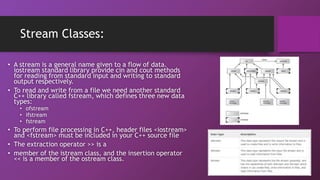
• A stream is a general name given to a flow of data.
iostream standard library provide cin and cout methods
for reading from standard input and writing to standard
output respectively.
• To read and write from a file we need another standard
C++ library called fstream, which defines three new data
types:
• ofstream
• ifstream
• fstream
• To perform file processing in C++, header files <iostream>
and <fstream> must be included in your C++ source file
• The extraction operator >> is a
• member of the istream class, and the insertion operator
<< is a member of the ostream class.
Opening / Closing a File:
• A file must be opened before you can read from it or write to it. Either
the ofstream or fstream object may be used to open a file for writing
and ifstream object is used to open a file for reading purpose only.
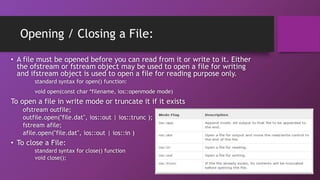
standard syntax for open() function:
void open(const char *filename, ios::openmode mode)
To open a file in write mode or truncate it if it exists
ofstream outfile;
outfile.open("file.dat", ios::out | ios::trunc );
fstream afile;
afile.open("file.dat", ios::out | ios::in )
• To close a File:
standard syntax for close() function
void close();
Reading / Writing a File:
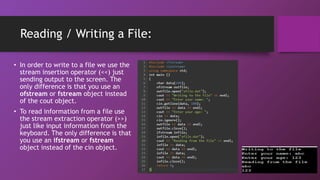
• In order to write to a file we use the
stream insertion operator (<<) just
sending output to the screen. The
only difference is that you use an
ofstream or fstream object instead
of the cout object.
• To read information from a file use
the stream extraction operator (>>)
just like input information from the
keyboard. The only difference is that
you use an ifstream or fstream
object instead of the cin object.
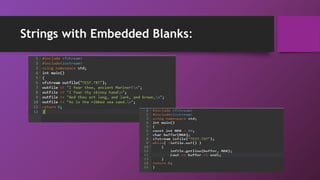
Strings with Embedded Blanks:
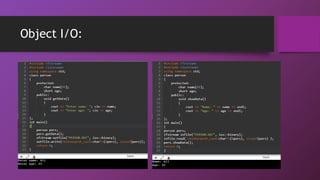
Object I/O:
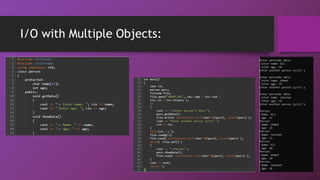
I/O with Multiple Objects:
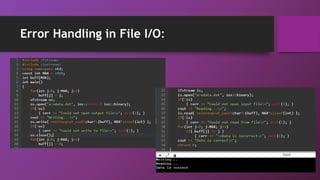
Error Handling in File I/O:

Streams and Files

  • 1.
    Streams and Files: Chapter12: Ms. Munazza Mah Jabeen Assistant Professor of Computer Science
  • 2.
    Stream Classes: • Astream is a general name given to a flow of data. iostream standard library provide cin and cout methods for reading from standard input and writing to standard output respectively. • To read and write from a file we need another standard C++ library called fstream, which defines three new data types: • ofstream • ifstream • fstream • To perform file processing in C++, header files <iostream> and <fstream> must be included in your C++ source file • The extraction operator >> is a • member of the istream class, and the insertion operator << is a member of the ostream class.
  • 3.
    Opening / Closinga File: • A file must be opened before you can read from it or write to it. Either the ofstream or fstream object may be used to open a file for writing and ifstream object is used to open a file for reading purpose only. standard syntax for open() function: void open(const char *filename, ios::openmode mode) To open a file in write mode or truncate it if it exists ofstream outfile; outfile.open("file.dat", ios::out | ios::trunc ); fstream afile; afile.open("file.dat", ios::out | ios::in ) • To close a File: standard syntax for close() function void close();
  • 4.
    Reading / Writinga File: • In order to write to a file we use the stream insertion operator (<<) just sending output to the screen. The only difference is that you use an ofstream or fstream object instead of the cout object. • To read information from a file use the stream extraction operator (>>) just like input information from the keyboard. The only difference is that you use an ifstream or fstream object instead of the cin object.
  • 5.
  • 6.
  • 7.
  • 8.