MODERN OPERATING SYSTEMS
Third Edition
ANDREW S. TANENBAUM
Chapter – 1
Introduction
What Is An Operating System
A modern computer consists of:
 One or more processors
 Main memory
 Disks
 Printers
 Various input/output devices
 Networking
 Disks
 Video/audio card
 It is impossible for every application programmer to understand every
detail
 A layer of computer software is introduced to provide a better, simpler,
cleaner model of the resources and manage them
 Managing all these components requires a layer of software – the
operating system
…
 Users use various OS
 Windows, Linux, Mac OS etc.
 User interacts with shell or GUI
 part of OS.
 they use OS to get their work done
 Is device driver part of OS
 On top of hardware is OS
 Most computers have two modes of operation:
 Kernel mode and user mode
 OS runs in kernel mode, which has complete access to all hardware and can execute
any instruction
 Rest of software runs in user mode, which has limited capability
 Shell or GUI is the lowest level of user mode software
Two Major Functions of Operating System
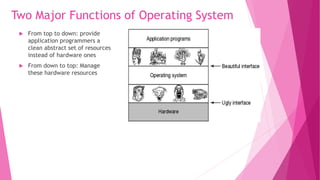
 From top to down: provide
application programmers a
clean abstract set of resources
instead of hardware ones
 From down to top: Manage
these hardware resources
Two Major Functions of Operating System:
As an extended machine:
 Abstraction:
 CPU—process
 Storage –- files
 Memory– address space
 4 types of people:
 Industrial engineer: design
hardware
 Kernel designer
 Application programmer: OS’s
user
 End users
As a Resource Manager:
 Allow multiple programs to run at the same time
 Manage and protect memory, I/O devices, and other
resources
 Includes multiplexing (sharing) resources in two
different ways:
 In time
 In space
 Modern OS runs multiple programs of multiple users at
the same time
 Imagine what would happen if several programs want to
print at the same time?
 How to account the resource usage of each process?
 Resources can be multiplexed:
 How to ensure fairness and efficiency?
History of Operating Systems:
Generations:
 (1945–55) Vacuum Tubes:
 Large and slow
 Engineers design, build, operate and maintain the computer
 All programming is done with machine language, or by wiring circuits using cables
 insert plug boards into the computer and operate
 The work is mainly numerical calculations
 (1955–65) Transistors and Batch Systems:
 Also called mainframes
 Computers are managed by professional operators
 Programmers use punch card to run programs; operators operate (load compiler, etc ) and collect
output to the user
 Complains soon come:
 Human Operation between computer operation
 Lead to batch system
 Collect a batch of jobs in the input room, then read them into a magnetic tape; the same for output
An early batch system.
(a) Programmers bring cards to 1401.
(b)1401 reads batch of jobs onto tape.
(c) Operator carries input tape to 7094.
(d) 7094 does computing.
(e) Operator carries output tape to 1401.
(f) 1401 prints output.
Structure of a typical FMS job.
 (1965–1980) ICs and Multiprogramming:
 OS/360:
 However, OS/360 introduces several key techniques
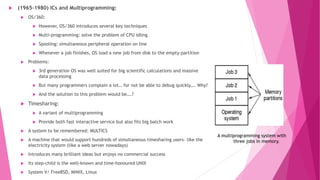
 Multi-programming: solve the problem of CPU idling
 Spooling: simultaneous peripheral operation on line
 Whenever a job finishes, OS load a new job from disk to the empty-partition
 Problems:
 3rd generation OS was well suited for big scientific calculations and massive
data processing
 But many programmers complain a lot… for not be able to debug quickly…. Why?
 And the solution to this problem would be….?
 Timesharing:
 A variant of multiprogramming
 Provide both fast interactive service but also fits big batch work
 A system to be remembered: MULTICS
 A machine that would support hundreds of simultaneous timesharing users– like the
electricity system (like a web server nowadays)
 Introduces many brilliant ideas but enjoys no commercial success
 Its step-child is the well-known and time-honoured UNIX
 System V/ FreeBSD, MINIX, Linux
A multiprogramming system with
three jobs in memory.
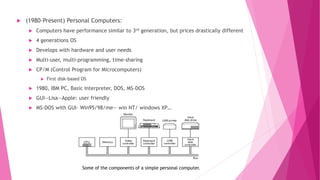
 (1980–Present) Personal Computers:
 Computers have performance similar to 3rd generation, but prices drastically different
 4 generations OS
 Develops with hardware and user needs
 Multi-user, multi-programming, time-sharing
 CP/M (Control Program for Microcomputers)
 First disk-based OS
 1980, IBM PC, Basic Interpreter, DOS, MS-DOS
 GUI--Lisa—Apple: user friendly
 MS-DOS with GUI– Win95/98/me— win NT/ windows XP…
Some of the components of a simple personal computer.
Hardware: processor
 Brain of computer
 Fetches instruction from memory and execute
 Cycle of CPU:
 fetch, decode, execute
 CPU has registers to store variable and temporary result: load from memory to register; store
from register to memory
 Program counter: next instruction to fetch
 Stack pointer: the top of the current stack
 PSW: program status word (The program status word (PSW) is an IBM System/360 architecture
and successors control register which performs the function of a status register and program
counter in other architectures, and more), priority, mode…
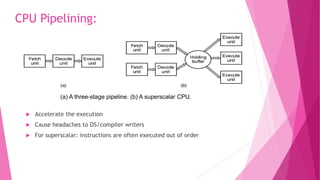
(a) A three-stage pipeline. (b) A superscalar CPU.
 Accelerate the execution
 Cause headaches to OS/compiler writers
 For superscalar: instructions are often executed out of order
CPU Pipelining:
(a) A quad-core chip with a shared L2 cache. (b) A quad-core chip with separate L2 caches.
Multithreaded and Multicore (Multiprocessor) Chips:
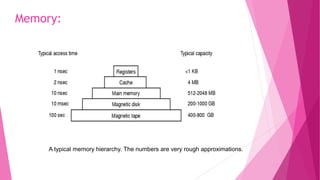
A typical memory hierarchy. The numbers are very rough approximations.
Memory:
Memory
 Memory is where computer fetch and store data, ideally, it should be both chip/large
 The best people can do, is to construct a memory hierarchy
 Cache lines:
 Memory divided into cache lines; the mostly used ones are stored in caches
 Cache hit, cache miss
 Cache: whenever there is disparity in usage or speed; used to improve performance
 Questions when dealing with cache:
 When to put a new item into the cache.
 Which cache line to put the new item in.
 Which item to remove from the cache when a slot is needed.
 Where to put a newly evicted item in the larger memory.
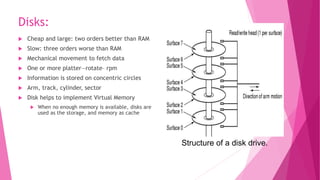
Structure of a disk drive.
Disks:
 Cheap and large: two orders better than RAM
 Slow: three orders worse than RAM
 Mechanical movement to fetch data
 One or more platter—rotate– rpm
 Information is stored on concentric circles
 Arm, track, cylinder, sector
 Disk helps to implement Virtual Memory
 When no enough memory is available, disks are
used as the storage, and memory as cache
The steps in starting an I/O device and getting an interrupt.
 a Two parts: a controller and a device
 Controller: to provide simpler interface to OS
 Device driver: talks to controller, give commands and accepts response
 Busy waiting/interrupt/DMA
I/O Devices:
Booting the Computer
 BIOS—basic input/output system
 On the motherboard, low-level I/O software
 Checks RAM, keyboard and other basic devices
 Determine the boot device: floppy, CD-ROM, disk
 First sector of the boot-device is read into memory
 The sector contains program to check which partition is active
 Then a secondary boot-loader is read into memory and reads in operating
system from the active partition
 Mainframe operating systems
 Server operating systems
 Multiprocessor operating systems
 Personal computer operating systems
 Handheld operating systems
 Embedded operating systems
 Sensor node operating systems
 Real-time operating systems
 Smart card operating systems
The Operating System Zoo:
 Processes
 Address spaces
 Files
 Input / Output
 Protection
 The shell
 Ontogeny recapitulates phylogeny
 Large memories
 Protection hardware
 Disks
 Virtual memory
Operating System Concepts:
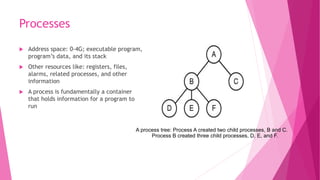
Processes
 Address space: 0-4G; executable program,
program’s data, and its stack
 Other resources like: registers, files,
alarms, related processes, and other
information
 A process is fundamentally a container
that holds information for a program to
run
A process tree: Process A created two child processes, B and C.
Process B created three child processes, D, E, and F.
Address Space
 The memory used by a process, in concept
 OS allows multiple processes in memory simultaneously
 Some processes need more memory than physically available–
virtual memory
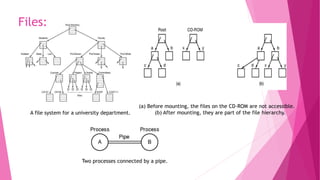
A file system for a university department.
Files:
(a) Before mounting, the files on the CD-ROM are not accessible.
(b) After mounting, they are part of the file hierarchy.
Two processes connected by a pipe.
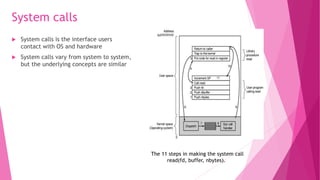
System calls
 System calls is the interface users
contact with OS and hardware
 System calls vary from system to system,
but the underlying concepts are similar
The 11 steps in making the system call
read(fd, buffer, nbytes).
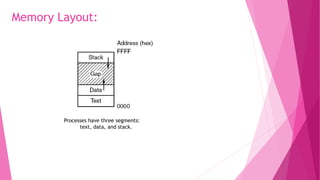
Processes have three segments:
text, data, and stack.
Memory Layout:
(a) Two directories before linking /usr/jim/memo to ast’s directory. (b) The same directories after linking.
Linking:
(a) File system before the mount. (b) File system after the mount.
Monolithic systems – basic structure:
 A main program that invokes the requested service procedure.
 A set of service procedures that carry out the system calls.
 A set of utility procedures that help the service procedures.
Operating Systems Structure:
Structure of the THE operating system.
Layered Systems:
Structure of the MINIX 3 system.
Microkernels:
The client-server model over a network.
Client-Server Model:
(a) A type 1 hypervisor. (b) A type 2 hypervisor.
Virtual Machines:

Introduction To operating System:

  • 1.
    MODERN OPERATING SYSTEMS ThirdEdition ANDREW S. TANENBAUM Chapter – 1 Introduction
  • 2.
    What Is AnOperating System A modern computer consists of:  One or more processors  Main memory  Disks  Printers  Various input/output devices  Networking  Disks  Video/audio card  It is impossible for every application programmer to understand every detail  A layer of computer software is introduced to provide a better, simpler, cleaner model of the resources and manage them  Managing all these components requires a layer of software – the operating system
  • 3.
    …  Users usevarious OS  Windows, Linux, Mac OS etc.  User interacts with shell or GUI  part of OS.  they use OS to get their work done  Is device driver part of OS  On top of hardware is OS  Most computers have two modes of operation:  Kernel mode and user mode  OS runs in kernel mode, which has complete access to all hardware and can execute any instruction  Rest of software runs in user mode, which has limited capability  Shell or GUI is the lowest level of user mode software
  • 4.
    Two Major Functionsof Operating System  From top to down: provide application programmers a clean abstract set of resources instead of hardware ones  From down to top: Manage these hardware resources
  • 5.
    Two Major Functionsof Operating System: As an extended machine:  Abstraction:  CPU—process  Storage –- files  Memory– address space  4 types of people:  Industrial engineer: design hardware  Kernel designer  Application programmer: OS’s user  End users As a Resource Manager:  Allow multiple programs to run at the same time  Manage and protect memory, I/O devices, and other resources  Includes multiplexing (sharing) resources in two different ways:  In time  In space  Modern OS runs multiple programs of multiple users at the same time  Imagine what would happen if several programs want to print at the same time?  How to account the resource usage of each process?  Resources can be multiplexed:  How to ensure fairness and efficiency?
  • 6.
    History of OperatingSystems: Generations:  (1945–55) Vacuum Tubes:  Large and slow  Engineers design, build, operate and maintain the computer  All programming is done with machine language, or by wiring circuits using cables  insert plug boards into the computer and operate  The work is mainly numerical calculations  (1955–65) Transistors and Batch Systems:  Also called mainframes  Computers are managed by professional operators  Programmers use punch card to run programs; operators operate (load compiler, etc ) and collect output to the user  Complains soon come:  Human Operation between computer operation  Lead to batch system  Collect a batch of jobs in the input room, then read them into a magnetic tape; the same for output
  • 7.
    An early batchsystem. (a) Programmers bring cards to 1401. (b)1401 reads batch of jobs onto tape. (c) Operator carries input tape to 7094. (d) 7094 does computing. (e) Operator carries output tape to 1401. (f) 1401 prints output. Structure of a typical FMS job.
  • 8.
     (1965–1980) ICsand Multiprogramming:  OS/360:  However, OS/360 introduces several key techniques  Multi-programming: solve the problem of CPU idling  Spooling: simultaneous peripheral operation on line  Whenever a job finishes, OS load a new job from disk to the empty-partition  Problems:  3rd generation OS was well suited for big scientific calculations and massive data processing  But many programmers complain a lot… for not be able to debug quickly…. Why?  And the solution to this problem would be….?  Timesharing:  A variant of multiprogramming  Provide both fast interactive service but also fits big batch work  A system to be remembered: MULTICS  A machine that would support hundreds of simultaneous timesharing users– like the electricity system (like a web server nowadays)  Introduces many brilliant ideas but enjoys no commercial success  Its step-child is the well-known and time-honoured UNIX  System V/ FreeBSD, MINIX, Linux A multiprogramming system with three jobs in memory.
  • 9.
     (1980–Present) PersonalComputers:  Computers have performance similar to 3rd generation, but prices drastically different  4 generations OS  Develops with hardware and user needs  Multi-user, multi-programming, time-sharing  CP/M (Control Program for Microcomputers)  First disk-based OS  1980, IBM PC, Basic Interpreter, DOS, MS-DOS  GUI--Lisa—Apple: user friendly  MS-DOS with GUI– Win95/98/me— win NT/ windows XP… Some of the components of a simple personal computer.
  • 10.
    Hardware: processor  Brainof computer  Fetches instruction from memory and execute  Cycle of CPU:  fetch, decode, execute  CPU has registers to store variable and temporary result: load from memory to register; store from register to memory  Program counter: next instruction to fetch  Stack pointer: the top of the current stack  PSW: program status word (The program status word (PSW) is an IBM System/360 architecture and successors control register which performs the function of a status register and program counter in other architectures, and more), priority, mode…
  • 11.
    (a) A three-stagepipeline. (b) A superscalar CPU.  Accelerate the execution  Cause headaches to OS/compiler writers  For superscalar: instructions are often executed out of order CPU Pipelining:
  • 12.
    (a) A quad-corechip with a shared L2 cache. (b) A quad-core chip with separate L2 caches. Multithreaded and Multicore (Multiprocessor) Chips:
  • 13.
    A typical memoryhierarchy. The numbers are very rough approximations. Memory:
  • 14.
    Memory  Memory iswhere computer fetch and store data, ideally, it should be both chip/large  The best people can do, is to construct a memory hierarchy  Cache lines:  Memory divided into cache lines; the mostly used ones are stored in caches  Cache hit, cache miss  Cache: whenever there is disparity in usage or speed; used to improve performance  Questions when dealing with cache:  When to put a new item into the cache.  Which cache line to put the new item in.  Which item to remove from the cache when a slot is needed.  Where to put a newly evicted item in the larger memory.
  • 15.
    Structure of adisk drive. Disks:  Cheap and large: two orders better than RAM  Slow: three orders worse than RAM  Mechanical movement to fetch data  One or more platter—rotate– rpm  Information is stored on concentric circles  Arm, track, cylinder, sector  Disk helps to implement Virtual Memory  When no enough memory is available, disks are used as the storage, and memory as cache
  • 16.
    The steps instarting an I/O device and getting an interrupt.  a Two parts: a controller and a device  Controller: to provide simpler interface to OS  Device driver: talks to controller, give commands and accepts response  Busy waiting/interrupt/DMA I/O Devices:
  • 17.
    Booting the Computer BIOS—basic input/output system  On the motherboard, low-level I/O software  Checks RAM, keyboard and other basic devices  Determine the boot device: floppy, CD-ROM, disk  First sector of the boot-device is read into memory  The sector contains program to check which partition is active  Then a secondary boot-loader is read into memory and reads in operating system from the active partition
  • 18.
     Mainframe operatingsystems  Server operating systems  Multiprocessor operating systems  Personal computer operating systems  Handheld operating systems  Embedded operating systems  Sensor node operating systems  Real-time operating systems  Smart card operating systems The Operating System Zoo:
  • 19.
     Processes  Addressspaces  Files  Input / Output  Protection  The shell  Ontogeny recapitulates phylogeny  Large memories  Protection hardware  Disks  Virtual memory Operating System Concepts:
  • 20.
    Processes  Address space:0-4G; executable program, program’s data, and its stack  Other resources like: registers, files, alarms, related processes, and other information  A process is fundamentally a container that holds information for a program to run A process tree: Process A created two child processes, B and C. Process B created three child processes, D, E, and F.
  • 21.
    Address Space  Thememory used by a process, in concept  OS allows multiple processes in memory simultaneously  Some processes need more memory than physically available– virtual memory
  • 22.
    A file systemfor a university department. Files: (a) Before mounting, the files on the CD-ROM are not accessible. (b) After mounting, they are part of the file hierarchy. Two processes connected by a pipe.
  • 23.
    System calls  Systemcalls is the interface users contact with OS and hardware  System calls vary from system to system, but the underlying concepts are similar The 11 steps in making the system call read(fd, buffer, nbytes).
  • 24.
    Processes have threesegments: text, data, and stack. Memory Layout:
  • 25.
    (a) Two directoriesbefore linking /usr/jim/memo to ast’s directory. (b) The same directories after linking. Linking: (a) File system before the mount. (b) File system after the mount.
  • 26.
    Monolithic systems –basic structure:  A main program that invokes the requested service procedure.  A set of service procedures that carry out the system calls.  A set of utility procedures that help the service procedures. Operating Systems Structure:
  • 27.
    Structure of theTHE operating system. Layered Systems:
  • 28.
    Structure of theMINIX 3 system. Microkernels:
  • 29.
    The client-server modelover a network. Client-Server Model:
  • 30.
    (a) A type1 hypervisor. (b) A type 2 hypervisor. Virtual Machines: