Chapter 4: Memory Management
Part 1: Mechanisms for Managing Memory
Chapter 4 2
CS 1550, cs.pitt.edu
(originaly modified by Ethan
Memory management
 Basic memory management
 Swapping
 Virtual memory
 Page replacement algorithms
 Modeling page replacement algorithms
 Design issues for paging systems
 Implementation issues
 Segmentation
Chapter 4 3
CS 1550, cs.pitt.edu
(originaly modified by Ethan
In an ideal world…
 The ideal world has memory that is
 Very large
 Very fast
 Non-volatile (doesn’t go away when power is turned off)
 The real world has memory that is:
 Very large
 Very fast
 Affordable!
Pick any two…
 Memory management goal: make the real world look
as much like the ideal world as possible
Chapter 4 4
CS 1550, cs.pitt.edu
(originaly modified by Ethan
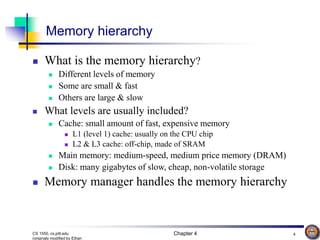
Memory hierarchy
 What is the memory hierarchy?
 Different levels of memory
 Some are small & fast
 Others are large & slow
 What levels are usually included?
 Cache: small amount of fast, expensive memory
 L1 (level 1) cache: usually on the CPU chip
 L2 & L3 cache: off-chip, made of SRAM
 Main memory: medium-speed, medium price memory (DRAM)
 Disk: many gigabytes of slow, cheap, non-volatile storage
 Memory manager handles the memory hierarchy
Chapter 4 5
CS 1550, cs.pitt.edu
(originaly modified by Ethan
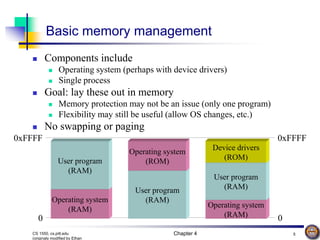
Basic memory management
 Components include
 Operating system (perhaps with device drivers)
 Single process
 Goal: lay these out in memory
 Memory protection may not be an issue (only one program)
 Flexibility may still be useful (allow OS changes, etc.)
 No swapping or paging
Operating system
(RAM)
User program
(RAM)
0xFFFF 0xFFFF
0 0
User program
(RAM)
Operating system
(ROM)
Operating system
(RAM)
User program
(RAM)
Device drivers
(ROM)
Chapter 4 6
CS 1550, cs.pitt.edu
(originaly modified by Ethan
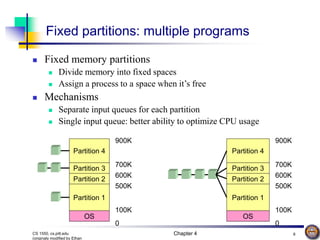
Fixed partitions: multiple programs
 Fixed memory partitions
 Divide memory into fixed spaces
 Assign a process to a space when it’s free
 Mechanisms
 Separate input queues for each partition
 Single input queue: better ability to optimize CPU usage
OS
Partition 1
Partition 2
Partition 3
Partition 4
0
100K
500K
600K
700K
900K
OS
Partition 1
Partition 2
Partition 3
Partition 4
0
100K
500K
600K
700K
900K
Chapter 4 7
CS 1550, cs.pitt.edu
(originaly modified by Ethan
How many programs is enough?
 Several memory partitions (fixed or variable size)
 Lots of processes wanting to use the CPU
 Tradeoff
 More processes utilize the CPU better
 Fewer processes use less memory (cheaper!)
 How many processes do we need to keep the CPU
fully utilized?
 This will help determine how much memory we need
 Is this still relevant with memory costing less than $1/GB?
Chapter 4 8
CS 1550, cs.pitt.edu
(originaly modified by Ethan
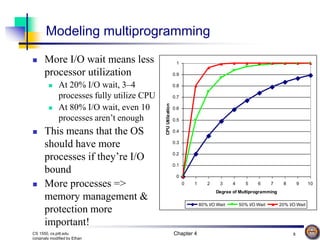
Modeling multiprogramming
 More I/O wait means less
processor utilization
 At 20% I/O wait, 3–4
processes fully utilize CPU
 At 80% I/O wait, even 10
processes aren’t enough
 This means that the OS
should have more
processes if they’re I/O
bound
 More processes =>
memory management &
protection more
important!
0
0.1
0.2
0.3
0.4
0.5
0.6
0.7
0.8
0.9
1
0 1 2 3 4 5 6 7 8 9 10
Degree of Multiprogramming
CPU
Utilization
80% I/O Wait 50% I/O Wait 20% I/O Wait
Chapter 4 9
CS 1550, cs.pitt.edu
(originaly modified by Ethan
Multiprogrammed system performance
 Arrival and work requirements of 4 jobs
 CPU utilization for 1–4 jobs with 80% I/O wait
 Sequence of events as jobs arrive and finish
 Numbers show amount of CPU time jobs get in each interval
 More processes => better utilization, less time per process
Job Arrival
time
CPU
needed
1 10:00 4
2 10:10 3
3 10:15 2
4 10:20 2
1 2 3 4
CPU idle 0.80 0.64 0.51 0.41
CPU busy 0.20 0.36 0.49 0.59
CPU/process 0.20 0.18 0.16 0.15
0 10 15 20 22 27.6 28.2 31.7
1
2
3
4
Time
Chapter 4 10
CS 1550, cs.pitt.edu
(originaly modified by Ethan
Memory and multiprogramming
 Memory needs two things for multiprogramming
 Relocation
 Protection
 The OS cannot be certain where a program will be
loaded in memory
 Variables and procedures can’t use absolute locations in
memory
 Several ways to guarantee this
 The OS must keep processes’ memory separate
 Protect a process from other processes reading or
modifying its own memory
 Protect a process from modifying its own memory in
undesirable ways (such as writing to program code)
Chapter 4 11
CS 1550, cs.pitt.edu
(originaly modified by Ethan
Base and limit registers
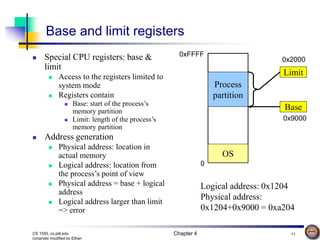
 Special CPU registers: base &
limit
 Access to the registers limited to
system mode
 Registers contain
 Base: start of the process’s
memory partition
 Limit: length of the process’s
memory partition
 Address generation
 Physical address: location in
actual memory
 Logical address: location from
the process’s point of view
 Physical address = base + logical
address
 Logical address larger than limit
=> error
Process
partition
OS
0
0xFFFF
Limit
Base
0x2000
0x9000
Logical address: 0x1204
Physical address:
0x1204+0x9000 = 0xa204
Chapter 4 12
CS 1550, cs.pitt.edu
(originaly modified by Ethan
Swapping
 Memory allocation changes as
 Processes come into memory
 Processes leave memory
 Swapped to disk
 Complete execution
 Gray regions are unused memory
OS OS OS OS OS OS OS
A A
B
A
B
C
B
C
B
C
D
C
D
C
D
A
Chapter 4 13
CS 1550, cs.pitt.edu
(originaly modified by Ethan
Swapping: leaving room to grow
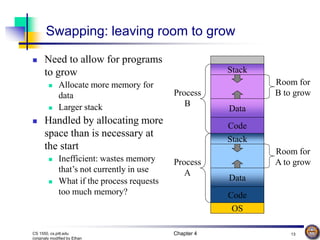
 Need to allow for programs
to grow
 Allocate more memory for
data
 Larger stack
 Handled by allocating more
space than is necessary at
the start
 Inefficient: wastes memory
that’s not currently in use
 What if the process requests
too much memory?
OS
Code
Data
Stack
Code
Data
Stack
Process
B
Process
A
Room for
B to grow
Room for
A to grow
Chapter 4 14
CS 1550, cs.pitt.edu
(originaly modified by Ethan
Tracking memory usage: bitmaps
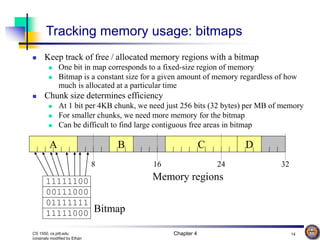
 Keep track of free / allocated memory regions with a bitmap
 One bit in map corresponds to a fixed-size region of memory
 Bitmap is a constant size for a given amount of memory regardless of how
much is allocated at a particular time
 Chunk size determines efficiency
 At 1 bit per 4KB chunk, we need just 256 bits (32 bytes) per MB of memory
 For smaller chunks, we need more memory for the bitmap
 Can be difficult to find large contiguous free areas in bitmap
A B C D
11111100
00111000
01111111
11111000
8 16 24 32
Memory regions
Bitmap
Chapter 4 15
CS 1550, cs.pitt.edu
(originaly modified by Ethan
Tracking memory usage: linked lists
 Keep track of free / allocated memory regions with a linked list
 Each entry in the list corresponds to a contiguous region of memory
 Entry can indicate either allocated or free (and, optionally, owning process)
 May have separate lists for free and allocated areas
 Efficient if chunks are large
 Fixed-size representation for each region
 More regions => more space needed for free lists
A B C D
16 24 32
Memory regions
A 0 6 - 6 4 B 10 3 - 13 4 C 17 9
- 29 3
D 26 3
8
Chapter 4 16
CS 1550, cs.pitt.edu
(originaly modified by Ethan
Allocating memory
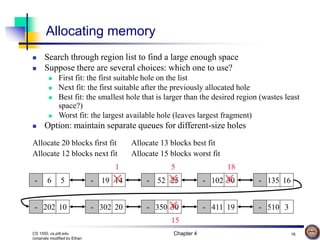
 Search through region list to find a large enough space
 Suppose there are several choices: which one to use?
 First fit: the first suitable hole on the list
 Next fit: the first suitable after the previously allocated hole
 Best fit: the smallest hole that is larger than the desired region (wastes least
space?)
 Worst fit: the largest available hole (leaves largest fragment)
 Option: maintain separate queues for different-size holes
- 6 5 - 19 14 - 52 25 - 102 30 - 135 16
- 202 10 - 302 20 - 350 30 - 411 19 - 510 3
Allocate 20 blocks first fit
5
Allocate 12 blocks next fit
18
Allocate 13 blocks best fit
1
Allocate 15 blocks worst fit
15
Chapter 4 17
CS 1550, cs.pitt.edu
(originaly modified by Ethan
Freeing memory
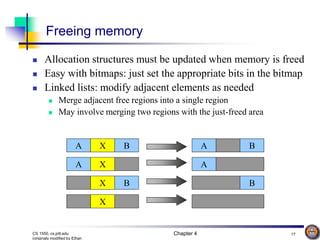
 Allocation structures must be updated when memory is freed
 Easy with bitmaps: just set the appropriate bits in the bitmap
 Linked lists: modify adjacent elements as needed
 Merge adjacent free regions into a single region
 May involve merging two regions with the just-freed area
A X B
A X
X B
X
A B
A
B
Chapter 4 18
CS 1550, cs.pitt.edu
(originaly modified by Ethan
Limitations of swapping
 Problems with swapping
 Process must fit into physical memory (impossible to run
larger processes)
 Memory becomes fragmented
 External fragmentation: lots of small free areas
 Compaction needed to reassemble larger free areas
 Processes are either in memory or on disk: half and half
doesn’t do any good
 Overlays solved the first problem
 Bring in pieces of the process over time (typically data)
 Still doesn’t solve the problem of fragmentation or
partially resident processes
Chapter 4 19
CS 1550, cs.pitt.edu
(originaly modified by Ethan
Virtual memory
 Basic idea: allow the OS to hand out more memory
than exists on the system
 Keep recently used stuff in physical memory
 Move less recently used stuff to disk
 Keep all of this hidden from processes
 Processes still see an address space from 0 – max address
 Movement of information to and from disk handled by the
OS without process help
 Virtual memory (VM) especially helpful in
multiprogrammed system
 CPU schedules process B while process A waits for its
memory to be retrieved from disk
Chapter 4 20
CS 1550, cs.pitt.edu
(originaly modified by Ethan
Virtual and physical addresses
 Program uses virtual
addresses
 Addresses local to the process
 Hardware translates virtual
address to physical address
 Translation done by the
Memory Management Unit
 Usually on the same chip as
the CPU
 Only physical addresses leave
the CPU/MMU chip
 Physical memory indexed
by physical addresses
CPU chip
CPU
Memory
Disk
controller
MMU
Virtual addresses
from CPU to MMU
Physical addresses
on bus, in memory
Chapter 4 21
CS 1550, cs.pitt.edu
(originaly modified by Ethan
0–4K
4–8K
8–12K
12–16K
16–20K
20–24K
24–28K
28–32K
Paging and page tables
 Virtual addresses mapped to
physical addresses
 Unit of mapping is called a page
 All addresses in the same virtual
page are in the same physical
page
 Page table entry (PTE) contains
translation for a single page
 Table translates virtual page
number to physical page number
 Not all virtual memory has a
physical page
 Not every physical page need be
used
 Example:
 64 KB virtual memory
 32 KB physical memory
7
0–4K
4
4–8K
8–12K
12–16K
0
16–20K
20–24K
24–28K
3
28–32K
32–36K
36–40K
1
40–44K
5
44–48K
6
48–52K
-
52–56K
56–60K
-
60–64K
Virtual
address
space
Physical
memory
-
-
-
-
-
-
-
Chapter 4 22
CS 1550, cs.pitt.edu
(originaly modified by Ethan
What’s in a page table entry?
 Each entry in the page table contains
 Valid bit: set if this logical page number has a corresponding physical frame
in memory
 If not valid, remainder of PTE is irrelevant
 Page frame number: page in physical memory
 Referenced bit: set if data on the page has been accessed
 Dirty (modified) bit :set if data on the page has been modified
 Protection information
Page frame number
V
R
D
Protection
Valid bit
Referenced bit
Dirty bit
Chapter 4 23
CS 1550, cs.pitt.edu
(originaly modified by Ethan
Example:
• 4 KB (=4096 byte) pages
• 32 bit logical addresses
p d
2d = 4096 d = 12
12 bits
32 bit logical address
32-12 = 20 bits
Mapping logical => physical address
 Split address from CPU into
two pieces
 Page number (p)
 Page offset (d)
 Page number
 Index into page table
 Page table contains base
address of page in physical
memory
 Page offset
 Added to base address to get
actual physical memory
address
 Page size = 2d bytes
Chapter 4 24
CS 1550, cs.pitt.edu
(originaly modified by Ethan
page number
p d
page offset
0
1
p-1
p
p+1
f
f d
Page frame number
.
.
.
page table
physical memory
0
1
.
.
.
f-1
f
f+1
f+2
.
.
.
Page frame number
CPU
Address translation architecture
Chapter 4 25
CS 1550, cs.pitt.edu
(originaly modified by Ethan
0
Page frame number
Logical memory (P0)
1
2
3
4
5
6
7
8
9
Physical
memory
Page table (P0)
Logical memory (P1) Page table (P1)
Page 4
Page 3
Page 2
Page 1
Page 0
Page 1
Page 0
0
8
2
9
4
3
6
Page 3 (P0)
Page 0 (P1)
Page 0 (P0)
Page 2 (P0)
Page 1 (P0)
Page 4 (P0)
Page 1 (P1)
Free
pages
Memory & paging structures
Chapter 4 26
CS 1550, cs.pitt.edu
(originaly modified by Ethan
884
960
955
.
.
.
220
657
401
.
.
.
1st level
page table
2nd level
page tables
.
.
.
.
.
.
.
.
.
.
.
.
.
.
.
.
.
.
.
.
.
.
.
.
.
.
.
main
memory
.
.
.
125
613
961
.
.
.
Two-level page tables
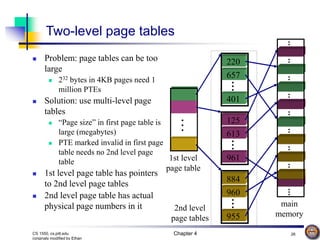
 Problem: page tables can be too
large
 232 bytes in 4KB pages need 1
million PTEs
 Solution: use multi-level page
tables
 “Page size” in first page table is
large (megabytes)
 PTE marked invalid in first page
table needs no 2nd level page
table
 1st level page table has pointers
to 2nd level page tables
 2nd level page table has actual
physical page numbers in it
Chapter 4 27
CS 1550, cs.pitt.edu
(originaly modified by Ethan
More on two-level page tables
 Tradeoffs between 1st and 2nd level page table sizes
 Total number of bits indexing 1st and 2nd level table is
constant for a given page size and logical address length
 Tradeoff between number of bits indexing 1st and number
indexing 2nd level tables
 More bits in 1st level: fine granularity at 2nd level
 Fewer bits in 1st level: maybe less wasted space?
 All addresses in table are physical addresses
 Protection bits kept in 2nd level table
Chapter 4 28
CS 1550, cs.pitt.edu
(originaly modified by Ethan
p1 = 10 bits p2 = 9 bits offset = 13 bits
page offset
page number
Two-level paging: example
 System characteristics
 8 KB pages
 32-bit logical address divided into 13 bit page offset, 19 bit page number
 Page number divided into:
 10 bit page number
 9 bit page offset
 Logical address looks like this:
 p1 is an index into the 1st level page table
 p2 is an index into the 2nd level page table pointed to by p1
Chapter 4 29
CS 1550, cs.pitt.edu
(originaly modified by Ethan
.
.
.
.
.
.
2-level address translation example
p1 = 10 bits p2 = 9 bits offset = 13 bits
page offset
page number
.
.
.
0
1
p1
.
.
.
0
1
p2
19
physical address
1st level page table
2nd level page table
main memory
0
1
frame
number
13
Page
table
base
.
.
.
.
.
.
Chapter 4 30
CS 1550, cs.pitt.edu
(originaly modified by Ethan
Implementing page tables in hardware
 Page table resides in main (physical) memory
 CPU uses special registers for paging
 Page table base register (PTBR) points to the page table
 Page table length register (PTLR) contains length of page table:
restricts maximum legal logical address
 Translating an address requires two memory accesses
 First access reads page table entry (PTE)
 Second access reads the data / instruction from memory
 Reduce number of memory accesses
 Can’t avoid second access (we need the value from memory)
 Eliminate first access by keeping a hardware cache (called a
translation lookaside buffer or TLB) of recently used page table
entries
Chapter 4 31
CS 1550, cs.pitt.edu
(originaly modified by Ethan
Logical
page #
Physical
frame #
Example TLB
8
unused
2
3
12
29
22
7
3
1
0
12
6
11
4
Translation Lookaside Buffer (TLB)
 Search the TLB for the desired
logical page number
 Search entries in parallel
 Use standard cache techniques
 If desired logical page number is
found, get frame number from
TLB
 If desired logical page number
isn’t found
 Get frame number from page
table in memory
 Replace an entry in the TLB
with the logical & physical page
numbers from this reference
Chapter 4 32
CS 1550, cs.pitt.edu
(originaly modified by Ethan
Handling TLB misses
 If PTE isn’t found in TLB, OS needs to do the lookup in the
page table
 Lookup can be done in hardware or software
 Hardware TLB replacement
 CPU hardware does page table lookup
 Can be faster than software
 Less flexible than software, and more complex hardware
 Software TLB replacement
 OS gets TLB exception
 Exception handler does page table lookup & places the result into the
TLB
 Program continues after return from exception
 Larger TLB (lower miss rate) can make this feasible
Chapter 4 33
CS 1550, cs.pitt.edu
(originaly modified by Ethan
How long do memory accesses take?
 Assume the following times:
 TLB lookup time = a (often zero - overlapped in CPU)
 Memory access time = m
 Hit ratio (h) is percentage of time that a logical page number
is found in the TLB
 Larger TLB usually means higher h
 TLB structure can affect h as well
 Effective access time (an average) is calculated as:
 EAT = (m + a)h + (m + m + a)(1-h)
 EAT =a + (2-h)m
 Interpretation
 Reference always requires TLB lookup, 1 memory access
 TLB misses also require an additional memory reference
Chapter 4 34
CS 1550, cs.pitt.edu
(originaly modified by Ethan
Inverted page table
 Reduce page table size further: keep one entry for
each frame in memory
 PTE contains
 Virtual address pointing to this frame
 Information about the process that owns this page
 Search page table by
 Hashing the virtual page number and process ID
 Starting at the entry corresponding to the hash result
 Search until either the entry is found or a limit is reached
 Page frame number is index of PTE
 Improve performance by using more advanced
hashing algorithms
Chapter 4 35
CS 1550, cs.pitt.edu
(originaly modified by Ethan
pid1
pidk
pid0
Inverted page table architecture
process ID p = 19 bits offset = 13 bits
page number
13
19
physical address
inverted page table
main memory
.
.
.
0
1
.
.
.
Page frame
number
page offset
pid p
p0
p1
pk
.
.
.
.
.
.
0
1
k
search
k

Memory Management

  • 1.
    Chapter 4: MemoryManagement Part 1: Mechanisms for Managing Memory
  • 2.
    Chapter 4 2 CS1550, cs.pitt.edu (originaly modified by Ethan Memory management  Basic memory management  Swapping  Virtual memory  Page replacement algorithms  Modeling page replacement algorithms  Design issues for paging systems  Implementation issues  Segmentation
  • 3.
    Chapter 4 3 CS1550, cs.pitt.edu (originaly modified by Ethan In an ideal world…  The ideal world has memory that is  Very large  Very fast  Non-volatile (doesn’t go away when power is turned off)  The real world has memory that is:  Very large  Very fast  Affordable! Pick any two…  Memory management goal: make the real world look as much like the ideal world as possible
  • 4.
    Chapter 4 4 CS1550, cs.pitt.edu (originaly modified by Ethan Memory hierarchy  What is the memory hierarchy?  Different levels of memory  Some are small & fast  Others are large & slow  What levels are usually included?  Cache: small amount of fast, expensive memory  L1 (level 1) cache: usually on the CPU chip  L2 & L3 cache: off-chip, made of SRAM  Main memory: medium-speed, medium price memory (DRAM)  Disk: many gigabytes of slow, cheap, non-volatile storage  Memory manager handles the memory hierarchy
  • 5.
    Chapter 4 5 CS1550, cs.pitt.edu (originaly modified by Ethan Basic memory management  Components include  Operating system (perhaps with device drivers)  Single process  Goal: lay these out in memory  Memory protection may not be an issue (only one program)  Flexibility may still be useful (allow OS changes, etc.)  No swapping or paging Operating system (RAM) User program (RAM) 0xFFFF 0xFFFF 0 0 User program (RAM) Operating system (ROM) Operating system (RAM) User program (RAM) Device drivers (ROM)
  • 6.
    Chapter 4 6 CS1550, cs.pitt.edu (originaly modified by Ethan Fixed partitions: multiple programs  Fixed memory partitions  Divide memory into fixed spaces  Assign a process to a space when it’s free  Mechanisms  Separate input queues for each partition  Single input queue: better ability to optimize CPU usage OS Partition 1 Partition 2 Partition 3 Partition 4 0 100K 500K 600K 700K 900K OS Partition 1 Partition 2 Partition 3 Partition 4 0 100K 500K 600K 700K 900K
  • 7.
    Chapter 4 7 CS1550, cs.pitt.edu (originaly modified by Ethan How many programs is enough?  Several memory partitions (fixed or variable size)  Lots of processes wanting to use the CPU  Tradeoff  More processes utilize the CPU better  Fewer processes use less memory (cheaper!)  How many processes do we need to keep the CPU fully utilized?  This will help determine how much memory we need  Is this still relevant with memory costing less than $1/GB?
  • 8.
    Chapter 4 8 CS1550, cs.pitt.edu (originaly modified by Ethan Modeling multiprogramming  More I/O wait means less processor utilization  At 20% I/O wait, 3–4 processes fully utilize CPU  At 80% I/O wait, even 10 processes aren’t enough  This means that the OS should have more processes if they’re I/O bound  More processes => memory management & protection more important! 0 0.1 0.2 0.3 0.4 0.5 0.6 0.7 0.8 0.9 1 0 1 2 3 4 5 6 7 8 9 10 Degree of Multiprogramming CPU Utilization 80% I/O Wait 50% I/O Wait 20% I/O Wait
  • 9.
    Chapter 4 9 CS1550, cs.pitt.edu (originaly modified by Ethan Multiprogrammed system performance  Arrival and work requirements of 4 jobs  CPU utilization for 1–4 jobs with 80% I/O wait  Sequence of events as jobs arrive and finish  Numbers show amount of CPU time jobs get in each interval  More processes => better utilization, less time per process Job Arrival time CPU needed 1 10:00 4 2 10:10 3 3 10:15 2 4 10:20 2 1 2 3 4 CPU idle 0.80 0.64 0.51 0.41 CPU busy 0.20 0.36 0.49 0.59 CPU/process 0.20 0.18 0.16 0.15 0 10 15 20 22 27.6 28.2 31.7 1 2 3 4 Time
  • 10.
    Chapter 4 10 CS1550, cs.pitt.edu (originaly modified by Ethan Memory and multiprogramming  Memory needs two things for multiprogramming  Relocation  Protection  The OS cannot be certain where a program will be loaded in memory  Variables and procedures can’t use absolute locations in memory  Several ways to guarantee this  The OS must keep processes’ memory separate  Protect a process from other processes reading or modifying its own memory  Protect a process from modifying its own memory in undesirable ways (such as writing to program code)
  • 11.
    Chapter 4 11 CS1550, cs.pitt.edu (originaly modified by Ethan Base and limit registers  Special CPU registers: base & limit  Access to the registers limited to system mode  Registers contain  Base: start of the process’s memory partition  Limit: length of the process’s memory partition  Address generation  Physical address: location in actual memory  Logical address: location from the process’s point of view  Physical address = base + logical address  Logical address larger than limit => error Process partition OS 0 0xFFFF Limit Base 0x2000 0x9000 Logical address: 0x1204 Physical address: 0x1204+0x9000 = 0xa204
  • 12.
    Chapter 4 12 CS1550, cs.pitt.edu (originaly modified by Ethan Swapping  Memory allocation changes as  Processes come into memory  Processes leave memory  Swapped to disk  Complete execution  Gray regions are unused memory OS OS OS OS OS OS OS A A B A B C B C B C D C D C D A
  • 13.
    Chapter 4 13 CS1550, cs.pitt.edu (originaly modified by Ethan Swapping: leaving room to grow  Need to allow for programs to grow  Allocate more memory for data  Larger stack  Handled by allocating more space than is necessary at the start  Inefficient: wastes memory that’s not currently in use  What if the process requests too much memory? OS Code Data Stack Code Data Stack Process B Process A Room for B to grow Room for A to grow
  • 14.
    Chapter 4 14 CS1550, cs.pitt.edu (originaly modified by Ethan Tracking memory usage: bitmaps  Keep track of free / allocated memory regions with a bitmap  One bit in map corresponds to a fixed-size region of memory  Bitmap is a constant size for a given amount of memory regardless of how much is allocated at a particular time  Chunk size determines efficiency  At 1 bit per 4KB chunk, we need just 256 bits (32 bytes) per MB of memory  For smaller chunks, we need more memory for the bitmap  Can be difficult to find large contiguous free areas in bitmap A B C D 11111100 00111000 01111111 11111000 8 16 24 32 Memory regions Bitmap
  • 15.
    Chapter 4 15 CS1550, cs.pitt.edu (originaly modified by Ethan Tracking memory usage: linked lists  Keep track of free / allocated memory regions with a linked list  Each entry in the list corresponds to a contiguous region of memory  Entry can indicate either allocated or free (and, optionally, owning process)  May have separate lists for free and allocated areas  Efficient if chunks are large  Fixed-size representation for each region  More regions => more space needed for free lists A B C D 16 24 32 Memory regions A 0 6 - 6 4 B 10 3 - 13 4 C 17 9 - 29 3 D 26 3 8
  • 16.
    Chapter 4 16 CS1550, cs.pitt.edu (originaly modified by Ethan Allocating memory  Search through region list to find a large enough space  Suppose there are several choices: which one to use?  First fit: the first suitable hole on the list  Next fit: the first suitable after the previously allocated hole  Best fit: the smallest hole that is larger than the desired region (wastes least space?)  Worst fit: the largest available hole (leaves largest fragment)  Option: maintain separate queues for different-size holes - 6 5 - 19 14 - 52 25 - 102 30 - 135 16 - 202 10 - 302 20 - 350 30 - 411 19 - 510 3 Allocate 20 blocks first fit 5 Allocate 12 blocks next fit 18 Allocate 13 blocks best fit 1 Allocate 15 blocks worst fit 15
  • 17.
    Chapter 4 17 CS1550, cs.pitt.edu (originaly modified by Ethan Freeing memory  Allocation structures must be updated when memory is freed  Easy with bitmaps: just set the appropriate bits in the bitmap  Linked lists: modify adjacent elements as needed  Merge adjacent free regions into a single region  May involve merging two regions with the just-freed area A X B A X X B X A B A B
  • 18.
    Chapter 4 18 CS1550, cs.pitt.edu (originaly modified by Ethan Limitations of swapping  Problems with swapping  Process must fit into physical memory (impossible to run larger processes)  Memory becomes fragmented  External fragmentation: lots of small free areas  Compaction needed to reassemble larger free areas  Processes are either in memory or on disk: half and half doesn’t do any good  Overlays solved the first problem  Bring in pieces of the process over time (typically data)  Still doesn’t solve the problem of fragmentation or partially resident processes
  • 19.
    Chapter 4 19 CS1550, cs.pitt.edu (originaly modified by Ethan Virtual memory  Basic idea: allow the OS to hand out more memory than exists on the system  Keep recently used stuff in physical memory  Move less recently used stuff to disk  Keep all of this hidden from processes  Processes still see an address space from 0 – max address  Movement of information to and from disk handled by the OS without process help  Virtual memory (VM) especially helpful in multiprogrammed system  CPU schedules process B while process A waits for its memory to be retrieved from disk
  • 20.
    Chapter 4 20 CS1550, cs.pitt.edu (originaly modified by Ethan Virtual and physical addresses  Program uses virtual addresses  Addresses local to the process  Hardware translates virtual address to physical address  Translation done by the Memory Management Unit  Usually on the same chip as the CPU  Only physical addresses leave the CPU/MMU chip  Physical memory indexed by physical addresses CPU chip CPU Memory Disk controller MMU Virtual addresses from CPU to MMU Physical addresses on bus, in memory
  • 21.
    Chapter 4 21 CS1550, cs.pitt.edu (originaly modified by Ethan 0–4K 4–8K 8–12K 12–16K 16–20K 20–24K 24–28K 28–32K Paging and page tables  Virtual addresses mapped to physical addresses  Unit of mapping is called a page  All addresses in the same virtual page are in the same physical page  Page table entry (PTE) contains translation for a single page  Table translates virtual page number to physical page number  Not all virtual memory has a physical page  Not every physical page need be used  Example:  64 KB virtual memory  32 KB physical memory 7 0–4K 4 4–8K 8–12K 12–16K 0 16–20K 20–24K 24–28K 3 28–32K 32–36K 36–40K 1 40–44K 5 44–48K 6 48–52K - 52–56K 56–60K - 60–64K Virtual address space Physical memory - - - - - - -
  • 22.
    Chapter 4 22 CS1550, cs.pitt.edu (originaly modified by Ethan What’s in a page table entry?  Each entry in the page table contains  Valid bit: set if this logical page number has a corresponding physical frame in memory  If not valid, remainder of PTE is irrelevant  Page frame number: page in physical memory  Referenced bit: set if data on the page has been accessed  Dirty (modified) bit :set if data on the page has been modified  Protection information Page frame number V R D Protection Valid bit Referenced bit Dirty bit
  • 23.
    Chapter 4 23 CS1550, cs.pitt.edu (originaly modified by Ethan Example: • 4 KB (=4096 byte) pages • 32 bit logical addresses p d 2d = 4096 d = 12 12 bits 32 bit logical address 32-12 = 20 bits Mapping logical => physical address  Split address from CPU into two pieces  Page number (p)  Page offset (d)  Page number  Index into page table  Page table contains base address of page in physical memory  Page offset  Added to base address to get actual physical memory address  Page size = 2d bytes
  • 24.
    Chapter 4 24 CS1550, cs.pitt.edu (originaly modified by Ethan page number p d page offset 0 1 p-1 p p+1 f f d Page frame number . . . page table physical memory 0 1 . . . f-1 f f+1 f+2 . . . Page frame number CPU Address translation architecture
  • 25.
    Chapter 4 25 CS1550, cs.pitt.edu (originaly modified by Ethan 0 Page frame number Logical memory (P0) 1 2 3 4 5 6 7 8 9 Physical memory Page table (P0) Logical memory (P1) Page table (P1) Page 4 Page 3 Page 2 Page 1 Page 0 Page 1 Page 0 0 8 2 9 4 3 6 Page 3 (P0) Page 0 (P1) Page 0 (P0) Page 2 (P0) Page 1 (P0) Page 4 (P0) Page 1 (P1) Free pages Memory & paging structures
  • 26.
    Chapter 4 26 CS1550, cs.pitt.edu (originaly modified by Ethan 884 960 955 . . . 220 657 401 . . . 1st level page table 2nd level page tables . . . . . . . . . . . . . . . . . . . . . . . . . . . main memory . . . 125 613 961 . . . Two-level page tables  Problem: page tables can be too large  232 bytes in 4KB pages need 1 million PTEs  Solution: use multi-level page tables  “Page size” in first page table is large (megabytes)  PTE marked invalid in first page table needs no 2nd level page table  1st level page table has pointers to 2nd level page tables  2nd level page table has actual physical page numbers in it
  • 27.
    Chapter 4 27 CS1550, cs.pitt.edu (originaly modified by Ethan More on two-level page tables  Tradeoffs between 1st and 2nd level page table sizes  Total number of bits indexing 1st and 2nd level table is constant for a given page size and logical address length  Tradeoff between number of bits indexing 1st and number indexing 2nd level tables  More bits in 1st level: fine granularity at 2nd level  Fewer bits in 1st level: maybe less wasted space?  All addresses in table are physical addresses  Protection bits kept in 2nd level table
  • 28.
    Chapter 4 28 CS1550, cs.pitt.edu (originaly modified by Ethan p1 = 10 bits p2 = 9 bits offset = 13 bits page offset page number Two-level paging: example  System characteristics  8 KB pages  32-bit logical address divided into 13 bit page offset, 19 bit page number  Page number divided into:  10 bit page number  9 bit page offset  Logical address looks like this:  p1 is an index into the 1st level page table  p2 is an index into the 2nd level page table pointed to by p1
  • 29.
    Chapter 4 29 CS1550, cs.pitt.edu (originaly modified by Ethan . . . . . . 2-level address translation example p1 = 10 bits p2 = 9 bits offset = 13 bits page offset page number . . . 0 1 p1 . . . 0 1 p2 19 physical address 1st level page table 2nd level page table main memory 0 1 frame number 13 Page table base . . . . . .
  • 30.
    Chapter 4 30 CS1550, cs.pitt.edu (originaly modified by Ethan Implementing page tables in hardware  Page table resides in main (physical) memory  CPU uses special registers for paging  Page table base register (PTBR) points to the page table  Page table length register (PTLR) contains length of page table: restricts maximum legal logical address  Translating an address requires two memory accesses  First access reads page table entry (PTE)  Second access reads the data / instruction from memory  Reduce number of memory accesses  Can’t avoid second access (we need the value from memory)  Eliminate first access by keeping a hardware cache (called a translation lookaside buffer or TLB) of recently used page table entries
  • 31.
    Chapter 4 31 CS1550, cs.pitt.edu (originaly modified by Ethan Logical page # Physical frame # Example TLB 8 unused 2 3 12 29 22 7 3 1 0 12 6 11 4 Translation Lookaside Buffer (TLB)  Search the TLB for the desired logical page number  Search entries in parallel  Use standard cache techniques  If desired logical page number is found, get frame number from TLB  If desired logical page number isn’t found  Get frame number from page table in memory  Replace an entry in the TLB with the logical & physical page numbers from this reference
  • 32.
    Chapter 4 32 CS1550, cs.pitt.edu (originaly modified by Ethan Handling TLB misses  If PTE isn’t found in TLB, OS needs to do the lookup in the page table  Lookup can be done in hardware or software  Hardware TLB replacement  CPU hardware does page table lookup  Can be faster than software  Less flexible than software, and more complex hardware  Software TLB replacement  OS gets TLB exception  Exception handler does page table lookup & places the result into the TLB  Program continues after return from exception  Larger TLB (lower miss rate) can make this feasible
  • 33.
    Chapter 4 33 CS1550, cs.pitt.edu (originaly modified by Ethan How long do memory accesses take?  Assume the following times:  TLB lookup time = a (often zero - overlapped in CPU)  Memory access time = m  Hit ratio (h) is percentage of time that a logical page number is found in the TLB  Larger TLB usually means higher h  TLB structure can affect h as well  Effective access time (an average) is calculated as:  EAT = (m + a)h + (m + m + a)(1-h)  EAT =a + (2-h)m  Interpretation  Reference always requires TLB lookup, 1 memory access  TLB misses also require an additional memory reference
  • 34.
    Chapter 4 34 CS1550, cs.pitt.edu (originaly modified by Ethan Inverted page table  Reduce page table size further: keep one entry for each frame in memory  PTE contains  Virtual address pointing to this frame  Information about the process that owns this page  Search page table by  Hashing the virtual page number and process ID  Starting at the entry corresponding to the hash result  Search until either the entry is found or a limit is reached  Page frame number is index of PTE  Improve performance by using more advanced hashing algorithms
  • 35.
    Chapter 4 35 CS1550, cs.pitt.edu (originaly modified by Ethan pid1 pidk pid0 Inverted page table architecture process ID p = 19 bits offset = 13 bits page number 13 19 physical address inverted page table main memory . . . 0 1 . . . Page frame number page offset pid p p0 p1 pk . . . . . . 0 1 k search k