Business Information Systems OLAP Cubes in Datawarehousing Prithwis Mukerjee, Ph.D. Acknowledgement Hector Garcia Molina – Stanford FORWISS - Bavarian Research Centre for Knowledge Based Systems
What is a Warehouse? Collection of diverse data subject oriented aimed at executive, decision maker often a copy of operational data with value-added data (e.g., summaries, history) ‏ integrated time-varying non-volatile Collection of tools gathering data cleansing, integrating, ... querying, reporting, analysis data mining monitoring, administering warehouse
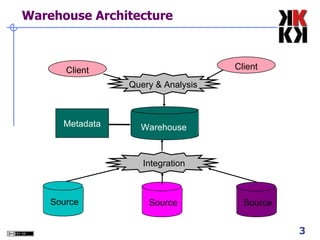
Warehouse Architecture Metadata Client Client Warehouse Source Source Source Query & Analysis Integration
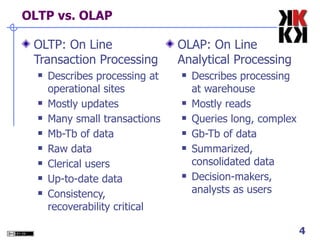
OLTP vs. OLAP OLTP: On Line Transaction Processing Describes processing at operational sites Mostly updates Many small transactions Mb-Tb of data Raw data Clerical users Up-to-date data Consistency, recoverability critical OLAP: On Line Analytical Processing Describes processing at warehouse Mostly reads Queries long, complex Gb-Tb of data Summarized, consolidated data Decision-makers, analysts as users
Data Marts Smaller warehouses Spans part of organization e.g., marketing (customers, products, sales) ‏ Do not require enterprise-wide consensus but long term integration problems?
Warehouse Models & Operators Data Models relations stars & snowflakes cubes Operators slice & dice roll-up, drill down pivoting other
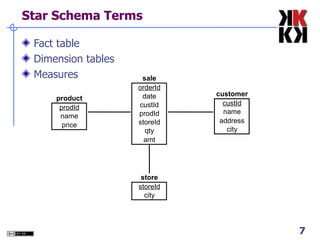
Star Schema Terms Fact table Dimension tables Measures
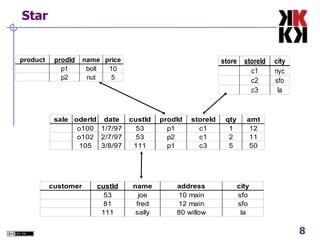
Star
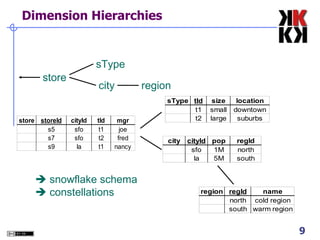
Dimension Hierarchies store sType city region    snowflake schema    constellations
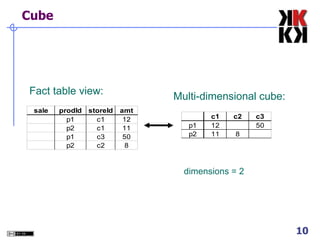
Cube Fact table view: Multi-dimensional cube: dimensions = 2
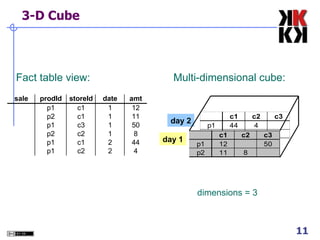
3-D Cube dimensions = 3 Multi-dimensional cube: Fact table view: day 2 day 1
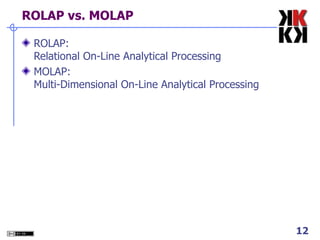
ROLAP vs. MOLAP ROLAP: Relational On-Line Analytical Processing MOLAP: Multi-Dimensional On-Line Analytical Processing
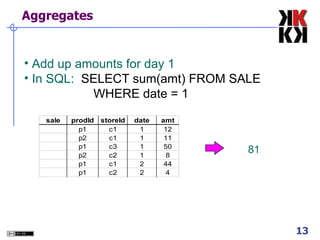
Aggregates Add up amounts for day 1 In SQL:  SELECT sum(amt) FROM SALE WHERE date = 1 81
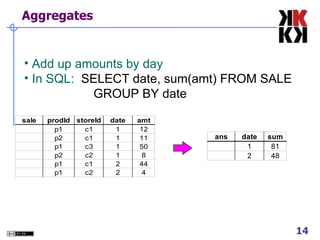
Aggregates Add up amounts by day In SQL:  SELECT date, sum(amt) FROM SALE GROUP BY date
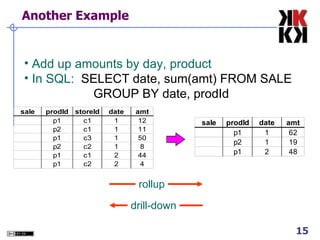
Another Example Add up amounts by day, product In SQL:  SELECT date, sum(amt) FROM SALE GROUP BY date, prodId drill-down rollup
Aggregates Operators: sum, count, max, min,  median, ave “ Having” clause Using dimension hierarchy average by region (within store) ‏ maximum by month (within date) ‏
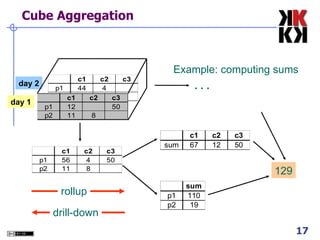
Cube Aggregation day 2 day 1 129 . . . Example: computing sums drill-down rollup
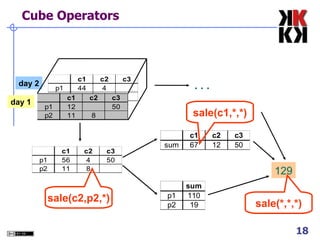
Cube Operators day 2 day 1 129 . . . sale(c1,*,*) ‏ sale(*,*,*) ‏ sale(c2,p2,*) ‏
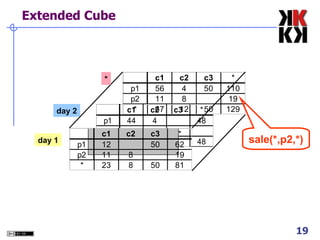
Extended Cube day 2 day 1 * sale(*,p2,*) ‏
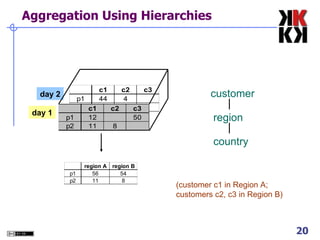
Aggregation Using Hierarchies customer region country (customer c1 in Region A; customers c2, c3 in Region B) ‏ day 2 day 1
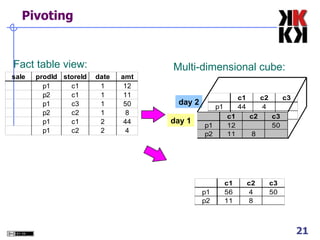
Pivoting Multi-dimensional cube: Fact table view: day 2 day 1 day 2 day 1
  What is a Multi-Dimensional Database? A multi dimensional  database (MDDB) is a computer software system designed to allow for the efficient and convenient storage and retrieval of large volumes of data that are  intimately related and  stored, viewed and analyzed from different  perspectives .  These perspectives are called  dimensions .
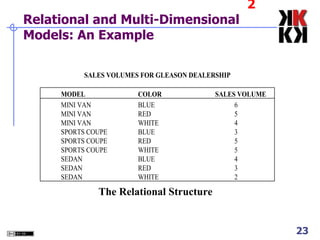
2 Relational and Multi-Dimensional Models: An Example The Relational Structure
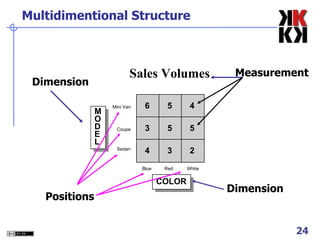
Multidimentional Structure Measurement Dimension Positions Dimension
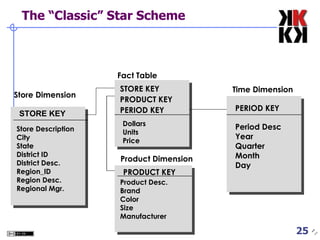
The “Classic” Star Scheme PERIOD KEY Store Dimension Time Dimension Product Dimension STORE KEY PRODUCT KEY PERIOD KEY Dollars Units Price Period Desc Year Quarter Month Day Fact Table PRODUCT KEY Store Description City State District ID District Desc. Region_ID Region Desc. Regional Mgr. Product Desc. Brand Color Size Manufacturer STORE KEY
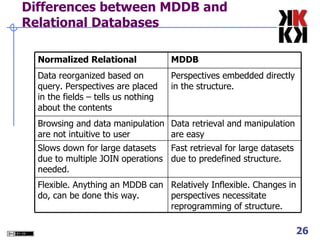
Differences between MDDB and Relational Databases Relatively Inflexible. Changes in perspectives necessitate reprogramming of structure. Flexible. Anything an MDDB can do, can be done this way. Fast retrieval for large datasets due to predefined structure. Slows down for large datasets due to multiple JOIN operations needed. Data retrieval and manipulation are easy Browsing and data manipulation are not intuitive to user Perspectives embedded directly in the structure. Data reorganized based on query. Perspectives are placed in the fields – tells us nothing about the contents MDDB Normalized Relational
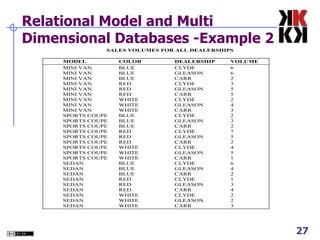
Relational Model and Multi Dimensional Databases -Example 2
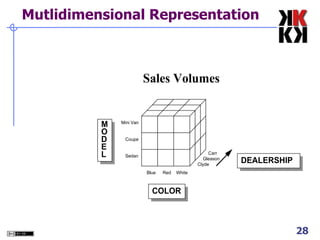
Mutlidimensional Representation
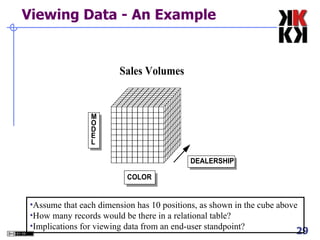
Viewing Data - An Example   Assume that each dimension has 10 positions, as shown in the cube above  How many records would be there in a relational table?  Implications for viewing data from an end-user standpoint?
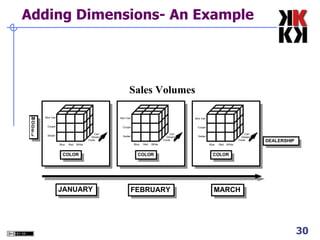
Adding Dimensions- An Example
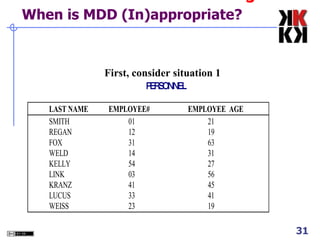
3 When is MDD (In)appropriate? First, consider situation 1
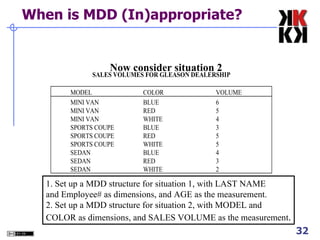
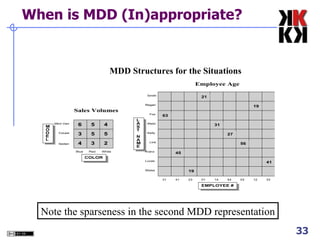
When is MDD (In)appropriate? Now consider situation 2  1. Set up a MDD structure for situation 1, with LAST NAME and Employee# as dimensions, and AGE as the measurement. 2. Set up a MDD structure for situation 2, with MODEL and COLOR as dimensions, and SALES VOLUME as the measurement .
When is MDD (In)appropriate? Note the sparseness in the second MDD representation MDD Structures for the Situations
When is MDD (In)appropriate? Highly interrelated dataset types be placed in a multidimensional data structure for greatest ease of access and analysis. When there are no interrelationships, the MDD structure is not appropriate.
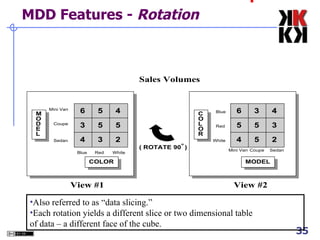
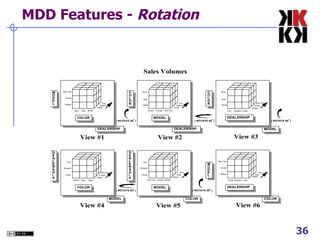
4 MDD Features -  Rotation Also referred to as “data slicing.” Each rotation yields a different slice or two dimensional table of data – a different face of the cube.
MDD Features -  Rotation
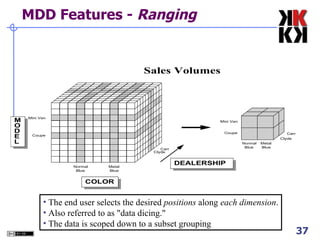
MDD Features -  Ranging The end user selects the desired  positions  along  each dimension . Also referred to as "data dicing."  The data is scoped down to a subset grouping
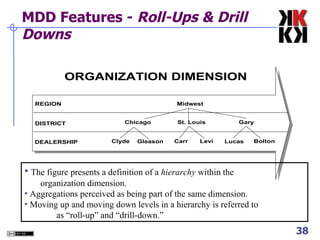
MDD Features -  Roll-Ups & Drill Downs The figure presents a definition of a  hierarchy  within the  organization dimension. Aggregations perceived as being part of the same dimension. Moving up and moving down levels in a hierarchy is referred to  as “roll-up” and “drill-down.”
MDD Features: Multidimensional Computations Well equipped to handle demanding mathematical functions.  Can treat arrays like cells in spreadsheets. For example, in a budget analysis situation, one can divide the ACTUAL array by the BUDGET array to compute the VARIANCE array. Applications based on multidimensional database technology typically have one dimension defined as a "business measurements" dimension.  Integrates computational tools very tightly with the database structure.
The Time Dimension TIME as a predefined hierarchy for rolling-up and drilling-down across days, weeks, months, years and special periods, such as fiscal years. Eliminates the effort required to build sophisticated hierarchies every time a database is set up. Extra performance advantages
5 Pros/Cons of MDD Cognitive Advantages for the User Ease of Data Presentation and Navigation, Time dimension Performance Less flexible Requires greater initial effort
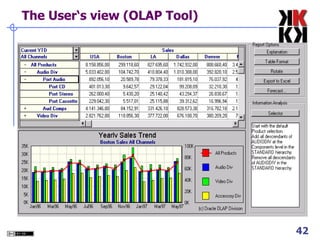
The User‘s view (OLAP Tool) ‏
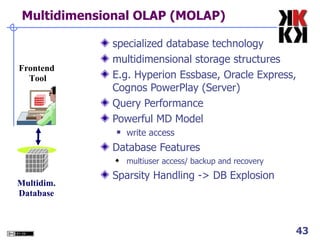
Multidimensional OLAP (MOLAP) ‏ specialized database technology multidimensional storage structures E.g. Hyperion Essbase, Oracle Express, Cognos PowerPlay (Server) ‏ Query Performance Powerful MD Model write access Database Features multiuser access/ backup and recovery Sparsity Handling -> DB Explosion Multidim. Database Frontend  Tool
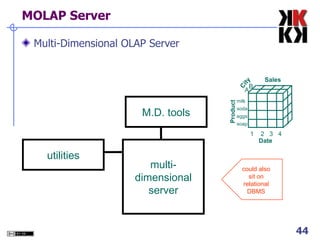
MOLAP Server Multi-Dimensional OLAP Server multi-dimensional server M.D. tools could also sit on relational DBMS utilities Product City Date 1  2  3  4 milk soda eggs soap A B Sales
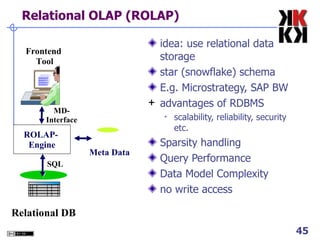
Relational OLAP (ROLAP) ‏ idea: use relational data storage star (snowflake) schema E.g. Microstrategy, SAP BW advantages of RDBMS scalability, reliability, security etc. Sparsity handling Query Performance Data Model Complexity no write access ROLAP-  Engine Relational DB Frontend  Tool SQL MD-Interface Meta Data
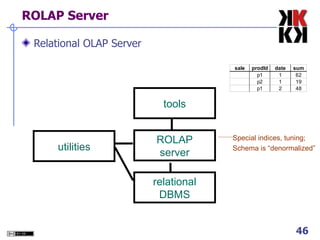
ROLAP Server Relational OLAP Server tools Special indices, tuning; Schema is “denormalized” relational DBMS ROLAP server utilities
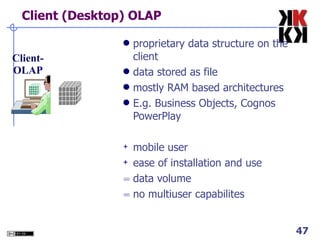
Client (Desktop) OLAP proprietary data structure on the client data stored as file mostly RAM based architectures E.g. Business Objects, Cognos PowerPlay mobile user ease of installation and use data volume no multiuser capabilites Client- OLAP
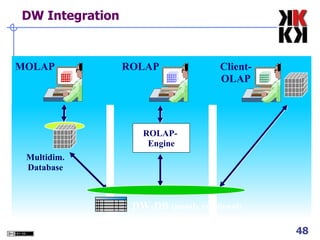
DW Integration DW-DB  (mostly relational) ‏ MOLAP ROLAP Client- OLAP ROLAP-  Engine Multidim. Database
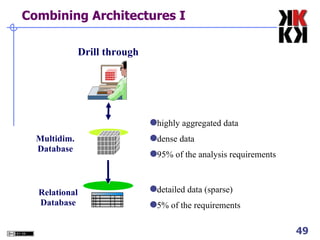
Combining Architectures I Multidim. Database Drill through highly aggregated data dense data 95% of the analysis requirements detailed data (sparse) ‏ 5% of the requirements Relational Database
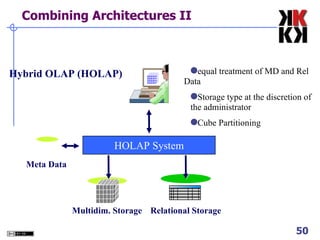
Combining Architectures II Multidim. Storage Hybrid OLAP (HOLAP) ‏ HOLAP System Relational Storage Meta Data equal treatment of MD and Rel  Data Storage type at the discretion of  the administrator Cube Partitioning
SURPLUS SLIDES  Prithwis Mukerjee
Index Structures Traditional Access Methods B-trees, hash tables, R-trees, grids, … Popular in Warehouses inverted lists bit map indexes join indexes text indexes
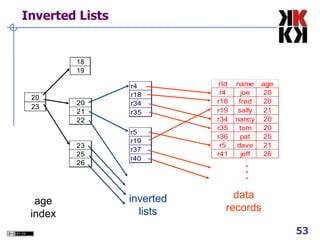
Inverted Lists . . . age index inverted lists data records
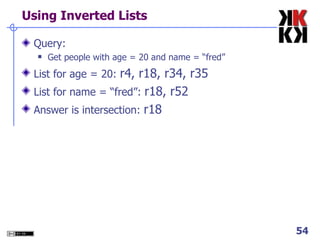
Using Inverted Lists Query:  Get people with age = 20 and name = “fred” List for age = 20:  r4, r18, r34, r35 List for name = “fred”:  r18, r52 Answer is intersection:  r18
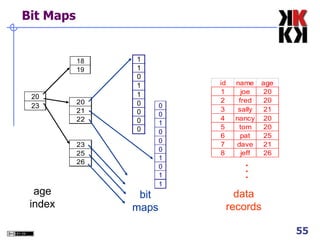
Bit Maps . . . age index bit maps data records
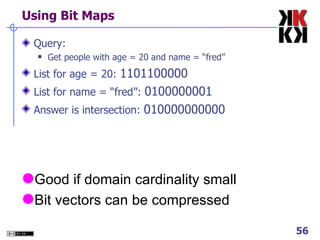
Using Bit Maps Query:  Get people with age = 20 and name = “fred” List for age = 20:  1101100000 List for name = “fred”:  0100000001 Answer is intersection:  010000000000 Good if domain cardinality small Bit vectors can be compressed
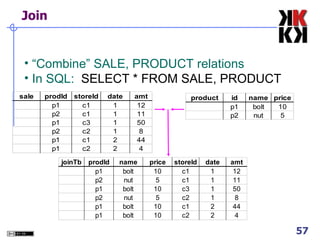
Join “ Combine” SALE, PRODUCT relations In SQL:  SELECT * FROM SALE, PRODUCT
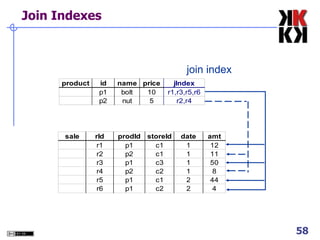
Join Indexes join index
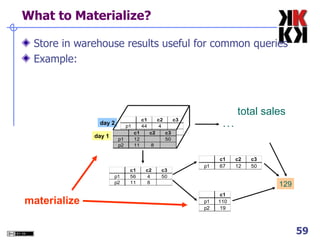
What to Materialize? Store in warehouse results useful for common queries Example: day 2 day 1 129 . . . total sales materialize
Materialization Factors Type/frequency of queries Query response time Storage cost Update cost
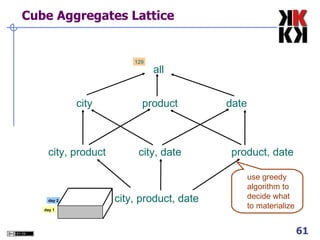
Cube Aggregates Lattice city, product, date city, product city, date product, date city product date all 129 use greedy algorithm to decide what to materialize day 2 day 1
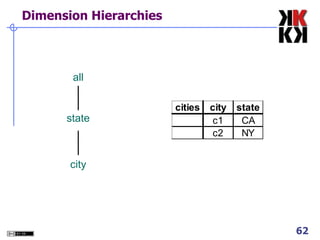
Dimension Hierarchies all state city
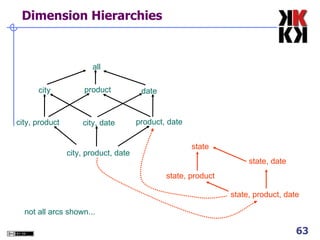
Dimension Hierarchies city, product city, product, date city, date product, date city product date all state, product, date state, date state, product state not all arcs shown...
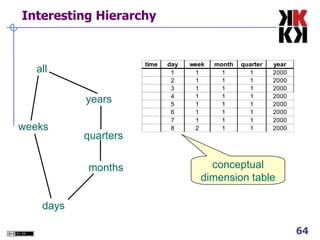
Interesting Hierarchy all years quarters months days weeks conceptual dimension table
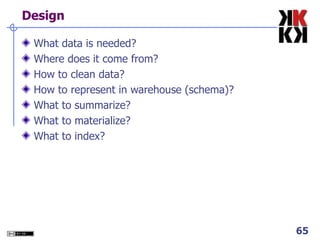
Design What data is needed? Where does it come from? How to clean data? How to represent in warehouse (schema)? What to summarize? What to materialize? What to index?
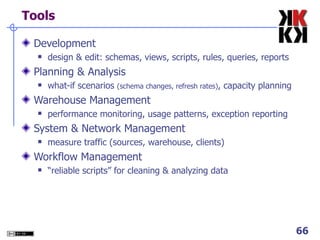
Tools Development design & edit: schemas, views, scripts, rules, queries, reports Planning & Analysis what-if scenarios  (schema changes, refresh rates) , capacity planning Warehouse Management performance monitoring, usage patterns, exception reporting System & Network Management measure traffic (sources, warehouse, clients) ‏ Workflow Management “ reliable scripts” for cleaning & analyzing data
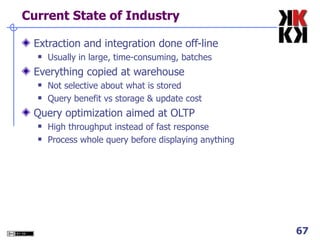
Current State of Industry Extraction and integration done off-line Usually in large, time-consuming, batches Everything copied at warehouse Not selective about what is stored Query benefit vs storage & update cost Query optimization aimed at OLTP High throughput instead of fast response Process whole query before displaying anything

OLAP Cubes in Datawarehousing

  • 1.
    Business Information SystemsOLAP Cubes in Datawarehousing Prithwis Mukerjee, Ph.D. Acknowledgement Hector Garcia Molina – Stanford FORWISS - Bavarian Research Centre for Knowledge Based Systems
  • 2.
    What is aWarehouse? Collection of diverse data subject oriented aimed at executive, decision maker often a copy of operational data with value-added data (e.g., summaries, history) ‏ integrated time-varying non-volatile Collection of tools gathering data cleansing, integrating, ... querying, reporting, analysis data mining monitoring, administering warehouse
  • 3.
    Warehouse Architecture MetadataClient Client Warehouse Source Source Source Query & Analysis Integration
  • 4.
    OLTP vs. OLAPOLTP: On Line Transaction Processing Describes processing at operational sites Mostly updates Many small transactions Mb-Tb of data Raw data Clerical users Up-to-date data Consistency, recoverability critical OLAP: On Line Analytical Processing Describes processing at warehouse Mostly reads Queries long, complex Gb-Tb of data Summarized, consolidated data Decision-makers, analysts as users
  • 5.
    Data Marts Smallerwarehouses Spans part of organization e.g., marketing (customers, products, sales) ‏ Do not require enterprise-wide consensus but long term integration problems?
  • 6.
    Warehouse Models &Operators Data Models relations stars & snowflakes cubes Operators slice & dice roll-up, drill down pivoting other
  • 7.
    Star Schema TermsFact table Dimension tables Measures
  • 8.
  • 9.
    Dimension Hierarchies storesType city region  snowflake schema  constellations
  • 10.
    Cube Fact tableview: Multi-dimensional cube: dimensions = 2
  • 11.
    3-D Cube dimensions= 3 Multi-dimensional cube: Fact table view: day 2 day 1
  • 12.
    ROLAP vs. MOLAPROLAP: Relational On-Line Analytical Processing MOLAP: Multi-Dimensional On-Line Analytical Processing
  • 13.
    Aggregates Add upamounts for day 1 In SQL: SELECT sum(amt) FROM SALE WHERE date = 1 81
  • 14.
    Aggregates Add upamounts by day In SQL: SELECT date, sum(amt) FROM SALE GROUP BY date
  • 15.
    Another Example Addup amounts by day, product In SQL: SELECT date, sum(amt) FROM SALE GROUP BY date, prodId drill-down rollup
  • 16.
    Aggregates Operators: sum,count, max, min, median, ave “ Having” clause Using dimension hierarchy average by region (within store) ‏ maximum by month (within date) ‏
  • 17.
    Cube Aggregation day2 day 1 129 . . . Example: computing sums drill-down rollup
  • 18.
    Cube Operators day2 day 1 129 . . . sale(c1,*,*) ‏ sale(*,*,*) ‏ sale(c2,p2,*) ‏
  • 19.
    Extended Cube day2 day 1 * sale(*,p2,*) ‏
  • 20.
    Aggregation Using Hierarchiescustomer region country (customer c1 in Region A; customers c2, c3 in Region B) ‏ day 2 day 1
  • 21.
    Pivoting Multi-dimensional cube:Fact table view: day 2 day 1 day 2 day 1
  • 22.
    Whatis a Multi-Dimensional Database? A multi dimensional database (MDDB) is a computer software system designed to allow for the efficient and convenient storage and retrieval of large volumes of data that are intimately related and stored, viewed and analyzed from different perspectives . These perspectives are called dimensions .
  • 23.
    2 Relational andMulti-Dimensional Models: An Example The Relational Structure
  • 24.
    Multidimentional Structure MeasurementDimension Positions Dimension
  • 25.
    The “Classic” StarScheme PERIOD KEY Store Dimension Time Dimension Product Dimension STORE KEY PRODUCT KEY PERIOD KEY Dollars Units Price Period Desc Year Quarter Month Day Fact Table PRODUCT KEY Store Description City State District ID District Desc. Region_ID Region Desc. Regional Mgr. Product Desc. Brand Color Size Manufacturer STORE KEY
  • 26.
    Differences between MDDBand Relational Databases Relatively Inflexible. Changes in perspectives necessitate reprogramming of structure. Flexible. Anything an MDDB can do, can be done this way. Fast retrieval for large datasets due to predefined structure. Slows down for large datasets due to multiple JOIN operations needed. Data retrieval and manipulation are easy Browsing and data manipulation are not intuitive to user Perspectives embedded directly in the structure. Data reorganized based on query. Perspectives are placed in the fields – tells us nothing about the contents MDDB Normalized Relational
  • 27.
    Relational Model andMulti Dimensional Databases -Example 2
  • 28.
  • 29.
    Viewing Data -An Example Assume that each dimension has 10 positions, as shown in the cube above How many records would be there in a relational table? Implications for viewing data from an end-user standpoint?
  • 30.
  • 31.
    3 When isMDD (In)appropriate? First, consider situation 1
  • 32.
    When is MDD(In)appropriate? Now consider situation 2 1. Set up a MDD structure for situation 1, with LAST NAME and Employee# as dimensions, and AGE as the measurement. 2. Set up a MDD structure for situation 2, with MODEL and COLOR as dimensions, and SALES VOLUME as the measurement .
  • 33.
    When is MDD(In)appropriate? Note the sparseness in the second MDD representation MDD Structures for the Situations
  • 34.
    When is MDD(In)appropriate? Highly interrelated dataset types be placed in a multidimensional data structure for greatest ease of access and analysis. When there are no interrelationships, the MDD structure is not appropriate.
  • 35.
    4 MDD Features- Rotation Also referred to as “data slicing.” Each rotation yields a different slice or two dimensional table of data – a different face of the cube.
  • 36.
    MDD Features - Rotation
  • 37.
    MDD Features - Ranging The end user selects the desired positions along each dimension . Also referred to as "data dicing." The data is scoped down to a subset grouping
  • 38.
    MDD Features - Roll-Ups & Drill Downs The figure presents a definition of a hierarchy within the organization dimension. Aggregations perceived as being part of the same dimension. Moving up and moving down levels in a hierarchy is referred to as “roll-up” and “drill-down.”
  • 39.
    MDD Features: MultidimensionalComputations Well equipped to handle demanding mathematical functions. Can treat arrays like cells in spreadsheets. For example, in a budget analysis situation, one can divide the ACTUAL array by the BUDGET array to compute the VARIANCE array. Applications based on multidimensional database technology typically have one dimension defined as a "business measurements" dimension. Integrates computational tools very tightly with the database structure.
  • 40.
    The Time DimensionTIME as a predefined hierarchy for rolling-up and drilling-down across days, weeks, months, years and special periods, such as fiscal years. Eliminates the effort required to build sophisticated hierarchies every time a database is set up. Extra performance advantages
  • 41.
    5 Pros/Cons ofMDD Cognitive Advantages for the User Ease of Data Presentation and Navigation, Time dimension Performance Less flexible Requires greater initial effort
  • 42.
    The User‘s view(OLAP Tool) ‏
  • 43.
    Multidimensional OLAP (MOLAP)‏ specialized database technology multidimensional storage structures E.g. Hyperion Essbase, Oracle Express, Cognos PowerPlay (Server) ‏ Query Performance Powerful MD Model write access Database Features multiuser access/ backup and recovery Sparsity Handling -> DB Explosion Multidim. Database Frontend Tool
  • 44.
    MOLAP Server Multi-DimensionalOLAP Server multi-dimensional server M.D. tools could also sit on relational DBMS utilities Product City Date 1 2 3 4 milk soda eggs soap A B Sales
  • 45.
    Relational OLAP (ROLAP)‏ idea: use relational data storage star (snowflake) schema E.g. Microstrategy, SAP BW advantages of RDBMS scalability, reliability, security etc. Sparsity handling Query Performance Data Model Complexity no write access ROLAP- Engine Relational DB Frontend Tool SQL MD-Interface Meta Data
  • 46.
    ROLAP Server RelationalOLAP Server tools Special indices, tuning; Schema is “denormalized” relational DBMS ROLAP server utilities
  • 47.
    Client (Desktop) OLAPproprietary data structure on the client data stored as file mostly RAM based architectures E.g. Business Objects, Cognos PowerPlay mobile user ease of installation and use data volume no multiuser capabilites Client- OLAP
  • 48.
    DW Integration DW-DB (mostly relational) ‏ MOLAP ROLAP Client- OLAP ROLAP- Engine Multidim. Database
  • 49.
    Combining Architectures IMultidim. Database Drill through highly aggregated data dense data 95% of the analysis requirements detailed data (sparse) ‏ 5% of the requirements Relational Database
  • 50.
    Combining Architectures IIMultidim. Storage Hybrid OLAP (HOLAP) ‏ HOLAP System Relational Storage Meta Data equal treatment of MD and Rel Data Storage type at the discretion of the administrator Cube Partitioning
  • 51.
    SURPLUS SLIDES Prithwis Mukerjee
  • 52.
    Index Structures TraditionalAccess Methods B-trees, hash tables, R-trees, grids, … Popular in Warehouses inverted lists bit map indexes join indexes text indexes
  • 53.
    Inverted Lists .. . age index inverted lists data records
  • 54.
    Using Inverted ListsQuery: Get people with age = 20 and name = “fred” List for age = 20: r4, r18, r34, r35 List for name = “fred”: r18, r52 Answer is intersection: r18
  • 55.
    Bit Maps .. . age index bit maps data records
  • 56.
    Using Bit MapsQuery: Get people with age = 20 and name = “fred” List for age = 20: 1101100000 List for name = “fred”: 0100000001 Answer is intersection: 010000000000 Good if domain cardinality small Bit vectors can be compressed
  • 57.
    Join “ Combine”SALE, PRODUCT relations In SQL: SELECT * FROM SALE, PRODUCT
  • 58.
  • 59.
    What to Materialize?Store in warehouse results useful for common queries Example: day 2 day 1 129 . . . total sales materialize
  • 60.
    Materialization Factors Type/frequencyof queries Query response time Storage cost Update cost
  • 61.
    Cube Aggregates Latticecity, product, date city, product city, date product, date city product date all 129 use greedy algorithm to decide what to materialize day 2 day 1
  • 62.
  • 63.
    Dimension Hierarchies city,product city, product, date city, date product, date city product date all state, product, date state, date state, product state not all arcs shown...
  • 64.
    Interesting Hierarchy allyears quarters months days weeks conceptual dimension table
  • 65.
    Design What datais needed? Where does it come from? How to clean data? How to represent in warehouse (schema)? What to summarize? What to materialize? What to index?
  • 66.
    Tools Development design& edit: schemas, views, scripts, rules, queries, reports Planning & Analysis what-if scenarios (schema changes, refresh rates) , capacity planning Warehouse Management performance monitoring, usage patterns, exception reporting System & Network Management measure traffic (sources, warehouse, clients) ‏ Workflow Management “ reliable scripts” for cleaning & analyzing data
  • 67.
    Current State ofIndustry Extraction and integration done off-line Usually in large, time-consuming, batches Everything copied at warehouse Not selective about what is stored Query benefit vs storage & update cost Query optimization aimed at OLTP High throughput instead of fast response Process whole query before displaying anything