There are three main network topologies: bus, ring, and star. The document describes each in detail. It discusses how each works, including using examples of early implementations from the 1980s. It also outlines the advantages and disadvantages of each topology. Hubs, switches, routers, and mesh networks are also explained.
Bus topologyBus topology
Thistype of network was widely used in the 1980’s
In this configuration every computer (node) shares the
networks total bus capacities.
In this configuration adding more computers will
reduce the access speed on the network.
Each computer communicates to other computers on
the network independently this is referred to as
PEER-TO-PEER networking
5.
How a BusPeer to PeerHow a Bus Peer to Peer
Network WorksNetwork Works
All computers on a network have a
distinct address just like your house does
a message would be send from one
computer with the address of another
computer attached to the message
The message is broadcasted to all the
computers on the network until the
addressed PC accepts the message
6.
How it workedHowit worked
The type of wires used for Bus Networks in the
80’s were called Thicknet and Thinnet
A Thicknet cable (very large about 1 inch in
diameter usually yellow was hung around a
room)
Thinnet cables were connected to the PC’s
NIC and a Transceiver. The Transceiver was
tapped into the Thicknet cable
To stop the message from bouncing back and
forward down the wire (known as signal
bounce) both ends of the network are
terminated with 50 resistorsΩ
7.
ProblemsProblems
One of themain problems with this type
of network is that it is not very fault
tolerant, a break or defect in the bus
would affect the whole network
8.
Advantages
▸ It iseasy to set up, handle, and
implement.
▸ It is best-suited for small networks.
▸ It costs very less.
9.
Disadvantages
▸ Thecable length is limited. This limits the number of network nodes
that can be connected.
▸ This network topology can perform well only for a limited number of
nodes. When the number of devices connected to the bus increases, the
efficiency decreases.
▸ It is suitable for networks with low traffic. High traffic increases load on
the bus, and the network efficiency drops.
▸ It is heavily dependent on the central bus. A fault in the bus leads to
network failure.
▸ It is not easy to isolate faults in the network nodes.
▸ Each device on the network "sees" all the data being transmitted, thus
posing a security risk.
10.
Ring TopologyRing Topology
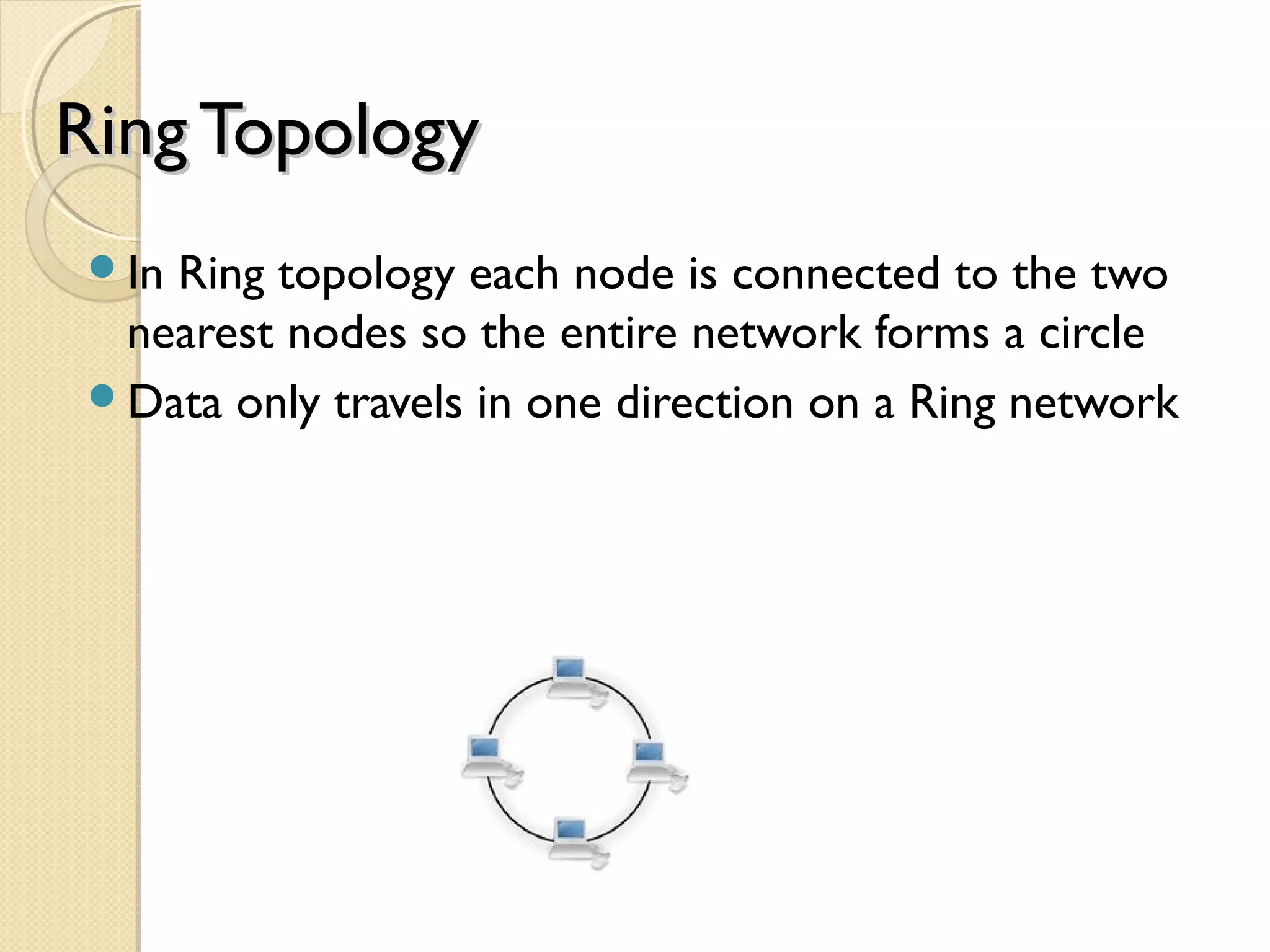
InRing topology each node is connected to the two
nearest nodes so the entire network forms a circle
Data only travels in one direction on a Ring network
11.
How this TopologyworksHow this Topology works
a node has information to send to another
computer on the network so it sends the
information out on the network to the PC it is
connected to, if the information is for this PC
(the recipients NIC address is attached to the
message, which is like putting an address on an
envelope) then the PC accepts the data
otherwise it passes the information on to the
next PC by repeating the data back out on the
line
This method of repeating the data helps keep
the integrity of the data readable by other
computers
12.
How it WorksHowit Works
As it is better to have computers take
turns using the connecting Data cable,
Ring topologies incorporated a system
called Token passing
In this topology, to transmit on the wire
your computer must have control of the
token or wait for the token to be free
Larger Token Ring networks use multiple
tokens
13.
Problems and SolutionsProblemsand Solutions
The drawback to this type of topology is that a single
malfunctioning workstation can disable the whole
network
To make sure all the information is sent the receiving
PC sends the token back to the sending PC after it has
received all the data
If the sending PC is finished sending it passes the token
to the next PC
This type of network was also widely used in the 1980’s
This type of network used Thinnet cable joining nodes.
In the mid 1980’s Thinnet cable was replaced by
Category 3 Ethernet cable capable of handling up to
10Mbps
14.
Advantages
▸ Thedata being transmitted between two nodes passes through
all the intermediate nodes. A central server is not required for the
management of this topology.
▸ The traffic is unidirectional and the data transmission is high-
speed.
▸ In comparison to a bus, a ring is better at handling load.
▸ The adding or removing of network nodes is easy, as the
process requires changing only two connections.
▸ The configuration makes it easy to identify faults in network
nodes.
▸ In this topology, each node has the opportunity to transmit data.
Thus, it is a very organized network topology.
▸ It is less costly than a star topology.
15.
Disadvantages
▸ Thefailure of a single node in the network can cause the entire
network to fail.
▸ The movement or changes made to network nodes affect the
entire network's performance.
▸ Data sent from one node to another has to pass through all the
intermediate nodes. This makes the transmission slower in
comparison to that in a star topology. The transmission speed
drops with an increase in the number of nodes.
▸ There is heavy dependency on the wire connecting the network
nodes in the ring.
16.
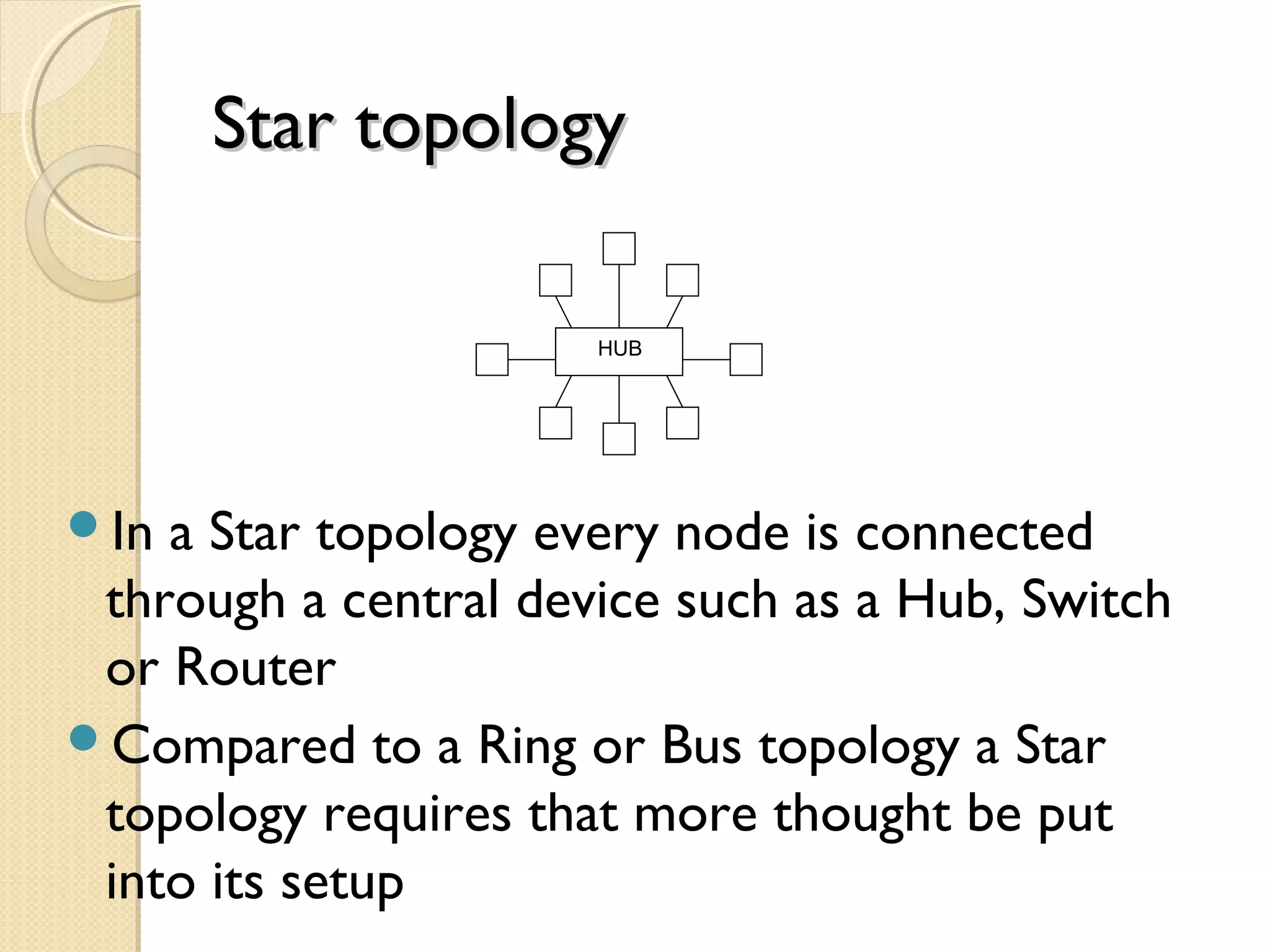
Star topologyStar topology
Ina Star topology every node is connected
through a central device such as a Hub, Switch
or Router
Compared to a Ring or Bus topology a Star
topology requires that more thought be put
into its setup
HUB
17.
The Good andBad of aThe Good and Bad of a
Star NetworkStar Network
The upside of a star network is that if any
one cable fails then only the node
connected on that cable would be
affected
Another positive point to this type of
network is that it is very simple to join
two star networks together by
connecting their central devices to each
other
18.
The Good andBad of aThe Good and Bad of a
Star NetworkStar Network
As each computer is connected to a
central device (Hub) the location of the
Hub must be made as central as possible,
so as to reduce cable lengths
The drawback to this type of topology is
if a central device was to fail then all
computers connected to that device
would not be able to see the network
19.
What is aHub?What is a Hub?
A hub is usually a small rectangular box,
often made of plastic, which receives its
power from an ordinary wall outlet
A hub joins multiple computers (or other
network devices) together to form a
single network segment
On this network segment, all computers
can communicate directly with each
other
20.
What is aHub?What is a Hub?
Ethernet hubs are by far the most
common type, but hubs for other types
of networks such as USB also exist
A hub includes a series of ports that each
accepts a network cable
Small hubs can network four computers
together
They contain four or sometimes five
ports
21.
What is aHub?What is a Hub?
Many times the fifth port is reserved for
"uplink" which is the connecting of one
hub to another hub or similar device
(joining two segments together).
Larger hubs contain eight, 12, 16, and
even 24 ports
22.
Key Features ofHubsKey Features of Hubs
Hubs classify as Layer 1 devices in the
OSI model
OSI stands for :
The Open Systems Interconnection Basic
Reference Model
At the physical layer, hubs can support little in
the way of sophisticated networking
Hubs do not read any of the data passing
through them and are not aware of their
source or destination
23.
Key Features ofHubsKey Features of Hubs
Essentially, a hub simply receives
incoming packets, possibly amplifies the
electrical signal, and broadcasts these
packets out to all devices on the network
- including the one that originally sent the
packet!
a packet is a formatted block of data
carried by a computer network
24.
Different Types ofHubsDifferent Types of Hubs
Technically speaking, three different
types of hubs exist
PassivePassive
ActiveActive
IntelligentIntelligent
25.
Passive hubsPassive hubs
Passivehubs do not amplify the electrical
signal of incoming packets before broadcasting
them out to the network
Active hubsActive hubs
amplify the electrical signal of incoming packets
back to their original level before broadcasting
them back out on the network
26.
Intelligent hubsIntelligent hubs
addextra features to an active hub that
are of particular importance to businesses
An intelligent hub is typically stackable
(built in such a way that multiple units can
be placed one on top of the other to
conserve space).
27.
Intelligent hubsIntelligent hubs
Italso typically includes remote
management capabilities via SNMP and
virtual LAN (VLAN) support (You can
configure or check it from a computer
that is connected to it).
SNMP-Simple Network Management
Protocol
28.
Advantages
▸ Dueto its centralized nature, the topology offers simplicity of
operation.
▸ It also achieves isolation of each device in the network.
▸ Adding or removing network nodes is easy, and can be done without
affecting the entire network.
▸ Due to the centralized nature, it is easy to detect faults in the network
devices.
▸ As the analysis of traffic is easy, the topology poses lesser security risk.
▸ Data packets do not have to pass through many nodes, like in the case
of a ring network. Thus, with the use of a high-capacity central hub, traffic
load can be handled at fairly decent speeds.
29.
Disadvantages
▸ Network operationdepends on the
functioning of the central hub. Hence,
central hub failure leads to failure of the
entire network.
▸ Also, the number of nodes that can be
added, depends on the capacity of the
central hub.
▸ The setup cost is quite high.
30.
What is aNetwork Switch?What is a Network Switch?
A network switch is a small hardware
device that joins multiple computers
together within one
local area network (LAN)
Technically, network switches operate at
layer two (Data Link Layer) of the
OSI model
31.
Network SwitchNetwork Switch
Networkswitches appear nearly identical
to network hubs, but a switch generally
contains more "intelligence" (and a
slightly higher price tag) than a hub
Unlike hubs, network switches are
capable of inspecting data packets as they
are received, determining the source and
destination device of that packet, and
forwarding it appropriately
32.
Network SwitchNetwork Switch
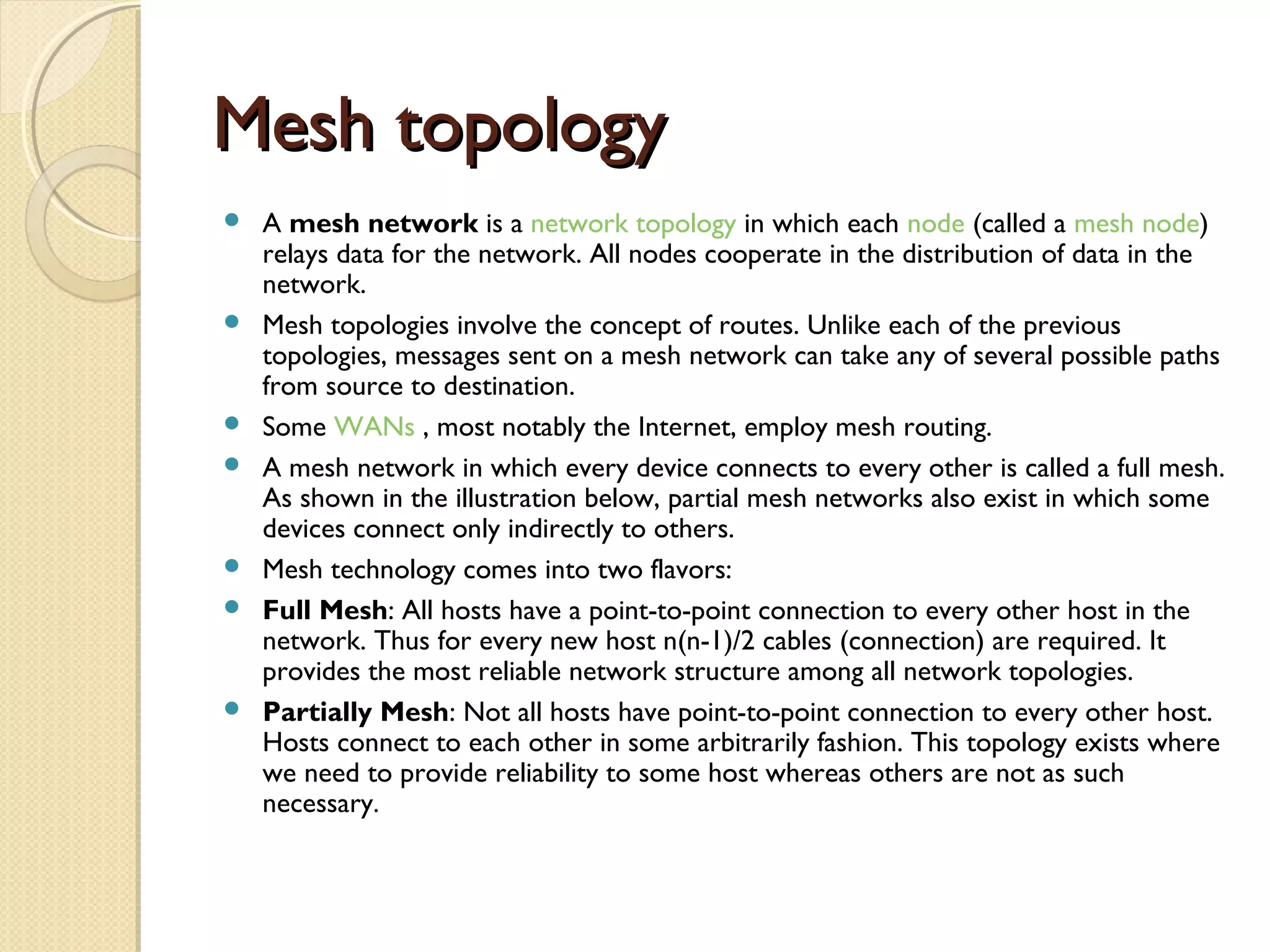
Bydelivering each message only to the
connected device it was intended for, a
network switch conserves
network bandwidth and offers generally
better performance than a hub
33.
Mesh topologyMesh topology
A mesh network is a network topology in which each node (called a mesh node)
relays data for the network. All nodes cooperate in the distribution of data in the
network.
Mesh topologies involve the concept of routes. Unlike each of the previous
topologies, messages sent on a mesh network can take any of several possible paths
from source to destination.
Some WANs , most notably the Internet, employ mesh routing.
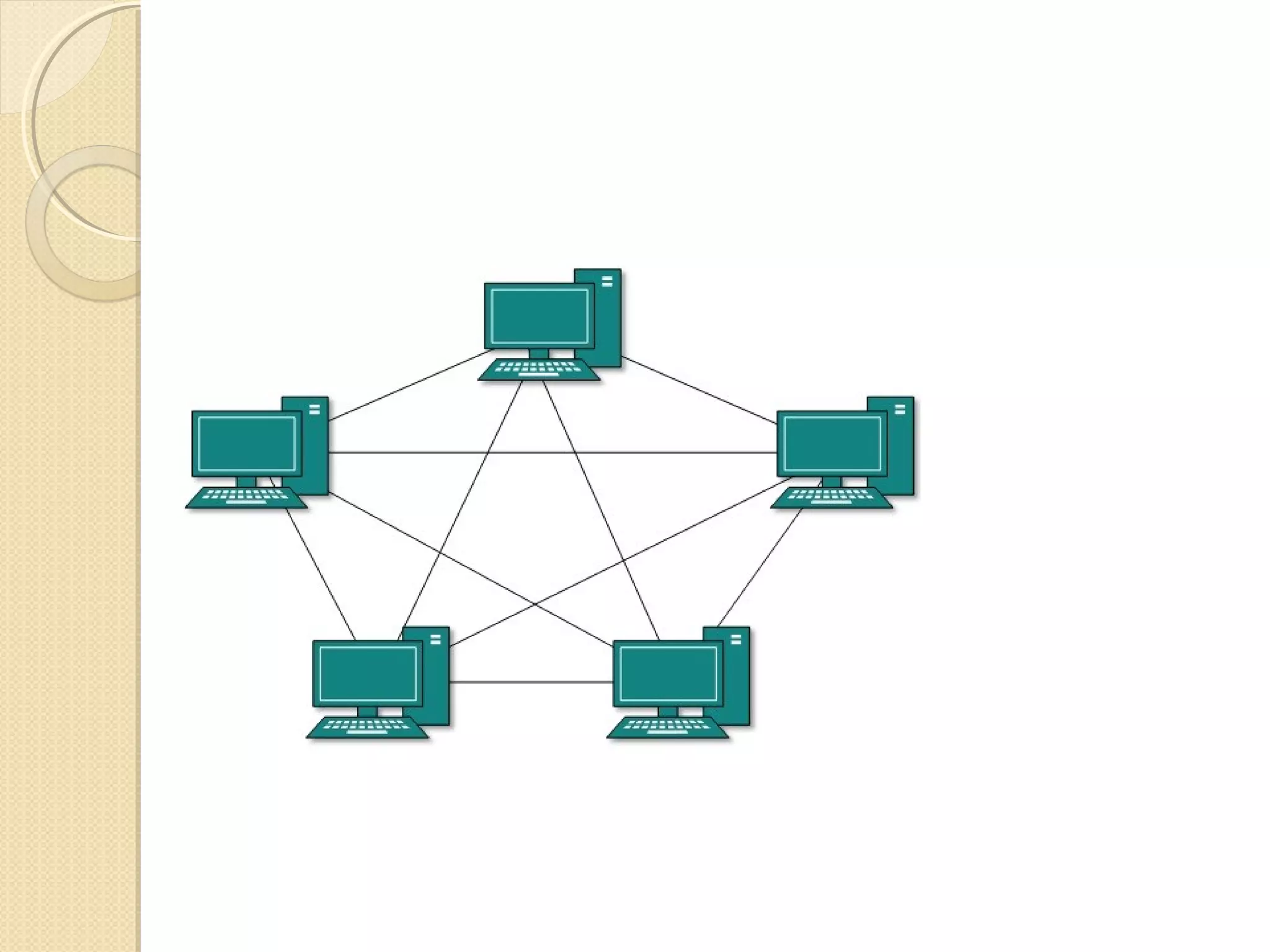
A mesh network in which every device connects to every other is called a full mesh.
As shown in the illustration below, partial mesh networks also exist in which some
devices connect only indirectly to others.
Mesh technology comes into two flavors:
Full Mesh: All hosts have a point-to-point connection to every other host in the
network. Thus for every new host n(n-1)/2 cables (connection) are required. It
provides the most reliable network structure among all network topologies.
Partially Mesh: Not all hosts have point-to-point connection to every other host.
Hosts connect to each other in some arbitrarily fashion. This topology exists where
we need to provide reliability to some host whereas others are not as such
necessary.
35.
Advantages
▸ Thearrangement of the network nodes is such that it is possible
to transmit data from one node to many other nodes at the same
time.
▸ The failure of a single node does not cause the entire network
to fail as there are alternate paths for data transmission.
▸ It can handle heavy traffic, as there are dedicated paths between
any two network nodes.
▸ Point-to-point contact between every pair of nodes, makes it
easy to identify faults.
36.
Disadvantages
▸ Thearrangement wherein every network node is
connected to every other node of the network, many
connections serve no major purpose. This leads to
redundancy of many network connections.
▸ A lot of cabling is required. Thus, the costs incurred
in setup and maintenance are high.
▸ Owing to its complexity, the administration of a
mesh network is difficult.
37.
What is aRouter?What is a Router?
Routers are physical devices that join
multiple wired or wireless networks
together
Technically, a wired or wireless router is
a Layer 3 gateway, meaning that the
wired/wireless router connects networks
together
A Gateway is a device that acts like a
security guard and only allows data in or
out if it has the right network headers
38.
RoutersRouters
Home “networkers” oftenuse an Internet
Protocol (IP) wired or wireless router
IP is the most common OSI network layer
protocol
Protocols are the rules governing the transfer
of data information, it can also be compared to
how humans use languages (to get your point
across you must talk in the same language as
the person you are speaking to).
39.
RoutersRouters
An IP routersuch as a DSL or cable
modem are broadband routers and joins
the home's local area network (LAN) to
the wide-area network (WAN) of the
Internet
A Broadband Router is a device that
allows multiple PC’s to access the
Internet using only one address.