NETWORK MINER
SREEKANTH N
AGENDA
 Introduction
 Digital Forensics
 Network Forensic
 Why?
 Network Miner
 Network Miner- Features
 Screenshots
 Demo – Live Capture
 Demo – Scenario Analysis
 Conclusion
 References
INTRODUCTION - DIGITAL FORENSICS
 Collection, preservation, analysis and presentation of computer-related evidence
 Determining the past actions that have taken place on a computer system using computer forensic
techniques
 Attempts to retrieve information even if it has been altered or erased so it can be used in the pursuit of
an attacker or a criminal
 Incident Response
 Live System Analysis
 Computer Forensics
 Post-Mortem Analysis
INTRODUCTION - NETWORK FORENSICS
 Network forensics is the process of capturing information that moves over a network and trying to make
sense of it in some kind of forensics capacity.
 Network forensics is the capture, recording, and analysis of network events in order to discover the source of
security attacks or other problem incidents.
 A network forensics appliance is a device that automates this process.
 Network forensics systems can be one of two kinds:
 "Catch-it-as-you-can" systems, in which all packets passing through a certain traffic point are captured and written
to storage with analysis being done subsequently in batch mode.
 "Stop, look and listen" systems, in which each packet is analyzed in a rudimentary way in memory and only certain
information saved for future analysis.
INTRODUCTION – WHY NETWORK FORENSICS ?
 Network Forensics is the process of collecting and analyzing raw
network data and then tracking network traffic to determine
how an attack took place.
 When intruders break into a network they leave a trail. Need to
spot variations in network traffic to detect anomalies.
 Network forensics can usually help to determine whether
network has been attacked or there is a user error.
INTRODUCTION – NETWORK MINER
 An open source Network Forensic Analysis Tool (NFAT) for Windows (but also works in
Linux / Mac OS X).
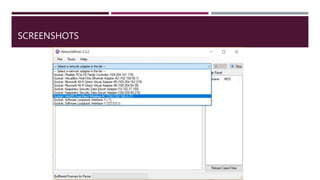
 Used as a passive network sniffer/packet capturing tool in order to detect operating
systems, sessions, hostnames, open ports etc. without putting any traffic on the
network.
 Can also parse PCAP files for off-line analysis and to regenerate/reassemble
transmitted files and certificates from PCAP files.
 It is easy to perform advanced Network Traffic Analysis (NTA) as the extracted artifacts
are displayed in an intuitive user interface.
FEATURES
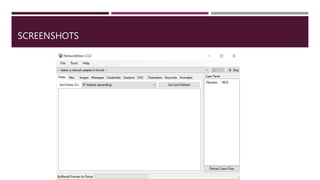
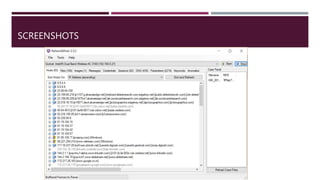
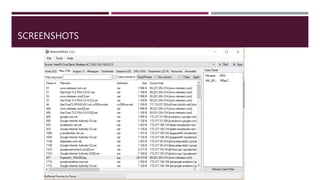
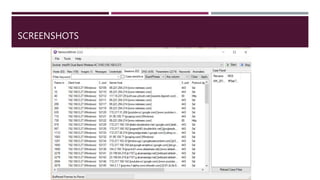
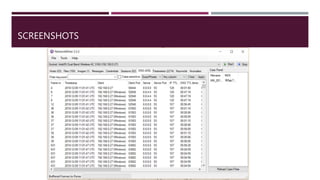
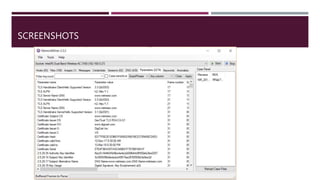
 Network Miner can extract files, emails and certificates transferred over the network by parsing a PCAP file or
by sniffing traffic directly from the network.
 User credentials (usernames and passwords) for supported protocols are extracted and displayed under the
"Credentials" tab.
 The credentials tab sometimes also show information that can be used to identify a particular person, such as
user accounts for popular online services like Gmail or Facebook.
 A user can search sniffed or stored data for keywords.
 Network Miner allows the user to insert arbitrary string or byte-patterns that shall be
searched for with the keyword search functionality.
SCREENSHOTS
SCREENSHOTS
SCREENSHOTS
SCREENSHOTS
SCREENSHOTS
SCREENSHOTS
SCREENSHOTS
DEMO – LIVE CAPTURE
DEMO – SCENARIO – MIKES COMPUTER
ACTING WEIRD
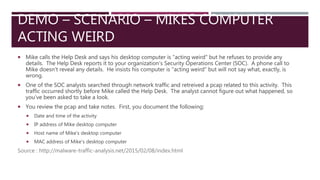
 Mike calls the Help Desk and says his desktop computer is "acting weird" but he refuses to provide any
details. The Help Desk reports it to your organization's Security Operations Center (SOC). A phone call to
Mike doesn't reveal any details. He insists his computer is "acting weird" but will not say what, exactly, is
wrong.
 One of the SOC analysts searched through network traffic and retreived a pcap related to this activity. This
traffic occurred shortly before Mike called the Help Desk. The analyst cannot figure out what happened, so
you've been asked to take a look.
 You review the pcap and take notes. First, you document the following:
 Date and time of the activity
 IP address of Mike desktop computer
 Host name of Mike's desktop computer
 MAC address of Mike's desktop computer
Source : http://malware-traffic-analysis.net/2015/02/08/index.html
REFERENCES
 https://www.netresec.com/?page=Networkminer
 https://www.slideshare.net/cisoplatform7/network-forensics-and-practical-packet-
analysis?from_action=save
Thankyou

Network Miner Network forensics

  • 1.
  • 2.
    AGENDA  Introduction  DigitalForensics  Network Forensic  Why?  Network Miner  Network Miner- Features  Screenshots  Demo – Live Capture  Demo – Scenario Analysis  Conclusion  References
  • 3.
    INTRODUCTION - DIGITALFORENSICS  Collection, preservation, analysis and presentation of computer-related evidence  Determining the past actions that have taken place on a computer system using computer forensic techniques  Attempts to retrieve information even if it has been altered or erased so it can be used in the pursuit of an attacker or a criminal  Incident Response  Live System Analysis  Computer Forensics  Post-Mortem Analysis
  • 4.
    INTRODUCTION - NETWORKFORENSICS  Network forensics is the process of capturing information that moves over a network and trying to make sense of it in some kind of forensics capacity.  Network forensics is the capture, recording, and analysis of network events in order to discover the source of security attacks or other problem incidents.  A network forensics appliance is a device that automates this process.  Network forensics systems can be one of two kinds:  "Catch-it-as-you-can" systems, in which all packets passing through a certain traffic point are captured and written to storage with analysis being done subsequently in batch mode.  "Stop, look and listen" systems, in which each packet is analyzed in a rudimentary way in memory and only certain information saved for future analysis.
  • 5.
    INTRODUCTION – WHYNETWORK FORENSICS ?  Network Forensics is the process of collecting and analyzing raw network data and then tracking network traffic to determine how an attack took place.  When intruders break into a network they leave a trail. Need to spot variations in network traffic to detect anomalies.  Network forensics can usually help to determine whether network has been attacked or there is a user error.
  • 6.
    INTRODUCTION – NETWORKMINER  An open source Network Forensic Analysis Tool (NFAT) for Windows (but also works in Linux / Mac OS X).  Used as a passive network sniffer/packet capturing tool in order to detect operating systems, sessions, hostnames, open ports etc. without putting any traffic on the network.  Can also parse PCAP files for off-line analysis and to regenerate/reassemble transmitted files and certificates from PCAP files.  It is easy to perform advanced Network Traffic Analysis (NTA) as the extracted artifacts are displayed in an intuitive user interface.
  • 7.
    FEATURES  Network Minercan extract files, emails and certificates transferred over the network by parsing a PCAP file or by sniffing traffic directly from the network.  User credentials (usernames and passwords) for supported protocols are extracted and displayed under the "Credentials" tab.  The credentials tab sometimes also show information that can be used to identify a particular person, such as user accounts for popular online services like Gmail or Facebook.  A user can search sniffed or stored data for keywords.  Network Miner allows the user to insert arbitrary string or byte-patterns that shall be searched for with the keyword search functionality.
  • 8.
  • 9.
  • 10.
  • 11.
  • 12.
  • 13.
  • 14.
  • 15.
  • 16.
    DEMO – SCENARIO– MIKES COMPUTER ACTING WEIRD  Mike calls the Help Desk and says his desktop computer is "acting weird" but he refuses to provide any details. The Help Desk reports it to your organization's Security Operations Center (SOC). A phone call to Mike doesn't reveal any details. He insists his computer is "acting weird" but will not say what, exactly, is wrong.  One of the SOC analysts searched through network traffic and retreived a pcap related to this activity. This traffic occurred shortly before Mike called the Help Desk. The analyst cannot figure out what happened, so you've been asked to take a look.  You review the pcap and take notes. First, you document the following:  Date and time of the activity  IP address of Mike desktop computer  Host name of Mike's desktop computer  MAC address of Mike's desktop computer Source : http://malware-traffic-analysis.net/2015/02/08/index.html
  • 17.
  • 18.