IP Network Scanning
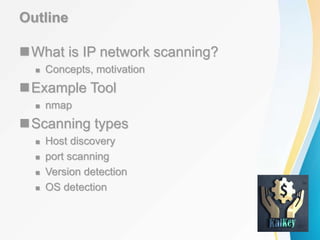
Outline
What is IP network scanning?
 Concepts, motivation
Example Tool
 nmap
Scanning types
 Host discovery
 port scanning
 Version detection
 OS detection
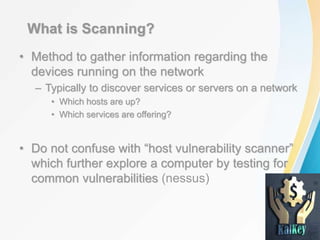
What is Scanning?
• Method to gather information regarding the
devices running on the network
– Typically to discover services or servers on a network
• Which hosts are up?
• Which services are offering?
• Do not confuse with “host vulnerability scanner”
which further explore a computer by testing for
common vulnerabilities (nessus)
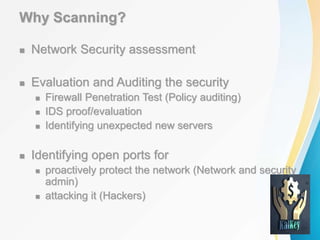
Why Scanning?
 Network Security assessment
 Evaluation and Auditing the security
 Firewall Penetration Test (Policy auditing)
 IDS proof/evaluation
 Identifying unexpected new servers
 Identifying open ports for
 proactively protect the network (Network and security
admin)
 attacking it (Hackers)
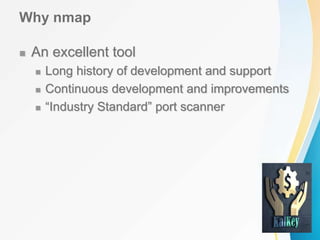
Why nmap
 An excellent tool
 Long history of development and support
 Continuous development and improvements
 “Industry Standard” port scanner
nmap features
• Host Discovery: Which host is alive?
– Identifying computers on a network, for example listing the computers
which respond to pings (Ping Sweeps)
• Port Scanning : What services are available?
– Enumerating the open ports on one or more target computers
• Service and Version Detection : Which version is running?
– Determine the application name and version number
• OS Detection: What platforms are served?
– Remotely determining the OS and some hardware characteristics of
network devices
Host Discovery
 Querying multiple hosts using this method is
referred to as ping sweeps
 The most basic step in mapping out a network.
 Several Sweeps technique
 ICMP Sweeps
 Broadcast ICMP
 NON Echo ICMP
 TCP sweep
 UDP sweep
Target Selection
Scan a single IP: nmap 192.168.20.128
Target Selection
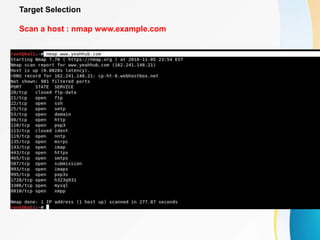
Scan a host : nmap www.example.com
Target Selection
Scan a range of IPs : nmap 192.168.20.120-128
Target Selection
Scan a subnet : nmap 192.168.20.2/24
Target Selection
Scan targets from Text file : nmap -iL ips.txt
Port Selection
Scan a single port: nmap -p 22 192.168.20.128
Port Selection
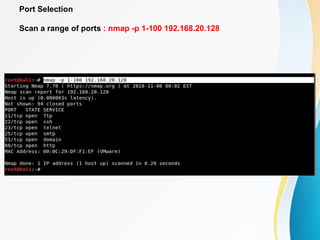
Scan a range of ports : nmap -p 1-100 192.168.20.128
Port Selection
Scan 100 common ports : nmap -F 192.168.20.128
Port Selection
Scan all ports : nmap -p- 192.168.20.128
Scan Types
Scan using TCP connect : nmap -sT 192.168.20.128
Scan Types
Scan using TCP SYN scan : nmap -sS 192.168.20.128
Scan Types
Scan UDP ports : nmap -sU -p 123,161,162 192.168.20.128
Scan Types
Scan Selected ports (Ignore Discovery) : nmap -Pn -F 192.168.20.128
Service and OS Detection
Detect OS and Services : nmap -A 192.168.20.128
Service and OS Detection
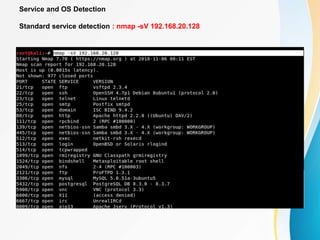
Standard service detection : nmap -sV 192.168.20.128
Output Formats
Save default output to file : nmap -oN result.txt 192.168.20.128
Output Formats
Save results as XML : nmap -oX resultxml.xml 192.168.20.128
Output Formats
Save in all formats : nmap -oA allformats 192.168.20.128
Scripting Engine
Scan using default safe scripts : nmap -sV -sC 192.168.20.128
Scripting Engine
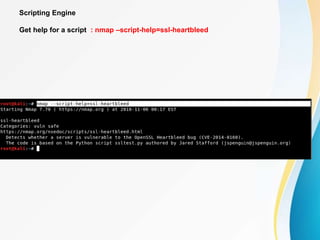
Get help for a script : nmap –script-help=ssl-heartbleed
Scripting Engine
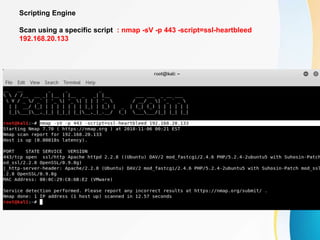
Scan using a specific script : nmap -sV -p 443 -script=ssl-heartbleed
192.168.20.133
Scripting Engine
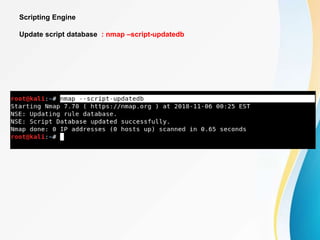
Update script database : nmap –script-updatedb
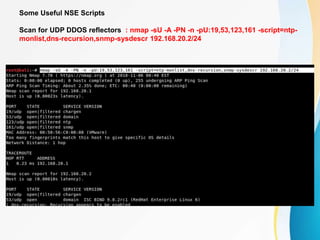
Some Useful NSE Scripts
Scan for UDP DDOS reflectors : nmap -sU -A -PN -n -pU:19,53,123,161 -script=ntp-
monlist,dns-recursion,snmp-sysdescr 192.168.20.2/24
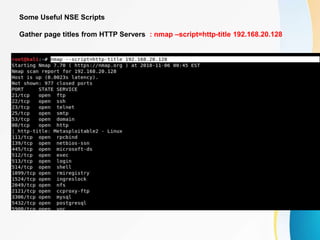
Some Useful NSE Scripts
Gather page titles from HTTP Servers : nmap –script=http-title 192.168.20.128
Some Useful NSE Scripts
Get HTTP headers of web services : nmap –script= http-headers 192.168.20.128
Some Useful NSE Scripts
Find web apps from known paths : nmap –script=http-enum 192.168.20.128

Namp

  • 1.
  • 2.
    Outline What is IPnetwork scanning?  Concepts, motivation Example Tool  nmap Scanning types  Host discovery  port scanning  Version detection  OS detection
  • 3.
    What is Scanning? •Method to gather information regarding the devices running on the network – Typically to discover services or servers on a network • Which hosts are up? • Which services are offering? • Do not confuse with “host vulnerability scanner” which further explore a computer by testing for common vulnerabilities (nessus)
  • 4.
    Why Scanning?  NetworkSecurity assessment  Evaluation and Auditing the security  Firewall Penetration Test (Policy auditing)  IDS proof/evaluation  Identifying unexpected new servers  Identifying open ports for  proactively protect the network (Network and security admin)  attacking it (Hackers)
  • 5.
    Why nmap  Anexcellent tool  Long history of development and support  Continuous development and improvements  “Industry Standard” port scanner
  • 6.
    nmap features • HostDiscovery: Which host is alive? – Identifying computers on a network, for example listing the computers which respond to pings (Ping Sweeps) • Port Scanning : What services are available? – Enumerating the open ports on one or more target computers • Service and Version Detection : Which version is running? – Determine the application name and version number • OS Detection: What platforms are served? – Remotely determining the OS and some hardware characteristics of network devices
  • 7.
    Host Discovery  Queryingmultiple hosts using this method is referred to as ping sweeps  The most basic step in mapping out a network.  Several Sweeps technique  ICMP Sweeps  Broadcast ICMP  NON Echo ICMP  TCP sweep  UDP sweep
  • 8.
    Target Selection Scan asingle IP: nmap 192.168.20.128
  • 9.
    Target Selection Scan ahost : nmap www.example.com
  • 10.
    Target Selection Scan arange of IPs : nmap 192.168.20.120-128
  • 11.
    Target Selection Scan asubnet : nmap 192.168.20.2/24
  • 12.
    Target Selection Scan targetsfrom Text file : nmap -iL ips.txt
  • 13.
    Port Selection Scan asingle port: nmap -p 22 192.168.20.128
  • 14.
    Port Selection Scan arange of ports : nmap -p 1-100 192.168.20.128
  • 15.
    Port Selection Scan 100common ports : nmap -F 192.168.20.128
  • 16.
    Port Selection Scan allports : nmap -p- 192.168.20.128
  • 17.
    Scan Types Scan usingTCP connect : nmap -sT 192.168.20.128
  • 18.
    Scan Types Scan usingTCP SYN scan : nmap -sS 192.168.20.128
  • 19.
    Scan Types Scan UDPports : nmap -sU -p 123,161,162 192.168.20.128
  • 20.
    Scan Types Scan Selectedports (Ignore Discovery) : nmap -Pn -F 192.168.20.128
  • 21.
    Service and OSDetection Detect OS and Services : nmap -A 192.168.20.128
  • 22.
    Service and OSDetection Standard service detection : nmap -sV 192.168.20.128
  • 23.
    Output Formats Save defaultoutput to file : nmap -oN result.txt 192.168.20.128
  • 24.
    Output Formats Save resultsas XML : nmap -oX resultxml.xml 192.168.20.128
  • 25.
    Output Formats Save inall formats : nmap -oA allformats 192.168.20.128
  • 26.
    Scripting Engine Scan usingdefault safe scripts : nmap -sV -sC 192.168.20.128
  • 27.
    Scripting Engine Get helpfor a script : nmap –script-help=ssl-heartbleed
  • 28.
    Scripting Engine Scan usinga specific script : nmap -sV -p 443 -script=ssl-heartbleed 192.168.20.133
  • 29.
    Scripting Engine Update scriptdatabase : nmap –script-updatedb
  • 30.
    Some Useful NSEScripts Scan for UDP DDOS reflectors : nmap -sU -A -PN -n -pU:19,53,123,161 -script=ntp- monlist,dns-recursion,snmp-sysdescr 192.168.20.2/24
  • 31.
    Some Useful NSEScripts Gather page titles from HTTP Servers : nmap –script=http-title 192.168.20.128
  • 32.
    Some Useful NSEScripts Get HTTP headers of web services : nmap –script= http-headers 192.168.20.128
  • 33.
    Some Useful NSEScripts Find web apps from known paths : nmap –script=http-enum 192.168.20.128