Nmap Commands
www.lucideus.com KAILASH KUMAR
NSIC Campus,Okhla PhaseIII Lucideus Grade2(5-7)
New Delhi-110020
Nmap Commands July 28, 2016
www.lucideus.com Page 1
INTRODUCTION TO NMAP
Nmap (Network Mapper) is a security scanner originally written by Gordon Lyon used to
discover hosts and services on a computer network, thus creating a "map" of the network. To
accomplish its goal, Nmap sends specially crafted packets to the target host and then analyzes the
responses.
The software provides a number of features for probing computer networks, including host
discovery and service and operating system detection. These features are extensible by scripts
that provide more advanced service detection,vulnerability detection, and other features. Nmap is
also capable of adapting to network conditions including latency and congestion during a scan.
Nmap is under development and refinement by its user community.
FEATURES AND USES OF NMAP
Nmap features include:
 Host discovery – Identifying hosts on a network. For example, listing the hosts that
respond to TCP and/or ICMP requests or have a particular port open.
 Port scanning – Enumerating the open ports on target hosts.
 Version detection – Interrogating network services on remote devices to determine
application name and version number.
 OS detection – Determining the operating system and hardware characteristics of
network devices.
 Scriptable interaction with the target – using Nmap Scripting Engine (NSE) and Lua
programming language.
Nmap can provide further information on targets, including reverse DNS names, device
types, and MAC addresses.
Typical uses of Nmap:
 Auditing the security of a device or firewall by identifying the network connections
which can be made to, or through it.
 Identifying open ports on a target host in preparation for auditing.
 Network inventory, network mapping, maintenance and asset management.
 Auditing the security of a network by identifying new servers.
 Generating traffic to hosts on a network, response analysis and response time
measurement.
 Find and exploit vulnerabilities in a network.
Nmap Commands July 28, 2016
www.lucideus.com Page 2
NMAP COMMANDS
1-Scan a Single Host or an IP Address
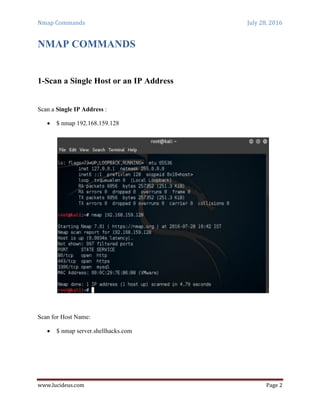
Scan a Single IP Address :
 $ nmap 192.168.159.128
Scan for Host Name:
 $ nmap server.shellhacks.com
Nmap Commands July 28, 2016
www.lucideus.com Page 3
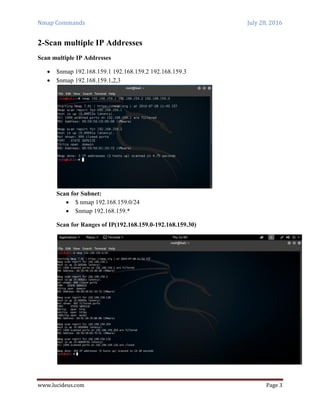
2-Scan multiple IP Addresses
Scan multiple IP Addresses
 $nmap 192.168.159.1 192.168.159.2 192.168.159.3
 $nmap 192.168.159.1,2,3
Scan for Subnet:
 $ nmap 192.168.159.0/24
 $nmap 192.168.159.*
Scan for Ranges of IP(192.168.159.0-192.168.159.30)
Nmap Commands July 28, 2016
www.lucideus.com Page 4
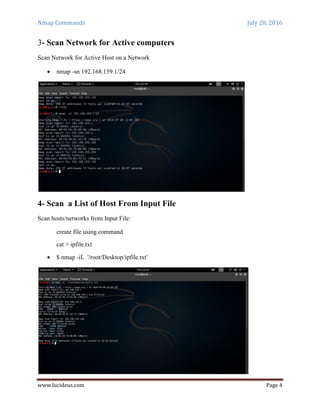
3- Scan Network for Active computers
Scan Network for Active Host on a Network
 nmap -sn 192.168.159.1/24
4- Scan a List of Host From Input File
Scan hosts/networks from Input File:
create file using command
cat > ipfile.txt
 $ nmap -iL '/root/Desktop/ipfile.txt'
Nmap Commands July 28, 2016
www.lucideus.com Page 5
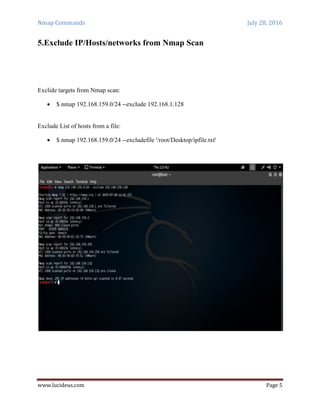
5.Exclude IP/Hosts/networks from Nmap Scan
Exclide targets from Nmap scan:
 $ nmap 192.168.159.0/24 --exclude 192.168.1.128
Exclude List of hosts from a file:
 $ nmap 192.168.159.0/24 --excludefile '/root/Desktop/ipfile.txt'
Nmap Commands July 28, 2016
www.lucideus.com Page 6
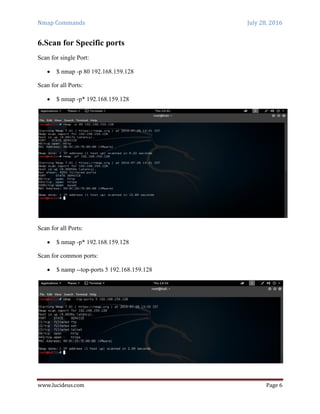
6.Scan for Specific ports
Scan for single Port:
 $ nmap -p 80 192.168.159.128
Scan for all Ports:
 $ nmap -p* 192.168.159.128
Scan for all Ports:
 $ nmap -p* 192.168.159.128
Scan for common ports:
 $ namp --top-ports 5 192.168.159.128
Nmap Commands July 28, 2016
www.lucideus.com Page 7
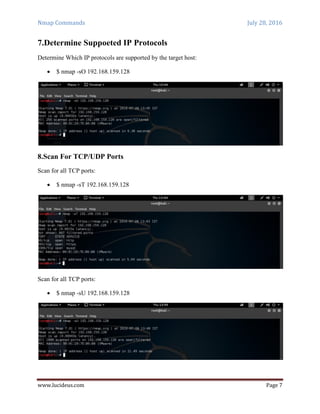
7.Determine Suppoeted IP Protocols
Determine Which IP protocols are supported by the target host:
 $ nmap -sO 192.168.159.128
8.Scan For TCP/UDP Ports
Scan for all TCP ports:
 $ nmap -sT 192.168.159.128
Scan for all TCP ports:
 $ nmap -sU 192.168.159.128
Nmap Commands July 28, 2016
www.lucideus.com Page 8
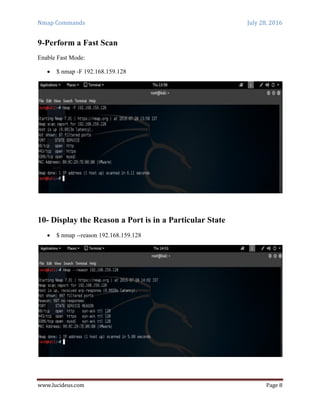
9-Perform a Fast Scan
Enable Fast Mode:
 $ nmap -F 192.168.159.128
10- Display the Reason a Port is in a Particular State
 $ nmap --reason 192.168.159.128
Nmap Commands July 28, 2016
www.lucideus.com Page 9
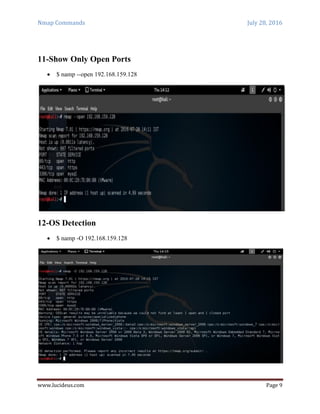
11-Show Only Open Ports
 $ namp --open 192.168.159.128
12-OS Detection
 $ namp -O 192.168.159.128
Nmap Commands July 28, 2016
www.lucideus.com Page 10
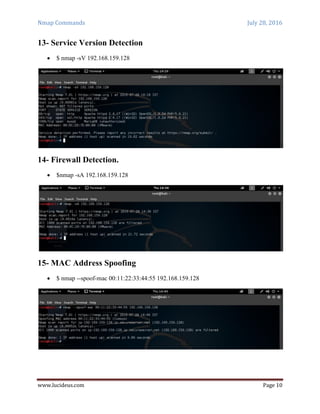
13- Service Version Detection
 $ nmap -sV 192.168.159.128
14- Firewall Detection.
 $nmap -sA 192.168.159.128
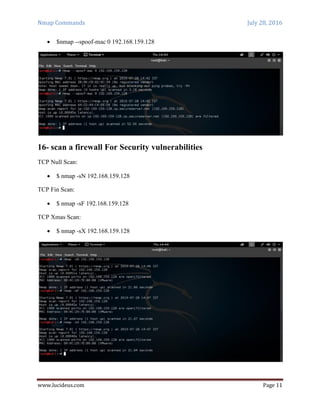
15- MAC Address Spoofing
 $ nmap --spoof-mac 00:11:22:33:44:55 192.168.159.128
Nmap Commands July 28, 2016
www.lucideus.com Page 11
 $nmap --spoof-mac 0 192.168.159.128
16- scan a firewall For Security vulnerabilities
TCP Null Scan:
 $ nmap -sN 192.168.159.128
TCP Fin Scan:
 $ nmap -sF 192.168.159.128
TCP Xmas Scan:
 $ nmap -sX 192.168.159.128
Nmap Commands July 28, 2016
www.lucideus.com Page 12
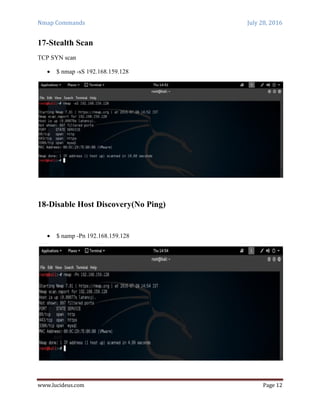
17-Stealth Scan
TCP SYN scan
 $ nmap -sS 192.168.159.128
18-Disable Host Discovery(No Ping)
 $ namp -Pn 192.168.159.128
Nmap Commands July 28, 2016
www.lucideus.com Page 13
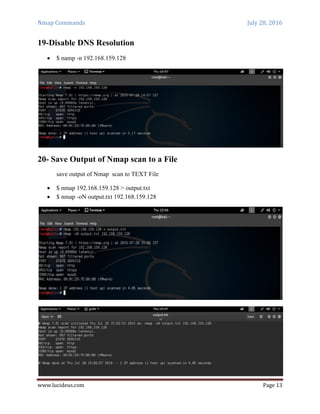
19-Disable DNS Resolution
 $ namp -n 192.168.159.128
20- Save Output of Nmap scan to a File
save output of Nmap scan to TEXT File
 $ nmap 192.168.159.128 > output.txt
 $ nmap -oN output.txt 192.168.159.128
Nmap Commands July 28, 2016
www.lucideus.com Page 14
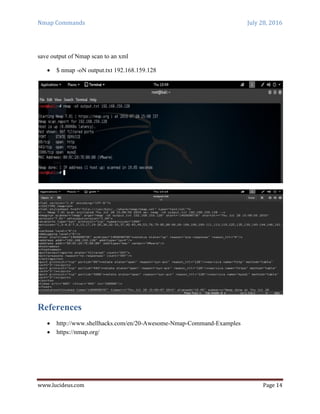
save output of Nmap scan to an xml
 $ nmap -oN output.txt 192.168.159.128
References
 http://www.shellhacks.com/en/20-Awesome-Nmap-Command-Examples
 https://nmap.org/

Nmap commands

  • 1.
    Nmap Commands www.lucideus.com KAILASHKUMAR NSIC Campus,Okhla PhaseIII Lucideus Grade2(5-7) New Delhi-110020
  • 2.
    Nmap Commands July28, 2016 www.lucideus.com Page 1 INTRODUCTION TO NMAP Nmap (Network Mapper) is a security scanner originally written by Gordon Lyon used to discover hosts and services on a computer network, thus creating a "map" of the network. To accomplish its goal, Nmap sends specially crafted packets to the target host and then analyzes the responses. The software provides a number of features for probing computer networks, including host discovery and service and operating system detection. These features are extensible by scripts that provide more advanced service detection,vulnerability detection, and other features. Nmap is also capable of adapting to network conditions including latency and congestion during a scan. Nmap is under development and refinement by its user community. FEATURES AND USES OF NMAP Nmap features include:  Host discovery – Identifying hosts on a network. For example, listing the hosts that respond to TCP and/or ICMP requests or have a particular port open.  Port scanning – Enumerating the open ports on target hosts.  Version detection – Interrogating network services on remote devices to determine application name and version number.  OS detection – Determining the operating system and hardware characteristics of network devices.  Scriptable interaction with the target – using Nmap Scripting Engine (NSE) and Lua programming language. Nmap can provide further information on targets, including reverse DNS names, device types, and MAC addresses. Typical uses of Nmap:  Auditing the security of a device or firewall by identifying the network connections which can be made to, or through it.  Identifying open ports on a target host in preparation for auditing.  Network inventory, network mapping, maintenance and asset management.  Auditing the security of a network by identifying new servers.  Generating traffic to hosts on a network, response analysis and response time measurement.  Find and exploit vulnerabilities in a network.
  • 3.
    Nmap Commands July28, 2016 www.lucideus.com Page 2 NMAP COMMANDS 1-Scan a Single Host or an IP Address Scan a Single IP Address :  $ nmap 192.168.159.128 Scan for Host Name:  $ nmap server.shellhacks.com
  • 4.
    Nmap Commands July28, 2016 www.lucideus.com Page 3 2-Scan multiple IP Addresses Scan multiple IP Addresses  $nmap 192.168.159.1 192.168.159.2 192.168.159.3  $nmap 192.168.159.1,2,3 Scan for Subnet:  $ nmap 192.168.159.0/24  $nmap 192.168.159.* Scan for Ranges of IP(192.168.159.0-192.168.159.30)
  • 5.
    Nmap Commands July28, 2016 www.lucideus.com Page 4 3- Scan Network for Active computers Scan Network for Active Host on a Network  nmap -sn 192.168.159.1/24 4- Scan a List of Host From Input File Scan hosts/networks from Input File: create file using command cat > ipfile.txt  $ nmap -iL '/root/Desktop/ipfile.txt'
  • 6.
    Nmap Commands July28, 2016 www.lucideus.com Page 5 5.Exclude IP/Hosts/networks from Nmap Scan Exclide targets from Nmap scan:  $ nmap 192.168.159.0/24 --exclude 192.168.1.128 Exclude List of hosts from a file:  $ nmap 192.168.159.0/24 --excludefile '/root/Desktop/ipfile.txt'
  • 7.
    Nmap Commands July28, 2016 www.lucideus.com Page 6 6.Scan for Specific ports Scan for single Port:  $ nmap -p 80 192.168.159.128 Scan for all Ports:  $ nmap -p* 192.168.159.128 Scan for all Ports:  $ nmap -p* 192.168.159.128 Scan for common ports:  $ namp --top-ports 5 192.168.159.128
  • 8.
    Nmap Commands July28, 2016 www.lucideus.com Page 7 7.Determine Suppoeted IP Protocols Determine Which IP protocols are supported by the target host:  $ nmap -sO 192.168.159.128 8.Scan For TCP/UDP Ports Scan for all TCP ports:  $ nmap -sT 192.168.159.128 Scan for all TCP ports:  $ nmap -sU 192.168.159.128
  • 9.
    Nmap Commands July28, 2016 www.lucideus.com Page 8 9-Perform a Fast Scan Enable Fast Mode:  $ nmap -F 192.168.159.128 10- Display the Reason a Port is in a Particular State  $ nmap --reason 192.168.159.128
  • 10.
    Nmap Commands July28, 2016 www.lucideus.com Page 9 11-Show Only Open Ports  $ namp --open 192.168.159.128 12-OS Detection  $ namp -O 192.168.159.128
  • 11.
    Nmap Commands July28, 2016 www.lucideus.com Page 10 13- Service Version Detection  $ nmap -sV 192.168.159.128 14- Firewall Detection.  $nmap -sA 192.168.159.128 15- MAC Address Spoofing  $ nmap --spoof-mac 00:11:22:33:44:55 192.168.159.128
  • 12.
    Nmap Commands July28, 2016 www.lucideus.com Page 11  $nmap --spoof-mac 0 192.168.159.128 16- scan a firewall For Security vulnerabilities TCP Null Scan:  $ nmap -sN 192.168.159.128 TCP Fin Scan:  $ nmap -sF 192.168.159.128 TCP Xmas Scan:  $ nmap -sX 192.168.159.128
  • 13.
    Nmap Commands July28, 2016 www.lucideus.com Page 12 17-Stealth Scan TCP SYN scan  $ nmap -sS 192.168.159.128 18-Disable Host Discovery(No Ping)  $ namp -Pn 192.168.159.128
  • 14.
    Nmap Commands July28, 2016 www.lucideus.com Page 13 19-Disable DNS Resolution  $ namp -n 192.168.159.128 20- Save Output of Nmap scan to a File save output of Nmap scan to TEXT File  $ nmap 192.168.159.128 > output.txt  $ nmap -oN output.txt 192.168.159.128
  • 15.
    Nmap Commands July28, 2016 www.lucideus.com Page 14 save output of Nmap scan to an xml  $ nmap -oN output.txt 192.168.159.128 References  http://www.shellhacks.com/en/20-Awesome-Nmap-Command-Examples  https://nmap.org/