

www.prismacsi.com
© All Rights Reserved.
1
Practical White Hat Hacker Training #3
Active Information
Gathering
This document can be shared or used by quoted and used for commercial purposes, but can not be changed. Detailed
information is available at https://creativecommons.org/licenses/by-nc-nd/4.0/legalcode.
www.prismacsi.com
© All Rights Reserved.
2
Active Information Gathering
• Nmap basics
• Scanning methods with nmap
• Reconnaissance using nmap
• Port, service, version scanning
• Operating system detection
• Nmap Scripting Engine (NSE) use and resources
• Detailed reconnaissance on DNS, SMTP, SNMP
• Anonymous scanning operations
• Firewall/IDS evasion methods
www.prismacsi.com
© All Rights Reserved.
3
Active Scanning after OSINT
• Verify information gathered during the passive information gathering stage
• Discover systems that are active within the IP range and save time on vulnerability scanning, the next
stage.
• Discover ports and services, get to know more about the target!
• Identify software and their versions
• Identify operating systems
www.prismacsi.com
© All Rights Reserved.
4
Nmap – Network Mapping
• Network Reconnaissance
• Port, service scanning
• Version scanning
• Operating system discovery
• Vulnerability scanning
• Firewall/IDS evasion
www.prismacsi.com
© All Rights Reserved.
5
Nmap Host Definition
• nmap 10.0.1.5
• nmap 10.0.1.5-15
• nmap 10.0.1.0/24
• nmap 10.0.1.5,6,7,8
• nmap –iL iplist.txt
• nmap 10.0.1.0/24 —exclude 10.0.1.5
www.prismacsi.com
© All Rights Reserved.
6
Nmap Port Definition
• nmap 10.0.1.5 –p 80
• nmap 10.0.1.5 –p 80,443
• nmap 10.0.1.5 –p 1-1000
• nmap 10.0.1.5 –p 0-65535
• nmap 10.0.1.5 –p-
• nmap 10.0.1.5 –top-ports=500
www.prismacsi.com
© All Rights Reserved.
7
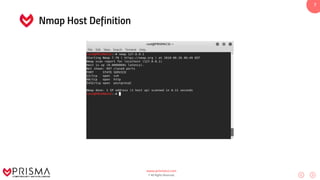
Nmap Host Definition
www.prismacsi.com
© All Rights Reserved.
8
Nmap Port States and Inferences
• Open :
• Port açık
• Portu dinleyen bir uygulama var.
• Closed :
• Port kapalı
• Fakat erişilebilir
• Portu dinleyen bir uygulama yok.
• Filtered :
• Port durumu belli değil.
• Cevap alınamamış olabilir.
• Güvenlik duvarı paketi filtrelemiş olabilir.
www.prismacsi.com
© All Rights Reserved.
9
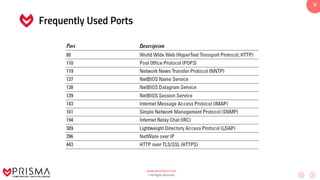
Frequently Used Ports
www.prismacsi.com
© All Rights Reserved.
10
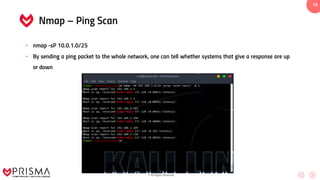
Nmap – Ping Scan
• nmap -sP 10.0.1.0/25
• By sending a ping packet to the whole network, one can tell whether systems that give a response are up
or down
www.prismacsi.com
© All Rights Reserved.
11
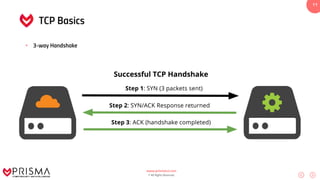
TCP Basics
• 3-way Handshake
www.prismacsi.com
© All Rights Reserved.
12
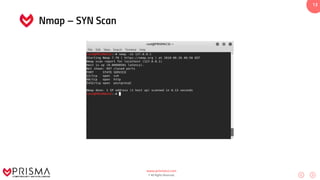
Nmap – SYN Scan
• SYN Scan is the default port scanning technique and is very fast.
• Scanning operation is done according to the response to a sent SYN packet.
• If the response to a SNY packet is RST+ACK then the port is closed.
• If the response is SYN+ACK then the port is understood to be open and RST is sent
• SYN Scan is also known as Half Open Scan.
• nmap -sS 10.0.1.5
www.prismacsi.com
© All Rights Reserved.
13
Nmap – SYN Scan
www.prismacsi.com
© All Rights Reserved.
14
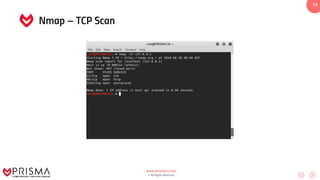
Nmap – TCP Scan
• TCP Connect Scan, completes a three way handshake and is recorded in a log.
• Obtains more accurate results.
• Port states are based on the response to the SYN packet.
• If the response to a SNY packet is RST+ACK then the port is inferred to be closed.
• If the response is SYN+ACK then the port is inferred to be open and the three way handshake is completed.
• nmap –sT 10.0.1.5
www.prismacsi.com
© All Rights Reserved.
15
Nmap – TCP Scan
www.prismacsi.com
© All Rights Reserved.
16
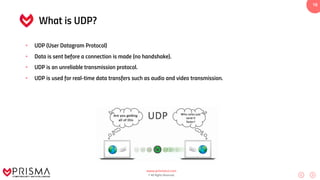
What is UDP?
• UDP (User Datagram Protocol)
• Data is sent before a connection is made (no handshake).
• UDP is an unreliable transmission protocol.
• UDP is used for real-time data transfers such as audio and video transmission.
www.prismacsi.com
© All Rights Reserved.
17
Nmap – UDP Scan
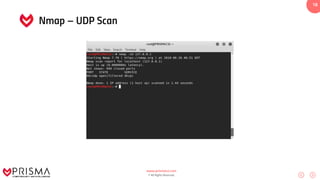
• Used to analyze UDP ports.
• Analysis is done according to the response to UDP packets.
• If the response is “ICMP Port Unreachable” then the port is closed.
• If the response is a UDP packet then the port is open.
• nmap –sU 10.0.1.15
www.prismacsi.com
© All Rights Reserved.
18
Nmap – UDP Scan
www.prismacsi.com
© All Rights Reserved.
19
TCP Flags
There are a total of 6 tcp flags :
• ACK: Indicates that the data reached the opposite side without any problem.
• SYN: Indicates that a TCP connection will be established. In short it starts the three way handshake.
• FIN: Ends a TCP session.
• RST: Allows the sender and the receiver to disconnect incase an error occurs in the connection. FIN flag is
used to safely terminate a TCP session.
• URG: Enables processing of incoming data packets.
• PSH: Used to set priority within data packets.
www.prismacsi.com
© All Rights Reserved.
20
Nmap – NULL, FIN, XMAS Scan
• The analyses are similar.
• If the response to a sent packet is RST + ACK then the port is closed, if no packet returns then the port is
inferred to be open .
• A “ICMP Unreachable” response infers a filtered port.
• NULL
• nmap –sN 10.0.1.15
• FIN
• nmap –sF 10.0.1.15
• XMAS
• nmap –sX 10.0.1.15
www.prismacsi.com
© All Rights Reserved.
21
Nmap – ACK ve Window Scan
• ACK Scan, frequently used for firewall configuration analysis.
• In ACK Scan if the response is an RST packet then the port is inferred to be unfiltered. If there is no
response or ICMP Unreachable packet returns then the port is inferred to be filtered.
• It’s similar to Window Scan ACK.
• In Window Scan port states can be Open or Closed.
• ACK
• nmap –sA 10.0.1.15
• Window
• nmap –sW 10.0.1.15
www.prismacsi.com
© All Rights Reserved.
22
Nmap Basics
• Nmap – Service and Version enumeration
• nmap –sS -sV 10.0.1.15
• Nmap – OS detection
• nmap –sS –O 10.0.1.15
• Nmap – Detailed analysis
• nmap –sS -A 10.0.1.15
www.prismacsi.com
© All Rights Reserved.
23
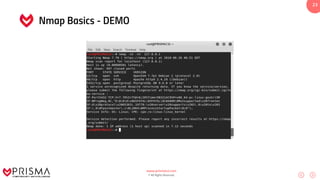
Nmap Basics - DEMO
www.prismacsi.com
© All Rights Reserved.
24
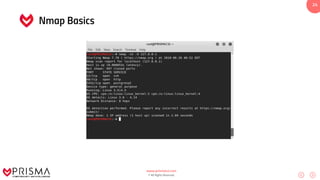
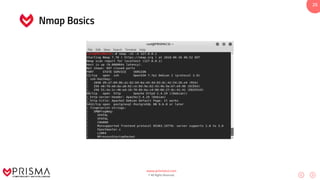
Nmap Basics
www.prismacsi.com
© All Rights Reserved.
25
Nmap Basics
www.prismacsi.com
© All Rights Reserved.
26
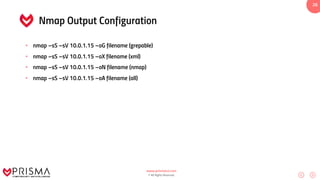
Nmap Output Configuration
• nmap –sS –sV 10.0.1.15 –oG filename (grepable)
• nmap –sS –sV 10.0.1.15 –oX filename (xml)
• nmap –sS –sV 10.0.1.15 –oN filename (nmap)
• nmap –sS –sV 10.0.1.15 –oA filename (all)
www.prismacsi.com
© All Rights Reserved.
27
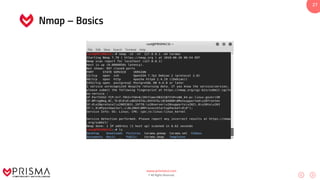
Nmap – Basics
www.prismacsi.com
© All Rights Reserved.
28
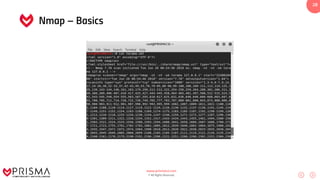
Nmap – Basics
www.prismacsi.com
© All Rights Reserved.
29
Nmap – Necessary Parameters
• – h Parameter : Help
• – T Parameter : Time configuration
• – Pn Parameter : Pinging
• – V Parameter : Nmap version control
• – v Parameter : Output details
• -- open Parameter : Show only open ports
• – 6 Parameter : activate IPv6
www.prismacsi.com
© All Rights Reserved.
30
Nmap – Scripting Engine
• All resources
• http://nmap.org/nsedoc/
• /usr/share/nmap/scripts/
• Developed with Lua programming language
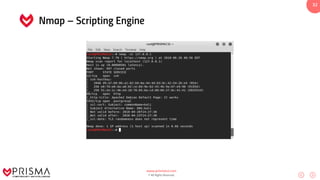
• Script Scanning
• nmap –sC 10.0.1.15
www.prismacsi.com
© All Rights Reserved.
31
Nmap – Scripting Engine
• NSE Categoriesi
• Auth
• Brute
• Default
• Dos
• Exploit
• Vuln
• Malware
• Safe
• Version
www.prismacsi.com
© All Rights Reserved.
32
Nmap – Scripting Engine
www.prismacsi.com
© All Rights Reserved.
33
Nmap – Scripting Engine
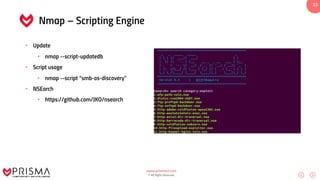
• Update
• nmap --script-updatedb
• Script usage
• nmap --script “smb-os-discovery”
• NSEarch
• https://github.com/JKO/nsearch
www.prismacsi.com
© All Rights Reserved.
34
Advanced Nmap Use
• nmap --script “smb-vuln-*” 10.0.1.15
• nmap --script http-enum domain.com
• nmap --script smb-brute –p 445 10.0.1.15
• nmap --script all 10.0.1.15
• nmap --script-help smb-brute
www.prismacsi.com
© All Rights Reserved.
35
Advanced Nmap Use
• Nmap – Firewall Evasion
• – f Parameter : Packet shredding
• nmap –f 10.0.1.15
• – D Parameter : IP Spoofing, Make some noise!
• nmap –D Spoofedip 10.0.1.15
• – spoof-mac Parameter : MAC poisoning
• nmap –spoof-mac „Fortinet‟ 10.0.1.15
• Maximum Host Configuration
• nmap --max-paralellism 1 10.0.1.15
www.prismacsi.com
© All Rights Reserved.
36
Advanced Nmap Use
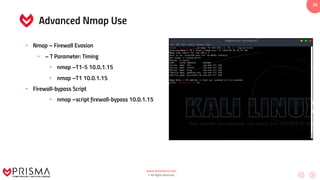
• Nmap – Firewall Evasion
• – T Parameter: Timing
• nmap –T1-5 10.0.1.15
• nmap –T1 10.0.1.15
• Firewall-bypass Script
• nmap –script firewall-bypass 10.0.1.15
www.prismacsi.com
© All Rights Reserved.
37
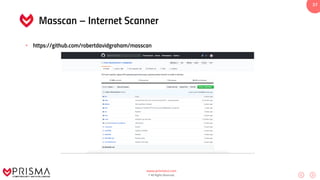
Masscan – Internet Scanner
• https://github.com/robertdavidgraham/masscan
www.prismacsi.com
© All Rights Reserved.
38
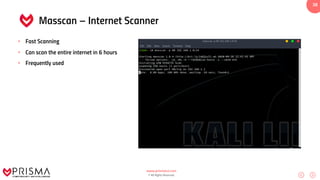
Masscan – Internet Scanner
• Fast Scanning
• Can scan the entire internet in 6 hours
• Frequently used
www.prismacsi.com
© All Rights Reserved.
39
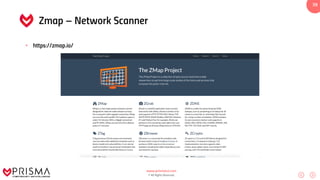
Zmap – Network Scanner
• https://zmap.io/
www.prismacsi.com
© All Rights Reserved.
40
Collecting Information Over DNS
• Using Dig
• dig NS domain.com
• dig MX domain.com
• Frequently Used Tools:
• dnsmap domain.com wordlist
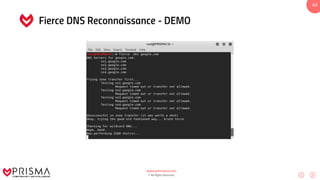
• Fierce –dns domain.com
• Dnsrecon.py –d domain.com
www.prismacsi.com
© All Rights Reserved.
41
Zone Transfer
• Automation can be attempted with Fierce.
• Manual testing can be done with Dig.
• dig axfr @dnsztm2.digi.ninja zonetransfer.me
www.prismacsi.com
© All Rights Reserved.
42
Fierce DNS Reconnaissance - DEMO
www.prismacsi.com
© All Rights Reserved.
43
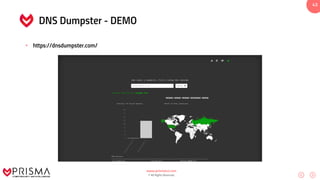
DNS Dumpster - DEMO
• https://dnsdumpster.com/
www.prismacsi.com
© All Rights Reserved.
44
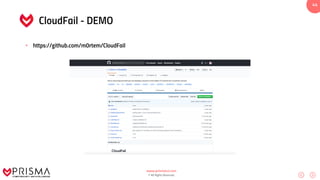
CloudFail - DEMO
• https://github.com/m0rtem/CloudFail
www.prismacsi.com
© All Rights Reserved.
45
CloudFail - DEMO
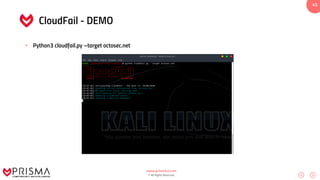
• Python3 cloudfail.py –target octosec.net
www.prismacsi.com
© All Rights Reserved.
46
Frequently used enumeration tools - DEMO
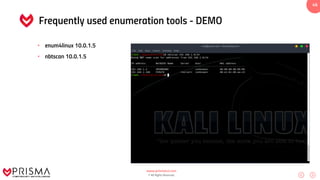
• enum4linux 10.0.1.5
• nbtscan 10.0.1.5
www.prismacsi.com
© All Rights Reserved.
47
Frequently used enumeration tools- DEMO
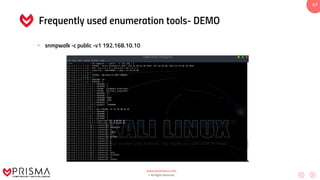
• snmpwalk -c public -v1 192.168.10.10
www.prismacsi.com
© All Rights Reserved.
48
Anonymous Scan Operations
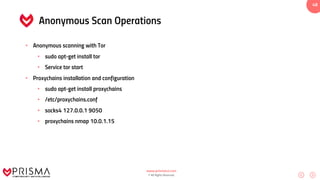
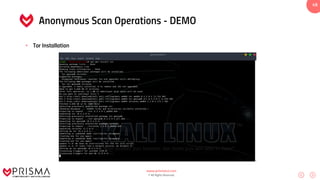
• Anonymous scanning with Tor
• sudo apt-get install tor
• Service tor start
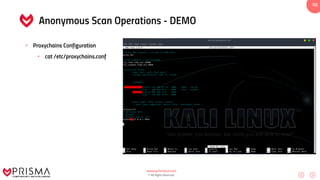
• Proxychains installation and configuration
• sudo apt-get install proxychains
• /etc/proxychains.conf
• socks4 127.0.0.1 9050
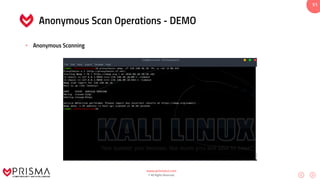
• proxychains nmap 10.0.1.15
www.prismacsi.com
© All Rights Reserved.
49
Anonymous Scan Operations - DEMO
• Tor Installation
www.prismacsi.com
© All Rights Reserved.
50
Anonymous Scan Operations - DEMO
• Proxychains Configuration
• cat /etc/proxychains.conf
www.prismacsi.com
© All Rights Reserved.
51
Anonymous Scan Operations - DEMO
• Anonymous Scanning
www.prismacsi.com
© All Rights Reserved.
52
WAF / Firewall Discovery
• Rule;
• Response to a SYN packet sent
• SYN+ACK sent back
• RST sent back
• No reply indicates that there may be a firewall present.
www.prismacsi.com
© All Rights Reserved.
53
WAF / Firewall Discovery
• Requests that can raise an alarm from IPS;
• ../../../../
• cmd.exe
• /etc/shadow
• /etc/passwd
• Inferences are made from the answers.
• An IPS exists if the connection is reset or a timeout occurs.
www.prismacsi.com
© All Rights Reserved.
54
WAF / Firewall Discovery
• Recon with Wafw00f and WAF
• Analysis is performed on harmful requests.
• wafw00f domain.com
www.prismacsi.com
© All Rights Reserved.
55
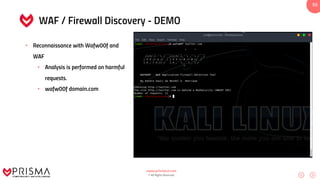
WAF / Firewall Discovery - DEMO
• Reconnaissance with Wafw00f and
WAF
• Analysis is performed on harmful
requests.
• wafw00f domain.com
www.prismacsi.com
© All Rights Reserved.
56
Demo
Practice
www.prismacsi.com
© All Rights Reserved.
57
Questions
?
www.prismacsi.com
© All Rights Reserved.
58
www.prismacsi.com
info@prismacsi.com
0 850 303 85 35
/prismacsi
Contacts

Practical White Hat Hacker Training - Active Information Gathering

  • 1.
    www.prismacsi.com © All RightsReserved. 1 Practical White Hat Hacker Training #3 Active Information Gathering This document can be shared or used by quoted and used for commercial purposes, but can not be changed. Detailed information is available at https://creativecommons.org/licenses/by-nc-nd/4.0/legalcode.
  • 2.
    www.prismacsi.com © All RightsReserved. 2 Active Information Gathering • Nmap basics • Scanning methods with nmap • Reconnaissance using nmap • Port, service, version scanning • Operating system detection • Nmap Scripting Engine (NSE) use and resources • Detailed reconnaissance on DNS, SMTP, SNMP • Anonymous scanning operations • Firewall/IDS evasion methods
  • 3.
    www.prismacsi.com © All RightsReserved. 3 Active Scanning after OSINT • Verify information gathered during the passive information gathering stage • Discover systems that are active within the IP range and save time on vulnerability scanning, the next stage. • Discover ports and services, get to know more about the target! • Identify software and their versions • Identify operating systems
  • 4.
    www.prismacsi.com © All RightsReserved. 4 Nmap – Network Mapping • Network Reconnaissance • Port, service scanning • Version scanning • Operating system discovery • Vulnerability scanning • Firewall/IDS evasion
  • 5.
    www.prismacsi.com © All RightsReserved. 5 Nmap Host Definition • nmap 10.0.1.5 • nmap 10.0.1.5-15 • nmap 10.0.1.0/24 • nmap 10.0.1.5,6,7,8 • nmap –iL iplist.txt • nmap 10.0.1.0/24 —exclude 10.0.1.5
  • 6.
    www.prismacsi.com © All RightsReserved. 6 Nmap Port Definition • nmap 10.0.1.5 –p 80 • nmap 10.0.1.5 –p 80,443 • nmap 10.0.1.5 –p 1-1000 • nmap 10.0.1.5 –p 0-65535 • nmap 10.0.1.5 –p- • nmap 10.0.1.5 –top-ports=500
  • 7.
    www.prismacsi.com © All RightsReserved. 7 Nmap Host Definition
  • 8.
    www.prismacsi.com © All RightsReserved. 8 Nmap Port States and Inferences • Open : • Port açık • Portu dinleyen bir uygulama var. • Closed : • Port kapalı • Fakat erişilebilir • Portu dinleyen bir uygulama yok. • Filtered : • Port durumu belli değil. • Cevap alınamamış olabilir. • Güvenlik duvarı paketi filtrelemiş olabilir.
  • 9.
    www.prismacsi.com © All RightsReserved. 9 Frequently Used Ports
  • 10.
    www.prismacsi.com © All RightsReserved. 10 Nmap – Ping Scan • nmap -sP 10.0.1.0/25 • By sending a ping packet to the whole network, one can tell whether systems that give a response are up or down
  • 11.
    www.prismacsi.com © All RightsReserved. 11 TCP Basics • 3-way Handshake
  • 12.
    www.prismacsi.com © All RightsReserved. 12 Nmap – SYN Scan • SYN Scan is the default port scanning technique and is very fast. • Scanning operation is done according to the response to a sent SYN packet. • If the response to a SNY packet is RST+ACK then the port is closed. • If the response is SYN+ACK then the port is understood to be open and RST is sent • SYN Scan is also known as Half Open Scan. • nmap -sS 10.0.1.5
  • 13.
    www.prismacsi.com © All RightsReserved. 13 Nmap – SYN Scan
  • 14.
    www.prismacsi.com © All RightsReserved. 14 Nmap – TCP Scan • TCP Connect Scan, completes a three way handshake and is recorded in a log. • Obtains more accurate results. • Port states are based on the response to the SYN packet. • If the response to a SNY packet is RST+ACK then the port is inferred to be closed. • If the response is SYN+ACK then the port is inferred to be open and the three way handshake is completed. • nmap –sT 10.0.1.5
  • 15.
    www.prismacsi.com © All RightsReserved. 15 Nmap – TCP Scan
  • 16.
    www.prismacsi.com © All RightsReserved. 16 What is UDP? • UDP (User Datagram Protocol) • Data is sent before a connection is made (no handshake). • UDP is an unreliable transmission protocol. • UDP is used for real-time data transfers such as audio and video transmission.
  • 17.
    www.prismacsi.com © All RightsReserved. 17 Nmap – UDP Scan • Used to analyze UDP ports. • Analysis is done according to the response to UDP packets. • If the response is “ICMP Port Unreachable” then the port is closed. • If the response is a UDP packet then the port is open. • nmap –sU 10.0.1.15
  • 18.
    www.prismacsi.com © All RightsReserved. 18 Nmap – UDP Scan
  • 19.
    www.prismacsi.com © All RightsReserved. 19 TCP Flags There are a total of 6 tcp flags : • ACK: Indicates that the data reached the opposite side without any problem. • SYN: Indicates that a TCP connection will be established. In short it starts the three way handshake. • FIN: Ends a TCP session. • RST: Allows the sender and the receiver to disconnect incase an error occurs in the connection. FIN flag is used to safely terminate a TCP session. • URG: Enables processing of incoming data packets. • PSH: Used to set priority within data packets.
  • 20.
    www.prismacsi.com © All RightsReserved. 20 Nmap – NULL, FIN, XMAS Scan • The analyses are similar. • If the response to a sent packet is RST + ACK then the port is closed, if no packet returns then the port is inferred to be open . • A “ICMP Unreachable” response infers a filtered port. • NULL • nmap –sN 10.0.1.15 • FIN • nmap –sF 10.0.1.15 • XMAS • nmap –sX 10.0.1.15
  • 21.
    www.prismacsi.com © All RightsReserved. 21 Nmap – ACK ve Window Scan • ACK Scan, frequently used for firewall configuration analysis. • In ACK Scan if the response is an RST packet then the port is inferred to be unfiltered. If there is no response or ICMP Unreachable packet returns then the port is inferred to be filtered. • It’s similar to Window Scan ACK. • In Window Scan port states can be Open or Closed. • ACK • nmap –sA 10.0.1.15 • Window • nmap –sW 10.0.1.15
  • 22.
    www.prismacsi.com © All RightsReserved. 22 Nmap Basics • Nmap – Service and Version enumeration • nmap –sS -sV 10.0.1.15 • Nmap – OS detection • nmap –sS –O 10.0.1.15 • Nmap – Detailed analysis • nmap –sS -A 10.0.1.15
  • 23.
    www.prismacsi.com © All RightsReserved. 23 Nmap Basics - DEMO
  • 24.
    www.prismacsi.com © All RightsReserved. 24 Nmap Basics
  • 25.
    www.prismacsi.com © All RightsReserved. 25 Nmap Basics
  • 26.
    www.prismacsi.com © All RightsReserved. 26 Nmap Output Configuration • nmap –sS –sV 10.0.1.15 –oG filename (grepable) • nmap –sS –sV 10.0.1.15 –oX filename (xml) • nmap –sS –sV 10.0.1.15 –oN filename (nmap) • nmap –sS –sV 10.0.1.15 –oA filename (all)
  • 27.
    www.prismacsi.com © All RightsReserved. 27 Nmap – Basics
  • 28.
    www.prismacsi.com © All RightsReserved. 28 Nmap – Basics
  • 29.
    www.prismacsi.com © All RightsReserved. 29 Nmap – Necessary Parameters • – h Parameter : Help • – T Parameter : Time configuration • – Pn Parameter : Pinging • – V Parameter : Nmap version control • – v Parameter : Output details • -- open Parameter : Show only open ports • – 6 Parameter : activate IPv6
  • 30.
    www.prismacsi.com © All RightsReserved. 30 Nmap – Scripting Engine • All resources • http://nmap.org/nsedoc/ • /usr/share/nmap/scripts/ • Developed with Lua programming language • Script Scanning • nmap –sC 10.0.1.15
  • 31.
    www.prismacsi.com © All RightsReserved. 31 Nmap – Scripting Engine • NSE Categoriesi • Auth • Brute • Default • Dos • Exploit • Vuln • Malware • Safe • Version
  • 32.
    www.prismacsi.com © All RightsReserved. 32 Nmap – Scripting Engine
  • 33.
    www.prismacsi.com © All RightsReserved. 33 Nmap – Scripting Engine • Update • nmap --script-updatedb • Script usage • nmap --script “smb-os-discovery” • NSEarch • https://github.com/JKO/nsearch
  • 34.
    www.prismacsi.com © All RightsReserved. 34 Advanced Nmap Use • nmap --script “smb-vuln-*” 10.0.1.15 • nmap --script http-enum domain.com • nmap --script smb-brute –p 445 10.0.1.15 • nmap --script all 10.0.1.15 • nmap --script-help smb-brute
  • 35.
    www.prismacsi.com © All RightsReserved. 35 Advanced Nmap Use • Nmap – Firewall Evasion • – f Parameter : Packet shredding • nmap –f 10.0.1.15 • – D Parameter : IP Spoofing, Make some noise! • nmap –D Spoofedip 10.0.1.15 • – spoof-mac Parameter : MAC poisoning • nmap –spoof-mac „Fortinet‟ 10.0.1.15 • Maximum Host Configuration • nmap --max-paralellism 1 10.0.1.15
  • 36.
    www.prismacsi.com © All RightsReserved. 36 Advanced Nmap Use • Nmap – Firewall Evasion • – T Parameter: Timing • nmap –T1-5 10.0.1.15 • nmap –T1 10.0.1.15 • Firewall-bypass Script • nmap –script firewall-bypass 10.0.1.15
  • 37.
    www.prismacsi.com © All RightsReserved. 37 Masscan – Internet Scanner • https://github.com/robertdavidgraham/masscan
  • 38.
    www.prismacsi.com © All RightsReserved. 38 Masscan – Internet Scanner • Fast Scanning • Can scan the entire internet in 6 hours • Frequently used
  • 39.
    www.prismacsi.com © All RightsReserved. 39 Zmap – Network Scanner • https://zmap.io/
  • 40.
    www.prismacsi.com © All RightsReserved. 40 Collecting Information Over DNS • Using Dig • dig NS domain.com • dig MX domain.com • Frequently Used Tools: • dnsmap domain.com wordlist • Fierce –dns domain.com • Dnsrecon.py –d domain.com
  • 41.
    www.prismacsi.com © All RightsReserved. 41 Zone Transfer • Automation can be attempted with Fierce. • Manual testing can be done with Dig. • dig axfr @dnsztm2.digi.ninja zonetransfer.me
  • 42.
    www.prismacsi.com © All RightsReserved. 42 Fierce DNS Reconnaissance - DEMO
  • 43.
    www.prismacsi.com © All RightsReserved. 43 DNS Dumpster - DEMO • https://dnsdumpster.com/
  • 44.
    www.prismacsi.com © All RightsReserved. 44 CloudFail - DEMO • https://github.com/m0rtem/CloudFail
  • 45.
    www.prismacsi.com © All RightsReserved. 45 CloudFail - DEMO • Python3 cloudfail.py –target octosec.net
  • 46.
    www.prismacsi.com © All RightsReserved. 46 Frequently used enumeration tools - DEMO • enum4linux 10.0.1.5 • nbtscan 10.0.1.5
  • 47.
    www.prismacsi.com © All RightsReserved. 47 Frequently used enumeration tools- DEMO • snmpwalk -c public -v1 192.168.10.10
  • 48.
    www.prismacsi.com © All RightsReserved. 48 Anonymous Scan Operations • Anonymous scanning with Tor • sudo apt-get install tor • Service tor start • Proxychains installation and configuration • sudo apt-get install proxychains • /etc/proxychains.conf • socks4 127.0.0.1 9050 • proxychains nmap 10.0.1.15
  • 49.
    www.prismacsi.com © All RightsReserved. 49 Anonymous Scan Operations - DEMO • Tor Installation
  • 50.
    www.prismacsi.com © All RightsReserved. 50 Anonymous Scan Operations - DEMO • Proxychains Configuration • cat /etc/proxychains.conf
  • 51.
    www.prismacsi.com © All RightsReserved. 51 Anonymous Scan Operations - DEMO • Anonymous Scanning
  • 52.
    www.prismacsi.com © All RightsReserved. 52 WAF / Firewall Discovery • Rule; • Response to a SYN packet sent • SYN+ACK sent back • RST sent back • No reply indicates that there may be a firewall present.
  • 53.
    www.prismacsi.com © All RightsReserved. 53 WAF / Firewall Discovery • Requests that can raise an alarm from IPS; • ../../../../ • cmd.exe • /etc/shadow • /etc/passwd • Inferences are made from the answers. • An IPS exists if the connection is reset or a timeout occurs.
  • 54.
    www.prismacsi.com © All RightsReserved. 54 WAF / Firewall Discovery • Recon with Wafw00f and WAF • Analysis is performed on harmful requests. • wafw00f domain.com
  • 55.
    www.prismacsi.com © All RightsReserved. 55 WAF / Firewall Discovery - DEMO • Reconnaissance with Wafw00f and WAF • Analysis is performed on harmful requests. • wafw00f domain.com
  • 56.
    www.prismacsi.com © All RightsReserved. 56 Demo Practice
  • 57.
    www.prismacsi.com © All RightsReserved. 57 Questions ?
  • 58.
    www.prismacsi.com © All RightsReserved. 58 www.prismacsi.com info@prismacsi.com 0 850 303 85 35 /prismacsi Contacts