LOGIN
Support Center Documentation Desktop editions Tools Intruder Using Burp Intruder
Professional
Using Burp Intruder
Burp Intruder is a tool for automating customized attacks against web applications. It is extremely powerful and configurable, and can be
used to perform a huge range of tasks, from simple brute-force guessing of web directories through to active exploitation of complex
blind SQL injection vulnerabilities.
How Intruder works
Burp Intruder works by taking an HTTP request (called the "base request"), modifying the request in various systematic ways, issuing
each modified version of the request, and analyzing the application's responses to identify interesting features.
For each attack, you must specify one or more sets of payloads, and the positions in the base request where the payloads are to be
placed. Numerous methods of generating payloads are available (including simple lists of strings, numbers, dates, brute force, bit
flipping, and many others). Payloads can be placed into payload positions using different algorithms. Various tools are available to help
analyze the results and identify interesting items for further investigation.
Typical uses
Burp Intruder is a very flexible tool and can help automate all kinds of tasks when testing web applications. The most common use cases
for Intruder fall into the following categories:
Enumerating identifiers
Harvesting useful data
Fuzzing for vulnerabilities
Enumerating identifiers
Web applications frequently use identifiers to refer to items of data and resources; for example, usernames, document IDs, and account
numbers. Often, you will need to cycle through a large number of potential identifiers to enumerate which ones are valid or worthy of
further investigation. To do this in Burp Intruder, you can perform the following steps:
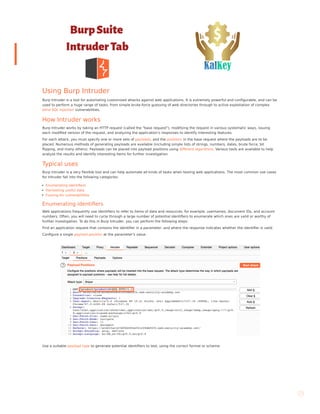
Find an application request that contains the identifier in a parameter, and where the response indicates whether the identifier is valid.
Configure a single payload position at the parameter's value.
Use a suitable payload type to generate potential identifiers to test, using the correct format or scheme.
Support Center Getting Started Documentation Knowledge Base Training Troubleshooting Extensibility BApp Store Release Notes
>> >> >> >> >>
Products  Solutions  Research Academy Daily Swig Support 
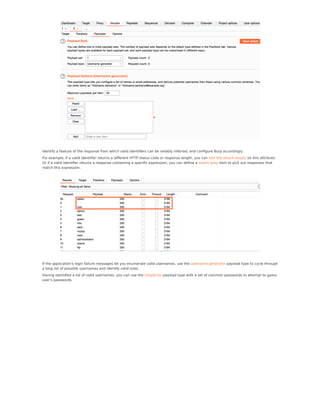
Identify a feature of the response from which valid identifiers can be reliably inferred, and configure Burp accordingly.
For example, if a valid identifier returns a different HTTP status code or response length, you can sort the attack results on this attribute.
Or if a valid identifier returns a response containing a specific expression, you can define a match grep item to pick out responses that
match this expression.
If the application's login failure messages let you enumerate valid usernames, use the username generator payload type to cycle through
a long list of possible usernames and identify valid ones.
Having identified a list of valid usernames, you can use the simple list payload type with a set of common passwords to attempt to guess
user's passwords.
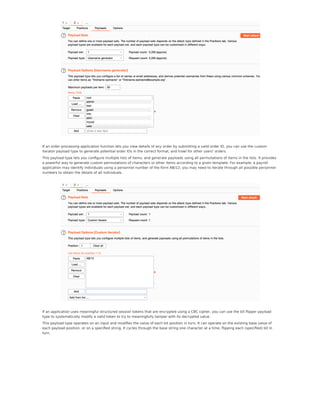
If an order processing application function lets you view details of any order by submitting a valid order ID, you can use the custom
iterator payload type to generate potential order IDs in the correct format, and trawl for other users' orders.
This payload type lets you configure multiple lists of items, and generate payloads using all permutations of items in the lists. It provides
a powerful way to generate custom permutations of characters or other items according to a given template. For example, a payroll
application may identify individuals using a personnel number of the form AB/12; you may need to iterate through all possible personnel
numbers to obtain the details of all individuals.
If an application uses meaningful structured session tokens that are encrypted using a CBC cipher, you can use the bit flipper payload
type to systematically modify a valid token to try to meaningfully tamper with its decrypted value.
This payload type operates on an input and modifies the value of each bit position in turn. It can operate on the existing base value of
each payload position, or on a specified string. It cycles through the base string one character at a time, flipping each (specified) bit in
turn.
Harvesting useful data
In many situations, rather than simply identifying valid identifiers, you need to extract some interesting data about each item, to help
you focus your efforts on the most critical items, or to feed in to other attacks. To do this in Burp Intruder, you can perform the following
steps:
Find an request that contains an identifier in a parameter, and where the response contains the interesting data about the requested
item.
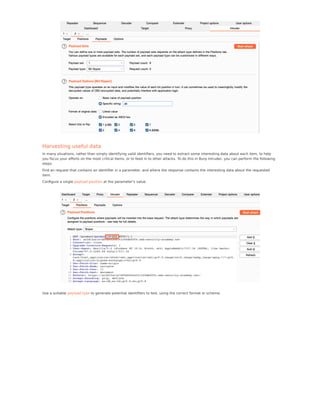
Configure a single payload position at the parameter's value.
Use a suitable payload type to generate potential identifiers to test, using the correct format or scheme.
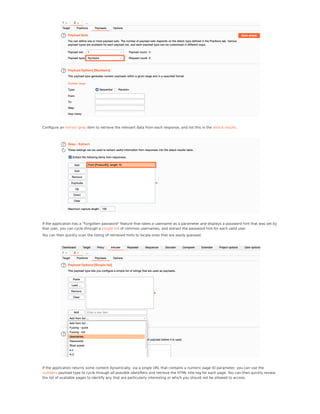
Configure an extract grep item to retrieve the relevant data from each response, and list this in the attack results.
If the application has a "Forgotten password" feature that takes a username as a parameter and displays a password hint that was set by
that user, you can cycle through a simple list of common usernames, and extract the password hint for each valid user.
You can then quickly scan the listing of retrieved hints to locate ones that are easily guessed.
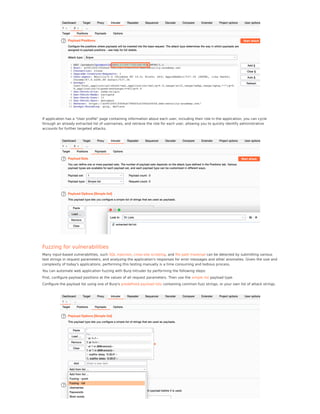
If the application returns some content dynamically, via a single URL that contains a numeric page ID parameter, you can use the
numbers payload type to cycle through all possible identifiers and retrieve the HTML title tag for each page. You can then quickly review
the list of available pages to identify any that are particularly interesting or which you should not be allowed to access.
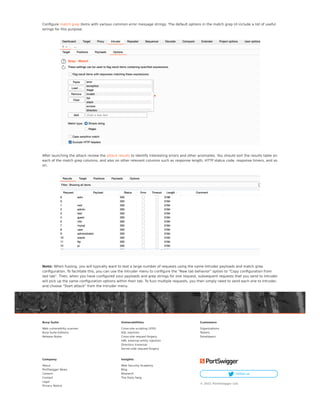
If application has a "User profile" page containing information about each user, including their role in the application, you can cycle
through an already extracted list of usernames, and retrieve the role for each user, allowing you to quickly identify administrative
accounts for further targeted attacks.
Fuzzing for vulnerabilities
Many input-based vulnerabilities, such SQL injection, cross-site scripting, and file path traversal can be detected by submitting various
test strings in request parameters, and analyzing the application's responses for error messages and other anomalies. Given the size and
complexity of today's applications, performing this testing manually is a time consuming and tedious process.
You can automate web application fuzzing with Burp Intruder by performing the following steps:
First, configure payload positions at the values of all request parameters. Then use the simple list payload type.
Configure the payload list using one of Burp's predefined payload lists containing common fuzz strings, or your own list of attack strings.
Configure match grep items with various common error message strings. The default options in the match grep UI include a list of useful
strings for this purpose.
After launching the attack review the attack results to identify interesting errors and other anomalies. You should sort the results table on
each of the match grep columns, and also on other relevant columns such as response length, HTTP status code, response timers, and so
on.
Note: When fuzzing, you will typically want to test a large number of requests using the same Intruder payloads and match grep
configuration. To facilitate this, you can use the Intruder menu to configure the "New tab behavior" option to "Copy configuration from
last tab". Then, when you have configured your payloads and grep strings for one request, subsequent requests that you send to Intruder
will pick up the same configuration options within their tab. To fuzz multiple requests, you then simply need to send each one to Intruder,
and choose "Start attack" from the Intruder menu.
Burp Suite
Web vulnerability scanner
Burp Suite Editions
Release Notes
Vulnerabilities
Cross-site scripting (XSS)
SQL injection
Cross-site request forgery
XML external entity injection
Directory traversal
Server-side request forgery
Customers
Organizations
Testers
Developers
Company
About
PortSwigger News
Careers
Contact
Legal
Privacy Notice
Insights
Web Security Academy
Blog
Research
The Daily Swig
 Follow us
© 2021 PortSwigger Ltd.

Burp documentation

  • 1.
    LOGIN Support Center DocumentationDesktop editions Tools Intruder Using Burp Intruder Professional Using Burp Intruder Burp Intruder is a tool for automating customized attacks against web applications. It is extremely powerful and configurable, and can be used to perform a huge range of tasks, from simple brute-force guessing of web directories through to active exploitation of complex blind SQL injection vulnerabilities. How Intruder works Burp Intruder works by taking an HTTP request (called the "base request"), modifying the request in various systematic ways, issuing each modified version of the request, and analyzing the application's responses to identify interesting features. For each attack, you must specify one or more sets of payloads, and the positions in the base request where the payloads are to be placed. Numerous methods of generating payloads are available (including simple lists of strings, numbers, dates, brute force, bit flipping, and many others). Payloads can be placed into payload positions using different algorithms. Various tools are available to help analyze the results and identify interesting items for further investigation. Typical uses Burp Intruder is a very flexible tool and can help automate all kinds of tasks when testing web applications. The most common use cases for Intruder fall into the following categories: Enumerating identifiers Harvesting useful data Fuzzing for vulnerabilities Enumerating identifiers Web applications frequently use identifiers to refer to items of data and resources; for example, usernames, document IDs, and account numbers. Often, you will need to cycle through a large number of potential identifiers to enumerate which ones are valid or worthy of further investigation. To do this in Burp Intruder, you can perform the following steps: Find an application request that contains the identifier in a parameter, and where the response indicates whether the identifier is valid. Configure a single payload position at the parameter's value. Use a suitable payload type to generate potential identifiers to test, using the correct format or scheme. Support Center Getting Started Documentation Knowledge Base Training Troubleshooting Extensibility BApp Store Release Notes >> >> >> >> >> Products  Solutions  Research Academy Daily Swig Support 
  • 2.
    Identify a featureof the response from which valid identifiers can be reliably inferred, and configure Burp accordingly. For example, if a valid identifier returns a different HTTP status code or response length, you can sort the attack results on this attribute. Or if a valid identifier returns a response containing a specific expression, you can define a match grep item to pick out responses that match this expression. If the application's login failure messages let you enumerate valid usernames, use the username generator payload type to cycle through a long list of possible usernames and identify valid ones. Having identified a list of valid usernames, you can use the simple list payload type with a set of common passwords to attempt to guess user's passwords.
  • 3.
    If an orderprocessing application function lets you view details of any order by submitting a valid order ID, you can use the custom iterator payload type to generate potential order IDs in the correct format, and trawl for other users' orders. This payload type lets you configure multiple lists of items, and generate payloads using all permutations of items in the lists. It provides a powerful way to generate custom permutations of characters or other items according to a given template. For example, a payroll application may identify individuals using a personnel number of the form AB/12; you may need to iterate through all possible personnel numbers to obtain the details of all individuals. If an application uses meaningful structured session tokens that are encrypted using a CBC cipher, you can use the bit flipper payload type to systematically modify a valid token to try to meaningfully tamper with its decrypted value. This payload type operates on an input and modifies the value of each bit position in turn. It can operate on the existing base value of each payload position, or on a specified string. It cycles through the base string one character at a time, flipping each (specified) bit in turn.
  • 4.
    Harvesting useful data Inmany situations, rather than simply identifying valid identifiers, you need to extract some interesting data about each item, to help you focus your efforts on the most critical items, or to feed in to other attacks. To do this in Burp Intruder, you can perform the following steps: Find an request that contains an identifier in a parameter, and where the response contains the interesting data about the requested item. Configure a single payload position at the parameter's value. Use a suitable payload type to generate potential identifiers to test, using the correct format or scheme.
  • 5.
    Configure an extractgrep item to retrieve the relevant data from each response, and list this in the attack results. If the application has a "Forgotten password" feature that takes a username as a parameter and displays a password hint that was set by that user, you can cycle through a simple list of common usernames, and extract the password hint for each valid user. You can then quickly scan the listing of retrieved hints to locate ones that are easily guessed. If the application returns some content dynamically, via a single URL that contains a numeric page ID parameter, you can use the numbers payload type to cycle through all possible identifiers and retrieve the HTML title tag for each page. You can then quickly review the list of available pages to identify any that are particularly interesting or which you should not be allowed to access.
  • 6.
    If application hasa "User profile" page containing information about each user, including their role in the application, you can cycle through an already extracted list of usernames, and retrieve the role for each user, allowing you to quickly identify administrative accounts for further targeted attacks. Fuzzing for vulnerabilities Many input-based vulnerabilities, such SQL injection, cross-site scripting, and file path traversal can be detected by submitting various test strings in request parameters, and analyzing the application's responses for error messages and other anomalies. Given the size and complexity of today's applications, performing this testing manually is a time consuming and tedious process. You can automate web application fuzzing with Burp Intruder by performing the following steps: First, configure payload positions at the values of all request parameters. Then use the simple list payload type. Configure the payload list using one of Burp's predefined payload lists containing common fuzz strings, or your own list of attack strings.
  • 7.
    Configure match grepitems with various common error message strings. The default options in the match grep UI include a list of useful strings for this purpose. After launching the attack review the attack results to identify interesting errors and other anomalies. You should sort the results table on each of the match grep columns, and also on other relevant columns such as response length, HTTP status code, response timers, and so on. Note: When fuzzing, you will typically want to test a large number of requests using the same Intruder payloads and match grep configuration. To facilitate this, you can use the Intruder menu to configure the "New tab behavior" option to "Copy configuration from last tab". Then, when you have configured your payloads and grep strings for one request, subsequent requests that you send to Intruder will pick up the same configuration options within their tab. To fuzz multiple requests, you then simply need to send each one to Intruder, and choose "Start attack" from the Intruder menu. Burp Suite Web vulnerability scanner Burp Suite Editions Release Notes Vulnerabilities Cross-site scripting (XSS) SQL injection Cross-site request forgery XML external entity injection Directory traversal Server-side request forgery Customers Organizations Testers Developers Company About PortSwigger News Careers Contact Legal Privacy Notice Insights Web Security Academy Blog Research The Daily Swig  Follow us © 2021 PortSwigger Ltd.