Presented by : Avinash Singhal
Customer Support Engineer
Cisco Unified Computing System(UCS)
‘
Inter- Integrated Circuit
on CISCO UCS
 Table of Contents
What it is ? , What it does ??
Various components and how they work??
I2C architecture (and components linked )within UCS 5108
chassis??
Various issues that may arise due to I2C congestion??
 Show Tech Analysis and Collecting information via UCS CLI ??
I2C use case scenarios and suggested workarounds w.r.t UCS ??
Reference Links
Question????????????????????????
What it is ? , What it does ??
I2C provides support for communication with various slow, on-board
peripheral devices that are accessed intermittently.
Most available I2C devices operate at speeds up to 400Kbps, with
some venturing up into the low megahertz range.
 I2C is easy to use to link multiple devices together since it has a
built-in addressing scheme(7 bit and 10 bit addressing scheme).
It is widely used in varieties of embedded systems to connect low
speed peripherals listed here :external SEEPROMs, digital sensors,
remote I/O ports, GPIO expanders, RAM, etc) to the main controller
Various components and how they work??
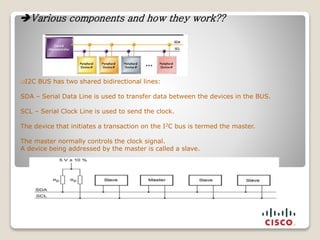
I2C BUS has two shared bidirectional lines:
SDA – Serial Data Line is used to transfer data between the devices in the BUS.
SCL – Serial Clock Line is used to send the clock.
The device that initiates a transaction on the I2C bus is termed the master.
The master normally controls the clock signal.
A device being addressed by the master is called a slave.
 I²C in the UCS Chassis

The UCS uses the PCA9541 IC and the PCA9518 (Hub / Mux) located in the IOM as an I2c MUX.
 The PCA9541 chip is included in each fan, each PSU, and the UCS 5108 chassis mid plane (up to
13 chips per fully loaded UCS 5108 chassis). The chip is the i2c-bus master/slave selector
designed for high reliability dual master i2c bus applications.
 The UCS has 13 different i2c multiplexers (pca9541) in it:
 6 - one on each fan
 4 - one on each PSU
 2 - one on each IOM
 1 - one on the chassis mid plane
 It is used by the Chassis Management Controller (CMC) to monitor components and to control the
master/slave selection on the bus.
 The IOM CPU needs to initialize its I2C interfaces as masters prior to using the I2C bus. If acting
as a slave, the CPU’s slave address is programmable, but defaulted to 0x00. Due to the relatively
large number of devices the I2C devices are divided into several branches behind I2C Mux devices.
 The 9541 device on the mid plane is used as the lock to determine which IOM has exclusive
access to the fans and power supplies in addition to configuring which IOM can access the chassis
seeprom and chassis FRU also located on the mid plane.
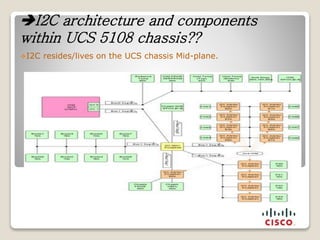
 There are two I2C buses in the UCS 5108 chassis.
 Each of these buses has multiple segments.
 Bus has 5 segments.
 - 0-IOM, - 1 chassis- 2 blade- 3 fan- 4 psu
I2C architecture and components
within UCS 5108 chassis??
I2C resides/lives on the UCS chassis Mid-plane.
“IOM reboot” can cause a lockup condition between CMC and IOM switch
component resulting in IOM outage.
“Multiple false positive events” invalidating UCS health monitoring practice..
FAN spinning at full speed. Fan noise and higher than normal power
consumption.
Generally problems with “reading sensor data” that in turn can cause fans to
spin in safe mode (i.e. run at 100%) and general access problems and faults.
Error code from failed I2C misinterpreted as a blade removal event
Noisy PSU I2C bus misinterpreted as a blade removal event (flapping).
A failed PCA9541 disconnect command sequence can leave multiple PSU I2C
buses connected which can lead to an “out-of-spec electrical condition” on the
I2C bus. This can lead to additional failures.
It is essential to realize these PCA9541 errors can often be cleared by resetting
one or multiple components that have the 9541 chip.
 Various issues that may arise due to I2C
congestion??
 Fan & PSU I2C Issues
 If the fans lock up intermittently, becomes unreadable, or spin to
high but safe speed (safe mode), one or more of the fans might
have a bad 9541 chip.
 This type of problem includes failure to control fan speed and
failure to read fan sensor data like temperature, rotation speed
and FRU data. When this happens, log file data usually indicates
connection problems between the IOM and fan segment.
 The file techsupport_detailed_iocard1/fsl-i2c.2/counters.out &
fsl-i2c.1/counters.out may show PSU and fan related 9541 errors
 Ex: error_pca9541_per_device:
 c.ms 6
 p.psu0.fru 11538
 p.psu0.psmi 13053
 p.fan1.fru 11534
 Fan & PSU I2C Issues
 The file psreading.out from the Chassis techsupport file can also be used.
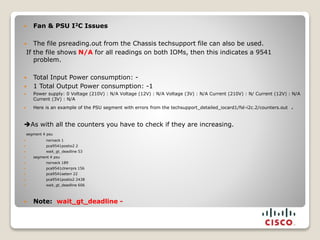
If the file shows N/A for all readings on both IOMs, then this indicates a 9541
problem.
 Total Input Power consumption: -
 1 Total Output Power consumption: -1
 Power supply: 0 Voltage (210V) : N/A Voltage (12V) : N/A Voltage (3V) : N/A Current (210V) : N/ Current (12V) : N/A
Current (3V) : N/A
 Here is an example of the PSU segment with errors from the techsupport_detailed_iocard1/fsl-i2c.2/counters.out .
As with all the counters you have to check if they are increasing.
segment 4 psu
 norxack 1
 pca9541postio2 2
 wait_gt_deadline 53
 segment 4 psu
 norxack 189
 pca9541clrerrprs 156
 pca9541seterr 22
 pca9541postio2 2438
 wait_gt_deadline 606
 Note: wait_gt_deadline -
 Other components that interface the I2C bus, like the SEEPROM, GPIO, Gilroy(mid plane).
There are two Chassis SEEPROMs.
The first SEEPROM is used to store FRU information and is read-only.
The second chassis SEEPROM is read-write and stores chassis UCSM supplied data and uBoot
diagnostic data.
UCS-A# connect local-mgmt a
(local-mgmt)# show cluster st
Cluster Id: 0xd3e9601eeeb711df-0xa232000573af4ac4
A: UP, PRIMARY
B: UP, SUBORDINATE
HA READY
Detailed state of the device selected for HA storage:
Chassis, serial: FOX1442GL18, state: active with errors
Fabric A, chassis-seeprom local IO failure:
FOX1442GL18 READ_FAILED, error: TIMEOUT, error code: 10, error count: 211
Warning: there are pending SEEPROM errors on one or more devices, failover may not complete
Or Description: Chassis FOX1422GJ59, error accessing SEEPROM
IOM-1 midplane 9541 errors:c.seeprom={SUCCESS=36494,ETIMEDOUT=9}
mac:log user$ grep -i "Chassis grab failed" obfl-cmc.log |wc 64 576 8541
SEEPROM IO error is usually due to chassis PCA9541 problem. This can be a transient
problem where two IOMs are contending for access. High error counts per hour may
indicate a faulty PCA9541
General Purpose Input/Output (GPIO)
 GPIO is a generic pin on a chip whose behavior can be controlled by the user at run time.
 GPIO expanders provide expansion for most microprocessor families allowing designers to
save the GPIOs on microprocessors for other important functions.
 As more features and processing requirements, such as LED control, hardware control
monitors, and humidity sensors in the computing space are added to applications, the
limited numbers of GPIOs on microprocessors are becoming more valuable.
 By implementing our I/O expanders, designers can utilize the microprocessor.
 They are also ideal for monitoring system functions and accepting push-button inputs
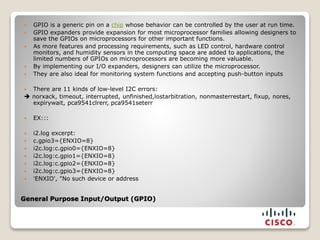
 There are 11 kinds of low-level I2C errors:
 norxack, timeout, interrupted, unfinished,lostarbitration, nonmasterrestart, fixup, nores,
expirywait, pca9541clrerr, pca9541seterr
 EX:::
 i2.log excerpt:
 c.gpio3={ENXIO=8}
 i2c.log:c.gpio0={ENXIO=8}
 i2c.log:c.gpio1={ENXIO=8}
 i2c.log:c.gpio2={ENXIO=8}
 i2c.log:c.gpio3={ENXIO=8}
 'ENXIO', "No such device or address
I²C and SMBus Fault Codes
 EBUSY --- Returned by SMBus adapters when the bus was busy for longer than allowed
 EINVAL ---This rather vague error means an invalid parameter has been detected before any I/O
operation was started
 ENODEV --- Returned by driver probe methods. This is a bit more specific than ENXIO, implying
the problem isn't with the address, but with the device found there
 ENXIO --- Returned by I2C adapters to indicate that the address phase of a transfer didn't get
an ACK. While it might just mean an I2C device was temporarily not responding
 ETIMEDOUT --- This is returned by drivers when an operation took too much time, and was
aborted before it completed.
 EPROTO --- Returned when slave does not conform to the relevant I2C or SMBus (or chip-specific)
protocol specifications.
 EOPNOTSUPP --- Returned by an adapter when asked to perform an operation that it doesn't, or
can't, support
 my %errmap = (
 -1 => ['EPERM', "Operation not permitted"],
 -4 => ['EINTR', "Interrupted system call"],
 -5 => ['EIO', "I/O error"],
 -6 => ['ENXIO', "No such device or address"],
 -11 => ['EAGAIN', "Try again"],
 -12 => ['ENOMEM', "Out of memory"],
 -16 => ['EBUSY', "Device or resource busy"], ("fan present but data not ready, returning -EBUSY");
 -19 => ['ENODEV', "No such device"],
 -22 => ['EINVAL', "Invalid argument"],
 -110 => ['ETIMEDOUT', "Connection timed out"],
 -512 => ['ERESTARTSYS', ""]
Show Tech Analysis and Collecting information via UCS CLI ??
Tech Support Files ::
IOCardcmclogobfl-cmc.log
IOCardcmclogi2c.log
IOM/cmc/log/thermal.log
IOCardx log you can find the following files : psreadings.out , thresholds.out , fancontrol.out,
cmclogplatform_ohms ,cmclogdmserver ,IOCardcmclogpwrmgrcli.log
 fex-1# show platform software cmcctrl thermal status – Shows us the same output as
“thermal.log”
 fex-1# show platform software cmcctrl ohms all – Same output as “ohms.log” with some
additional syslogs added
 fex-1# show platform software cmcctrl obfl logs – Same output as “obfl-cmc.log”
 fex-1# show platform software cmcctrl pstate – Shows us if there are any processes crashing
on the IOM
 fex-1# show platform software cmcctrl cmc manager - current state of the IOM cluster
 show platform software cmcctrl dmclient iom/chassisfru: this is just to get the live
information about the fru and sn
 show platform software cmcctrl showi2c: This is the showi2c command (and i2c.log file)
 PSU: show platform software cmcctrl power status
 show platform software cmcctrl power redundancy : this will give you same output as
pwrmgrcli –r
 show platform software cmcctrl dmclient psreadings
 show platform software cmcctrl dmclient threshold : to check if there is anything crossing
threshold but not only for psu
I2C use case scenarios and suggested workarounds
w.r.t UCS
 Implementing Workarounds for I2C Bus Issues
 Make sure all servers have redundant paths for network and storage.
 Fan Segment Issues
 Remove the fan(s) showing errors and wait at least 30 seconds before reinserting.
 If issue does not resolve, remove the fan and move it to the next fan over and see if the
alert follows the fan or the slot.
 Power supply issues
 Remove the power supplies one at time waiting 2 minutes before reinserting. Never
remove more than one power supply at a time.
 IOM Issues
 Reseat the IOM on one side at time, waiting at least 5 minutes prior to reinserting the
IOM. Never remove both IOM’s at the same time
 Note : No maintenance window required as long as we have HA (fabric failover ,NIC
teaming /bonding ,multi-pathing in place)
Reference links
 Links :
 https://techzone.cisco.com/t5/B-Series/I2C-Workaround/ta-p/290954
 https://techzone.cisco.com/t5/B-Series/625491035-I2C-Case-Study-1/ta-p/237076
 https://techzone.cisco.com/t5/B-Series/I2C-in-B-Series/ta-p/165432
 https://techzone.cisco.com/t5/B-Series/I2C-basics/ta-p/165348/message-revision/165348:1
 https://techzone.cisco.com/t5/B-Series/UCS-I2C-detailed-overview/ta-p/179486
 https://techzone.cisco.com/t5/B-Series/Q-amp-A-Where-to-look-for-i2c-bug-evidence/ta-p/48106
 https://techzone.cisco.com/t5/B-Series/Typical-I2C-errors-after-upgrade-to-2-1-1f/ta-p/319686
 https://techzone.cisco.com/t5/B-Series/Q-amp-A-Thermal-faults-and-Fan-errors-Are-we-seeing-I2C-
issues/ta-p/82010
 https://techzone.cisco.com/t5/B-Series/Purpose-of-Chassis-SEEPROM/ta-p/195482
 https://techzone.cisco.com/t5/B-Series/Q-amp-A-What-is-quot-error-accessing-shared-storage-quot-and-
how/ta-p/39206
 https://techzone.cisco.com/t5/B-Series/UCS-B-Series-Thermal-Alert-Troubleshooting/ta-p/697713
 https://supportforums.cisco.com/discussion/12333451/ucsb-psu-2500acpl-versus-n20-pac5-2500w
 https://supportforums.cisco.com/discussion/11901926/chassis-lost-ucs-212a
 http://whatis.techtarget.com/definition/I2C-bus-Inter-IC-bus
 http://en.wikipedia.org/wiki/I%C2%B2C
 http://www.embedded.com/electronics-blogs/beginner-s-corner/4023816/Introduction-to-I2C
 https://techzone.cisco.com/t5/B-Series/I2C-basics/ta-p/165348/message-revision/165348:1
 www-us.semiconductors.philips.com/i2c/
QUESTIONS ????????????????????
END

My i2c

  • 1.
    Presented by :Avinash Singhal Customer Support Engineer Cisco Unified Computing System(UCS) ‘ Inter- Integrated Circuit on CISCO UCS
  • 2.
     Table ofContents What it is ? , What it does ?? Various components and how they work?? I2C architecture (and components linked )within UCS 5108 chassis?? Various issues that may arise due to I2C congestion??  Show Tech Analysis and Collecting information via UCS CLI ?? I2C use case scenarios and suggested workarounds w.r.t UCS ?? Reference Links Question????????????????????????
  • 3.
    What it is? , What it does ?? I2C provides support for communication with various slow, on-board peripheral devices that are accessed intermittently. Most available I2C devices operate at speeds up to 400Kbps, with some venturing up into the low megahertz range.  I2C is easy to use to link multiple devices together since it has a built-in addressing scheme(7 bit and 10 bit addressing scheme). It is widely used in varieties of embedded systems to connect low speed peripherals listed here :external SEEPROMs, digital sensors, remote I/O ports, GPIO expanders, RAM, etc) to the main controller
  • 4.
    Various components andhow they work?? I2C BUS has two shared bidirectional lines: SDA – Serial Data Line is used to transfer data between the devices in the BUS. SCL – Serial Clock Line is used to send the clock. The device that initiates a transaction on the I2C bus is termed the master. The master normally controls the clock signal. A device being addressed by the master is called a slave.
  • 5.
     I²C inthe UCS Chassis  The UCS uses the PCA9541 IC and the PCA9518 (Hub / Mux) located in the IOM as an I2c MUX.  The PCA9541 chip is included in each fan, each PSU, and the UCS 5108 chassis mid plane (up to 13 chips per fully loaded UCS 5108 chassis). The chip is the i2c-bus master/slave selector designed for high reliability dual master i2c bus applications.  The UCS has 13 different i2c multiplexers (pca9541) in it:  6 - one on each fan  4 - one on each PSU  2 - one on each IOM  1 - one on the chassis mid plane  It is used by the Chassis Management Controller (CMC) to monitor components and to control the master/slave selection on the bus.  The IOM CPU needs to initialize its I2C interfaces as masters prior to using the I2C bus. If acting as a slave, the CPU’s slave address is programmable, but defaulted to 0x00. Due to the relatively large number of devices the I2C devices are divided into several branches behind I2C Mux devices.  The 9541 device on the mid plane is used as the lock to determine which IOM has exclusive access to the fans and power supplies in addition to configuring which IOM can access the chassis seeprom and chassis FRU also located on the mid plane.  There are two I2C buses in the UCS 5108 chassis.  Each of these buses has multiple segments.  Bus has 5 segments.  - 0-IOM, - 1 chassis- 2 blade- 3 fan- 4 psu
  • 6.
    I2C architecture andcomponents within UCS 5108 chassis?? I2C resides/lives on the UCS chassis Mid-plane.
  • 7.
    “IOM reboot” cancause a lockup condition between CMC and IOM switch component resulting in IOM outage. “Multiple false positive events” invalidating UCS health monitoring practice.. FAN spinning at full speed. Fan noise and higher than normal power consumption. Generally problems with “reading sensor data” that in turn can cause fans to spin in safe mode (i.e. run at 100%) and general access problems and faults. Error code from failed I2C misinterpreted as a blade removal event Noisy PSU I2C bus misinterpreted as a blade removal event (flapping). A failed PCA9541 disconnect command sequence can leave multiple PSU I2C buses connected which can lead to an “out-of-spec electrical condition” on the I2C bus. This can lead to additional failures. It is essential to realize these PCA9541 errors can often be cleared by resetting one or multiple components that have the 9541 chip.  Various issues that may arise due to I2C congestion??
  • 8.
     Fan &PSU I2C Issues  If the fans lock up intermittently, becomes unreadable, or spin to high but safe speed (safe mode), one or more of the fans might have a bad 9541 chip.  This type of problem includes failure to control fan speed and failure to read fan sensor data like temperature, rotation speed and FRU data. When this happens, log file data usually indicates connection problems between the IOM and fan segment.  The file techsupport_detailed_iocard1/fsl-i2c.2/counters.out & fsl-i2c.1/counters.out may show PSU and fan related 9541 errors  Ex: error_pca9541_per_device:  c.ms 6  p.psu0.fru 11538  p.psu0.psmi 13053  p.fan1.fru 11534
  • 9.
     Fan &PSU I2C Issues  The file psreading.out from the Chassis techsupport file can also be used. If the file shows N/A for all readings on both IOMs, then this indicates a 9541 problem.  Total Input Power consumption: -  1 Total Output Power consumption: -1  Power supply: 0 Voltage (210V) : N/A Voltage (12V) : N/A Voltage (3V) : N/A Current (210V) : N/ Current (12V) : N/A Current (3V) : N/A  Here is an example of the PSU segment with errors from the techsupport_detailed_iocard1/fsl-i2c.2/counters.out . As with all the counters you have to check if they are increasing. segment 4 psu  norxack 1  pca9541postio2 2  wait_gt_deadline 53  segment 4 psu  norxack 189  pca9541clrerrprs 156  pca9541seterr 22  pca9541postio2 2438  wait_gt_deadline 606  Note: wait_gt_deadline -
  • 10.
     Other componentsthat interface the I2C bus, like the SEEPROM, GPIO, Gilroy(mid plane). There are two Chassis SEEPROMs. The first SEEPROM is used to store FRU information and is read-only. The second chassis SEEPROM is read-write and stores chassis UCSM supplied data and uBoot diagnostic data. UCS-A# connect local-mgmt a (local-mgmt)# show cluster st Cluster Id: 0xd3e9601eeeb711df-0xa232000573af4ac4 A: UP, PRIMARY B: UP, SUBORDINATE HA READY Detailed state of the device selected for HA storage: Chassis, serial: FOX1442GL18, state: active with errors Fabric A, chassis-seeprom local IO failure: FOX1442GL18 READ_FAILED, error: TIMEOUT, error code: 10, error count: 211 Warning: there are pending SEEPROM errors on one or more devices, failover may not complete Or Description: Chassis FOX1422GJ59, error accessing SEEPROM IOM-1 midplane 9541 errors:c.seeprom={SUCCESS=36494,ETIMEDOUT=9} mac:log user$ grep -i "Chassis grab failed" obfl-cmc.log |wc 64 576 8541 SEEPROM IO error is usually due to chassis PCA9541 problem. This can be a transient problem where two IOMs are contending for access. High error counts per hour may indicate a faulty PCA9541
  • 11.
    General Purpose Input/Output(GPIO)  GPIO is a generic pin on a chip whose behavior can be controlled by the user at run time.  GPIO expanders provide expansion for most microprocessor families allowing designers to save the GPIOs on microprocessors for other important functions.  As more features and processing requirements, such as LED control, hardware control monitors, and humidity sensors in the computing space are added to applications, the limited numbers of GPIOs on microprocessors are becoming more valuable.  By implementing our I/O expanders, designers can utilize the microprocessor.  They are also ideal for monitoring system functions and accepting push-button inputs  There are 11 kinds of low-level I2C errors:  norxack, timeout, interrupted, unfinished,lostarbitration, nonmasterrestart, fixup, nores, expirywait, pca9541clrerr, pca9541seterr  EX:::  i2.log excerpt:  c.gpio3={ENXIO=8}  i2c.log:c.gpio0={ENXIO=8}  i2c.log:c.gpio1={ENXIO=8}  i2c.log:c.gpio2={ENXIO=8}  i2c.log:c.gpio3={ENXIO=8}  'ENXIO', "No such device or address
  • 12.
    I²C and SMBusFault Codes  EBUSY --- Returned by SMBus adapters when the bus was busy for longer than allowed  EINVAL ---This rather vague error means an invalid parameter has been detected before any I/O operation was started  ENODEV --- Returned by driver probe methods. This is a bit more specific than ENXIO, implying the problem isn't with the address, but with the device found there  ENXIO --- Returned by I2C adapters to indicate that the address phase of a transfer didn't get an ACK. While it might just mean an I2C device was temporarily not responding  ETIMEDOUT --- This is returned by drivers when an operation took too much time, and was aborted before it completed.  EPROTO --- Returned when slave does not conform to the relevant I2C or SMBus (or chip-specific) protocol specifications.  EOPNOTSUPP --- Returned by an adapter when asked to perform an operation that it doesn't, or can't, support  my %errmap = (  -1 => ['EPERM', "Operation not permitted"],  -4 => ['EINTR', "Interrupted system call"],  -5 => ['EIO', "I/O error"],  -6 => ['ENXIO', "No such device or address"],  -11 => ['EAGAIN', "Try again"],  -12 => ['ENOMEM', "Out of memory"],  -16 => ['EBUSY', "Device or resource busy"], ("fan present but data not ready, returning -EBUSY");  -19 => ['ENODEV', "No such device"],  -22 => ['EINVAL', "Invalid argument"],  -110 => ['ETIMEDOUT', "Connection timed out"],  -512 => ['ERESTARTSYS', ""]
  • 13.
    Show Tech Analysisand Collecting information via UCS CLI ?? Tech Support Files :: IOCardcmclogobfl-cmc.log IOCardcmclogi2c.log IOM/cmc/log/thermal.log IOCardx log you can find the following files : psreadings.out , thresholds.out , fancontrol.out, cmclogplatform_ohms ,cmclogdmserver ,IOCardcmclogpwrmgrcli.log  fex-1# show platform software cmcctrl thermal status – Shows us the same output as “thermal.log”  fex-1# show platform software cmcctrl ohms all – Same output as “ohms.log” with some additional syslogs added  fex-1# show platform software cmcctrl obfl logs – Same output as “obfl-cmc.log”  fex-1# show platform software cmcctrl pstate – Shows us if there are any processes crashing on the IOM  fex-1# show platform software cmcctrl cmc manager - current state of the IOM cluster  show platform software cmcctrl dmclient iom/chassisfru: this is just to get the live information about the fru and sn  show platform software cmcctrl showi2c: This is the showi2c command (and i2c.log file)  PSU: show platform software cmcctrl power status  show platform software cmcctrl power redundancy : this will give you same output as pwrmgrcli –r  show platform software cmcctrl dmclient psreadings  show platform software cmcctrl dmclient threshold : to check if there is anything crossing threshold but not only for psu
  • 14.
    I2C use casescenarios and suggested workarounds w.r.t UCS  Implementing Workarounds for I2C Bus Issues  Make sure all servers have redundant paths for network and storage.  Fan Segment Issues  Remove the fan(s) showing errors and wait at least 30 seconds before reinserting.  If issue does not resolve, remove the fan and move it to the next fan over and see if the alert follows the fan or the slot.  Power supply issues  Remove the power supplies one at time waiting 2 minutes before reinserting. Never remove more than one power supply at a time.  IOM Issues  Reseat the IOM on one side at time, waiting at least 5 minutes prior to reinserting the IOM. Never remove both IOM’s at the same time  Note : No maintenance window required as long as we have HA (fabric failover ,NIC teaming /bonding ,multi-pathing in place)
  • 15.
    Reference links  Links:  https://techzone.cisco.com/t5/B-Series/I2C-Workaround/ta-p/290954  https://techzone.cisco.com/t5/B-Series/625491035-I2C-Case-Study-1/ta-p/237076  https://techzone.cisco.com/t5/B-Series/I2C-in-B-Series/ta-p/165432  https://techzone.cisco.com/t5/B-Series/I2C-basics/ta-p/165348/message-revision/165348:1  https://techzone.cisco.com/t5/B-Series/UCS-I2C-detailed-overview/ta-p/179486  https://techzone.cisco.com/t5/B-Series/Q-amp-A-Where-to-look-for-i2c-bug-evidence/ta-p/48106  https://techzone.cisco.com/t5/B-Series/Q-amp-A-Where-to-look-for-i2c-bug-evidence/ta-p/48106  https://techzone.cisco.com/t5/B-Series/Typical-I2C-errors-after-upgrade-to-2-1-1f/ta-p/319686  https://techzone.cisco.com/t5/B-Series/Q-amp-A-Thermal-faults-and-Fan-errors-Are-we-seeing-I2C- issues/ta-p/82010  https://techzone.cisco.com/t5/B-Series/Purpose-of-Chassis-SEEPROM/ta-p/195482  https://techzone.cisco.com/t5/B-Series/Q-amp-A-What-is-quot-error-accessing-shared-storage-quot-and- how/ta-p/39206  https://techzone.cisco.com/t5/B-Series/UCS-B-Series-Thermal-Alert-Troubleshooting/ta-p/697713  https://supportforums.cisco.com/discussion/12333451/ucsb-psu-2500acpl-versus-n20-pac5-2500w  https://supportforums.cisco.com/discussion/11901926/chassis-lost-ucs-212a  http://whatis.techtarget.com/definition/I2C-bus-Inter-IC-bus  http://en.wikipedia.org/wiki/I%C2%B2C  http://www.embedded.com/electronics-blogs/beginner-s-corner/4023816/Introduction-to-I2C  https://techzone.cisco.com/t5/B-Series/I2C-basics/ta-p/165348/message-revision/165348:1  https://techzone.cisco.com/t5/B-Series/I2C-basics/ta-p/165348/message-revision/165348:1  www-us.semiconductors.philips.com/i2c/
  • 16.