INTEL IOT Workshop
BY SRIVIGNESSH PSS
Microprocessor
 A microprocessor incorporates the functions of a computer's central
processing unit (CPU) on a single integrated circuit (IC),or at most a
few integrated circuits.
 The microprocessor is a multipurpose, programmable device that
accepts digital data as input, processes it according to instructions
stored in its memory, and provides results as output.
 The integration of a whole CPU onto a single chip or on a few chips
greatly reduced the cost of processing power.
 The integrated circuit processor was produced in large numbers by
highly automated processes, so unit cost was low.
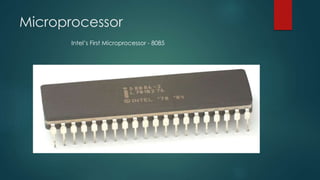
Microprocessor
Intel’s First Microprocessor - 8085
 Microprocessor gives you the base for understanding the
Microcontroller and makes it easy to deal with the advanced
development boards like Arduino, Galileo, MSP430, AVR, PIC, ARM.
HOW??!!!
 Because it is the brain of the microcontroller. It is the CPU. The
Central Processing Unit.
 When it is attached with peripherals and integrated on a single chip
it becomes a controller.
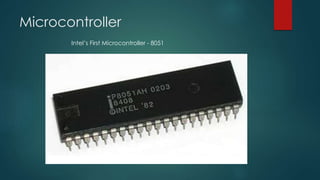
Microcontroller
Intel’s First Microcontroller - 8051
Microcontroller
 A microcontroller (sometimes abbreviated µC, uC or MCU) is a small
computer on a single integrated circuit containing a processor
core, memory, and programmable input/output peripherals.
 Microcontrollers are designed for embedded applications, in
contrast to the microprocessors used in personal computers or other
general purpose applications.
 Microcontrollers are used in automatically controlled products and
devices, such as automobile engine control systems, implantable
medical devices, remote controls, office machines, appliances,
power tools, toys and other embedded systems
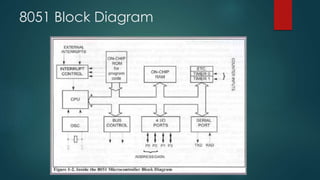
8051 Block Diagram
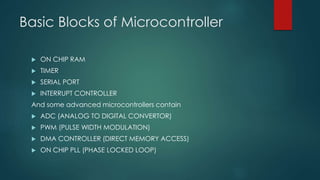
Basic Blocks of Microcontroller
 ON CHIP RAM
 TIMER
 SERIAL PORT
 INTERRUPT CONTROLLER
And some advanced microcontrollers contain
 ADC (ANALOG TO DIGITAL CONVERTOR)
 PWM (PULSE WIDTH MODULATION)
 DMA CONTROLLER (DIRECT MEMORY ACCESS)
 ON CHIP PLL (PHASE LOCKED LOOP)
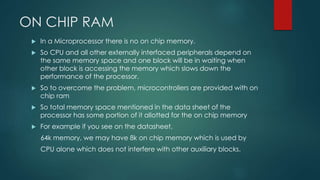
ON CHIP RAM
 In a Microprocessor there is no on chip memory.
 So CPU and all other externally interfaced peripherals depend on
the same memory space and one block will be in waiting when
other block is accessing the memory which slows down the
performance of the processor.
 So to overcome the problem, microcontrollers are provided with on
chip ram
 So total memory space mentioned in the data sheet of the
processor has some portion of it allotted for the on chip memory
 For example if you see on the datasheet,
64k memory, we may have 8k on chip memory which is used by
CPU alone which does not interfere with other auxiliary blocks.
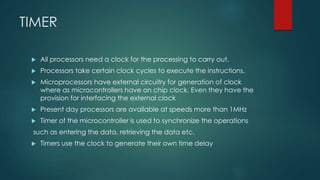
TIMER
 All processors need a clock for the processing to carry out.
 Processors take certain clock cycles to execute the instructions.
 Microprocessors have external circuitry for generation of clock
where as microcontrollers have on chip clock. Even they have the
provision for interfacing the external clock
 Present day processors are available at speeds more than 1MHz
 Timer of the microcontroller is used to synchronize the operations
such as entering the data, retrieving the data etc.
 Timers use the clock to generate their own time delay
Clock[DIVIDE BY NETWORK]TIMER
SERIAL PORT
 Serial port is used for communicating with externally interfaced
devices or processors
 In computing, a serial port is a serial communication physical
interface through which information transfers in or out one bit at a
time
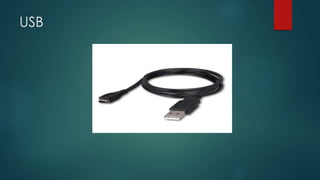
 Modern computers without serial ports may require serial-to-USB
converters to allow compatibility with RS 232 serial devices. Serial
ports are still used in applications such as industrial automation
systems, scientific instruments, point of sale systems and some
industrial and consumer products.
USB
INTERRUPT CONTROLLER
 Interrupts are those which initiate a communication
 Interrupts are asynchronous events which when occurred, processor
suspends the current task and attend the interrupt to render its
service.
 Microcontrollers are provided with on chip interrupt controllers
ONCHIP ADC
 Most of the naturally occurring signals are analog signals but to
process them in the digital domain we need them in digital values
so signals are converted to digital signals
 Then they are processed in the micro controller and after processing
they are again converted to analog signals by proper techniques
and filtering
 So microcontrollers are provided with on chip Analog to digital
convertor to increase the performance
PULSE WIDTH MODULATINON
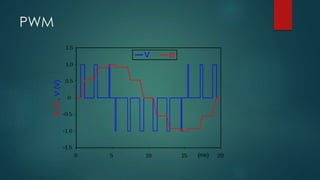
 Pulse-width modulation (PWM), or pulse-duration modulation (PDM),
is a modulation technique used in communications systems to
encode the amplitude of a signal into the width of the pulse
(duration) of another
 Although this modulation technique can be used to encode
information for transmission, its main use is to allow the control of the
power supplied to electrical devices, especially to inertial loads such
as motor signal.
PWM
PWM
 Microcontrollers are also provided with on chip PWM controller for
many control applications mostly used for Radio Frequency
applications in the area of communications and also for electrical
applications.
NOW THAT YOU Understood WHAT
THE BASIC BLOCKS OF A
MICROCONTROLLER are…………..
Let us learn a specific micro-
controller Atmega328 using
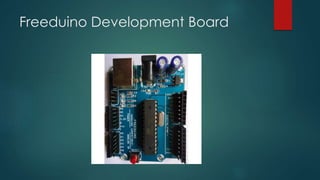
FREEDUINO development Board.
Freeduino Development Board
Features
 8-bit microcontroller
 23 programmable I/O lines
 2 8-bit timers/counters
 1 16-bit timers/counters
 6 PWM channels
 6 channel 10-bit ADC
 PROGRAMMABLE SERIAL USART
 MASTER SALVE SPI SERIAL INTERFACE
 Operating Voltage 1.8-5.5V
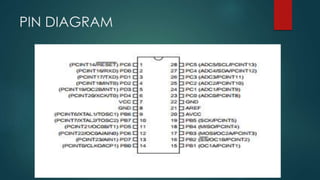
PIN DIAGRAM
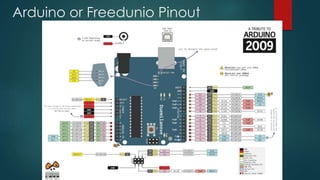
Arduino or Freedunio Pinout
Example Programs 1:
LED BLINK
 void setup() {
 // initialize digital pin 13 as an output.
 pinMode(13, OUTPUT);
 }
 // the loop function runs over and over again forever
 void loop() {
 digitalWrite(13, HIGH); // turn the LED on (HIGH is the voltage level)
 delay(1000); // wait for a second
 digitalWrite(13, LOW); // turn the LED off by making the voltage LOW
 delay(1000); // wait for a second
 }
Example Program 2
Analog to Serial
 void setup() {
 // initialize serial communication at 9600 bits per second:
 Serial.begin(9600);
 }
 // the loop routine runs over and over again forever:
 void loop() {
 // read the input on analog pin 0:
 int sensorValue = analogRead(A0);
 // print out the value you read:
 Serial.println(sensorValue);
 delay(1); // delay in between reads for stability
 }
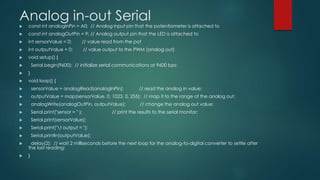
Analog in-out Serial
 const int analogInPin = A0; // Analog input pin that the potentiometer is attached to
 const int analogOutPin = 9; // Analog output pin that the LED is attached to
 int sensorValue = 0; // value read from the pot
 int outputValue = 0; // value output to the PWM (analog out)
 void setup() {
 Serial.begin(9600); // initialize serial communications at 9600 bps:
 }
 void loop() {
 sensorValue = analogRead(analogInPin); // read the analog in value:
 outputValue = map(sensorValue, 0, 1023, 0, 255); // map it to the range of the analog out:
 analogWrite(analogOutPin, outputValue); // change the analog out value:
 Serial.print("sensor = " ); // print the results to the serial monitor:
 Serial.print(sensorValue);
 Serial.print("t output = ");
 Serial.println(outputValue);
 delay(2); // wait 2 milliseconds before the next loop for the analog-to-digital converter to settle after
the last reading:
 }
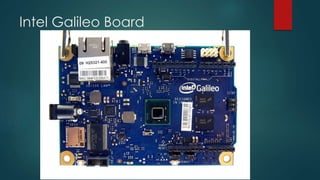
Intel Galileo Board
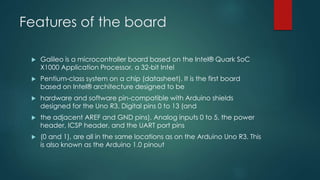
Features of the board
 Galileo is a microcontroller board based on the Intel® Quark SoC
X1000 Application Processor, a 32-bit Intel
 Pentium-class system on a chip (datasheet). It is the first board
based on Intel® architecture designed to be
 hardware and software pin-compatible with Arduino shields
designed for the Uno R3. Digital pins 0 to 13 (and
 the adjacent AREF and GND pins), Analog inputs 0 to 5, the power
header, ICSP header, and the UART port pins
 (0 and 1), are all in the same locations as on the Arduino Uno R3. This
is also known as the Arduino 1.0 pinout
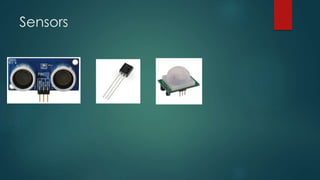
Sensors
Useful Tech-fests
 IIT Kharagpur
http://www.ktj.in/
 IIT Bombay: Techfest
http://www.techfest.org/
 IIT Kanpur
http://www.techkriti.org/
 IIT Madras: Shaatra
http://shaastra.org/2015/main/php/pages/eventlist.php…
 IIT Delhi
http://www.tryst-iitd.com/index.php
 Anna Univarsity : Kurushetra
http://kurukshetra.org.in/#/events
 Amirtha :Anokha
https://www.amrita.edu/event/anokha-2014
USEFUL DESIGN Challenges
 1.Intel Make it Wearables
2.TI IDC Contest
3.Intel Embedded Design Contest
4. Atmel Embedded Design Contest
5. Freescale Design Challenge
6. Cisco IOT Challenge
7. TI MCU Design Challenge
8. Analog Anveshan
9. GE Edison Challenge
10.Honeywell Young Innovator Challenge
Conferences and Journal
Publications
 IEEE
 Sciencedirect
 Springer
 International Journal of Scientific Research
How to Convert your Idea into
Project.
 Literature Survey (scholar.google.com)
 Market Survey (Government and Non-Government Survey)
 Brain-storm
 Components Survey and Cost Analysis.
 Check for Innovation
 Keep improving the design based on feedback
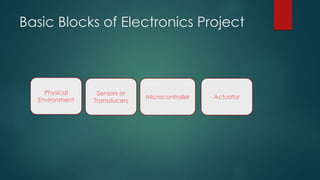
Basic Blocks of Electronics Project
Physical
Environment
Sensors or
Transducers
Microcontroller Actuator
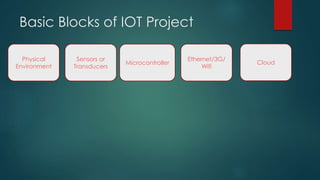
Basic Blocks of IOT Project
Physical
Environment
Sensors or
Transducers
Microcontroller
Ethernet/3G/
Wifi
Cloud

Iot Workshop NITT 2015

  • 1.
    INTEL IOT Workshop BYSRIVIGNESSH PSS
  • 4.
    Microprocessor  A microprocessorincorporates the functions of a computer's central processing unit (CPU) on a single integrated circuit (IC),or at most a few integrated circuits.  The microprocessor is a multipurpose, programmable device that accepts digital data as input, processes it according to instructions stored in its memory, and provides results as output.  The integration of a whole CPU onto a single chip or on a few chips greatly reduced the cost of processing power.  The integrated circuit processor was produced in large numbers by highly automated processes, so unit cost was low.
  • 5.
  • 6.
     Microprocessor givesyou the base for understanding the Microcontroller and makes it easy to deal with the advanced development boards like Arduino, Galileo, MSP430, AVR, PIC, ARM. HOW??!!!  Because it is the brain of the microcontroller. It is the CPU. The Central Processing Unit.  When it is attached with peripherals and integrated on a single chip it becomes a controller.
  • 7.
  • 8.
    Microcontroller  A microcontroller(sometimes abbreviated µC, uC or MCU) is a small computer on a single integrated circuit containing a processor core, memory, and programmable input/output peripherals.  Microcontrollers are designed for embedded applications, in contrast to the microprocessors used in personal computers or other general purpose applications.  Microcontrollers are used in automatically controlled products and devices, such as automobile engine control systems, implantable medical devices, remote controls, office machines, appliances, power tools, toys and other embedded systems
  • 9.
  • 10.
    Basic Blocks ofMicrocontroller  ON CHIP RAM  TIMER  SERIAL PORT  INTERRUPT CONTROLLER And some advanced microcontrollers contain  ADC (ANALOG TO DIGITAL CONVERTOR)  PWM (PULSE WIDTH MODULATION)  DMA CONTROLLER (DIRECT MEMORY ACCESS)  ON CHIP PLL (PHASE LOCKED LOOP)
  • 11.
    ON CHIP RAM In a Microprocessor there is no on chip memory.  So CPU and all other externally interfaced peripherals depend on the same memory space and one block will be in waiting when other block is accessing the memory which slows down the performance of the processor.  So to overcome the problem, microcontrollers are provided with on chip ram  So total memory space mentioned in the data sheet of the processor has some portion of it allotted for the on chip memory  For example if you see on the datasheet, 64k memory, we may have 8k on chip memory which is used by CPU alone which does not interfere with other auxiliary blocks.
  • 12.
    TIMER  All processorsneed a clock for the processing to carry out.  Processors take certain clock cycles to execute the instructions.  Microprocessors have external circuitry for generation of clock where as microcontrollers have on chip clock. Even they have the provision for interfacing the external clock  Present day processors are available at speeds more than 1MHz  Timer of the microcontroller is used to synchronize the operations such as entering the data, retrieving the data etc.  Timers use the clock to generate their own time delay
  • 13.
  • 14.
    SERIAL PORT  Serialport is used for communicating with externally interfaced devices or processors  In computing, a serial port is a serial communication physical interface through which information transfers in or out one bit at a time  Modern computers without serial ports may require serial-to-USB converters to allow compatibility with RS 232 serial devices. Serial ports are still used in applications such as industrial automation systems, scientific instruments, point of sale systems and some industrial and consumer products.
  • 15.
  • 16.
    INTERRUPT CONTROLLER  Interruptsare those which initiate a communication  Interrupts are asynchronous events which when occurred, processor suspends the current task and attend the interrupt to render its service.  Microcontrollers are provided with on chip interrupt controllers
  • 17.
    ONCHIP ADC  Mostof the naturally occurring signals are analog signals but to process them in the digital domain we need them in digital values so signals are converted to digital signals  Then they are processed in the micro controller and after processing they are again converted to analog signals by proper techniques and filtering  So microcontrollers are provided with on chip Analog to digital convertor to increase the performance
  • 18.
    PULSE WIDTH MODULATINON Pulse-width modulation (PWM), or pulse-duration modulation (PDM), is a modulation technique used in communications systems to encode the amplitude of a signal into the width of the pulse (duration) of another  Although this modulation technique can be used to encode information for transmission, its main use is to allow the control of the power supplied to electrical devices, especially to inertial loads such as motor signal.
  • 19.
  • 20.
    PWM  Microcontrollers arealso provided with on chip PWM controller for many control applications mostly used for Radio Frequency applications in the area of communications and also for electrical applications.
  • 21.
    NOW THAT YOUUnderstood WHAT THE BASIC BLOCKS OF A MICROCONTROLLER are………….. Let us learn a specific micro- controller Atmega328 using FREEDUINO development Board.
  • 22.
  • 23.
    Features  8-bit microcontroller 23 programmable I/O lines  2 8-bit timers/counters  1 16-bit timers/counters  6 PWM channels  6 channel 10-bit ADC  PROGRAMMABLE SERIAL USART  MASTER SALVE SPI SERIAL INTERFACE  Operating Voltage 1.8-5.5V
  • 24.
  • 25.
  • 26.
    Example Programs 1: LEDBLINK  void setup() {  // initialize digital pin 13 as an output.  pinMode(13, OUTPUT);  }  // the loop function runs over and over again forever  void loop() {  digitalWrite(13, HIGH); // turn the LED on (HIGH is the voltage level)  delay(1000); // wait for a second  digitalWrite(13, LOW); // turn the LED off by making the voltage LOW  delay(1000); // wait for a second  }
  • 27.
    Example Program 2 Analogto Serial  void setup() {  // initialize serial communication at 9600 bits per second:  Serial.begin(9600);  }  // the loop routine runs over and over again forever:  void loop() {  // read the input on analog pin 0:  int sensorValue = analogRead(A0);  // print out the value you read:  Serial.println(sensorValue);  delay(1); // delay in between reads for stability  }
  • 28.
    Analog in-out Serial const int analogInPin = A0; // Analog input pin that the potentiometer is attached to  const int analogOutPin = 9; // Analog output pin that the LED is attached to  int sensorValue = 0; // value read from the pot  int outputValue = 0; // value output to the PWM (analog out)  void setup() {  Serial.begin(9600); // initialize serial communications at 9600 bps:  }  void loop() {  sensorValue = analogRead(analogInPin); // read the analog in value:  outputValue = map(sensorValue, 0, 1023, 0, 255); // map it to the range of the analog out:  analogWrite(analogOutPin, outputValue); // change the analog out value:  Serial.print("sensor = " ); // print the results to the serial monitor:  Serial.print(sensorValue);  Serial.print("t output = ");  Serial.println(outputValue);  delay(2); // wait 2 milliseconds before the next loop for the analog-to-digital converter to settle after the last reading:  }
  • 29.
  • 30.
    Features of theboard  Galileo is a microcontroller board based on the Intel® Quark SoC X1000 Application Processor, a 32-bit Intel  Pentium-class system on a chip (datasheet). It is the first board based on Intel® architecture designed to be  hardware and software pin-compatible with Arduino shields designed for the Uno R3. Digital pins 0 to 13 (and  the adjacent AREF and GND pins), Analog inputs 0 to 5, the power header, ICSP header, and the UART port pins  (0 and 1), are all in the same locations as on the Arduino Uno R3. This is also known as the Arduino 1.0 pinout
  • 31.
  • 32.
    Useful Tech-fests  IITKharagpur http://www.ktj.in/  IIT Bombay: Techfest http://www.techfest.org/  IIT Kanpur http://www.techkriti.org/  IIT Madras: Shaatra http://shaastra.org/2015/main/php/pages/eventlist.php…  IIT Delhi http://www.tryst-iitd.com/index.php  Anna Univarsity : Kurushetra http://kurukshetra.org.in/#/events  Amirtha :Anokha https://www.amrita.edu/event/anokha-2014
  • 33.
    USEFUL DESIGN Challenges 1.Intel Make it Wearables 2.TI IDC Contest 3.Intel Embedded Design Contest 4. Atmel Embedded Design Contest 5. Freescale Design Challenge 6. Cisco IOT Challenge 7. TI MCU Design Challenge 8. Analog Anveshan 9. GE Edison Challenge 10.Honeywell Young Innovator Challenge
  • 34.
    Conferences and Journal Publications IEEE  Sciencedirect  Springer  International Journal of Scientific Research
  • 35.
    How to Convertyour Idea into Project.  Literature Survey (scholar.google.com)  Market Survey (Government and Non-Government Survey)  Brain-storm  Components Survey and Cost Analysis.  Check for Innovation  Keep improving the design based on feedback
  • 36.
    Basic Blocks ofElectronics Project Physical Environment Sensors or Transducers Microcontroller Actuator
  • 37.
    Basic Blocks ofIOT Project Physical Environment Sensors or Transducers Microcontroller Ethernet/3G/ Wifi Cloud