


An overview
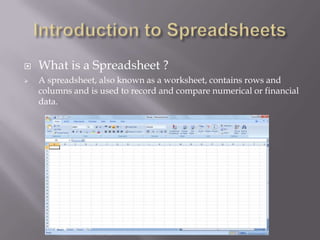
   What is a Spreadsheet ?
   A spreadsheet, also known as a worksheet, contains rows and
    columns and is used to record and compare numerical or financial
    data.
   Each spreadsheet consists of rows and
    columns.

   A cell is the intersection of a row and column.

   Rows are labeled with 1,2,3,4.....

   Columns are labeled with A,B,C,D....
   Home Tab
   We can format the text in your document, cut, copy, and paste information.
   We can change the alignment of data, insert, delete, and format cells.
   The Home Tab also allows us to change the number of your data (i.e. currency, time, date).


   Insert Tab
   We can insert various different things from this tab such
    as pictures, clip art, charts, links, headers and footers, and word art.


   Page Layout
   Herewe are able to add margins, themes to our document, change the orientation, page
    breaks, and titles.
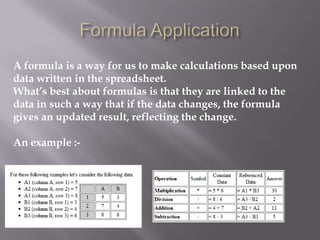
A formula is a way for us to make calculations based upon
data written in the spreadsheet.
What’s best about formulas is that they are linked to the
data in such a way that if the data changes, the formula
gives an updated result, reflecting the change.

An example :-
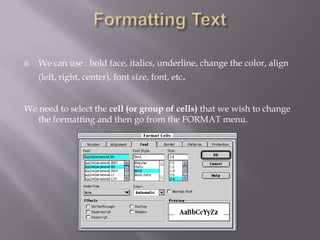
   We can use : bold face, italics, underline, change the color, align
    (left, right, center), font size, font, etc.


We need to select the cell (or group of cells) that we wish to change
   the formatting and then go from the FORMAT menu.
   The VLookup function searches for value in the left-
    most column of table array and returns the value in
    the same row based on the index number.


    The syntax for the VLookup function is:

    VLookup( value, table_array, index_number, not_exact_match )
   The HLookup function searches for value in the top
    row of table_array and returns the value in the same
    column based on the index_number.


    The syntax for the HLookup function is:

HLookup( value, table_array, index_number,
  not_exact_match )
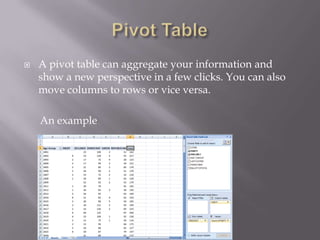
   A pivot table can aggregate your information and
    show a new perspective in a few clicks. You can also
    move columns to rows or vice versa.

    An example
That day was my first day in class.
Had access to internet , so out of mere excitement
had logged in, and i had lost the context going in
the class , i know it was very stupid of me to do
so. But all i can say is SORRY.
Such mistakes wont be repeated again.

Microsoft excel

  • 1.
  • 2.
    What is a Spreadsheet ?  A spreadsheet, also known as a worksheet, contains rows and columns and is used to record and compare numerical or financial data.
  • 3.
    Each spreadsheet consists of rows and columns.  A cell is the intersection of a row and column.  Rows are labeled with 1,2,3,4.....  Columns are labeled with A,B,C,D....
  • 4.
    Home Tab  We can format the text in your document, cut, copy, and paste information.  We can change the alignment of data, insert, delete, and format cells.  The Home Tab also allows us to change the number of your data (i.e. currency, time, date).  Insert Tab  We can insert various different things from this tab such as pictures, clip art, charts, links, headers and footers, and word art.  Page Layout  Herewe are able to add margins, themes to our document, change the orientation, page breaks, and titles.
  • 5.
    A formula isa way for us to make calculations based upon data written in the spreadsheet. What’s best about formulas is that they are linked to the data in such a way that if the data changes, the formula gives an updated result, reflecting the change. An example :-
  • 6.
    We can use : bold face, italics, underline, change the color, align (left, right, center), font size, font, etc. We need to select the cell (or group of cells) that we wish to change the formatting and then go from the FORMAT menu.
  • 7.
    The VLookup function searches for value in the left- most column of table array and returns the value in the same row based on the index number. The syntax for the VLookup function is: VLookup( value, table_array, index_number, not_exact_match )
  • 8.
    The HLookup function searches for value in the top row of table_array and returns the value in the same column based on the index_number. The syntax for the HLookup function is: HLookup( value, table_array, index_number, not_exact_match )
  • 9.
    A pivot table can aggregate your information and show a new perspective in a few clicks. You can also move columns to rows or vice versa. An example
  • 10.
    That day wasmy first day in class. Had access to internet , so out of mere excitement had logged in, and i had lost the context going in the class , i know it was very stupid of me to do so. But all i can say is SORRY. Such mistakes wont be repeated again.