MICROPROCESSORMICROPROCESSOR
&&
NETWORKINGNETWORKING
Microprocessor :
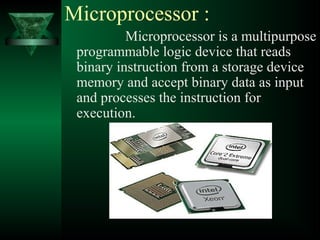
Microprocessor is a multipurpose
programmable logic device that reads
binary instruction from a storage device
memory and accept binary data as input
and processes the instruction for
execution.
Intel 1st
4004 Microprocessor
µp is made up of semiconductor device is
called Integrated Circuit (IC)
IC is used for manufacturing process of
microprocessor and other IC’s.
 Classification of IC’s
 Bipolar IC’s Unipolar IC’s
IC’s
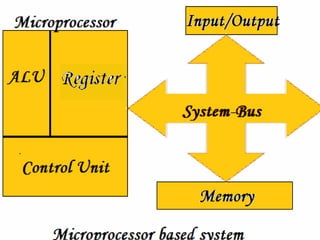
Parts of Microprocessor
Microprocessor is divided into the three
parts:-
1. Arithmetic Logic Unit (ALU)
2. Register
3. Control Unit.
Memory
 Memory is one of the most important factor in
the microprocessor.
 It is used to store the data or information in a
binary format.
 Microprocessor memory
Cache Memory: A cache memory used by the
central processing unit of a computer to reduce
the average time to access memory.
The cache is a smaller, faster memory which
stores copies of the data from the most
frequently used main memory locations.
What is Bus?
A bus in computer terms, is simply a
channel over which information flows
between two or more devices.
There are three types of bus:-
1. Address bus
2. Data bus
3. Control bus
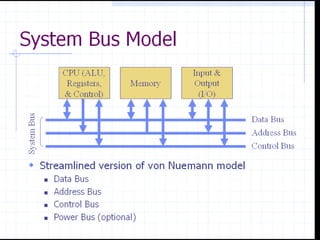
System Bus
System bus is a combination of data bus ,
address bus and control bus.
8085 Microprocessor
The Intel 8085 is an 8-bit microprocessor
introduced by Intel in 1977.
Microprocessor
8085
8085
Kit
8056
Kit
Thefeaturesof INTEL 8085
It is an 8 bit processor.
It has multiplexed address and data bus.
(AD 0 -AD 7 ).
It works on 5 Volt dc power supply.
It provides 72 instructions with 5
different addressing modes.
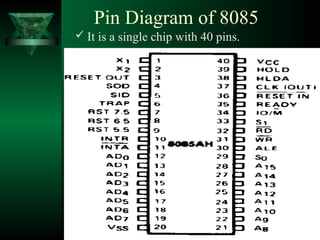
Pin Diagram of 8085
 It is a single chip with 40 pins.
Block Diagram of 8085
Family of Microprocessor
1. 4004 (4 bit)
2. 8080 (8 bit)
3. 8085 (8 bit)
4. 8086 (16 bit)
5. 8088 (16 bit)
6. 80186 (16 bit)
7. 80188 (16 bit)
8. 80286 (16 bit)
9. 80386 (32 bit)
10. 80486 (32 bit)
11. Pentium pro (32bit)
12. Pentium II (32 bit)
13. Pentium III (32 bit)
14. Pentium IV (32bit)
15. Intel core (64 bit)
16. Dual core (64 bit)
17. Core 2 duo (64 bit)
18. Core i3 (64 bit)
19. Core i5 (64 bit)
20. Core i7 (64 bit)
Networking
What is a “Network”?
 A network is a way to get “stuff” between 2 or
more “things”
 Examples: Mail, phone system, conversations,
railroad system, highways, etc
Computer Network
 A two or more computers are connected to each
other to exchange information and data and
also to share hardware and software
resources like Printer, Scanner, Applications
software etc.
Communication Basics
of Networks
Physically connect computers together.
Use of wires or optical cables.
The connections are called network
links.
The Physical Connection:-
Guided Media
Three most common physical links:
1. Coaxial cable
2. Twisted pair ((I.) STP & (II.)UTP)
3. Fiber-optic cable
 Guided media means there is actual
physical connection between computers
Coaxial cable
 One of the wires is woven of fine
strands of copper forming a tube.
 Space between has a non-conducting
material.
 Makes them more protected from
outside noise.
Twisted pair
Two wires twisted together.
 Makes them less susceptible to acting like
an antenna and picking up radio frequency
information or appliance noise.
 Telephone company uses twisted-pair
copper wires to link telephones.
Fibre-optic cable
Light is electromagnetic.
Can transmit more information down a
single strand.
Each cable can send several thousand phone
conversations or computer communications.
Wireless connections
 The link is made using
electromagnetic energy that goes
through space instead of along wires
or cables.
Unguided Media
Unguided media means there is no actual
physical connection between computers.
 Three types of wireless communications
commonly used in networking:
1. Infrared
2. Radio frequency
3. Microwave
Infrared:-
 Commonly used in TV and VCR remote
controls.
 Use infrared frequencies of electromagnetic
radiation that behave much like visible light.
 Must be in the line of sight.
 Often used to connect keyboards, mouse,
and
printers.
Satellite:-
 Often used to communicate with distant
locations.
 Must be line of sight.
 Satellite communications use
microwaves.
CREATED
BY
AKSHAY MOHITE
SURAJ KEVAT
Microprocessor ppt

Microprocessor ppt

  • 1.
  • 2.
    Microprocessor : Microprocessor isa multipurpose programmable logic device that reads binary instruction from a storage device memory and accept binary data as input and processes the instruction for execution.
  • 3.
  • 4.
    µp is madeup of semiconductor device is called Integrated Circuit (IC) IC is used for manufacturing process of microprocessor and other IC’s.  Classification of IC’s  Bipolar IC’s Unipolar IC’s IC’s
  • 5.
    Parts of Microprocessor Microprocessoris divided into the three parts:- 1. Arithmetic Logic Unit (ALU) 2. Register 3. Control Unit.
  • 6.
    Memory  Memory isone of the most important factor in the microprocessor.  It is used to store the data or information in a binary format.  Microprocessor memory Cache Memory: A cache memory used by the central processing unit of a computer to reduce the average time to access memory. The cache is a smaller, faster memory which stores copies of the data from the most frequently used main memory locations.
  • 7.
    What is Bus? Abus in computer terms, is simply a channel over which information flows between two or more devices. There are three types of bus:- 1. Address bus 2. Data bus 3. Control bus
  • 8.
    System Bus System busis a combination of data bus , address bus and control bus.
  • 9.
    8085 Microprocessor The Intel8085 is an 8-bit microprocessor introduced by Intel in 1977. Microprocessor 8085
  • 10.
  • 11.
  • 12.
    Thefeaturesof INTEL 8085 Itis an 8 bit processor. It has multiplexed address and data bus. (AD 0 -AD 7 ). It works on 5 Volt dc power supply. It provides 72 instructions with 5 different addressing modes.
  • 13.
    Pin Diagram of8085  It is a single chip with 40 pins.
  • 14.
  • 15.
    Family of Microprocessor 1.4004 (4 bit) 2. 8080 (8 bit) 3. 8085 (8 bit) 4. 8086 (16 bit) 5. 8088 (16 bit) 6. 80186 (16 bit) 7. 80188 (16 bit) 8. 80286 (16 bit) 9. 80386 (32 bit) 10. 80486 (32 bit) 11. Pentium pro (32bit) 12. Pentium II (32 bit) 13. Pentium III (32 bit) 14. Pentium IV (32bit) 15. Intel core (64 bit) 16. Dual core (64 bit) 17. Core 2 duo (64 bit) 18. Core i3 (64 bit) 19. Core i5 (64 bit) 20. Core i7 (64 bit)
  • 16.
    Networking What is a“Network”?  A network is a way to get “stuff” between 2 or more “things”  Examples: Mail, phone system, conversations, railroad system, highways, etc
  • 17.
    Computer Network  Atwo or more computers are connected to each other to exchange information and data and also to share hardware and software resources like Printer, Scanner, Applications software etc.
  • 18.
  • 19.
    Physically connect computerstogether. Use of wires or optical cables. The connections are called network links. The Physical Connection:-
  • 20.
    Guided Media Three mostcommon physical links: 1. Coaxial cable 2. Twisted pair ((I.) STP & (II.)UTP) 3. Fiber-optic cable  Guided media means there is actual physical connection between computers
  • 21.
    Coaxial cable  Oneof the wires is woven of fine strands of copper forming a tube.  Space between has a non-conducting material.  Makes them more protected from outside noise.
  • 22.
    Twisted pair Two wirestwisted together.  Makes them less susceptible to acting like an antenna and picking up radio frequency information or appliance noise.  Telephone company uses twisted-pair copper wires to link telephones.
  • 23.
    Fibre-optic cable Light iselectromagnetic. Can transmit more information down a single strand. Each cable can send several thousand phone conversations or computer communications.
  • 24.
    Wireless connections  Thelink is made using electromagnetic energy that goes through space instead of along wires or cables.
  • 25.
    Unguided Media Unguided mediameans there is no actual physical connection between computers.  Three types of wireless communications commonly used in networking: 1. Infrared 2. Radio frequency 3. Microwave
  • 26.
    Infrared:-  Commonly usedin TV and VCR remote controls.  Use infrared frequencies of electromagnetic radiation that behave much like visible light.  Must be in the line of sight.  Often used to connect keyboards, mouse, and printers.
  • 27.
    Satellite:-  Often usedto communicate with distant locations.  Must be line of sight.  Satellite communications use microwaves.
  • 28.