Web 2.0 Hands-On Session July 26, 2007 1:30 PM  -  5:00 PM  Michael T. Qaissaunee Director / Principal Investigator MAITT, Co-PI NCTT, Brookdale Community College Gordon F. Snyder, Jr. Executive Director / PI NCTT, Springfield Technical Community College Download/Subscribe to our podcasts at:  http://www.nctt.org/podcast   Read Gordon’s blog at:  http://ictcenter.blogspot.com/   Read Mike’s blog at:   http://q-ontech.blogspot.com/ Podcasts also available on iTunes!
Description This is a special, end of conference, hands-on workshop providing experience needed for addressing the new paradigms required in technician education that incorporate flat world strategies such as informal learner-driven knowledge transfer and new technologies and forms of learning. One of the key observations of this less predictable, less hierarchical flattened world is that knowledge is widely distributed and rapidly changing and that traditional course- based learning is increasingly unable to meet the needs of students.  Using Web 2.0 tools and delivery methods, instructors are discovering new ways to develop and deliver content to and engage their students. Web 2.0 based technologies discussed in this special workshop will include: blogging, audio and video podcasting, subscription, instant messaging, chat, and wikis.
Coverage Outline Aggregators myYahoo! Google Blackboard Webware Google Docs and Spreadsheets ThinkFree Blogging Blogger Podcasting Audio - Audacity Video - Camtasia MMORPGs Second Life Expect Repetition, Some Level of Confusion and…. CHAOS!
Blogging
Goals for Blog Session Define technological terms A little bit of background on the technology Blogging style tips Setting-up and posting your own live blog Using the power of RSS feeds with your blog Online resources for getting the most out of your blog
What is Web 2.0? Web 2.0 is a term used to describe the latest generation of interactive websites and services.  The web is the platform. The phrase "Web 2.0" hints at an improved form of the World Wide Web; and advocates suggest that technologies such as weblogs, social bookmarking, wikis, podcasts, RSS feeds (and other forms of many-to-many publishing), social software, Web APIs, Web standards and online Web services imply a significant change in web usage.  (From Wikipedia)  Coined by O’Reily Media in 2004 NOT Internet2 - a separate, dedicated research network
What is a Blog? A mash-up of the words “Web” and “Log” and can be used as a verb or a noun According to Wikipedia: “A blog is a user-generated website where entries are made in journal style and displayed in a reverse chronological order.” Started with online journaling and gained a lot of momentum in 1994.  The term “blog” was coined by Peter Merholz in 1999. The site Xanga, launched in 1996, had only 100 diaries by 1997, but over 20 million as of December 2005. 2001 - Present has seen wide mainstream media adoption as well as corporate and political campaign usage
Two Types of Blogs Personal blogs are written by an individual and are not endorsed by the company the individual works for. Typically not for profit. Corporate blogs are written by company employees and are endorsed, either directly or indirectly by the company. Internal Corporate Blogs External Corporate Blogs
Reasons to Blog Blogs allow informal communication with your students. You can quickly and easily update content. User can subscribe to your blog with RSS feeds. (Push Technology) You can position yourself as a “Thought Leader” in your field. Improve search engine optimization (SEO) by building incoming links. PR opportunities can present themselves in the form of links from mass media outlets.
Blogging Style Tips Position yourself as an expert in your field. Post new content regularly. Stale blogs lead to stale traffic. Use an editor. It doesn’t have to be a professional editor, but another set of eyes never hurts. Be personable. Use an informal and conversational tone. Identify the niche market of people who you are trying to reach. Then, write things that they will find interesting. Stay focused on your target niche. Don’t abandon them to pursue others. Keep the business / educational goals of your blog in mind.
What to Avoid Don’t violate any contractual agreements or obligations. Don’t divulge company trade secrets or other confidential information. Don’t be disrespectful. Don’t say anything you wouldn’t say in a face to face meeting.
Where Do We Start? Sign-up for a Google account for free. http://www.google.com Google purchased Blogger.com in 2003 and users now must log-in with their Google account to post, also for free. http://www.blogger.com   Let’s try it out before we discuss RSS in detail.
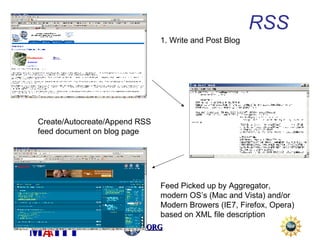
RSS and ATOM RSS - RDF Site Summary, more commonly referred to as Really Simple Syndication RSS feeds are XML (eXtensible Mark-up Language) documents that are automatically updated when you post a new blog entry. Subscribers set-up aggregator software (reader applications) which link to the RSS document and check automatically for new content. User can collect (aggregate) all of their chosen blog subscriptions in one easy-to-use place because of the standardization of RSS.
Popular RSS Aggregators Google Reader (uses the same free Google account) http://www.google.com/reader/   My Yahoo! (also free) http://my.yahoo.com   BlogLines http://www.bloglines.com     FeedBurner http://www.feedburner.com Technorati is a popular blog search engine tracking the content of over 72 million blogs. http://www.technorati.com
Marketing the Blog Digg : Mammoth traffic; tech-focused; tech-savvy users. http://www.digg.com   Delicious : Pretty big traffic; somewhat tech/design-focused; a lot of bloggers browse Delicious for “things to link to”. http://del.icio.us/   Reddit : Lower traffic; politics/random stuff; everyday users. (Wired) http://www.reddit.com   Newsvine : Lower traffic; politics and news; everyday users. http://www.newsvine.com/   Links from other relevant blogs and websites to yours also help to increase traffic.
Tips for Success Always use grammar AND spellcheck tools. Have other people review your posts. (Google Docs is great for this) Links from blogging sites in your ‘industry’. Be compelling and original (Don’t say: This is cool, check it out) Continuous updates are key. Know your audience, but write what’s interesting to you. Write to a niche market first. Things will expand on their own. Always give credit where credit is due. Develop a thick skin for criticism. You will be criticized. Use a consistent and friendly tone of voice Build relationships with other bloggers It’s all about the content
Web Resources Thinking in Web 2.0 http://web2.wsj2.com/thinking_in_web_20_sixteen_ways.htm Blogger http://www.blogger.com Google Reader www.google.com/reader   Google Blog Search http://blogsearch.google.com/ Wikis and Blogs in Education http://wikiblogedu.org/   Creative Commons http://www.creativecommons.org   Technology at Harvard Law - RSS Specification http://blogs.law.harvard.edu/tech/rss   Ed Blog List 	 http://www.pageflakes.com/trainingblogs
Podcasting
What is a Podcast? A noun and a verb! Podcast, podcaster, podcasting A media file distributed over the internet Via subscription (Paid or unpaid) Download or stream for play back on computer or personal mobile device Syndicated feeds which can be downloaded automatically Source: Wikipedia.com
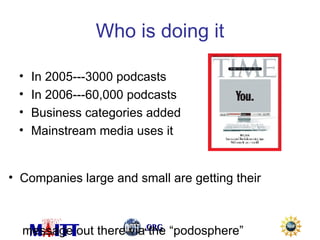
Who is doing it In 2005---3000 podcasts In 2006---60,000 podcasts Business categories added Mainstream media uses it Companies large and small are getting their  message out there via the “podosphere”
Content What do I put in it? Basic course info Avoid continuous “commercials” Select a topic that is important to your students Become a trusted advisor Create a schedule of topics Keep your podcast fresh to keep your students/subscribers happy Use music as intro and bumpers from segment to segment. See: http://music.podshow.com http://promonet.iodalliance.com/login.php
Some Basics Before Recording Keep hydrated Talk across the microphone and not into it Write out your content ahead of time Apple offers 3 part online seminar:  http://seminars.apple.com/seminarsonline/podcast/apple/index.html?s=203
Getting Started
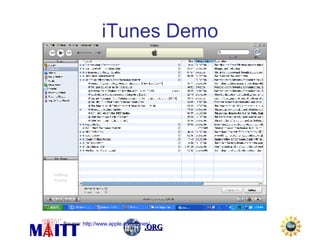
iTunes Demo Source:  http://www.apple.com/itunes/
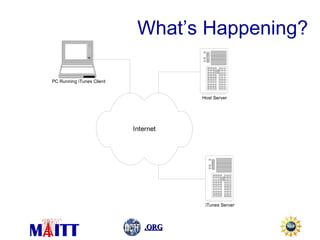
What’s Happening?
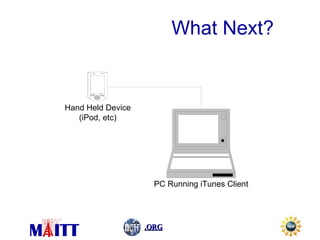
What Next?
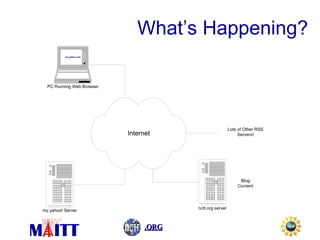
RSS RSS (RDF Site Summary - formerly called Rich Site Summary or Really Simple Syndication) is a method of describing news or other Web content that is available for "feeding" (distribution or syndication) from an online publisher to Web users.  Procedure: A Web site that wants to "publish" some of its content, such as news headlines or stories, creates a description of the content and specifically where the content is on its site in the form of an RSS document.  The publishing site then registers its RSS document with one of several existing directories of RSS publishers.  A user with a Web browser or a special program that can read RSS-distributed content can read periodically-provided distributions.  Some current directories of RSS files include Meerkat, GropSoup, NewsIsFree, UserLand, and XML Tree; these sites are sometimes known as content aggregators. Web based aggregators include My Yahoo! and Google Reader.  You can feed discussion forum excerpts, software announcements, etc -  ny form of content retrievable with a URL can be RSS fed.  Source:  http://searchvb.techtarget.com/sDefinition/0,290660,sid8_gci813358,00.html
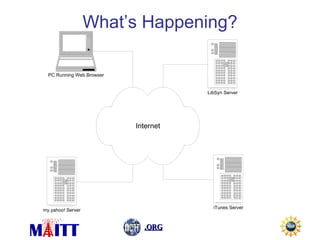
1. Write and Post Blog Create/Autocreate/Append RSS feed document on blog page Feed Picked up by Aggregator, modern OS’s (Mac and Vista) and/or Modern Browers (IE7, Firefox, Opera)  based on XML file description RSS
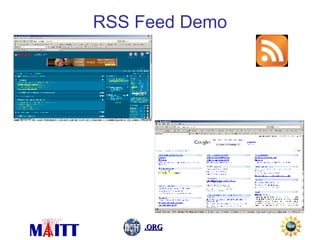
RSS Feed Demo
What’s Happening?
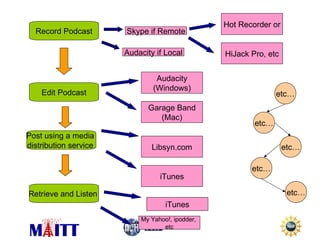
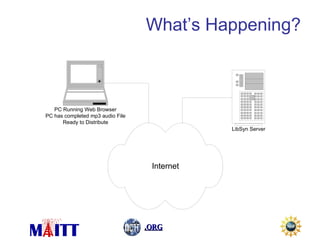
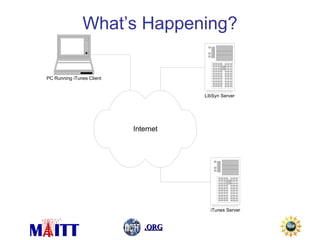
Record Podcast Edit Podcast Post using a media  distribution service  Skype if Remote Hot Recorder or HiJack Pro, etc Audacity (Windows) Garage Band (Mac) Libsyn.com iTunes Retrieve and Listen  iTunes My Yahoo!, ipodder,  etc etc… etc… etc… etc… etc… Audacity if Local
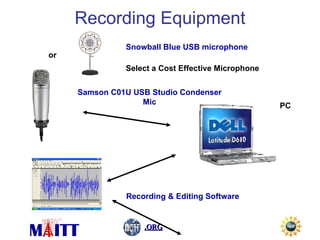
Recording Equipment Samson C01U USB Studio Condenser  Mic  PC Recording & Editing Software or Snowball Blue USB microphone Select a Cost Effective Microphone
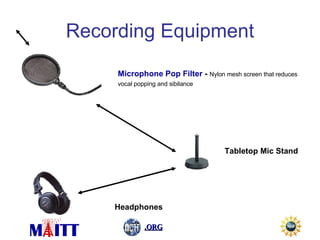
Recording Equipment Microphone Pop Filter  -  Nylon mesh screen that reduces vocal popping and sibilance   Tabletop Mic Stand Headphones
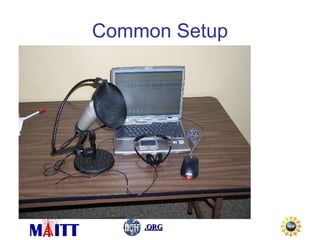
Common Setup
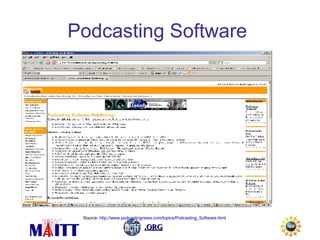
Podcasting Software   Source:  http://www.podcastingnews.com/topics/Podcasting_Software.html
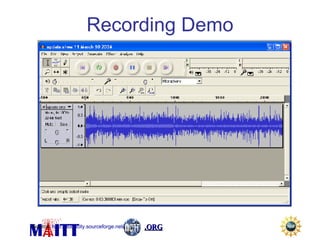
Recording Demo Source:  http://audacity.sourceforge.net/
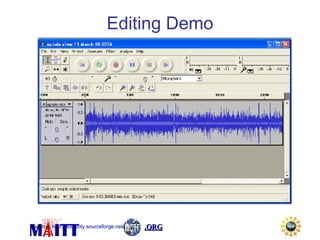
Editing Demo Source:  http://audacity.sourceforge.net/
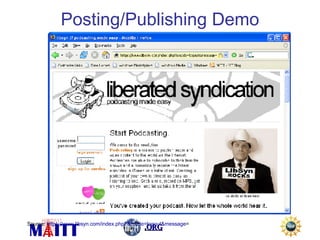
Posting/Publishing Demo Source:  https://www.libsyn.com/index.php?&mode=logout&message =
What’s Happening?
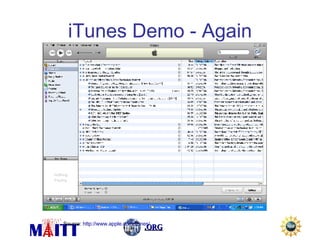
iTunes Demo - Again Source:  http://www.apple.com/itunes/
What’s Happening?
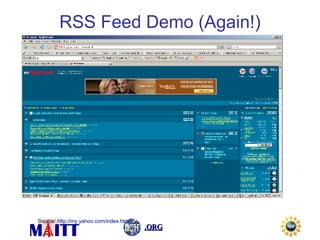
RSS Feed Demo (Again!) Source:  http://my.yahoo.com/index.html
What’s Happening?
ID3 Tags Digital audio files can contain, in addition to the audio track, related text and/or graphical information. The information you're probably familiar with take the form of Song title, Artist name, Album name, Year and Genre. This is the information displayed when you playback a digital audio file on your computer or portable device.  The process of including information other than sound into these digital audio files is commonly referred to as "tagging" in which you "tag" the audio file with additional information that describes the audio file. The original standard for tagging digital files was developed in 1996 by Eric Kemp and he coined the term ID3. At that time ID3 simply meant " ID entify an MP 3 ".  Source:  http://www.id3.org/intro.html
If Time Jing:  www.jingproject.com Slideshare and Slidecasting:  http://q-ontech.blogspot.com/2007/07/slideshare-and-slidecasting.html Skype:  www.skype.com Camtasia:  http://www.techsmith.com/camtasia.asp
Michael T. Qaissaunee Director / Principal Investigator MAITT, Co-PI NCTT Brookdale Community College 765 Newman Springs Road Lincroft, NJ 07738 (732) 224-2879  mqaissaunee@brookdalecc.edu  Gordon F. Snyder, Jr. Executive Director / Principal Investigator NCTT STCC One Armory Square Springfield, MA 01102 Phone: (413) 755-6550 [email_address] Contact Info

Matec Web2 Session Thurs

  • 1.
    Web 2.0 Hands-OnSession July 26, 2007 1:30 PM - 5:00 PM Michael T. Qaissaunee Director / Principal Investigator MAITT, Co-PI NCTT, Brookdale Community College Gordon F. Snyder, Jr. Executive Director / PI NCTT, Springfield Technical Community College Download/Subscribe to our podcasts at: http://www.nctt.org/podcast Read Gordon’s blog at: http://ictcenter.blogspot.com/ Read Mike’s blog at: http://q-ontech.blogspot.com/ Podcasts also available on iTunes!
  • 2.
    Description This isa special, end of conference, hands-on workshop providing experience needed for addressing the new paradigms required in technician education that incorporate flat world strategies such as informal learner-driven knowledge transfer and new technologies and forms of learning. One of the key observations of this less predictable, less hierarchical flattened world is that knowledge is widely distributed and rapidly changing and that traditional course- based learning is increasingly unable to meet the needs of students. Using Web 2.0 tools and delivery methods, instructors are discovering new ways to develop and deliver content to and engage their students. Web 2.0 based technologies discussed in this special workshop will include: blogging, audio and video podcasting, subscription, instant messaging, chat, and wikis.
  • 3.
    Coverage Outline AggregatorsmyYahoo! Google Blackboard Webware Google Docs and Spreadsheets ThinkFree Blogging Blogger Podcasting Audio - Audacity Video - Camtasia MMORPGs Second Life Expect Repetition, Some Level of Confusion and…. CHAOS!
  • 4.
  • 5.
    Goals for BlogSession Define technological terms A little bit of background on the technology Blogging style tips Setting-up and posting your own live blog Using the power of RSS feeds with your blog Online resources for getting the most out of your blog
  • 6.
    What is Web2.0? Web 2.0 is a term used to describe the latest generation of interactive websites and services. The web is the platform. The phrase "Web 2.0" hints at an improved form of the World Wide Web; and advocates suggest that technologies such as weblogs, social bookmarking, wikis, podcasts, RSS feeds (and other forms of many-to-many publishing), social software, Web APIs, Web standards and online Web services imply a significant change in web usage. (From Wikipedia) Coined by O’Reily Media in 2004 NOT Internet2 - a separate, dedicated research network
  • 7.
    What is aBlog? A mash-up of the words “Web” and “Log” and can be used as a verb or a noun According to Wikipedia: “A blog is a user-generated website where entries are made in journal style and displayed in a reverse chronological order.” Started with online journaling and gained a lot of momentum in 1994. The term “blog” was coined by Peter Merholz in 1999. The site Xanga, launched in 1996, had only 100 diaries by 1997, but over 20 million as of December 2005. 2001 - Present has seen wide mainstream media adoption as well as corporate and political campaign usage
  • 8.
    Two Types ofBlogs Personal blogs are written by an individual and are not endorsed by the company the individual works for. Typically not for profit. Corporate blogs are written by company employees and are endorsed, either directly or indirectly by the company. Internal Corporate Blogs External Corporate Blogs
  • 9.
    Reasons to BlogBlogs allow informal communication with your students. You can quickly and easily update content. User can subscribe to your blog with RSS feeds. (Push Technology) You can position yourself as a “Thought Leader” in your field. Improve search engine optimization (SEO) by building incoming links. PR opportunities can present themselves in the form of links from mass media outlets.
  • 10.
    Blogging Style TipsPosition yourself as an expert in your field. Post new content regularly. Stale blogs lead to stale traffic. Use an editor. It doesn’t have to be a professional editor, but another set of eyes never hurts. Be personable. Use an informal and conversational tone. Identify the niche market of people who you are trying to reach. Then, write things that they will find interesting. Stay focused on your target niche. Don’t abandon them to pursue others. Keep the business / educational goals of your blog in mind.
  • 11.
    What to AvoidDon’t violate any contractual agreements or obligations. Don’t divulge company trade secrets or other confidential information. Don’t be disrespectful. Don’t say anything you wouldn’t say in a face to face meeting.
  • 12.
    Where Do WeStart? Sign-up for a Google account for free. http://www.google.com Google purchased Blogger.com in 2003 and users now must log-in with their Google account to post, also for free. http://www.blogger.com Let’s try it out before we discuss RSS in detail.
  • 13.
    RSS and ATOMRSS - RDF Site Summary, more commonly referred to as Really Simple Syndication RSS feeds are XML (eXtensible Mark-up Language) documents that are automatically updated when you post a new blog entry. Subscribers set-up aggregator software (reader applications) which link to the RSS document and check automatically for new content. User can collect (aggregate) all of their chosen blog subscriptions in one easy-to-use place because of the standardization of RSS.
  • 14.
    Popular RSS AggregatorsGoogle Reader (uses the same free Google account) http://www.google.com/reader/ My Yahoo! (also free) http://my.yahoo.com BlogLines http://www.bloglines.com FeedBurner http://www.feedburner.com Technorati is a popular blog search engine tracking the content of over 72 million blogs. http://www.technorati.com
  • 15.
    Marketing the BlogDigg : Mammoth traffic; tech-focused; tech-savvy users. http://www.digg.com Delicious : Pretty big traffic; somewhat tech/design-focused; a lot of bloggers browse Delicious for “things to link to”. http://del.icio.us/ Reddit : Lower traffic; politics/random stuff; everyday users. (Wired) http://www.reddit.com Newsvine : Lower traffic; politics and news; everyday users. http://www.newsvine.com/ Links from other relevant blogs and websites to yours also help to increase traffic.
  • 16.
    Tips for SuccessAlways use grammar AND spellcheck tools. Have other people review your posts. (Google Docs is great for this) Links from blogging sites in your ‘industry’. Be compelling and original (Don’t say: This is cool, check it out) Continuous updates are key. Know your audience, but write what’s interesting to you. Write to a niche market first. Things will expand on their own. Always give credit where credit is due. Develop a thick skin for criticism. You will be criticized. Use a consistent and friendly tone of voice Build relationships with other bloggers It’s all about the content
  • 17.
    Web Resources Thinkingin Web 2.0 http://web2.wsj2.com/thinking_in_web_20_sixteen_ways.htm Blogger http://www.blogger.com Google Reader www.google.com/reader Google Blog Search http://blogsearch.google.com/ Wikis and Blogs in Education http://wikiblogedu.org/ Creative Commons http://www.creativecommons.org Technology at Harvard Law - RSS Specification http://blogs.law.harvard.edu/tech/rss Ed Blog List http://www.pageflakes.com/trainingblogs
  • 18.
  • 19.
    What is aPodcast? A noun and a verb! Podcast, podcaster, podcasting A media file distributed over the internet Via subscription (Paid or unpaid) Download or stream for play back on computer or personal mobile device Syndicated feeds which can be downloaded automatically Source: Wikipedia.com
  • 20.
    Who is doingit In 2005---3000 podcasts In 2006---60,000 podcasts Business categories added Mainstream media uses it Companies large and small are getting their message out there via the “podosphere”
  • 21.
    Content What doI put in it? Basic course info Avoid continuous “commercials” Select a topic that is important to your students Become a trusted advisor Create a schedule of topics Keep your podcast fresh to keep your students/subscribers happy Use music as intro and bumpers from segment to segment. See: http://music.podshow.com http://promonet.iodalliance.com/login.php
  • 22.
    Some Basics BeforeRecording Keep hydrated Talk across the microphone and not into it Write out your content ahead of time Apple offers 3 part online seminar: http://seminars.apple.com/seminarsonline/podcast/apple/index.html?s=203
  • 23.
  • 24.
    iTunes Demo Source: http://www.apple.com/itunes/
  • 25.
  • 26.
  • 27.
    RSS RSS (RDFSite Summary - formerly called Rich Site Summary or Really Simple Syndication) is a method of describing news or other Web content that is available for "feeding" (distribution or syndication) from an online publisher to Web users. Procedure: A Web site that wants to "publish" some of its content, such as news headlines or stories, creates a description of the content and specifically where the content is on its site in the form of an RSS document. The publishing site then registers its RSS document with one of several existing directories of RSS publishers. A user with a Web browser or a special program that can read RSS-distributed content can read periodically-provided distributions. Some current directories of RSS files include Meerkat, GropSoup, NewsIsFree, UserLand, and XML Tree; these sites are sometimes known as content aggregators. Web based aggregators include My Yahoo! and Google Reader. You can feed discussion forum excerpts, software announcements, etc - ny form of content retrievable with a URL can be RSS fed. Source: http://searchvb.techtarget.com/sDefinition/0,290660,sid8_gci813358,00.html
  • 28.
    1. Write andPost Blog Create/Autocreate/Append RSS feed document on blog page Feed Picked up by Aggregator, modern OS’s (Mac and Vista) and/or Modern Browers (IE7, Firefox, Opera) based on XML file description RSS
  • 29.
  • 30.
  • 31.
    Record Podcast EditPodcast Post using a media distribution service Skype if Remote Hot Recorder or HiJack Pro, etc Audacity (Windows) Garage Band (Mac) Libsyn.com iTunes Retrieve and Listen iTunes My Yahoo!, ipodder, etc etc… etc… etc… etc… etc… Audacity if Local
  • 32.
    Recording Equipment SamsonC01U USB Studio Condenser Mic PC Recording & Editing Software or Snowball Blue USB microphone Select a Cost Effective Microphone
  • 33.
    Recording Equipment MicrophonePop Filter - Nylon mesh screen that reduces vocal popping and sibilance Tabletop Mic Stand Headphones
  • 34.
  • 35.
    Podcasting Software Source: http://www.podcastingnews.com/topics/Podcasting_Software.html
  • 36.
    Recording Demo Source: http://audacity.sourceforge.net/
  • 37.
    Editing Demo Source: http://audacity.sourceforge.net/
  • 38.
    Posting/Publishing Demo Source: https://www.libsyn.com/index.php?&mode=logout&message =
  • 39.
  • 40.
    iTunes Demo -Again Source: http://www.apple.com/itunes/
  • 41.
  • 42.
    RSS Feed Demo(Again!) Source: http://my.yahoo.com/index.html
  • 43.
  • 44.
    ID3 Tags Digitalaudio files can contain, in addition to the audio track, related text and/or graphical information. The information you're probably familiar with take the form of Song title, Artist name, Album name, Year and Genre. This is the information displayed when you playback a digital audio file on your computer or portable device. The process of including information other than sound into these digital audio files is commonly referred to as "tagging" in which you "tag" the audio file with additional information that describes the audio file. The original standard for tagging digital files was developed in 1996 by Eric Kemp and he coined the term ID3. At that time ID3 simply meant " ID entify an MP 3 ". Source: http://www.id3.org/intro.html
  • 45.
    If Time Jing: www.jingproject.com Slideshare and Slidecasting: http://q-ontech.blogspot.com/2007/07/slideshare-and-slidecasting.html Skype: www.skype.com Camtasia: http://www.techsmith.com/camtasia.asp
  • 46.
    Michael T. QaissauneeDirector / Principal Investigator MAITT, Co-PI NCTT Brookdale Community College 765 Newman Springs Road Lincroft, NJ 07738 (732) 224-2879 mqaissaunee@brookdalecc.edu Gordon F. Snyder, Jr. Executive Director / Principal Investigator NCTT STCC One Armory Square Springfield, MA 01102 Phone: (413) 755-6550 [email_address] Contact Info