Information Literacy Application in LIS Social Software Shashi Ranjan Kumar  Dept. Of Library & Information Science University of Delhi
 
About This Presentation This Presentation aims to provide: A better understanding of  Social Software An awareness of how cultural organisations may benefits from Social Software An understanding of possible dangers, both for users and the institution An opportunity to discuss how we should address the opportunities and challenges
About You How many of you: Have heard of social software? Have read content in a blog or wiki? Use Facebook? Have used MSN Messenger, Skype, …? Use photo sharing sites (e.g. Flickr)? Have viewed video clips on YouTube? Do you: Use the tools for work?  Use the tools for social purposes (e.g. communicating with your children)?
Contents Social software – What Is It?  Deployment Strategies (… doing) User focus Information literacy; staff development Risk assessment & safe experimentation
Definitions Social Software: a range of software systems that allow users to interact and share data Social Network (service ): an online service, platform, or site that focuses on building and reflecting of social networks or social relations among people Social Media : are media for social interaction, using highly accessible and scalable publishing techniques
Why Social Software? Interaction  – Conversation  – Participation Engagement Build Community
How do libraries use Social Software?
Examples of social software in Libraries   Social networking sites  Media sharing  Virtual worlds  Social bookmarking and resource sharing  Wikis  Blogs  RSS feeds/ Syndication/ Atom
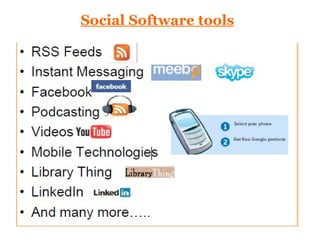
Social Software tools
1. Social Networking sites Social networking sites are most popular type of social software.  Users create a profile and join a network, which might be connected to where they live, what music they like, where they work or where they study.  Both  MySpace  ( http://www.myspace.com ) and  Facebook ( http://www.facebook.com ) are extremely popular social networking sites which primarily have a social function allowing people to make friends, talk online and share resources. Professional social networking sites (such as  LinkedIn  http://www.linkedin.com/ )  and those focused on education (such as  Elgg  http://elgg.net/  ) are also becoming popular.
2. Media sharing   The two key examples here are  Flickr  ( http://flickr.com ) which is a photo sharing website and  YouTube  ( http://www.youtube.com / ) which is a video sharing website.  Users can upload their own photo or video resources to these sites and then these are available to other users of the site.  Tagging makes the resources retrievable by others interested in similar subjects.
Media sharing However other sites exist that allow sharing of different sorts of resources, for example  Slide Share  ( http://www.slideshare.net ) which allows users to share PowerPoint presentations. This site became very popular amongst conference presenters during the course of the LASSIE project, allowing them to easily share their slides.
3. Virtual worlds   Second Life  ( http://secondlife.com / ) and other virtual worlds allow users to create a profile and move around a virtual world. Users can attend events, buy and sell goods and there are currently a number of projects exploring its potential for teaching and learning.
4. Social bookmarking and resource sharing Social bookmarking tools allow users to store their bookmarks or Internet Favourites remotely on a site so that they can be accessed from any computer connected to the internet, rather than being  stored within a specific browser.  Sites such as  del.icio.us  ( http://del.icio.us ) allow users to store, organise and share internet resources.  Available at:  http://del.icio.us/lse_lassie /
Social bookmarking and resource sharing Other tools are also available to allow users to share other types of resources, examples include:  Bibliographic references ( CiteUlike  http://www.citeulike.org /  and  Connotea  http://www.connotea.org / );  Music, video and films ( Listal  http://www.listal.com / ; ,  Books that you own ( LibraryThing  http://www.librarything.com / ).
5. Wikis Wikis are another very popular type of social software.  They are a simple way of creating content on a website, however rather than having one author, they often have many contributors and are ideal for collaborative working. Most wikis allow contributions from people once they have registered, however others allow editing without a user needing to register.  The most famous example of a wiki is  Wikipedia ,  which is an online encyclopedia which can be edited by any registered user. Features include versioning and document history, so previous versions can be retrieved; discussion is also possible. Wikis can be used remotely or set up on a local server.
6. Blogs Blogs  are probably the most popular type of social software.  They are a simple way of creating a website which is updated, often on a regular basis with ‘posts’.  Features that blogs include are:  •  commenting facilities so that others can participate in a discussion;  •  tagging to associate postings with a keyword or topic;  •  a calendar, so postings can be retrieved by date.  It is usually possible to subscribe to an RSS feed from a blog, so these can be read using a News Reader.
7. RSS feeds/ Syndication/ Atom   Really Simple Syndication (RSS) is not a social software but it is a way of communicating information in a format that Feed Readers or News Reader software can understand.  It has become an important way of using social software effectively. Most blogs have RSS feeds, which users can subscribe to, to ensure content is pushed into the Feed Reader of their choice, rather than having to visit a specific website to read a blog.
Other social software   Personalization functionality on websites such as  Google  and  Yahoo  often uses some Web 2.0 capabilities.  For example  iGoogle  ( http://www.google.com/ig ) allows users to add RSS feeds to their home page so as to receive updated content from websites or blogs. Podcasts  and audio blogging also fall under the social software banner, using RSS feeds as a way of keeping people up to date with new material.  Mashups  are also part of social software, often bringing data together from different sites and ‘mashing it up’ in a new way. For example  ChicagoCrime.org  ( http://www.chicagocrime.org / ) which uses crime statistics and  Google maps  to identify locations where crime occurs in the city.
The Opportunities Social software provides great opportunities for colleges and universities: It’s popular It’s easy-to-use No need for in-house development or to purchase software Useful for staff and post-graduate students too We can easily integrate our resources  It can provide alternative access to our services.
Evolution of Communication
Conclusions To conclude: Social Software can provide real benefits for our users There are many opportunities for cultural heritage organisations We need to be seek ways we can exploit such opportunities We also need to acknowledge risks and dangers
Thanks [email_address]

Information literacy application in lis

  • 1.
    Information Literacy Applicationin LIS Social Software Shashi Ranjan Kumar Dept. Of Library & Information Science University of Delhi
  • 2.
  • 3.
    About This PresentationThis Presentation aims to provide: A better understanding of Social Software An awareness of how cultural organisations may benefits from Social Software An understanding of possible dangers, both for users and the institution An opportunity to discuss how we should address the opportunities and challenges
  • 4.
    About You Howmany of you: Have heard of social software? Have read content in a blog or wiki? Use Facebook? Have used MSN Messenger, Skype, …? Use photo sharing sites (e.g. Flickr)? Have viewed video clips on YouTube? Do you: Use the tools for work? Use the tools for social purposes (e.g. communicating with your children)?
  • 5.
    Contents Social software– What Is It? Deployment Strategies (… doing) User focus Information literacy; staff development Risk assessment & safe experimentation
  • 6.
    Definitions Social Software:a range of software systems that allow users to interact and share data Social Network (service ): an online service, platform, or site that focuses on building and reflecting of social networks or social relations among people Social Media : are media for social interaction, using highly accessible and scalable publishing techniques
  • 7.
    Why Social Software?Interaction – Conversation – Participation Engagement Build Community
  • 8.
    How do librariesuse Social Software?
  • 9.
    Examples of socialsoftware in Libraries Social networking sites Media sharing Virtual worlds Social bookmarking and resource sharing Wikis Blogs RSS feeds/ Syndication/ Atom
  • 10.
  • 11.
    1. Social Networkingsites Social networking sites are most popular type of social software. Users create a profile and join a network, which might be connected to where they live, what music they like, where they work or where they study. Both MySpace ( http://www.myspace.com ) and Facebook ( http://www.facebook.com ) are extremely popular social networking sites which primarily have a social function allowing people to make friends, talk online and share resources. Professional social networking sites (such as LinkedIn http://www.linkedin.com/ ) and those focused on education (such as Elgg http://elgg.net/ ) are also becoming popular.
  • 12.
    2. Media sharing The two key examples here are Flickr ( http://flickr.com ) which is a photo sharing website and YouTube ( http://www.youtube.com / ) which is a video sharing website. Users can upload their own photo or video resources to these sites and then these are available to other users of the site. Tagging makes the resources retrievable by others interested in similar subjects.
  • 13.
    Media sharing Howeverother sites exist that allow sharing of different sorts of resources, for example Slide Share ( http://www.slideshare.net ) which allows users to share PowerPoint presentations. This site became very popular amongst conference presenters during the course of the LASSIE project, allowing them to easily share their slides.
  • 14.
    3. Virtual worlds Second Life ( http://secondlife.com / ) and other virtual worlds allow users to create a profile and move around a virtual world. Users can attend events, buy and sell goods and there are currently a number of projects exploring its potential for teaching and learning.
  • 15.
    4. Social bookmarkingand resource sharing Social bookmarking tools allow users to store their bookmarks or Internet Favourites remotely on a site so that they can be accessed from any computer connected to the internet, rather than being stored within a specific browser. Sites such as del.icio.us ( http://del.icio.us ) allow users to store, organise and share internet resources. Available at: http://del.icio.us/lse_lassie /
  • 16.
    Social bookmarking andresource sharing Other tools are also available to allow users to share other types of resources, examples include: Bibliographic references ( CiteUlike http://www.citeulike.org / and Connotea http://www.connotea.org / ); Music, video and films ( Listal http://www.listal.com / ; , Books that you own ( LibraryThing http://www.librarything.com / ).
  • 17.
    5. Wikis Wikisare another very popular type of social software. They are a simple way of creating content on a website, however rather than having one author, they often have many contributors and are ideal for collaborative working. Most wikis allow contributions from people once they have registered, however others allow editing without a user needing to register. The most famous example of a wiki is Wikipedia , which is an online encyclopedia which can be edited by any registered user. Features include versioning and document history, so previous versions can be retrieved; discussion is also possible. Wikis can be used remotely or set up on a local server.
  • 18.
    6. Blogs Blogs are probably the most popular type of social software. They are a simple way of creating a website which is updated, often on a regular basis with ‘posts’. Features that blogs include are: • commenting facilities so that others can participate in a discussion; • tagging to associate postings with a keyword or topic; • a calendar, so postings can be retrieved by date. It is usually possible to subscribe to an RSS feed from a blog, so these can be read using a News Reader.
  • 19.
    7. RSS feeds/Syndication/ Atom Really Simple Syndication (RSS) is not a social software but it is a way of communicating information in a format that Feed Readers or News Reader software can understand. It has become an important way of using social software effectively. Most blogs have RSS feeds, which users can subscribe to, to ensure content is pushed into the Feed Reader of their choice, rather than having to visit a specific website to read a blog.
  • 20.
    Other social software Personalization functionality on websites such as Google and Yahoo often uses some Web 2.0 capabilities. For example iGoogle ( http://www.google.com/ig ) allows users to add RSS feeds to their home page so as to receive updated content from websites or blogs. Podcasts and audio blogging also fall under the social software banner, using RSS feeds as a way of keeping people up to date with new material. Mashups are also part of social software, often bringing data together from different sites and ‘mashing it up’ in a new way. For example ChicagoCrime.org ( http://www.chicagocrime.org / ) which uses crime statistics and Google maps to identify locations where crime occurs in the city.
  • 21.
    The Opportunities Socialsoftware provides great opportunities for colleges and universities: It’s popular It’s easy-to-use No need for in-house development or to purchase software Useful for staff and post-graduate students too We can easily integrate our resources It can provide alternative access to our services.
  • 22.
  • 23.
    Conclusions To conclude:Social Software can provide real benefits for our users There are many opportunities for cultural heritage organisations We need to be seek ways we can exploit such opportunities We also need to acknowledge risks and dangers
  • 24.