“ Social Bookmarking” InfoTechTools Learning Unit 11 Chris Allen
What is “Social Bookmarking”? A method for internet users to store, organize, search, and manage bookmarks of web pages on the internet.
What do you need? The internet user will 1 st  have to download one of the following popular “bookmarking” tools: Mixx Newsvine Simpy SiteBar StumbleUpon BookmarkSync del.icio.us Blue Dot CiteULike Digg Diigo Furl
“ Social Bookmarking Mechanics” Users save links to certain web pages they want to remember or share w/ others – the saved links are the “bookmarks”. The “bookmarks” are usually viewable by the public, however they can be made private. The user can send the “bookmarks” to certain individuals within their network if they so choose.
How do you organize “bookmarks”? The user must assign a key word or “tag” to each site that they “bookmark” This allows for keyword-based classification and search of information Examples of “tags”: Web 2.0, Baseball, Bill Clinton
Why Social “Bookmarking”? Tagging is done by human beings who actually understand the content of the particular website rather than relying on software algorithms.  Ranks resources by how many times it has been “bookmarked” by users and not by how many external links point to it. Able to find resources that have not been already tagged by “web spiders”. Can access your “bookmarks” from any computer
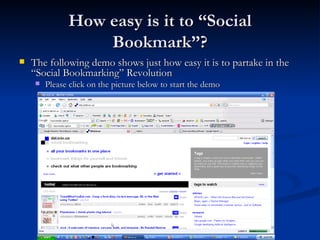
How easy is it to “Social Bookmark”? The following demo shows just how easy it is to partake in the “Social Bookmarking” Revolution Please click on the picture below to start the demo
Drawbacks of Social “Bookmarking” There is no adopted standard for proper “tagging” method Misspelling Synonym/Antonym Confusion No way to indicate hierarchical relationships Spammers are starting to use popular “tags” to describe their website therefore misleading the users to their site(s).
My Experience w/ “Social Bookmarking” Used in InfoTechTools class to bookmark certain applications and determine most popular by which one was bookmarked the most “Bookmarked” sites that provided useful information for a research report so other contributors to the report did not have to waste time finding the same sites I already did
References “Social Bookmarking” -  http://en.wikipedia.org/wiki/Social_bookmarking “Internet Bookmark” -  http://en.wikipedia.org/wiki/Internet_bookmark “Folksonomy” -  http://en.wikipedia.org/wiki/Collaborative_tagging

Social Bookmarking

  • 1.
    “ Social Bookmarking”InfoTechTools Learning Unit 11 Chris Allen
  • 2.
    What is “SocialBookmarking”? A method for internet users to store, organize, search, and manage bookmarks of web pages on the internet.
  • 3.
    What do youneed? The internet user will 1 st have to download one of the following popular “bookmarking” tools: Mixx Newsvine Simpy SiteBar StumbleUpon BookmarkSync del.icio.us Blue Dot CiteULike Digg Diigo Furl
  • 4.
    “ Social BookmarkingMechanics” Users save links to certain web pages they want to remember or share w/ others – the saved links are the “bookmarks”. The “bookmarks” are usually viewable by the public, however they can be made private. The user can send the “bookmarks” to certain individuals within their network if they so choose.
  • 5.
    How do youorganize “bookmarks”? The user must assign a key word or “tag” to each site that they “bookmark” This allows for keyword-based classification and search of information Examples of “tags”: Web 2.0, Baseball, Bill Clinton
  • 6.
    Why Social “Bookmarking”?Tagging is done by human beings who actually understand the content of the particular website rather than relying on software algorithms. Ranks resources by how many times it has been “bookmarked” by users and not by how many external links point to it. Able to find resources that have not been already tagged by “web spiders”. Can access your “bookmarks” from any computer
  • 7.
    How easy isit to “Social Bookmark”? The following demo shows just how easy it is to partake in the “Social Bookmarking” Revolution Please click on the picture below to start the demo
  • 8.
    Drawbacks of Social“Bookmarking” There is no adopted standard for proper “tagging” method Misspelling Synonym/Antonym Confusion No way to indicate hierarchical relationships Spammers are starting to use popular “tags” to describe their website therefore misleading the users to their site(s).
  • 9.
    My Experience w/“Social Bookmarking” Used in InfoTechTools class to bookmark certain applications and determine most popular by which one was bookmarked the most “Bookmarked” sites that provided useful information for a research report so other contributors to the report did not have to waste time finding the same sites I already did
  • 10.
    References “Social Bookmarking”- http://en.wikipedia.org/wiki/Social_bookmarking “Internet Bookmark” - http://en.wikipedia.org/wiki/Internet_bookmark “Folksonomy” - http://en.wikipedia.org/wiki/Collaborative_tagging