December 15, 2009T@sty Bytes:Screencasting Bake OffMichael C. SensibaNext Generation Librarianao9754@wayne.edu
What is Screencasting?A screencast is a digital recording of computer screen output, also known as a video screen capture, often containing audio narration.http://en.wikipedia.org/wiki/ScreencastDecember 15, 2009
Why Screencast?Create demonstrations/tutorialsCapture and convert moviesCapture computer problemsOn-the-fly guided referenceDecember 15, 2009
The Screencasting ProcessPrepare to screencastRecord your screen activityExport what you’ve recordedEdit the video you’ve capturedShare your screencastDecember 15, 2009
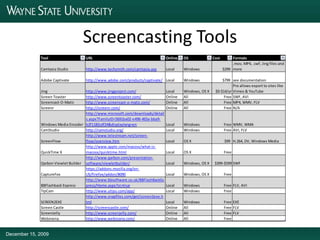
Screencasting ToolsDecember 15, 2009
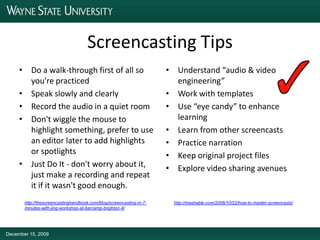
Screencasting TipsDo a walk-through first of all so you're practicedSpeak slowly and clearlyRecord the audio in a quiet roomDon't wiggle the mouse to highlight something, prefer to use an editor later to add highlights or spotlightsJust Do It - don't worry about it, just make a recording and repeat it if it wasn't good enough. Understand “audio & video engineering”Work with templatesUse “eye candy” to enhance learningLearn from other screencastsPractice narrationKeep original project filesExplore video sharing avenueshttp://thescreencastinghandbook.com/blog/screencasting-in-7-minutes-with-jing-workshop-at-barcamp-brighton-4/http://mashable.com/2008/10/22/how-to-master-screencasts/December 15, 2009
More on Screencastinghttp://delicious.com/msensiba/t@stybytes+screencastingMichael C. Sensibaao9754@wayne.eduDecember 15, 2009

T@sty Bytes Screencasting Bake Off

  • 1.
    December 15, 2009T@styBytes:Screencasting Bake OffMichael C. SensibaNext Generation Librarianao9754@wayne.edu
  • 2.
    What is Screencasting?Ascreencast is a digital recording of computer screen output, also known as a video screen capture, often containing audio narration.http://en.wikipedia.org/wiki/ScreencastDecember 15, 2009
  • 3.
    Why Screencast?Create demonstrations/tutorialsCaptureand convert moviesCapture computer problemsOn-the-fly guided referenceDecember 15, 2009
  • 4.
    The Screencasting ProcessPrepareto screencastRecord your screen activityExport what you’ve recordedEdit the video you’ve capturedShare your screencastDecember 15, 2009
  • 5.
  • 6.
    Screencasting TipsDo awalk-through first of all so you're practicedSpeak slowly and clearlyRecord the audio in a quiet roomDon't wiggle the mouse to highlight something, prefer to use an editor later to add highlights or spotlightsJust Do It - don't worry about it, just make a recording and repeat it if it wasn't good enough. Understand “audio & video engineering”Work with templatesUse “eye candy” to enhance learningLearn from other screencastsPractice narrationKeep original project filesExplore video sharing avenueshttp://thescreencastinghandbook.com/blog/screencasting-in-7-minutes-with-jing-workshop-at-barcamp-brighton-4/http://mashable.com/2008/10/22/how-to-master-screencasts/December 15, 2009
  • 7.