Teaching in a Participatory Culture How blogs support 21 st  century literacy Jennifer Carrier Dorman http://jdorman.wikispaces.com/+Blogs
Pre-Workshop Poll Visit  http://jdorman.wikispaces.com/blogworkshop  to take the Pre-Workshop Poll
The “New” Rs Dr. Willard Daggett –  International Center for Leadership in Education Rigor, Relevance, Relationships Why  is change needed? What  needs to be changed? How  do we implement such changes?
An Answer to the WHY http://thefischbowl.blogspot.com/2007/06/did-you-know-20.html
In times of change, learners inherit the Earth, while the learned find themselves beautifully equipped to deal with a world that no longer exists. Eric Hoffer
Gathering data for the WHAT http://www.leadered.com/nesswelcome.shtml
Items to Consider for the HOW Learning profile of the digital natives Emerging 21 st  century literacies Rigor and relevance framework Impact of Web 2.0 technologies on learning
Learning Profile of Digital Natives Digital Natives are used to receiving information really fast.  They like to parallel process and multi-task.  They prefer their graphics  before  their text rather than the opposite.  Digital Natives, Digital Immigrants – Marc Prensky (NCB University Press, Vol. 9 No. 5, October 2001)
Learning Profile of Digital Natives They prefer random access (like hypertext).  They function best when networked.  They thrive on instant gratification and frequent rewards.  They prefer games to “serious” work.  Digital Natives, Digital Immigrants – Marc Prensky (NCB University Press, Vol. 9 No. 5, October 2001)
The New Literacies Play  — the capacity to experiment with one’s surroundings as a form of problem-solving Performance  — the ability to adopt alternative identities for the purpose of improvisation and discovery Simulation  — the ability to interpret and construct dynamic models of real-world processes Appropriation  — the ability to meaningfully sample and remix media content Confronting the Challenges of Participatory Culture: Media Education for the 21st Century - Henry Jenkins 10/19/06
The New Literacies Multitasking  — the ability to scan one’s environment and shift focus as needed to salient details. Distributed Cognition  — the ability to interact meaningfully with tools that expand mental capacities Collective Intelligence  — the ability to pool knowledge and compare notes with others toward a common goal Judgment  — the ability to evaluate the reliability and credibility of different information sources Confronting the Challenges of Participatory Culture: Media Education for the 21st Century - Henry Jenkins 10/19/06
The New Literacies Transmedia Navigation  — the ability to follow the flow of stories and information across multiple modalities Networking  — the ability to search for, synthesize, and disseminate information Negotiation  — the ability to travel across diverse communities, discerning and respecting multiple perspectives, and grasping and following alternative norms. Confronting the Challenges of Participatory Culture: Media Education for the 21st Century - Henry Jenkins 10/19/06
Rigor/Relevance Framework http://www.leadered.com/rigor.html
Web 2.0 The evolution of the semantic read/write web
Web 1.0    Web 2.0
Blogs Giving students a voice
Blogs A blog is a website for which an individual or a group frequently generates text, photographs, video or audio files, and/or links, typically (but not always) on a daily basis.
Blogs in Plain English http://www.teachertube.com/view_video.php?viewkey=367ab9eed5af82966a48
Why the sudden popularity of blogs? The answer is RSS
What is RSS? Depending on who you talk to, RSS stands for  Rich Site Summary  or  Real Simple Syndication
RSS – Really Simple Syndication http://www.edutopia.org/tech-teacher-RSS
Ask an Expert . . . Excerpts from Will Richardson’s publication,  RSS: A Quick Start Guide for Educators http://snipurl.com/1w86t   Will’s Blog http://weblogg-ed.com/   Will’s Book http://snipurl.com/1w87c
What is RSS? Blogs, podcasts, news sites, and an ever-growing number of other media site generate a behind-the-scenes code in a language similar to HTML called XML. This code, usually referred to as a "feed," makes it possible for readers to "subscribe" to the content that is created on a particular website so they no longer have to visit the site itself to get it.
RSS – Really Simple Syndication http://www.edutopia.org/tech-teacher-RSS
RSS Syndication As is true with traditional syndication, the content comes to you instead of you going to get it, hence “Real Simple Syndication.”
Applications for RSS Feeds An RSS aggregator checks the feeds you subscribe to and it collects all the new content from those sites you are subscribed to.  Then, when you’re ready, you open up your aggregator to read the individual stories, file them for later use, click through to the site itself, or delete them if they’re not relevant.  In other words, you check one site instead of dozens of individual websites
RSS – Really Simple Syndication http://www.edutopia.org/tech-teacher-RSS
RSS in Plain English http://www.teachertube.com/view_video.php?viewkey=086faafd8c122981cc82
Subscribing to RSS Feeds
Finding Feeds Blogs, podcasts, news sites, and many other media services syndicate their content through RSS feeds
Options for Subscribing Option 1- Manual Subscription Right-click on the RSS or Atom link/icon and select Copy Link Location Paste that feed URL into your RSS reader
Options for Subscribing Option 2 – Automatic Browser Subscription Firefox Internet Explorer 7
Automatic Subscribing in Firefox Tools > Options Click on the Feeds tab Select your preferred RSS reader
Automatic Subscribing in IE7 Click on the Feed icon Click subscribe to this feed Select the folder and click subscribe
Automatic Subscribing in IE7 Read your subscriptions through IE7
Options for Subscribing Option 3: Automatic Feed Reader Subscriptions Many sites now offer one-click subscriptions targeted to popular feed readers Click on the icon for the reader you use and the subscription feed will automatically be added to your reader
Options for Subscribing
RSS Aggregators Collating and organizing your feeds
Bloglines
Bloglines Save Time, Read it Your Way   View all your subscriptions by clicking on the  My Feeds tab   Modify display preferences in feed  Options   View articles by selecting from the links in your  Feeds folder   Modify individual subscription options using the Edit feature  Choose a Notifier  for Bloglines alerts  View Bloglines on your  mobile device   Read Bloglines in your  favorite language   http://www.bloglines.com/
Bloglines What interests you?   Blogs ,  News ,  Podcasts  and  more   Weather forecasts   Package tracking   View the 200  Most Popular Feeds   Track future web articles by creating a  search subscription
Bloglines Subscribe to it   Subscribe with one click from your  browser toolbar   Subscribe from  search results   Look for RSS enabled sites with  'Subscribe with Bloglines'  or XML/RSS buttons  If you don't see an RSS button, use the 'Add' link and  enter the URL  and Bloglines will find all available feeds for you.  Manage mailing list clutter by creating unique  email addresses
Bloglines Publish, Share & Save   Publish  your own blog   Post a 'Subscribe with Bloglines' button  on your blog  Share your blogroll   Email articles to any address using the  'Email This'  feature  Save articles  with the 'Keep New' or 'Clip/Blog This' features
Bloglines My public Bloglines feeds are available at  http://www.bloglines.com/public/jdorman
Google Reader
Google Reader Stay up to date  Google Reader constantly checks your favorite news sites and blogs for new content.  Share with your friends  Use Google Reader's built-in public page to easily share interesting items with your friends and family.  Use it anywhere, for free  Google Reader is totally free and works in most modern browsers, without any software to install.  https://www.google.com/reader/view/
Sharing Feeds with Google Reader
Importing and Exporting
Added Functionality
Added Functionality
Added Functionality
Added Functionality
Google Reader Take a tour of Google Reader at  http://snipurl.com/1w843   Create a personalized homepage with iGoogle  http://www.google.com/ig   Integrates with Google Reader Learn more about Google Resources for Educators at  http://jdorman.wikispaces.com/Google
Netvibes
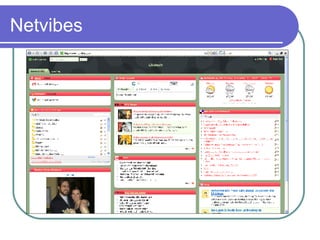
Netvibes Netvibes is a personalized page – you can now modify everything: move modules, add new RSS/ATOM feeds, change the parameters for each module, etc.  Your modifications are saved in real-time and you'll find your page when you get back on Netvibes.com.  If you want to be able to access your page from any computer, you can sign in with your email and a password. http://www.netvibes.com/
Netvibes NetVibes can pull content from: RSS or web feeds Podcasts Calendars Widget and applications modules http://www.netvibes.com/
Pageflakes http://www.pageflakes.com
Pageflakes Pageflakes is your personalized start page on the Internet.  Your address book, local weather information, to-do-list, news, blogs and much more – all on one page that you can access from anywhere.  You can also use Pageflakes to keep up with your favorite blogs and news feeds.  "Flake" is our word for those little modules which you can see on the screen.  http://www.pageflakes.com
Pageflakes in Action
Customizing – Content  Click on the Flake button in the upper right
Customizing – Layout  Click on the Flake button in the upper right
Customizing – Themes  Click on the Flake button in the upper right
Pagecasting with Pageflakes “ Pagecasting” means publishing your Pageflakes page for others to see.  You can share your Pagecast with the world or with a private group.  You can even let others edit and contribute to your Pagecast!  http://www.pageflakes.com
Pagecasting  Click on the Flake button in the upper right Select Make Pagecast Designate sharing permissions
Pagecasting Broadcast the URL address and invite others to collaborate to maintain dynamic page content Helpful hint: You can shorten your Pagecast URL with the following applications:  http://snipurl.com ,  http://tinyurl.com/ ,  http://teach42.com/go/
Public Pagecast  http://snipurl.com/1w80a
Sharing Pagecasts Users can:  Follow the Pagecast by clicking “Watch this Pagecast” Copy the Pagecast into their account and modify the content for their purposes E-mail the Pagecast to others
Grazr Grazr is a free and easy way to gather and organize information from all over the Web.  Use our drag and drop editor to collect feeds and links to Web pages, and then share them with others on this site, or place them on your own pages with our free widget.  http://www.grazr.com/
RSS Reading Lists with Grazr
Creating Widgets with Grazr
Grazr Embedded Grazr feed reader
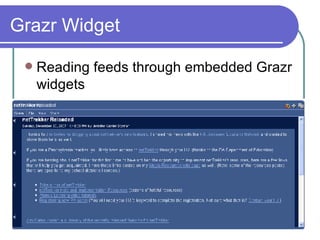
Grazr Widget Reading feeds through embedded Grazr widgets
The Power of RSS RSS + Feed Reader/Aggregator = personalized learning/affinity network RSS is not limited to blogs News feeds Podcasts Wiki edits and discussions Social bookmarking Multiple users
Blogs in Schools
Blogs in School? Blogs are tools, and like any tools they can be used or misused.  Misuse occurs more often when there's a lack of instruction Blogging in school models appropriate online behavior and offers teachers the chance to address issues of online safety and intellectual property
Why Students  Shouldn’t  Blog People will read it.  People might not like it.  They might share test answers with others.  They might be found by a child predator online  They might write something inappropriate.  They might find something inappropriate.  They might get other students to start blogging.  http://blogging101.wikispaces.com/whywhynot
Why Students  Should  Blog People will read it.  They might like it.  They might share what they've learned with others.  They might participate in a collaborative learning project.  They might become inspired to learn.  They might inspire others to learn.  They might get other students to start blogging.  If they don't talk in class, they might on a blog.  http://blogging101.wikispaces.com/whywhynot
Blogging Tips for Students Never, never, NEVER give out your full name or any other personal information (address, phone number, instant message screen name, etc.).  Plagiarism is still wrong. Don't copy more than a paragraph from anything and ALWAYS give credit and a link to the source of the information. After all, you'd like for people to link to you, right? It's only fair.  Don't go to meet people who talk to you online.  http://blogging101.wikispaces.com/bloggersbeware
Blogging Tips for Students Just because someone wrote it doesn't mean it's true. That cute person that wants to meet you might be a 32 year old who wants to hurt you.  Photographs can be faked or could be of someone else. Don't use them as proof of who someone is.  You are writing for a GLOBAL audience. Don't get angry when a teacher, classmate, or (oh my gosh!) parent finds and reads your blog.  You are also writing for a LOCAL audience. The content of your posts should always be safe for discussion in class.  http://blogging101.wikispaces.com/bloggersbeware
Blogging Tips for Teachers Get permission slips from the parents before you even think of having your students in a blog.  Even with permission, do not identify your students by their last names.  Assume that whatever you post will be read by your students, coworkers, and superiors, because the one time you don't think they will, they will.  http://blogging101.wikispaces.com/bloggersbeware
Blogging Tips for Teachers In the same vein, don't link to something if it's not safe for your students to see.  If you absolutely must rant and complain about your place of employment in a global forum like a blog ( bad idea ), have an alternate blog under an assumed name and don't mention ANY real names or locations. You still might get caught.  http://blogging101.wikispaces.com/bloggersbeware
Integration Ideas Ways that blogs can be incorporated
Daily Scribe –  What we did today
Extending Class Discussion
Student Work Showcase
Student-Initiated Content
Student Sharing
Students Making a Difference http://ninawrites.wordpress.com http://twentyfivedays.wordpress.com/
Successful Tips for “Book” Blogs Get comfortable with blogging Choose a relevant book [article, topic, etc.] Devise interesting questions Solicit the author’s involvement Welcome bloggers [experts] from outside the classroom Erik Langhorst – “The Dixie Clicks” 12/1/2006
Blog Hosting Blogmeister –  (school code required) http://classblogmeister.com/ Edublogs – ( personal professional blogs ) http://edublogs.org/   Blogger – ( personal professional blogs ) https://www.blogger.com/   21 Classes –  (free service is limited) http://21classes.com/ http://jdorman.wikispaces.com/+Blogs
Getting Started Surf a few educational blogs to get a feel for how teachers use them with students and also as part of their professional learning Brainstorm application ideas for blogs in your classroom Decide if your needs require a service that allows for all students to have a private blog in addition to the class blog Sign up for a service and start blogging (it’s addictive!)
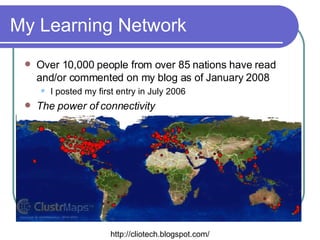
My Learning Network Over 10,000 people from over 85 nations have read and/or commented on my blog as of January 2008 I posted my first entry in July 2006 The power of connectivity http://cliotech.blogspot.com/
To Learn More . . . http://jdorman.wikispaces.com/+Blogs
Lab Session http://jdorman.wikispaces.com/blogworkshop

Blogs In Education

  • 1.
    Teaching in aParticipatory Culture How blogs support 21 st century literacy Jennifer Carrier Dorman http://jdorman.wikispaces.com/+Blogs
  • 2.
    Pre-Workshop Poll Visit http://jdorman.wikispaces.com/blogworkshop to take the Pre-Workshop Poll
  • 3.
    The “New” RsDr. Willard Daggett – International Center for Leadership in Education Rigor, Relevance, Relationships Why is change needed? What needs to be changed? How do we implement such changes?
  • 4.
    An Answer tothe WHY http://thefischbowl.blogspot.com/2007/06/did-you-know-20.html
  • 5.
    In times ofchange, learners inherit the Earth, while the learned find themselves beautifully equipped to deal with a world that no longer exists. Eric Hoffer
  • 6.
    Gathering data forthe WHAT http://www.leadered.com/nesswelcome.shtml
  • 7.
    Items to Considerfor the HOW Learning profile of the digital natives Emerging 21 st century literacies Rigor and relevance framework Impact of Web 2.0 technologies on learning
  • 8.
    Learning Profile ofDigital Natives Digital Natives are used to receiving information really fast. They like to parallel process and multi-task. They prefer their graphics before their text rather than the opposite. Digital Natives, Digital Immigrants – Marc Prensky (NCB University Press, Vol. 9 No. 5, October 2001)
  • 9.
    Learning Profile ofDigital Natives They prefer random access (like hypertext). They function best when networked. They thrive on instant gratification and frequent rewards. They prefer games to “serious” work. Digital Natives, Digital Immigrants – Marc Prensky (NCB University Press, Vol. 9 No. 5, October 2001)
  • 10.
    The New LiteraciesPlay — the capacity to experiment with one’s surroundings as a form of problem-solving Performance — the ability to adopt alternative identities for the purpose of improvisation and discovery Simulation — the ability to interpret and construct dynamic models of real-world processes Appropriation — the ability to meaningfully sample and remix media content Confronting the Challenges of Participatory Culture: Media Education for the 21st Century - Henry Jenkins 10/19/06
  • 11.
    The New LiteraciesMultitasking — the ability to scan one’s environment and shift focus as needed to salient details. Distributed Cognition — the ability to interact meaningfully with tools that expand mental capacities Collective Intelligence — the ability to pool knowledge and compare notes with others toward a common goal Judgment — the ability to evaluate the reliability and credibility of different information sources Confronting the Challenges of Participatory Culture: Media Education for the 21st Century - Henry Jenkins 10/19/06
  • 12.
    The New LiteraciesTransmedia Navigation — the ability to follow the flow of stories and information across multiple modalities Networking — the ability to search for, synthesize, and disseminate information Negotiation — the ability to travel across diverse communities, discerning and respecting multiple perspectives, and grasping and following alternative norms. Confronting the Challenges of Participatory Culture: Media Education for the 21st Century - Henry Jenkins 10/19/06
  • 13.
  • 14.
    Web 2.0 Theevolution of the semantic read/write web
  • 15.
    Web 1.0  Web 2.0
  • 16.
  • 17.
    Blogs A blogis a website for which an individual or a group frequently generates text, photographs, video or audio files, and/or links, typically (but not always) on a daily basis.
  • 18.
    Blogs in PlainEnglish http://www.teachertube.com/view_video.php?viewkey=367ab9eed5af82966a48
  • 19.
    Why the suddenpopularity of blogs? The answer is RSS
  • 20.
    What is RSS?Depending on who you talk to, RSS stands for Rich Site Summary or Real Simple Syndication
  • 21.
    RSS – ReallySimple Syndication http://www.edutopia.org/tech-teacher-RSS
  • 22.
    Ask an Expert. . . Excerpts from Will Richardson’s publication, RSS: A Quick Start Guide for Educators http://snipurl.com/1w86t Will’s Blog http://weblogg-ed.com/ Will’s Book http://snipurl.com/1w87c
  • 23.
    What is RSS?Blogs, podcasts, news sites, and an ever-growing number of other media site generate a behind-the-scenes code in a language similar to HTML called XML. This code, usually referred to as a "feed," makes it possible for readers to "subscribe" to the content that is created on a particular website so they no longer have to visit the site itself to get it.
  • 24.
    RSS – ReallySimple Syndication http://www.edutopia.org/tech-teacher-RSS
  • 25.
    RSS – ReallySimple Syndication http://www.edutopia.org/tech-teacher-RSS
  • 26.
    RSS Syndication Asis true with traditional syndication, the content comes to you instead of you going to get it, hence “Real Simple Syndication.”
  • 27.
    Applications for RSSFeeds An RSS aggregator checks the feeds you subscribe to and it collects all the new content from those sites you are subscribed to. Then, when you’re ready, you open up your aggregator to read the individual stories, file them for later use, click through to the site itself, or delete them if they’re not relevant. In other words, you check one site instead of dozens of individual websites
  • 28.
    RSS – ReallySimple Syndication http://www.edutopia.org/tech-teacher-RSS
  • 29.
    RSS in PlainEnglish http://www.teachertube.com/view_video.php?viewkey=086faafd8c122981cc82
  • 30.
  • 31.
    Finding Feeds Blogs,podcasts, news sites, and many other media services syndicate their content through RSS feeds
  • 32.
    Options for SubscribingOption 1- Manual Subscription Right-click on the RSS or Atom link/icon and select Copy Link Location Paste that feed URL into your RSS reader
  • 33.
    Options for SubscribingOption 2 – Automatic Browser Subscription Firefox Internet Explorer 7
  • 34.
    Automatic Subscribing inFirefox Tools > Options Click on the Feeds tab Select your preferred RSS reader
  • 35.
    Automatic Subscribing inIE7 Click on the Feed icon Click subscribe to this feed Select the folder and click subscribe
  • 36.
    Automatic Subscribing inIE7 Read your subscriptions through IE7
  • 37.
    Options for SubscribingOption 3: Automatic Feed Reader Subscriptions Many sites now offer one-click subscriptions targeted to popular feed readers Click on the icon for the reader you use and the subscription feed will automatically be added to your reader
  • 38.
  • 39.
    RSS Aggregators Collatingand organizing your feeds
  • 40.
  • 41.
    Bloglines Save Time,Read it Your Way View all your subscriptions by clicking on the My Feeds tab Modify display preferences in feed Options View articles by selecting from the links in your Feeds folder Modify individual subscription options using the Edit feature Choose a Notifier for Bloglines alerts View Bloglines on your mobile device Read Bloglines in your favorite language http://www.bloglines.com/
  • 42.
    Bloglines What interestsyou? Blogs , News , Podcasts and more Weather forecasts Package tracking View the 200 Most Popular Feeds Track future web articles by creating a search subscription
  • 43.
    Bloglines Subscribe toit Subscribe with one click from your browser toolbar Subscribe from search results Look for RSS enabled sites with 'Subscribe with Bloglines' or XML/RSS buttons If you don't see an RSS button, use the 'Add' link and enter the URL and Bloglines will find all available feeds for you. Manage mailing list clutter by creating unique email addresses
  • 44.
    Bloglines Publish, Share& Save Publish your own blog Post a 'Subscribe with Bloglines' button on your blog Share your blogroll Email articles to any address using the 'Email This' feature Save articles with the 'Keep New' or 'Clip/Blog This' features
  • 45.
    Bloglines My publicBloglines feeds are available at http://www.bloglines.com/public/jdorman
  • 46.
  • 47.
    Google Reader Stayup to date Google Reader constantly checks your favorite news sites and blogs for new content. Share with your friends Use Google Reader's built-in public page to easily share interesting items with your friends and family. Use it anywhere, for free Google Reader is totally free and works in most modern browsers, without any software to install. https://www.google.com/reader/view/
  • 48.
    Sharing Feeds withGoogle Reader
  • 49.
  • 50.
  • 51.
  • 52.
  • 53.
  • 54.
    Google Reader Takea tour of Google Reader at http://snipurl.com/1w843 Create a personalized homepage with iGoogle http://www.google.com/ig Integrates with Google Reader Learn more about Google Resources for Educators at http://jdorman.wikispaces.com/Google
  • 55.
  • 56.
    Netvibes Netvibes isa personalized page – you can now modify everything: move modules, add new RSS/ATOM feeds, change the parameters for each module, etc. Your modifications are saved in real-time and you'll find your page when you get back on Netvibes.com. If you want to be able to access your page from any computer, you can sign in with your email and a password. http://www.netvibes.com/
  • 57.
    Netvibes NetVibes canpull content from: RSS or web feeds Podcasts Calendars Widget and applications modules http://www.netvibes.com/
  • 58.
  • 59.
    Pageflakes Pageflakes isyour personalized start page on the Internet. Your address book, local weather information, to-do-list, news, blogs and much more – all on one page that you can access from anywhere. You can also use Pageflakes to keep up with your favorite blogs and news feeds. "Flake" is our word for those little modules which you can see on the screen. http://www.pageflakes.com
  • 60.
  • 61.
  • 62.
    Customizing – Content Click on the Flake button in the upper right
  • 63.
    Customizing – Layout Click on the Flake button in the upper right
  • 64.
    Customizing – Themes Click on the Flake button in the upper right
  • 65.
    Pagecasting with Pageflakes“ Pagecasting” means publishing your Pageflakes page for others to see. You can share your Pagecast with the world or with a private group. You can even let others edit and contribute to your Pagecast! http://www.pageflakes.com
  • 66.
    Pagecasting Clickon the Flake button in the upper right Select Make Pagecast Designate sharing permissions
  • 67.
    Pagecasting Broadcast theURL address and invite others to collaborate to maintain dynamic page content Helpful hint: You can shorten your Pagecast URL with the following applications: http://snipurl.com , http://tinyurl.com/ , http://teach42.com/go/
  • 68.
    Public Pagecast http://snipurl.com/1w80a
  • 69.
    Sharing Pagecasts Userscan: Follow the Pagecast by clicking “Watch this Pagecast” Copy the Pagecast into their account and modify the content for their purposes E-mail the Pagecast to others
  • 70.
    Grazr Grazr isa free and easy way to gather and organize information from all over the Web. Use our drag and drop editor to collect feeds and links to Web pages, and then share them with others on this site, or place them on your own pages with our free widget. http://www.grazr.com/
  • 71.
  • 72.
  • 73.
  • 74.
    Grazr Widget Readingfeeds through embedded Grazr widgets
  • 75.
    The Power ofRSS RSS + Feed Reader/Aggregator = personalized learning/affinity network RSS is not limited to blogs News feeds Podcasts Wiki edits and discussions Social bookmarking Multiple users
  • 76.
  • 77.
    Blogs in School?Blogs are tools, and like any tools they can be used or misused. Misuse occurs more often when there's a lack of instruction Blogging in school models appropriate online behavior and offers teachers the chance to address issues of online safety and intellectual property
  • 78.
    Why Students Shouldn’t Blog People will read it. People might not like it. They might share test answers with others. They might be found by a child predator online They might write something inappropriate. They might find something inappropriate. They might get other students to start blogging. http://blogging101.wikispaces.com/whywhynot
  • 79.
    Why Students Should Blog People will read it. They might like it. They might share what they've learned with others. They might participate in a collaborative learning project. They might become inspired to learn. They might inspire others to learn. They might get other students to start blogging. If they don't talk in class, they might on a blog. http://blogging101.wikispaces.com/whywhynot
  • 80.
    Blogging Tips forStudents Never, never, NEVER give out your full name or any other personal information (address, phone number, instant message screen name, etc.). Plagiarism is still wrong. Don't copy more than a paragraph from anything and ALWAYS give credit and a link to the source of the information. After all, you'd like for people to link to you, right? It's only fair. Don't go to meet people who talk to you online. http://blogging101.wikispaces.com/bloggersbeware
  • 81.
    Blogging Tips forStudents Just because someone wrote it doesn't mean it's true. That cute person that wants to meet you might be a 32 year old who wants to hurt you. Photographs can be faked or could be of someone else. Don't use them as proof of who someone is. You are writing for a GLOBAL audience. Don't get angry when a teacher, classmate, or (oh my gosh!) parent finds and reads your blog. You are also writing for a LOCAL audience. The content of your posts should always be safe for discussion in class. http://blogging101.wikispaces.com/bloggersbeware
  • 82.
    Blogging Tips forTeachers Get permission slips from the parents before you even think of having your students in a blog. Even with permission, do not identify your students by their last names. Assume that whatever you post will be read by your students, coworkers, and superiors, because the one time you don't think they will, they will. http://blogging101.wikispaces.com/bloggersbeware
  • 83.
    Blogging Tips forTeachers In the same vein, don't link to something if it's not safe for your students to see. If you absolutely must rant and complain about your place of employment in a global forum like a blog ( bad idea ), have an alternate blog under an assumed name and don't mention ANY real names or locations. You still might get caught. http://blogging101.wikispaces.com/bloggersbeware
  • 84.
    Integration Ideas Waysthat blogs can be incorporated
  • 85.
    Daily Scribe – What we did today
  • 86.
  • 87.
  • 88.
  • 89.
  • 90.
    Students Making aDifference http://ninawrites.wordpress.com http://twentyfivedays.wordpress.com/
  • 91.
    Successful Tips for“Book” Blogs Get comfortable with blogging Choose a relevant book [article, topic, etc.] Devise interesting questions Solicit the author’s involvement Welcome bloggers [experts] from outside the classroom Erik Langhorst – “The Dixie Clicks” 12/1/2006
  • 92.
    Blog Hosting Blogmeister– (school code required) http://classblogmeister.com/ Edublogs – ( personal professional blogs ) http://edublogs.org/ Blogger – ( personal professional blogs ) https://www.blogger.com/ 21 Classes – (free service is limited) http://21classes.com/ http://jdorman.wikispaces.com/+Blogs
  • 93.
    Getting Started Surfa few educational blogs to get a feel for how teachers use them with students and also as part of their professional learning Brainstorm application ideas for blogs in your classroom Decide if your needs require a service that allows for all students to have a private blog in addition to the class blog Sign up for a service and start blogging (it’s addictive!)
  • 94.
    My Learning NetworkOver 10,000 people from over 85 nations have read and/or commented on my blog as of January 2008 I posted my first entry in July 2006 The power of connectivity http://cliotech.blogspot.com/
  • 95.
    To Learn More. . . http://jdorman.wikispaces.com/+Blogs
  • 96.