Blogs & Wikis A RRLC Pizza Workshop with Kate Pitcher November 12, 2007
Tonight’s Workshop Objectives: Define blogs & wikis Understand the difference between blogs, wikis, and other websites Search for blogs & wikis Understand what RSS is and learn how to subscribe to RSS feeds Create a blog Create a wiki
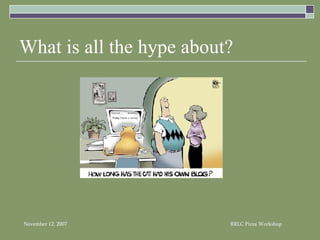
What is all the hype about?
Blogs “…online journals or websites where users can post commentary, links and news…” “[Blogs] enable the rapid production and consumption of Web-based publications”
Vocabulary to Learn… Permalink Blogroll Syndication RSS Tagging Ping Trackback
What makes a blog different? Dated entries (“posts”) Each “post” has a permanent webpage created automatically (“permalink”) Links to favorite or recommended blogs (“blogroll”) Content is syndicated to users (“RSS feed”) Readers can leave comments  Posts are archived Ping search engines when you update your blog

Why a blog? Categorization of posts Tagging the content of posts No need to know HTML Role of hyperlink Interactivity with reader Frequency & currency of content Blogging community
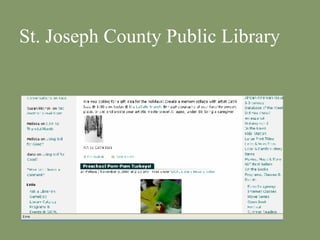
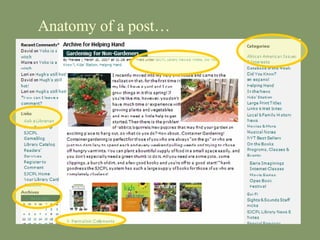
St. Joseph County Public Library
Anatomy of a post…
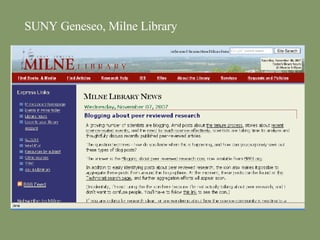
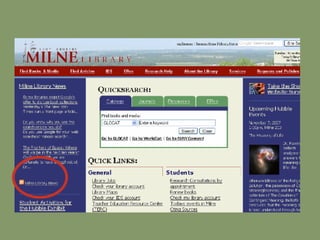
SUNY Geneseo, Milne Library
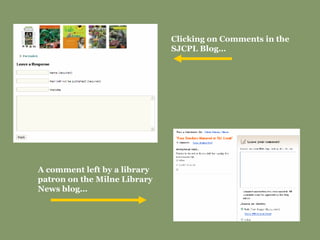
Clicking on Comments in the SJCPL Blog… A comment left by a library patron on the Milne Library News blog…
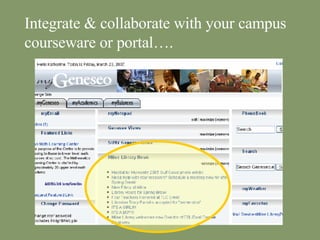
Integrate & collaborate with your campus courseware or portal….
BLOG ACTIVITY #1 What makes a blog different from a webpage? Compare the following three sites : Politico   http://www.politico.com    Daily Kos http://www.dailykos.com Instapundit http://www.instapundit.com
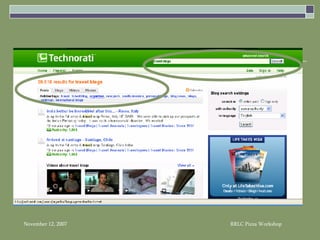
Where can I find blogs? Google Blog Search  http://search.blogger.com/ Blogarama http:// www.blogarama.com / Technorati http:// technorati.com IceRocket http://www.icerocket.com/ Blog Search Engine http:// www.blogsearchengine.com /
 
BLOG ACTIVITY #2 Use a search engine to find a blog on the topic of… Library 2.0
Some statistics… 150 blogs in the late 1990s¹ 4.12 million blogs in 2003¹ 57 million Americans read blogs every day³ 5% of Internet users use RSS aggregators to get news² 8% of Internet users have created a blog or web diary³ Sources : ¹ Trammell & Ferdig, 2004. ²  Pew Internet &  American Life Project, January 2005 ³ Pew Internet & American Life Project, July 2006
Why should your library have a blog? News Current events Interaction with library patrons Market and promote different library services Easy to create, maintain and update No HTML skills necessary User feedback FREE!
What makes a successful blog? currency frequency relevance to library or patron’s needs well written interaction with patrons through comments know your purpose and focus  simplicity lots  of hyperlinks syndicate the content with an RSS feed publicize
Tips for successful blogging… Collaborate Edit Policy Interaction Purpose
Some library blogs… Ann Arbor District Library http://www.aadl.org/ Moraine Valley Community College http://www2.sls.lib.il.us/MVCC/librarynews/ Stark County Law Library http://temp.starklawlibrary.org/blog/ Georgia State University Library  http://www.library.gsu.edu/news/index.asp?typeID=62 Waterboro Public Library http:// www.waterborolibrary.org/blog.htm
What you need: Application (many free services will host your blog:  Blogger ,  WordPress ,  LiveJournal , etc. ) Commitment   (“buy-in” from your contributors) Technical support   (at least one person who can fool with the code behind the application if you want to host it on your own server) Training
Free blog applications Blogger  http://www2.blogger.com/ WordPress  http://wordpress.org/ LiveJournal  http://www.livejournal.com/ Diaryland  (hosted)  http://www.diaryland.com/ Pitas  (hosted)  http://www.pitas.com Slash  (open source app)  http://www.slashcode.com Greymatter  (open source app)  http://noahgrey.com/greysoft/ LifeType  (open source app)  http://www.lifetype.net/
Other blog applications (cost $$) Movable Type  ($)  http://www.movabletype.org TypePad  ($)  http://www.sixapart.com/typepad/index Radio Userland  ($)  http://radio.userland.com Manila  ($)  http://manila.userland.com/
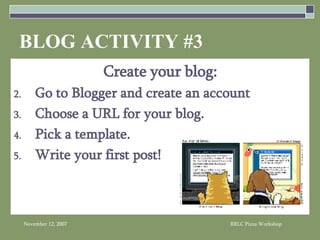
BLOG ACTIVITY #3 Create your blog: Go to Blogger and create an account Choose a URL for your blog. Pick a template. Write your first post!
What is RSS?
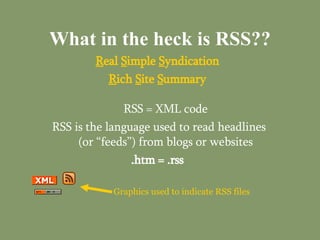
What in the heck is RSS?? R eal  S imple  S yndication R ich  S ite  S ummary RSS = XML code RSS is the language used to read headlines (or “feeds”) from blogs or websites .htm = .rss Graphics used to indicate RSS files
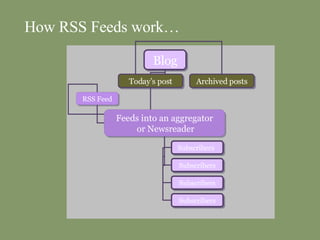
How RSS Feeds work… Blog Today’s post Archived posts RSS Feed Feeds into an aggregator  or Newsreader Subscribers   Subscribers Subscribers Subscribers
RSS Advantages visitors can access multiple sites without having to go to each one subscribe to the RSS feeds of sites you like and the content comes to you  use a news aggregator to read the  headlines and links in one place do not need to give out your email address to web sites to receive updates will need a aggregator to read content Jardin, Xeni.  “Why RSS is Everywhere.”  Wired.  April 2004. 19 May 2004  http://www.wired.com/wired/archive/12.04/start.html?pg=7 .
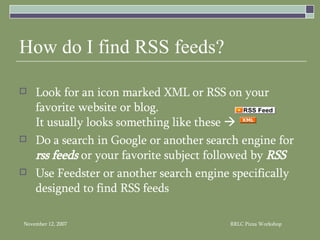
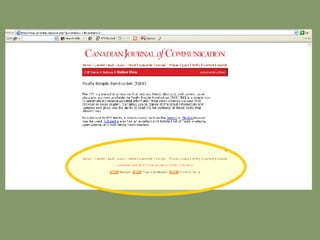
How do I find RSS feeds? Look for an icon marked XML or RSS on your favorite website or blog.  It usually looks something like these     Do a search in Google or another search engine for  rss feeds  or your favorite subject followed by  RSS Use Feedster or another search engine specifically designed to find RSS feeds
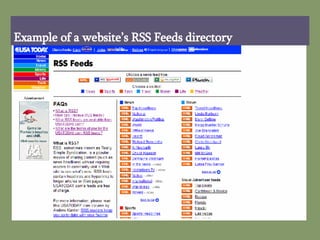
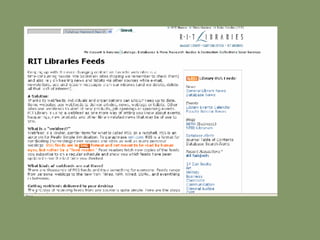
Example of a website’s RSS Feeds directory
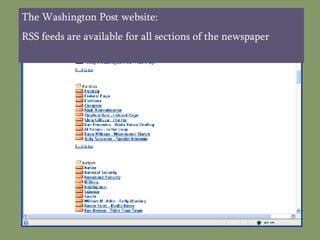
The Washington Post website: RSS feeds are available for all sections of the newspaper
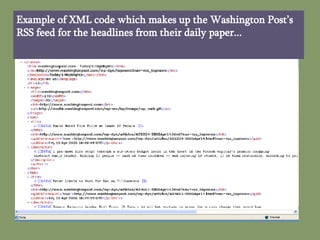
Example of XML code which makes up the Washington Post’s RSS feed for the headlines from their daily paper...
 
 
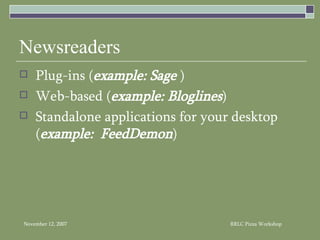
Newsreaders Plug-ins ( example: Sage  ) Web-based ( example: Bloglines ) Standalone applications for your desktop ( example:  FeedDemon )
RSS Newsreaders… Bloglines   http://www.bloglines.com FeedDemon   http://www.feeddemon.com NewsGator   http://www.newsgator.com Sage   http://sage.mozdev.org/  (Firefox users) FeedReader   http://www.feedreader.com/ AmphetaDesk   http://www.disobey.com/amphetadesk
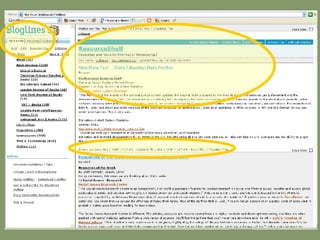
Library-related RSS Feeds Pubmed   http://pmbrowser.info Library Stuff   http://www.librarystuff.net/index.rdf LISNews   http://www.lisnews.com/lisnews.rss Library Jobs   http://feedster.com/makerss.php? Research Buzz   http://www.researchbuzz.com/researchbuzz.rss Resource Shelf   http://www.resourceshelf.com/resourceshelf.xml LISFeeds.com   http://www.lisfeeds.com


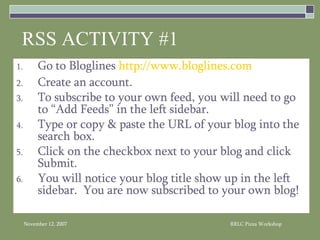
RSS ACTIVITY #1 Go to Bloglines  http://www.bloglines.com Create an account. To subscribe to your own feed, you will need to go to “Add Feeds” in the left sidebar. Type or copy & paste the URL of your blog into the search box. Click on the checkbox next to your blog and click Submit. You will notice your blog title show up in the left sidebar.  You are now subscribed to your own blog!
Wikis Image courtesy of The Content Wrangler at :  www.thecontentwrangler.com
What is a wiki? Collaborative website Users may edit, add content or delete May be used as a repository, discussion forum, or composition system Low barrier to use
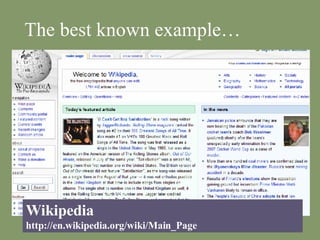
The best known example… Wikipedia http://en.wikipedia.org/wiki/Main_Page
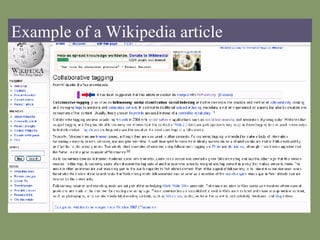
Example of a Wikipedia article
What makes a wiki different? Multiple users may edit content Searchable No formal HTML coding experience needed Very similar to many content management systems Upload documents and files
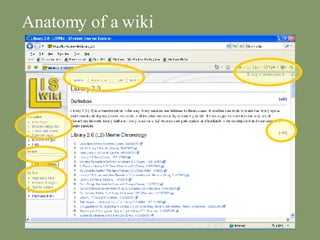
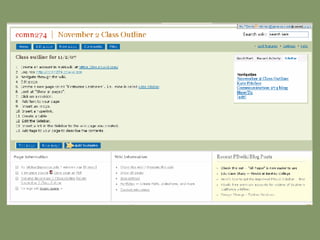
Anatomy of a wiki
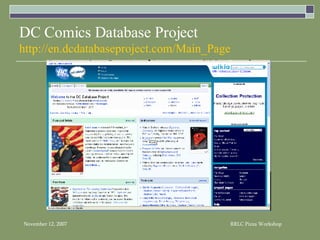
DC Comics Database Project http://en.dcdatabaseproject.com/Main_Page
How does a wiki work? Most wikis either use a downloaded client on your desktop or through a server; or are web-based through an Internet browser Edit    script sends a raw text file to your browser in an editable form, allowing you to modify the content of the page Save     clicking the button sends the modified text back to the wiki server, which replaces the existing text file with your changed version  When you request a wiki page, the script gathers the corresponding text file, changes its marked-up text into HTML, turns user-selected words into hyperlinks, inserts this information into a page template, and sends the result to your browser
 
Useful features… Track recent changes to wiki (RSS feeds can be incorporated so users can be notified immediately) History of page revisions (With some wiki apps, you can revert back to a previous version of the wiki) Accessibility of documents and information through a web-based browser
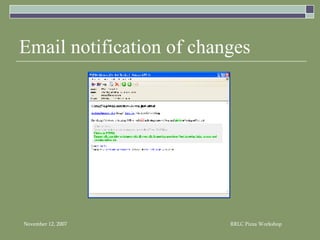
Email notification of changes
Some disadvantages… Anyone  (if you don’t require login) can contribute and edit documents Must use special “wiki” editing syntax to make changes or contribute content – this can be cumbersome for some users to learn
WIKI ACTIVITY #1: Go to  https://my.pbwiki.com  and register for a wiki account. Next, go to the Workshop Wiki:  http://librarysocialsoftware.pbwiki.com  and login (password is  rrlc ). Next, click on New Page and create your own wiki page.  Give it a name. Finally, add some text to your page.  Make sure to include your name and your library.
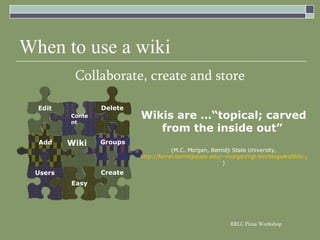
When to use a wiki Collaborate, create and store Wikis are …“topical; carved from the inside out”   (M.C. Morgan, Bemidji State University, http://ferret.bemidjistate.edu/~morgan/cgi-bin/blogsAndWiki.pl?WikiAndBlog ) Users Groups Easy Create Wiki Add Content Delete Edit
Library wiki examples LIS Wiki  http:// liswiki.org/wiki/Main_Page Library Instruction Wiki  http:// instructionwiki.org/Sharing_resources Library Success: A Best Practices Wiki  http://www.libsuccess.org/index.php?title=Main_Page ALA Professional Tips Wiki   http:// wikis.ala.org/professionaltips/index.php/Main_Page
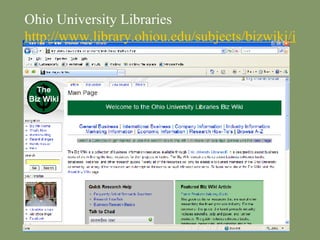
Ohio University Libraries http://www.library.ohiou.edu/subjects/bizwiki/index.php/Main_Page
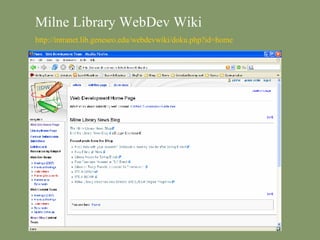
Milne Library WebDev Wiki http:// intranet.lib.geneseo.edu/webdevwiki/doku.php?id =home
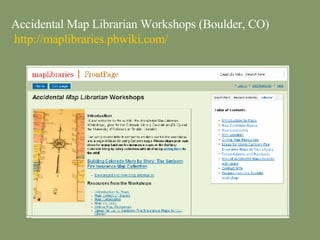
Accidental Map Librarian Workshops (Boulder, CO)   http:// maplibraries.pbwiki.com /
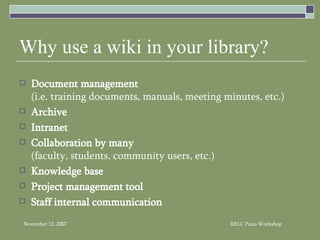
Why use a wiki in your library? Document management   (i.e. training documents, manuals, meeting minutes, etc.) Archive Intranet   Collaboration by many   (faculty, students, community users, etc.) Knowledge base   Project management tool Staff internal communication
What you need: Application (many free software apps:  PBwiki ,  Wetpaint ,  MediaWiki ,  DokuWiki ; just to name a few) Commitment   (“buy-in” from your contributors) Technical support   (at least one person who can fool with the code behind the application) Training
Web-based Wiki tools (all free) PBwiki   http://pbwiki.com/ Wetpaint   http://www.wetpaint.com SeedWiki   http://www.seedwiki.com Wikia   http://www.wikia.com/wiki/Wikia
Wiki server software apps MediaWiki (open source)  http:// www.mediawiki.org / DokuWiki (free; open source)  http://wiki.splitbrain.org/wiki:dokuwiki TWiki (open source app)  http:// twiki.org
Blogs vs. Wikis: What should you use? What do you want the software to do? Is it for the public or internal use? What is the technology “aptitude” of those you want involved?
When to use a blog: You need a tool for communication purposes within a group “chronological; staying on top of things” ( M.C. Morgan, Bemidji State University, http://ferret.bemidjistate.edu/~morgan/cgi-bin/blogsAndWiki.pl?WikiAndBlog )
When to use a wiki: You need a place to store and collaborate on group documents “topical; carved from the inside out”  ( M.C. Morgan, Bemidji State University, http://ferret.bemidjistate.edu/~morgan/cgi-bin/blogsAndWiki.pl?WikiAndBlog )
Go pbwiki.com and log into your account. Underneath the box for “Join a wiki”, click on the link for “Create a wiki”.  Create your own wiki!! WIKI ACTIVITY #2
Kate Pitcher Reference/Instruction & Web Development  Librarian   Milne Library, Room 201A SUNY Geneseo Contact Information: Email:  [email_address] Phone:  (585) 245-5064 Web:  http://www.geneseo.edu/~pitcher AIM:  beebugkate This presentation is available at: http:// librarysocialsoftware.pbwiki.com

Blogs and Wikis

  • 1.
    Blogs & WikisA RRLC Pizza Workshop with Kate Pitcher November 12, 2007
  • 2.
    Tonight’s Workshop Objectives:Define blogs & wikis Understand the difference between blogs, wikis, and other websites Search for blogs & wikis Understand what RSS is and learn how to subscribe to RSS feeds Create a blog Create a wiki
  • 3.
    What is allthe hype about?
  • 4.
    Blogs “…online journalsor websites where users can post commentary, links and news…” “[Blogs] enable the rapid production and consumption of Web-based publications”
  • 5.
    Vocabulary to Learn…Permalink Blogroll Syndication RSS Tagging Ping Trackback
  • 6.
    What makes ablog different? Dated entries (“posts”) Each “post” has a permanent webpage created automatically (“permalink”) Links to favorite or recommended blogs (“blogroll”) Content is syndicated to users (“RSS feed”) Readers can leave comments Posts are archived Ping search engines when you update your blog
  • 7.
    Why a blog?Categorization of posts Tagging the content of posts No need to know HTML Role of hyperlink Interactivity with reader Frequency & currency of content Blogging community
  • 8.
    St. Joseph CountyPublic Library
  • 9.
    Anatomy of apost…
  • 10.
  • 11.
    Clicking on Commentsin the SJCPL Blog… A comment left by a library patron on the Milne Library News blog…
  • 12.
    Integrate & collaboratewith your campus courseware or portal….
  • 13.
    BLOG ACTIVITY #1What makes a blog different from a webpage? Compare the following three sites : Politico http://www.politico.com Daily Kos http://www.dailykos.com Instapundit http://www.instapundit.com
  • 14.
    Where can Ifind blogs? Google Blog Search http://search.blogger.com/ Blogarama http:// www.blogarama.com / Technorati http:// technorati.com IceRocket http://www.icerocket.com/ Blog Search Engine http:// www.blogsearchengine.com /
  • 15.
  • 16.
    BLOG ACTIVITY #2Use a search engine to find a blog on the topic of… Library 2.0
  • 17.
    Some statistics… 150blogs in the late 1990s¹ 4.12 million blogs in 2003¹ 57 million Americans read blogs every day³ 5% of Internet users use RSS aggregators to get news² 8% of Internet users have created a blog or web diary³ Sources : ¹ Trammell & Ferdig, 2004. ² Pew Internet & American Life Project, January 2005 ³ Pew Internet & American Life Project, July 2006
  • 18.
    Why should yourlibrary have a blog? News Current events Interaction with library patrons Market and promote different library services Easy to create, maintain and update No HTML skills necessary User feedback FREE!
  • 19.
    What makes asuccessful blog? currency frequency relevance to library or patron’s needs well written interaction with patrons through comments know your purpose and focus simplicity lots of hyperlinks syndicate the content with an RSS feed publicize
  • 20.
    Tips for successfulblogging… Collaborate Edit Policy Interaction Purpose
  • 21.
    Some library blogs…Ann Arbor District Library http://www.aadl.org/ Moraine Valley Community College http://www2.sls.lib.il.us/MVCC/librarynews/ Stark County Law Library http://temp.starklawlibrary.org/blog/ Georgia State University Library http://www.library.gsu.edu/news/index.asp?typeID=62 Waterboro Public Library http:// www.waterborolibrary.org/blog.htm
  • 22.
    What you need:Application (many free services will host your blog: Blogger , WordPress , LiveJournal , etc. ) Commitment (“buy-in” from your contributors) Technical support (at least one person who can fool with the code behind the application if you want to host it on your own server) Training
  • 23.
    Free blog applicationsBlogger http://www2.blogger.com/ WordPress http://wordpress.org/ LiveJournal http://www.livejournal.com/ Diaryland (hosted) http://www.diaryland.com/ Pitas (hosted) http://www.pitas.com Slash (open source app) http://www.slashcode.com Greymatter (open source app) http://noahgrey.com/greysoft/ LifeType (open source app) http://www.lifetype.net/
  • 24.
    Other blog applications(cost $$) Movable Type ($) http://www.movabletype.org TypePad ($) http://www.sixapart.com/typepad/index Radio Userland ($) http://radio.userland.com Manila ($) http://manila.userland.com/
  • 25.
    BLOG ACTIVITY #3Create your blog: Go to Blogger and create an account Choose a URL for your blog. Pick a template. Write your first post!
  • 26.
  • 27.
    What in theheck is RSS?? R eal S imple S yndication R ich S ite S ummary RSS = XML code RSS is the language used to read headlines (or “feeds”) from blogs or websites .htm = .rss Graphics used to indicate RSS files
  • 28.
    How RSS Feedswork… Blog Today’s post Archived posts RSS Feed Feeds into an aggregator or Newsreader Subscribers Subscribers Subscribers Subscribers
  • 29.
    RSS Advantages visitorscan access multiple sites without having to go to each one subscribe to the RSS feeds of sites you like and the content comes to you use a news aggregator to read the headlines and links in one place do not need to give out your email address to web sites to receive updates will need a aggregator to read content Jardin, Xeni. “Why RSS is Everywhere.” Wired. April 2004. 19 May 2004 http://www.wired.com/wired/archive/12.04/start.html?pg=7 .
  • 30.
    How do Ifind RSS feeds? Look for an icon marked XML or RSS on your favorite website or blog. It usually looks something like these  Do a search in Google or another search engine for rss feeds or your favorite subject followed by RSS Use Feedster or another search engine specifically designed to find RSS feeds
  • 31.
    Example of awebsite’s RSS Feeds directory
  • 32.
    The Washington Postwebsite: RSS feeds are available for all sections of the newspaper
  • 33.
    Example of XMLcode which makes up the Washington Post’s RSS feed for the headlines from their daily paper...
  • 34.
  • 35.
  • 36.
    Newsreaders Plug-ins (example: Sage ) Web-based ( example: Bloglines ) Standalone applications for your desktop ( example: FeedDemon )
  • 37.
    RSS Newsreaders… Bloglines http://www.bloglines.com FeedDemon http://www.feeddemon.com NewsGator http://www.newsgator.com Sage http://sage.mozdev.org/ (Firefox users) FeedReader http://www.feedreader.com/ AmphetaDesk http://www.disobey.com/amphetadesk
  • 38.
    Library-related RSS FeedsPubmed http://pmbrowser.info Library Stuff http://www.librarystuff.net/index.rdf LISNews http://www.lisnews.com/lisnews.rss Library Jobs http://feedster.com/makerss.php? Research Buzz http://www.researchbuzz.com/researchbuzz.rss Resource Shelf http://www.resourceshelf.com/resourceshelf.xml LISFeeds.com http://www.lisfeeds.com
  • 39.
  • 40.
  • 41.
  • 42.
    RSS ACTIVITY #1Go to Bloglines http://www.bloglines.com Create an account. To subscribe to your own feed, you will need to go to “Add Feeds” in the left sidebar. Type or copy & paste the URL of your blog into the search box. Click on the checkbox next to your blog and click Submit. You will notice your blog title show up in the left sidebar. You are now subscribed to your own blog!
  • 43.
    Wikis Image courtesyof The Content Wrangler at : www.thecontentwrangler.com
  • 44.
    What is awiki? Collaborative website Users may edit, add content or delete May be used as a repository, discussion forum, or composition system Low barrier to use
  • 45.
    The best knownexample… Wikipedia http://en.wikipedia.org/wiki/Main_Page
  • 46.
    Example of aWikipedia article
  • 47.
    What makes awiki different? Multiple users may edit content Searchable No formal HTML coding experience needed Very similar to many content management systems Upload documents and files
  • 48.
  • 49.
    DC Comics DatabaseProject http://en.dcdatabaseproject.com/Main_Page
  • 50.
    How does awiki work? Most wikis either use a downloaded client on your desktop or through a server; or are web-based through an Internet browser Edit  script sends a raw text file to your browser in an editable form, allowing you to modify the content of the page Save  clicking the button sends the modified text back to the wiki server, which replaces the existing text file with your changed version When you request a wiki page, the script gathers the corresponding text file, changes its marked-up text into HTML, turns user-selected words into hyperlinks, inserts this information into a page template, and sends the result to your browser
  • 51.
  • 52.
    Useful features… Trackrecent changes to wiki (RSS feeds can be incorporated so users can be notified immediately) History of page revisions (With some wiki apps, you can revert back to a previous version of the wiki) Accessibility of documents and information through a web-based browser
  • 53.
  • 54.
    Some disadvantages… Anyone (if you don’t require login) can contribute and edit documents Must use special “wiki” editing syntax to make changes or contribute content – this can be cumbersome for some users to learn
  • 55.
    WIKI ACTIVITY #1:Go to https://my.pbwiki.com and register for a wiki account. Next, go to the Workshop Wiki: http://librarysocialsoftware.pbwiki.com and login (password is rrlc ). Next, click on New Page and create your own wiki page. Give it a name. Finally, add some text to your page. Make sure to include your name and your library.
  • 56.
    When to usea wiki Collaborate, create and store Wikis are …“topical; carved from the inside out” (M.C. Morgan, Bemidji State University, http://ferret.bemidjistate.edu/~morgan/cgi-bin/blogsAndWiki.pl?WikiAndBlog ) Users Groups Easy Create Wiki Add Content Delete Edit
  • 57.
    Library wiki examplesLIS Wiki http:// liswiki.org/wiki/Main_Page Library Instruction Wiki http:// instructionwiki.org/Sharing_resources Library Success: A Best Practices Wiki http://www.libsuccess.org/index.php?title=Main_Page ALA Professional Tips Wiki http:// wikis.ala.org/professionaltips/index.php/Main_Page
  • 58.
    Ohio University Librarieshttp://www.library.ohiou.edu/subjects/bizwiki/index.php/Main_Page
  • 59.
    Milne Library WebDevWiki http:// intranet.lib.geneseo.edu/webdevwiki/doku.php?id =home
  • 60.
    Accidental Map LibrarianWorkshops (Boulder, CO) http:// maplibraries.pbwiki.com /
  • 61.
    Why use awiki in your library? Document management (i.e. training documents, manuals, meeting minutes, etc.) Archive Intranet Collaboration by many (faculty, students, community users, etc.) Knowledge base Project management tool Staff internal communication
  • 62.
    What you need:Application (many free software apps: PBwiki , Wetpaint , MediaWiki , DokuWiki ; just to name a few) Commitment (“buy-in” from your contributors) Technical support (at least one person who can fool with the code behind the application) Training
  • 63.
    Web-based Wiki tools(all free) PBwiki http://pbwiki.com/ Wetpaint http://www.wetpaint.com SeedWiki http://www.seedwiki.com Wikia http://www.wikia.com/wiki/Wikia
  • 64.
    Wiki server softwareapps MediaWiki (open source) http:// www.mediawiki.org / DokuWiki (free; open source) http://wiki.splitbrain.org/wiki:dokuwiki TWiki (open source app) http:// twiki.org
  • 65.
    Blogs vs. Wikis:What should you use? What do you want the software to do? Is it for the public or internal use? What is the technology “aptitude” of those you want involved?
  • 66.
    When to usea blog: You need a tool for communication purposes within a group “chronological; staying on top of things” ( M.C. Morgan, Bemidji State University, http://ferret.bemidjistate.edu/~morgan/cgi-bin/blogsAndWiki.pl?WikiAndBlog )
  • 67.
    When to usea wiki: You need a place to store and collaborate on group documents “topical; carved from the inside out” ( M.C. Morgan, Bemidji State University, http://ferret.bemidjistate.edu/~morgan/cgi-bin/blogsAndWiki.pl?WikiAndBlog )
  • 68.
    Go pbwiki.com andlog into your account. Underneath the box for “Join a wiki”, click on the link for “Create a wiki”. Create your own wiki!! WIKI ACTIVITY #2
  • 69.
    Kate Pitcher Reference/Instruction& Web Development Librarian Milne Library, Room 201A SUNY Geneseo Contact Information: Email: [email_address] Phone: (585) 245-5064 Web: http://www.geneseo.edu/~pitcher AIM: beebugkate This presentation is available at: http:// librarysocialsoftware.pbwiki.com