Planning – User Needs
Lesson 6
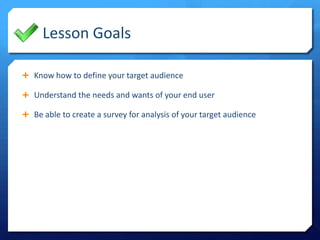
Lesson Goals
 Know how to define your target audience
 Understand the needs and wants of your end user
 Be able to create a survey for analysis of your target audience
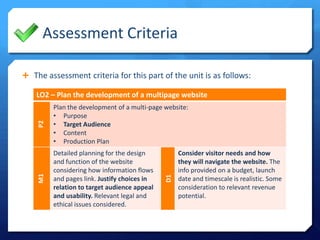
Assessment Criteria
 The assessment criteria for this part of the unit is as follows:

Detailed planning for the design
and function of the website
considering how information flows
and pages link. Justify choices in
relation to target audience appeal
and usability. Relevant legal and
ethical issues considered.

D1

P2

Plan the development of a multi-page website:
• Purpose
• Target Audience
• Content
• Production Plan

M1

LO2 – Plan the development of a multipage website

Consider visitor needs and how
they will navigate the website. The
info provided on a budget, launch
date and timescale is realistic. Some
consideration to relevant revenue
potential.
What are the user needs?
Think about your research on this topic…
Understand needs of your user
Survey your target audience

User Needs

 The user needs could be defined as the requirements of the person who is

going to be the end user. This can be split into two categories:

Technical
The type of information the user
would expect to SEE on the site





Obtain information
Purchase products
Download files
Establish trust in the site

The things the user would expect to
be able to DO when using the site





Navigation structure
Flow of information
Easy access
Loading times

 Each of the four client briefs may result in slightly different needs for the

user although some will be common across them all.
#target #audience
#user #needs
Content Needs

Understand needs of your user
Survey your target audience

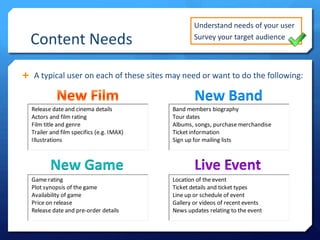
 A typical user on each of these sites may need or want to do the following:

New Band

New Game
Technical Needs

Understand needs of your user
Survey your target audience

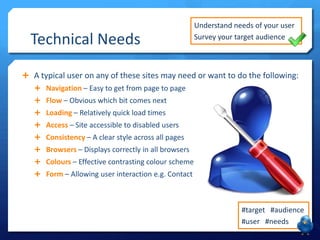
 A typical user on any of these sites may need or want to do the following:
 Navigation – Easy to get from page to page
 Flow – Obvious which bit comes next
 Loading – Relatively quick load times
 Access – Site accessible to disabled users

 Consistency – A clear style across all pages
 Browsers – Displays correctly in all browsers
 Colours – Effective contrasting colour scheme
 Form – Allowing user interaction e.g. Contact

#target #audience
#user #needs
Your Task

Understand needs of your user
Survey your target audience

 Define the content needs explaining:
 What should the site to do?
 What information is required?
 What look and feel will appeal?
 What features are expected?

 What will you avoid doing?
 What will make the site successful?
 What will make the site stand out?

 Explain the technical needs of the

user relating to the specific qualities
of the webpages themselves.

#target #audience
#user #needs

LO2 - Lesson 6 - User Needs

  • 1.
    Planning – UserNeeds Lesson 6
  • 2.
    Lesson Goals  Knowhow to define your target audience  Understand the needs and wants of your end user  Be able to create a survey for analysis of your target audience
  • 3.
    Assessment Criteria  Theassessment criteria for this part of the unit is as follows: Detailed planning for the design and function of the website considering how information flows and pages link. Justify choices in relation to target audience appeal and usability. Relevant legal and ethical issues considered. D1 P2 Plan the development of a multi-page website: • Purpose • Target Audience • Content • Production Plan M1 LO2 – Plan the development of a multipage website Consider visitor needs and how they will navigate the website. The info provided on a budget, launch date and timescale is realistic. Some consideration to relevant revenue potential.
  • 4.
    What are theuser needs? Think about your research on this topic…
  • 5.
    Understand needs ofyour user Survey your target audience User Needs  The user needs could be defined as the requirements of the person who is going to be the end user. This can be split into two categories: Technical The type of information the user would expect to SEE on the site     Obtain information Purchase products Download files Establish trust in the site The things the user would expect to be able to DO when using the site     Navigation structure Flow of information Easy access Loading times  Each of the four client briefs may result in slightly different needs for the user although some will be common across them all. #target #audience #user #needs
  • 6.
    Content Needs Understand needsof your user Survey your target audience  A typical user on each of these sites may need or want to do the following: New Band New Game
  • 7.
    Technical Needs Understand needsof your user Survey your target audience  A typical user on any of these sites may need or want to do the following:  Navigation – Easy to get from page to page  Flow – Obvious which bit comes next  Loading – Relatively quick load times  Access – Site accessible to disabled users  Consistency – A clear style across all pages  Browsers – Displays correctly in all browsers  Colours – Effective contrasting colour scheme  Form – Allowing user interaction e.g. Contact #target #audience #user #needs
  • 8.
    Your Task Understand needsof your user Survey your target audience  Define the content needs explaining:  What should the site to do?  What information is required?  What look and feel will appeal?  What features are expected?  What will you avoid doing?  What will make the site successful?  What will make the site stand out?  Explain the technical needs of the user relating to the specific qualities of the webpages themselves. #target #audience #user #needs