THE 
WEBSITE 
REDESIGN 
PROCESS 
Make sure that your redesign 
project starts on the right foot and 
solves the right problems 
Gary Schroeder 
@gary_schroeder
| 2 
Define the Project 
Goals should be concrete, not 
vague. For example, a project goal 
might be to decrease total calls to 
the Help Desk by 30% or increase the 
number of users who say they are 
“fully satisfied” with the website from 
25% to 45% in the next 6 months. 
Your redesign goals may be based 
on formal user feedback like an 
online survey, or management 
directives, or internal group goals for 
continuous product improvement. 
Is new functionality needed to 
support your redesign goals? 
Because that decision will affect how 
the site looks, how it’s structured, and 
how it’s programmed, desired 
functionality has to be fully described 
at the beginning. 
Functionality requirements include 
things like "user must be able to find 
a record based on a part number" or 
“if logged into the domain, user must 
be automatically recognized" or "it 
has to support record searches from 
mobile phones." 
. 
Websites are redesigned because of 
underperformance or a perceived flaw. How will 
a redesign correct the problem? What will the 
goals for the redesigned website be? 
Define success. Decide beforehand 
how you’ll know you've been 
successful in meeting your redesign 
goals. Set objective measures for 
success like numerical targets and 
satisfaction ratings. 
What’s the schedule? Agree on 
when the new site has to be live. 
Who's on the Project Team and 
what are their responsibilities? 
Identify project manager, content 
provider, programmer, visual 
designer, information architect.
| 3 
Who’s Doing What? 
WHY are they coming? 
No one is coming to your website for 
fun or to “surf.” They’re coming for a 
specific purpose. Your job is to 
identify all of the possible reasons 
that your audience members might 
want to use your site. 
WHO is using your website? 
There will likely be a spectrum of 
groups who are using your website. A 
typical selection might include 
internal staff, external program 
managers, scientific collaborators, or 
prospective hires. Plan to 
accommodate each one of them. 
WHAT are they trying to do? 
Each user who comes to your website 
is attempting to complete a task. 
What is it? By making a chart or list 
of each audience group, their 
motivation for coming, and a 
complete list of possible tasks, you 
can design your site to satisfy their 
needs.
| 4 
Audience Analysis 
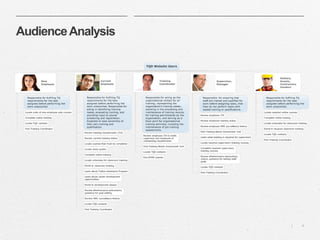
Each member of your 
website’s audience has a 
different reason for visiting 
the site. 
Identify what motivates 
them to be a site user.
| 5 
Task Completion 
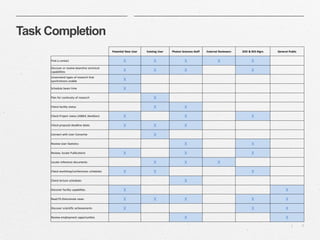
By making a chart or list of 
each audience group and a 
complete list of possible 
tasks, you can design your 
site to satisfy their needs. 
Potential New User Existing User Department Staff 
Find a contact X X X 
Unserstand types of research that 
synchrotrons enable X 
Schedule beam time X 
Check facility status X X 
Check proposal deadline dates X X X 
Review User Statistics X 
Review, locate Publications X X 
Locate reference documents X X 
Check lecture schedules X 
Review employment opportunities X
| 6 
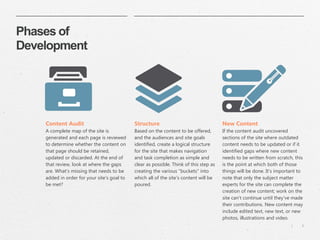
Phases of 
Development 
Structure 
Based on the content to be offered, 
and the audiences and site goals 
identified, create a logical structure 
for the site that makes navigation 
and task completion as simple and 
clear as possible. Think of this step as 
creating the various "buckets" into 
which all of the site's content will be 
poured. 
Content Audit 
A complete map of the site is 
generated and each page is reviewed 
to determine whether the content on 
that page should be retained, 
updated or discarded. At the end of 
that review, look at where the gaps 
are. What's missing that needs to be 
added in order for your site's goal to 
be met? 
New Content 
If the content audit uncovered 
sections of the site where outdated 
content needs to be updated or if it 
identified gaps where new content 
needs to be written from scratch, this 
is the point at which both of those 
things will be done. It's important to 
note that only the subject matter 
experts for the site can complete the 
creation of new content; work on the 
site can't continue until they've made 
their contributions. New content may 
include edited text, new text, or new 
photos, illustrations and video.
| 7 
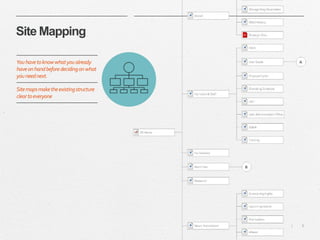
Site Mapping 
You have to know what you already 
have on hand before deciding on what 
you need next. 
Site maps make the existing structure 
clear to everyone
| 8 
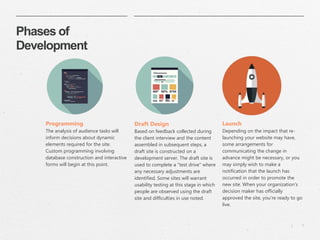
Phases of 
Development 
Draft Design 
Based on feedback collected during 
the client interview and the content 
assembled in subsequent steps, a 
draft site is constructed on a 
development server. The draft site is 
used to complete a "test drive" where 
any necessary adjustments are 
identified. Some sites will warrant 
usability testing at this stage in which 
people are observed using the draft 
site and difficulties in use noted. 
Programming 
The analysis of audience tasks will 
inform decisions about dynamic 
elements required for the site. 
Custom programming involving 
database construction and interactive 
forms will begin at this point. 
Launch 
Depending on the impact that re-launching 
your website may have, 
some arrangements for 
communicating the change in 
advance might be necessary, or you 
may simply wish to make a 
notification that the launch has 
occurred in order to promote the 
new site. When your organization's 
decision maker has officially 
approved the site, you're ready to go 
live.
| 9 
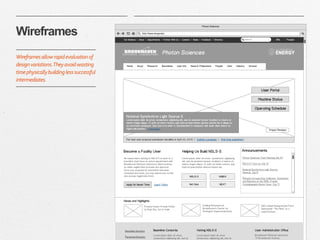
Wireframes 
Wireframes allow rapid evaluation of 
design variations. They avoid wasting 
time physically building less successful 
intermediates.
| 10 
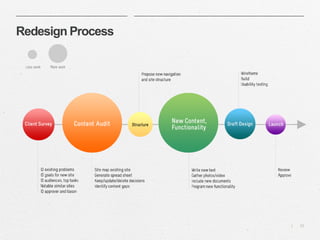
Redesign Process
| 11 
Bear in mind… 
Without an explicit plan, it’s very unlikely 
that your website redesign project will be 
successful. 
Your plan must consider your audience, and what 
you want to help them do online. 
Know what’s wrong with your existing site and 
how proposed changes are going to fix it. 
Have clear project requirements. Your technical 
staff must have an explicit list of what features the 
site must contain and what information it must 
communicate. 
Know what constitutes “success” for your project.

The Website Redesign Process

  • 1.
    THE WEBSITE REDESIGN PROCESS Make sure that your redesign project starts on the right foot and solves the right problems Gary Schroeder @gary_schroeder
  • 2.
    | 2 Definethe Project Goals should be concrete, not vague. For example, a project goal might be to decrease total calls to the Help Desk by 30% or increase the number of users who say they are “fully satisfied” with the website from 25% to 45% in the next 6 months. Your redesign goals may be based on formal user feedback like an online survey, or management directives, or internal group goals for continuous product improvement. Is new functionality needed to support your redesign goals? Because that decision will affect how the site looks, how it’s structured, and how it’s programmed, desired functionality has to be fully described at the beginning. Functionality requirements include things like "user must be able to find a record based on a part number" or “if logged into the domain, user must be automatically recognized" or "it has to support record searches from mobile phones." . Websites are redesigned because of underperformance or a perceived flaw. How will a redesign correct the problem? What will the goals for the redesigned website be? Define success. Decide beforehand how you’ll know you've been successful in meeting your redesign goals. Set objective measures for success like numerical targets and satisfaction ratings. What’s the schedule? Agree on when the new site has to be live. Who's on the Project Team and what are their responsibilities? Identify project manager, content provider, programmer, visual designer, information architect.
  • 3.
    | 3 Who’sDoing What? WHY are they coming? No one is coming to your website for fun or to “surf.” They’re coming for a specific purpose. Your job is to identify all of the possible reasons that your audience members might want to use your site. WHO is using your website? There will likely be a spectrum of groups who are using your website. A typical selection might include internal staff, external program managers, scientific collaborators, or prospective hires. Plan to accommodate each one of them. WHAT are they trying to do? Each user who comes to your website is attempting to complete a task. What is it? By making a chart or list of each audience group, their motivation for coming, and a complete list of possible tasks, you can design your site to satisfy their needs.
  • 4.
    | 4 AudienceAnalysis Each member of your website’s audience has a different reason for visiting the site. Identify what motivates them to be a site user.
  • 5.
    | 5 TaskCompletion By making a chart or list of each audience group and a complete list of possible tasks, you can design your site to satisfy their needs. Potential New User Existing User Department Staff Find a contact X X X Unserstand types of research that synchrotrons enable X Schedule beam time X Check facility status X X Check proposal deadline dates X X X Review User Statistics X Review, locate Publications X X Locate reference documents X X Check lecture schedules X Review employment opportunities X
  • 6.
    | 6 Phasesof Development Structure Based on the content to be offered, and the audiences and site goals identified, create a logical structure for the site that makes navigation and task completion as simple and clear as possible. Think of this step as creating the various "buckets" into which all of the site's content will be poured. Content Audit A complete map of the site is generated and each page is reviewed to determine whether the content on that page should be retained, updated or discarded. At the end of that review, look at where the gaps are. What's missing that needs to be added in order for your site's goal to be met? New Content If the content audit uncovered sections of the site where outdated content needs to be updated or if it identified gaps where new content needs to be written from scratch, this is the point at which both of those things will be done. It's important to note that only the subject matter experts for the site can complete the creation of new content; work on the site can't continue until they've made their contributions. New content may include edited text, new text, or new photos, illustrations and video.
  • 7.
    | 7 SiteMapping You have to know what you already have on hand before deciding on what you need next. Site maps make the existing structure clear to everyone
  • 8.
    | 8 Phasesof Development Draft Design Based on feedback collected during the client interview and the content assembled in subsequent steps, a draft site is constructed on a development server. The draft site is used to complete a "test drive" where any necessary adjustments are identified. Some sites will warrant usability testing at this stage in which people are observed using the draft site and difficulties in use noted. Programming The analysis of audience tasks will inform decisions about dynamic elements required for the site. Custom programming involving database construction and interactive forms will begin at this point. Launch Depending on the impact that re-launching your website may have, some arrangements for communicating the change in advance might be necessary, or you may simply wish to make a notification that the launch has occurred in order to promote the new site. When your organization's decision maker has officially approved the site, you're ready to go live.
  • 9.
    | 9 Wireframes Wireframes allow rapid evaluation of design variations. They avoid wasting time physically building less successful intermediates.
  • 10.
  • 11.
    | 11 Bearin mind… Without an explicit plan, it’s very unlikely that your website redesign project will be successful. Your plan must consider your audience, and what you want to help them do online. Know what’s wrong with your existing site and how proposed changes are going to fix it. Have clear project requirements. Your technical staff must have an explicit list of what features the site must contain and what information it must communicate. Know what constitutes “success” for your project.